

The popular advice to “join an email feedback loop and remove everyone who complains” doesn't work across every provider. A classic email feedback loop returns a structured complaint report when a recipient marks a message as spam, but Yahoo and Microsoft's reporting channels differ from Gmail's aggregate campaign data in Postmaster Tools. For cold outreach teams, the important question isn't whether feedback exists, but whether it identifies a contact, a campaign, or only an infrastructure problem.
What an Email Feedback Loop Actually Returns in 2026
A feedback loop isn't a universal complaint feed. Each mailbox provider decides which senders can enroll, which events it reports, and how much identifying information it exposes.
Classic reports use Abuse Reporting Format, usually shortened to ARF. The format combines a human-readable explanation with machine-readable feedback, allowing sending systems to process complaints rather than leaving them in a support inbox. The ARF operational standard also addresses safe report delivery, mail-loop prevention, and amplification risks.
| Reporting channel | Main return | Practical limitation |
|---|---|---|
| Yahoo Complaint Feedback Loop | ARF complaint reports | Requires enrollment of the DKIM signing domain |
| Microsoft JMRP | Complaint information | Depends on control of sending infrastructure |
| Microsoft SNDS | IP-level monitoring | Isn't an individual complaint feed |
| Gmail Feedback Loop | Aggregate campaign spam data | Doesn't identify individual complainants |
| Participating smaller providers | Provider-dependent feedback | Coverage and report contents vary |
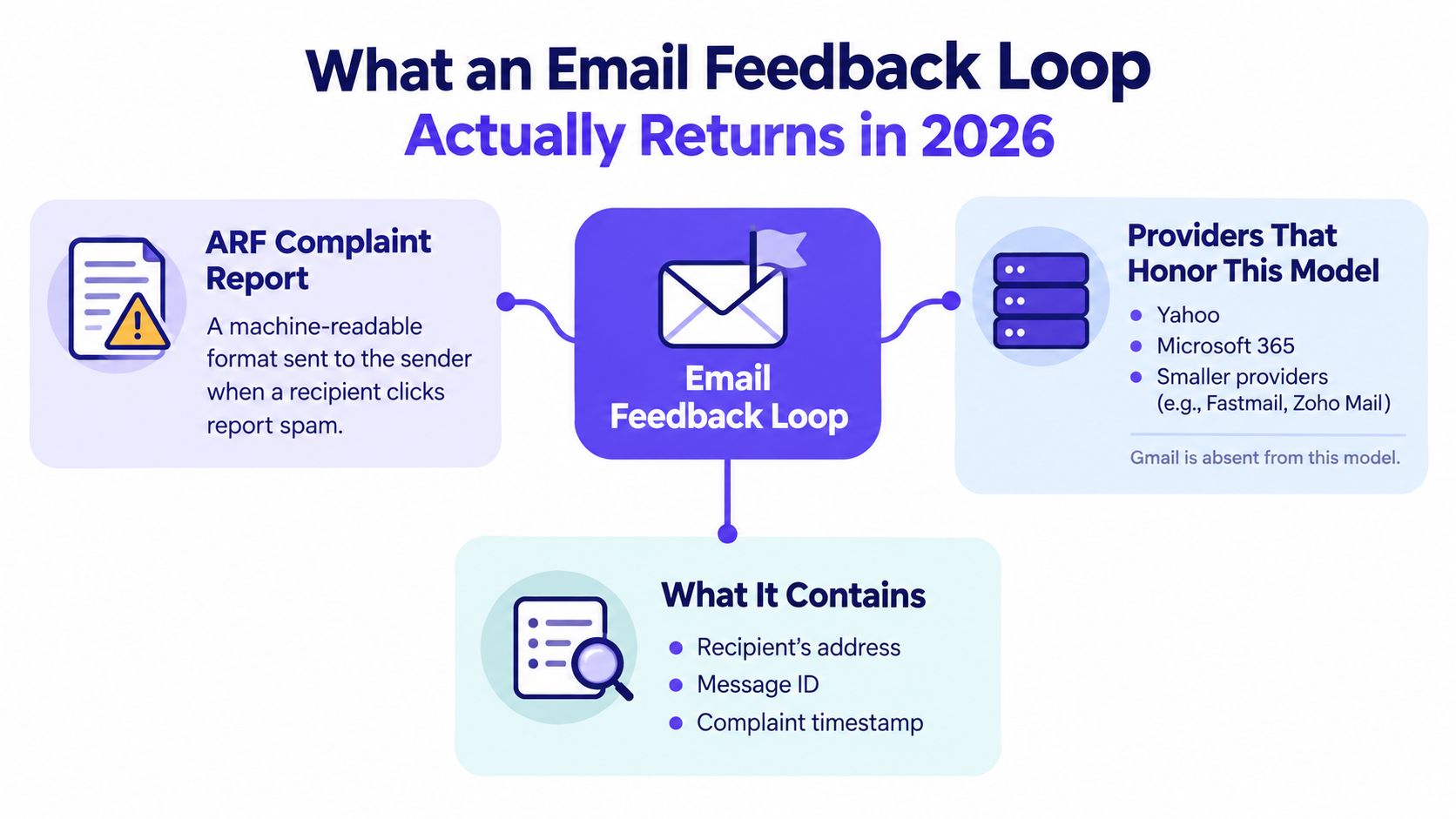
The illustration is a simplified model, not an enrollment guide. Microsoft's reporting programs shouldn't be confused with an automatic complaint feed available to every Microsoft 365 mailbox user, and recipient identification isn't guaranteed in every report.
Choose the reporting model before the tool
An agency evaluating WebinOne's top email tools for agency teams should also ask each shortlisted platform what complaint information it processes. A campaign dashboard and an address-level suppression workflow solve different problems.
- Establish eligibility. Identify whether enrollment depends on a signing domain or sending IP control.
- Identify the return. Determine whether reports support contact suppression or only campaign diagnosis.
- Assign ownership. Decide who maintains enrollment, parses reports, and acts on alerts.
Approval times vary. A sending team shouldn't build its launch schedule around an assumed instant approval.
Yahoo Complaint Feedback Loop and AOL Coverage
Yahoo's Complaint Feedback Loop, or CFL, is domain-based. Its eligibility follows the domain in the DKIM signature's d= field, not the visible From address.
The Yahoo Complaint Feedback Loop documentation requires DKIM-signed messages, verification through Yahoo Sender Hub, and a DKIM key of at least 1024 bits. SPF alone doesn't establish eligibility for these reports.
Enrollment follows the signing domain
The documented setup centers on these actions:
- Identify the DKIM signing domain used by the actual outbound mail stream.
- Verify that domain in Yahoo Sender Hub.
- Configure the address that will receive complaint reports.
- Confirm that the sending system can process those reports and connect them to outbound records.
Yahoo's CFL also serves AOL coverage. Teams shouldn't assume that enrolling an organizational domain automatically covers every separate signing domain or every outbound platform associated with the business.
A mismatch between the domain a team thinks it uses and the domain its provider signs with is a practical setup problem. The relevant identity is the one in the delivered message's DKIM signature.
Treat reports as structured input
ARF uses the MIME type multipart/report with report-type=feedback-report, including a machine-readable message/feedback-report section. Those are format identifiers, not ordinary customer replies.
| Report component | Processing purpose |
|---|---|
| Human-readable section | Explain the reported event |
| Machine-readable feedback | Support automated classification |
| Returned message information | Connect the complaint to sending records |
Recipient information may be redacted, so a parser shouldn't depend exclusively on a visible recipient address. Preserve outbound message identifiers and campaign metadata that can help reconcile a report with the original send.
Processing rule: A complaint that reaches a report mailbox but never reaches the suppression system hasn't been operationalized.
For senders using an email service provider, the useful question is specific: does the provider enroll the signing domain, receive Yahoo complaints, and apply suppression on the sender's behalf? Don't assume either that every provider handles this or that none does.
Microsoft JMRP and SNDS for IP Owners
Microsoft has two distinct reporting channels: Junk Mail Reporting Program, or JMRP, and Smart Network Data Services, or SNDS. They complement each other, but they aren't interchangeable.
JMRP concerns complaint information. SNDS concerns the sending IP, including reputation-related monitoring and sending activity. Treating SNDS as an address-level suppression feed leads to the wrong implementation.
| Program | Operational question | Appropriate response |
|---|---|---|
| JMRP | Which reported messages require investigation? | Process complaint information and suppress identifiable complainants |
| SNDS | What's happening across this sending IP? | Investigate infrastructure and traffic patterns |
IP control is the gate
These programs are relevant to organizations that can prove control of their sending IP ranges. A dedicated sending environment may make enrollment practical, although the infrastructure owner or email service provider may need to handle authorization.
A Google Workspace or Microsoft 365 mailbox subscription doesn't establish ownership of the shared outbound IPs. Creating another mailbox, changing its password, or adding a domain administrator won't resolve that infrastructure constraint.
- Dedicated infrastructure. Ask the owner who controls enrollment and where reports are delivered.
- Shared email service provider infrastructure. Ask what complaint processing the provider already performs.
- Hosted business mailboxes. Don't assume tenant administration provides access to IP-owner reporting.
The Microsoft SNDS JMRP reputation guide helps distinguish those responsibilities before a team starts an enrollment attempt.
Complaint processing still needs a local workflow
Microsoft's complaint-related analytics and suppression capabilities don't remove the sender's responsibility to understand the affected traffic. A report should connect to a message, campaign, or sending stream, rather than becoming an isolated alert.
SNDS is useful for infrastructure diagnosis, but it can't replace that complaint-processing workflow. Conversely, removing an identifiable complainant doesn't explain a wider IP-level problem.
The practical trade-off is ownership. Teams with dedicated infrastructure gain more reporting options, but they also inherit the work of maintaining those channels, handling reports, and investigating the traffic behind them.
Gmail's Feedback-ID Header and Postmaster Tools
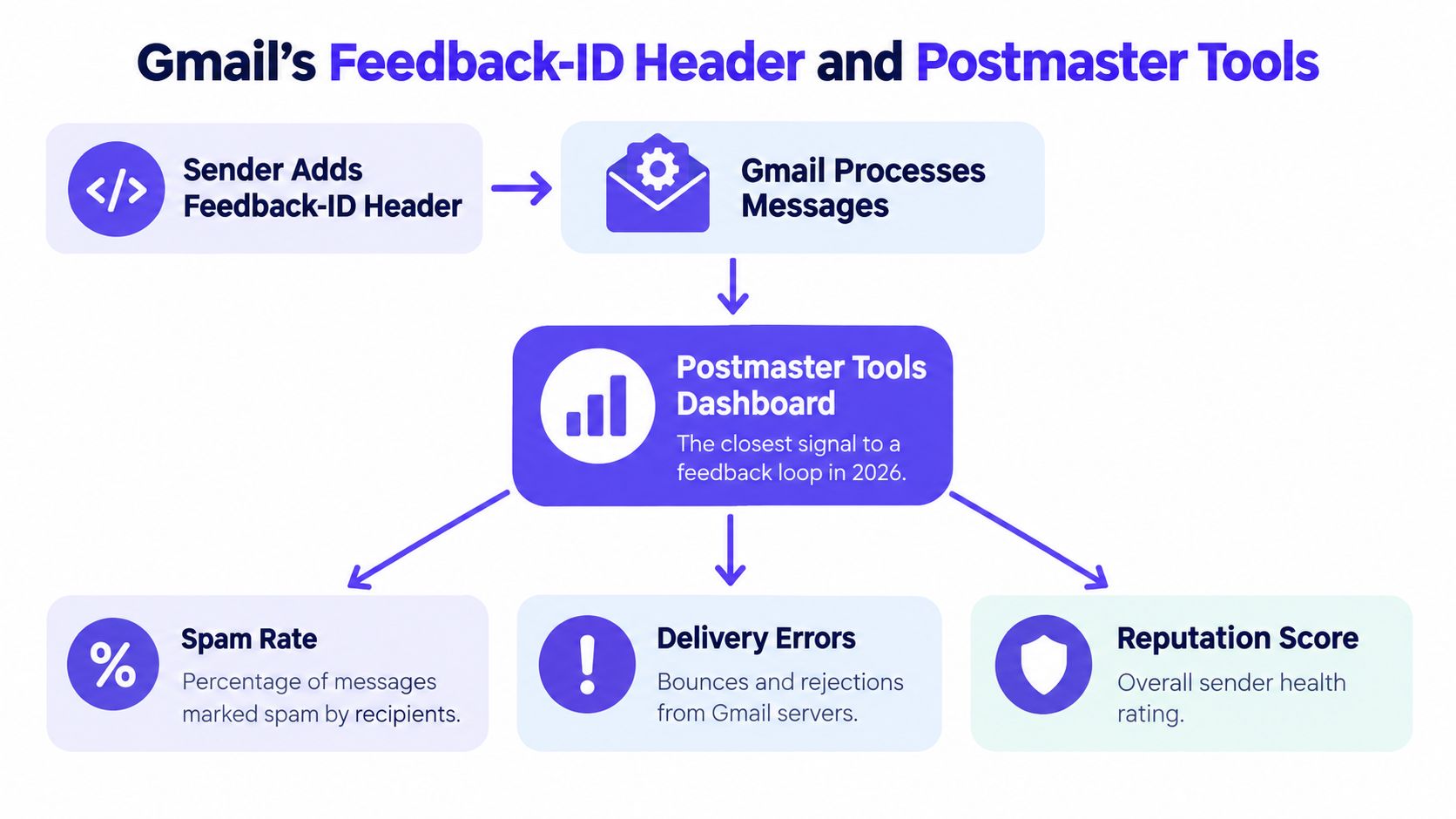
Gmail doesn't provide the classic report containing an individual complainant's address. Its Feedback Loop connects aggregate spam activity to campaigns or mailing patterns through Postmaster Tools.
Google's Gmail Feedback Loop guidance describes adding a feedback loop identifier to campaign messages and configuring Postmaster Tools to view the resulting data. This supports campaign diagnosis, not contact-level complaint suppression.
Make identifiers useful for decisions
The relevant header name is Feedback-ID. Its value should represent a stable campaign or mailing classification that the sender can recognize later, rather than an arbitrary label nobody can map back to the sending system.
A fabricated header example isn't a substitute for checking Google's current implementation requirements. Teams should also verify whether their sending platform can add and preserve the header before designing a reporting taxonomy around it.
Useful classifications include:
- Campaign identity. Separate a newsletter from an outbound prospecting campaign.
- Audience source. Distinguish consent-based acquisition from another prospecting source.
- Sequence position. Make an aggressive follow-up distinguishable from the initial message.
- Sending stream. Keep materially different mailing patterns identifiable.
A single identifier across unrelated traffic makes diagnosis harder. Changing identifiers without maintaining a mapping creates a different problem: the dashboard becomes difficult to compare with campaign records.
Separate campaign feedback from reputation
Gmail's Feedback Loop data is separate from its general domain and IP reputation dashboards. An absent campaign report doesn't establish that nobody complained, and a low reported campaign spam rate doesn't prove that the domain has healthy reputation or consistent inbox placement.
Aggregate feedback can identify a mailing pattern worth stopping. It can't identify a particular recipient to remove.
The practical reading order is campaign feedback, broader reputation, delivery errors, and the sender's own campaign records. The guide to how to read Postmaster Tools helps connect those views without treating them as the same metric.
For Gmail-heavy outreach, campaign labeling matters more than collecting another dashboard. If the sending platform can't expose meaningful distinctions, the team needs better campaign records and controlled changes, not guesses about who clicked spam.
Smaller ISPs Through Validity and Cloudmark
Smaller-provider feedback deserves an eligibility and coverage check, not an automatic purchase. Validity's feedback-loop service can provide a route to participating mailbox providers, but its usefulness depends on the sender's actual audience and the service's current terms.
Cloudmark-related reporting should likewise be evaluated against the specific participating provider and reporting arrangement. A service name isn't proof that every regional ISP or corporate domain is covered.
Evaluate the marginal value
For a sender with meaningful traffic outside Gmail, Yahoo, and Microsoft, additional complaint coverage may support stricter suppression requirements. For a sender whose audience is concentrated elsewhere, the administrative work may produce little actionable information.
| Question to resolve | Why it matters |
|---|---|
| Which recipient providers currently participate? | Establishes whether coverage overlaps the audience |
| What enrollment evidence is required? | Determines whether the sender can qualify |
| Are reports address-level or redacted? | Defines the suppression workflow |
| What are the current commercial terms? | Establishes the cost of maintaining coverage |
| Who processes the reports? | Prevents an unattended reporting mailbox |
Claims about current pricing, provider lists, or shrinking coverage need a current service check. They shouldn't be inferred from an older feedback-loop tutorial.
Buy a usable signal, not a larger list
A service that aggregates reports still requires campaign reconciliation, recipient handling, and monitoring. It doesn't solve Gmail's lack of individual complaint addresses.
- Audience fit. Compare participating providers with actual recipient domains.
- Processing fit. Confirm that the existing email platform can ingest the returned format.
- Operational fit. Establish who handles failed parsing and unresolved reports.
The sensible decision is based on suppression value. More provider coverage isn't automatically better if the team can't connect a report to a campaign or act on it.
If You Send From Google Workspace or Microsoft 365
Cold outreach teams often administer mailboxes without administering the infrastructure that sends their messages. That distinction explains why an IP-based reporting application can fail even when the team owns its domain and pays for the mailbox service.
The wrong response is to keep pursuing an IP-owner enrollment path that the setup can't support. The useful response is to build a monitoring workflow around the signals available to that setup.

The image's slogan needs a qualification: no IP control limits IP-based programs, not every feedback mechanism. Yahoo's domain-based route remains a separate eligibility question.
Use signals without pretending they're equivalent
| Available signal | Useful interpretation | What it doesn't establish |
|---|---|---|
| Postmaster Tools spam data | Gmail recipients objected to a mailing pattern | The identity of each complainant |
| Replies | Recipients expressed interest, confusion, or rejection | Overall inbox placement |
| Bounce patterns | Delivery or recipient failures need investigation | Whether delivered mail was welcomed |
| Placement testing | Test messages reached particular folders | Every live recipient had the same result |
Negative replies deserve operational handling even when they aren't formal spam complaints. A clear request to stop receiving mail shouldn't wait for a provider report.
Fix the sending decision
Teams should separate infrastructure failures from audience objections. A bounce investigation concerns delivery; a complaint investigation also concerns whether the message should have been sent.
Cold outreach reality: The absence of an individual complaint feed isn't evidence that the audience accepts the campaign.
List hygiene, relevant targeting, restrained follow-ups, and clear opt-out handling deserve more attention than an unavailable signup. Before expanding traffic, teams can also check where your emails land, while remembering that placement testing and complaint monitoring answer different questions.
What to Do With Complaint Data Once You Have It
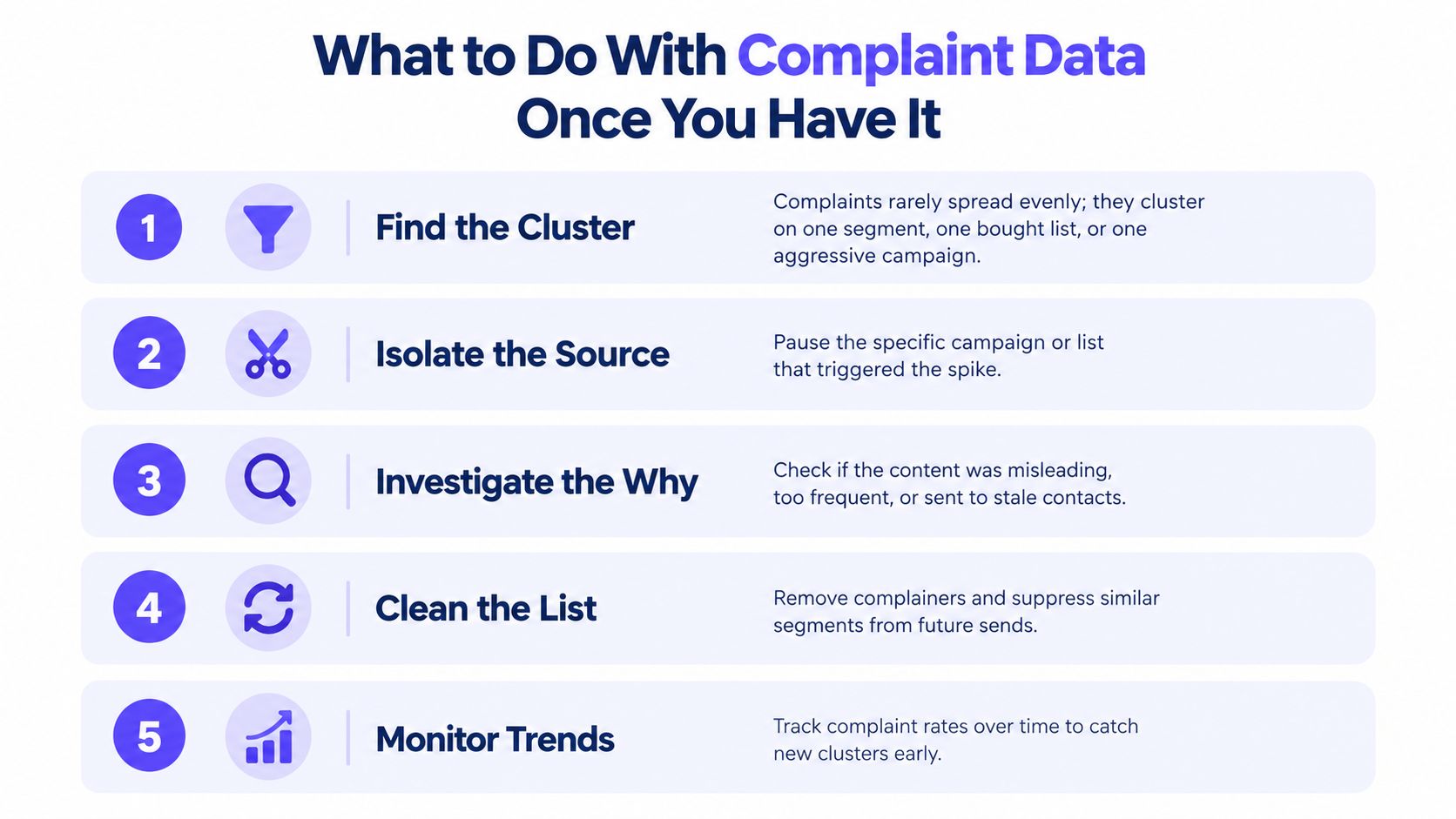
Complaint handling should begin with an action, not a presentation. Where the recipient can be reliably identified, suppress that address promptly and prevent scheduled follow-ups from continuing.
The feedback-loop recommendations in RFC 6449 recommend treating a complaint like an unsubscribe request. They also define complaint rate using feedback messages divided by messages delivered to the relevant provider over the same period, which makes raw complaint counts a poor comparison between campaigns.
Find the smallest actionable cluster
A useful investigation starts with the hypothesis that one segment or sequence step is responsible, rather than assuming the entire campaign needs a rewrite. Compare acquisition source, recipient provider, message version, follow-up position, and sending volume.
- Suppress identifiable complainants. Reconcile reports with outbound records before modifying contact status.
- Pause the suspected segment or sequence step while investigating.
- Compare complaint rates using matching provider-specific delivery periods.
- Inspect the message experience. Check relevance, subject-line accuracy, frequency, authentication, and unsubscribe handling.
- Resume cautiously only after the underlying sending decision has changed.
Without individual addresses, isolate campaign-level variables instead. Don't guess which contacts complained, and don't interpret an aggregate dashboard as permission to continue every segment unchanged.
Keep warmup separate from remediation
When complaints rise, lowering cold sending volume and removing the problematic traffic are practical containment measures. Steady warmup can remain part of reputation work, but it shouldn't be increased as though extra activity cancels recipient objections.
One option alongside provider dashboards and sending-platform suppression is Mailwarm, a premium email warmup and deliverability platform combining real inbox engagement, inbox placement insights, and expert guidance. Its role is to support reputation and placement work, not to reveal Gmail complainants or replace consent decisions.
For the operational checklist, the guide on how to lower spam complaints connects complaint handling to targeting and campaign changes.
Frequently Asked Questions
Why doesn't Gmail return individual complaint addresses?
Gmail's Feedback Loop uses aggregate campaign reporting rather than a classic address-level complaint feed. Senders can investigate the mailing pattern, but they can't suppress a specific complainant from that data alone.
How long does Yahoo or Microsoft approval take?
Approval times vary with the program and the authorization required. Teams should confirm the current process and resolve domain or infrastructure ownership before scheduling a launch around enrollment.
What should happen when complaints rise without contact-level data?
The sender should pause the suspected campaign, segment, or follow-up step and compare it with other traffic. Campaign records, provider data, reply content, and bounce patterns can narrow the cause without identifying individual complainants.
Does a low complaint rate prove inbox placement?
No, complaint monitoring isn't a complete deliverability score. Reputation dashboards, delivery errors, and placement testing provide separate evidence that should inform the decision.
An email feedback loop is useful when its output changes sending behavior. The immediate priorities are reliable suppression where possible, identifiable campaign segments, and a clear pause-and-investigate process where only aggregate data exists.
Mailwarm offers expert-guided warmup and inbox placement insights alongside the complaint-handling workflow, without requiring IMAP access to private inboxes. Visit Mailwarm to discuss a reputation and monitoring plan that complements provider feedback rather than treating warmup as a substitute for fixing unwanted mail.