
Keep the spam complaint rate below 0.1%, or fewer than 1 complaint per 1,000 delivered emails. Never cross 0.3%, which equals 3 complaints per 1,000 delivered emails, because mailbox providers treat that level as a serious deliverability risk.
That distinction matters. The 0.3% figure is an enforcement ceiling, not a healthy operating target. A sender can remain technically below the provider limit while complaints are already weakening inbox placement, especially when the rate is measured across the wrong mailbox population.
What Spam Complaint Rate Means
Spam complaint rate is the percentage of delivered emails that recipients mark as spam or junk. Calculate it by dividing complaints by delivered emails, then multiplying by 100. Bounced messages do not belong in the denominator, as explained in this spam complaint rate calculation guide.
Use two thresholds when judging performance:
- Below 0.1%: The practical operating target, equal to 1 complaint per 1,000 delivered emails. Treat this as the operating line, not as an optional benchmark. ZeroBounce explains the 0.1% benchmark and its calculation.
- At or above 0.3%: The serious risk boundary for bulk sending. Google and Yahoo guidance treats this level as a major spam-rate problem, while Microsoft-related guidance uses 0.3% as an enforcement ceiling for higher-volume senders. OneSignal summarizes the healthy target and risk boundary.
The denominator can change the result sharply. A campaign delivered to 40,000 recipients and generating 80 complaints produces a 0.2% complaint rate. The calculation uses delivered messages, not the 50,000 addresses originally targeted. That result is already twice the 0.1% operating target, even if 80 complaints seems small by itself.
Practical rule: Judge complaint volume alongside delivered volume and mailbox-provider scope.
Complaint rate is a provider-specific signal, not a universal score for an entire sending program. Gmail, Outlook, Yahoo, and other providers measure different recipient populations and expose different reporting. A sender may look healthy in one segment while struggling in another, so an aggregate ESP dashboard is an alert, not a final diagnosis. Use the 0.1% target for daily operating discipline, and treat 0.3% as the point where provider enforcement risk becomes immediate.
How Complaint Rate Is Measured
Complaint data comes through several feedback loops, and each loop has a different level of visibility. Senders that rely on one dashboard usually miss part of the picture.
Gmail Postmaster Tools
Google Postmaster Tools is the main source for Gmail-specific spam-rate monitoring. It presents aggregate complaint information for Gmail traffic, alongside domain reputation, IP reputation, authentication, and delivery-related signals.
Google's data is provider-specific. It doesn't show every complaint from every mailbox provider, and it isn't a recipient-level list of people who clicked the spam button. That limitation makes the metric useful for Gmail reputation analysis, but unreliable as a universal complaint score.
Microsoft SNDS and feedback loops
Microsoft's Smart Network Data Services, usually called SNDS, provides sending-IP data for Outlook-related traffic after the sender registers the relevant IP. Outlook complaint visibility is harder than Gmail visibility because Microsoft doesn't provide a public feedback loop equivalent to a traditional complaint-forwarding program.
Feedback Loop programs can provide more actionable notifications for participating providers and networks. ESPs may support programs associated with providers such as Yahoo, AOL, Comcast, Proofpoint, and Validity, although the exact data and eligibility depend on the provider and sending arrangement.
| Provider | Source | Granularity | Access |
|---|---|---|---|
| Gmail | Google Postmaster Tools | Aggregate Gmail reporting, with reputation and authentication views | Sender verifies the domain and accesses the dashboard |
| Outlook and related Microsoft traffic | Microsoft SNDS | Sending-IP reporting and provider-level signals | IP registration and Microsoft access are required |
| Yahoo and participating networks | Feedback Loop programs | Complaint notifications where supported | ESP or direct provider enrollment |
| Other supported mailbox networks | FBL providers such as Proofpoint and Validity | Complaint events subject to program coverage | Enrollment through an ESP or provider |
Teams should start with Gmail Postmaster Tools when Gmail represents a meaningful part of the audience, then add SNDS for Microsoft traffic. FBL enrollment fills gaps, but it still won't create a single global truth.
Before a campaign launches, teams can also check your email for spam words. Content isn't the only cause of complaints, but confusing or misleading copy can increase the mismatch between what recipients expect and what arrives.
What a High Complaint Rate Does to Your Domain
A high complaint rate is the fastest way to damage a sending domain. Bounces indicate delivery problems. A spam complaint is a direct recipient signal that the message was unwanted, and mailbox providers can use that signal immediately.
The damage usually starts with filtering and throttling. Providers may then defer or block messages, while future campaigns receive less favorable treatment. Gmail and Yahoo both treat 0.3% as a serious bulk-sender boundary, and Microsoft-related guidance also frames 0.3% as an enforcement ceiling. SenderReputation outlines the Microsoft complaint-rate guidance.
A complaint spike can affect more than the campaign that caused it. Transactional messages, sales sequences, newsletters, and support emails may share the same domain reputation. Once providers connect those streams, careless marketing activity can make legitimate mail harder to deliver.

Why one bad batch matters
A single aggressive batch sent to a cold or stale list can push complaints past 0.3% in one day. Recovery then requires consistent, clean sending, careful segmentation, and lower-risk volume. Domains don't recover because a sender promises to improve. They recover when mailbox providers observe better recipient behavior over time.
The common mistake is checking a blacklist and assuming the domain is safe because no listing appears. Blocklists are only one part of the picture. Senders can check if your domain is blacklisted, but a clean result doesn't cancel out a rising provider-level complaint rate.
A domain can look clean in a blacklist report and still be losing inbox placement because recipients keep reporting its messages.
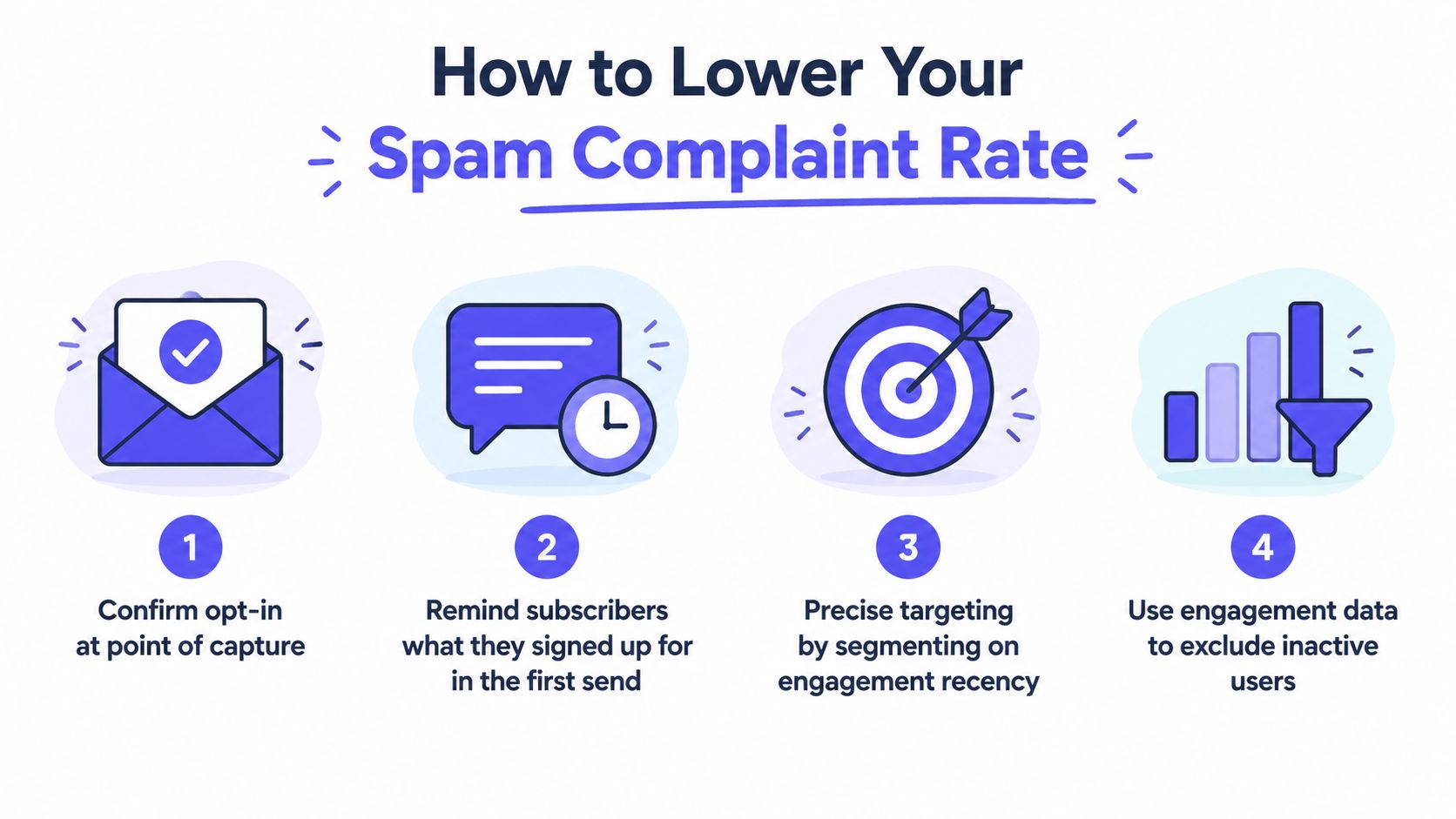
How to Lower Your Spam Complaint Rate
Lowering complaints starts before the first email. The sender must make the message expected, recognizable, relevant, and easy to refuse.
Set expectations at capture
The signup or lead-capture experience should state what recipients will receive and how often. Confirmation at the point of capture helps remove uncertainty, while the first message should remind the recipient why the sender is contacting them.
For sales outreach, that means explaining the business reason for the message without pretending that the recipient requested a newsletter. For marketing programs, it means matching the promise made on the form to the content delivered afterward.
Segment before sending
Broad lists create predictable complaint problems. Segment by engagement recency, role, geography, customer status, and the original acquisition source. A message that makes sense for an active customer may feel irrelevant to an old lead or a recipient in another market.
A practical suppression checklist includes:
- Recent engagement: Prioritize recipients who have interacted with recent messages.
- Role relevance: Remove contacts whose job function doesn't match the offer.
- Acquisition quality: Isolate questionable sources instead of mixing them with trusted opt-ins.
- Complaint suppression: Suppress known complainers as soon as feedback arrives.
- Risky addresses: Filter spam traps, invalid contacts, and role addresses before delivery.
Make unsubscribing easier than reporting spam
An unclear unsubscribe process is a self-inflicted complaint generator. The link should be visible, work without a login, and avoid a maze of preference screens. A recipient who can leave quickly has less reason to use the spam button.
The sender should also make the identity obvious. A consistent From name, familiar branding, and a subject line that matches the content help recipients recognize why the email arrived.
Sunset inactive recipients
Unengaged contacts shouldn't remain on every campaign indefinitely. A fixed monthly review can move long-inactive recipients into a re-engagement stream, then suppress them when they don't respond.
The exact inactivity window should reflect the program's normal cadence and buying cycle. The key principle is simple: recipients who no longer recognize or value the sender shouldn't receive the same volume as active contacts.
Control volume
Sudden bursts create risk, especially when a team combines a new sending source with a cold segment. Volume should increase gradually, and every expansion should be evaluated by provider, campaign, and engagement quality.
Teams that need to warm up an SMTP server should treat warmup as reputation preparation, not permission to send irrelevant mail. No warmup process can compensate for poor targeting or a list that never wanted the messages.
List discipline beats clever copy. The fastest complaint reductions usually come from sending to fewer, better-matched recipients.
How to Monitor Complaint Rate Weekly
Complaint monitoring needs a fixed owner and a recurring review. A weekly check catches a deteriorating pattern earlier than a monthly performance report, especially when campaigns change frequently.
Start with Gmail Postmaster Tools
The reviewer should open the spam-rate view and record the current Gmail trend, then compare it with domain reputation and IP reputation. A complaint increase paired with weaker reputation is more urgent than an isolated dashboard fluctuation.
The working alert levels should be stricter than the provider ceiling:
- Watch level: A Gmail reading above 0.05% deserves investigation, based on the practical warning guidance summarized by Flicked's complaint-rate analysis.
- Review level: A weekly rate near 0.08% should trigger list and campaign review.
- Urgent level: A rate above 0.1% requires immediate action, because the sender has moved beyond the healthy operating line.
The dashboard doesn't explain the cause by itself. The reviewer should compare the timing against new campaigns, list sources, content changes, frequency changes, and volume shifts.

Check Microsoft SNDS and FBL feeds
For Microsoft traffic, the reviewer should pull SNDS data for each sending IP and examine the complaint indicator, filter result, and confidence information. Outlook complaints won't appear in Gmail Postmaster Tools, so Microsoft traffic needs its own monitoring path.
FBL feeds should be consolidated into one working report. Useful dimensions include:
- Campaign: Which message or sequence generated the complaints?
- Provider: Did the issue occur at Gmail, Outlook, Yahoo, or another network?
- Segment: Which acquisition source, geography, role, or engagement group reacted?
- Change log: What changed in volume, content, targeting, or cadence?
A send hold should apply when complaint data reaches the team's danger threshold, even if the provider hasn't blocked anything yet. Staying technically deliverable isn't the same as operating safely.
Where a Deliverability Platform Fits In
A deliverability platform doesn't replace Postmaster Tools, SNDS, feedback loops, or list hygiene. It strengthens the foundation around them by helping teams build reputation, observe inbox placement, and identify configuration or content risks before a campaign creates a larger problem.
Mailwarm is a premium email warmup and deliverability platform that uses 50,000+ aged real inboxes and real engagement signals such as opens, replies, threads, spam removal, and important marking. Depending on the plan, it supports up to 100% replies to warmup emails, while provider-level warmup lets teams focus activity across Gmail, Outlook, Microsoft 365, Yahoo, and SMTP environments. These capabilities support sender-reputation work, but they don't make unwanted campaigns safe.
The platform also combines spam score monitoring, inbox placement insights, bounce prevention, custom email content warmup, authentication fix tools, and deliverability analytics. It doesn't require IMAP access or permission to read a user's private inbox, and expert deliverability calls are included in every plan.
Use warmup as protection, not a shortcut
Warmup can help establish a more credible sending pattern before a new or changed mailbox begins regular outreach. It can't fix unclear consent, stale contacts, misleading offers, or excessive frequency. Those problems must be corrected at the campaign and list level.
A sensible operating model is:
- Use warmup and reputation monitoring to establish the foundation.
- Use Postmaster Tools and SNDS to examine provider-specific signals.
- Use FBL data to suppress known complainers.
- Use campaign analytics to identify the exact segment or message causing friction.
- Hold or reduce sending when complaint rates move toward the operating line.
That combination is more useful than a basic warmup dashboard that reports activity without showing whether messages are reaching the inbox.
Spam Complaint Rate FAQ
What is an acceptable spam complaint rate?
Treat below 0.1% as the operating line, equal to roughly 1 complaint per 1,000 delivered emails. The 0.3% level, or 3 complaints per 1,000 delivered emails, is a provider-risk boundary, not a performance target. These thresholds are guidance, not a universal benchmark. Complaint tolerance varies by mailbox provider, sender history, traffic type, and recipient population.
How do senders calculate the complaint rate?
Divide complaints by delivered emails, then multiply by 100. 10 complaints among 10,000 delivered emails equals 0.1%. Calculate the rate separately for each provider or mailbox segment whenever the data allows. A blended total can hide a serious problem at one provider.
How do senders see who marked an email as spam?
Gmail Postmaster Tools reports aggregate Gmail complaint signals, not a simple recipient-level list. Feedback Loop programs can send complaint notifications for participating providers. Microsoft SNDS supplies Microsoft-related sending data, but it is not a public Outlook complaint feed.
Does one spam complaint matter?
Yes. Its effect depends on delivered volume and the provider segment. One complaint in a small campaign can move the rate sharply, so evaluate counts against delivered emails instead of judging them in isolation.
Can a sender recover after a complaint spike?
Stop repeating the trigger. Recovery requires controlled sending, list pruning, tighter targeting, lower volume, and clear expectations. A short clean period may help, but persistent complaints require sustained correction, not a quick technical change.
Is a low complaint rate enough?
No. Review complaint rate with inbox placement, spam-folder placement, domain and IP reputation, authentication, bounces, and engagement. A low rate in one provider segment can conceal heavy filtering elsewhere. The denominator and mailbox population always matter.
Mailwarm helps teams build sender reputation through real inbox engagement, provider-level warmup, inbox placement insights, spam score monitoring, and expert deliverability guidance. Teams can visit Mailwarm to review the platform's deliverability approach.