
Why Microsoft SNDS and JMRP Matter for Outlook Junk Placement and Sender Reputation
Outlook’s filtering system evaluates both your sending domain and your IP addresses. Microsoft SNDS and JMRP provide unique visibility into that process. By using these tools together, you can pinpoint complaint trends, potential spam traps, and any instability in your mail streams, allowing you to address root causes before more messages end up in the Outlook Junk folder.
SNDS offers a detailed view of Microsoft’s assessment of your IP reputation over time, while JMRP provides structured reports of end-user complaints. Reviewing both together equips you with a comprehensive understanding of risks and your ongoing progress.
How Microsoft SNDS Collects and Displays IP-Level Reputation Signals
SNDS aggregates data from the Outlook and Hotmail ecosystems by linking events to your sending IPs, summarized by day. Key data points include message volume, spam trap hits, and filtering results, with color-coded status indicators that quickly summarize each IP’s health.
Please be aware that SNDS data might not be updated in real time, but rather with some delay. Use broad trends, rather than single-day spikes, to guide your actions. Pay special attention to abrupt shifts in volume, increases in spam trap hits, or extended periods showing red status. Such signals often align with new list sources or changes in mail routing.
How Microsoft JMRP Complaint Feedback Works and How to Act on It
JMRP is Microsoft’s feedback loop for sender complaints. When users mark your message as “Junk,” Outlook sends you a detailed Abuse Reporting Format (ARF) message containing original email headers and a snippet of the content. This allows you to identify both the subscriber and campaign involved.
Suppress complainants’ addresses immediately. Investigate how these users joined your list to ensure your opt-in process, frequency, and user expectations are appropriate. High complaint rates have significant negative effects on Outlook inbox placement, so keep complaints infrequent and resolve them swiftly.
Step-by-Step Process to Enroll in Microsoft SNDS and JMRP
- Create or use a Microsoft account dedicated to sender operations.
- Gather your sending IPs, including any sub-allocated address ranges.
- Sign up for SNDS and request access to manage those IPs.
- Verify your ownership via the postmaster or abuse contact address, or by confirming WHOIS details.
- Allow some time for Microsoft to approve your request and start loading data.
- Register the same IPs with JMRP, designating a monitored mailbox for incoming reports.
- Set up automatic parsing for ARF messages, integrating the outcomes into your suppression process.
Store credentials securely, limit access to trusted team members, and consider SNDS and JMRP as essential tools for monitoring your email delivery performance, similar to how production telemetry monitors software systems.
Operational Tactics to Reduce Outlook Junk Placement Using SNDS and JMRP Data
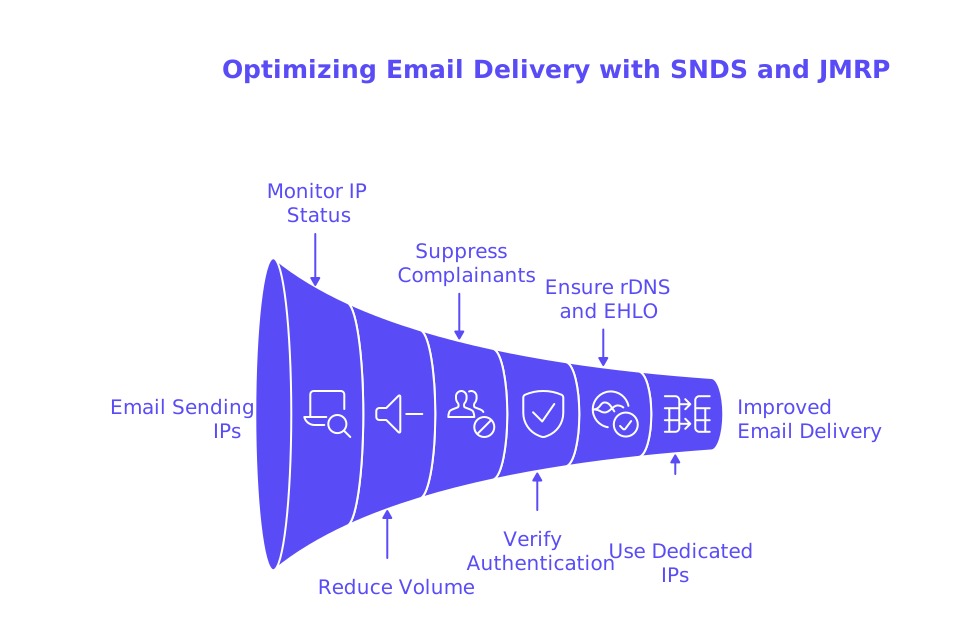
- Monitor each sending IP daily, and investigate any prolonged red or unknown status periods.
- Reduce sending volume from affected IPs while troubleshooting issues.
- Quickly suppress complainants and recent inactives associated with complaint clusters.
- Verify that your authentication (SPF, DKIM, DMARC) aligns with your active sending domain.
- Ensure consistent and correct rDNS and EHLO values for all sending IPs.
- Use dedicated IP addresses for different mail streams to separate higher and lower-risk traffic.
Ramp up new IPs and domains gradually, maintaining a controlled increase in sending volume. Do not accelerate until SNDS status reliably shows green.
How Spam Checker and Blacklist Monitoring Complement Microsoft SNDS and JMRP
Use SNDS and JMRP together with a spam checker to run pre-send validation. Seed list testing and header reviews can uncover potential SPAM triggers, while also confirming your authentication alignment and list-unsubscribe header formatting.
Incorporate a blacklist checking tool into your weekly monitoring routine. Certain DNS-based blocklist (DNSBL) incidents often coincide with increases in spam trap activity. Submitting prompt delisting requests can limit the negative impact on your Outlook inbox rates while you address the underlying sources.
Where Mailwarm Fits in a Microsoft Deliverability Plan Focused on SNDS and JMRP
In February 2021, Mailwarm evolved into a next-generation email warm-up service, adding powerful features such as multi-account management, advanced deliverability and reputation insights, multi-provider support, and provider-specific spam score tracking to help safely scale sending. It interacts with more than fifty thousand active, managed mailboxes, enabling natural opens, replies, and reputation recovery activities. This is not a marketing tool, its purpose is to generate positive technical signals that reinforce your sender reputation and support safe, predictable ramping.
Leverage this managed activity to keep your SNDS data consistently green and your JMRP reports quiet. Pace your ramp-up carefully, always reviewing telemetry before increasing your send volume.
Configuration Fixes that Resolve Common SNDS and JMRP Warnings for Outlook Delivery
Spam Trap Hits in SNDS
- Audit any recent list sources and pause imports from questionable partners.
- Ensure confirmed opt-in (COI) for any high-risk acquisition channels.
- Temporarily reduce daily sending volume until spam traps clear for several days.
Complaint Spikes in JMRP
- Suppress all complainants immediately and permanently.
- Review and potentially reduce the messaging cadence tied to the complaint stream.
- Increase visibility of your unsubscribe options using the List-Unsubscribe email header.
Authentication and DNS Issues Behind Outlook Filtering
- Flatten any SPF records that are too long to avoid configuration failures across domains. See the guide on avoiding SPF record length limits in multi‑domain setups.
- Make sure your SMTP greeting (EHLO) matches your sending hostname. Learn more about the impact in what HELO in emailing means for sender reputation.
- Keep reverse DNS (rDNS) records in sync with both the EHLO value and the PTR domain.
Handling Newly Added IP Addresses or Domains
- Begin with small, steady mail volumes, and review SNDS telemetry before every increase.
- Follow Outlook-specific IP warm-up best practices. Check out the best warm-up tools for Outlook and Microsoft 365.
Ongoing Measurement to Maintain Microsoft Sender Reputation Beyond SNDS and JMRP
Set regular (weekly) checkpoints to compare your SNDS history with your sending plan. Track any deviations from typical message volume or bounce/error rates. Cross-reference JMRP complaint data with specific acquisition sources and campaign templates.
Monitor your authentication configuration after each DNS update. Before conducting large launches or during seasonal spikes, make sure to re-test your emails with a spam checker, a tool that can verify your emails for potential SPAM triggers. Maintain a detailed change log to contextualize any delivery shifts for your stakeholders.
Only escalate to Microsoft support after thoroughly identifying and resolving the root cause. Microsoft expects consistently strong mailing practices and configuration hygiene prior to opening any tickets.
Practical Workflow Connecting Microsoft SNDS, JMRP, and Deliverability Operations
- Collect SNDS performance data daily and aggregate it into your deliverability dashboard.
- Process JMRP complaints and automatically suppress those email addresses.
- Use a spam checker before adjusting routes or updating sending domains.
- Confirm alignment on SPF, DKIM, DMARC, rDNS, and EHLO details with every significant code or config change.
- Only increase sending volumes after two to three days of steady “green” SNDS status.
- Log every send change and its measured impact on Outlook inbox placement.
Healthy Outlook delivery is a discipline, not a one‑time fix.
Bring It Together and Reduce Outlook Junk Placement with Confidence
SNDS gives you actionable visibility. JMRP brings accountability. Your role is to connect these indicators with operational decisions. Keep your infrastructure robust, your complaint rates low, and your volume growth measured.
If you need help converting monitoring data into reliable outcomes, start with a focused warm-up plan and regularly validate your settings. Let’s keep your sends landing in the inbox, where they belong.
FAQ
How can Microsoft SNDS improve my email deliverability?
SNDS provides in-depth insights into your IP's reputation, allowing you to identify and address issues like spam traps and filtering problems. By regularly analyzing SNDS data, you can make informed adjustments to maintain a positive sender reputation and improve deliverability.
What is the function of Microsoft JMRP in email marketing?
JMRP acts as a feedback loop, providing detailed reports on user complaints. This information enables you to swiftly remove complainants, analyze the causes, and tighten your email practices to keep complaint rates low.
Why should I use Mailwarm in conjunction with SNDS and JMRP?
Mailwarm helps maintain a healthy sender reputation by automating engagement activities like opens and replies. Paired with SNDS and JMRP insights, it efficiently boosts your email deliverability by reinforcing positive sender behavior and metrics.
What are common pitfalls when using SNDS and JMRP data?
A common error is reacting to daily fluctuations rather than identifying broader trends. Misunderstanding these metrics can lead to misguided adjustments that harm your deliverability instead of optimizing it.
Why is authentication critical for avoiding junk placement?
Authentication methods like SPF, DKIM, and DMARC validate your sending domain, reducing chances of emails being flagged as spam. Failures in these protocols often result in poor inbox placement, emphasizing the need for strict configuration adherence.
How do spam checker tools complement SNDS and JMRP?
Spam checkers identify potential triggers before emails are sent, aligning with SNDS and JMRP data to preemptively solve delivery issues. When used properly, they prevent blacklisting and improve inbox reach.
What is the risk of not acting on JMRP complaint data?
Ignoring complaint data results in sustained high complaint rates, damaging your sender reputation and leading to greater junk-folder placements. Addressing complaints swiftly avoids escalation to critical reputation tiers.