
1. Inventory Every Sending Domain and Source
First, list every domain and subdomain you send mail from, such as example.com, mail.example.com, billing.example.com, or brand-specific domains. For each, note the real sender: Google Workspace, Microsoft 365, a marketing service, a transactional provider, or help desks.
Check whether each service offers a ready-made include: record or requires you to list IP ranges. Don’t forget about internal relays or API-driven senders used by your engineering team. An important reminder: don’t automatically trust mx mechanisms for authorization, many mail servers only receive, not send, mail. Clean and complete inventories help you avoid issues and keep policies tidy, making it much easier to circumvent SPF record length limits in the future.
2. Measure Lookups and Byte Length
Now, evaluate your current SPF setup against its two main technical limits: total DNS lookups and record length.
Use an our free SPF checker to expand any include, a, and mx mechanisms, counting how many DNS queries your policy triggers in total. If you’re at or above the 10-lookup threshold, you risk delivery errors. Also, check the size of your SPF TXT record; while DNS accepts multiple strings up to 255 characters each, keeping your overall record compact prevents odd errors and fragmentation. Make a list of both lookup counts and policy size for every domain.
Tip: Avoid using outdated or unreliable mechanisms (like ptr), and be wary of broad mx rules for domains with many hosts. Carefully managed records are much less likely to hit SPF limits.
3. Consolidate Providers and Minimize Mechanisms
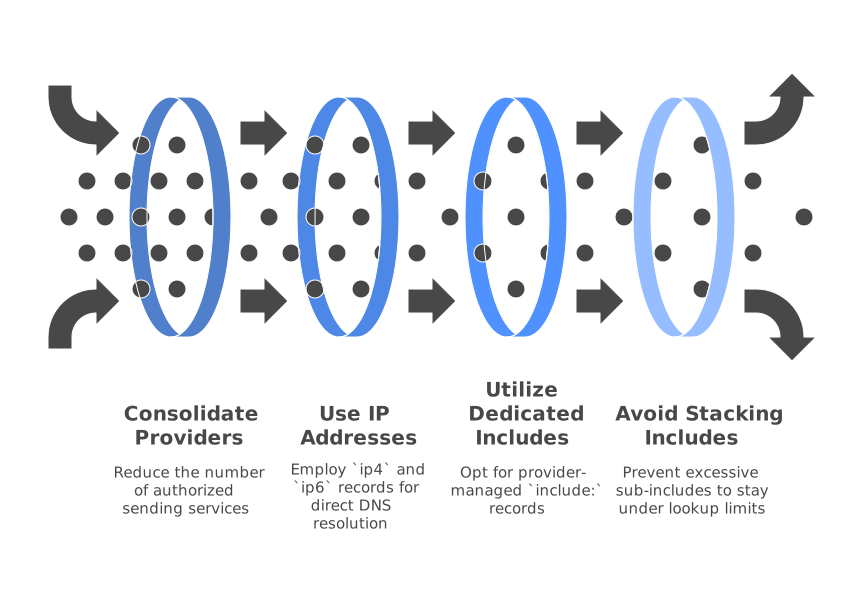
Your aim is to reduce the number of different places authorized to send on your behalf. The fewer services you allow, the fewer DNS lookups your record requires, and the shorter and clearer your policy will be.
If possible, standardize on a single provider for the same type of email across brands. Wherever you control the sending IP addresses, use ip4 and ip6 instead of a or mx, this removes the need for further DNS lookups. If your provider offers a dedicated include: record, use that over copying ranges by hand; these generally stay updated as their infrastructure evolves.
Beware of stacking multiple provider “all-in-one” includes. These often pull in more sub-includes, pushing you over the lookup threshold. Always ask your providers for “lite” or IP-only options if you’re close to the limit. Careful consolidation streamlines your SPF and helps you stay well under record limits while accurately listing legitimate senders.
4. Use Modular Sub-Records and Chained Includes
Modular SPF design makes ongoing management much simpler. Instead of one overloaded record, split responsibilities into helper records, each handling a specific type of mail traffic.
For example, create:
_spf-core.example.comfor main business mail_spf-marketing.example.comfor marketing platforms_spf-transact.example.comfor transactional providers
Each contains only what’s needed for its category (such as certain include:s or direct IPs). Your main domain record then looks like:
example.com TXT v=spf1 include:_spf-core.example.com include:_spf-marketing.example.com include:_spf-transact.example.com -all
Keep helpers short, and avoid repeating the same entries across modules. This clear structure is easier to maintain and helps prevent accidental overages in lookup count or record size.
5. Apply redirect= for Domain Families
If you manage multiple sibling domains (such as brand-a.com, brand-b.com, etc.) that all share the same policy, the redirect= feature lets you centralize the logic and save space.
Set up your master policy on a shared subdomain like spf.example.com and use:
brand-a.com TXT v=spf1 redirect=spf.example.com
With this technique, all the detailed SPF logic lives in one place. If a specific domain needs a custom rule, you can always override it by publishing a custom record. Remember: when using redirect=, the target policy must include the final -all. The redirect approach eliminates repetitive includes on every brand domain, saving both length and lookup headroom.
6. Choose a Safe Flattening Strategy
Flattening is a process where you replace include:s with explicit lists of current IP ranges, greatly reducing DNS lookups. This can be useful, but comes with risk: IPs at large providers may change without warning, potentially breaking your delivery if your record isn’t kept up to date.
Static flattening means pasting provider IPs directly into your SPF record using ip4 and ip6. This method lowers lookup counts, but you must regularly update the record so it stays in sync with provider changes. If you opt for static flattening, set short DNS TTLs during rollout and automate regular checks for provider IP changes if you can.
Dynamic flattening uses a scheduled task or service to refresh your flattened SPF automatically. The system reads include:s, collects active IPs, and overwrites a helper record (e.g., _spf-flat.example.com) every day or week. Your active SPF record then simply includes the latest helper, reducing risk and effort. Dynamic flattening helps you circumvent SPF length and lookup limits while safely keeping pace with provider changes.
7. Publish Safely, Validate, and Stage the Cutover
Always roll out SPF changes cautiously. Use a test or non-critical subdomain, such as stage.example.com, first. Apply your helper records and streamlined structure there, and send test emails to confirm correct SPF pass results in both email headers and provider dashboards. Run your SPF through multiple validators for lookup counts and final logic. Be especially watchful for “void” (NXDOMAIN) lookups, as too many also cause errors.
Once you’re confident in your setup, apply your SPF changes to live domains. Keep DNS TTLs short (300–600 seconds) in the first couple of days. After things are stable, you can increase TTLs. This measured process lets you spot any issues early and ensures your changes help, not harm, mail delivery.
9. Monitor Changes and Document Ownership
SPF needs occasional attention: providers update their guidance, and your own needs may change as you add or retire mail tools.
Assign ownership of each SPF helper record to specific teams (such as marketing, product, or IT). Regularly check your SPF’s total lookup count and overall length to see if you’re approaching the technical limits. If you have the resources, consider setting up an automated system to alert you when you get close to those limits, but manual checks are a solid start.
Keep good documentation on why each entry is present, short notes about when you added a provider, what purpose it serves, and who owns changes. Clear documentation ensures the right people can make safe SPF adjustments as your business evolves.
Provider Specifics: Google and Microsoft
Major suites like Google Workspace and Microsoft 365 have their own SPF recommendations and records, which must be combined thoughtfully with your other providers’ settings. For detailed platform-specific advice, read our SPF strategies for Google Workspace and Microsoft 365. These tips work alongside this guide for robust SPF management in complex enterprise scenarios.
Troubleshooting and Alternatives
Even with a careful plan, snags may arise. Here are common problems with straightforward fixes to keep your SPF streamlined:
- SPF PermError: too many DNS lookups. The total is over 10. Remove unnecessary or broad mechanisms (like
mx), merge providers, or use a flattened helper record. - Intermittent SPF fails. These can come from DNS timeouts or very long records. Simplify your record, use direct IPs, and check that your DNS provider is performing well.
- Provider changed IPs silently. If your static flattened SPF suddenly fails, the provider’s IPs likely changed. Switch to their latest
include:or improve your automation. - Multiple SPF records detected. Only one SPF TXT record per hostname is valid. Merge all mechanisms into a single entry and retest.
- Subdomain sends but inherits root policy incorrectly. Use a dedicated SPF policy or a
redirect=for each subdomain that sends mail directly.
Keep an eye on deliverability trends, email rules and filters evolve rapidly. If you see more bounces or blocks after changes, review the latest requirements from mailbox providers and new authentication rules. For more detail, check out our article on why emails get bounced in 2025 and new delivery rules, which pairs well with this SPF overview.
Remember: SPF is just one part of deliverability. Combine a smart SPF with proper DKIM and DMARC, then focus on positive sending habits and your reputation as a sender.
Worked Example: From Messy to Maintainable
Here’s how you might apply this process in practice, using a fictional company, Example Brands, with three domains and four email providers:
Initial state: The SPF for example.com includes Google, a marketing ESP, a helpdesk, and a handful of a/mx mechanisms. Expanding the record hits 13 lookups, leading to occasional PermErrors and deliverability drops due to excess length and overcomplexity.
Refactor: Move Google to _spf-core.example.com. Move the ESP and its two dedicated IPs to _spf-marketing.example.com. Put the helpdesk in _spf-support.example.com. The SPF for example.com becomes:
example.com TXT v=spf1 include:_spf-core.example.com include:_spf-marketing.example.com include:_spf-support.example.com -all
Next, flatten the marketing helper into explicit IPs using _spf-marketing-flat.example.com and swap it in to reduce lookups. Lookup count drops to eight. Finally, centralize the shared logic for brand-a.com and brand-b.com by using redirect=spf.example.com. The result is easy to manage and safely under SPF limits.
Maintenance Checklist
- Log SPF lookup counts after every change and keep a record.
- Where possible, use direct
ip4/ip6entries rather than catch-alla/mxmechanisms. - Use modular helper SPF records, each as concise as possible.
- Review and refresh flattened records regularly; assign an owner for each change.
- Deploy with a low TTL and increase it only after confirming stability.
- Review policies every time you add or update a provider’s sending IPs or mechanisms.
Conclusion
Scaling SPF across brands doesn’t have to mean hitting hard DNS limits or tangled records. Start by recording every sender, measuring your current setup, and cleaning out unnecessary mechanisms. Build simple, modular helper records, centralize common logic with redirect=, and choose a flattening approach you can sustain. Always validate your changes in test stages, document who owns each record, and keep a steady eye on updates from your providers.
Need expert review or custom advice for your SPF or deliverability plan? Reach out to experienced consultants at MailAdept.
FAQ
What is SPF and why is it important?
SPF, or Sender Policy Framework, is an email authentication method that helps prevent sender address forgery. It's important because it protects your domain from being used in email spoofing and ensures your emails are recognized as legitimate by email receivers.
How can I identify if my SPF record is too long?
You can identify if your SPF record is too long by using an SPF checker tool to count DNS lookups and verify the total record length. If your record exceeds 10 DNS lookups or becomes overly large, you may encounter email delivery issues.
What are some ways to reduce DNS lookups in SPF records?
To reduce DNS lookups, consolidate email providers, use specific IP address mechanisms instead of 'a' or 'mx' records, and create modular helper records for different email categories. Consider flattening includes by using direct IP addresses or chaining lightweight SPF includes.
What is SPF flattening and is it safe?
SPF flattening involves replacing 'include' records with explicit IP addresses to reduce DNS lookups. While it is effective in lowering lookups, it requires regular updates to keep the IP list current, especially if you are using static flattening.
How can I safely test SPF changes before they go live?
To safely test SPF changes, implement them on a test or non-critical domain first and send test emails to check SPF pass results. Use validators to verify lookup counts and logic, and monitor for errors before applying changes to live domains.