
Cold email deliverability is the ability to get outreach emails into the inbox, not just accepted by a mail server. That distinction matters because a large 2025 benchmark of legitimate marketing email found that 83.5% reached the inbox, 6.7% landed in spam, and 9.8% were missing, which means a meaningful share of legitimate email never gets a chance to earn a reply, and the report described that baseline as “one in six legitimate marketing emails fails to reach the inbox” (Validity benchmark report).
For outreach teams, that changes the question from “Was the email delivered?” to “Which providers placed it in the inbox?” Cold email deliverability in 2026 isn't one global score. It's a provider-by-provider reputation problem that has to be diagnosed and fixed with that level of precision.
What Cold Email Deliverability Really Means for Outreach Teams
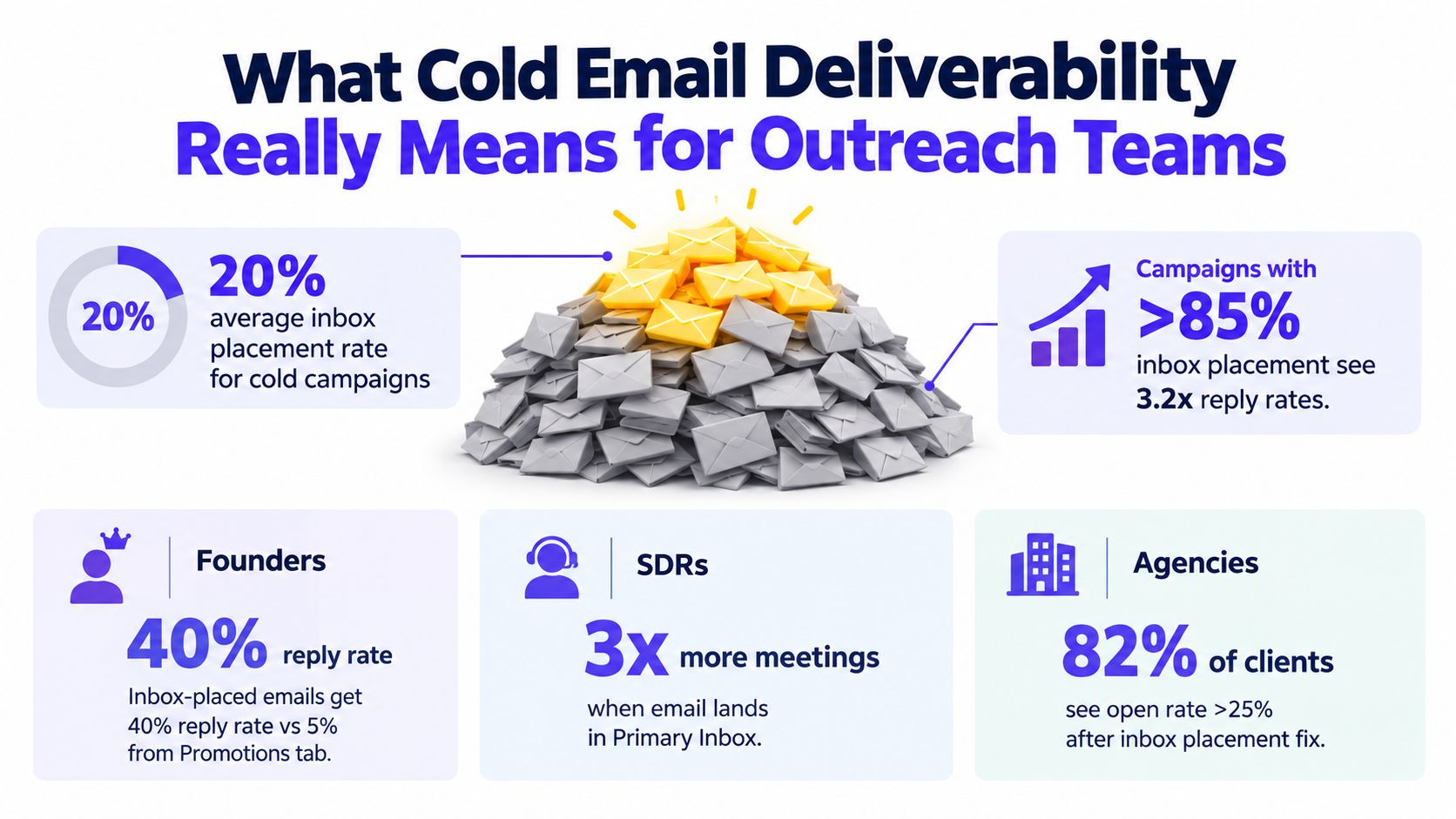
Teams can hit an acceptable delivered rate and still lose a large share of real inbox visibility. Analysts at Validity found that a meaningful portion of legitimate email still misses the inbox entirely, which is why outreach performance has to be judged by placement, not server acceptance alone.
For outreach teams, cold email deliverability means one thing: whether messages reach the inbox at the mailbox providers that make up the list.
That sounds obvious, but it changes how the work gets done. A message accepted by Google can still land in spam. A message accepted by Microsoft can disappear into junk while Gmail placement looks fine. The campaign dashboard may still show "delivered" across both.
Delivered is only the first checkpoint
Receiving servers answer a narrow question. Should this message be accepted?
Mailbox providers answer the harder one. Should this sender be trusted enough to show up in front of a user?
Those are different decisions, and outreach teams pay for the gap between them. Server acceptance keeps bounce rate low. Inbox placement creates the chance of a reply. Spam placement, promotions tab placement, and silent filtering all reduce visibility, even when the sending tool reports a successful delivery.
A practical rule I use with outbound teams is simple: if reporting stops at sent, delivered, and open rate, diagnosis is still incomplete.
Provider reputation decides the outcome
Cold email deliverability is not one global score attached to a domain. It is a set of reputation decisions made separately by Gmail, Microsoft, Yahoo, and smaller providers.
That distinction matters because provider mix is rarely even. SaaS outbound usually skews heavily toward Google Workspace and Microsoft 365. Recruiting campaigns often behave differently. Agency lists can be all over the map. If one provider makes up 40 percent of the list and that provider stops trusting the domain, overall performance can collapse while the rest of the program looks stable.
Analysts at Unspam found that inbox placement differences between mailbox providers widened in its 2026 reporting, reinforcing a pattern deliverability teams see every week: the same campaign can perform well at one provider and poorly at another without any visible change in copy or volume.
This is why broad statements like "the domain is healthy" are not useful enough. The question is narrower. Which providers trust this sender right now?
What outreach teams should measure
Strong deliverability work starts with provider-level visibility.
Track these outcomes by mailbox provider:
- Inbox placement. The message had a real chance to be seen.
- Spam or junk placement. The provider accepted the mail but did not trust it enough for the inbox.
- Missing placement. The message was accepted upstream, but filtering or suppression kept it from showing up reliably.
- Reply rate by provider. A drop at one provider often appears here before the rest of the dashboard looks unhealthy.
This approach changes the troubleshooting path. If Gmail placement is stable and Microsoft placement drops, the fix is usually not "rewrite all copy." It may be Microsoft-specific reputation, a warmup pattern that does not match the actual list mix, or engagement signals that are weaker on that network.
What good looks like in practice
Poor deliverability usually looks deceptively normal. Delivery rate holds. Volume goes out. Replies soften, then testing becomes noisy because one provider is dragging down the whole program.
Acceptable deliverability gives the team enough stable inbox placement to judge campaign performance.
Strong deliverability means the team can answer a few operational questions quickly:
- Which provider is underperforming
- Whether the problem is new or part of a longer trend
- Whether the issue is tied to one domain, one mailbox cluster, or one sending pattern
- Whether inbox loss is happening at Gmail, Microsoft, Yahoo, or across all of them
Teams that recover fastest stop treating deliverability as a single score and start managing it as provider-level reputation. That is the difference between guessing and fixing.
How to Fix Authentication Before You Scale Sending
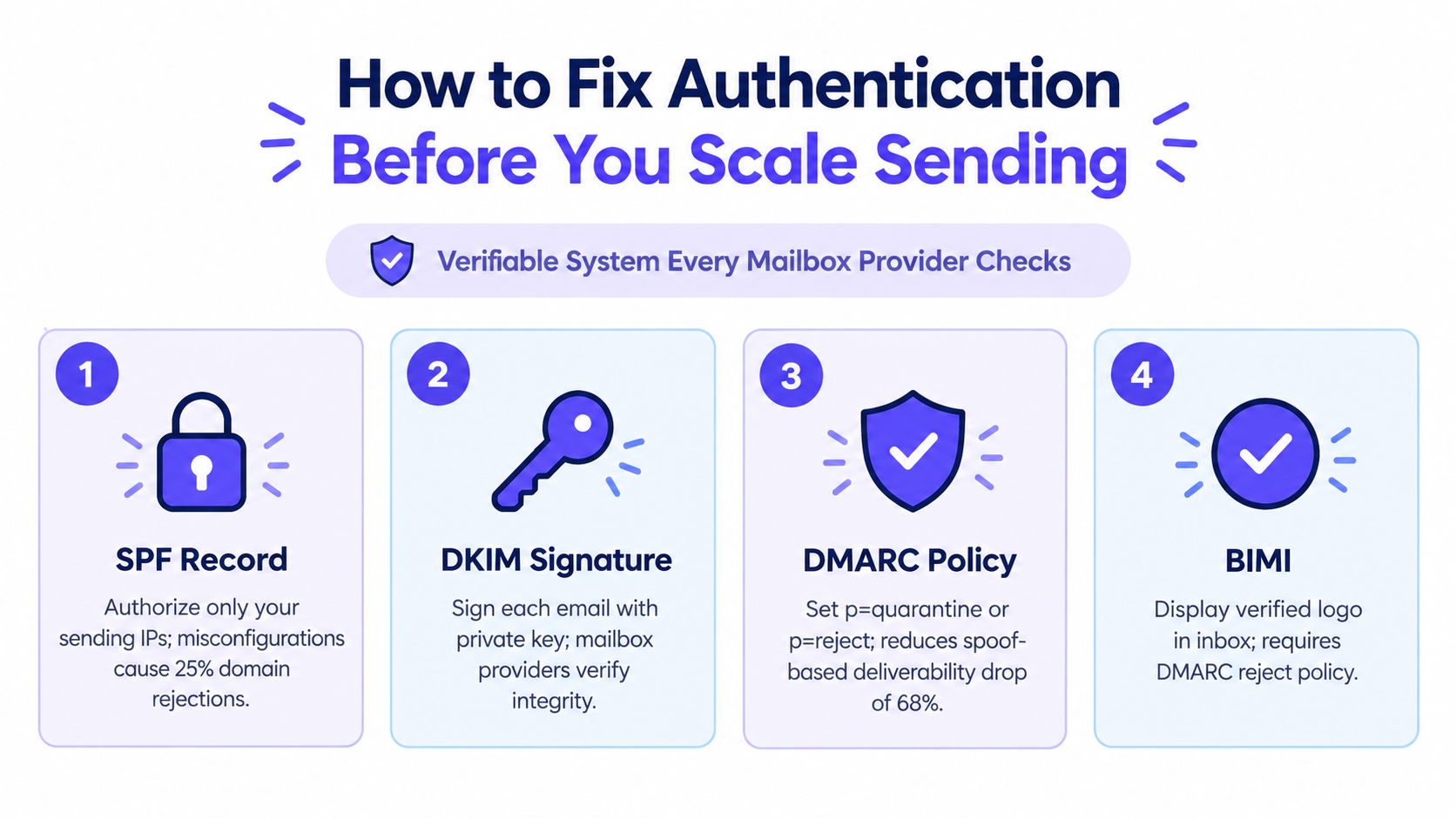
Authentication affects whether Gmail, Microsoft, Yahoo, and other providers trust your mail in the first place. If that trust is weak, sending more volume does not help. It gives each provider more negative signals to work with.
I see this mistake often with outbound teams. They validate one mailbox, assume the whole setup is fine, then add inboxes, domains, and tools on top of a broken DNS foundation. The result is usually uneven placement by provider, because one network may tolerate a flaw that another treats as a clear warning.
What each protocol does
The core setup has three parts:
- SPF publishes a DNS TXT record that lists which servers can send for your domain. Guidance from OutreachBloom's authentication guide notes that SPF should stay to a single record and avoid exceeding 10 DNS lookups.
- DKIM signs outgoing mail so providers can verify the message was authorized by the domain and was not altered in transit.
- DMARC tells receivers how SPF and DKIM should align with the visible From domain, and what to do when they do not.
Problems usually start after a team adds a sales engagement tool, routes mail through a CRM, or leaves old sending services in DNS. The records may still exist, but alignment breaks. Providers evaluate the message that arrived, not the setup you intended.
A useful reference for teams reviewing setup and alignment is this Mailwarm domain authentication overview.
What to verify in real message headers
DNS records alone are not enough. Check headers from a live send to each provider you care about, especially Gmail and Microsoft, because provider-specific handling is where hidden problems show up.
Look for:
- spf=pass
- dkim=pass
- dmarc=pass
Independent setup guidance from this header verification guide recommends confirming those pass states before campaigns go live.
If one of those fails, the issue is already visible to mailbox providers. If Gmail passes and Microsoft does not, treat that as a Microsoft deliverability problem first, not a global domain verdict. That distinction matters once volume increases.
When providers start enforcing this hard
For bulk senders, the requirements are explicit. Gmail and Yahoo require bulk senders sending 5,000 or more messages per day to authenticate with SPF and DKIM and to publish a DMARC record. Google also states that bulk senders with a user-reported spam rate above 0.3% are ineligible for mitigation, and eligibility returns only after staying below 0.3% for 7 consecutive days (Google sender requirements).
Smaller outbound programs should still work to that standard. Providers do not wait for high volume before forming a reputation view.
A practical pre-scale checklist
Before you increase sending, confirm five things:
SPF is clean
One record. No abandoned includes. No unnecessary services still authorized to send.DKIM is active on every mailbox and sending path you use
The primary workspace can pass while a secondary inbox or connected tool fails.DMARC is published and aligned with the visible From domain
Publishing a record without alignment does not solve the trust problem.Headers show pass results in live tests
Check actual received messages, not just admin settings.Basic preflight checks are done before launch
Use a spam checker or seed testing workflow to catch obvious setup and content issues before the first campaign goes out.
Authentication should be stable and boring. If your team has to guess whether SPF, DKIM, or DMARC is working, the setup is not ready for scale.
How to Build Sender Reputation With Controlled Warmup
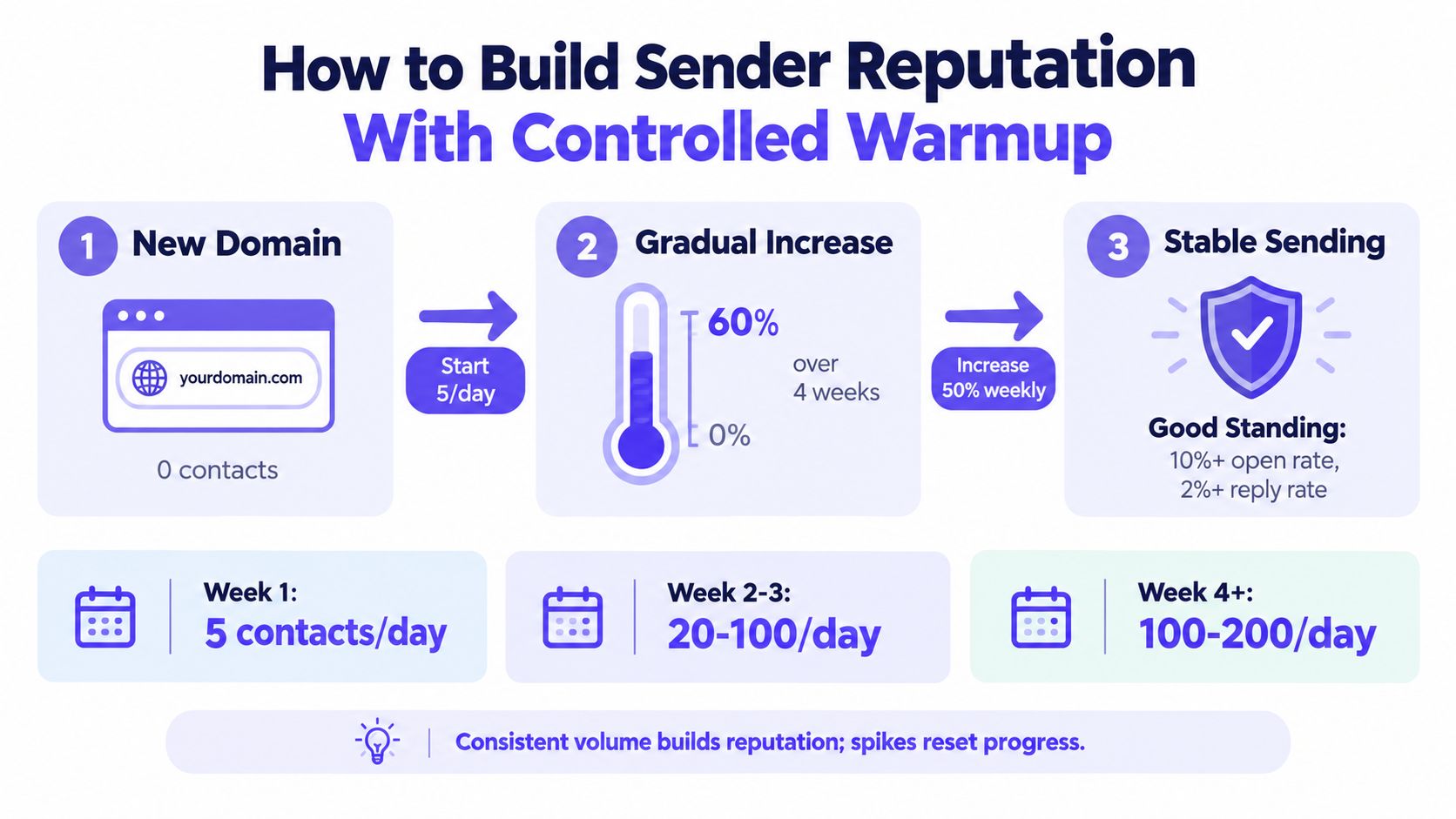
Warmup changes outcomes fast. As noted earlier, benchmark data shows a large gap between inbox placement on brand-new sending setups and inbox placement after a disciplined warmup period with the rest of the setup handled correctly.
The part many outbound teams miss is simple. Reputation is not one global score that rises evenly everywhere. Gmail forms its own view. Microsoft 365 forms its own view. Yahoo does the same. A domain can perform well with Gmail and still struggle with Outlook because the domain never built enough positive history there.
That is why controlled warmup beats generic warmup.
What warmup should actually do
A good warmup plan builds trust in the same provider mix your live campaigns will hit. If half your list is Google Workspace and enterprise Gmail, that provider should get a large share of early traffic. If your ICP lives in Microsoft 365, you need enough Microsoft-facing volume and engagement to build a separate reputation there.
Positive activity also has to look real. Providers respond better to normal human patterns such as opens, replies, thread depth, message saves, and spam-folder removals than to volume by itself. Warmup that generates activity in the wrong provider mix, or activity that looks thin and repetitive, creates very little useful history.
One sentence version: train where you plan to send.
How to run controlled warmup
Use a schedule that stays boring on purpose.
Start low and increase slowly
New inboxes should add volume in small steps. Sudden jumps are one of the fastest ways to trigger filtering.Split warmup by provider
Build Gmail reputation with Gmail-heavy traffic. Build Microsoft reputation with Microsoft-heavy traffic. Treat provider mix as a setting, not a side effect.Keep engagement believable
Replies matter more than raw opens. Short back-and-forth threads are stronger than one isolated interaction.Match warmup to production behavior
If live campaigns come from individual rep inboxes, warm those inboxes. If sending will run through custom infrastructure, warm that path too.Continue after launch
Warmup should taper into maintenance, not stop on the first day campaigns go live.
What to control during warmup
Teams get better results when they set warmup against the actual mailbox distribution in their prospect list.
| Warmup lever | What to control | Why it matters |
|---|---|---|
| Provider mix | Gmail, Outlook, Microsoft 365, Yahoo, other SMTP traffic | Each provider builds reputation separately |
| Daily volume | Small increases, stable weekdays, no spikes | Consistency is easier for filters to trust |
| Reply pattern | Realistic thread depth and timing | Replies carry more weight than empty activity |
| Content pattern | Variation that resembles real outreach | Warmup history should look similar to future sends |
Teams that need more control often use a platform instead of a basic auto-warmup script. Mailwarm is one option. It supports provider-level warmup across major mailbox types, generates engagement signals such as opens, replies, threads, spam removal, and important marking, includes deliverability analytics, and does not require IMAP access to read a user's inbox. If you send through direct infrastructure, smtp warmup should happen on that path too, because that is the reputation path prospects will receive from.
What usually goes wrong
The common failure pattern is easy to spot. A team warms a domain with light generic traffic, then sends real campaigns into a very different provider mix at much higher volume. Gmail may hold up for a while, while Microsoft starts junking mail almost immediately. The team sees mixed results and assumes the copy is the problem when the issue is uneven provider reputation.
Avoid these mistakes:
- Ramping too fast after mailbox creation
- Using the same warmup pattern across every provider
- Treating opens as enough
- Warming one inbox, then sending from several
- Stopping reputation work as soon as campaigns start
Sender reputation is built one provider at a time. Teams that stay in the inbox treat warmup as an ongoing sending control, not a one-time setup task.
Content List Quality and Sending Habits That Keep You Out of Spam
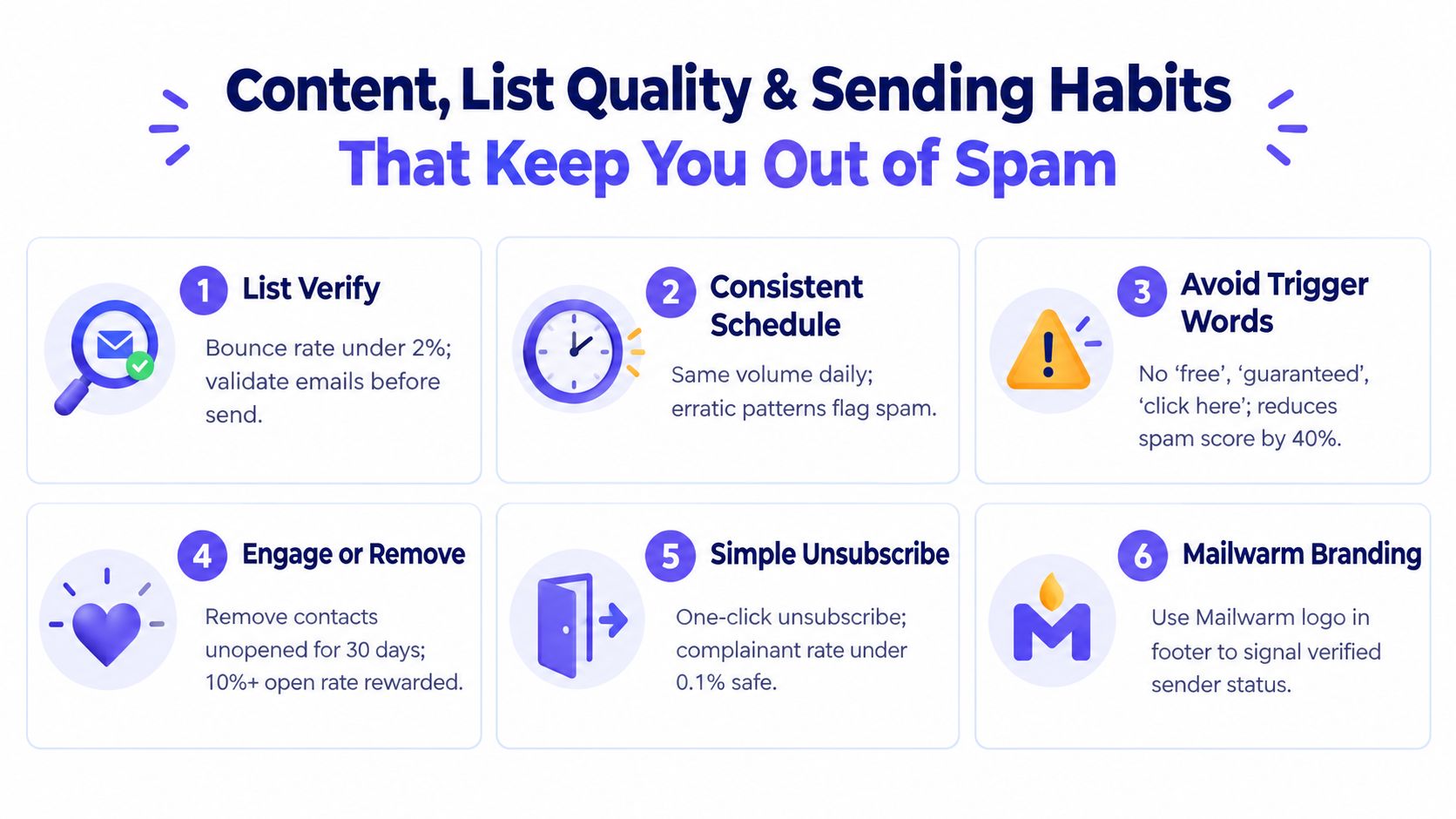
Analysts at TrulyInbox found that authenticated domains with SPF, DKIM, and DMARC in place achieved much stronger inbox placement than unauthenticated domains, and they recommend keeping bounce rate below 1% per inbox per day with spam complaints under 0.05% to protect reputation (TrulyInbox authentication and threshold benchmark).
That sounds technical, but the day-to-day cause is usually simple. Bad data, uneven sending, and copy that gets ignored or marked as spam weaken reputation one provider at a time. Gmail may tolerate a segment that Microsoft rejects. Yahoo may hold steady while Outlook starts junking the same campaign after two bad days.
The teams that stay out of spam treat list quality and send behavior as provider controls, not campaign admin.
The habits that protect reputation
A clean list is the first filter. Verify before launch, suppress stale records, and be stricter with segments headed to providers that are already underperforming. If Outlook mailboxes are bouncing at a higher rate than Gmail, do not keep feeding Outlook the same data and volume.
Volume also needs to look deliberate. Quiet inboxes that suddenly push large bursts create avoidable risk, especially at Microsoft properties. A steadier send pattern gives each provider more consistent engagement and complaint signals to work from.
Copy matters, but usually in indirect ways. Short emails with one clear ask tend to generate cleaner engagement, fewer complaints, and less filtering than sequences packed with links, images, or multiple CTAs. The goal is not to trick filters. The goal is to send messages that real people either reply to or ignore without flagging.
A useful operating rule is simple. If a message style is likely to change reply behavior, test it on a small slice before rolling it out across every provider.
A quick decision matrix
| If this happens | Most likely issue | Action |
|---|---|---|
| Bounces rise suddenly | Weak data or stale segment | Pause, clean the segment, and suppress risky contacts |
| Spam placement increases | Reputation drift or a content pattern providers dislike | Reduce volume, simplify the message, and check which provider is filtering harder |
| Replies drop while delivery looks normal | Low inbox visibility or weak targeting | Check inbox placement by provider, then review targeting and copy |
| One provider underperforms | Provider-specific reputation gap | Lower pressure on that provider and rebuild with tighter list quality |
Operational note: Good deliverability comes from repeatable controls, not clever copy tricks.
What content should avoid
There is no banned-word list that guarantees inbox placement. Filters care more about patterns than single words. Still, a few traits create problems often enough to treat them as avoidable risk:
- Overpromising language that sounds like bulk promotion
- Forced urgency that the offer does not support
- Multiple links or heavy formatting in early-touch emails
- Personalization that is obviously templated or wrong
- Big content shifts between campaigns that change engagement patterns overnight
A pre-send review can still help. Use a spam word checker or internal QA pass to catch obvious risk before a sequence goes live, but do not confuse that with a deliverability diagnosis. If only one provider is filtering your campaign, the issue is usually reputation on that provider, not a global content score.
The sending habits that usually age badly
A few habits hurt slowly, then all at once:
- Rotating message styles too quickly across the same inboxes
- Launching on unverified lead exports
- Keeping a segment live after bounce or complaint signals rise
- Sending the same volume to every provider despite different results
- Judging campaign health by aggregate opens while one provider is collapsing
Analysts at Instantly also noted that teams with steadier domain health and more consistent sending saw higher reply performance over time, while bounce rates above 2% can trigger penalties (Instantly cold email benchmark report).
The trade-off is straightforward. Tighter list standards and slower ramps usually reduce top-of-funnel volume in the short term. They also protect the provider reputations that determine whether future campaigns reach the inbox at all.
How to Monitor Inbox Placement and Troubleshoot by Provider
Inbox placement can look healthy in aggregate while one provider is already filtering most of your mail. That is how outreach teams miss problems until replies fall off a cliff.
Cold email deliverability is not one global score. Gmail, Microsoft 365, Outlook, and Yahoo each build their own view of your domain, inboxes, IPs, and engagement pattern. A domain that still lands in Gmail can already be weakened at Microsoft. If your target accounts skew enterprise, that difference matters more than any blended dashboard score.
Why provider-level monitoring matters
Provider-level monitoring answers the only question that matters after launch. Where is mail landing by destination?
I look at Gmail and Microsoft separately first. In practice, Microsoft properties often show trouble earlier. You may see normal delivery and acceptable opens overall while Outlook and Microsoft 365 start routing mail to spam or filtering it before a human sees it. If you only watch top-line metrics, you keep sending into the problem and make recovery slower.
That trade-off catches a lot of teams. Aggregate reporting feels simpler. Provider splits produce the diagnosis.
Cold Email Deliverability Metrics and Healthy Thresholds
| Metric | Healthy Target | If Outside Target Do This |
|---|---|---|
| Inbox placement | Aim for at least 80% on cold sends | Pause scaling, inspect provider split, then review authentication and warmup |
| Bounce rate | Keep below 3% overall | Clean the list, suppress risky segments, and reduce send pressure |
| Spam complaints | Keep below 0.1% | Tighten targeting, simplify opt-out path, and rewrite copy |
| Per-inbox daily bounce rate | Keep under 1% per inbox per day | Stop that inbox, verify leads again, and resume more carefully |
| User-reported spam rate for bulk sending | Stay below 0.3% | Reduce complaint triggers and hold volume until the rate stabilizes |
Use those numbers as guardrails, not as proof that everything is fine. A campaign can sit inside those ranges overall and still be failing at one provider.
A troubleshooting flow that works
When placement drops, isolate the provider before you touch copy, domains, or warmup settings.
Check where the drop happened
Compare Gmail, Outlook, Microsoft 365, Yahoo, and any other provider that matters to your list mix.Check authentication in live headers
SPF, DKIM, and DMARC need to pass on real messages, not just in setup screenshots.Check reputation risk
Run a blacklist checker if placement drops fast or messages start disappearing.Review bounce and complaint patterns by provider
A weak segment often breaks first at the stricter destination.Check whether the problem follows the inbox or the provider
If several sender inboxes struggle only at Microsoft, treat it as a Microsoft reputation issue. If one inbox fails everywhere, isolate that inbox.Reduce pressure only where results are weak
Cut volume to the affected provider, keep stable providers steady, and avoid changing everything at once.
That sequence saves time. It also prevents the common mistake of rewriting a campaign that was never the root problem.
What to watch every week
A useful weekly review is short:
- Provider split across Gmail, Outlook, Microsoft 365, Yahoo, and custom domains
- Inbox versus spam placement on seed tests or placement checks
- Bounce trend by sender inbox
- Complaint trend
- Header pass states on test sends
- Reply rate by provider, if enough volume exists to make that comparison useful
Teams evaluating software for this work often compare analytics depth and provider controls, which is why tool reviews like best email warmup tools can help. The point is not warmup automation alone. You need visibility into which provider trusts you, which one is pulling back, and which sender inbox is causing the drag.
Generic deliverability monitoring hides the failure. Provider-level monitoring shows where to fix it.
Putting It All Together and Protecting Long Term Deliverability
A small reputation dip at one provider can cut inbox placement long before the rest of your program looks unhealthy. That is why strong outreach teams do not manage deliverability as one domain score. They manage it as separate trust relationships with Gmail, Microsoft, Yahoo, and everyone else that receives meaningful volume.
Long-term deliverability comes from running the same disciplined process every week. Authentication has to stay clean. Warmup has to match the providers you target. List quality has to hold. Volume has to stay predictable enough that a provider can trust the pattern.
A practical next-step plan
For the next few weeks, keep the plan simple:
Lock down technical trust
Confirm your sending domain and every active mailbox are still passing authentication on live messages, not just in setup screenshots.Keep volume controlled while reputation forms
New sending setups usually need a few weeks of steady warmup before cold outreach volume increases. During that period, keep bounce and complaint rates low and avoid sudden spikes, as noted in this Defrost Mail deliverability checklist.Review performance by provider
If Gmail is stable but Microsoft starts filtering, treat that as a Microsoft problem first. Reduce pressure there, review that segment, and leave stable providers alone until you confirm the cause.Protect the floor
Keep verification, suppression, and mailbox rotation rules active after launch. Long-term performance usually drops from drift, not from one obvious mistake.
The long-term mindset
Deliverability problems usually build slowly. A few risky contacts, a sender that ramps too fast, or a Microsoft segment that starts complaining can weaken reputation with that provider while Gmail still looks fine. Teams that only watch blended metrics catch the issue late.
The safer model is operational. Check provider-level placement, replies, bounces, and complaints every week. Isolate weak inboxes early. Adjust volume by provider instead of making account-wide changes that interrupt healthy traffic.
Mailwarm gives teams a way to run that process with provider-aware warmup, placement monitoring, and deliverability support. For teams that depend on outbound email, those controls help protect sender reputation over time instead of reacting after inbox placement has already dropped.
FAQ
What is cold email deliverability?
Cold email deliverability is the ability to get outreach emails into the inbox where recipients can see them. It is different from simple delivery, which only means the receiving server accepted the message.
How long does email warmup take?
Practical guidance says new domains should be warmed for about 2 to 4 weeks before cold sending at scale. Some setups need longer if authentication, provider mix, or sending habits are still unstable.
Does email warmup improve inbox placement?
Yes, when it is done with controlled volume, realistic engagement, and proper authentication. Warmup helps build sender reputation, but it works best when it is aligned to the providers a team targets.
Is email warmup enough to fix deliverability?
No. Warmup helps, but it cannot compensate for broken authentication, poor list quality, rising complaints, or inconsistent sending behavior. Cold email deliverability depends on all of those systems working together.
Why do emails go to spam?
The common causes are authentication failures, weak sender reputation, poor list hygiene, spam complaints, and content patterns that look risky. A provider-specific issue can also affect one mailbox ecosystem while others still perform normally.
How does Mailwarm help improve sender reputation?
Mailwarm is a premium email warmup and deliverability platform that helps improve sender reputation through real inbox engagement, advanced warmup controls, inbox placement insights, spam score monitoring, authentication fix tools, and expert guidance. It is built for teams that care about real inbox placement, not just automated warmup activity.
Why is Mailwarm more expensive than basic warmup tools?
Mailwarm costs more because it combines real inbox engagement, up to 100% replies to warmup emails depending on the plan, spam score monitoring, provider-level warmup, authentication tools, no IMAP access required, and expert deliverability calls included in every plan.
Does Mailwarm need access to my inbox?
No. Unlike basic warmup tools, Mailwarm does not require IMAP access or permission to read your private inbox. That makes it less intrusive for teams that care about security and mailbox privacy.
If email is a real growth channel, Mailwarm gives teams more than basic warmup. It helps build sender reputation, monitor inbox placement by provider, reduce spam risk, and get expert guidance when authentication or reputation issues start dragging cold email deliverability down.