

Email bounce rate is the percentage of sent emails that fail to reach recipients, calculated as (bounced emails ÷ total emails sent) × 100. It includes both hard and soft bounces, so it measures delivery failure, not whether a message reached the inbox, was opened, or earned a reply.
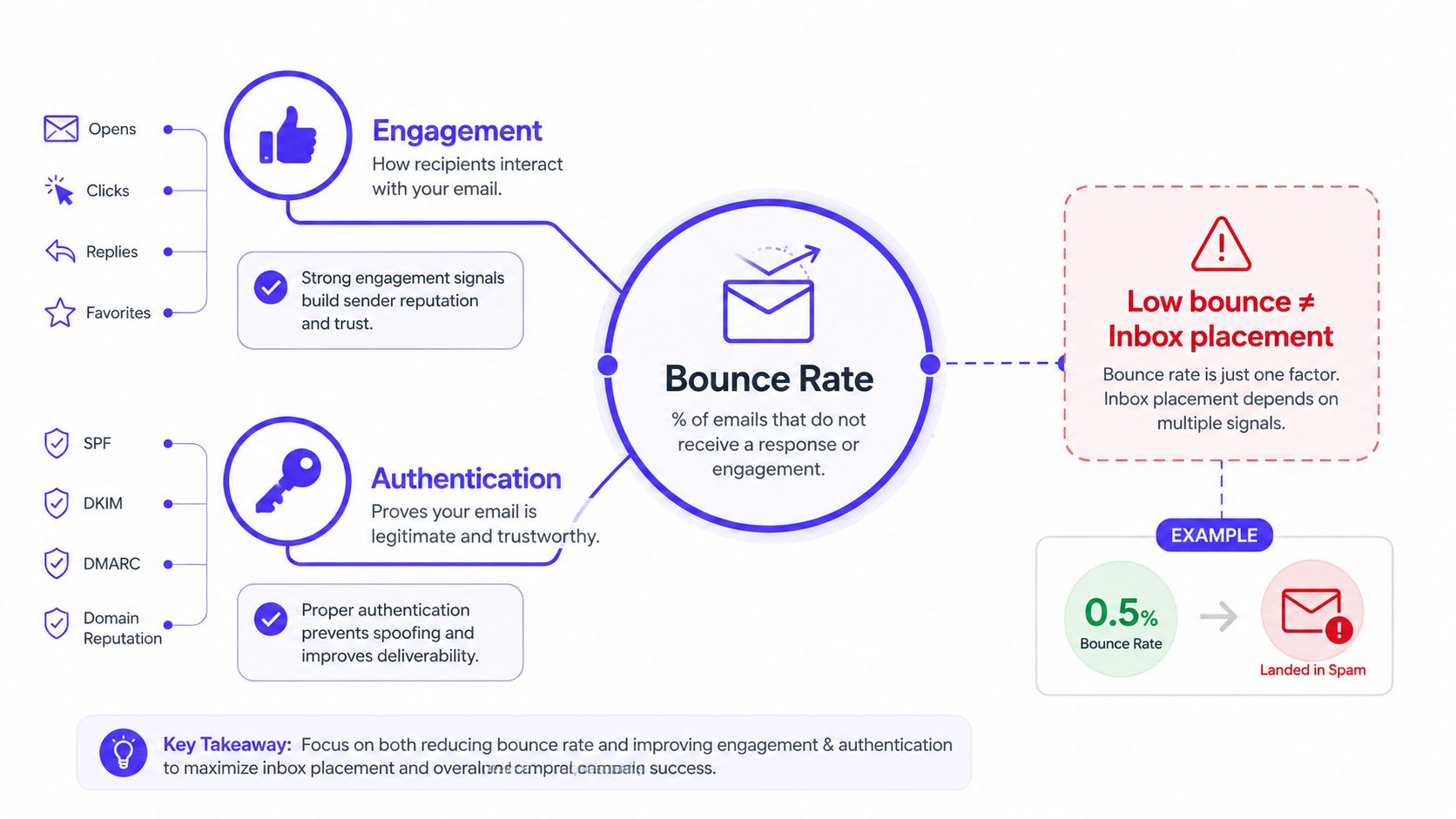
That distinction challenges the most popular advice about bounce rate. A low number can look reassuring while messages still land in spam because authentication is misaligned, engagement is weak, or provider-level reputation has deteriorated. Founders and sales teams need to treat bounce rate as a warning signal inside a larger email deliverability system, not as proof that campaigns are healthy.
What Bounce Rate Really Measures in Email
A sender can record a 0.5% bounce rate and still have messages routed to spam. That outcome is possible because mailbox providers evaluate more than delivery failure. They also consider sender reputation, authentication, content, recipient behavior, and engagement.
Email bounce rate has a precise operational meaning. It is the percentage of sent emails that fail to reach recipients, calculated with this formula:
Bounce rate = (bounced emails ÷ total emails sent) × 100
The bounced-email total includes both permanent and temporary delivery failures. The metric therefore tells a team whether receiving systems accepted the messages, but it doesn't reveal what happened after acceptance. The standard formula and hard-versus-soft distinction are also described in CleverTap's email bounce rate guide.
What the metric includes
A bounce generally means the receiving system returned a non-delivery response. SMTP status codes connect the metric to a receiving-server rejection, rather than to an open, click, or reply, as explained in SMTP.com's technical explanation of bounce handling.
A bounce rate can help identify:
- Invalid addresses: The mailbox doesn't exist or the domain can't receive mail.
- Temporary restrictions: A mailbox, server, or provider temporarily refuses delivery.
- Sending infrastructure problems: Authentication or volume patterns trigger rejection.
- List quality deterioration: Old, mistyped, or unverified addresses remain active.
It can't tell a sender whether a message reached the primary inbox, a promotions tab, or a spam folder. It also can't show whether recipients ignored the email, marked it as spam, or replied.
Practical rule: Treat bounce rate as a delivery-failure metric. Use inbox placement and engagement data to judge whether delivered mail is producing the intended result.
The terminology can also create confusion across analytics products. In website analytics, Google Analytics 4 defines bounce rate as the percentage of sessions that aren't engaged. A session counts as engaged when it lasts at least 10 seconds, includes a conversion event, or contains at least two pageviews or screenviews, according to Adobe's explanation of bounce rate definitions. Email teams should therefore specify email bounce rate when discussing failed messages, especially in cross-functional reporting.
Hard Bounces vs Soft Bounces Explained
Hard and soft bounces require different decisions. A hard bounce is a permanent delivery failure, while a soft bounce is usually temporary and may resolve without removing the recipient immediately.
A receiving server might return 550 5.1.1 User Unknown when an address doesn't exist. An invalid domain or permanently disabled mailbox can produce the same operational conclusion, even when the exact response differs.
A soft failure can occur when a mailbox is full, a server times out, the message exceeds a size limit, or the provider temporarily applies a sending restriction. 552 5.2.2 Mailbox Full is a common example. Greylisting, where a server asks the sender to try again later, can also make classification less straightforward.
Hard Bounces vs Soft Bounces Key Differences
| Attribute | Hard Bounce | Soft Bounce |
|---|---|---|
| Meaning | Permanent delivery failure | Temporary or potentially recoverable failure |
| Common cause | Invalid address, nonexistent domain, disabled mailbox | Full mailbox, timeout, size restriction, temporary throttling |
| Example response | 550 5.1.1 User Unknown | 552 5.2.2 Mailbox Full |
| Recommended action | Suppress the address immediately | Allow controlled retries, then review repeated failures |
| Reputation signal | Strong warning about list quality | May indicate infrastructure or recipient-side conditions |
| Edge cases | Role-based and catch-all addresses can hide risk | Greylisting can resemble a temporary rejection |
Most email service providers retry soft bounces automatically for a limited period before treating persistent failures as permanent. The exact retry policy varies, so teams should review provider documentation rather than assume every platform uses the same schedule.
Hard bounces deserve immediate attention because repeatedly mailing nonexistent addresses signals poor list control. A practical guide to diagnosing common causes is Mailwarm's guide to why emails bounce.
Role-based addresses, such as generic departmental inboxes, can accept mail while producing weak engagement or later restrictions. Catch-all domains may accept messages for addresses that aren't actively monitored. Neither case fits neatly into a simple hard-versus-soft label, which is why bounce diagnosis should include mailbox status, recipient type, and engagement history.
How Bounce Rate Is Calculated and Benchmarked
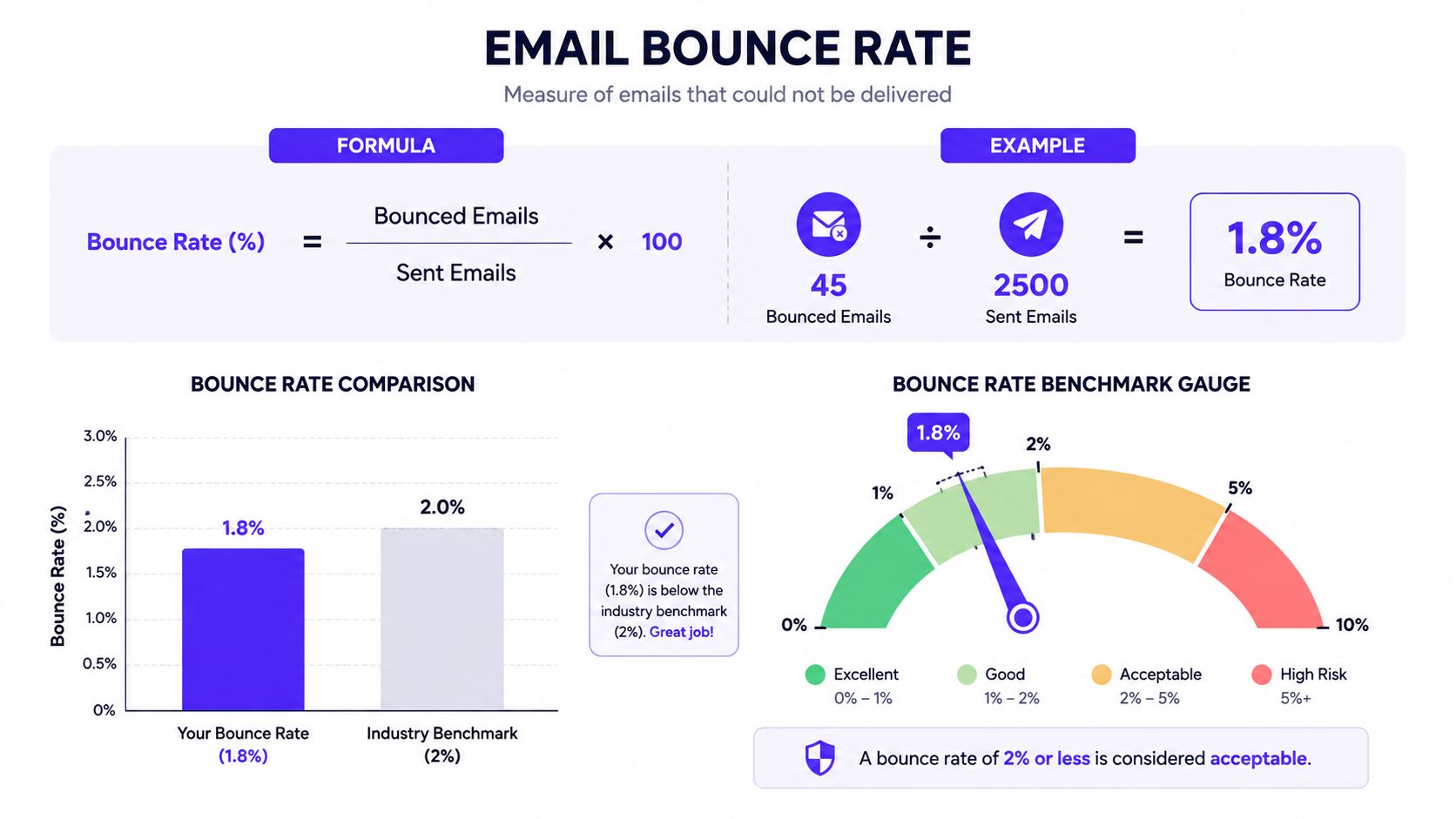
The calculation is simple, but the interpretation requires context. If a campaign generates 45 bounces from 2,500 sent emails, its bounce rate is 1.8%, calculated as (45 ÷ 2,500) × 100.
A commonly cited industry threshold is below 2%, and published guidance uses examples such as 20 bounces from 1,000 sends and 100 bounces from 5,000 sends, both equaling 2%. These examples and the benchmark appear in DashThis's email bounce rate KPI guide.
Why the benchmark isn't a verdict
The 2% benchmark is a useful alert line, not a universal pass mark. A permission-based list with ongoing hygiene should be judged differently from a cold outreach list, a purchased list, or a campaign sent in a sudden burst.
Teams should segment bounce reporting by:
- List source: Confirmed opt-in, older permission-based data, third-party data, or prospecting data carry different levels of address risk.
- Mailbox provider: Gmail, Outlook, Microsoft 365, Yahoo, and smaller providers can respond differently to the same sending pattern.
- Campaign purpose: Promotional, lifecycle, transactional, and cold outreach messages create different recipient expectations.
- Sending pattern: Sudden volume changes can create temporary rejections even when the underlying list is reasonably clean.
- Bounce type: A total rate that hides a concentration of hard bounces is less useful than a breakdown by response and cause.
Recent benchmark guidance continues to cite under 2% overall and under 0.5% hard bounces, but those figures should be treated as broad reference points rather than guarantees. Salesforce's email benchmark material also illustrates why campaign context matters.
The historical term “bounce rate” can refer to single-page or non-engaged sessions in website analytics, and benchmark summaries vary by site purpose. Broad website ranges include roughly 40% to 60% for many business sites, 20% to 45% for ecommerce, and 70% to 90% for blogs and content sites, as summarized in the Wikipedia overview of bounce rate. Those figures don't apply to email delivery, but they show why a metric's meaning depends on the system and user action being measured.
A sender with a low bounce rate and no meaningful engagement still has a deliverability problem. Bounce rate should sit beside inbox placement, spam complaints, replies, clicks, and provider-level reputation trends.
How Bounces Damage Sender Reputation and Inbox Placement
Mailbox providers use sending history to decide how they handle future messages. Repeated delivery failures, especially hard bounces, can suggest that a sender doesn't maintain recipient data carefully or sends to addresses without reliable permission.
The problem becomes clearer as a feedback loop:
- A campaign produces repeated bounces.
- The sender's reputation weakens with affected providers.
- Providers apply more throttling or route more messages away from the inbox.
- Recipients engage less, which adds another negative signal.
A sender doesn't need a dramatic overall rate for a provider-specific issue to matter. If failures concentrate among Gmail, Outlook, Microsoft 365, or Yahoo recipients, the aggregate figure can hide the practical damage. A campaign may look acceptable across all providers while one important mailbox ecosystem is rejecting or filtering a disproportionate share.
Reputation has several inputs
Bounce activity interacts with signals that the metric can't explain on its own:
- Authentication alignment: SPF, DKIM, and DMARC help providers evaluate whether the sender is authorized and aligned.
- Spam complaints: Complaints indicate that recipients actively rejected the message, not merely that delivery failed.
- Engagement: Opens, replies, clicks, and ongoing interaction help distinguish wanted mail from unwanted mail.
- Content and behavior: Sudden volume changes, repetitive content, and unusual sending patterns can increase scrutiny.
- Inbox placement: Accepted mail can still land in spam, so delivery acceptance isn't equivalent to inbox success.
Reaching the recipient's mailbox system is only the first checkpoint. Inbox placement is the outcome that growth teams actually need to monitor.
This is why a low bounce rate can coexist with poor results. A provider may accept nearly every message and still place much of the campaign in spam because authentication, reputation, or recipient engagement is weak. Deliverability teams should compare bounce trends with placement tests and engagement by provider, campaign, and audience segment.
Practical Steps to Reduce Email Bounces
Reducing bounces is a controlled operating process. Chasing the lowest displayed rate by suppressing every uncertain address can sacrifice legitimate reach. The better objective is to remove preventable failures, preserve qualified contacts, and protect sender trust over time.
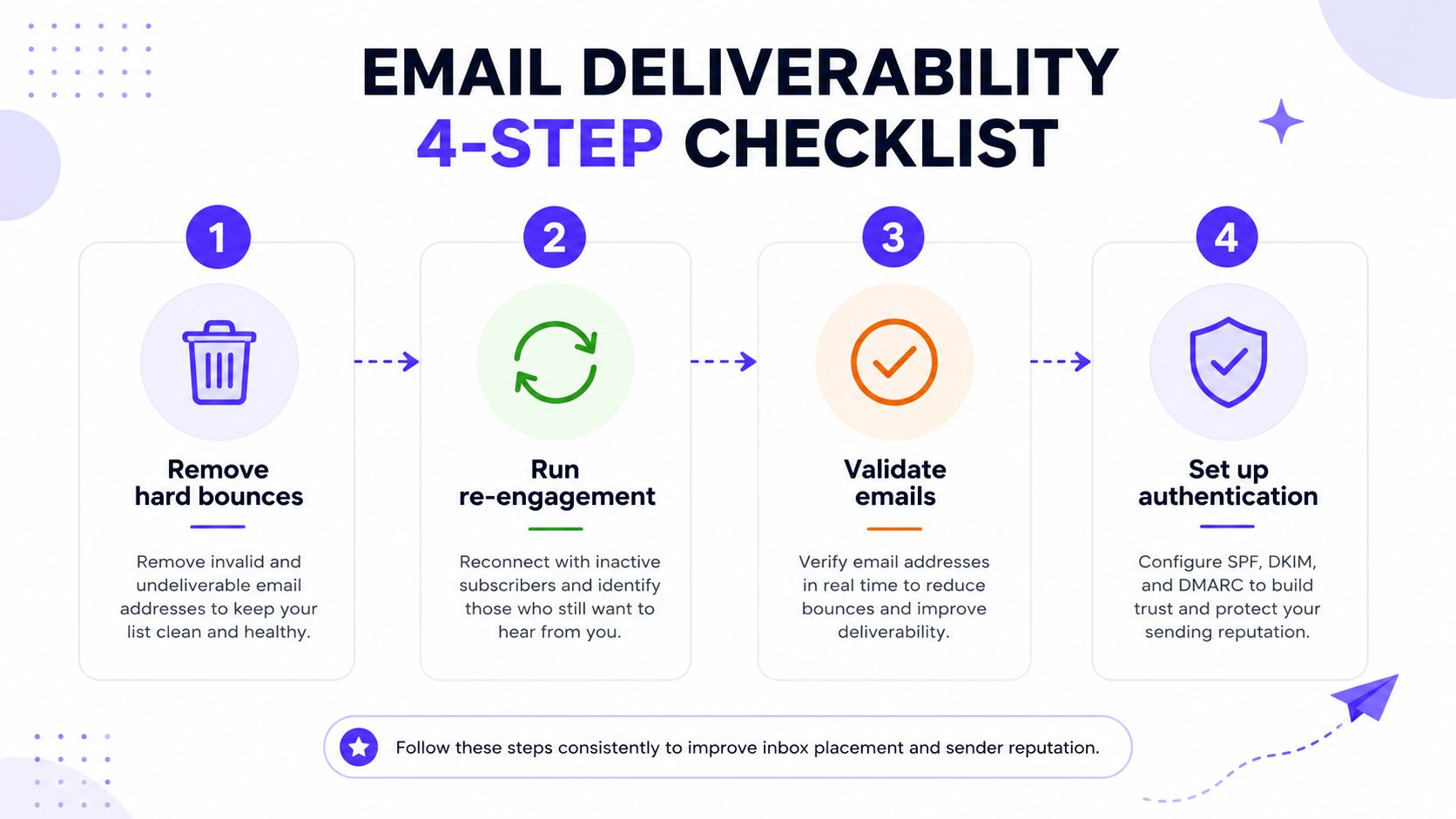
1. Clean the list before sending
Suppress hard-bounced addresses after the first confirmed permanent failure. Review repeated soft bounces separately. A full mailbox or temporary server problem may resolve without requiring immediate suppression.
Use double opt-in for new subscribers and verify addresses during capture. Verification can catch typos, disposable addresses, and other risky records before they enter a campaign audience. Teams comparing available options can review Mailwarm's email verifier tools guide.
Expected impact: Fewer invalid-recipient failures and a clearer view of genuine delivery problems.
Broader health connection: Better list hygiene protects sender reputation and makes engagement data more reliable.
2. Segment by engagement and address risk
Set different sending rules for active recipients, inactive subscribers, new contacts, role-based addresses, and records with earlier delivery problems. Applying the same volume to every contact increases exposure to avoidable risk.
Run a re-engagement campaign for inactive contacts before deciding whether continued sending makes sense. Suppress recipients who remain unresponsive or repeatedly fail, while allowing for a temporary quiet period that does not prove an address is invalid.
Expected impact: Lower exposure to risky or disengaged recipients.
Broader health connection: Engagement segmentation gives providers a steadier pattern of wanted mail.
3. Check authentication and alignment
Review SPF, DKIM, and DMARC before scaling a campaign. Provider-side rejection can occur when authentication is missing or when the visible sender identity fails to align with the authenticated domain.
While authentication alone cannot fix a poor list, it eliminates a major infrastructure risk. It also helps separate recipient-data failures from messages rejected because the sending setup lacks trust.
Expected impact: Fewer authentication-related rejections and clearer diagnostics.
Broader health connection: Authentication supports reputation and inbox placement alongside bounce reduction.
4. Warm up volume and respect provider limits
Increase volume gradually rather than moving from light activity to a large burst. Provider-level warmup matters when a team sends from a new domain, mailbox, or infrastructure setup with little history.
Rate limiting matters as well. A provider that temporarily restricts a sender can create soft bounces even when every address is valid. Consistent volume and provider-specific monitoring help distinguish capacity problems from list problems.
5. Keep prevention active
Use real-time verification at signup, suppress risky role-based addresses where appropriate, and review bounce classifications after every campaign. Record the response code, provider, address segment, and campaign type instead of relying on one blended percentage.
Operational check: A bounce report should identify which provider rejected the message, which addresses failed, whether the failure was permanent, and what changed in sending behavior.
These steps reduce avoidable failures without sacrificing volume blindly. Suppressing entire segments may improve the displayed rate while leaving the underlying data-quality problem unresolved.
Monitoring Bounces as Part of a Deliverability System
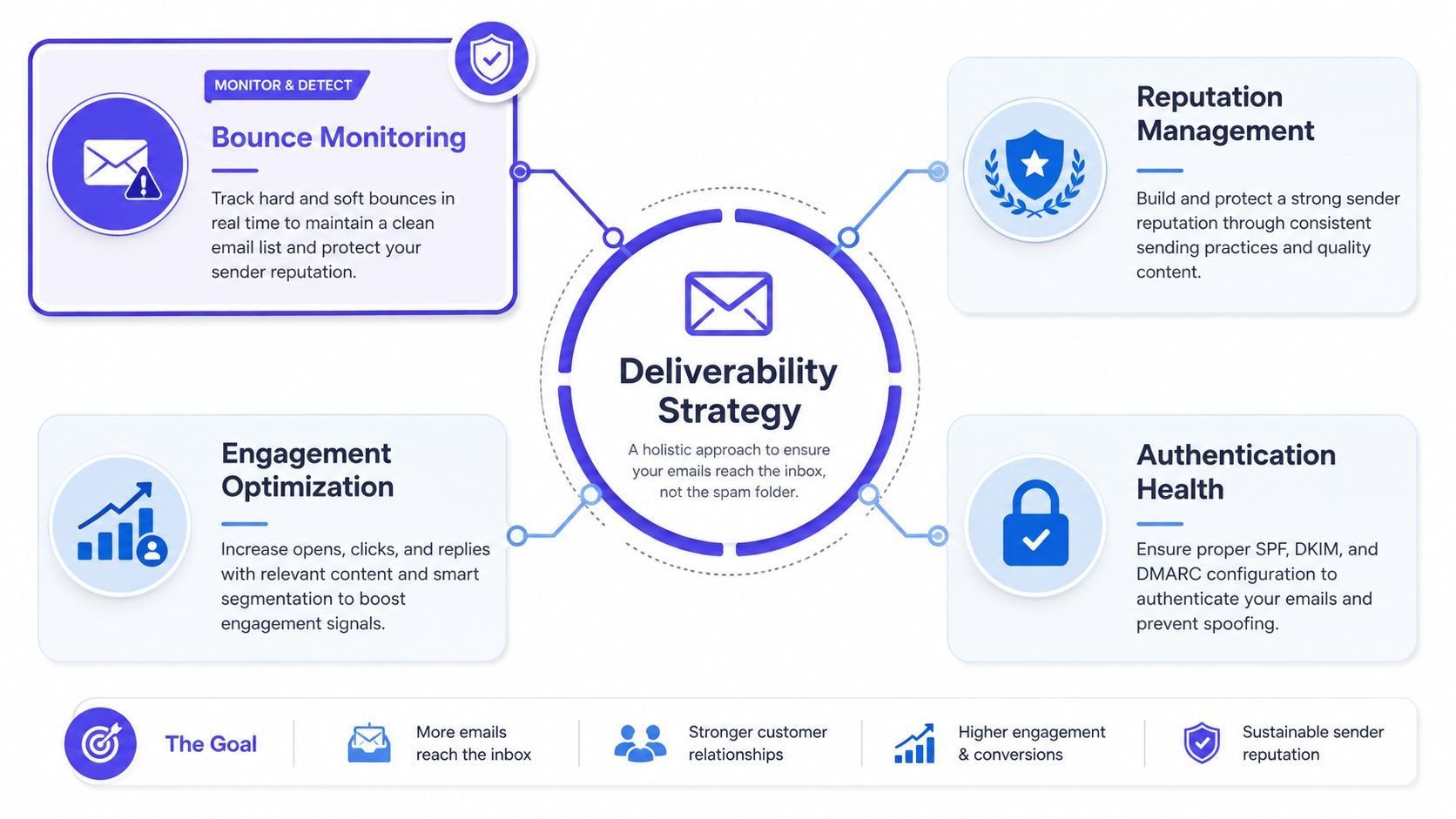
A dashboard that reports bounce rate without placement, authentication, and engagement leaves the most important questions unanswered. Teams need to know whether providers accepted the message, where accepted mail landed, how recipients reacted, and whether the sender's reputation is changing.
Mailwarm is a premium email warmup and deliverability platform that helps senders build reputation, monitor inbox placement, and improve deliverability through real inbox engagement, advanced warmup controls, and expert guidance. Its platform uses 50,000+ aged real inboxes and supports engagement signals such as opens, replies, threads, spam removal, and important marking, according to the publisher's product information.
What a broader monitoring setup should include
- Bounce tracking: Separate hard failures, soft failures, providers, and list segments.
- Inbox placement insights: Check whether accepted messages reach the inbox or spam.
- Authentication diagnostics: Identify SPF, DKIM, and DMARC issues before sending at scale.
- Reputation monitoring: Watch provider-level changes rather than relying only on an account-wide average.
- Engagement signals: Compare replies and ongoing interaction with delivery outcomes.
- Sending controls: Adjust volume, audience, content, and provider targeting when risk appears.
Mailwarm also offers provider-level warmup, B2B and B2C warmup, custom email content warmup, spam score monitoring, authentication fix tools, bounce prevention, and deliverability analytics. It doesn't require IMAP access or permission to read a user's private inbox. Depending on the plan, it can generate up to 100% replies to warmup emails, as described in the publisher's product information.
The target isn't a mathematically perfect zero. A zero result can deserve investigation if a team has aggressively suppressed uncertain records or stopped reaching new audiences. The practical target is controlled bounce activity, reliable authentication, healthy engagement, and stable placement across the providers that matter to the business.
Teams can also use Mailwarm's free email deliverability tools to inspect specific risks before changing campaign volume.
Frequently Asked Questions About Bounce Rate
What is a good email bounce rate?
Industry guidance commonly treats an overall email bounce rate below 2% as acceptable, with hard bounces below 0.5%, as noted in Verified.email's benchmark discussion. The right threshold still depends on provider, list source, campaign type, and sending pattern.
What is the difference between a hard bounce and a soft bounce?
A hard bounce is a permanent failure, such as an address that doesn't exist, and should usually be suppressed immediately. A soft bounce is temporary, such as a full mailbox or server delay, so controlled retries may be appropriate.
Can a high bounce rate damage sender reputation?
Yes. Repeated bounces can signal poor list quality or unreliable sending behavior, which may weaken provider trust and contribute to throttling or spam placement. Hard bounces generally deserve faster action than isolated soft failures.
How can teams check email bounce rate?
Most email service providers calculate it from bounced emails divided by total emails sent, multiplied by 100. Teams should also export bounce reasons and compare the result with inbox placement, authentication, complaints, and engagement.
Does a soft bounce hurt deliverability?
A single soft bounce may reflect a temporary recipient or server condition and may resolve during retry. Repeated soft bounces, especially when concentrated at one provider, can indicate throttling, authentication trouble, or infrastructure strain.
How often should an email list be cleaned?
List cleaning should happen continuously, not only after a major campaign fails. Remove confirmed hard bounces promptly, review repeated soft bounces, validate new addresses, and monitor inactive segments before increasing volume.
Bounce rate becomes useful when it is read as part of a broader deliverability system, not treated as a standalone score.
Mailwarm helps teams monitor bounce risk, improve sender reputation, and evaluate inbox placement through real inbox engagement, provider-level warmup, authentication tools, and deliverability analytics. Visit Mailwarm to assess campaign health before the next send and build a more controlled path to the inbox.