

The most popular advice in an Instantly warmup review is also the least reliable: turn on warmup, wait for a high dashboard score, and assume live campaigns are ready. Instantly Warmup is a convenient bundled feature that exchanges automated emails between connected inboxes, creates simulated engagement, and gradually increases activity. That can establish useful baseline signals, but a warmup score isn't the same as real inbox placement across Gmail, Outlook, Microsoft 365, Yahoo, and custom SMTP environments.
Mailbox providers judge much more than whether warmup emails were sent. Sender reputation, authentication, sending consistency, list quality, and recipient engagement all influence whether legitimate mail reaches the inbox. Validity's 2025 benchmark report says one in six legitimate marketing emails fails to reach the inbox, while Microsoft recorded the lowest inbox placement rate in that report at 75.6%. A green dashboard can therefore hide a provider-specific problem that only appears once real outreach starts.
What Instantly Warmup Actually Does
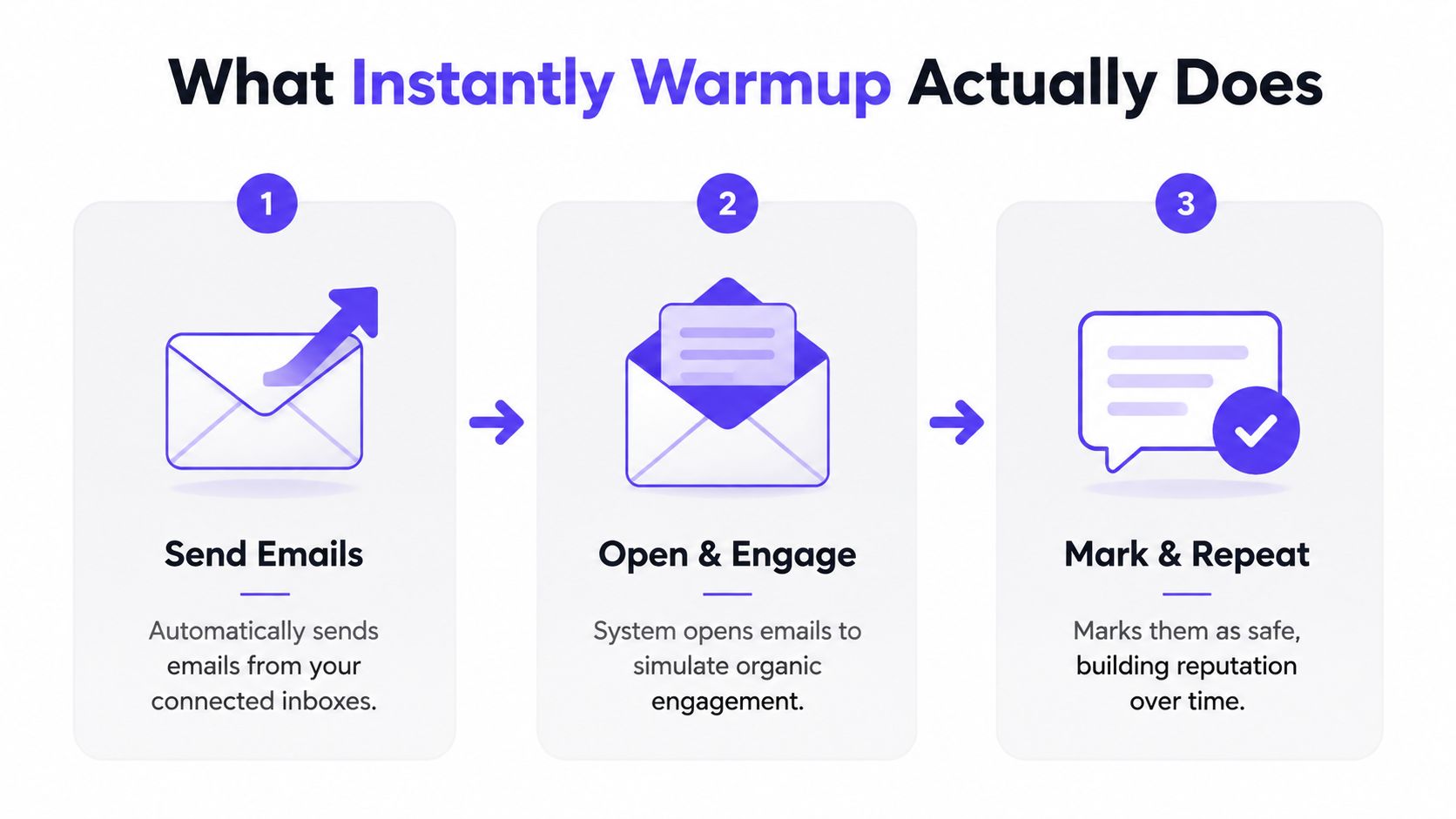
Instantly Warmup automatically sends and receives messages between inboxes connected to its warmup network. The system opens messages, creates replies, marks some emails as important, and removes messages from spam, all to imitate positive mailbox activity.
The basic workflow looks like this:
- Connect an inbox. The sender links a mailbox used for outreach.
- Activate warmup. Instantly begins sending warmup messages between participating inboxes.
- Increase activity gradually. A slow-ramp approach is intended to avoid abrupt changes in sending behavior.
- Simulate engagement. Opens, replies, and other actions create activity around the messages.
- Review the dashboard. The sender sees warmup-related indicators, such as delivery and engagement outcomes.
- Continue during campaigns. Warmup is generally kept active while live sending continues.
The pool matters more than the activity count
Warmup traffic happens inside a closed ecosystem of participating inboxes. Those messages aren't conversations with prospects, customers, or subscribers, so they can't validate whether a real audience wants the sender's content.
That distinction matters because mailbox providers evaluate the broader context of sending. The State of Email Industry Data 2024 identifies sender reputation as a combination of IP and domain reputation, authentication, sending patterns, consistency, subscriber behavior, and list quality. Warmup can influence some behavior signals, but it can't repair every weakness in that chain.
A score isn't a placement test
The central issue in any Instantly warmup review is measurement. A dashboard score shows what happened inside the warmup system. It doesn't necessarily show whether a separate cold email lands in the primary inbox, a promotions category, or spam at each recipient provider.
Recent review and community evidence describes this mismatch clearly. One 2026 review reported warmup scores above 90 alongside inbox placement of only 30% to 40%, based on placement testing described in Salesforge's Instantly review. That doesn't prove every Instantly account will show the same outcome. It does show why live placement tests, spam monitoring, authentication checks, and campaign-level engagement deserve more attention than a single warmup indicator.
Practical rule: Treat Instantly's warmup score as an activity signal, not a final verdict on deliverability.
Where Instantly Warmup Performs Well
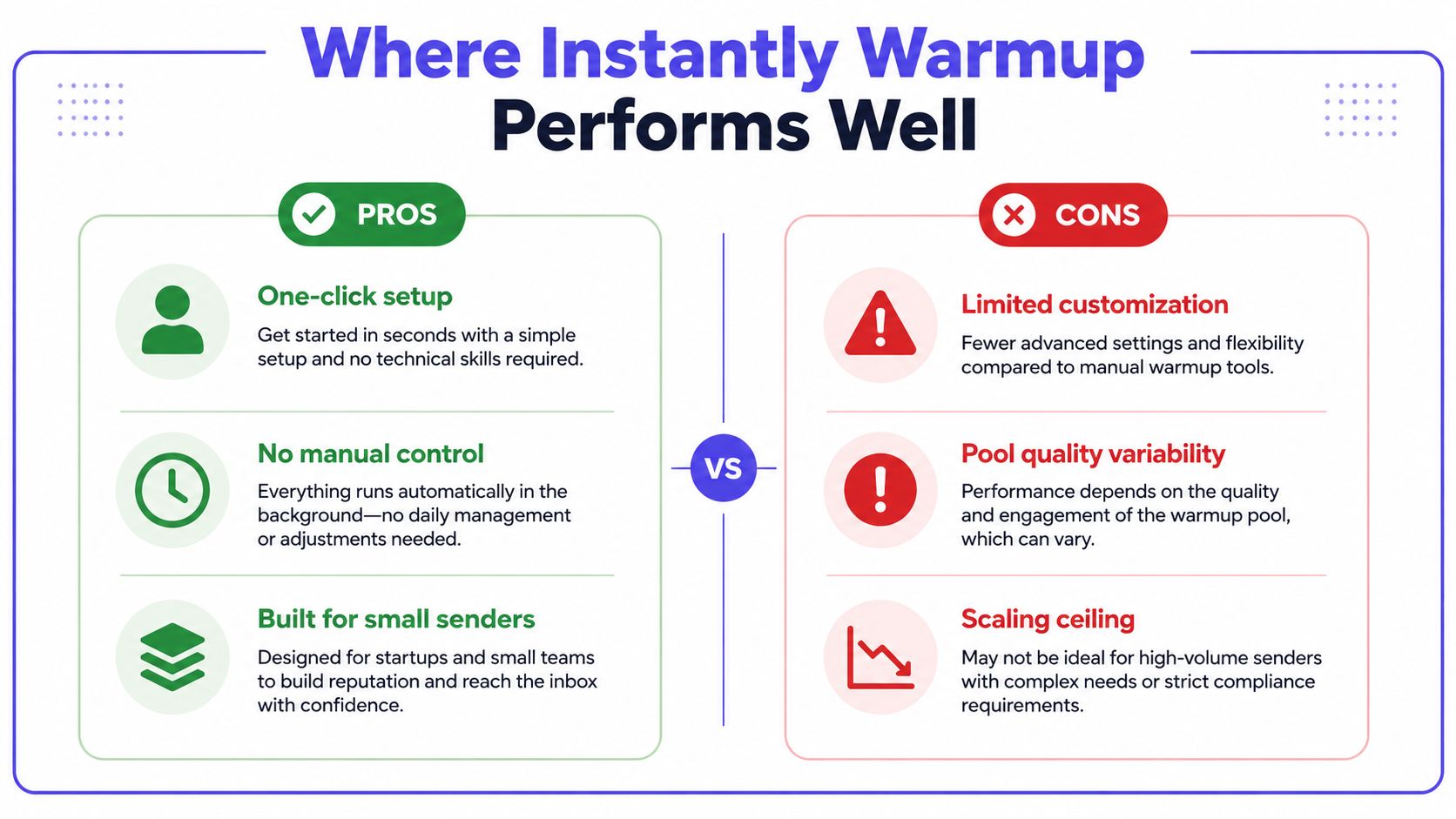
Instantly earns genuine credit for convenience. The warmup feature sits inside the same platform used to create campaigns, rotate inboxes, manage replies, and control sending activity. A solo founder or small agency doesn't need to coordinate a separate login, integration, and reporting workflow before launching a basic outreach program.
That simplicity is useful for senders with straightforward needs:
- Small initial programs: Teams sending at modest volume can establish baseline activity without building a complex deliverability operation.
- New outreach inboxes: A recently connected mailbox can begin forming a consistent sending pattern before live campaigns start.
- Speed-sensitive launches: Founders and lean sales teams can activate warmup without learning a separate platform first.
- Centralized oversight: Campaign and warmup indicators appear in one workspace, which makes routine checks easier for non-specialist users.
The bundled model suits uncomplicated sending
Bundled warmup works best when the sender has a small number of inboxes, a clean domain, consistent content, and a restrained campaign plan. It removes operational friction, and that alone can prevent common mistakes such as forgetting to warm a newly added mailbox or changing sending volume without monitoring the account.
The feature is also reasonable for a team that sees warmup as one part of a wider process rather than a complete deliverability program. Teams still need to validate authentication, control list quality, monitor bounces, and test inbox placement. SPF, DKIM, and DMARC guidance from TrulyInbox describes the practical order clearly: align authentication, enforce DMARC, then increase volume after placement stabilizes.
For sales teams recruiting outbound talent, the outreach platform and the people operating it need separate evaluation. A resource such as Hire SDR can help teams think through the staffing side, while Instantly handles campaign execution and basic warmup activity.
Teams that also send through transactional or application infrastructure should assess smtp warmup separately. SMTP traffic has different operational constraints from a standard sales mailbox, and bundling both environments into one general warmup assumption can produce misleading conclusions.
Instantly isn't bad at its intended job. It provides an accessible starting point for senders who value setup speed over deep control. The mistake is treating that convenience as proof that every provider, domain, and campaign will perform well.
Where Instantly Warmup Hits Real Limits
Instantly warmup can show that automated activity is running while real prospects still miss the inbox. The ceiling appears when teams use one bundled score to judge pool quality, provider behavior, authentication, content, and recipient risk.
Pool quality and engagement depth
A large warmup pool does not guarantee useful reputation signals. Participating inboxes may have inconsistent behavior, weak reputations, or sending practices that create activity without adding trustworthy context to your domain.
Automated opens and short replies are also easier to produce than genuine conversations. Providers evaluate engagement alongside sending history, recipient behavior, and message context. Predictable actions can raise a dashboard score while contributing less to durable reputation than varied interaction with relevant recipients.
Authentication creates a separate boundary. SPF, DKIM, and DMARC help verify sender identity, but they do not show that recipients want the message. Warmup cannot compensate for poor targeting, stale addresses, or unhealthy list behavior.
Provider control is often too broad
Gmail, Outlook, Microsoft 365, Yahoo, and SMTP environments respond differently to the same sending pattern. A mailbox may perform acceptably with one provider and struggle with another, especially after a campaign changes its audience or volume.
A generic warmup stream can hide that split. Teams need provider-level results showing whether the issue is isolated to Outlook, concentrated on Gmail, or present across several systems. They also need to separate warmup traffic from live campaign performance. Otherwise, a healthy internal score can obscure falling replies or rising spam placement.
Missing diagnostics create blind spots
Instantly warmup is not an authentication or domain-health audit. If SPF, DKIM, or DMARC alignment is incorrect, continued warmup activity leaves the underlying risk in place. Authentication analysis has reported aligned mail reaching inboxes at roughly 78% to 95%, while unauthenticated mail can fall below 50%, with some benchmarks reaching 8% to 22%. The figures cited by TrulyInbox's authentication analysis show why increasing activity before fixing authentication is a weak sequence.
Watch for these symptoms:
- A green warmup score with spam placement: The dashboard looks healthy, while live tests or real replies deteriorate.
- A drop after scaling: Performance falls after a volume change even though warmup remains active.
- Provider inconsistency: Gmail performs reasonably, while Microsoft recipients stop responding.
- Promotion or spam filtering: Messages are accepted but fail to reach the primary inbox.
- Weak campaign engagement: Opens or replies collapse when live sending resumes.
Use a spam trigger words checker for one content review step. It cannot replace authentication checks, provider-specific placement tests, bounce monitoring, or list hygiene.
Security deserves equal attention. Warmup activity does not confirm that a domain, mailbox, or integration is protected from account takeover, suspicious forwarding, or unauthorized sending. A strong dashboard result can coexist with a compromised credential or a misconfigured policy, so teams should review access and authentication controls separately.
A warmup dashboard confirms that automation is active. It cannot explain why a real prospect failed to see the message.
When Bundled Warmup Is Enough Versus When You Need More
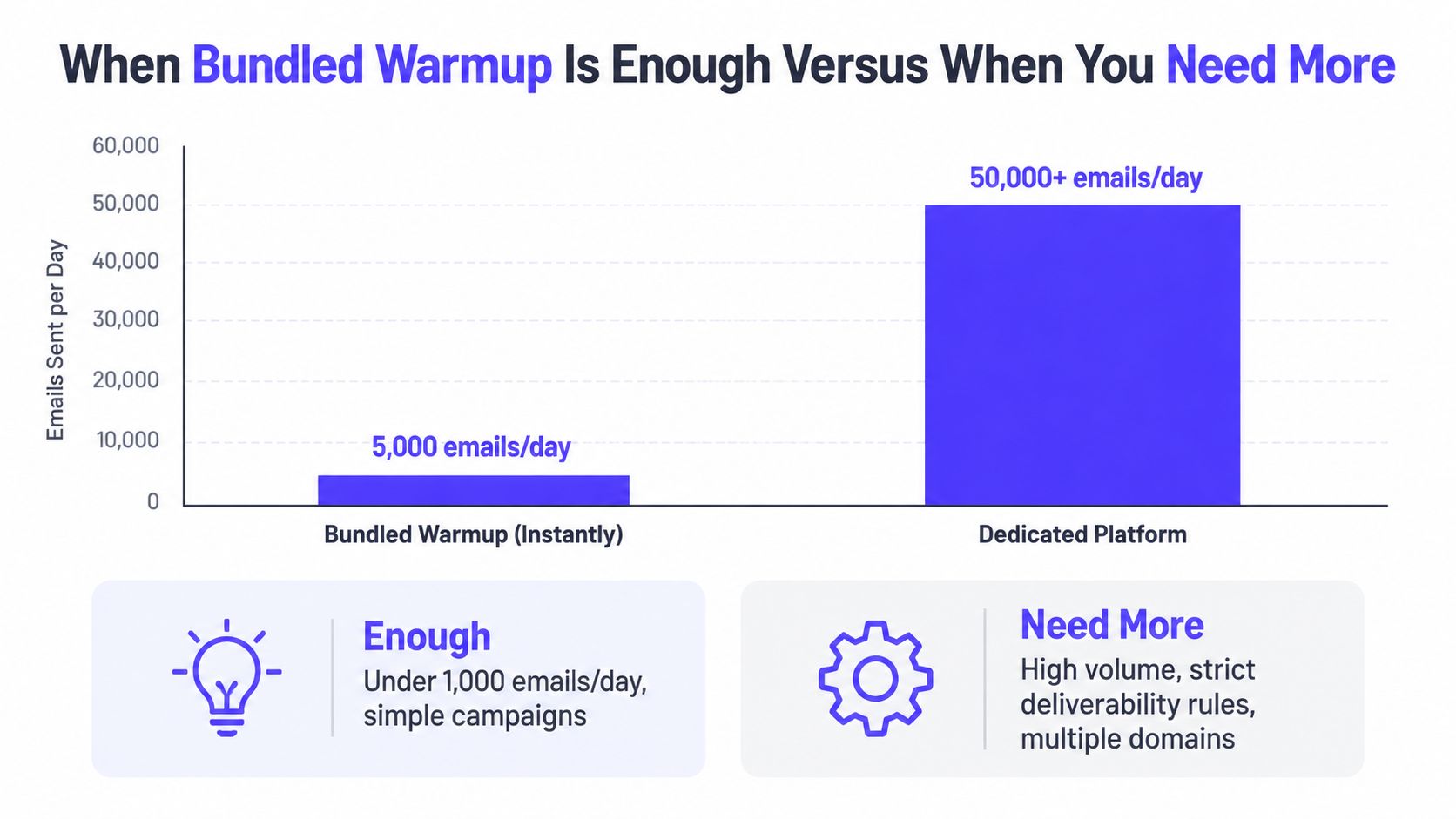
Bundled warmup is usually enough when the sending operation is simple and the consequences of a mistake are limited. A small founder-led campaign with a few inboxes, modest volume, clean targeting, and no strict enterprise procurement filters can often start with Instantly's built-in feature.
A dedicated platform becomes easier to justify when deliverability is a business dependency rather than a setup task. The decision should follow operational risk, not the appeal of a more impressive dashboard.
A practical fit test
Stay with bundled warmup when most of these conditions apply:
- The team manages only a small set of inboxes.
- Campaigns target a clearly defined audience.
- Sending volume changes gradually.
- Authentication is aligned and monitored separately.
- Live replies and delivery remain stable across target providers.
- The team can pause campaigns quickly if placement deteriorates.
Consider dedicated infrastructure when any of these conditions become persistent:
- Several client domains need different policies and reporting.
- Gmail, Outlook, or Microsoft 365 performance diverges.
- Live campaigns land in spam despite healthy warmup indicators.
- A sales operation depends on enterprise prospects with strict filtering.
- The team needs provider-level warmup, content testing, bounce prevention, or expert diagnosis.
- A deliverability failure would interrupt a major acquisition channel.
Escalate based on symptoms, not calendar promises
No responsible review can promise that warmup will be complete after a fixed number of days. Domain age, authentication, list quality, provider mix, and prior reputation all affect the timeline.
A sensible escalation path is:
- Audit the foundation. Confirm authentication alignment, domain health, list quality, bounce handling, and content risk.
- Run live placement checks. Test the providers that matter to the target audience instead of relying only on internal warmup results.
- Compare warmup with campaign data. Look for gaps between dashboard activity, inbox placement, replies, and bounce behavior.
- Reduce risk when signals conflict. Pause expansion rather than increasing volume to compensate for weak results.
- Add dedicated support when diagnosis is unclear. Expert review becomes valuable when multiple domains, providers, or sending systems interact.
The marginal cost of a dedicated platform makes sense when it protects a valuable domain, shortens troubleshooting, and gives operators evidence about where mail lands. It makes less sense for a sender who only wants a simple automated baseline and can tolerate limited reporting.
Instantly Warmup Alternatives Compared
Instantly and dedicated warmup platforms perform different jobs. Instantly combines outreach execution and basic warmup in one system. Mailwarm, Warmup Inbox, and MailReach focus more directly on warmup depth, monitoring, provider handling, or support, depending on the product and plan.
Publicly available materials don't establish a reliable, like-for-like monthly price, pool size, reply rate, or IMAP policy for every competitor listed below. Rather than inventing a pricing comparison, the matrix marks those areas for verification before purchase.
| Platform | Pool Quality | Provider Control | Reporting Depth | Best For | Monthly Cost |
|---|---|---|---|---|---|
| Instantly | Bundled network, quality and composition should be validated for the sender's providers | Basic bundled control, less suited to granular provider diagnosis | Convenient campaign and warmup visibility, with limited placement context | Small senders who want outreach and warmup together | Check current plan |
| Mailwarm | 50,000+ aged real inboxes across Gmail, Outlook, Microsoft 365, Yahoo, and SMTP providers | Provider-level warmup, B2B and B2C options | Spam score monitoring, inbox placement insights, bounce prevention, and deliverability analytics | Teams needing dedicated, security-conscious deliverability support | Check current plan |
| Warmup Inbox | Dedicated warmup network, pool composition should be assessed directly | Provider-specific capability should be confirmed for the intended environment | Monitoring-oriented workflows, subject to current plan details | Senders prioritizing a separate warmup workspace | Check current plan |
| MailReach | Dedicated engagement-focused network, interaction depth should be validated | Provider-level reporting and controls should be confirmed before rollout | Reputation and deliverability reporting vary by current offering | Teams prioritizing engagement simulation and deeper warmup workflows | Check current plan |
What each option does well
Instantly's strength is operational convenience. It suits teams that don't want another platform and are comfortable handling authentication and placement checks elsewhere.
Warmup Inbox can appeal to teams looking for a dedicated warmup environment with monitoring features. MailReach is often considered by teams that want deeper engagement simulation and more detailed reputation visibility. Those advantages still need to be matched against integration effort, provider coverage, support quality, and current plan terms.
Mailwarm is the dedicated premium option in this comparison. It uses 50,000+ aged real inboxes, supports real engagement signals such as opens, replies, threads, spam removal, and important marking, and can provide up to 100% replies to warmup emails depending on the plan. It doesn't require IMAP access or permission to read a user's private inbox, and expert deliverability calls are included in every plan.
The higher price reflects more than message exchange. Mailwarm combines provider-level warmup, spam score monitoring, inbox placement insights, authentication fix tools, bounce prevention, custom email content warmup, analytics, and expert guidance. Teams comparing the category can use this guide to evaluate the best email warmup tools against their actual risk profile.
A hybrid setup can also work. A team may continue using Instantly for campaign creation and sending while assigning warmup, monitoring, and diagnosis to a dedicated platform. That approach adds integration overhead, but it separates the sending job from the deliverability control layer.
Frequently Asked Questions
Is Instantly Warmup good?
Instantly Warmup is a reasonable choice for small senders who want convenient, bundled automation. It can create warmup activity and provide useful directional signals, but a high dashboard score doesn't prove live inbox placement across every provider.
Does Instantly Warmup work for high volume?
It can support a sending workflow, but high-volume teams need more than automated activity. Provider-level monitoring, authentication checks, bounce prevention, list hygiene, and real placement testing become increasingly important as the operation expands.
What is the best Instantly Warmup alternative?
The right alternative depends on the missing capability. Mailwarm fits teams that want a dedicated premium platform with 50,000+ aged real inboxes, provider-level warmup, inbox placement insights, no IMAP access, and expert calls included in every plan.
Does email warmup improve inbox placement?
Warmup can support positive sending patterns, but it doesn't guarantee placement. Validity's 2025 benchmark report shows that legitimate marketing mail still misses the inbox at a global scale, while provider performance varies materially.
Is email warmup enough to fix deliverability?
No. Authentication, sending consistency, recipient engagement, list quality, content, bounce behavior, and domain reputation also matter. Authentication confirms identity, but Valimail's deliverability guidance explains that it doesn't prove recipients want the email.
How can a team verify that warmup is working?
Compare warmup activity with live inbox placement tests, provider-level results, bounce behavior, and genuine campaign replies. If those outcomes disagree with the dashboard, the live results deserve more weight.
Does Mailwarm need access to a private inbox?
No. Mailwarm doesn't require IMAP access or permission to read the user's private inbox. It combines real inbox engagement with monitoring, authentication tools, provider-level controls, and expert deliverability guidance.
What should a team do when performance drops?
Stop increasing volume, check authentication and list quality, test placement by provider, and review the difference between warmup activity and live campaign outcomes. If the cause remains unclear across multiple domains or providers, bring in dedicated deliverability support rather than relying on the warmup score alone.
Mailwarm helps senders build reputation, monitor inbox placement, and reduce spam risk through real engagement, provider-level warmup, authentication tools, and expert guidance. Teams evaluating Instantly Warmup can visit Mailwarm to compare a dedicated deliverability platform with a bundled warmup feature before scaling live campaigns.