

Your legitimate emails are landing in spam, the list is reasonably clean, and the copy looks professional. Some messages may even reach Gmail's Promotions tab while others disappear into junk folders at Outlook or Yahoo. The practical answer is to fix authentication and sender reputation first, then control list quality, engagement, cadence, content, and monitoring.
The 2025 global benchmark from Validity recorded 84.8% average inbox placement, 6.1% spam placement, and 9.1% missing mail. Learning how to stop emails going to spam therefore requires more than rewriting a subject line. The ten steps below are ordered by impact, not convenience.
Why Emails Keep Landing in Spam in 2026
A legitimate campaign can still go to spam when mailbox providers see weak identity signals, poor engagement, or inconsistent sending. Gmail, Outlook, and Yahoo assess authentication, domain and IP reputation, recipient behavior, complaints, bounces, sending patterns, and policy compliance. Email content matters, but it rarely repairs a damaged reputation.
Authentication remains uneven. A 2024 EU analysis found strong adoption of SPF and DKIM, while DMARC adoption lagged at around 71%. A separate scan of 5.5 million domains found that only 30.4% had adopted DMARC, and only 12.8% enforced a policy protecting against spoofing, according to the European Commission Joint Research Centre analysis.
Practical rule: Fix identity and reputation before editing spam-word lists.
Bulk senders need a recognizable sender identity, correct authentication, usable unsubscribe controls, and low complaint levels. Gmail's sender guidelines state that SPF or DKIM must authenticate a message with the required alignment for DMARC to pass. Yahoo requires all senders to authenticate with SPF or DKIM. Bulk senders must also publish DMARC with at least a monitoring policy, according to Yahoo sender requirement guidance.
Use a ranked repair process. Start with authentication and domain warmup, then fix list quality, engagement, cadence, and monitoring. Leave content for last, because copy changes alone rarely restore inbox placement. For broader deliverability guidance, review Advisor Momentum deliverability insights.
Fix Authentication First
A message can be legitimate and still enter spam if its identity records fail. Set up SPF, DKIM, and DMARC before changing subject lines or removing suspected spam words.
SPF authorizes senders. It lists the services allowed to send mail for your domain. Add every platform that sends on your behalf, including marketing tools, CRMs, and SMTP services. Keep one combined SPF record. Multiple SPF records can invalidate authentication.
DKIM signs each message. Your sending system adds a cryptographic signature, while the recipient checks its public key in DNS. Confirm that the selector and public key match the provider's configuration. A stale selector or broken signing setup makes valid mail appear suspicious.
DMARC checks alignment and sets policy. The visible From domain must align with either the SPF envelope domain or the DKIM signing domain. Publish a reporting policy first, then use quarantine or rejection after reports show that legitimate streams pass.
Verify the records, not just the dashboard
Check the public DNS records and compare them with the current sending setup. Focus on these failures:
- SPF duplication: Publish one combined record, not separate records for each provider.
- Wrong provider path: Remove an outdated include after a platform changes its infrastructure.
- DKIM selector errors: Ensure the selector used to sign matches the selector published in DNS.
- DMARC misalignment: A passing SPF result is insufficient if its envelope domain differs from the visible From domain.
- Report omissions: Send aggregate reports to an address your team monitors.
Use nslookup, dig, or MXToolbox to confirm that all three records resolve publicly. Google Workspace administrators should also review the Gmail authentication help documentation.
For Gmail, compare the From domain, envelope sender, and DKIM signing domain, then review Google Postmaster Tools for authentication results. Keep BIMI until DMARC enforcement reaches quarantine with full alignment. Start domain warmup only after DMARC aggregate reports are arriving and legitimate messages pass consistently.
Warm Up Your Domain and Sending Reputation
A new or dormant domain has little recent sending history. A sudden burst gives Gmail, Outlook, and Yahoo no reason to trust the pattern, even when authentication passes. Build activity gradually, starting with recipients who opened or clicked within the last 90 days.
A practical ramp begins at 50 to 200 emails per day during the first week, doubles weekly during the first month, and reaches target volume by the sixth week. This schedule follows industry best-practice guidance. Reduce the ramp when complaints, bounces, or inbox placement deteriorate.
Domain reputation and IP reputation are different
Mailbox providers assess both the sending domain and the sending IP. A fresh domain on a warm shared IP can still struggle because its history is empty. A trusted domain on a damaged shared IP can inherit problems from other senders.
Gmail weighs domain history and consistent behavior heavily. Outlook gathers useful feedback through SNDS and JMRP after real sending activity begins. Warmup builds the stable history that makes provider feedback useful, instead of just generating volume.
Keep sends active. A pause of two or more weeks can reset warmup progress, so consistency matters more than intensity. Run provider-level warmup when your audience spans Gmail, Outlook, Microsoft 365, Yahoo, and SMTP providers. Teams comparing platforms can review the best email warmup tools before choosing a system. Begin only after authentication is passing consistently, then monitor each provider separately as volume rises.
Clean Your List and Control Bounces
Treat every address as a reputation decision. New signups, typos, abandoned accounts, role addresses, complaints, and inactive subscribers change the risk of the next send.
Suppress hard bounces immediately. Separate role-based addresses such as info@ and support@ from the primary engagement pool because they may not have a consistent human owner. Review them before including them in regular campaigns.
Use a clear re-engagement policy
Send one final re-engagement message to subscribers who have not opened or clicked for 90 to 180 days. Keep that message focused:
- Use one clear subject line.
- State the value of staying subscribed.
- Include a working unsubscribe link.
- Suppress anyone who does not engage after the final attempt.
Do not return suppressed contacts to the main campaign pool just because their addresses remain in the database. A smaller responsive audience protects deliverability better than a large list that produces silence.
Set hard operating limits for complaints and bounces. Bounce rates above about 2% and spam complaint rates above about 0.1% are strong negative signals. Spam traps can harm reputation quickly, as documented in email deliverability foundations guidance. Gmail and Yahoo bulk sender guidance sets a complaint ceiling of 0.3%, while the healthier operating target remains below 0.1%, according to DMARCPath's sender requirements summary.
| Metric | Safe Target | Warning Zone | Critical |
|---|---|---|---|
| Spam complaints | Below 0.1% | 0.1% to 0.3% | Above 0.3% |
| Hard bounces | Below 2% | Approaching 2% | Above 2% |
| Spam traps | None detected | Any suspected hit | Confirmed hit |
| Unengaged contacts | Suppressed after review | Growing segment | Included in broadcasts |
Build permission into acquisition
Use double opt-in to catch typos, disposable addresses, and unwanted signups before they affect reputation. Run real-time address validation at signup, then check addresses again before sending. ZeroBounce, NeverBounce, or an equivalent email service provider feature can support this process.
Reject purchased lists. Those recipients did not request the message, so one campaign can produce complaints, bounces, and spam traps that damage the domain.
Recipient behavior should guide suppression and segmentation. Opens, replies, marking a message important, moving it out of spam, clicking the star, and saving the sender as a contact indicate positive engagement. Spam complaints, deletes without reading, unsubscribes, and prolonged silence signal the opposite.
Ask a direct question when the message gives recipients a genuine reason to respond. Use a recognizable sender name and a human preview line. Replies carry particular weight because they show active participation rather than passive loading.
Clean Up Your Email Content
Content is a fourth-order fix, not your starting point. An authenticated domain rarely fails because a subject line includes “free.” Focus first on identity, complaints, bounces, engagement, and placement. Then remove content that creates confusion or looks deceptive.
Use these rules:
- Match subject and body: Deliver the discount, update, or reply promised in the subject.
- Keep the layout balanced: Avoid image-heavy designs and include a plain-text alternative.
- Use one primary action: Too many competing links make the message noisy and overly promotional.
- Remove risky mechanics: Skip URL shorteners, raw IP addresses, and unnecessary attachments.
- Personalize by relevance: Segment by interest, lifecycle stage, or previous behavior. A first name alone is weak personalization.
- Front-load value: Explain the reason to keep reading in the first two sentences.
- Offer easy exits: Show a visible unsubscribe link and support one-click unsubscribe through
List-Unsubscribe-Post.
Gmail's bulk sender rules make unsubscribe handling especially important. A clear opt-out path reduces the chance that frustrated recipients report the message as spam. Configure the same process consistently across campaigns, and verify that it works before deployment.
Before sending, check your email for spam words. Treat that scan as a content check only. A clean result cannot repair a stale list, weak authentication, or an abrupt volume spike. Content belongs at the end of the fix order, after the technical and reputation controls are working.
Stabilize Your Sending Cadence
Mailbox providers learn the expected rhythm of a domain and IP. Irregular sending makes that model harder to trust. A large spike can trigger throttling, while long silence followed by a broadcast resembles an inactive or compromised account.
Use a stable sending pattern across planned sending days. Increase volume gradually, with growth of no more than 10% to 20% per week in the supplied operational guidance. Product launches and seasonal campaigns should use seed recipients, staged deployment, and pauses between batches rather than one uncontrolled blast.
Outlook tends to react strongly to sudden volume changes. Gmail places greater weight on recipient-level engagement. Neither provider rewards a sender for creating an unpredictable pattern.
Triggered flows deserve separate treatment. Password resets, order notices, onboarding messages, and autoresponders should use appropriate subdomains or sending streams rather than sharing the exact cadence of a marketing broadcast. A broadcast program shouldn't sit idle for weeks and then attempt to recover through an oversized send.
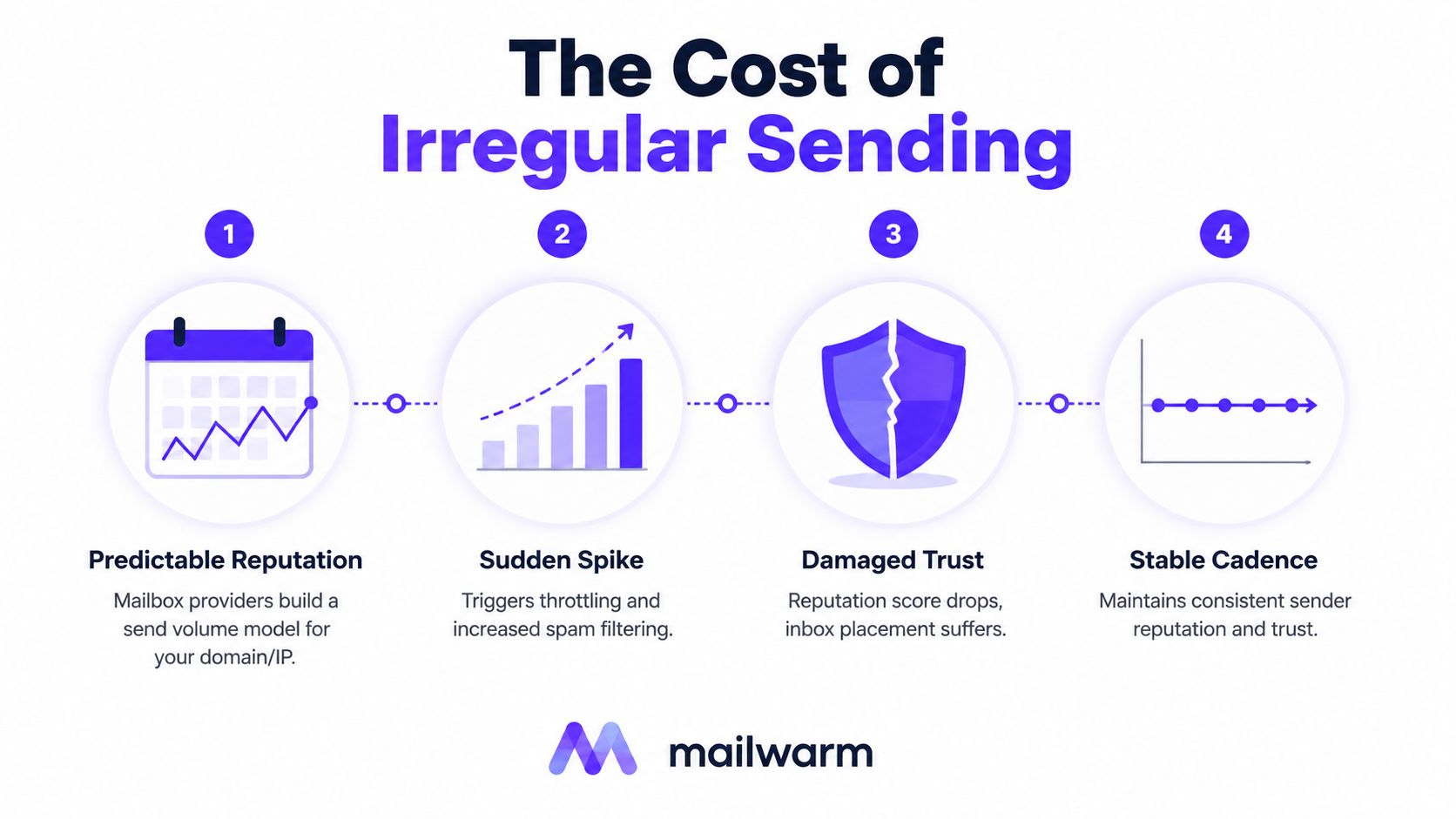
The sequence is simple: establish a predictable model, avoid spikes, protect trust, and keep the sending line steady. Mailwarm's provider-level warmup and deliverability analytics can help teams control that process across different mailbox providers.
Monitor Inbox Placement and Track Results
A sender cannot diagnose inbox placement from one metric. Separate authentication failures from reputation decline, list damage, and provider filtering.
Build monitoring around three layers:
- Authentication and reputation: Google Postmaster Tools, Microsoft SNDS, MXToolbox, and Validity Sender Score.
- Placement testing: InboxAlytics, GlockApps, Mailreach, and Folderly.
- ESP analytics: Complaint rate, bounce rate, replies, clicks, unsubscribes, and Gmail tab distribution.
Read Postmaster Tools as a trend report. Review domain reputation, IP reputation, spam rate, and feedback-loop information. Strong authentication with weak domain reputation points to list quality, engagement, or cadence as the next repair area.
Run a baseline test before changing the program. Retest after 7 to 14 days, then review reputation weekly. Use above 90% inbox placement, below 0.1% spam rate, below 2% bounce rate, and below 0.3% unsubscribe rate as practical operating targets, while judging results against each provider and audience.
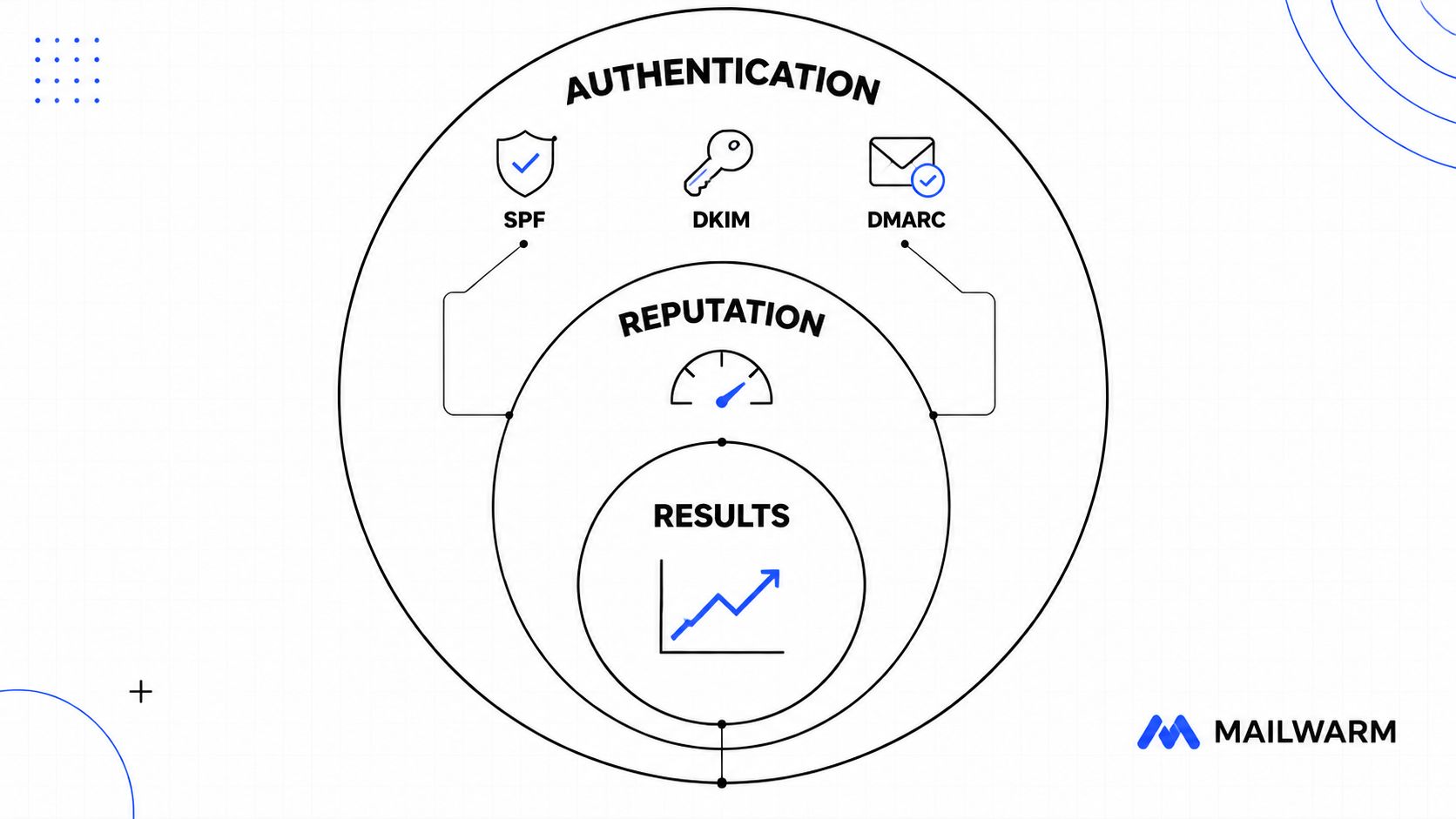
Open rates are unreliable because Apple Mail Privacy Protection and Gmail image proxying distort them. Give more weight to replies, clicks, complaints, bounces, placement tests, and provider dashboards. Teams can also check if your domain is blacklisted, but a clean result does not prove inbox placement.
The Complete 10-Step Fix Checklist
Use this order for the highest likely impact. Authentication and warmup come first, while content changes come last because polished copy cannot repair a weak sender reputation.
| Status | Step | Action | Quick verification | Impact |
|---|---|---|---|---|
| ☐ | 1 | Configure SPF, DKIM, and DMARC | DNS resolves, alignment passes, reports arrive | High |
| ☐ | 2 | Warm up the domain | Engaged recipients receive steady ramped volume | High |
| ☐ | 3 | Clean the list | Inactive and risky contacts are suppressed | High |
| ☐ | 4 | Control bounces | Hard bounces are removed immediately | High |
| ☐ | 5 | Earn engagement | Replies, clicks, and positive actions increase | High |
| ☐ | 6 | Clean content | Subject, body, links, and unsubscribe controls match | Medium |
| ☐ | 7 | Stabilize cadence | Volume follows a predictable sending pattern | High |
| ☐ | 8 | Monitor placement | Provider dashboards and tests show trends | Foundation |
| ☐ | 9 | Handle complaints | Complaints stay below operating limits | High |
| ☐ | 10 | Set up feedback loops | Gmail and Outlook feedback is reviewed regularly | Foundation |
Print this table and mark each item only after verification. For Gmail, review Postmaster Tools and domain reputation. For Outlook, check SNDS and complaint feedback. Yahoo also responds strongly to authentication, list quality, and complaint control, so do not treat a pass at one provider as proof of inbox placement everywhere.
Keep authentication and warmup ahead of subject-line or body edits. Review the program after each change, compare provider trends, and keep the sending pattern stable. A one-time improvement is not enough if complaints, bounces, or inactive recipients return.
Mailwarm helps senders build reputation, monitor inbox placement, and manage warmup through inbox engagement and provider-level controls. Use it to review authentication fixes, bounce prevention, spam-score monitoring, and deliverability analytics without requiring IMAP access to a private inbox.
Frequently Asked Questions
How do I stop my emails from going to spam in Gmail?
Start with SPF, DKIM, and DMARC, then verify DMARC alignment between the visible From domain and either SPF or DKIM. Keep complaints and bounces low, send consistently, and use Google Postmaster Tools to monitor domain reputation and spam rate. Gmail's sender requirements should be treated as a baseline rather than an optional checklist.
How long until emails stop going to spam?
There isn't one universal timeline. Authentication can be corrected quickly, but reputation needs consistent sending and positive recipient behavior. The supplied operational guidance indicates that senders who fix authentication and warmup may see placement improve within two to three weeks, while broader recovery can take longer when complaints, bounces, or inactivity have already weakened the domain.
Why do emails go to spam even when SPF, DKIM, and DMARC pass?
Authentication proves identity, but it doesn't guarantee inbox placement. Providers also evaluate sender reputation, complaints, bounces, recipient behavior, list quality, cadence, and content patterns. DMARC alignment must also pass, because a technically authenticated message can still fail the identity relationship required for trust.
Does email warmup improve inbox placement?
Warmup can support reputation by creating steady sending activity and positive engagement, especially for a new or dormant domain. It won't repair purchased lists, persistent complaints, broken authentication, or erratic volume on its own.
What changes for Gmail, Outlook, and Yahoo?
Gmail emphasizes authentication, domain reputation, and recipient engagement. Outlook places strong importance on volume behavior and uses SNDS and JMRP feedback, while Yahoo requires authentication for all senders and DMARC for bulk senders who reach 5,000 or more messages per day to Yahoo addresses, as outlined in Yahoo's sender requirements.
How does Mailwarm help improve sender reputation?
Mailwarm is a premium email warmup and deliverability platform that uses real inbox engagement, provider-level warmup, spam score monitoring, inbox placement insights, authentication fix tools, bounce prevention, and deliverability analytics. It uses 50,000+ aged real inboxes across major providers and doesn't require IMAP access or permission to read a private inbox.
Why is Mailwarm more expensive than basic warmup tools?
Mailwarm costs more because it combines real inbox engagement, up to 100% replies to warmup emails depending on the plan, spam score monitoring, provider-level warmup, authentication tools, no IMAP access required, and expert deliverability calls included in every plan.
Is email warmup enough to fix deliverability?
No. Warmup addresses sending reputation, but deliverability also depends on authentication, list hygiene, complaint control, engagement, content, cadence, and monitoring. A sender should complete the full checklist instead of treating warmup as a standalone repair.