

Publishing valid authentication records won't, by itself, keep email out of spam. Domain name reputation is the trust a mailbox provider assigns to a sending domain, based on its identity, history, and how recipients respond to its messages.
That trust isn't shared as one universal score. A sender needs to identify which provider is filtering its mail, distinguish authentication failures from recipient rejection, and make changes that address the actual problem.
What Domain Name Reputation Means for Your Email
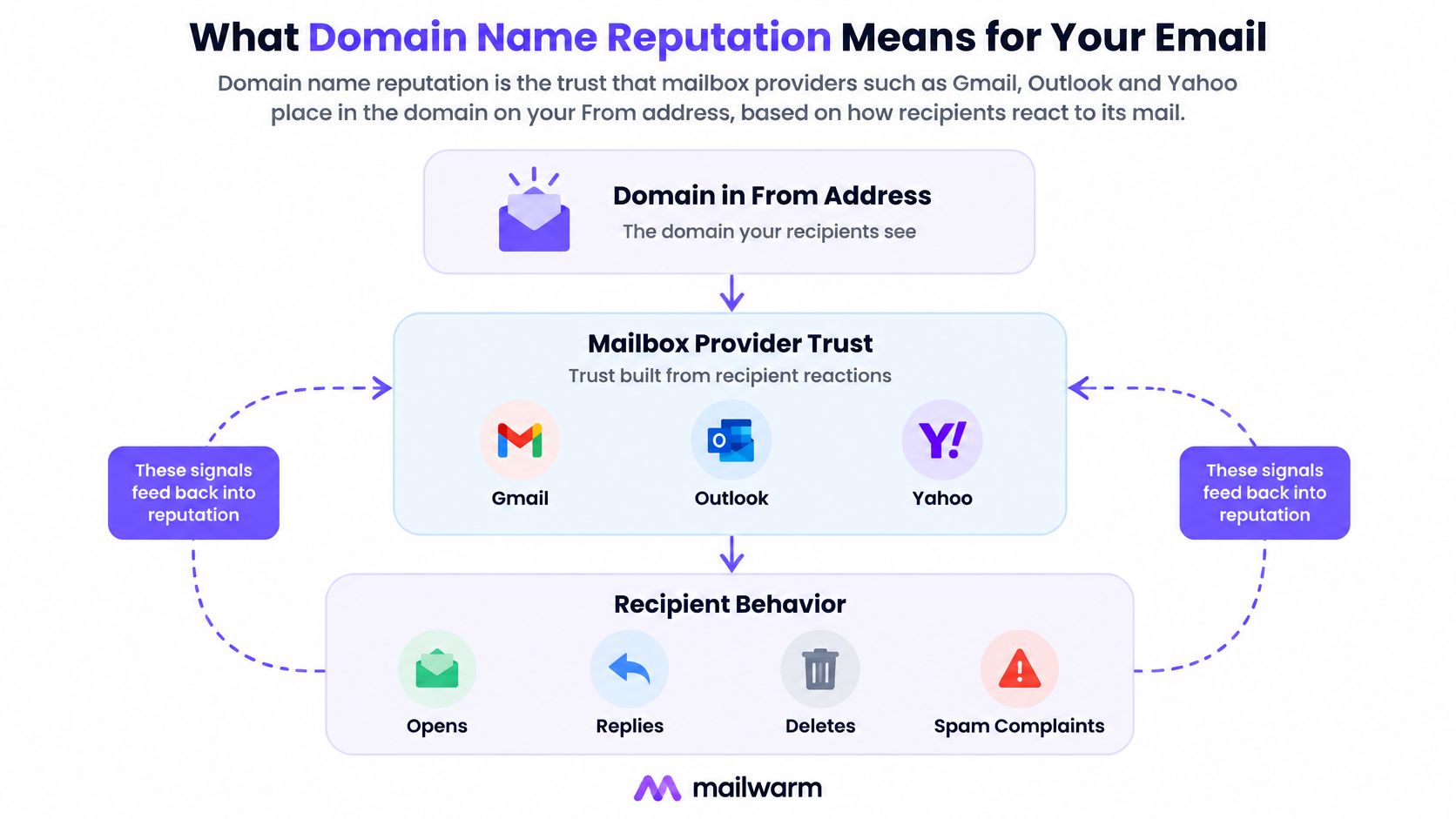
Domain name reputation is the trust that mailbox providers such as Gmail, Outlook and Yahoo place in the domain on the From address, based on how recipients react to its mail. Providers also evaluate technical and historical signals, so recipient behavior isn't the entire assessment.
Think of it as a credit history rather than a published credit score. Sending activity adds evidence, but providers don't publish a common formula or assign identical weight to every interaction.
Which signals matter?
The useful distinction is between signals that establish identity and signals that indicate acceptable sending behavior:
- Recipient reactions: Spam complaints, replies, and other engagement help reveal whether messages are welcome. An open isn't a substitute for an absence of complaints.
- Authentication: SPF, DKIM, and DMARC help receiving systems verify authorization and alignment.
- Infrastructure: Sending-IP history, blocklist listings, and consistent sending patterns provide context.
- Domain history: Previous use and ownership deserve investigation, especially after an acquisition.
Microsoft sender-requirement analysis from DMARC.com distinguishes sending-IP reputation from domain reputation and describes filtering that also considers authentication and content. Moving to a clean server therefore doesn't establish that the domain itself is trusted.
The relationship between domain identity, provider judgment, and recipient reactions looks like this:
What should a sender establish first?
A useful audit starts with the sending identity, not a dashboard's headline score. Record the visible From domain, the service transmitting messages, and the recipient providers for each campaign.
Before changing infrastructure or volume, the sender should answer:
- Who receives the mail? Separate Gmail, Microsoft, Yahoo, and corporate recipients.
- Does it authenticate? Inspect received-message results, not just the existence of DNS records.
- Has the domain sent mail before? Include activity under previous owners and previous sending services.
Provider Thresholds for Complaints and Authentication
| Provider | Complaint limit | Authentication rule | Where to monitor |
|---|---|---|---|
| Gmail | Spam rate below 0.3%, with a 0.1% target, according to Google's sender guidance | SPF or DKIM is the baseline requirement; bulk senders need stronger authentication, including DMARC | Postmaster Tools, daily spam rate and separate domain/IP reputation |
| Yahoo | Below 0.3%, calculated from inbox-delivered mail, according to Yahoo's best practices | SPF or DKIM for senders generally; bulk requirements add SPF, DKIM, and DMARC | Yahoo complaint feedback and provider-specific sending records |
| Outlook.com, Hotmail, Live | No numerical complaint ceiling stated in the cited policy coverage | Above 5,000 messages daily, SPF, DKIM, and DMARC are required from May 5, 2025, with at least p=none and From-domain alignment, according to DMARC Report's policy explanation | Microsoft SNDS for sending-IP filtering signals |
How should these limits be read?
The rows describe different measurements and requirements. Gmail's complaint reporting isn't a replacement for Yahoo feedback, and Microsoft authentication compliance doesn't establish that Microsoft recipients welcome a campaign.
For Yahoo bulk senders reaching approximately 5,000 or more recipients daily, GlockApps' sender-rule explanation describes DMARC at least at p=none, aligned authentication, one-click unsubscribe for marketing or subscribed mail, and requests honored within 48 hours. It also recommends an under-0.1% complaint target.
That distinction matters operationally. A message can satisfy the authorization requirement while still making unsubscribing difficult or reaching recipients who didn't expect it.
Operating principle: A published complaint ceiling is a boundary to stay away from, not a performance target to approach.
A practical policy for keeping complaints under 0.1% should identify who can stop a campaign, which list sources require review, and how unsubscribe requests reach every sending system.
Microsoft SNDS needs a separate interpretation. Its colors describe filtering outcomes, not the same user-complaint percentage displayed by Gmail. Treating the dashboards as interchangeable can produce the wrong response, such as changing DNS when the actual problem is a poorly received audience segment.
Why Spam Complaints Outweigh Opens in Reputation
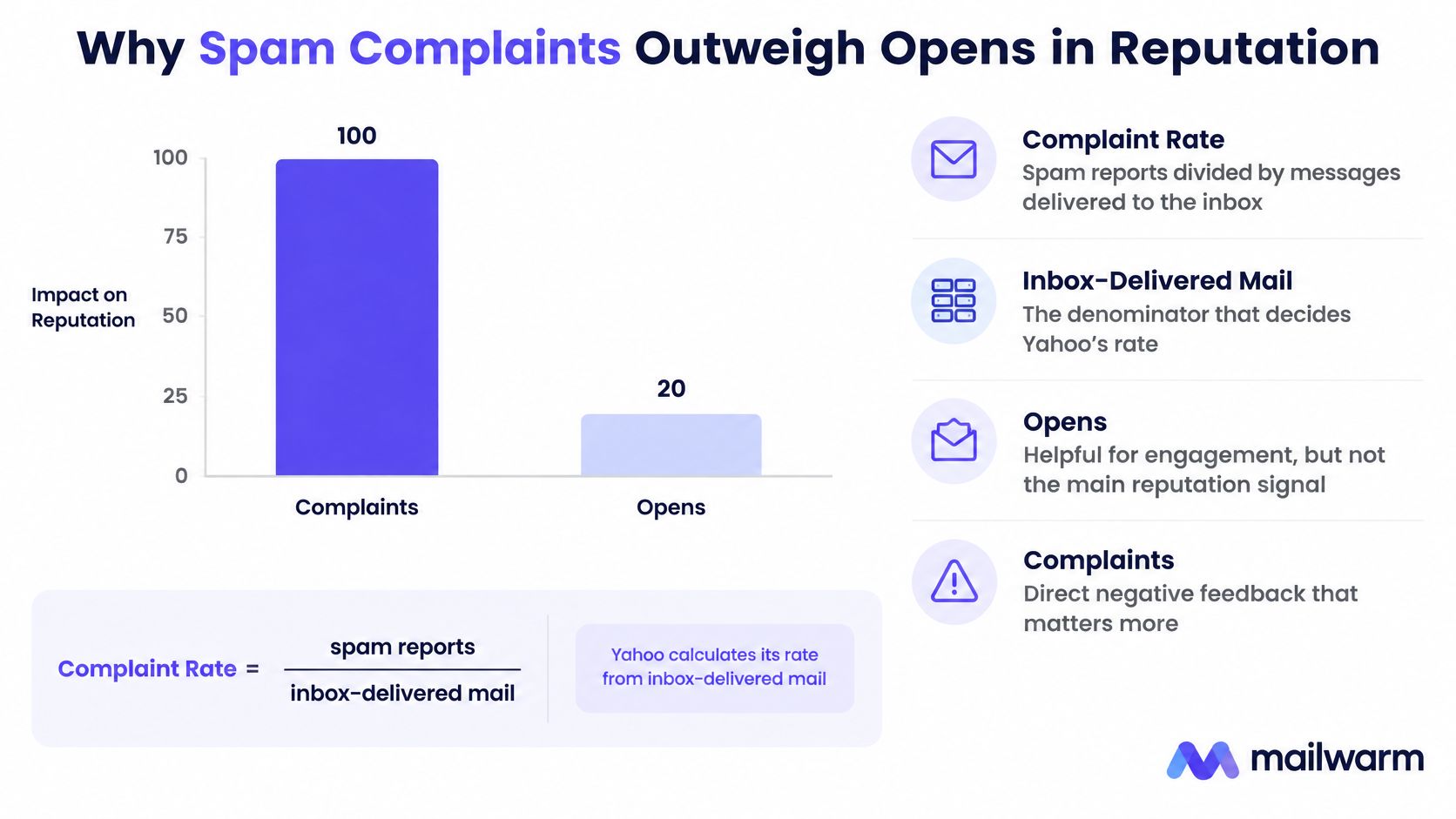
For provider reporting based on inbox-delivered messages, complaint rate means spam reports divided by messages delivered to the inbox. The denominator matters: dividing complaints by all attempted sends can make the result look healthier than the provider's measurement.
At 100,000 Gmail inbox-delivered messages, 100 complaints equal 0.1%, while 300 equal 0.3%; Google's sender FAQ recommends staying below 0.1%, warns of delivery effects above that level, and identifies 0.3% or higher as especially damaging. Google reports the metric daily and requires bulk senders to remain below the upper boundary for seven consecutive days before becoming eligible for mitigation.
Why opens don't cancel complaints
An open and a spam report aren't opposite entries in a public points system. Google doesn't publish an exchange rate under which enough opens erase a complaint.
A sender could see encouraging warmup engagement while a production campaign reaches people who don't want the offer. The production recipients still provide direct negative feedback about that domain's mail.
The important comparison is therefore not warmup opens versus campaign complaints. It's whether real campaign audiences continue to accept the sending relationship.
Read the trend, not the most flattering campaign
A provider-level complaint trend helps distinguish an isolated audience mismatch from a deteriorating acquisition process. Compare campaign dates with list imports, changes in targeting, and shifts in the promise made at signup.
Useful annotations include:
- Audience source: Where each cohort entered the database and what permission was recorded.
- Campaign promise: Whether the content matches what recipients expected.
- Sending change: Whether frequency, sender identity, or campaign volume changed.
- Complaint concentration: Whether the deterioration appears across the domain or mainly within a particular cohort.
A rising complaint trend across successive campaigns deserves intervention even when the latest send remains below the provider's upper boundary. It suggests the sending process is repeatedly creating unwanted mail, rather than suffering an isolated mistake.
The response should address suppression, audience relevance, and acquisition quality. Increasing warmup activity without changing those inputs leaves the production problem intact.
Why Valid Authentication Does Not Fix Reputation
A valid authentication record doesn't restore placement automatically. Authentication establishes identity, not recipient demand, and Google's email sender guidelines explicitly connect user spam reports with lower domain reputation.
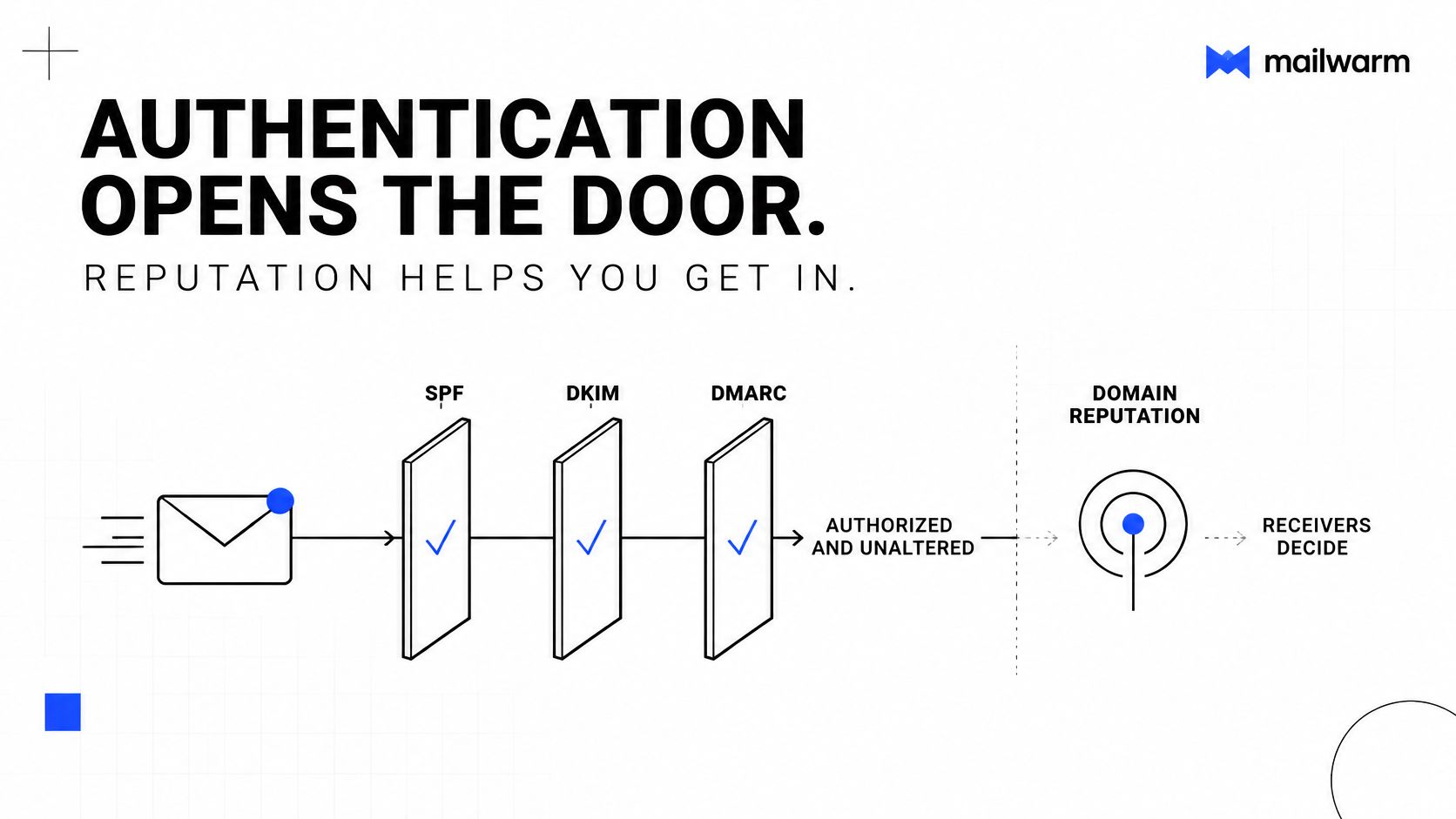
The distinction starts with what each protocol checks. SPF identifies authorized sending infrastructure. DKIM verifies a domain's signature and the integrity of signed message content. DMARC evaluates alignment with the visible From domain and publishes a handling policy for failures. None of these mechanisms measures how recipients respond.
The diagram separates those authentication checks from the broader reputation decision:
What a monitoring policy actually means
Many domains still publish DMARC at p=none, a monitoring-only policy that asks receivers to report failures rather than quarantine or reject them. It gathers evidence about who sends using the domain. It also doesn't certify the quality of messages that pass.
Reports require a reporting destination to be configured. Selecting a monitoring policy doesn't mean someone is receiving, reviewing, or acting on authentication reports.
Run a paired test
The useful test combines technical checks with audience evidence:
- Verify authorization: Confirm that every active sending service passes the intended SPF and DKIM checks.
- Verify alignment: Inspect actual received messages and check your DMARC record.
- Match the time period: Compare authentication results with complaints from the same sending period.
- Choose the correct fix: Repair authentication failures in configuration; investigate audience and content when authentication passes but complaints rise.
The accompanying video provides additional context for the authentication review:
Changing an already-correct record won't make an unwanted message relevant. The diagnostic advantage comes from proving the technical layer works, then stopping unnecessary DNS edits while the team fixes the sending relationship.
Where a Reputation Problem Actually Comes From
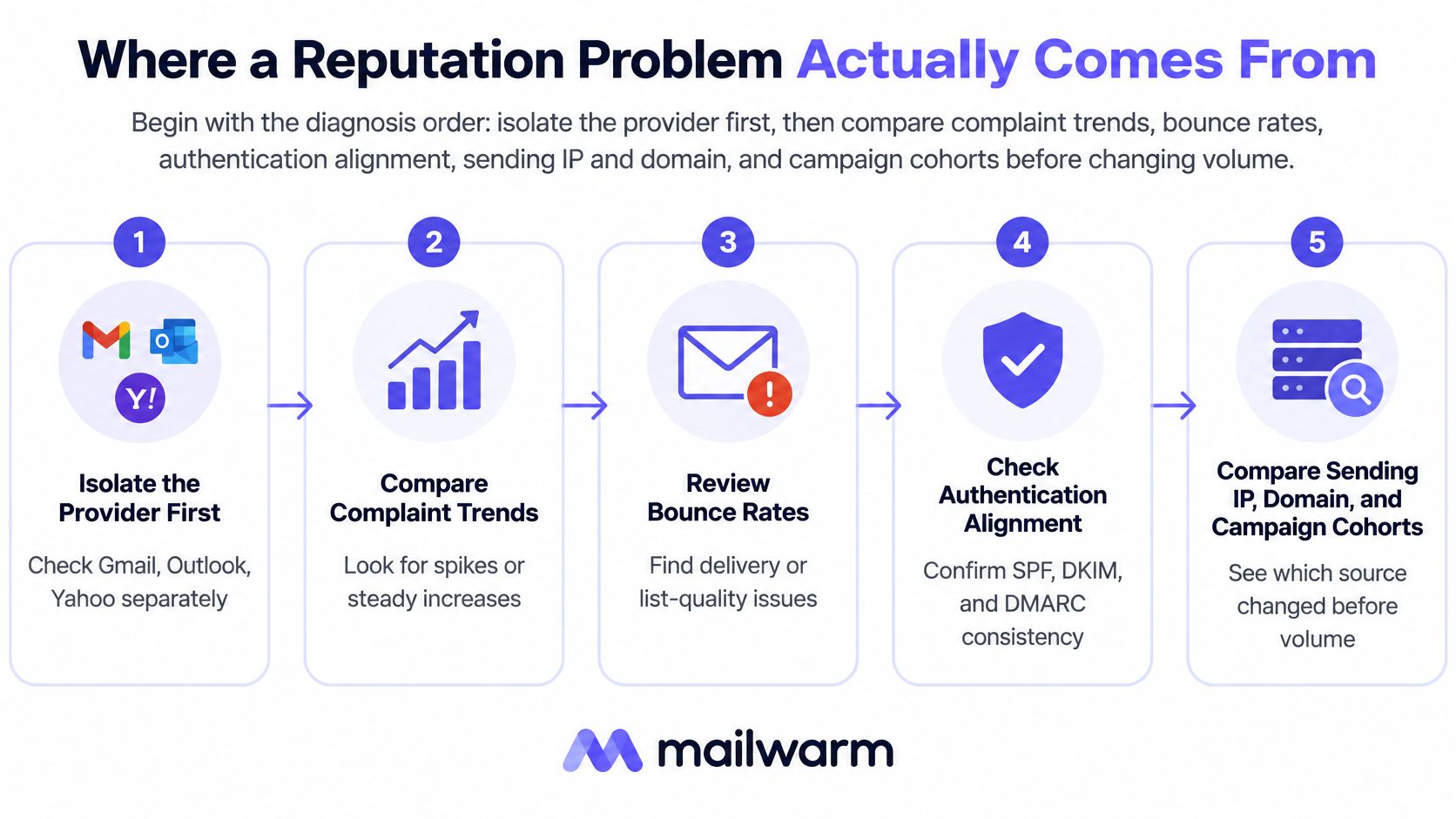
Isolate the affected provider first. Then compare complaint trends, bounce rates, authentication alignment, sending IP and domain, and campaign cohorts before changing volume.
According to Suped's comparison of Microsoft SNDS and Google Postmaster Tools, Gmail's complaint metric uses inbox-delivered mail, while SNDS filter results describe the share of recipient verdicts classified as spam. SNDS is green below 10%, yellow from 10% to 90%, and red above 90%; red signals severe filtering pressure, not proof that every accepted message reached junk.
Match the symptom to a test
| Symptom | Likely cause to investigate | First check |
|---|---|---|
| Spam at Gmail, inbox at Outlook | Complaints concentrated in a Gmail campaign or cohort | Compare Postmaster daily spam rate with campaign dates and internal cohort records |
| Junk at Outlook, Gmail fine | Microsoft filtering pressure involving content or infrastructure | SNDS filter color, sending-IP changes, and recent content changes |
| Spam across providers after a list import | Stale, purchased, or unengaged recipients | Complaint and bounce patterns by list source |
| Newly acquired domain lands in spam immediately | Limited sending history, technical problems, or inherited history | Historical DNS and registration records, then a gradual warmup plan |
These are hypotheses, not diagnoses. Postmaster Tools doesn't supply a native campaign-level complaint breakdown, so campaign attribution requires matching its daily domain-level signals with the sender's own records.
A repeatable routine for cleaning your email list should preserve acquisition-source labels. Without them, a sender can remove invalid addresses but still fail to identify the source of unwanted mail.
The diagnostic order prevents infrastructure changes from obscuring an audience problem:
Investigate history before assuming a fresh start
A domain re-registration study hosted by the National Science Foundation found that residual trust and recognizable Internet history can persist after ownership changes. That inherited trust isn't assured and can diminish.
The practical conclusion is narrower than saying every previously owned domain is risky. A clean-looking website isn't evidence of a clean historical profile.
Review historical DNS, ownership records, and previous use alongside current sending evidence. Then change one variable at a time, so the next result helps identify which intervention mattered.
How to Check and Protect Your Domain Reputation
A useful protection process produces evidence, not just completed setup tasks. Each check should leave a dated result that can be compared with the next campaign.
Establish visibility before increasing volume
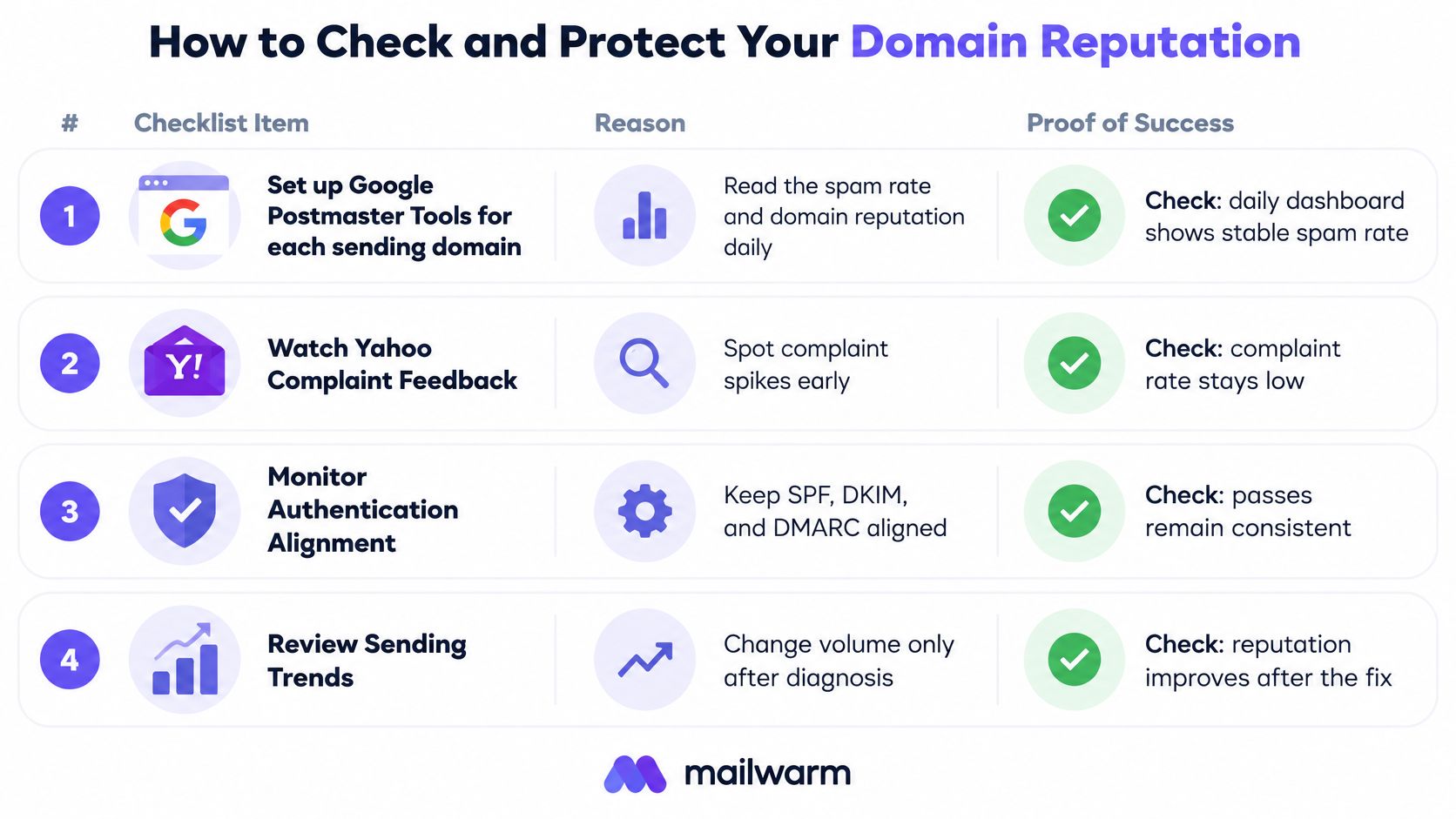
Verify each sending domain in Google Postmaster Tools. Read spam-rate and domain-reputation trends where sufficient reporting data is available. Missing data isn't proof of healthy performance. Check: domain verification succeeds, and the team records both available observations and reporting gaps.
Register sending IPs in Microsoft SNDS, where access is available. Shared-infrastructure senders may need their sending service to investigate IP-level results. Check: each active sending path has an owner responsible for reviewing Microsoft filtering signals.
Test authentication on received messages. Run SPF, DKIM, and DMARC checks, then inspect alignment rather than stopping at record existence. For an independent policy lookup, a sender can check your DMARC record with mailX. Check: legitimate sending services produce the expected aligned authentication results.
Run a domain and sending-IP blocklist check. Record the listing authority and affected identifier before requesting removal. Check: any listing has an investigated cause, a remediation owner, and a follow-up result.
Test placement before launch. Use the actual sending service and representative campaign content, not an unrelated mailbox or simplified message. Check: results are separated by provider and saved with the campaign's configuration.
A test is most useful when it resembles the campaign it is supposed to evaluate.
The monitoring checklist keeps provider feedback, authentication, and sending changes connected:
Remove the sources of repeated complaints
Suppress known complainers immediately. Apply suppression across connected campaign systems, not just the list that generated the complaint. Move disengaged recipients into a separate review or re-engagement process, using more than opens alone to judge interest. Check: subsequent sends exclude suppressed addresses and produce healthier cohort-level results.
Make unsubscribing straightforward for subscribed mail. Implement the required one-click mechanism alongside a visible unsubscribe option, then test that the request updates the active sending systems. Check: an opt-out made through a test message prevents further subscribed campaigns.
Increase volume gradually and reversibly. Don't expand audience size while complaints are rising or provider filtering is worsening. Stop the risky cohort rather than moving it to another domain. Check: the next increase follows stable provider feedback, not merely a quiet sending queue.
Review provider results together on a recurring schedule. Keep campaign dates, audience sources, authentication changes, bounce reasons, and placement observations in the same review. Teams can improve inbox placement using Postmaster by interpreting its signals alongside production sending records. Check: every adverse trend produces a named action and a follow-up date.
Healthy operation means low complaints, favorable Microsoft filtering signals, aligned legitimate mail, and no unexplained new blocklist listings. None of those observations alone proves inbox placement, but together they give a sender a defensible basis for scaling.
Domain Reputation Questions Answered
How long does domain reputation recovery take?
Recovery should be planned as sustained clean sending, not a single corrective campaign. Gmail's mitigation eligibility includes a consecutive clean-day requirement, but eligibility doesn't promise immediate recovery or establish a recovery timetable for other providers. A team should set milestones around complaint reduction and provider feedback rather than a fixed completion date.
Does a monitoring-only DMARC policy protect domain reputation?
It provides visibility when reporting is configured, but it doesn't request enforcement against failing messages. A sender should inventory legitimate sending services before moving toward quarantine or rejection. Stronger enforcement addresses unauthorized use, not complaints about authorized campaigns.
Is a complaint rate below the published ceiling safe?
Not necessarily. A sender operating close to the ceiling has little room for a poorly received campaign, and provider guidance distinguishes a safer operating target from the upper boundary. The better check is whether complaint trends remain comfortably low across audience sources, not whether the latest send narrowly passed.
Does Mailwarm need access to a private inbox?
No. Mailwarm doesn't require IMAP access or permission to read a user's private inbox. Its warmup process uses aged real inboxes that open, reply, mark messages important, and remove messages from spam, without replacing the sender's responsibility for relevant production mail.
Decision test: If authentication passes and complaints keep rising, the next investigation belongs in audience selection and campaign expectations, not another round of record edits.
Confirm Your Domain Reputation Before Your Next Campaign
Before approving a campaign, the sending team should review recent Gmail complaint trends and Microsoft filtering signals separately. The following is a conservative operating policy, not a promise of placement or a universal provider enforcement schedule.
| Signal | Continue | Slow down | Pause |
|---|---|---|---|
| Gmail spam-rate trend | Comfortably below the recommended target | Above the target but below the complaint ceiling | At or above the complaint ceiling |
| Microsoft SNDS color | Green | Yellow or red, pending investigation | No universal pause threshold stated in the cited public coverage |
A continue decision still requires aligned authentication, valid recipients, and a working unsubscribe process. A slow decision should trigger smaller cohorts and a review of recent changes, while a pause should stop the risky source rather than shift it to another sending identity.
Make readiness measurable
Mailwarm recommends 2 to 4 weeks of warmup for a new domain before campaigns, followed by a maintenance level of warmup. That is a planning recommendation, not evidence that every domain becomes ready on schedule.
Proper DNS setup, list hygiene, and smart sending patterns remain necessary. Warmup supports those foundations; it doesn't make a purchased list relevant or repair an ignored suppression request.
For teams using automated email warmup, readiness should be judged by production feedback and placement evidence, not warmup volume alone. Mailwarm provides spam score monitoring, inbox placement insights, and expert deliverability calls included in every plan to support that review.
Domain name reputation is the asset to protect before scaling. More sending capacity is useful only when the intended providers and recipients continue to accept the mail.
Mailwarm is a premium email warmup and deliverability platform that helps senders build reputation, monitor inbox placement, and reduce spam risk through real inbox engagement, advanced warmup controls, and expert guidance. If email is part of a business's growth strategy, its sending team can visit Mailwarm to plan expert-guided warmup around the providers and reputation risks that matter to its next campaign.