
SMTP error 451 is a deferred message, not a lost one. The sending server should keep it in the queue and retry, because the receiving server could not complete the action at that moment.
That matters right away, because a lot of teams panic, suppress the contact, or keep hammering the same recipient. Both reactions create avoidable deliverability damage when the right move is usually to wait, log the full response, and retry with control.
What SMTP Error 451 Actually Means
SMTP error 451 belongs to the 4yz transient negative completion class in SMTP. In plain English, the receiving server is saying, “not now,” not “never.” Under RFC 5321, the reply text is “Requested action aborted: local error in processing”, which tells you the receiver hit a temporary processing problem, not a permanent rejection.
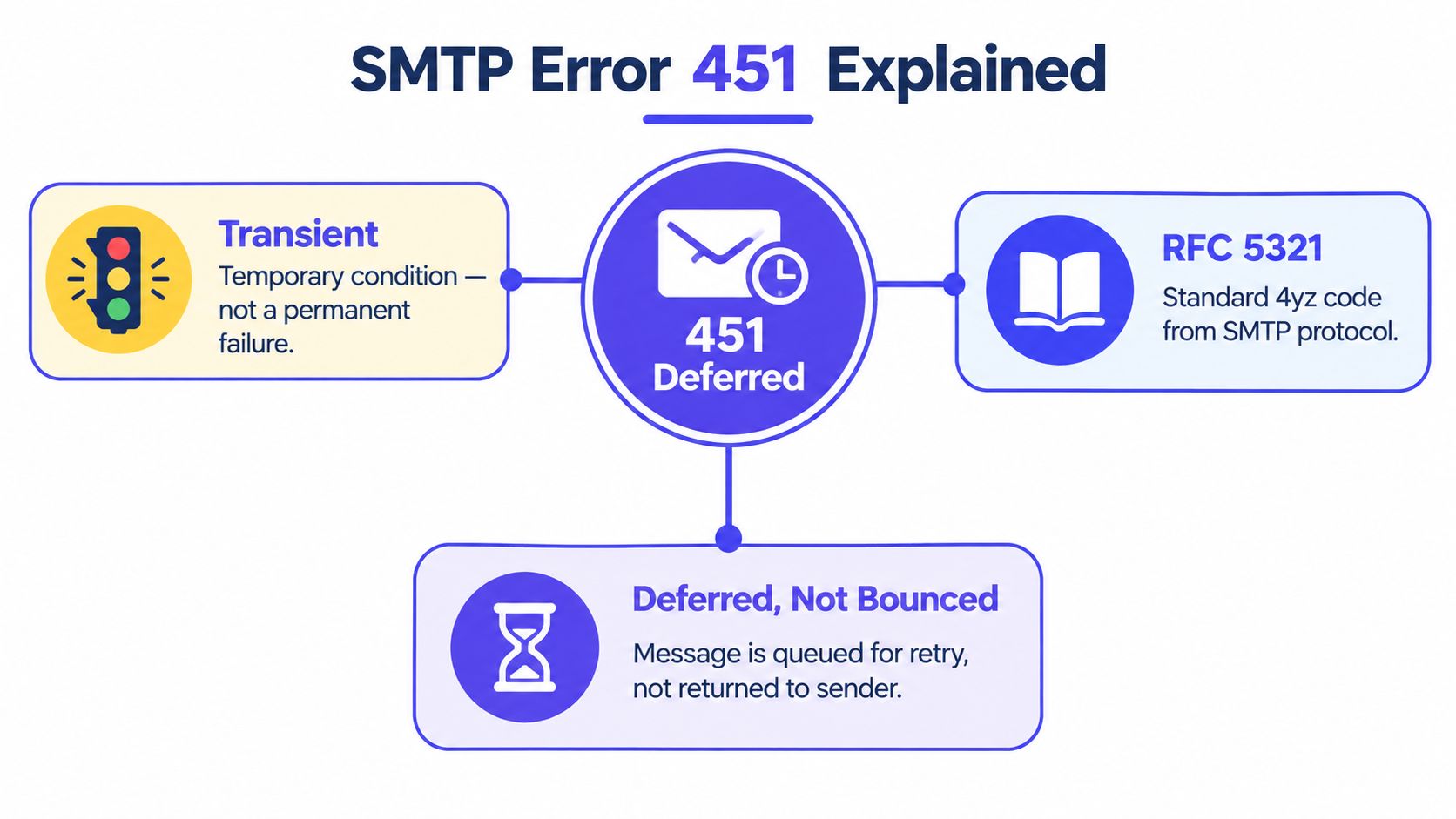
That is why 451 sits in a different bucket from 421 and 550. 421 usually means the service is unavailable at the connection level, while 550 is a permanent failure that should not be retried without fixing the underlying problem. A 451 response says the server could not finish the SMTP action right then, but the same command may work later.
Why the enhanced code matters
The three-digit code alone is too broad to diagnose properly. A 451 can mask a temporary server-side rejection, a policy pause, a queueing problem, or a local processing fault, depending on the enhanced code and the server text that comes with it.
Practical rule: if the sender marks a contact as invalid the moment it sees 451, that is usually a configuration mistake, not a deliverability verdict.
A good way to think about it is this, 451 is a delivery delay with context attached. If the message was important, the queue should hold it, the logs should preserve the exact server wording, and the system should try again later instead of throwing the address away.
For teams building safer sending habits, a useful reference on broader mailbox and transport hygiene is email security best practices. The key point is still the same, temporary SMTP failures need diagnosis, not panic.
The Common 451 Variants You Will See in Logs
The mistake many teams make is treating every 451 like the same thing. It isn't. The enhanced status code and the exact server string usually tell you whether you're dealing with sender reputation, a receiver-side resource issue, or a greylisting-style deferral.
The four log lines worth memorizing
451 4.7.650Requested action not taken: mailbox rate limited due to IP reputation451 4.7.500Server busy451 4.7.1Greylisted451 Requested action aborted: local error in processing451 4.7.650 is the one that usually points back at sender reputation, especially when volume jumps on one mailbox or one domain. Microsoft uses this family of responses when it is rate limiting the sender because the IP or sending pattern looks risky.
451 4.7.500 is different. That tends to point to the receiving server being busy or under temporary pressure, so the fault is more likely on their side than yours.
451 4.7.1 often shows up with greylisting. In that case, the receiver is asking for a retry to prove the sending system is legitimate and persistent, not a one-off spam source.
The generic 451 Requested action aborted: local error in processing is the broad catch-all. It usually means the server had a temporary internal problem, but the log line by itself does not say much more.
| Variant | Likely cause | First action |
|---|---|---|
| 451 4.7.650 | Sender reputation or volume throttling | Cut volume, slow retries, inspect reputation signals |
| 451 4.7.500 | Receiving server busy or resource constrained | Retry later, don't resend aggressively |
| 451 4.7.1 | Greylisting or temporary policy deferral | Keep the queue alive and retry after delay |
| Generic 451 | Temporary local processing fault | Preserve the message and log the full response |
A useful distinction here is simple. 4.7.650 often means the receiver is reacting to you, while 4.7.500 more often means the receiver is having its own problem. That difference changes the next move.
For operators comparing patterns across providers, a focused test beats guesswork. If you also need to compare how a mailbox reacts to repeated attempts, deeper provider behavior belongs in a greylisting workflow like greylisting, not in a generic bounce cleanup.
How to Read Your SMTP Logs and Run the Right Tests
The first 30 minutes matter more than the first 30 retries. Start by capturing the full response, not just the code, then look for patterns across recipient domain, sending IP, and SMTP stage.
What to capture first
A useful log entry should preserve:
- Full server string: The exact 451 text, not a shortened summary.
- Enhanced status code: For example, 4.7.650, 4.7.500, or 4.7.1.
- Recipient domain: So provider clustering is visible.
- Sending IP: So reputation or blocklist issues can be traced.
- Timestamp: To line up retries and outages.
- SMTP stage: Whether the error happened during connect, RCPT, or DATA.
- Retry count: So repeated deferrals don't get mistaken for new incidents.
Useful habit: if the same 451 shows up across several recipients on one provider, treat it as a provider-specific signal before you touch the copy or the list.
From there, run four quick checks. First, verify DNS and reverse DNS for the sending host, because mismatches can erode trust. Second, check SPF, DKIM, and DMARC alignment, because a receiver that already distrusts the sender has one more reason to defer.
Third, look at a blacklist checker to rule out an obvious reputation problem. Fourth, send a delivery test to Gmail, Outlook, and Yahoo so you can see where messages are landing right now, not where the dashboard says they should land.
If Outlook and Hotmail placement drop while Gmail stays stable, the 451s are usually a Microsoft reputation signal, not a universal server failure. In that case, volume has to come down for Microsoft first.
Teams that need a clean way to verify header behavior often pair logs with an Email Header Analyzer. That helps separate authentication mistakes from plain temporary deferrals.
For setup work on the sending side, a practical walkthrough such as configure SES SMTP credentials can also help eliminate basic transport misconfiguration before deeper diagnosis starts.
The Fix Sequence That Actually Clears 451 Errors
The fastest way to make a 451 problem worse is to treat it like a dead address. The fix is usually slower sending, better queue handling, and cleaner authentication, in that order.
Step one, stop breaking the queue
The sending tool should retry 4xx responses with exponential backoff, and it should keep the queue alive for a bounded delivery window rather than suppressing the contact on the first failure. Most operational systems continue retrying for roughly 48 to 72 hours, though the exact timing depends on the MTA.
If the platform marks a 451 as a bounce, that is a product bug, not a smart shortcut. It throws away mail that the receiver may accept on the next attempt.
Step two, reduce pressure on the mailbox
Slow the per-mailbox sending rate and spread the same daily volume over more hours and more mailboxes. That is usually the fix, not a hidden toggle in the provider UI.
A sudden jump in sends from one mailbox often gets interpreted as risky behavior, especially at providers that rate limit aggressively. Steady volume works better than bursts because it looks normal to the receiving side.
Step three, clean up trust signals
Verify that SPF, DKIM, and DMARC align. If the receiver sees authentication drift, it has another reason to defer rather than accept. Content rarely causes a 451, so rewriting the message copy should come after volume and authentication are fixed, not before.
For teams that want a structured reference while they tune DNS and identity, Trupeer's help centre is useful for general setup workflows. The SMTP part still comes down to the same discipline, queue the mail, slow the rate, and remove distrust.
Step four, use the right support tool
A checker that surfaces DKIM alignment is often enough to catch the obvious issue quickly. For that, Mailwarm's DKIM checker fits the diagnostic stage better than another resend button.
Warning: aggressive retries can reinforce throttling. The sender keeps looking busy, the receiver keeps saying no, and the problem turns into a loop.
Some operators also bring in a premium warmup and deliverability platform at this point, especially when they want provider-level visibility, inbox placement monitoring, and authentication fix tools in one place. Used well, that sort of system supports the remediation, but the order still matters, first stabilize the queue, then lower pressure, then validate trust.
Preventing 451 Errors from Coming Back
451s come back when sending stays erratic. The pattern that holds up best is steady volume, gradual warmup on new mailboxes and domains, and authentication that stays aligned over time.

What actually prevents repeat deferrals
Steady daily volume matters because sudden bursts trigger more scrutiny than a stable pattern does. Warmup matters because new mailboxes and domains need time to build reputation before they carry real campaign load. Aligned authentication matters because drifting records make receivers less willing to trust the message path. Ongoing placement monitoring matters because a slipping provider reputation should be noticed before production sends start stacking 451s.
how to warm up a domain is the kind of process that helps teams avoid jumping straight from a cold mailbox to full campaign volume. The point is gradual reputation building, not fake activity.
For teams that want that process wrapped together, Mailwarm is a premium email warmup and deliverability platform that combines real inbox engagement, spam score monitoring, inbox placement insights, and authentication fix tools in one workflow. It also uses a network of 50,000+ aged real inboxes, does not require IMAP access, and includes expert deliverability calls in every plan.
Simple rule: prevention lowers the frequency of 451, it does not eliminate it. Legitimate receiving-side congestion and greylisting still happen.
That is why the goal isn't to chase zero temporary deferrals. The goal is to make them rare, observable, and easy to recover from when they do show up.
When to Stop Retrying and Talk to the Recipient Admin
A retry window is a policy choice, not a hard SMTP standard. In practice, many MTAs keep trying for 48 to 72 hours, but after repeated deferrals the sender has to decide whether the message is stuck or just delayed.
If the same 451 repeats across a large cohort on one provider, pause traffic to that provider instead of burning more reputation with repeated attempts. If many providers return temporary failures at once, the problem is more likely sender reputation, authentication, or infrastructure than content.
When escalation makes sense
Contact the recipient admin when:
- A single corporate domain keeps returning 451 after repeated retries.
- Greylisting stays active past the normal retry window.
- The provider's wording suggests a misconfigured receiver.
- Multiple recipients at the same organization fail in the same way.
Include the timestamps, the sending IP, the full SMTP response, and the current SPF, DKIM, and DMARC status. That gives the recipient admin something concrete to check instead of a vague complaint about a bounce.
The right takeaway is simple. SMTP error 451 is a control signal for adaptive sending, not just a bounce to ignore.
If email is part of your growth strategy, Mailwarm helps teams build sender reputation, monitor inbox placement, and reduce spam risk with expert-guided warmup. It's built for deliverability work that has to handle temporary failures like SMTP 451 without breaking the queue or losing contacts. Visit Mailwarm to see how the platform supports warmup, authentication, and inbox placement control.