
A seasonal campaign can look perfectly prepared until open rates collapse and a support ticket reveals that the sending domain has been filtered for weeks. The team may then discover that nobody has completed a sender reputation check, because reputation isn't a single number sitting in one universal dashboard.
Sender reputation is the trust history mailbox providers associate with a sending domain and IP address. Gmail, Microsoft 365, Yahoo, and other providers use their own signals to decide whether messages reach the inbox, enter spam, or get blocked. The practical answer is a provider-by-provider monitoring stack, followed by controlled action when signals deteriorate.
What Sender Reputation Actually Means
Sender reputation is a mailbox-provider assessment of the quality and trustworthiness of the domains and IP addresses used to send email. Google describes reputation as a rating determined by sender behavior, with data tied to DKIM-authenticated messages sent to Gmail accounts, or SPF-authenticated messages when DKIM isn't used, as explained in this overview of Google's reputation model.
That reputation is built from historical behavior, including engagement, spam complaints, authentication, bounces, sending consistency, and infrastructure history. Providers use those signals to decide whether a message belongs in the inbox, spam folder, or nowhere at all. One industry report found that only 25.5% of senders believed they had a strong understanding of their reputation, which helps explain why many teams notice deliverability problems only after revenue or response rates fall (Mailgun's sender reputation report).
Domain reputation versus IP reputation
Domain reputation follows the authenticated sending identity, such as the domain shown through DKIM or aligned authentication. It matters when a domain has accumulated a long history of complaints, poor engagement, spoofing, or inconsistent mail, even if the sending infrastructure later changes.
IP reputation follows the infrastructure that transmits the message. It matters more when an IP has a history of abuse, blocklist activity, poor traffic quality, or unstable volume. A shared IP adds another variable, because other senders on that infrastructure can influence the provider's view of the traffic.
Neither view is complete on its own. A healthy IP can carry mail from a damaged domain, while a strong domain can be affected by a poor shared IP environment.
There isn't one universal score
Gmail, Outlook, Yahoo, and SMTP providers don't publish one shared reputation number. A sender can perform well at one provider and struggle at another because each ecosystem weighs similar inputs through a different internal model.
That makes a sender reputation check a diagnostic habit, not a vanity exercise. The useful question isn't, “What score does this domain have?” It's, “Which provider is filtering this traffic, what signal changed, and what action will improve the next send?”
Five Ways to Check Your Sender Reputation
A reliable audit combines first-party provider data, infrastructure checks, and real inbox outcomes. Each method answers a different question, so none should be treated as a complete verdict.
1. Google Postmaster Tools
Google Postmaster Tools is the starting point for domains that send meaningful Gmail traffic. The setup process requires domain verification, after which the available views can show domain reputation, IP reputation, spam-rate signals, and authentication status.
The reputation views use labels such as High, Medium, Low, or Bad, rather than presenting a universal score. High indicates healthier observed behavior, while Low or Bad signals that Gmail is seeing risk. A missing dashboard doesn't automatically mean the domain is unhealthy. It can mean Gmail doesn't have enough qualifying data for the authenticated domain.
The spam-rate view deserves immediate attention. Google's sender guidance says senders should keep the reported spam rate below 0.10% and avoid reaching 0.30% or higher (Google threshold guidance). A spike should trigger investigation before broad filtering appears.
2. Microsoft SNDS
Microsoft's Smart Network Data Services, or SNDS, provides visibility into traffic sent to Outlook, Hotmail, and related Microsoft mailboxes. Registration links the sending IP information to the account, allowing the sender to inspect complaint-related data, filtering behavior, and infrastructure signals.
SNDS is useful for spotting Microsoft-specific problems, but it isn't a complete complaint-feedback system. The Junk Mail Reporting Program, or JMRP, provides a separate path for complaint reports, so SNDS and JMRP serve different purposes.
A worsening filter signal, rising complaint pattern, or repeated delivery issue at Microsoft should be treated as a provider-specific incident. Microsoft's bulk-sender requirements apply to senders at or around 5,000 emails per day, effective May 5, 2025, making provider-level monitoring operationally important for high-volume teams (Microsoft requirement context).
3. Sender Score by Validity
Sender Score presents an aggregated 0 to 100 reputation scale. It can provide a useful external reference for IP history and comparative infrastructure health, but it isn't Gmail's or Microsoft's internal verdict.
A score above 90 is commonly treated as a strong signal, while a score below 70 warrants investigation, according to the sender-reputation guidance summarized in the Validity reputation guide. The score can lag behind live provider behavior, so a favorable result shouldn't override poor inbox placement or rising complaints.
4. Blacklist lookups
Public blocklist checks can reveal whether a sending domain or IP appears on databases such as Spamhaus, SpamCop, Barracuda, or SURBL. A listing is a reason to identify the cause, stop the behavior that triggered it, and follow the operator's removal process where appropriate.
Blocklist absence isn't proof of inbox placement. Many providers filter based on private reputation, engagement, authentication, and complaint data that public lists don't expose. Teams can check if your domain is blacklisted as one part of the audit, not as the final answer.
5. Inbox placement testing
Seed testing sends representative messages to controlled addresses across Gmail, Outlook, Yahoo, AOL, and other providers. Tools such as GlockApps, Inboxalytics, and Mail Tester can show whether messages land in the inbox, spam, promotions, or another folder.
Read placement by provider, domain, IP, message type, and sending stream. A result that looks healthy overall may hide a serious Microsoft or Yahoo problem. The most useful test compares the same message and sending identity across providers.
| Tool | Provider coverage | Data type | Cost | Key limitation |
|---|---|---|---|---|
| Google Postmaster Tools | Gmail | Reputation, spam signals, authentication | Free | Gmail-only and data may be limited |
| Microsoft SNDS | Outlook and Microsoft traffic | IP activity and filtering signals | Free | Microsoft-specific and separate from JMRP |
| Sender Score | Broad IP reference | Aggregated reputation proxy | Availability varies | Not a provider verdict |
| Blocklist lookups | Public databases | Domain and IP listings | Free and paid options | No listing doesn't prove inbox delivery |
| Seed testing | Multiple mailbox providers | Live placement outcomes | Availability varies | Results depend on test design and message |
A complete audit uses all five views together. Provider dashboards explain what a mailbox ecosystem sees, while seed tests show what recipients experience.
What Moves Your Reputation Score
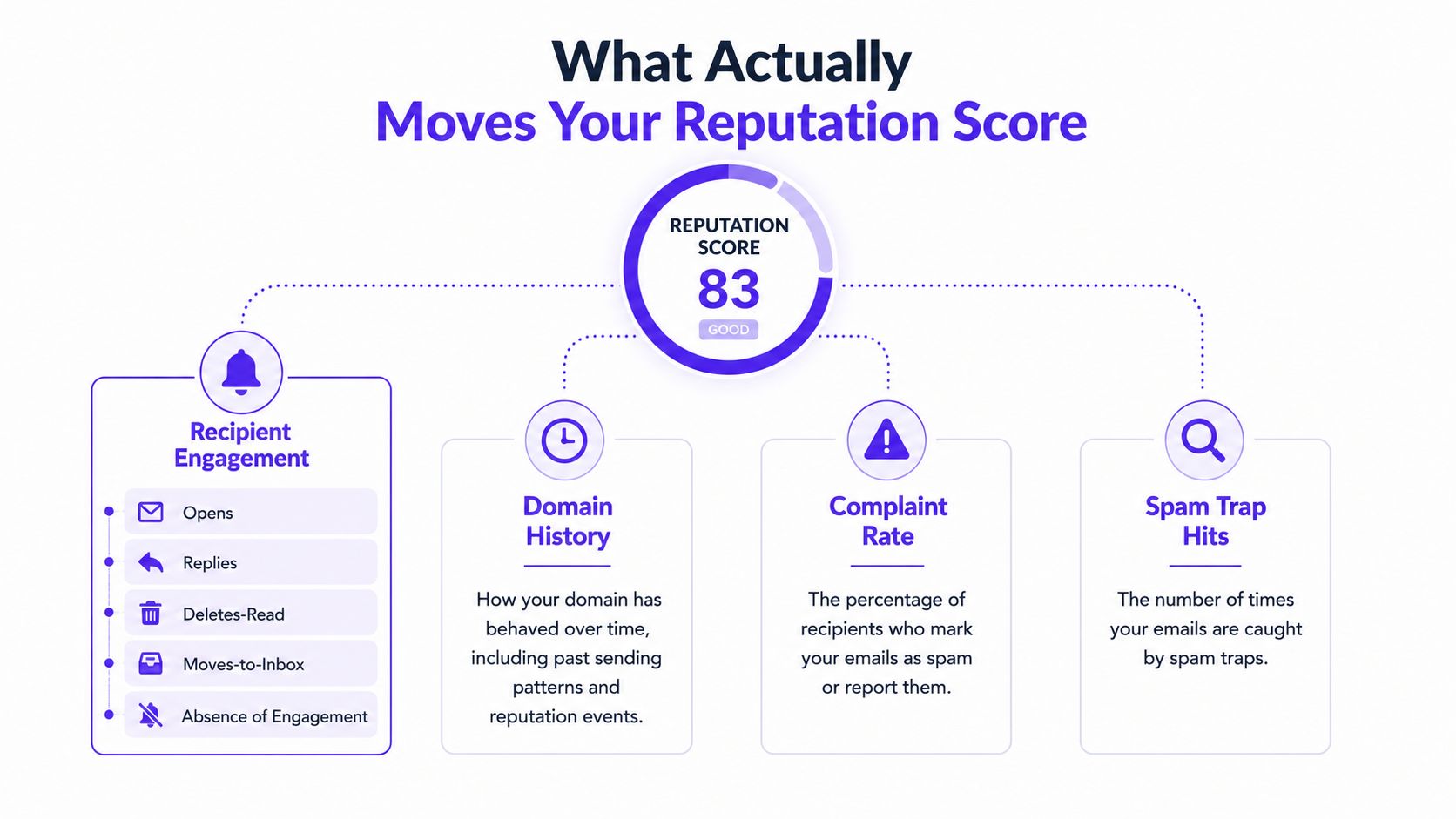
Mailbox providers evaluate reputation from historical sending behavior, not content alone. The main inputs are engagement history, complaint activity, volume consistency, authentication, and infrastructure stability. These signals are provider-specific, so a healthy Gmail result does not guarantee equally strong Outlook or Yahoo placement.
Engagement history
Opens, replies, reads, deletions, inbox moves, spam removal, and continued interaction help indicate whether recipients want the mail. Continued sending to inactive addresses creates the opposite pattern.
Open data is incomplete, particularly when privacy features obscure it. Replies, threads, and other direct interactions provide stronger evidence that recipients recognize and value the sender. Review these signals by provider and sending stream rather than relying on one combined engagement rate.
Complaints and feedback loops
Spam complaints are among the clearest negative signals. Gmail's guidance, described in the earlier Google Postmaster Tools discussion, sets a low tolerance for complaints and identifies a higher level that can create delivery problems. Operational guidance also treats complaint rates above a low threshold as risky, so use the earlier figures as Gmail-specific reference points rather than a universal rule.
Microsoft exposes complaint and filtering information through SNDS and JMRP. Segment complaints by provider. A low global rate can hide concentrated damage in one mailbox ecosystem, especially after a campaign reaches a new audience or changes its sending pattern.
Volume consistency and warmup
Sudden volume spikes, irregular cadence, unknown-user bounces, and complaint surges create an unstable history. Predictable volume gives each provider a clearer pattern to evaluate.
Warmup can establish controlled history for a new domain, mailbox, or IP. It cannot fix poor targeting or unwanted mail. Mailwarm helps senders build reputation, monitor inbox placement, and improve deliverability through inbox engagement, warmup controls, and guidance. Its platform includes provider-level warmup, spam score monitoring, inbox placement insights, authentication fix tools, bounce prevention, and deliverability analytics, without requiring IMAP access to a private inbox.
Authentication and infrastructure
SPF, DKIM, and DMARC alignment show whether the sender is authorized and whether the visible identity matches the authenticated identity. Google reputation reporting is tied to authenticated sending identity, so authentication failures can reduce reporting usefulness and make delivery less reliable.
Compare domain reputation with IP reputation, then correlate both with bounces, deferrals, complaints, and placement. The sender reputation fundamentals explain reputation as a composite provider view, not one universal score. Use that distinction when auditing Gmail, Outlook, and Yahoo separately.
Setting Up Continuous Reputation Monitoring
A one-time audit catches only the condition that exists on the day of the test. Continuous monitoring catches direction, which is more valuable because reputation damage often begins as a small trend.
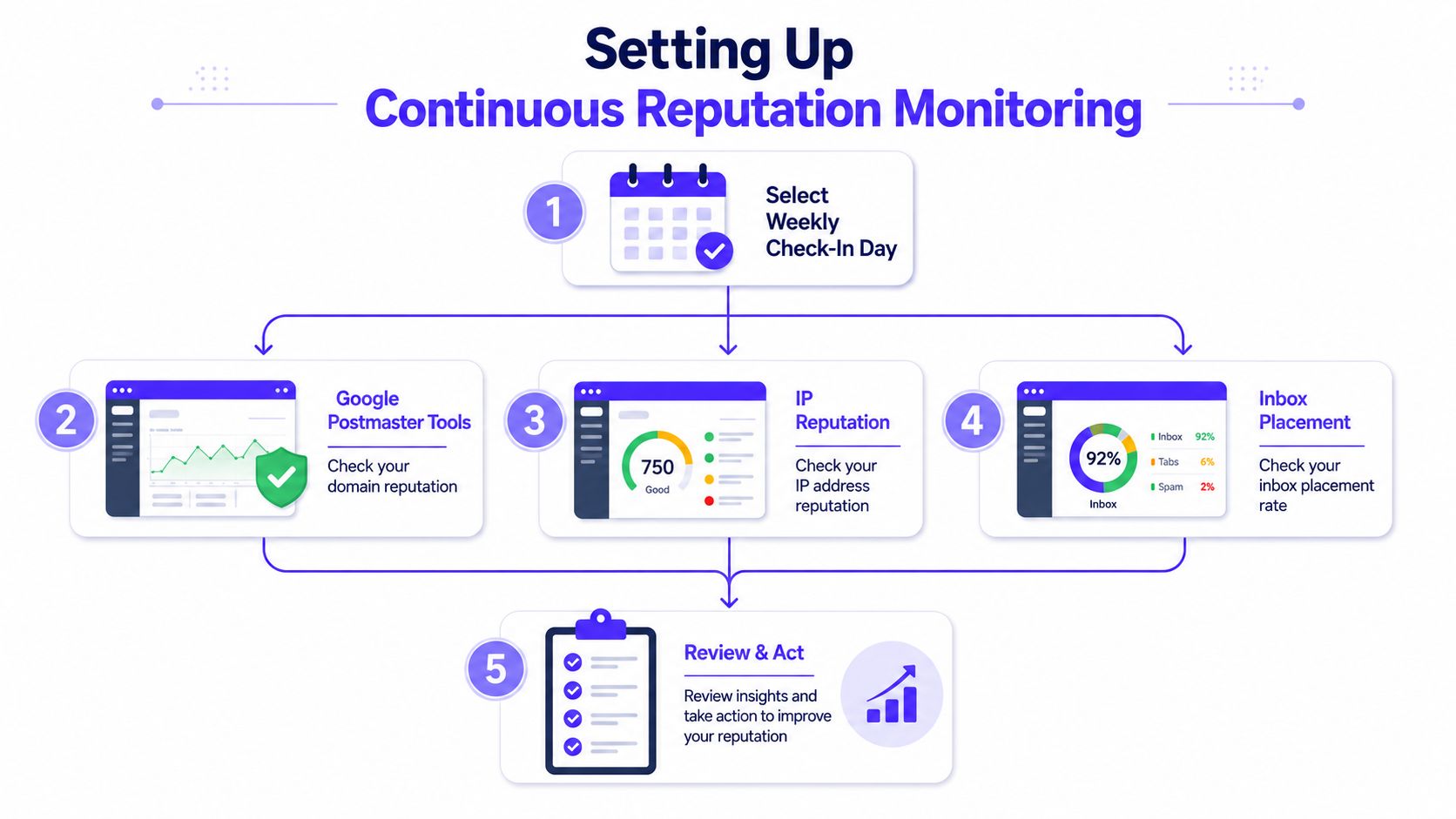
Build a weekly operating rhythm
Choose one weekly check-in day and collect the same signals in the same order:
- Review Gmail data. Check authenticated domain reputation, IP reputation, spam-rate movement, and authentication status in Google Postmaster Tools.
- Review Microsoft data. Inspect SNDS activity, filtering signals, and complaint information where available.
- Run a placement test. Send the same representative message to seed addresses at Gmail, Outlook, Yahoo, and other important providers.
- Check public lists. Look for domain or IP listings using a blacklist lookup.
- Compare snapshots. Record the current result beside the previous week's result and note what changed in sending volume, audience, content, or infrastructure.
A broader audit can be performed monthly, combining authentication diagnostics, seed testing, blocklist checks, and provider dashboards. Guidance on monitoring cadence recommends weekly Google Postmaster checks and monthly broader reviews, with symptom-based checks after complaints, blocks, or authentication failures (deliverability monitoring guidance).
Define alerts before trouble starts
Use alerts for meaningful operational changes, such as:
- Spam-rate movement. Treat a rise toward the Gmail warning threshold as urgent, not as a result to review later.
- Filtering deterioration. Flag SNDS data that trends in the wrong direction.
- Placement decline. Investigate a material drop in inbox placement, especially when concentrated at one provider.
- Blacklist activity. Open an incident when a relevant domain or IP appears on a public list.
- Authentication failure. Escalate changes in SPF, DKIM, or DMARC alignment before sending volume increases.
A shared dashboard should show the date, provider, domain, IP, placement result, complaint signal, bounce trend, authentication status, and action taken. Rolling 90-day records can make recurring patterns visible, but the monitoring record should preserve the actual observation date rather than relying on memory.
Teams that need a repeatable content and spam-risk review can add a spam checker to the same workflow. The tool doesn't replace provider data, but it can help isolate message-level issues when placement changes.
Reputation Damage Often Appears After Open Rates Fall
Reputation rarely collapses in one dramatic event. It usually weakens through smaller signals: more unread messages, added complaints, rising bounces, authentication drift, or a sending spike that no one investigates.
Teams often start a sender reputation check after a campaign underperforms. At that point, the domain may already carry negative history, an IP may be filtered by a major provider, and poor placement may be compared with outdated campaign averages.
Practical rule: Check reputation while performance still appears acceptable, not only after inbox placement has deteriorated.
Campaign reports emphasize opens, clicks, and conversions. Those measures describe downstream results. Provider-specific dashboards and placement tests can expose deterioration earlier, particularly when Gmail, Outlook, or Yahoo shows trouble while the blended campaign average remains stable.
No single result proves that a sender is healthy. A clean blacklist check does not confirm inbox delivery. A favorable aggregated IP score does not establish domain trust. Healthy Gmail data says little about Outlook or Yahoo. Each provider measures and exposes different parts of reputation, so the audit needs separate checks rather than one universal score.
Monitoring changes the response
Continuous observation gives the team time to reduce volume, isolate a segment, repair authentication, or pause a problematic stream before the issue spreads. It also leaves an evidence trail for separating a list problem from an infrastructure problem.
Waiting creates operational uncertainty. Without a regular baseline, the team cannot identify whether performance changed after a new campaign, provider adjustment, IP migration, list import, or compromised account. A provider-by-provider audit turns those questions into comparisons, helping the team act before open-rate decline becomes the first visible warning.
How to Repair a Damaged Sender Reputation
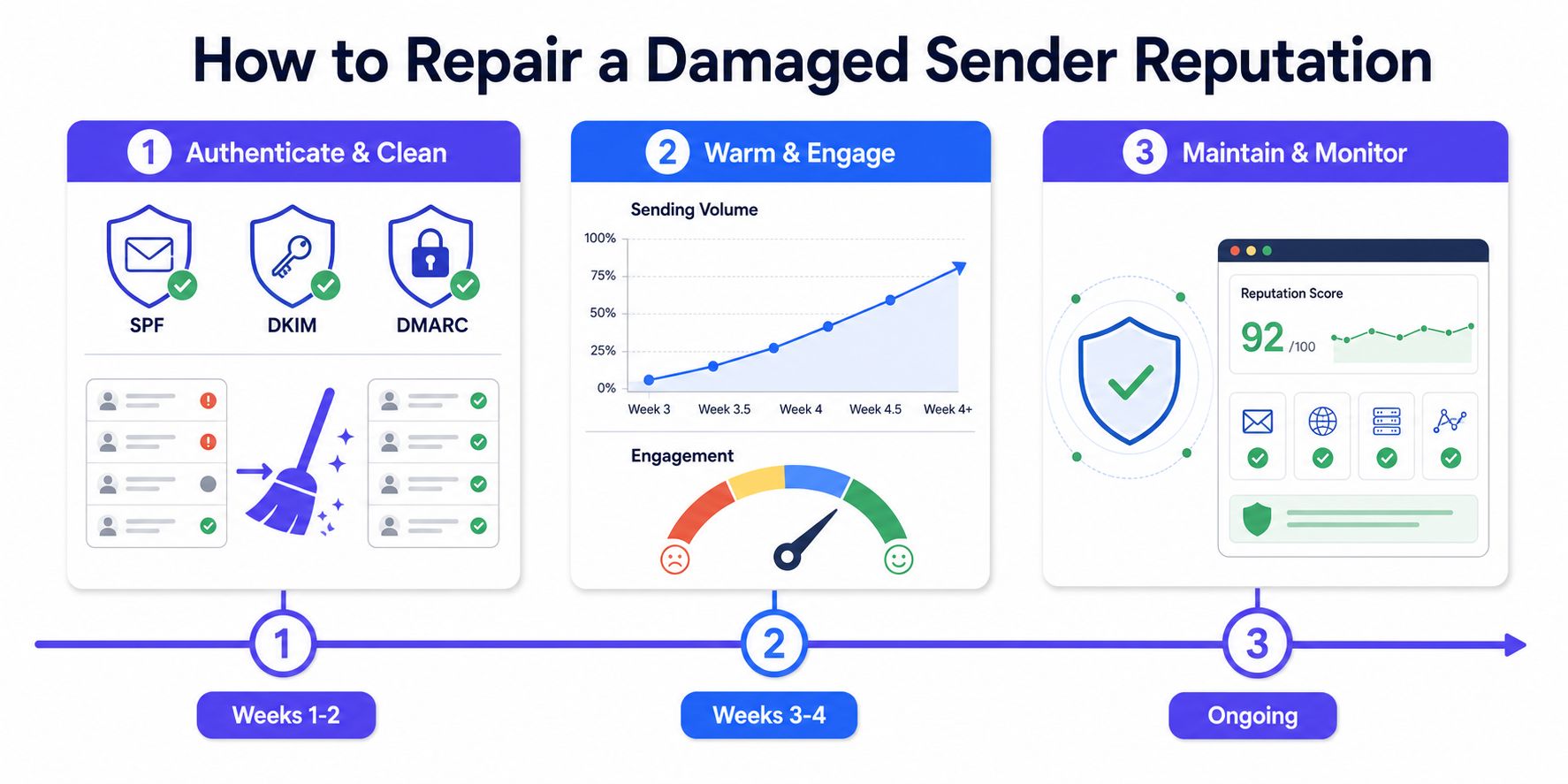
Recovery takes weeks, not days. Mailbox providers need repeated evidence of stable authentication, controlled volume, low complaints, and wanted engagement before trust improves.
Weeks one and two
Start by removing technical ambiguity and reducing the audience to the safest reachable segment.
- Authenticate the sending identity. Confirm SPF, DKIM, and DMARC alignment for every legitimate sending source.
- Clean inactive data. Review subscribers older than 180 days without engagement and sunset clearly unengaged segments.
- Protect the next send. Suppress invalid addresses, known complainers, risky imports, and recipients who have shown no meaningful interaction.
- Establish the baseline. Record Gmail Postmaster Tools, Microsoft SNDS, placement, bounce, deferral, and complaint signals before changing volume.
The purpose isn't to make the campaign smaller for its own sake. It is to stop sending the signals that caused the decline while the provider recalculates behavior.
Weeks three and four
Throttle volume by 50% and send only to recent openers or other clearly engaged recipients. Suppress anyone who hasn't engaged in 90 days, then inspect provider-level outcomes after each send cycle.
If spam rate climbs above 0.1%, pause the affected stream and investigate the audience, offer, acquisition source, and message expectation. The threshold is an operational warning point, not permission to continue until a provider blocks the domain.
Weeks five to eight
Ramp volume in controlled 10% to 20% increments, measuring after each cycle. A new sending IP should follow a separate warmup schedule, because IP history and domain history can recover at different speeds.
Run weekly placement tests across Gmail, Outlook, and Yahoo. Keep Postmaster Tools and SNDS open during the ramp, and stop increasing volume when complaint, bounce, deferral, or placement signals worsen.
Teams evaluating best email warmup tools should judge them by provider coverage, engagement quality, controls, authentication support, and monitoring, not by automated activity alone.
Buying a new domain can hide historical damage temporarily, but it doesn't repair the underlying list, complaint, authentication, or targeting problem. A new identity that repeats the same sending behavior will create the same risk again.
Frequently Asked Questions About Sender Reputation Checks
How do I check my email sender reputation for free?
Use Google Postmaster Tools for Gmail traffic and Microsoft SNDS for Outlook-family traffic. Add public blacklist checks and a representative seed test, then compare results by provider. No free tool offers one universal score.
What is a good sender score?
Sender Score is an aggregated reference, not a mailbox-provider verdict. A score above 90 is commonly viewed as strong, while one below 70 signals that the IP needs investigation. Gmail and Microsoft data still carry more weight for their own traffic.
How long does it take to rebuild sender reputation?
Recovery usually takes weeks, not days. Fix authentication, reduce the audience, send in controlled volumes, and maintain positive engagement while provider dashboards and placement tests confirm improvement.
What does Google Postmaster Tools show?
Google Postmaster Tools reports authenticated domain and IP reputation, spam-rate signals, and authentication details for qualifying Gmail traffic. It can show limited or no data when Gmail lacks enough authenticated traffic for the domain.
Does a blacklist-free result mean email will reach the inbox?
No. A clean blocklist result covers only one infrastructure signal. Providers may still filter mail because of complaints, bounces, weak engagement, authentication failures, or inconsistent volume.
Does Mailwarm need access to a private inbox?
No. Mailwarm does not require IMAP access or permission to read a private inbox. It supports reputation-building and deliverability monitoring through real inbox engagement, provider-level warmup, spam score monitoring, placement insights, and expert guidance.
Use the continuous monitoring workflow above and record Gmail, Outlook, and Yahoo results after each meaningful change. Their signals measure different parts of sender health, so a strong result with one provider cannot confirm inbox placement with another.
Mailwarm is a premium email warmup and deliverability platform that combines real engagement signals, provider-level warmup, spam score monitoring, inbox placement insights, authentication fix tools, bounce prevention, and expert deliverability guidance. Visit Mailwarm to build a continuous sender reputation check process focused on inbox placement rather than automated warmup activity.