
The HTML vs plain text emails debate is usually framed as if one format always wins. That's the wrong question. The key decision is whether the message needs visual structure and tracking, or whether it needs the highest chance of feeling personal, rendering cleanly, and inviting a reply.
Teams don't need a universal winner. They need the right format for the sender, the audience, and the job the email has to do. Once that lens is used, the trade-offs become much clearer.
| Factor | HTML Email | Plain Text Email |
|---|---|---|
| Visual formatting | Supports branding, layouts, images, buttons, and structured design | No images, buttons, or rich styling, just text |
| Tracking | Supports tracking pixels and richer measurement | Limited measurement, often less suited to open-rate-heavy reporting |
| Rendering | Depends on client support and coding quality | Consistent and simple across clients |
| Personal feel | Can look promotional or polished | Often feels more direct and human |
| Best use case | Newsletters, product launches, branded campaigns | Cold outreach, personal follow-ups, direct reply-driven messaging |
The Format Debate Is Not as Simple as It Looks
The usual advice says plain text is better for deliverability and HTML is better for branding. That advice is incomplete. Sender reputation, authentication, list quality, and content quality still do far more work than the file format alone.
The better question is whether the campaign depends on measurable behavior or human-style response. If a team wants clicks, visual hierarchy, and a polished brand feel, HTML has a place. If the goal is to start a conversation, plain text often fits better because it looks less promotional and asks less of the inbox.
Why the binary framing keeps failing
A lot of advice treats the inbox like a design contest. In practice, mailbox providers care about signals, consistency, and trust. A well-built HTML message can be appropriate, and a badly executed plain text blast can still look like bulk mail.
Practical rule: format should follow the campaign, not the other way around.
The reason this debate keeps coming back is that different teams measure success differently. Sales teams care about replies. Marketing teams care about clicks and content presentation. Recruiters often care about clarity and speed. That means the same email format can succeed for one sender and underperform for another.
The discussion also gets distorted when people ignore how email clients behave. A message that looks simple in the sender's editor can still be processed as marketing mail if it carries bulk-sending patterns, multiple links, or weak trust signals. So the decision is not “HTML or plain text,” it's whether the message structure matches the intent of the send.
What HTML and Plain Text Emails Actually Are
A plain text email contains only text. It has no images, no buttons, no styled fonts, and no rich media. A HTML email uses code to add structure, design, and interactive elements such as buttons, columns, images, and tracking-capable links, as described by Mailchimp's technical overview of email formats and Campaign Monitor's format comparison.
That difference is bigger than appearance. It changes what the recipient's client has to render, what the sender can include, and how the message can be measured. A plain text message is the stripped-down version. An HTML email is closer to a mini web page in the inbox.
HTML vs Plain Text Email Capabilities
| Feature | HTML Email | Plain Text Email |
|---|---|---|
| Formatting options | Fonts, colors, layout blocks, tables, buttons | No styled formatting, just line breaks and text |
| Media support | Images, videos, embedded visual elements | No images or embedded media |
| Link handling | Links can be styled as buttons or anchor text | Links are usually shown as raw URLs |
| Tracking pixels | Supported | Not supported in the same way |
| Client rendering | Depends on HTML support and code quality | Renders consistently in almost every client |
The technical gap matters because it shapes the sender's options. HTML can support visual branding and calls to action. Plain text cannot. That does not make HTML superior by default, it just means HTML is built for a different job.
For many teams, the cleanest way to think about it is this. Plain text is the message itself. HTML is the message plus design. Once that's clear, the performance data becomes easier to interpret.
What the Data Shows About Engagement and Deliverability
Benchmarks have repeatedly shown that plain text can outperform HTML on core response metrics. Stripo's research summary reports that readers spend 2.5 times longer reading HTML emails than plain text counterparts, but the same dataset also found plain text emails delivered 42% higher open rates on average and 21% lower click-through rates for HTML templates versus plain text, with plain text producing 60% of conversions among existing customers and 49% among newcomers in one set of studies (Stripo research summary).
That pattern is not isolated. A large 2022 Litmus analysis covering more than 4 billion emails found plain text had a 21% higher open rate, a 17% higher click rate, and an 8% higher click-to-open rate than HTML, with open rates of 24.3% for plain text versus 20.6% for simple HTML (Marketing Scoop summary of the Litmus analysis). Benchmark Email also cites 21% higher click-to-open rates and 17% higher click-through rates for plain text versus HTML, which lines up with the broader pattern (Benchmark Email benchmark summary).
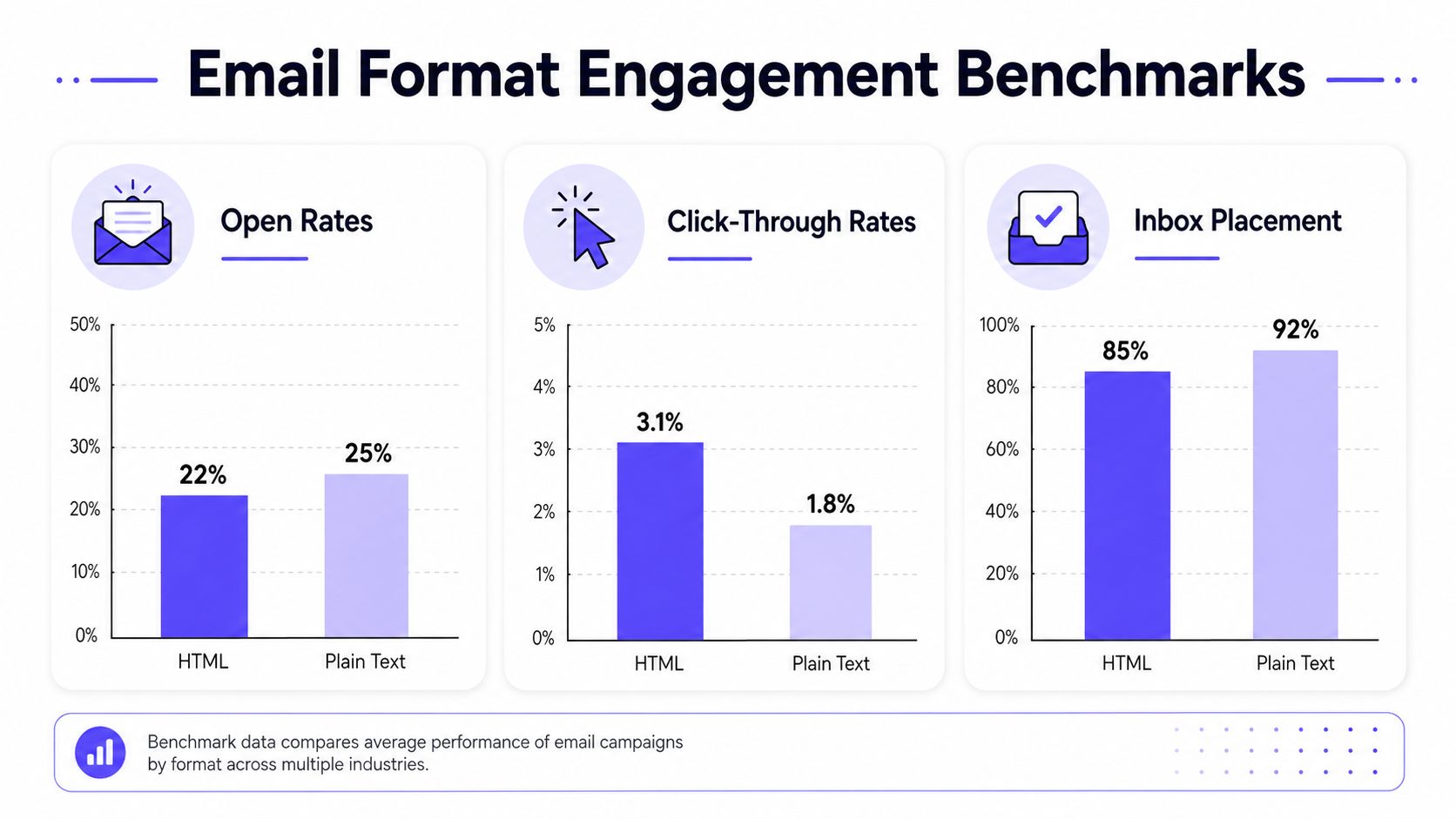
The important takeaway is not that plain text always wins. It's that plain text often wins on the metrics that matter most to outbound teams. HTML still has value when the sender needs design, structure, or richer conversion paths. But the performance trade-off is real, and it's been visible across large datasets for years.
For inbox placement strategy, the format alone still isn't the whole story. A useful benchmark summary from Mailwarm's inbox placement guidance on cold email inbox placement benchmarks and best practices reinforces the point that list quality, trust signals, and message structure have to be considered together.
Accessibility and Privacy Changes That Shift the Balance
Modern HTML email still creates a real accessibility problem, even before you get to deliverability. Stripo's 2026 research report says that across 443,585 tested HTML emails, only 0.11% passed WCAG accessibility checks, while the same report still found plain text outperforming HTML by up to 42% in opens and 21% in click-to-open rate. That combination matters because format choice affects usability and engagement, not just visual polish.
Accessibility is a deliverability issue too
If an email is hard to read, hard to render, or overloaded with design, recipients often ignore it. Some users also cannot access the content cleanly at all. Plain text avoids many of those barriers by default, which is why it remains a safer baseline for simple outreach.
Privacy changes have also reduced the value of tracking-heavy HTML. Open-rate measurement is less reliable in many inboxes, so teams that used HTML mainly for open tracking now get weaker feedback from the same send. That shifts more weight toward clicks, replies, and direct conversation, especially for outbound sales teams.
Open-rate-heavy reporting is less useful when the client side does not reliably show the full picture.
That is one reason outbound teams increasingly choose plain text for reply-driven campaigns, while HTML keeps its place in branded communication. For Gmail-specific behavior, avoiding the Gmail promotion tab often depends more on message patterns, links, and formatting signals than on design alone. If the campaign depends on engagement metrics that still hold up under modern privacy constraints, plain text is often the more honest choice.
For teams that care about inbox visibility, the question is not whether HTML can look better. It is whether the sender can still trust the signals that HTML is supposed to provide.
When to Use Each Format Based on Your Campaign Type
Plain text fits best when the message should feel like a direct note from one person to another. That usually includes cold outreach, sales prospecting, recruiter follow-ups, and personal check-ins. In those cases, simplicity supports the purpose of the send.
HTML fits best when the message needs visual hierarchy, brand recognition, or stronger click behavior. Newsletters, product announcements, e-commerce updates, and many transactional messages benefit from structured layout and clear buttons. The recipient expects more than a plain note in those contexts.
A practical format guide by sender type
- B2B sales teams: Plain text usually works better for first-touch outreach and follow-ups because it feels conversational and keeps the focus on the reply.
- Marketing agencies: HTML is often the better fit for newsletters, campaigns, and client-facing brand communication where presentation matters.
- E-commerce brands: HTML is usually stronger for promotions, product launches, and order-related updates that need clear visual structure.
- Recruitment firms: Plain text often performs better for direct candidate outreach, while HTML can help with branded career updates or newsletters.
A useful rule is to match format to audience expectation. If the recipient expects a personal message, plain text lowers friction. If the recipient expects a designed message, HTML meets that expectation without surprise.
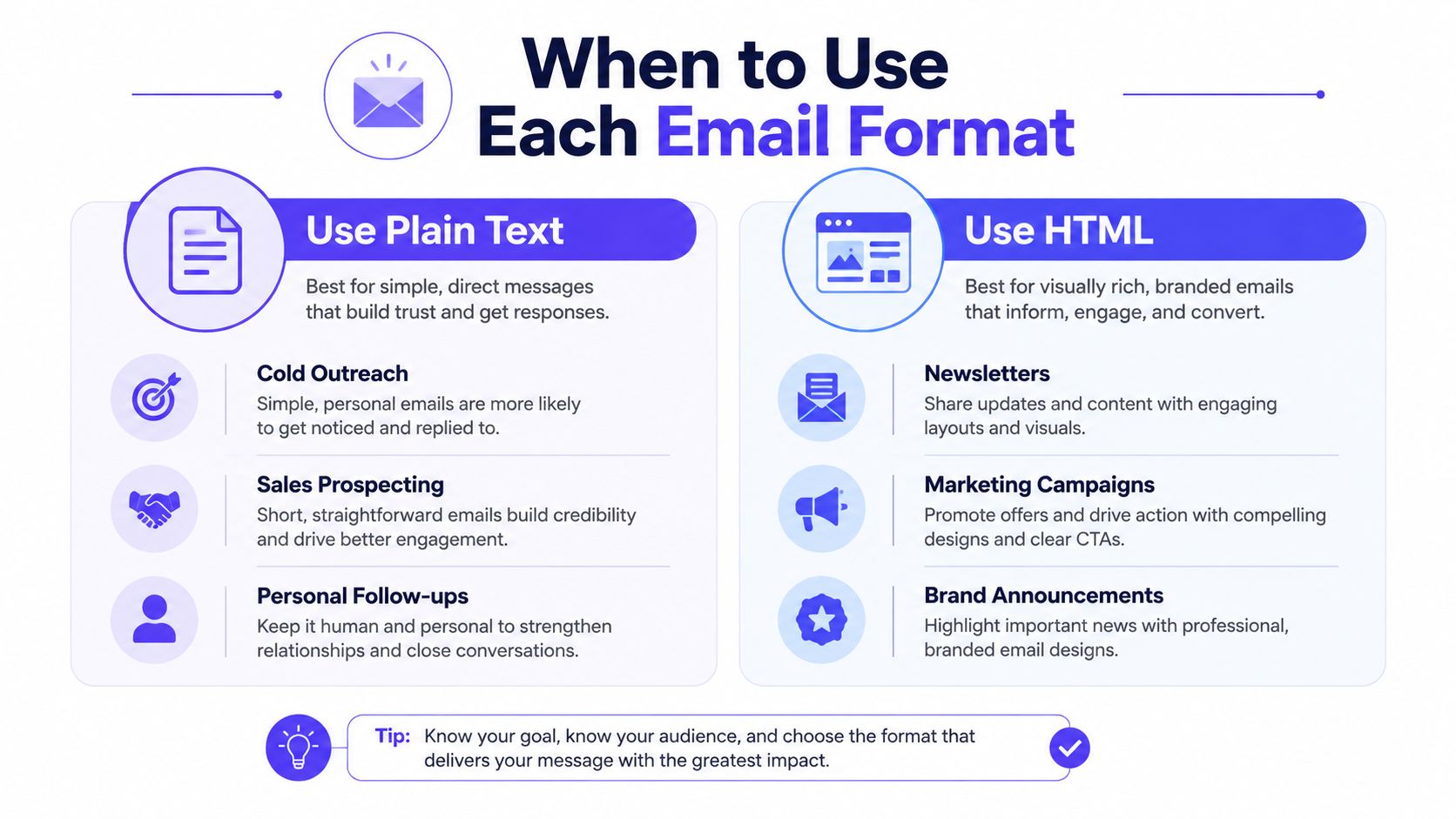
The smartest teams often keep both in their toolkit. One format is not a replacement for the other. The right choice depends on whether the message is meant to persuade, inform, or start a conversation.
Setting Up Multipart Emails for Maximum Compatibility
The safest setup is usually multipart/alternative, which sends both an HTML version and a plain-text fallback in the same message. That approach gives mailbox clients the option to display the version they handle best, and it helps cover accessibility and compatibility needs at the same time. It's the closest thing to a practical default for modern sending.
The setup still depends on a clean foundation. SPF, DKIM, DMARC, and proper MIME structure matter regardless of whether the visible version is HTML or plain text. If those elements are weak, a beautiful HTML message won't save the campaign, and a plain text message won't magically fix reputation problems either.
What to check before sending
- Build both versions: Create a readable plain text body and a properly coded HTML version.
- Keep the plain text useful: Don't treat it like an afterthought. It should stand on its own.
- Match the intent: Make sure the HTML version reflects the same core message, not a different pitch.
- Validate authentication: Make sure the sending infrastructure is aligned before the campaign goes live.
- Test on major clients: Gmail, Outlook, and mobile apps can surface different rendering issues.
For teams sending richer content, a visual preview can help before launch. The GIF preview for email engagement resource is useful when planning motion or embedded media in HTML-based campaigns, especially when presentation needs to stay lightweight.
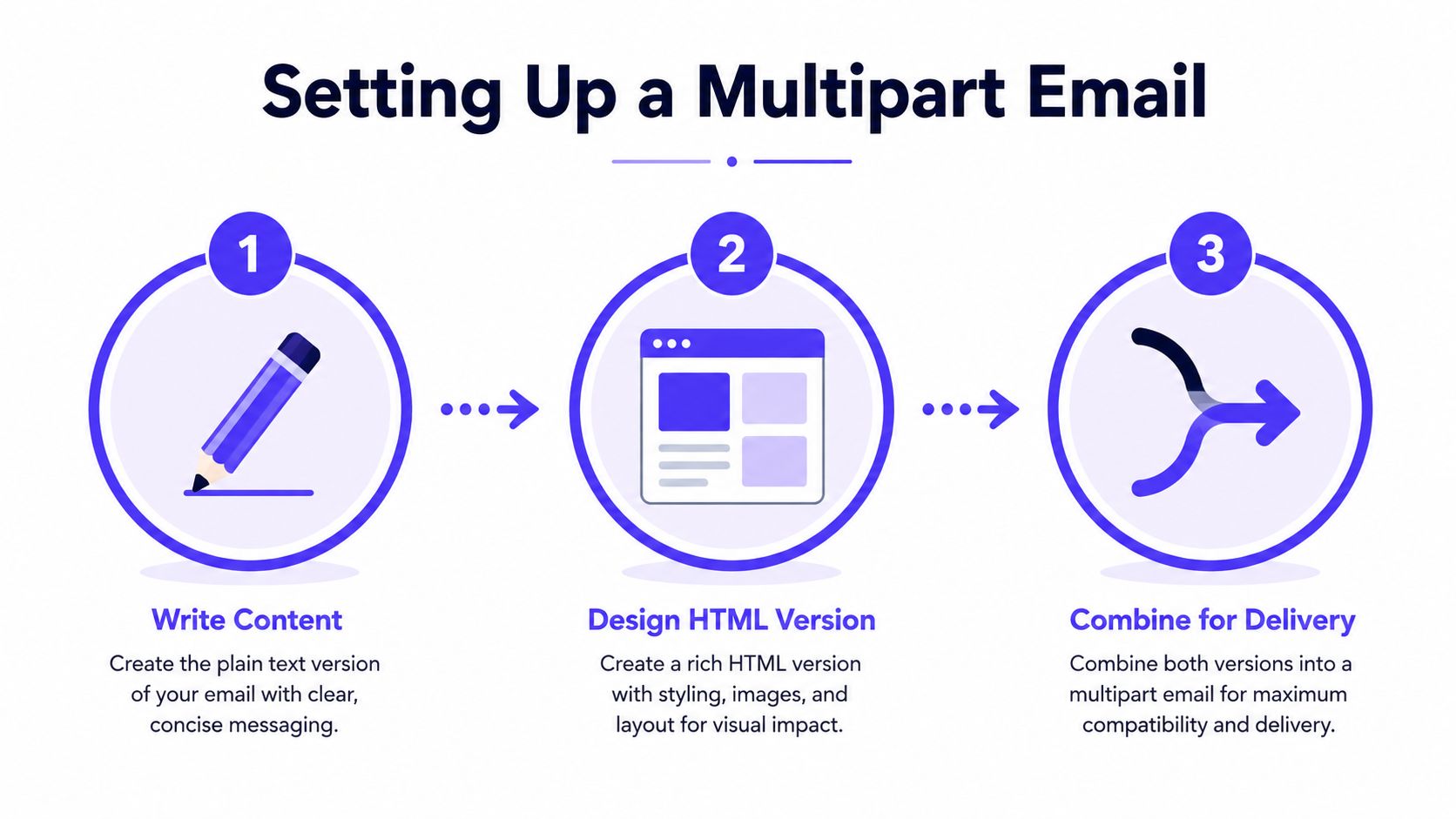
Clean authentication and consistent structure usually do more for inbox placement than format aesthetics. Multipart sending doesn't solve poor reputation, but it does make the message safer across clients and easier to support at scale. That's why serious senders treat format choice as one layer, not the entire strategy.
How Warmup and Deliverability Tools Affect Format Performance
Format choice only matters after the sender's reputation is stable. A plain text email from a damaged domain can still miss the inbox, and a polished HTML campaign from a trusted sender can still perform well. That's why warmup, monitoring, and reputation protection sit underneath the format debate.
Mailwarm is a premium email warmup and deliverability platform built for teams that care about real inbox placement, not just automated warmup activity. It uses real inbox engagement, provider-level warmup, spam score monitoring, and inbox placement insights to help protect sender reputation, and it does so without requiring IMAP access or permission to read a private inbox. For teams comparing infrastructure options, the product overview on Mailwarm's email warmup tool page is the clearest place to start.
The format conversation changes once deliverability is being managed properly. Then the sender can test plain text against HTML with fewer confounding variables. That makes the result more trustworthy and the decision more useful.
Mailwarm's premium positioning also matters because reputation work isn't just volume. It includes expert guidance, authentication fix tools, bounce prevention, and ongoing inbox placement analysis. In practice, that means the sender is not choosing between style and substance, but between a tool that only simulates activity and one that supports the full deliverability stack.
Your Action Plan for Testing and Choosing the Right Format
The right answer is audience-specific, so the final decision should come from testing. Run a clean A/B test with one variable changed, the format. Keep the subject line, offer, sender name, and send window consistent so the result isn't distorted.
Track the metric that matches the campaign goal. For cold outreach, reply rate matters most. For newsletters and product campaigns, clicks and downstream conversions matter more. Open rate can still be useful, but it's a weaker signal than it used to be.
A simple decision framework
- Define the goal. Decide whether the email is meant to start a reply, earn a click, or present a brand.
- Pick the format that fits the job. Use plain text for direct outreach and HTML for designed marketing sends.
- Test both on a segment. Send each version to a comparable audience slice.
- Read the result by behavior, not preference. Use the format that gets the response you need.
The outcome should be treated as a playbook, not a permanent law. A sales team may find plain text wins for outbound but HTML wins for customer updates. A brand team may keep HTML for campaigns and plain text for founder-led follow-ups. That's normal, and it's usually the right way to send.
If email is part of the growth engine, Mailwarm helps teams build sender reputation, monitor inbox placement, and reduce spam risk with expert-guided warmup. It's a premium email warmup and deliverability platform for senders who want real inbox engagement, not just busywork, and it fits naturally into a strategy built around HTML vs plain text emails. Visit Mailwarm to see how it supports cleaner testing, stronger reputation, and better inbox outcomes.