
Gmail’s Tabs in 2025: What Really Determines Placement
Gmail sorts messages based on intent and behavior, not just a set of keywords. Placement in the Promotions tab isn’t a punishment, it reflects messaging that follows marketing-like patterns. In 2025, Gmail and other email providers expect technical authentication, minimal abuse signals, and a simple way for users to unsubscribe. Meeting these technical criteria is just the beginning. Achieving Primary tab placement requires consistent, human-like sending behaviors over time.
There’s no shortcut or hack to force emails into the Primary tab. Instead, you must align your technical infrastructure, gradually warm up your domain, and send emails that resemble genuine conversations. This transition occurs over weeks, not days, and depends on sustained best practices.
Signals That Often Lead to Promotion Tab Placement
- Large, simultaneous email blasts from the same domain or IP address.
- Email headers that identify messages as bulk, including list or campaign identifiers.
- Mismatched sending domains: situations where the From domain differs from return-path or tracking domains.
- Low reply rates across Gmail recipients.
- New or previously inactive domains that suddenly increase sending volume.
- Frequently emailing inactive or mistyped addresses.
Primary placement is built through trust, technical alignment, and messaging patterns that mimic genuine conversations.
Start with a Solid Technical Foundation
Your email authentication must be accurate and aligned. Gmail evaluates the alignment between your visible From domain, the DKIM signing domain, and the envelope return-path. Use strong cryptographic keys and consistent security practices. Make sure reverse DNS entries and your HELO hostnames match up with your mail server identity.
- SPF: Publish a single, uncluttered record and keep within the 10-lookup limit.
- DKIM: Sign messages with 2048-bit keys and rotate keys regularly to maintain security.
- DMARC: Align DMARC policies to your From domain and move from
p=noneto an enforcement policy after testing. - Return-Path: Use a branded bounce domain that you control.
- rDNS / FCrDNS: Ensure forward and reverse DNS are consistent with your mail server’s hostname.
- TLS: Use modern cryptographic ciphers and present a valid, up-to-date certificate chain.
Example DNS Snippets
SPF: example.com. TXT v=spf1 include:mail.example.com -all
DKIM: selector1._domainkey.example.com. TXT v=DKIM1; k=rsa; p=MIIBIjANBgkqh...
DMARC: _dmarc.example.com. TXT v=DMARC1; p=quarantine; rua=mailto:dmarc@example.com; adkim=s; aspf=s
If you rely on a sending platform, ensure your tracking links and bounce domains are branded under your own domain. Consistent alignment reduces mixed signals that might suggest mass marketing or spam.
Properly Warm Up Your Inbox and Domain
Gmail carefully monitors recipient interactions with your emails. For new or dormant domains, you need gradual and positive engagement to build trust. Start by sending emails in small batches, invite genuine replies, and let conversations develop naturally. Only increase your email volume once you see stable inbox delivery.
Experienced senders can use automated warm-up processes to mimic natural inbox interactions and speed up reputation building. This can include orchestrated actions such as opening emails, replying, and moving messages out of the spam folder within a controlled network of accounts. For step-by-step instructions, refer to our detailed guide on mastering email warm-up in 2025.
- Begin with low daily sending limits, focusing only on Gmail addresses.
- Favor personalized, one-to-one messages that encourage replies.
- Gradually expand your recipients and include other providers as your reputation grows.
- Pause scaling efforts if you see sudden increases in complaints or soft bounces.
Emulate Real Conversations in Your Sending Patterns
Before sending, verify email addresses through an Email Verification Tool.
Emails that land in the Primary tab typically read as personal correspondence. Wherever possible, mirror this approach while remaining compliant. Address individual recipients, avoid “no-reply” sender addresses, and continue existing threads with concise, relevant follow-ups. Allow for natural pauses between communications.
- Use a real person’s name in the From field and ensure the reply-to address is monitored.
- Set conservative daily sending limits during your initial weeks.
- Avoid including large attachments until your domain and IP reputation are well established.
- Ensure all links consistently use your own branded domain.
Stay Aligned with 2025 Sender Requirements
The bulk sender rules rolled out in 2024 remain mission-critical for 2025. Always authenticate with SPF, DKIM, and DMARC. For any promotional or bulk traffic, include a one-click List-Unsubscribe header. Maintain a low complaint rate by quickly removing problematic addresses from your list. These steps improve your reputation and help shift your emails out of the Promotions tab over time.
Retain the List-Unsubscribe header despite the temptation to remove it in pursuit of Primary tab placement. Removing required headers such as this one can damage trust with users and potentially lead to an increase in complaints.
Make Gmail Postmaster Tools Your Deliverability Dashboard
Verify your domain with Gmail Postmaster Tools and regularly monitor your sender reputation, spam complaint rates, authentication pass rates, and delivery errors. Treat this data as your source of truth for ongoing sender health checks.
- If reputation drops, slow email volume and enhance engagement by crafting emails that merit a response.
- If authentication rates drop, audit your Domain Name System (DNS) settings and rotate your DomainKeys Identified Mail (DKIM) keys.
- If you experience delivery errors, promptly review your bounce logs and fix underlying issues.
Pair insights from Postmaster Tools with seed testing both tabs. Monitor inbox placement trends across multiple sends to see patterns over time, not just on a single campaign.
Common Pitfalls That Keep Emails in Promotions
- Rapid scaling: Suddenly ramping up from zero to thousands of sends in a short period.
- Mismatched identity: “From” address, DKIM, and return-path on different domains.
- Unbranded tracking: Using third-party tracking links not aligned with your brand domain.
- Long periods of silence: Gaps with no activity, followed by immediate high-volume campaigns.
- Missing one-click unsubscribe: This is now mandatory for promotional sends in 2025.
- Shared IP pitfalls: Poor reputation from senders sharing your infrastructure can negatively impact you.
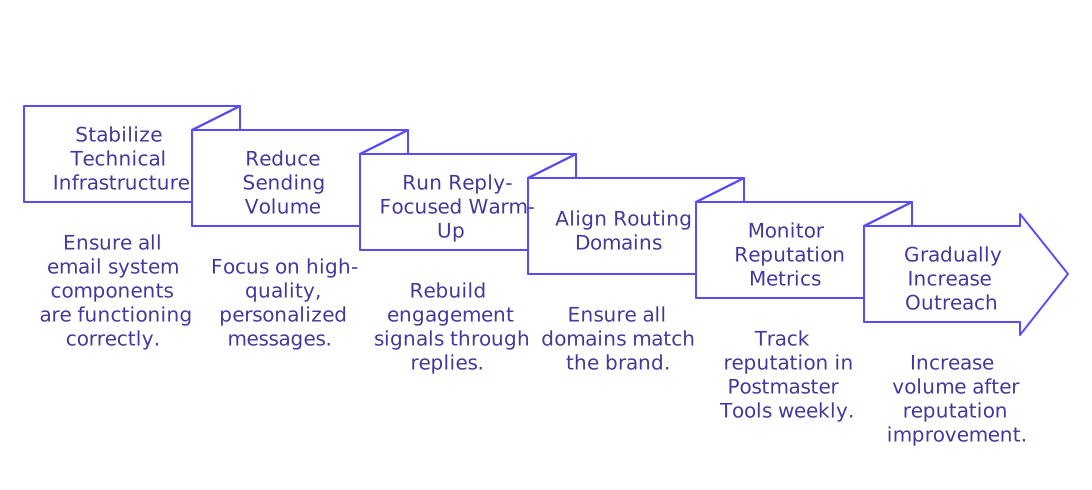
Steps to Recover If You’re Already in Promotions
- Stabilize your technical infrastructure by ensuring all components of your email system (SPF, DKIM, DMARC, rDNS, etc.) are functioning as intended.
- Reduce sending volume for two to three weeks, focusing on higher-quality, more personalized messages.
- Run a reply-focused warm-up phase to rebuild positive engagement signals.
- Align routing so your From, return-path, and tracking domains all match your brand.
- Monitor your reputation metrics in Postmaster Tools weekly and wait for improvement before ramping up volume.
Don't switch domains at the first sign of trouble. Fix core issues on your existing domain, then patiently and gradually increase your outreach.
Primary Tab Checklist for 2025
- Ensure SPF, DKIM (2048‑bit), and DMARC records are aligned and set to enforce.
- Use branded return-path and tracking domains aligned with your sending address.
- Keep rDNS and HELO values consistent with your mail server.
- Warm up with gradual sending and real, user-driven replies.
- Use an Email Validator to make sure your emails don't bounce.
- Send from a real person with an active reply-to address.
- Include a one-click List-Unsubscribe link for any bulk or promotional traffic.
- Send at a pace that matches recipient engagement and avoids sudden volume increases.
- Review Gmail Postmaster Tools regularly to monitor health and reputation.
Follow this checklist closely, and Primary tab placement will come as a result of sustained trust and consistency. The process takes time, but the gains are durable.
Final Word
Gmail’s tab system in 2025 rewards patience, technical alignment, and authentic conversation patterns. Keep your DNS records aligned, warm up your sending behavior purposefully, and always send like a real person, not like a robot. Measure every adjustment and give changes time to take effect. This measured approach is what consistently wins the Primary tab.
Need expert support? If you’d like a deliverability audit or detailed warm-up guidance, reach out to the specialists at mailadept. Get a professional review and clear recommendations for your setup.
FAQ
What determines if an email appears in Gmail's Primary tab?
Primary tab placement hinges on trust, consistent sender behavior, and alignment with technical standards, not just keywords. Forget tricks; email algorithms detect genuine intent through interaction patterns and engagement metrics over time.
Why do my emails keep landing in the Promotions tab?
Emails land in Promotions due to patterns akin to mass marketing, like bulk sends or mismatched domains. Emulate conversational email behaviors and avoid actions that scream 'spammy' to shift placement.
How important is email authentication in 2025?
Email authentication is non-negotiable; it's your entry ticket to delivering credibility. Without robust SPF, DKIM, and DMARC records, expect to lose traction and trust, finding emails lost in obscurity.
Can new domains accelerate their entry into the Primary tab?
New domains face a rigorous trust-building curve; rushing invites penalties. Gradually warm up your domain, focus on real engagement, and volume control, no shortcuts here, only disciplined persistence works.
Is List-Unsubscribe still mandatory for promotional emails in 2025?
Absolutely; skipping it damages trust and sparks complaints. This small gesture preserves your reputation and compliance isn't just courteous, it's mandatory to escape the Promotions dungeon.
What if my current domain struggles with deliverability?
Abandoning your domain is an amateur move; fix what's broken instead. Stabilize your technical setup and rebuild genuine engagement, using Postmaster Tools as your compass, not a new domain.
How can email engagement positively impact placement?
Recipient engagement mimics human interaction, vital for cracking the Primary tab. Low reply rates flag your emails as irrelevant, so foster replies with authentic content to boost your chances.
How does Gmail Postmaster Tools assist in improving sender reputation?
Postmaster Tools are your surveillance system for sender health, offering insights into reputation and delivery issues. Neglecting them is like flying blind; proactive use translates data into improvement strategies.
Is it risky to rely on third-party tracking domains?
Using unbranded or third-party domains is a red flag; it signals mixed identity and can bite back. Align with your own brand domain to avoid complexity and maintain clarity.