
Inbox Placement Rate for Cold Emails Explained and Why It Matters in 2026
Inbox placement rate measures how many delivered emails actually reach a non-spam folder, such as Primary, Promotions, or Updates, rather than landing in the spam or junk folder. Unlike delivery rate, which only indicates acceptance by the receiving server, inbox placement reflects the true visibility of your email based on mailbox filtering decisions. For cold outreach, this metric is crucial for sustaining a healthy pipeline and for accurately gauging campaign effectiveness.
As we move into 2026, mailbox providers have implemented even stricter filters for cold email programs. Key factors now include domain reputation, rigorous authentication, and predictable sender behavior. Even small missteps can divert a significant share of messages to spam. That's why precise terminology and definitions are essential to minimize confusion when evaluating results within your team.
Inbox Placement Rate Benchmarks for Cold Emails in 2026
Benchmarks for inbox placement rate differ based on provider mix, content style, and technical setup. Treat these figures as broad guidelines for setting goals and identifying issues, not strict guarantees.
- New domains in ramp‑up: Expect 30–60% inbox placement during the initial weeks as the domain is being established.
- Steady programs with a well-executed warm-up phase: A practical target is 80–92% inbox placement.
- Scaled sending after a misstep: 50–75% is typical until domain reputation is restored.
These numbers reflect non-spam delivery and include tabs like Gmail's Promotions or Updates, but exclude entirely blocked messages and hard bounces. Your actual rates will fluctuate by provider and over time. Focus on the trends and progression over time rather than individual emailing attempts.
Think trendlines, not snapshots. Day-to-day noise can hide underlying changes in reputation.
How to Measure Inbox Placement Rate for Cold Emails Without Guesswork
Don't rely solely on open or reply rates to judge deliverability. Establish a systematic, repeatable method to measure inbox placement accurately and consistently:
- Create a seed panel. Include addresses from Gmail, Outlook, Yahoo, Apple, and various corporate domains. Distribute these seeds across different inbox tabs and folders.
- Test before every campaign. Send a seed test using the same domain, IP, and content as your real campaigns.
- Record folder outcomes. Log whether each seed lands in Primary, Promotions, Updates, or Spam, and track this data in a shared sheet.
- Use provider dashboards. Consult tools like Gmail Postmaster Tools and Microsoft SNDS when possible for additional insights.
- Classify bounces quickly. Distinguish policy blocks from invalid addresses to inform next steps. For more detailed instruction, see why cold emails bounce under the 2026 delivery rules.
- Re-test after changes. Repeat the seed tests whenever you modify DNS settings, sending volume, or email templates.
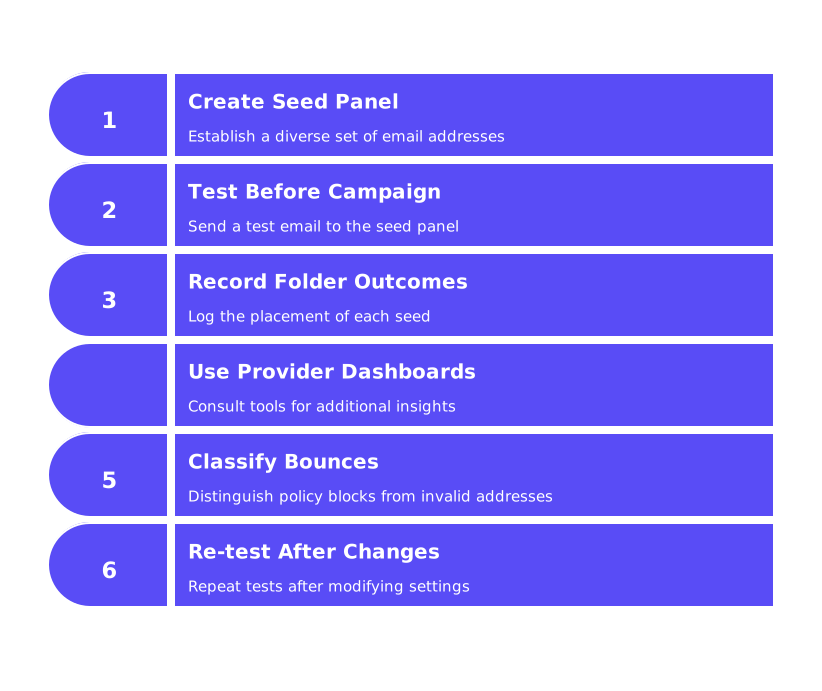
Using this systematic approach of seed tests, provider dashboards, and data recording reveals shifts in inbox placement early. It also aligns teams on the same definitions, allowing everyone, from sales to operations, to reference the same source of truth. This reduces miscommunication and accelerates problem solving.
Technical Setup Best Practices That Support Inbox Placement Rate for Cold Emails
To earn trust from mailbox providers, a consistent and transparent sender identity is essential. Set up technical authentication protocols first and maintain them rigorously:
- Authenticate fully. Implement SPF and DKIM. Make sure DMARC is aligned with your visible From domain.
- Match identities. Ensure EHLO/HELO, reverse DNS, and sending hostnames are consistent to prevent distrust.
- Use clean DNS. Maintain accurate MX and A records, and enable TLS. Consider MTA-STS and TLS-RPT for heightened transport security.
- Separate cold outreach. Use a dedicated subdomain for cold emails, keeping them apart from marketing and transactional messages.
- Age domains wisely. Avoid heavy sending from new domains, allow an adequate runway for domain aging.
- Monitor reputation. Check blocklists and sender reputation sources regularly, and resolve any issues before ramping up volume.
Technical discipline removes common causes for filtering and, when paired with careful sending practices, promotes consistent inbox placement.
Email Warm Up Best Practices That Raise Inbox Placement Rate for Cold Emails
The warm-up process helps reduce the likelihood of your emails being flagged by spam filters by establishing your sender identity as reliable. A gradual, positive track record before large-scale sending is essential to avoid early deliverability issues.
Automated warm-up services, leveraging networks of 50,000+ real mailboxes, can interact with your emails by opening, replying, rescuing them from spam, and marking them important. These interactions strengthen your reputation signals, even though the emails themselves serve a technical, not marketing, purpose.
Follow a reliable warm-up protocol:
- Begin with low daily volumes and increase gradually according to a set schedule.
- Encourage a mix of positive actions, opens, replies, and moves from spam to inbox.
- Continue the warm-up process while live campaigns are active; do not stop after just the first week.
- Extend the warm-up duration after any deliverability incident to help recovery.
Explore our in-depth guidance on the subject in the full guide to email warm up in 2026. If scaling is your goal, see examples of email warmup schedules for 1,000 daily sends to keep deliverability high as you expand.
As of February 2026, Mailwarm became an advanced email warmup software, adding features such as centralized multi-account management, comprehensive email reputation monitoring, cross-provider warm-up capabilities, and granular spam score tracking per provider, warmup your content, optimized for scalable performance.
Sending Behavior and Reputation Hygiene That Keep Inbox Placement Rate for Cold Emails High
Mailbox providers analyze sender patterns and historical behavior more than just message content. Maintain a steady, predictable approach for best results.
- Ramp volume slowly. Gradually increase the number of emails sent in planned increments.
- Stop spikes. Avoid sudden large increases, especially after weekends or major announcements.
- Validate addresses. Regularly remove invalid emails to minimize hard bounces.
- Reduce complaints. Use clear opt-out instructions on every first contact.
- Be cautious with links. Avoid link shorteners and minimize the use of attachments.
- Use consistent identities. Keep sender names and signatures stable throughout your campaigns.
- Respect provider feedback. Respond promptly to rate limits or temporary failures by pausing or reducing sends.
- Keep warm up active. Maintain ongoing background warm-up activity, especially during high sending periods.
Maintaining good email practices builds upon each other, reinforcing your reputation with each successful campaign. The more you invest in positive patterns, the more resilient your sender reputation becomes.
Troubleshooting a Drop in Inbox Placement Rate for Cold Emails
If you notice a decline in inbox placement, avoid knee-jerk content changes. Instead, follow a structured troubleshooting checklist to target the underlying causes:
- Verify authentication. After any DNS change, confirm that SPF, DKIM, and DMARC are properly aligned.
- Check reputation signals. Monitor spam rates in Gmail Postmaster Tools and be on the lookout for Microsoft throttling.
- Inspect bounce codes. Separate policy- or reputation-based blocks from address issues and act accordingly.
- Reduce volume. Lower your send counts until spam indicators improve, maintaining a background warm-up in parallel.
- Stabilize cadence. Switch to smaller, consistent batches for several days to regain stability.
- Consider domain rotation. If reputation damage is significant, transition future sends to a warm, well-prepared subdomain.
- Re-measure with seeds. Document improvements by running fresh seed panel tests to gauge recovery.
Document every step and timestamp your actions. Over time, you’ll discover which interventions have the most impact and speed up resolution of future incidents.
Inbox Placement Rate for Cold Emails: Key Takeaways and Next Steps
- Use seed tests and provider dashboards for accurate inbox placement measurement.
- Maintain strong technical alignment and regularly review your settings.
- Warm up every new domain and mailbox before launching real campaigns.
- Scale your sending gradually, sudden spikes often trigger spam filtering.
- Address drops in the inbox placement rate with a methodical, repeatable checklist.
Cold outreach succeeds when you respect filters and expand cautiously. If you need expert review or troubleshooting specific to your tech stack, consult with deliverability specialists for tailored advice. You can get direct, actionable guidance by contacting mailadept. Sometimes, one focused consultation is all it takes to identify your best next move.
FAQ
What is the difference between delivery rate and inbox placement rate?
While delivery rate measures whether an email reaches the recipient's server, inbox placement rate evaluates if it appears in the main inbox rather than spam. Misjudging these can sabotage outreach efforts, leading to inflated success metrics.
Why is domain reputation important for cold emails in 2026?
Domain reputation increasingly dictates email deliverability; tarnished reputations lead to widespread spam flags. Ignoring this reflects poor domain management, risking long-term communication bans.
How can you accurately measure inbox placement for cold emails?
Avoid relying solely on open rates. Implement systematic seed testing across major providers like Gmail and Outlook, as Mailwarm advocates, to reveal nuanced deliverability issues.
What are best practices for starting with a new email domain?
Establish domain credibility with a cautious warm-up, prioritizing authenticity and fully aligned authentication protocols. Rushing may trigger spam filters, eroding send authority before campaigns even begin.
Why is it crucial to maintain consistent sending behavior?
Erratic send volumes can incite spam flags, undoing efforts to build reputable sender status. Consistency solidifies your standing with mailbox providers, reducing risk of deliverability bottlenecks.
How can Mailwarm's services enhance cold email campaigns?
Mailwarm leverages interactions from a vast network of real mailboxes, enhancing email sender reputation through simulated engagement actions. This strengthens your campaign's deliverability rigor.
What should you do if your inbox placement starts declining?
Panic-induced content changes won't help. Instead, follow a structured checklist of reputation audits and throttled send volumes to correct underlying problems, limiting further damage.