

Email bounce rate equals bounced emails divided by total emails sent, multiplied by 100. For an accurate diagnosis, hard bounces and soft bounces must always be calculated separately rather than folded into one blended percentage.
Learning how to calculate bounce rate takes less than a minute, yet many marketing teams still misread their own delivery reports. Combining permanent address failures with temporary server rejections hides whether a contact list has decayed or a receiving server is throttling volume. Treating those two figures as distinct measurements turns a vague dashboard metric into a concrete plan for what to fix before the next campaign goes out.
The Email Bounce Rate Formula and a Worked Example
A bounce occurs when a receiving mail server rejects a message before it ever reaches an inbox. Instead of accepting the email, the destination server sends back an automated failure code explaining why delivery stopped.
Those rejections fall into two operational categories that call for completely different fixes:
- Hard bounces: Permanent delivery failures caused by a nonexistent address, a misspelled domain, or a deleted corporate mailbox.
- Soft bounces: Temporary delivery rejections triggered by a full inbox, a brief server timeout, rate throttling, or an oversized attachment.
Reporting both numbers independently keeps permanent list decay visible. According to Mailchimp's published email marketing benchmarks, the industrywide average hard-bounce rate is 0.21% and the average soft-bounce rate is 0.70%. Separate formulas isolate each outcome cleanly:
- Hard bounce rate:
(hard bounces ÷ total emails sent) × 100 - Soft bounce rate:
(soft bounces ÷ total emails sent) × 100
Here's how those two formulas work side by side on a campaign of 10,000 sent emails that mirrors those industrywide averages:
| Metric | Formula | Example count | Result |
|---|---|---|---|
| Hard bounce rate | Hard bounces ÷ sent emails × 100 | 21 hard bounces | 0.21% |
| Soft bounce rate | Soft bounces ÷ sent emails × 100 | 70 soft bounces | 0.70% |
| Total bounce rate | (Hard + soft bounces) ÷ sent emails × 100 | 91 total bounces | 0.91% |
Always check the denominator before trusting a report. The denominator is total emails sent, never total list size. Say a team stores 10,000 contacts in its CRM, sends a targeted sequence to 2,000 of them, and logs 40 bounces. That campaign produced a 2% bounce rate (40 ÷ 2,000 × 100), rather than a tiny fraction calculated against the full CRM.
Calculate one individual campaign by hand before averaging several months together. A quarterly average easily hides a steady rise in permanent failures on a single bad segment.
Email Bounce Rate Versus Website Bounce Rate
If you landed here looking for website analytics rather than email reporting, the math is entirely different. Per the Google Analytics 4 documentation, GA4 bounce rate equals non-engaged sessions divided by total sessions, multiplied by 100 (or 100% minus the engagement rate).
In GA4, a session qualifies as engaged when it lasts longer than 10 seconds, triggers a key event, or includes at least two page or screen views. For example, 1,000 website sessions with 640 engaged sessions produce a 36% bounce rate. Every formula, benchmark, and repair workflow in the rest of this guide covers email bounce rate exclusively.
How to Calculate Bounce Rate Step by Step
Two marketers pulling reports from the same email platform can walk away with different bounce percentages. One exports the whole month across three domains, while the other pulls a single newsletter segment and forgets to exclude skipped contacts.
Follow a fixed procedure on every platform so the math stays repeatable across campaigns and tools.
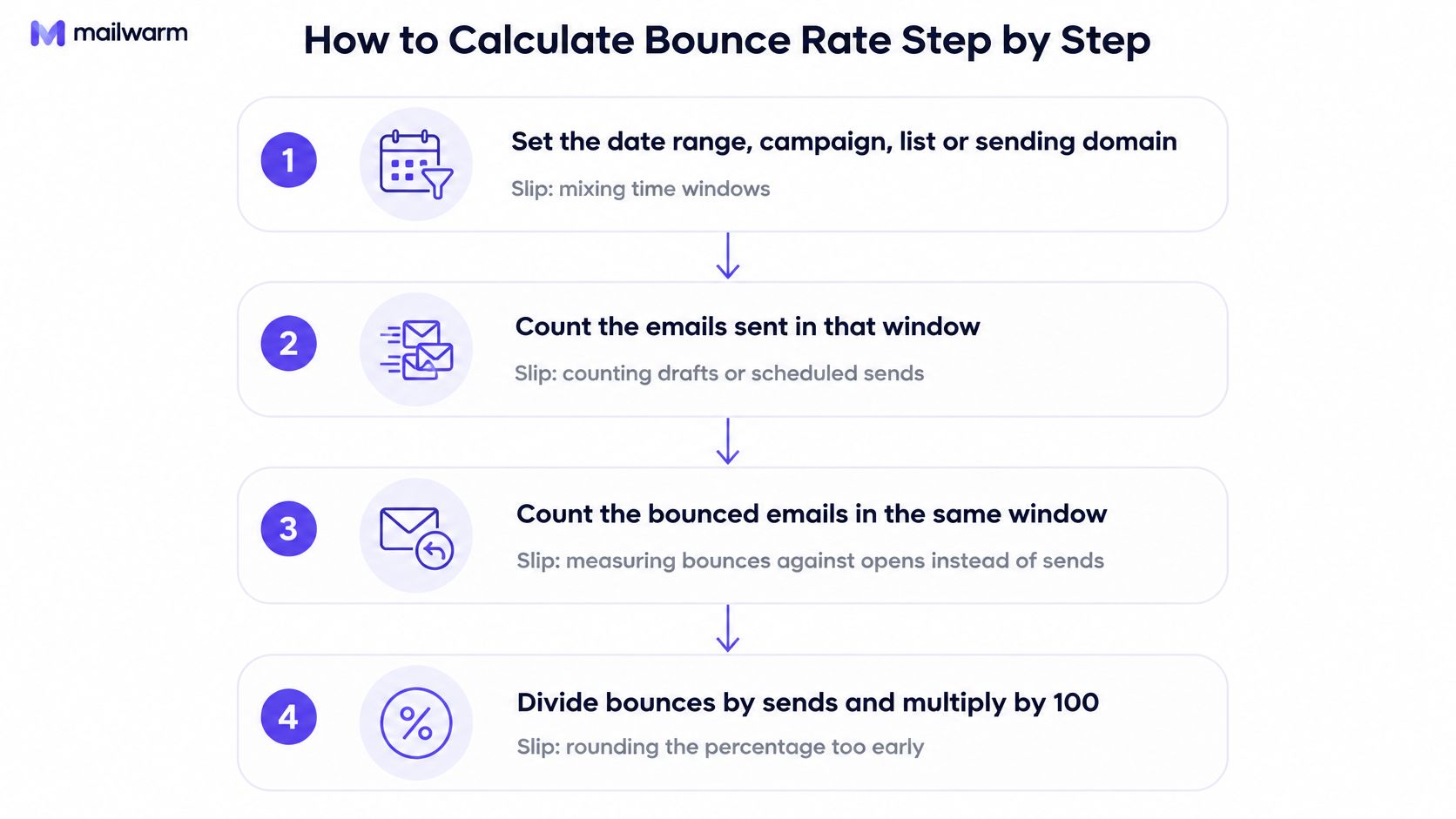
Six Steps to Calculate Campaign Bounce Rates
- Lock the measurement scope first. Choose one date range, one campaign, one list segment, or one sending domain before exporting logs. Mixing time windows is the fastest way to skew a report, because a stale import from last month will drag down this month's numbers.
- Export the send log and record total emails sent. Pull the exact count of attempted sends from your platform (such as HubSpot, Klaviyo, Mailchimp, or an outbound sequencer), leaving out drafts and scheduled messages that haven't fired. Don't divide by total database size. If a database contains 50,000 subscribers, a campaign goes out to 20,000 of them, and 500 messages bounce, the bounce rate is 2.5%, not 1%.
- Pull hard and soft bounce counts separately. Different tools use different labels in delivery exports, such as "permanent failure," "dropped," "deferred," or "soft bounce." Check the platform's bounce-category column before totaling anything, because blending both categories conceals dead addresses behind temporary inbox-full delays.
- Compute each bounce rate independently. Divide hard bounces by total emails sent and multiply by 100, then run the exact same calculation for soft bounces. Keep two decimal places rather than rounding early so small upward jumps don't vanish on the spreadsheet.
- Add both bounce types for the combined rate. Sum only confirmed server rejections. Never fold unsubscribes or spam complaints into the bounce count, because those recipients received the email before choosing to opt out or mark it as spam.
- Reconcile the totals before publishing the report. Confirm that delivered emails plus hard bounces plus soft bounces equal total emails sent (allowing for any deferred messages still sitting in the retry queue). Avoid averaging campaigns sent from different domains or acquisition sources together, since a clean customer newsletter will mask a broken cold prospect list.
Handling Multi-Batch Campaigns and Reporting Logs
Outreach sequences and large newsletters frequently go out in waves, such as half the segment on Tuesday and the rest on Thursday. Never average the Tuesday percentage with the Thursday percentage, especially when the batch sizes differ. Add total sends from both batches together, add total bounces from both batches together, and divide once.
Record three labels right next to every finished percentage: the date range, the list or segment name, and the sending domain. Without those three notes, comparing this month's delivery health against last quarter's spreadsheet becomes guesswork.
Reconciliation check: When delivered messages plus hard and soft bounces don't match total sends, verify whether the sending platform counts suppressed contacts or skipped addresses inside its "sent" column.
Benchmarks for Hard and Soft Bounce Rates
Raw percentages don't mean much until you know where normal delivery noise ends and list trouble begins. Using the industrywide averages as a baseline, the table below maps each bounce type to an operational review threshold and the exact response it calls for.
| Bounce type | Industry average | Review point | Action at that level |
|---|---|---|---|
| Hard bounce | 0.21% | Above 0.5% | Pause sends to the segment and clean the list |
| Soft bounce | 0.70% | Above 1% | Find repeat addresses and tighten retry rules |
| Combined | 0.91% | Above 1.5% total | Report the two types separately and act on each |
Why Hard Bounces Require Faster Intervention
Crossing 0.5% on hard bounces warrants an immediate pause on that segment. Every permanent failure signals to mailbox providers like Gmail, Outlook, Microsoft 365, and Yahoo that a sender is mailing addresses that don't exist. Continuing to push volume against invalid mailboxes damages delivery even for the valid contacts on the same list.
Crossing 1% on soft bounces calls for diagnosis rather than a blanket scrub. Inspect which domains or recipients are rejecting messages, check whether an oversized image or attachment tripped a mailbox limit, and review how many times your platform retries temporary failures before giving up.
Consider a realistic scenario where an outbound campaign closes with a 0.9% hard bounce rate. That figure runs at more than four times the industrywide average. Weak copy or a dull subject line can't trigger permanent server rejections; a spike at that level almost always points to a purchased, scraped, or outdated contact list that skipped verification before launch. Sales and growth teams running cold outreach can compare their numbers against this bounce rate guide for cold outbound teams to benchmark prospecting segments separately from opted-in newsletters.
Setting Your Own Baseline
Industry averages give you a starting reference, not a passing grade. A double-opt-in newsletter that normally runs well below the industry average shouldn't wait until it crosses 0.5% to investigate a sudden jump in hard bounces.
Compare every new campaign against the rolling baseline of your last five sends from the same domain and list type. Follow a strict priority order whenever numbers climb: fix the hard bounce problem first, because invalid addresses won't resolve themselves, then investigate soft bounces for repeat addresses or provider throttling.
What a Rising Bounce Rate Signals About Deliverability
One isolated bounce spike usually traces back to a single unverified spreadsheet. A multi-week upward trend points to a deeper problem: mailbox providers are losing trust in your sending domain, and your sender reputation is slipping.
Treat hard and soft bounces as separate warning lights. Hard bounces show that addresses cannot receive mail at all, so repeated sends to dead contacts make list quality look poor. Soft bounces can reflect temporary mailbox or provider problems, but the same address failing again and again still needs attention. Domain-level issues can then spread across the email ecosystem. Domains with poor sending practices can land on blocklists, which raises rejection rates quickly.
Before guessing at a fix, match the exact bounce pattern in your logs to its underlying cause.

Matching Bounce Patterns to Their First Fix
| Pattern | Likely cause | First fix |
|---|---|---|
| Hard bounces jump after a new list import | Unverified or scraped addresses | Verify the list and remove hard-bounced addresses before the next send |
| The same address soft-bounces on every send | Full or disabled mailbox | Suppress the address after three consecutive soft bounces |
| Bounces rise on one provider only | Provider-level block or reputation dip | Check blocklists and send smaller volumes to that provider |
| Bounces rise on a new domain | Volume ramped too quickly | Increase daily volume gradually over several weeks |
| Total bounces stable but spam placement rising | Content or authentication gaps | Review SPF, DKIM and DMARC records |
Read the pattern like a diagnostic chart, not a single grade. A hard-bounce jump after an import is a list problem first. A provider-only rise points to reputation or throttling with that mailbox provider. A new domain climbing too fast needs a slower ramp. When total bounces look stable but spam placement rises, the issue may sit in content or authentication instead of address quality.
Diagnostic Checks and Recovery Timelines
Never raise sending volume to "make up for" missed conversions while bounces are trending upward. Run two checks before touching your campaign schedule:
- Screen your sending domain for listings: Run the domain through a blacklist checker to confirm whether a DNS blocklist is rejecting your mail outright.
- Measure actual inbox placement: Run an email deliverability test to see where messages land across major providers. Mailwarm's free Email Deliverability Test sends one email and shows whether it lands in the inbox or spam at Gmail, Outlook, Yahoo, and Apple Mail, with no signup required.
Set realistic expectations for how long each repair takes. Verifying a CSV, suppressing a full mailbox, or fixing a missing authentication record takes a single afternoon. Rebuilding a damaged domain reputation or ramping a brand-new sending domain requires patience across several weeks. When ramping a new mailbox safely, Mailwarm recommends starting with 10 to 20 emails per day per mailbox and increasing volume by roughly 10 to 20 percent every few days.
Recovery timeline: Removing invalid addresses fixes tomorrow's hard bounce rate in hours, whereas restoring inbox placement after weeks of high bounces takes several weeks of restrained, consistent sending.
Clean Your List Before the Next Send
Calculating bounce percentages only protects revenue when the numbers trigger a routine before the next campaign leaves your outbox. Waiting until open rates collapse means mailbox providers have already started routing valid prospects to spam.
A clean workflow turns rejected sends into reliable inbox delivery over time.

Three Actions to Run Before Your Next Campaign
- Keep hard-bounced addresses out of every future send. Add every hard bounce to a global suppression list across your CRM and sending tools, and leave those contacts excluded until a verified opt-in replaces them. Building repeatable habits to protect sender reputation with clean lists stops old spreadsheets from reintroducing dead contacts next quarter.
- Recalculate hard and soft bounce rates after every campaign. Use the exact same scope and formula each time, logging both percentages next to your previous five sends so upward drift triggers a pause early.
- Verify domain health before scaling daily volume. Run a fresh deliverability check on your sending domain prior to increasing send counts. If you're launching campaigns from a freshly registered domain, warm up a new domain gradually before sending full sequences.
When bounce rates keep climbing despite routine list cleaning, Mailwarm helps senders build reputation, monitor inbox placement, and improve deliverability through real inbox engagement, advanced warmup controls, and expert guidance. Mailwarm's bounce prevention protects sender reputation by reducing bounces and automatically deactivates invalid inboxes to reduce bounce risk. Every plan includes expert deliverability calls to review your sending setup, and teams can request Mailwarm's free deliverability audit for a clear review of their configuration plus the top 3 fixes to improve inbox placement fast.
Watch this quick breakdown on managing bounces and protecting inbox placement before locking in your next send schedule:
If email is part of your growth strategy, Mailwarm helps you build sender reputation, monitor inbox placement, and reduce spam risk with expert-guided warmup. Before scheduling another campaign, open the send log for your largest active list today, calculate this month's hard bounce rate by hand, and write the number down as your baseline.
Frequently Asked Questions
Should Unsubscribes or Spam Complaints Count in Email Bounce Rate
No. Unsubscribes and spam complaints occur after a receiving server accepts the message, which means delivery succeeded. When reviewing how to calculate bounce rate for email campaigns, count only messages rejected by the receiving mail server (hard and soft bounces).
How Often Should Teams Recalculate Bounce Rates
Recalculate hard and soft bounce rates after every individual campaign rather than waiting for a monthly rollup. Reviewing each send independently catches bad list imports or single-provider blocks within hours instead of letting sender reputation drop over four weeks.
Is Email Warmup Enough to Fix Deliverability
No. Inbox warmup builds positive engagement signals with mailbox providers, yet it won't compensate for an unverified contact list, missing authentication records, or repeated hard bounces. Combining list hygiene, valid SPF, DKIM, and DMARC records, and gradual warmup gives campaigns the strongest foundation for inbox placement.
Does Mailwarm Need Access to Your Inbox
No. Unlike basic warmup tools, Mailwarm doesn't require IMAP access or permission to read your private inbox. It generates real engagement signals across its network of 50,000+ aged real inboxes while keeping your private mailbox untouched.
Why Is Mailwarm More Expensive Than Basic Warmup Tools
Mailwarm costs more because it combines real inbox engagement, up to 100% replies to warmup emails depending on the plan, spam score monitoring, provider-level warmup, authentication tools, no IMAP access required, and expert deliverability calls included in every plan.
Turning accurate bounce math into consistent inbox placement takes both clean contact lists and steady reputation monitoring. Mailwarm is a premium email warmup and deliverability platform built for teams that care about real inbox placement, offering bounce prevention, spam score monitoring, authentication tools, and expert deliverability calls in every plan. Visit the site to review your sending setup and protect your sender reputation before your next campaign goes out.