
Gmail Dot Variations Generator for Account Aliases: Why Teams Use It
Gmail treats periods in your username as invisible, so addresses like john.smith@gmail.com
and johnsmith@gmail.com
will reach the same inbox. A Gmail dot variations generator helps by producing every possible dotted arrangement of a base username. This is particularly useful for quality assurance, form testing, and mail routing workflows. Used effectively, a Gmail dot variations generator can save time and reduce manual errors.
It's important to use this ethically. Dot variations do not create separate mailboxes, new identities, or allow for additional sending limits, they all refer to a single Gmail account. Utilize them for testing and organization, rather than attempting to evade service restrictions or policies.
Rules of Gmail Dot Variations and Plus Addressing for Account Aliases
- Gmail ignores all periods in the part of the email address before
@gmail.com
, so any combination of dots will deliver to the same inbox. - Plus addressing is also supported. For example,
johnsmith+qa@gmail.com
delivers tojohnsmith@gmail.com
, and the tag after the plus can be used for filtering. - Some websites may block plus signs or remove dots during registration, so results can vary depending on the third-party service.
- Dotted versions are not considered separate sending identities. When you send mail, recipients will see the verified address, not a new unique alias.
- Always adhere to the terms of service. Never use dot variations to bypass limits on user accounts or to misuse trial offers.
When working with deliverability, treat every dotted format as a single mailbox. The reputation, warm-up status, and history apply to the core address, regardless of the dot placement.
Algorithm to Generate Gmail Dot Variations for a Chosen Username
A username with length n allows for 2^(n‑1) possible dot placements between its characters, which increases quickly with longer names. Only generate as many as you need. Be sure to avoid leading or trailing dots and to remove any existing periods before generating new variations.
Pair each variation with the @gmail.com
domain to form a valid address, such as jane.doe@gmail.com
. When testing sign-ups and flows, be sure to log which services accept dotted forms and which normalize or restrict them.
Legitimate Workflows for Gmail Dot Variations in Testing and Operations
- QA Registration Flows: Register multiple accounts routed to a single inbox for streamlined review and feedback.
- Automated Filtering: Set up labels in Gmail to manage messages addressed to patterns like
john.smith+billing
orjohn.s.mith
and automatically route them to the right folder. - Partner Tracking: Assign a distinct dotted form to each partner so you can easily trace leads and forwards.
- Form Validation Checks: Ensure your sign-up process properly accepts all valid Gmail formats without errors.
- Support Handoffs: Route messages to specific queues, such as
+tier2
, without needing new inboxes for your team.
A generator simplifies these use cases, reducing errors and keeping cross-team testing consistent and organized, but make sure to not use a random email generator.
Email Deliverability Facts About Gmail Dot Variations and Why Warm-Up Still Matters
Dot variations do not alter your sending reputation, mail sent from any variation is still processed as coming from the original mailbox. Deliverability and sender reputation are based on the core, underlying address. If you're sending cold outreach or important campaigns, be sure to warm up the actual inbox that will send the mail, not the alternative dotted versions.
For more detailed information and insights on email warm-up processes, you may wish to read our guide on how email warmup improves inbox placement. This resource explains how gradual, positive interactions improve inbox placement for new or previously inactive mailboxes.
How to Avoid Bounces and Policy Issues When Using Gmail Dot Variations
Some email providers may reject subaddressing or treat dotted usernames as duplicates. Others might block new registrations that only differ by punctuation. Expect future edge cases, especially as antifraud controls and disposable address filters become more sophisticated.
Keeping yourself updated about the ever-changing rules and nuanced requirements of email services is crucial. Specifically, familiarize yourself with the reasons why emails get bounced and the role SMTP greetings play in sender reputation. Clean protocol practices lower the risk of bounces, regardless of which alias or format you are testing.
Where a Gmail Dot Variations Generator Fits Inside a Modern Warm-Up Stack
Gmail dot variations are ideal for intake management, automated routing, and quality assurance. However, they should not be used as a workaround for sending restrictions. For outbound campaigns, proper domain authentication, measured warm-up, and authentic user interaction remain essential.
As of February, Mailwarm operates as a comprehensive email warm-up solution, providing centralized multi-account management, in-depth reputation monitoring, cross-provider warm-up functions, and detailed spam score tracking for providers like Gmail, Microsoft, and Yahoo. It is optimized for extensive, scalable performance.
Perform warm-up processes on the actual mailbox that you plan to use for sending campaigns. Keep aliases consistent with the account which has been verified as the legitimate sender. While dots and tags are helpful for sorting and testing, ensure the warm-up engine targets the true sending identity.
Practical Checklist for Gmail Dot Variations and Account Aliases
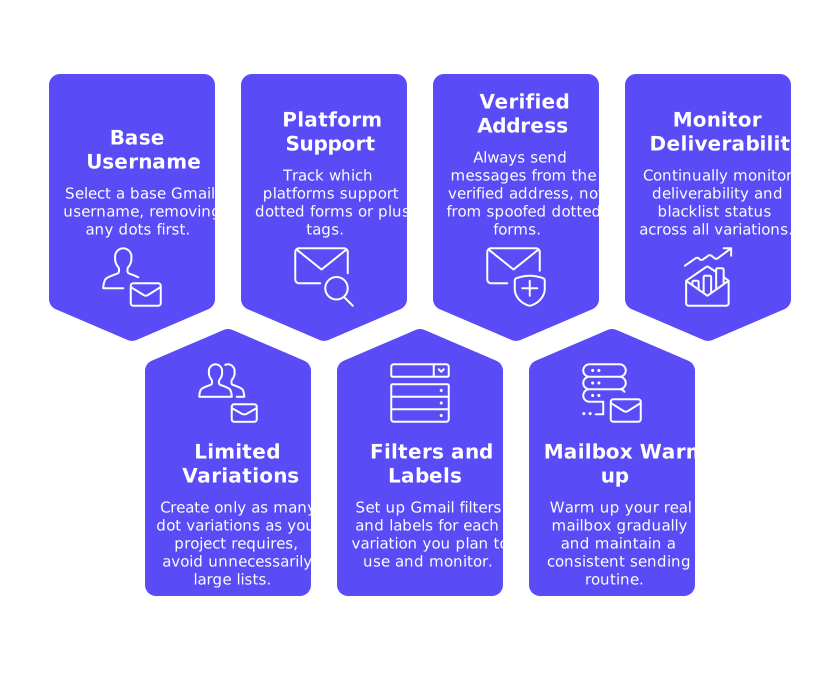
- Select a base Gmail username, removing any dots first.
- Create only as many dot variations as your project requires, avoid unnecessarily large lists.
- Track which platforms support dotted forms or plus tags.
- Set up Gmail filters and labels for each variation you plan to use and monitor.
- Always send messages from the verified address, not from spoofed dotted forms.
- Warm up your real mailbox gradually and maintain a consistent sending routine.
- Continually monitor deliverability and blacklist status across all variations.
Gmail Dot Variations Generator Example Inputs and Quick Tips
Start simple, with a base username like janedoe
. For manual use, choose variations that are easy to remember, such as jane.doe
. For larger QA projects, plan your spreadsheet in advance, label expected message flows and map each dotted form to its test scenario. Archive test messages after review to keep your main inbox organized.
Remember: Dots are a helpful organizational and testing tool, they do not enable additional sending capacity or create new sender identities.
Use a thoughtful approach. Deploy a manageable set of dotted variations for QA work, then focus your warm-up efforts on the real sender mailbox. When you're ready to move from tests to live campaigns, choose a solution that delivers robust deliverability diagnostics and keeps your sending domain in top shape.
FAQ
What is a Gmail dot variations generator?
A Gmail dot variations generator allows you to create multiple dotted configurations of a Gmail username. This is useful for testing purposes and organizing incoming messages without creating new email addresses.
Can using Gmail dot variations improve my email deliverability?
No, Gmail dot variations have no effect on deliverability or sender reputation. Focus your efforts on warming up the actual mailbox and maintaining clean sending practices to improve deliverability.
Is it ethical to use Gmail dot variations for bypassing platform restrictions?
No, using dot variations to circumvent platform limits or policies is unethical and could violate terms of service. Instead, use them for legitimate testing and organization when necessary.
Will recipients see the dotted version of my email when I send a message?
No, recipients will see the verified, base email address regardless of any dots in your username. This means variations are invisible at the recipient's end.
What are the potential risks of using Gmail dot variations incorrectly?
Incorrect usage, like assuming messages to each dotted version are part of separate inboxes, can cause confusion and policy violations. Stay informed about platform rules to avoid unwarranted bounces and account restrictions.
Is plus addressing compatible with Gmail dot variations?
Yes, Gmail supports plus addressing along with dot variations. Utilize tags after the plus sign for filtering without changing the functionality of the email address.
How can I efficiently use Gmail dot variations in testing workflows?
Plan which variations you need and set up Gmail filters to manage incoming mail accordingly. Use Mailwarm or similar tools to monitor deliverability and sender reputation effectively.
Does using Gmail dot variations create new sending identities?
No, all dot variations map back to a single sending identity. Efforts to create new identities using dots are futile and can lead to complications in deliverability and compliance.
Should I use a Gmail dot generator for outbound email campaigns?
No, for outbound campaigns, focus on the authenticated domain and mailbox. Use dot variations for internal testing and organization, but maintain synergy with the core email for shipping communications.
Why is it crucial to monitor the deliverability of Gmail dot variations?
While the variations themselves don't change sender reputation, mismanaging them can lead to negative deliverability impacts. Regular monitoring ensures that your email practices stay aligned with current standards and avoid unnecessary bounces.