
Perfect SPF, DKIM, and DMARC setup doesn't guarantee that messages will reach the inbox. Email sender reputation is a rolling assessment of how mailbox providers view a domain and its sending IP, based on authentication, sending consistency, delivery quality, and recipient behavior.
That distinction matters for founders, sales teams, agencies, recruiters, and marketers. A technically authenticated sender can still face spam filtering if recipients ignore, delete, report, or unsubscribe from messages at a sustained rate.
What Email Sender Reputation Actually Means
Email sender reputation is the long-term trust score mailbox providers assign to a sending domain and IP address. Providers use it to decide whether a message reaches the inbox, promotions, spam, or gets blocked, as described by Validity's explanation of sender reputation.
The common advice is to authenticate the domain and consider the job finished. SPF, DKIM, and DMARC are essential, but they're an entry requirement rather than a permanent pass. Large deliverability benchmarks published in 2026 found that fully authenticated domains achieved about 89.1% inbox placement, compared with roughly 44.2% for domains without full authentication, a gap of about 45 percentage points. The benchmark is documented by Digital Applied's 2026 email statistics analysis.
Authentication proves that a sender has permission to use a domain and that messages have integrity. It doesn't prove that recipients want the messages. Mailbox providers still evaluate what happens after delivery, including whether people read, reply to, forward, delete, or report the email.
Reputation is rolling, not permanent
A domain doesn't earn a fixed reputation level and hold onto it forever. Providers continually update their assessment as new campaigns create new delivery and engagement signals.
Microsoft describes sender reputation as a form of “credit worthiness”, with emphasis on maintaining a consistent, healthy percentage of successfully delivered messages and analyzing bounces and delivery failures. The guidance appears in Microsoft's sender support documentation.
That model creates a practical cause and effect:
- Authentication establishes identity: SPF, DKIM, and DMARC help providers verify the sender.
- Consistent sending establishes predictability: Sudden changes in volume or cadence can look suspicious.
- Recipient behavior establishes trust: Positive interactions support future inbox placement.
- Delivery failures create risk: Bounces, complaints, and repeated failures weaken confidence.
A sender can therefore have clean authentication and poor reputation at the same time. The technical setup may be correct while the audience, message relevance, volume, or list quality creates negative behavioral evidence.
Practical rule: Treat sender reputation as an operating metric that needs continuous monitoring, not as a DNS task completed before launch.
The Engagement Signals That Build or Break Trust
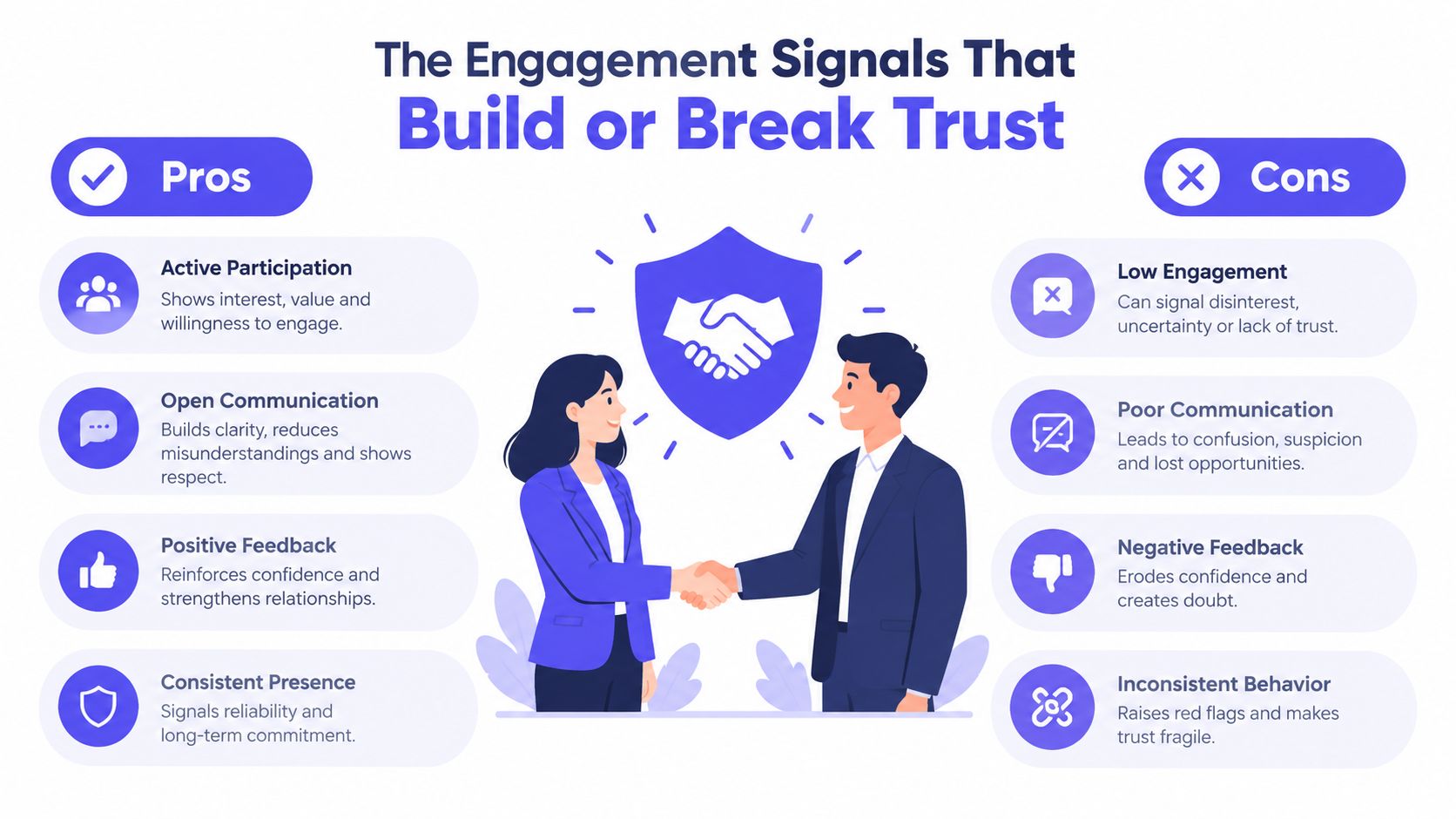
Mailbox providers observe how recipients handle messages because user behavior helps distinguish wanted mail from unwanted mail. Mailjet's deliverability guidance identifies positive signals such as opens, clicks, read depth, replies, forwards, and marking messages as not spam. Negative signals include low engagement, deletes without reading, spam complaints, and unsubscribes.
No single interaction determines a domain's future. Providers look at patterns over time and often interpret those patterns in relation to the recipient network, message type, and sending history.
Positive behavior carries more weight than activity alone
A genuine reply is usually more meaningful than an automated open. A forwarded message, a sustained thread, or a recipient moving a message out of spam shows that the user has taken an active action.
Useful positive signals include:
- Replies and threads: The recipient engages directly instead of passively viewing the message.
- Forwarding: The message appears useful enough to share.
- Read depth: The recipient spends time with the content rather than deleting it immediately.
- Not-spam actions: A user actively corrects a spam classification.
- Clicks and continued interaction: The recipient takes the next step the message invites.
These signals don't make irrelevant email safe. Warmup traffic can create interaction, but campaign content still needs to match the audience's expectations. If the live campaign produces complaints and indifference, positive activity from an unrelated warmup pattern won't repair the underlying problem.
Negative behavior exposes a weak sending strategy
Spam complaints are among the clearest warnings because the recipient has explicitly told the provider that the message isn't wanted. Microsoft guidance cited by Mailchimp's sender reputation overview identifies junk email complaint rate as a principal factor that can lower reputation and deliverability in Outlook.com.
Quick deletion and low engagement also matter. They may indicate poor targeting, excessive frequency, weak relevance, or an audience that never gave meaningful permission. Repeated unsubscribes add further evidence that the sender's expectations don't match the recipient's.
The operational response isn't to chase opens with misleading subject lines. It's to improve the reasons people interact:
- Send only to contacts with a defensible permission or outreach rationale.
- Segment by role, lifecycle stage, interest, or relationship.
- Remove or suppress addresses that repeatedly fail to engage.
- Make the message's value clear before asking for a reply or click.
- Stop sequences promptly when a recipient opts out.
The strongest reputation programs connect technical hygiene with useful communication. Authentication gets the message evaluated. Relevance determines what recipients do next.
How Different Mailbox Providers Evaluate Senders
There isn't one universal sender reputation number shared by Gmail, Microsoft, Yahoo, and Apple Mail. Each provider has its own filtering systems, recipient data, infrastructure history, and thresholds, so a domain can perform well with one provider and struggle with another.
Historical benchmark data reported in 2026 showed average inbox placement at 83.5%, down from 84.8% the year before. The same benchmark reported provider differences, including Gmail at 87.2%, Microsoft at 75.6%, Yahoo and AOL at 86.0%, and Apple Mail at 76.3%, as detailed by DMARC Report's authentication and deliverability analysis.
| Provider | Average inbox placement | Primary reputation focus |
|---|---|---|
| Gmail | 87.2% | Authentication, engagement, complaints, and provider-specific domain signals |
| Microsoft | 75.6% | Delivery consistency, failures, bounces, and junk complaints |
| Yahoo and AOL | 86.0% | Authentication, user experience, complaints, and engagement |
| Apple Mail | 76.3% | Provider filtering, authentication, and recipient behavior |
The figures describe benchmark results, not a promise for any individual sender. They show why an aggregate deliverability dashboard can hide a provider-specific problem.
Microsoft rewards consistency
Microsoft's guidance frames reputation as a rolling record of delivery quality. A sender that changes volume sharply, accumulates delivery failures, or generates recurring complaints can face more filtering or throttling even when authentication remains valid.
Gmail also provides provider-specific visibility through Google Postmaster Tools, while Yahoo and other providers may apply different rules to similar traffic. Teams should therefore compare placement by provider rather than relying on a single blended inbox rate.
For teams reviewing bulk sender authentication steps, the technical requirements are a starting point. The ongoing question is whether each provider sees stable, wanted, and consistent traffic.
A practical monitoring view should separate:
- Gmail domains and recipient segments
- Outlook.com and Microsoft 365 destinations
- Yahoo and AOL addresses
- Apple Mail users where measurement is available
- Transactional, marketing, and cold outreach streams
Generic warmup traffic can miss this distinction. Provider-level engagement is more useful when a sender knows where placement is weak and directs testing and reputation work toward that environment.
Diagnosing Deliverability and Reputation Issues
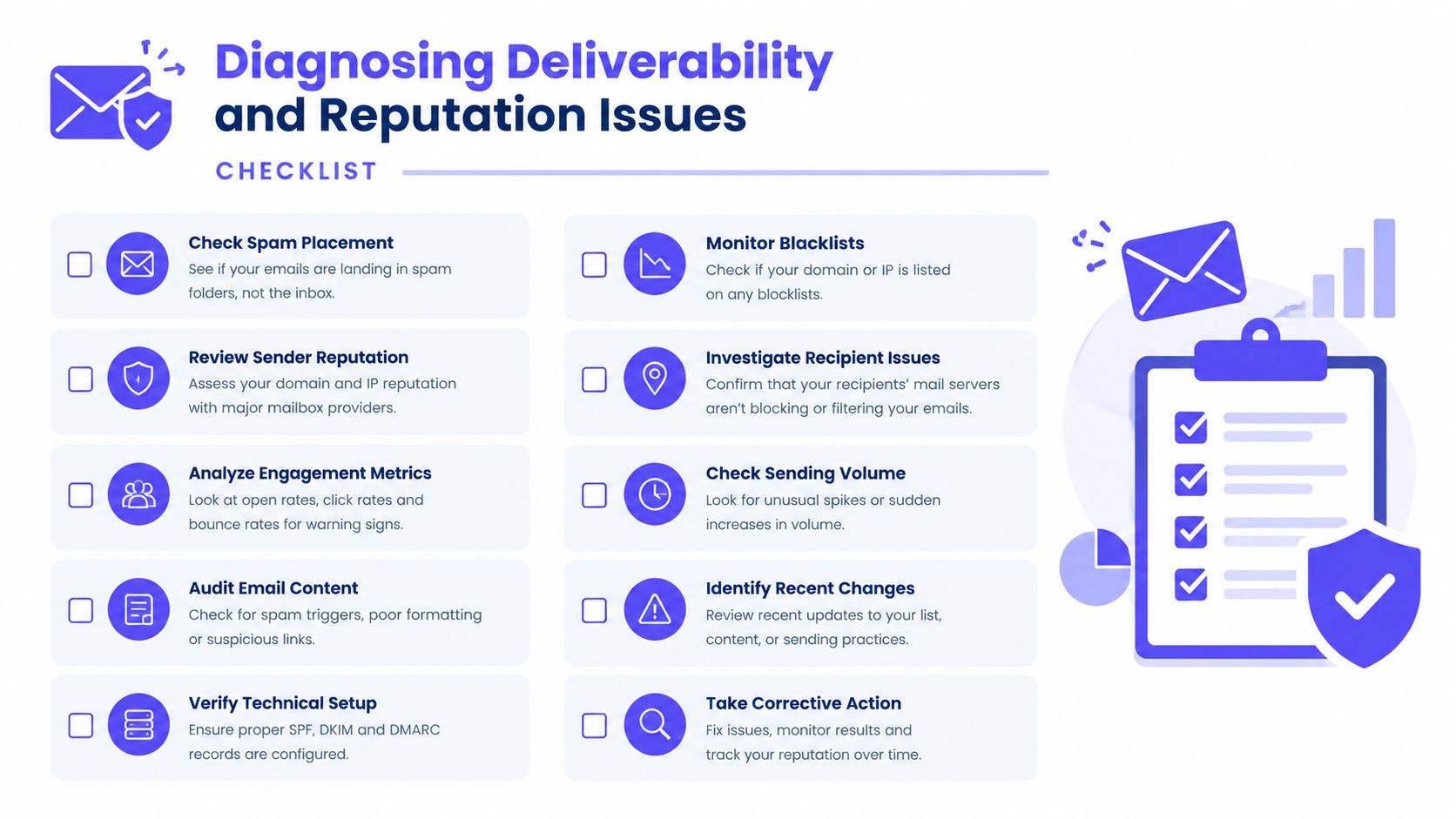
When messages start landing in spam, changing subject lines first is usually guesswork. A disciplined diagnosis separates infrastructure problems from list quality, provider filtering, and recipient engagement.
Follow the evidence in order
Separate the affected providers. Check whether the problem occurs at Gmail, Microsoft, Yahoo, Apple Mail, or across all destinations. A provider-specific decline points toward local filtering or reputation history, while a broad decline suggests a wider sending or list issue.
Review authentication results. Confirm that SPF, DKIM, and DMARC remain aligned for every sending stream. Authentication can drift after an ESP change, a new subdomain, or an infrastructure migration.
Inspect bounce categories. Hard bounces usually indicate invalid or unavailable addresses, while temporary failures may reflect throttling, rate limits, or transient provider conditions. Delivery logs should show whether the provider accepted, deferred, rejected, or blocked the message.
Check complaints and opt-outs. A rise in spam complaints is a direct warning that recipients don't recognize or want the mail. Suppress complainants and unsubscribed contacts immediately.
Review volume and cadence. Compare current sending behavior with the domain's established pattern. Large changes, inconsistent intervals, and sudden campaign launches can undermine a previously stable reputation.
Use provider tools. Google Postmaster Tools can expose domain-level signals for eligible senders, and Microsoft's guidance recommends analyzing failures, bounces, Sender Score, and IP blocklist status.
For broader guidance on list quality, targeting, and campaign structure, the master B2B email deliverability resource provides a useful companion reference.
Distinguish throttling from blocking
A temporary deferral means the provider has delayed acceptance. Repeated deferrals often indicate rate, volume, or reputation pressure, but they don't necessarily mean the domain is permanently blocked.
A hard rejection is more definitive. It can reflect authentication failure, policy enforcement, a blocklist listing, invalid routing, or a reputation problem serious enough to trigger refusal. Teams should preserve the exact response code and provider message before changing the campaign.
An email blacklist check can identify infrastructure listings, but a clean result doesn't prove good inbox placement. Blocklists are only one part of the diagnosis, and provider-specific reputation can remain poor without any public listing.
Using Premium Warmup to Protect and Grow Reputation
Basic warmup tools often exchange automated messages between participating users. That can create activity, but activity alone isn't the same as realistic, provider-specific engagement that supports a broader deliverability program.
A premium platform combines controlled sending with signals such as opens, replies, threads, spam removal, and important marking. The purpose isn't to manufacture a permanent reputation score. It's to help a sender build a more credible pattern while technical, content, volume, and audience issues are addressed.
What premium warmup should control
Mailwarm is a premium email warmup and deliverability platform. It uses 50,000+ aged real inboxes across Gmail, Outlook, Microsoft 365, Yahoo, and SMTP providers to generate engagement such as opens, replies, threads, spam removal, important marking, and ongoing inbox interactions.
Its controls are relevant when a team needs more than automated warmup activity:
- Provider-level warmup: Direct activity toward Gmail, Outlook, Microsoft 365, Yahoo, or SMTP environments.
- Real engagement signals: Use opens, replies, threads, spam removal, and important marking.
- Reply flexibility: Generate up to 100% replies to warmup emails, depending on the plan.
- Content testing: Use custom email content warmup rather than relying only on generic messages.
- Risk monitoring: Review spam scores, inbox placement insights, bounce prevention, and deliverability analytics.
- Infrastructure support: Use authentication fix tools and warm up an SMTP server.
- Privacy controls: No IMAP access is required, and the platform doesn't need permission to read a user's private inbox.
- Expert support: Deliverability calls are included in every plan.
The higher price of a premium system reflects the combination of aged real inbox engagement, monitoring, authentication tools, provider controls, reputation protection, and expert guidance. For a team that only wants low-cost automated traffic, that scope may be unnecessary. For a sales team, agency, recruiter, or marketing operation dependent on stable inbox access, the trade-off is more defensible.
Warmup still isn't a substitute for relevant content, permission, list hygiene, or sensible volume. It supports the sending pattern, while the sender remains responsible for the quality of the messages and recipients.
Common Mistakes That Destroy Sender Trust
Sender reputation problems often come from operational shortcuts rather than obscure filtering rules. The following mistakes are avoidable because each one leaves a clear behavioral or technical signal.
The volume jump
A new domain or mailbox that moves from light activity to an aggressive campaign can look unlike its established history. Scaling should follow observed delivery quality, not an arbitrary calendar.
The ignored bounce
Continuing to send to hard-bouncing addresses signals weak list management. Invalid contacts should be suppressed quickly, and temporary failures should be reviewed for recurring patterns rather than treated as harmless noise.
The purchased list
Purchased lists create uncertainty around permission, identity, and relevance. Even when addresses are technically valid, recipients may not recognize the sender, which increases complaints, deletions, and unsubscribes.
The forgotten authentication record
Authentication can break after a vendor change, a new sending domain, or an overlooked configuration update. Teams should test every sending stream after infrastructure changes and review alignment, not just the presence of individual records.
The overloaded sequence
Repeated follow-ups to unresponsive contacts create more negative interactions without adding useful evidence of interest. Suppression rules, clear opt-outs, and audience segmentation protect reputation better than just increasing activity.
A pre-launch checklist should confirm:
- Audience quality: Contacts have a clear reason to receive the message.
- Volume control: The launch matches the domain's established behavior.
- Bounce handling: Hard failures are suppressed and temporary failures are investigated.
- Complaint handling: Opt-outs and complaints stop future messages immediately.
- Provider coverage: Monitoring includes the mailbox providers that matter to the audience.
- Content relevance: The message matches what the recipient was told to expect.
Frequently Asked Questions About Sender Reputation
What is email sender reputation?
Email sender reputation is the long-term trust assessment mailbox providers assign to a sending domain and IP address. It reflects authentication, sending history, delivery quality, consistency, and recipient behavior.
How long does email warmup take?
There isn't a universal timetable because reputation is assessed continuously and depends on the sender's history, provider mix, volume, and engagement. Warmup should be treated as an ongoing operating process rather than a fixed task that ends after a set number of days.
Does email warmup improve inbox placement?
Warmup can support inbox placement by generating positive engagement and establishing more consistent sending behavior. It can't compensate for poor targeting, high complaint rates, invalid lists, broken authentication, or irrelevant content.
Is email warmup enough to fix deliverability?
No. A complete recovery plan may require volume reduction, list cleaning, authentication repair, complaint suppression, provider-level monitoring, and content changes. Warmup is one part of reputation management, not a replacement for diagnosis.
Why do emails go to spam?
Messages can go to spam because of weak authentication, poor domain or IP history, inconsistent volume, bounces, spam complaints, low engagement, or content that recipients don't expect. The specific cause often differs by mailbox provider.
For additional context beyond deliverability mechanics, teams can browse reputation management questions while building a broader trust strategy.
How does Mailwarm help improve sender reputation?
Mailwarm combines real inbox engagement, provider-level warmup, spam score monitoring, inbox placement insights, authentication tools, bounce prevention, custom content warmup, and deliverability analytics. It doesn't require IMAP access or permission to read a private inbox, and expert deliverability calls are included in every plan.
If email supports revenue, hiring, or customer communication, Mailwarm helps build sender reputation with real inbox engagement, provider-level controls, and practical deliverability monitoring. Review the affected providers, repair the highest-risk signals, and use expert-guided warmup to protect future inbox placement.