
A sales team can write relevant emails, authenticate its sending domain, and still watch messages disappear into spam. An email domain reputation checker helps diagnose that problem by reviewing trust signals connected to the domain, including authentication, blacklist status, sending behavior, and engagement. It matters because mailbox providers use those signals when deciding whether mail belongs in the inbox or spam.
The important detail is that a checker isn't a magic inbox-placement score. It's a diagnostic kit. Founders, agencies, recruiters, marketers, and sales teams need to read its results alongside provider-specific data and real engagement trends, especially when Gmail, Outlook, and Yahoo show different outcomes.
Introduction to Email Domain Reputation Checkers
An email domain reputation checker reviews the signals mailbox providers use to judge whether a sending domain appears trustworthy. It can identify authentication gaps, blacklist listings, suspicious sending patterns, and other conditions that may affect email deliverability and inbox placement.
That makes the checker useful at the start of an investigation. It can answer questions such as:
- Is authentication configured correctly?
- Does the domain or sending infrastructure appear on a relevant blacklist?
- Are complaint and bounce patterns creating risk?
- Does the sending domain have a history that providers may distrust?
A clean result is helpful, but it isn't proof that every message will reach the inbox. A domain can pass SPF, DKIM, and DMARC checks while recipients ignore its messages, mark them as spam, or stop replying. Provider systems evaluate behavior over time, not just technical records.
Practical rule: Treat a checker as a smoke alarm, not a complete fire investigation.
Domain reputation matters because mailbox providers connect sending behavior with future delivery decisions. A weak reputation can affect sales outreach, newsletters, account messages, recruiting campaigns, and other email programs. The sender may see successful SMTP delivery while the recipient sees nothing in the primary inbox.
The most useful workflow combines three views:
- Technical health, including authentication and DNS-related checks.
- Reputation health, including blacklist status and provider signals.
- Observed placement, including whether messages reach inboxes at Gmail, Outlook, Yahoo, and other providers.
This distinction prevents a common mistake. A team sees a favorable generic score, assumes deliverability is healthy, and increases sending volume. A better approach is to identify the warning signal, connect it to actual campaign behavior, and fix the highest-risk issue first.
How Domain Reputation Works and Why It Decides Inbox Placement
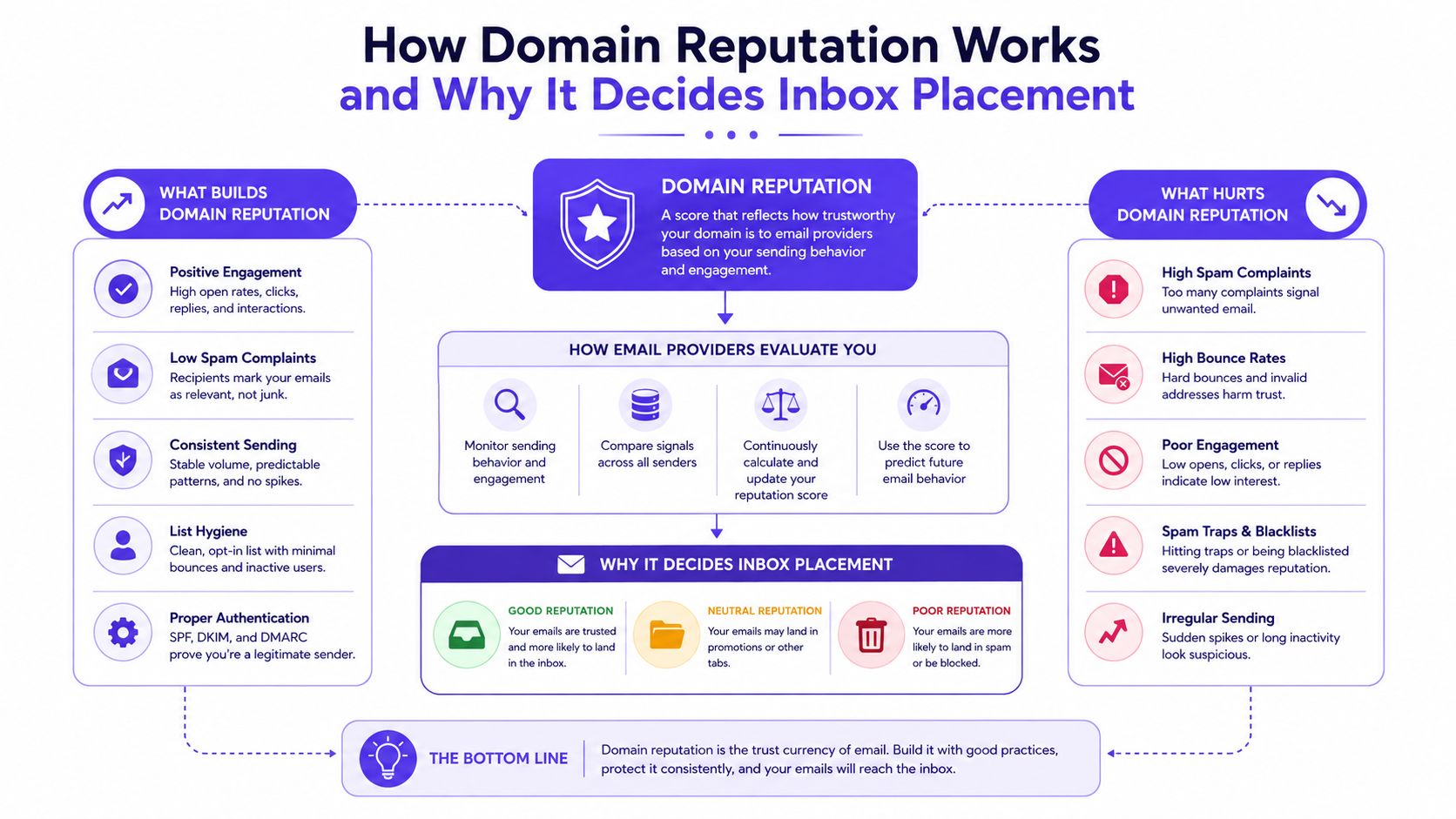
Domain reputation is a persistent trust signal associated with the domain used in the visible sender identity. Mailbox providers assess it through sending behavior, recipient reactions, authentication, and related infrastructure signals. Google describes reputation as a rating of the quality of domains and IP addresses used to send email, with the rating determined by sending behavior, and Gmail says high-reputation senders are more likely to reach Inbox instead of Spam. Google reputation guidance
A useful analogy is a credit profile. The domain is the long-term borrower. The IP address is closer to the branch or account used for a particular transaction. A new IP may change the immediate delivery context, but changing it doesn't erase the domain's behavioral history.
IP reputation still matters. Providers can use it as an initial gatekeeper for traffic, particularly when they see suspicious infrastructure or a shared environment with poor sending behavior. Yet domain trust has become increasingly persistent across infrastructure changes, which is why a sender can't solve every reputation problem by moving to another IP. Domain and IP reputation guidance
Trust accumulates through behavior
Mailbox providers observe patterns rather than isolated messages. Consistent, permission-based sending and positive recipient interaction support trust. Sudden volume changes, repeated complaints, hard bounces, or weak engagement can create doubt.
The same domain can also perform differently across providers. Gmail may show a favorable reputation view while Outlook or Yahoo users still report spam placement. Each provider has its own data, filtering logic, and view of recipient behavior.
Google Postmaster Tools includes a dedicated domain reputation view for Gmail senders. Google also documents that a higher domain reputation makes mail from that sending domain less likely to be filtered into a recipient's spam folder. Google Postmaster Tools reputation explanation
Cisco Talos provides a public Email Reputation view that scores sending IPs and related mail activity through fields such as last-day volume, volume change, and email reputation. Spamhaus describes domain reputation as a record of a domain's “who, what, where and when,” while Google's Postmaster Tools treats domain reputation as a direct inbox-placement signal for Gmail traffic. Together, these services show why reputation checking is now an operational layer, not a niche troubleshooting exercise. Cisco Talos Email Reputation
What an Email Domain Reputation Checker Measures
A checker works more like a diagnostic kit than a single score. It gathers signals from authentication, infrastructure, recipient behavior, sending patterns, and public blocklists. A clean result can still hide a placement gap, such as strong Gmail delivery but spam-folder placement in Outlook or Yahoo.
| Signal Group | What It Measures | Impact on Reputation |
|---|---|---|
| Authentication | SPF, DKIM, DMARC, MTA-STS, TLS-RPT, and BIMI posture | Strong alignment supports trust. Missing or weak controls create risk |
| Sending identity | Domain and IP associations, infrastructure history, and related activity | Unstable or suspicious identity signals can reduce confidence |
| Engagement | Opens, clicks, replies, threads, and moves from spam to inbox | Positive interaction supports reputation |
| Negative feedback | Spam complaints, hard bounces, and repeated non-engagement | These signals can push reputation down |
| Sending pattern | Volume consistency and changes in traffic behavior | Abrupt or irregular activity can look risky |
| Blocklists and DNS health | Public listing status and technical record health | Listings or configuration errors may contribute to filtering |
Authentication is necessary, but enforcement matters
SPF identifies permitted sending sources. DKIM adds a signature that helps verify message integrity. DMARC connects authentication with the domain shown to recipients and lets the domain owner define how unauthenticated mail should be handled.
Publishing a DMARC record does not automatically mean the domain is protected. A 2026 scan of 8,907 resolved domains from the Tranco top-10,000 list found that 68.2% published a DMARC record, while only 0.7% had SPF, enforced DMARC at quarantine or reject, MTA-STS, TLS-RPT, and BIMI enabled together. Separate 2026 reporting on a broad top-domain dataset found that 52.1% had a valid DMARC record, but only about 9% used enforcement. 2026 email security research
The distinction is practical. A monitoring-only policy reports authentication results, while quarantine or reject gives mailbox providers instructions for handling unauthenticated messages. A checker should therefore show both record presence and policy strength.
Engagement reveals what technical checks miss
A domain can pass authentication checks and avoid public blocklists while still producing weak inbox results. Providers observe opens, clicks, replies, spam complaints, hard bounces, and whether recipients move messages from spam to the inbox. Low engagement or repeated negative feedback can reduce confidence in future mail.
Provider-specific testing adds another layer. Compare Gmail, Outlook, Microsoft 365, and Yahoo outcomes instead of treating one clean checker result as universal. The result should connect technical signals with real inbox engagement, because reputation affects delivery through recipient response, not through DNS records alone.
Blacklist status remains useful, but it answers only one part of the diagnosis. For a practical explanation of how email blacklists function, Mailwarm's guide can be reviewed alongside complaint, bounce, and placement data.
How to Run an Email Domain Reputation Check and Interpret Results
A reliable check follows a sequence. Running one scan and accepting its headline score can hide the exact problem that is keeping messages out of the inbox.
A practical checking workflow
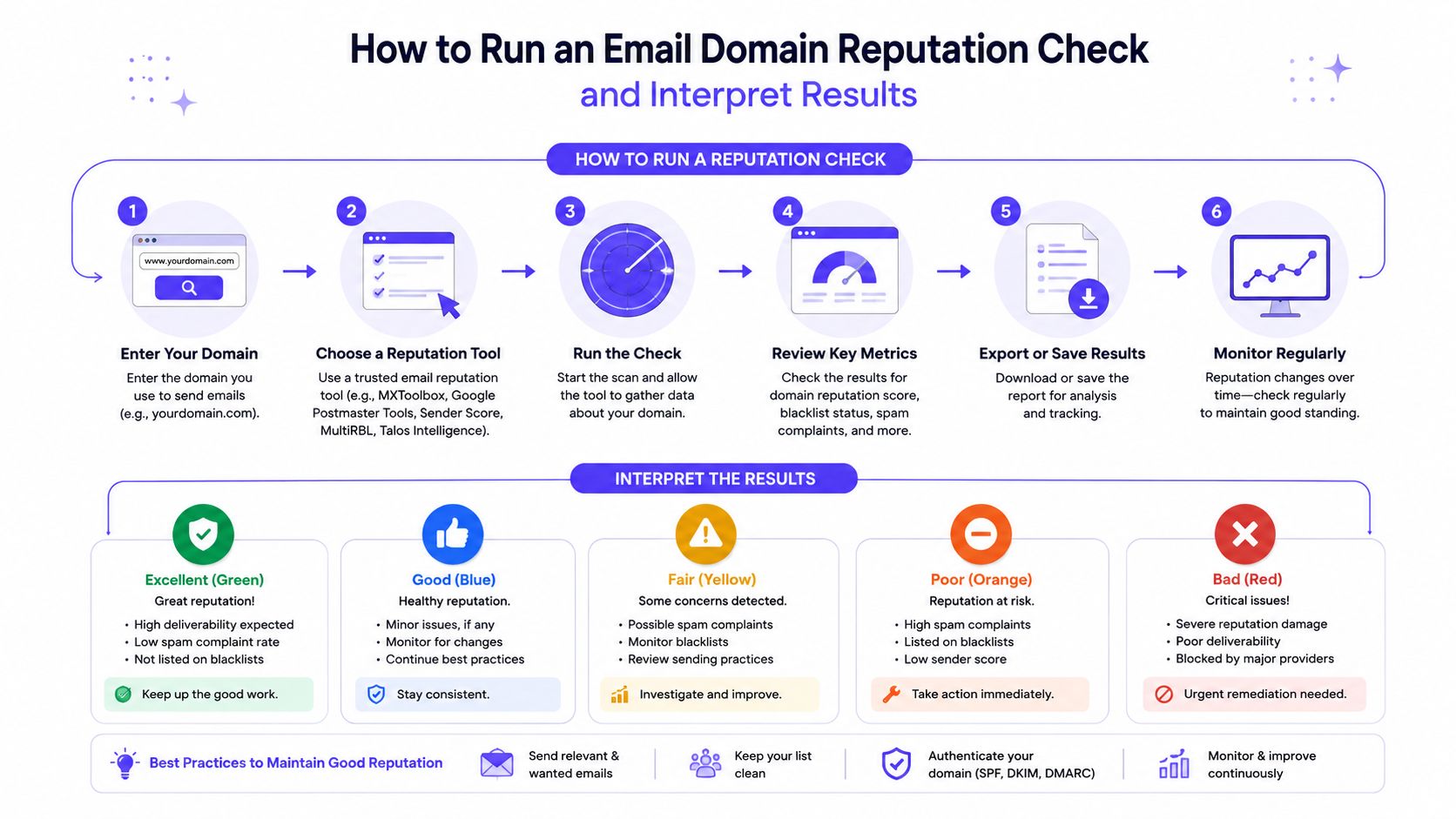
Confirm the sending domain.
The domain shown in the From address should match the domain being assessed. If a platform uses separate tracking or return-path domains, those identities may need separate review.Review authentication.
Check SPF, DKIM, and DMARC first. Look for alignment, not merely the presence of records. Also review MTA-STS, TLS-RPT, and BIMI when the checker supports them.Check reputation and blacklist signals.
A listing can explain blocking or filtering, but an absence of listings doesn't prove good inbox placement. Public blacklist status is one part of the diagnosis.Open Gmail Postmaster Tools.
Google's dashboard gives Gmail senders a dedicated Domain Reputation view. Google defines reputation as a rating of domain and IP quality determined by sending behavior, so history and behavior should be interpreted together rather than separated from the checker result. Gmail reputation dashboard contextCompare provider outcomes.
Send controlled test messages to relevant Gmail, Outlook, Microsoft 365, Yahoo, and other recipient environments. Record inbox, spam, delay, or rejection outcomes separately.Match the result with campaign data.
Review complaint trends, hard bounces, replies, clicks, and sending-volume changes around the time placement declined. A technical warning without behavioral evidence may be less urgent than a clean technical report paired with rising complaints.
How to read the outcome
A good result usually means the visible technical signals are healthy and no immediate reputation issue is obvious. It doesn't guarantee inbox placement.
A neutral result means the checker has found incomplete evidence, mixed signals, or a domain with limited history. The next action is to gather provider-specific placement and engagement information.
A poor result calls for restraint. The sender should pause risky volume increases, correct authentication problems, investigate complaints and bounces, and identify any blacklist issue before resuming normal activity.
A free set of supporting checks can help teams inspect authentication and reputation signals before committing to a broader platform. Mailwarm also provides free email deliverability tools for this kind of initial review.
The provider comparison matters because no single checker fully predicts placement across Gmail, Outlook, and Yahoo. A favorable Gmail result can coexist with a problem at another provider, so each provider's outcome should be treated as its own diagnostic view.
A short explainer can reinforce the workflow for teams that prefer a visual walkthrough:
How to Fix and Improve Domain Reputation After a Poor Result
A poor result shouldn't trigger random changes. The safest recovery plan starts with the signals most likely to create immediate filtering risk, then rebuilds trust through controlled sending and positive recipient behavior.
Start with technical identity
First, correct SPF, DKIM, and DMARC alignment. Remove unauthorized sending sources, confirm that legitimate platforms sign mail correctly, and move DMARC from observation toward enforcement when the organization understands its legitimate traffic.
Then inspect the domain's sending relationships. A new email service provider, a changed tracking setup, or a newly introduced campaign tool can create authentication failures even when the core mailbox appears healthy.
Reduce negative signals
List hygiene has a direct role in reputation protection. Sales teams should suppress invalid addresses and repeated hard bounces. Marketers should remove or suppress contacts who no longer engage, while recruiters and agencies should verify that outreach lists are current and permission-appropriate.
Content and cadence also matter. Teams should avoid misleading subject lines, aggressive resends, and sudden volume changes. A steady program with relevant messages gives recipients a reason to reply, click, or continue receiving mail.
Recovery principle: A sender rebuilds trust by making good behavior predictable, not by trying to manufacture a quick score improvement.
Mailbox-provider systems use multiple signals. Opens, clicks, replies, and moves from spam to inbox can support reputation, while spam complaints, hard bounces, and inconsistent volume can weaken it. Clean SPF, DKIM, and DMARC records alone won't guarantee inboxing when engagement remains poor. Multi-signal sender reputation guidance
Rebuild with real engagement
Provider-level warmup can help a team control where positive activity occurs instead of relying on a generic pool. The aim is to establish consistent, credible interaction while the sender monitors spam placement, bounce behavior, and provider differences.
Mailwarm is a premium email warmup and deliverability platform for teams that need more than automated warmup activity. It uses 50,000+ aged real inboxes and real engagement signals such as opens, replies, threads, spam removal, and important marking. Depending on the plan, it can generate up to 100% replies to warmup emails, while also offering provider-level warmup, B2B and B2C warmup, custom content warmup, spam score monitoring, inbox placement insights, authentication fix tools, bounce prevention, and deliverability analytics.
The platform doesn't require IMAP access or permission to read a user's private inbox. Expert deliverability calls are included in every plan, which gives teams a way to review DNS, sending patterns, complaints, bounces, and provider-specific placement with guidance rather than relying only on a dashboard. Teams can also use this practical guide to improve email sender reputation.
When a Free Checker Is Enough and When You Need a Premium Deliverability Platform
A free checker is often enough for a one-off technical review. It can help a small team identify an authentication error, inspect blacklist status, or decide whether a domain needs deeper investigation before a campaign launches.
The limits appear when the team needs continuous monitoring and provider-level answers. Gmail reputation, Outlook or Exchange reputation, blacklist status, DNS health, and inbox placement are separate signals. Current tool descriptions also caution that most checkers offer partial coverage or a generic score rather than a complete prediction across Gmail, Outlook, and Yahoo. Provider-specific checker limitations
| Situation | Free checker | Premium deliverability platform |
|---|---|---|
| One-time authentication review | Usually suitable | More capability than necessary |
| Blacklist investigation | Useful first step | Useful with broader monitoring |
| Multiple sending providers | Often fragmented | Better suited to coordinated review |
| Ongoing warmup | Limited | Built around controlled warmup activity |
| Inbox placement visibility | May be incomplete | Designed to connect placement and reputation |
| Expert diagnosis | Usually self-serve | Guidance may be included |
Teams should choose a premium platform when email directly supports revenue, recruitment, agency delivery, or customer communication and a failed campaign carries meaningful operational cost. The value isn't just warmup volume. It comes from combining real inbox engagement, monitoring, authentication tools, provider-level control, reputation protection, and expert guidance.
A free check can answer, “Is there an obvious problem?” A premium deliverability platform is designed to help answer, “What is happening at each provider, what behavior is creating it, and what should the team change next?”
Take Control of Your Domain Reputation Starting Today
Domain reputation is built through consistent sending behavior and measured through several signals. The practical starting point is simple:
- Run a complete check: Review authentication, blacklist status, provider dashboards, complaints, bounces, and placement.
- Fix the highest-risk gap: Correct identity problems before increasing volume.
- Monitor continuously: Compare Gmail, Outlook, Yahoo, and campaign engagement instead of trusting one generic score.
A clean checker result is encouraging, but real inbox placement is the outcome that matters. Teams should use reputation data to guide safer sending, stronger engagement, and faster troubleshooting.
Mailwarm helps senders build reputation, monitor inbox placement, and improve deliverability through real inbox engagement, advanced warmup controls, and expert guidance. Teams can explore the platform and its deliverability features at Mailwarm.