
Email blacklists explained and how they affect email deliverability and sender reputation
An email blacklist is a database where IP addresses or domains are flagged for potentially risky or suspicious sending behavior. Mail providers, gateways, and spam filters refer to these lists during SMTP checks, often as a first step to protect users from spam or malicious content. If you are listed on a blacklist, this can prevent your emails from being delivered, delay their delivery, or cause them to be placed directly in the spam folder. Some blacklists update in a matter of minutes, while others may take days, with each operating according to its unique criteria and evidence standards.
Being blacklisted damages more than just a single email campaign, it can tarnish the reputation of your domain and sending IP across multiple providers. Teams experience the effects of this in the form of an increase in email bounces, throttling, and poor inbox placement. The overall impact varies: some small, specialized blacklists may have little effect, but major DNSBLs used by many providers can suddenly block a significant portion of your email traffic.
A blacklist signals risk. It does not prove intent.Treat it as an alert that requires immediate, well-documented corrective action.
Common reasons you land on an email blacklist in 2026
Blacklists focus on patterns that suggest abusive or suspicious sending practices. Most triggers can be grouped into several categories. Often, problems stem from a combination of outdated systems, poor data quality, and risky sender behaviors. The most common reasons for being blacklisted include:
- High bounce rates resulting from sending to invalid or old addresses.
- Increased spam complaints from recipients marking your emails as unwanted.
- Sending to pristine or recycled spam traps.
- Missing or misconfigured SPF, DKIM, or DMARC authentication records.
- Inconsistencies in reverse DNS, HELO banners, or sending hostnames.
- Use of compromised credentials or malware infecting your mail host.
- Sudden surges in sending volume without a gradual warm-up period.
- Including links to unsafe domains, URL shorteners, or suspicious redirects.
If you've noticed an uptick in bounces recently, it's important to review the new delivery rules for bounced emails in 2026, as changes in policy can magnify issues that were previously minor.
How to confirm if your domain or IP is email blacklisted
Avoid speculation and confirm your status. Begin by reviewing SMTP logs and Non-Delivery Report (NDR) codes from your email provider, as block messages often cite the specific blacklist or provide a URL for delisting. Expand your investigation to check with public DNSBLs for broader coverage.
- Using a dedicated blacklist checker tool, check if your sending IP and domain are on a blacklist.
- Examine provider dashboards, such as postmaster tools, for signs of reputation problems.
- Optionally, query major DNS-based blacklists manually for direct confirmation.
- Send controlled test emails to monitoring accounts and review full headers and SMTP transcript details.
Record every finding meticulously. Note timestamps, error codes, and any relevant trace IDs. Blacklist operators generally expect a clear and factual timeline during delisting requests, so keep your documentation concise and accurate.
Step-by-step removal process to get delisted from an email blacklist
The chances of successful delisting are highest when you pair necessary fixes with a thoughtful, clear request. Do not submit mass requests until you have addressed the root cause of the problem. Most blacklist administrators will deny requests that do not demonstrate real improvements.
- Identify the cause. Examine logs, complaints, and records of spam trap hits to confirm what led to your listing.
- Fix the source. Repair authentication issues, rotate compromised credentials, secure your mail server, and resolve any data errors.
- Stabilize sending. Temporarily pause riskier sending streams. Lower sending rates and turn off problematic workflows.
- Follow the removal policy specified by the blacklist operator. This usually will involve using the blacklist operator’s designated form for removal requests, or sending them an email. Provide clear proof that you have fixed the underlying issue, rather than offering excuses.
- Wait and monitor. Some blacklists automatically review and update, while others require manual approval. Track your status each day.
- Escalate respectfully. If your request is declined, supply additional relevant evidence, such as updated logs, DMARC reports, or bounce data, to support your appeal.
Remember: removing a single blacklist entry doesn’t immediately restore your reputation everywhere. Many providers cache reputational data. You will need to continue monitoring and proceed cautiously as trust is rebuilt.
Delisting without a root-cause fix is temporary.To achieve lasting results, address the issue before requesting delisting.
Technical authentication that reduces future email blacklisting risk
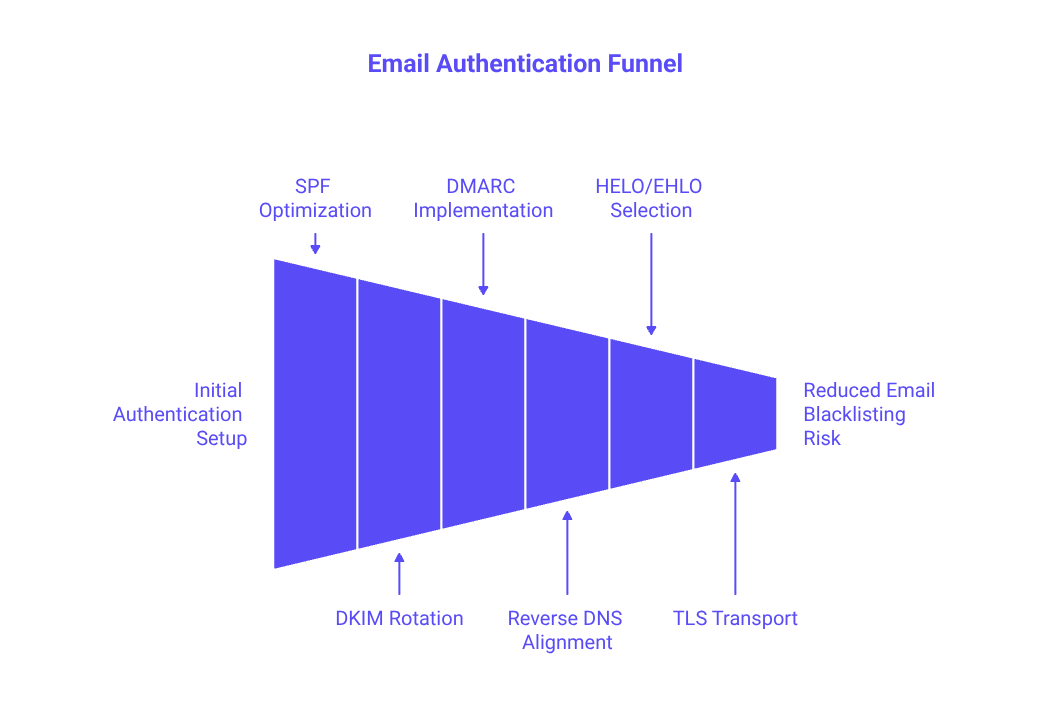
Strong and consistent authentication helps email filters distinguish legitimate mail from potential abuse. Align your domain authentication settings across your envelope and headers, and keep your records straightforward and easy to audit.
- SPF: Limit your SPF record to a maximum of ten DNS lookups. Remove any obsolete “include” mechanisms and ensure you have a single SPF record per domain.
- DKIM: Use a current cryptographic key, rotate selectors periodically, and ensure that the
d=domain in your DKIM signature matches your visible sending domain. - DMARC: Begin with p=none to collect reports, then gradually move to quarantine or reject once your authentication is stable.
- Reverse DNS and FCrDNS: Ensure your sending IP, DNS hostname, and HELO/EHLO identity all align correctly.
- HELO/EHLO: Choose a hostname that is both reputable and resolvable. You can learn more about this by reading how the HELO banner influences sender reputation.
- Transport: Always serve email using TLS, and proactively monitor for and resolve any cipher or downgrade errors, especially during busy periods.
Review DMARC aggregate reports each week. Pay close attention to any authentication alignment gaps, forwarding anomalies, or unexpected third-party senders using your domain.
Post-removal recovery plan to rebuild sender reputation without risky volume spikes
After delisting, proceed cautiously with your domain usage to prevent further issues. Gradually ramp up your sending volume, starting with your most engaged and recently active recipients. Keep concurrency low and continue monitoring your inbox placement and complaint rates closely as you increase your sending activity.
Implementing a strategic warm-up routine can help smooth this recovery phase. Warm-up activities build trust with email providers by sending consistent, low-risk messages that generate healthy engagement signals. Since February 2026, Mailwarm has evolved as an advanced email warm-up solution, now featuring multi-account management, deep deliverability and reputation monitoring, support for multiple providers, and tracking of individual provider spam scores, tailored for high-volume operations. Mailwarm connects your sender account to a robust network of 50,000+ active, frequently updated inboxes to simulate authentic engagement. This process is not promotional blasting, it’s technical engagement, such as opens, replies, spam-folder rescue, and primary inbox tagging, to help restore sender reputation.
Record your results daily during the first two weeks post-delisting. Watch carefully for renewed throttling, unusual bounce codes, or a sudden return to spam placement. If you see your emails being blacklisted again or receiving more complaints, you should pause, identify and fix the problem, and then resume, being careful to increase your email volume more gradually.
Ongoing monitoring habits that reduce future email blacklist risk
Make deliverability monitoring a regular routine instead of a last-minute fix. Strong senders proactively address problems before they become widespread. Set up a weekly checklist and maintain discipline in following it.
- Regularly review postmaster dashboards for early warnings of domain or IP reputation changes.
- Re-audit your SPF, DKIM, and DMARC records after any infrastructure update.
- Use a blacklist checker tool to review key DNSBLs on a consistent schedule.
- Track and investigate complaint signals, and remove sources responsible for high complaint rates.
- Rotate API keys and SMTP credentials according to a strict policy schedule.
- Keep SMTP logs archived for at least 30 days for investigation if incidents occur.
To better understand your results, consult inbox placement benchmarks for cold emails, and adjust your strategy accordingly based on your own inbox placement data.
Understanding bounces and inbox placement when email blacklisted
The impact of a blacklist is typically felt in two ways. Hard blocks will result in immediate bounces with direct references to the blacklisting, while soft blocks reduce sending speed or divert mail to the spam folder. Either outcome erodes the trust that providers have in your emails and can harm future deliverability. Carefully read error codes and relate them to the guidance from your provider.
Some filters will allow for rapid recovery once your sending is clean, while others require weeks of consistent, low-complaint traffic before trust is restored. Every adjustment you make should be backed by up-to-date evidence. Stable and lower rates of issues as seen on statistical graphs, and steady email placement, indicate that the recovery process is working correctly.
Take action now to clear and protect your sending reputation
Don’t wait, verify your blacklist status, address the cause, and request removal with a record of proof. Rebuild your reputation using a gradual warm-up routine and ongoing monitoring. Take these steps today to ensure your legitimate emails are delivered safely to your recipients’ inboxes.
FAQ
What triggers an email blacklist inclusion?
Email blacklisting typically results from high bounce rates, increased spam complaints, sending to spam traps, or misconfigured authentication. Neglecting technical standards like SPF, DKIM, and DMARC also raises red flags. Modern blacklist algorithms are quick to inflict consequences on lapses, making oversight costly.
How can I check if I'm blacklisted?
Monitor SMTP logs and NDR codes first; they often point to specific blacklists. Utilize a blacklist checker tool like Mailwarm for a broader examination. Don't rely on assumptions—verify your status with factual data.
How do I remove an email domain from a blacklist?
Identify and correct the underlying issue before requesting removal. Submit clear and documented evidence of fixes per the blacklist operator’s guidelines. Delisting is a temporary relief; without addressing root causes, expect relisting.
What role does Mailwarm play in preventing blacklisting?
Mailwarm employs an advanced warm-up solution that simulates genuine engagement, aiding in restoring reputation. By maintaining consistent sending behavior with high engagement metrics, it reduces the likelihood of future blacklisting. This work isn’t just about volume—it's about quality interaction.
What happens if a delisted domain is blacklisted again?
Repeated blacklisting signals unresolved issues and erodes trust further. It complicates future delisting and tarnishes your sender reputation across providers. Address underlying problems earnestly to break this damaging cycle.
Why is email authentication critical in avoiding blacklists?
Proper email authentication using SPF, DKIM, and DMARC establishes sender legitimacy, reducing false positives in spam filters. Misconfigurations invite suspicion, potentially flagging your messages as threats. Robust authentication aligns with transparency, a non-negotiable in email deliverability.
How can I minimize the risks of blacklisting post-removal?
Implement a post-removal recovery plan emphasizing gradual volume escalation to trusted recipients. Use ongoing monitoring tools, like Mailwarm, to stabilize your reputation through real engagement. Rash actions and complacency post-delisting are your downfall.
Is removing my domain from a single blacklist enough?
Delisting from one blacklist is a partial victory. Providers store reputational data, so bouncing back demands sustained low-complaint traffic and cautious operation under a watchful eye. Assume you're on thin ice until consistent conduct proves otherwise.
Are all blacklists equally influential?
No, the impact varies significantly. Listings on major DNSBLs, utilized by numerous providers, can disrupt vast swathes of your email traffic, while smaller niche lists might barely register. Understanding the scope of each blacklist informs remediation strategy.