

Email bounce rate is calculated as (hard bounces + soft bounces) / total emails sent × 100. A rate under 2% is healthy, 2% to 5% is a warning, and above 5% is critical, because bounced messages signal outright delivery failure before inbox placement can even be evaluated.
That makes bounce rate more than a list-cleaning statistic. Mailbox providers use repeated bounce patterns to assess sender quality, and a small number of unreachable addresses can become a serious reputation problem when a campaign is large. A clear bounce process helps founders, sales teams, agencies, recruiters, and marketers protect both delivery and future inbox placement.
What Email Bounce Rate Is and the Benchmarks That Matter
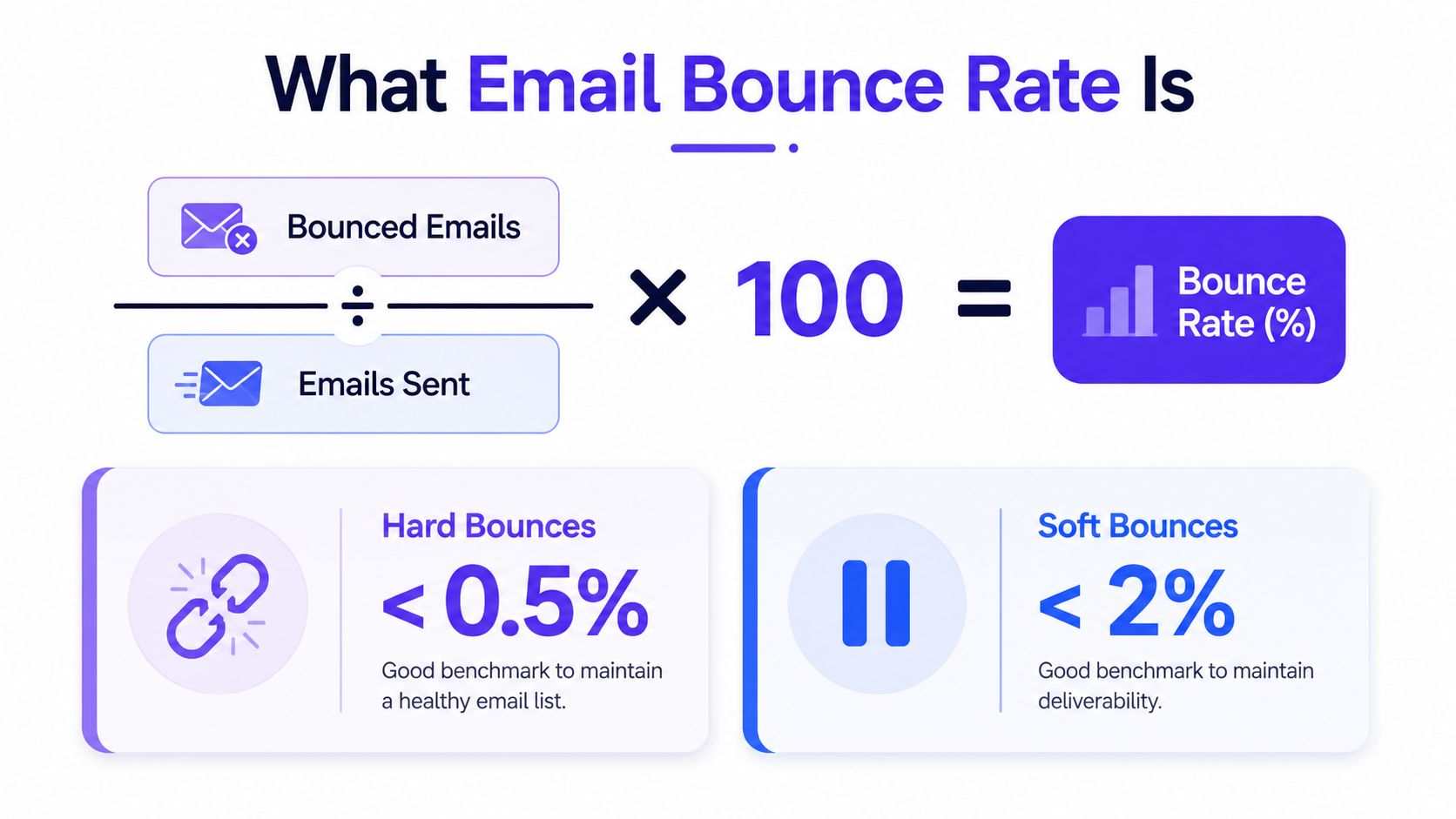
A 5% email bounce rate means 50 of 1,000 sent messages came back undeliverable. Calculate it this way:
Email bounce rate = (bounced emails ÷ total emails sent) × 100
The result counts messages rejected as undeliverable, not messages that reached a spam folder. The practical benchmark zones are:
- Under 2% is healthy. Acquisition and list hygiene are generally under control.
- 2% to 5% is a warning. Investigate the list, authentication, infrastructure, and targeting, especially if hard bounces are increasing or one provider performs worse.
- Above 5% is critical. Pause and review sending before repeated failures affect delivery and future inbox placement.
For 100,000 recipients, those ranges mean fewer than 2,000 bounces, 2,000 to 5,000 bounces, and more than 5,000 bounces. These thresholds provide an operating framework, not a promise that every mailbox provider uses identical limits. The formula and benchmark ranges are also summarized in practical bounce-rate guidance.
Why aggregate reporting can mislead
A single blended rate can hide a failure at one receiving provider. Benchmarking found a 2.2% blended cold email bounce rate, compared with 2.40% at Google and 2.46% at Microsoft, and identified Microsoft as the stricter provider in that comparison (Saleshandy benchmark data). Segment reports by Gmail, Microsoft, Yahoo, and other major environments so a healthy average does not conceal a provider-specific problem.
Bounce rate can also warn of inbox-placement decline before that decline becomes obvious. A 2025 global report recorded average inbox placement falling from 87.3% to 84.6% and associated 2% to 3% hard bounces with a 15% to 25% deliverability reduction (BillionVerify report). Treat a rising rate like an engine warning light: identify which provider, campaign, or address source is producing the failures before placement collapses.
Hard Bounces vs Soft Bounces and What Each One Means
A hard bounce is a permanent failure. The receiving server has indicated that the address is invalid, nonexistent, or permanently blocked, so another attempt usually won't help.
A soft bounce is temporary. The address may be valid, but the receiving server can't accept the message at that moment because of a full mailbox, a server issue, a temporary block, or another transient condition. A 4xx response usually represents a soft failure, while a 5xx response represents a permanent failure (Nylas explanation of SMTP bounce types).
Hard Bounce vs Soft Bounce Comparison
| Attribute | Hard Bounce | Soft Bounce |
|---|---|---|
| Typical cause | Invalid address, nonexistent mailbox, closed account, or permanent block | Full mailbox, temporary server issue, greylisting, message-size problem, or transient block |
| SMTP family | 5xx | 4xx |
| Retry behavior | Retrying generally won't succeed | The receiving server may accept a later attempt |
| Suppression | Suppress on the first confirmed occurrence | Monitor first, then suppress after repeated failures |
| Time to fix | Correct the address or remove it | Allow controlled retries while investigating the pattern |
| Main risk | Continued sending signals poor list quality | Repeated failures can become a persistent reputation issue |
Hard bounces should be removed from active sending immediately. The address can remain in a suppression record for auditing or customer-data continuity, but it shouldn't continue receiving campaigns.
Soft bounces deserve more measured handling. A temporary failure can resolve, but repeated failures shouldn't remain in an endless retry loop. Some guidance treats five or more soft bounces for the same address as a hard-bounce equivalent, recommending suppression at that point (NitroSend guidance).
Practical rule: Classify the response first, then decide whether the next action is correction, retry, or suppression.
A useful workflow records the bounce code, the receiving domain, the number of consecutive failures, and the last successful delivery. That information helps distinguish one recipient's temporary mailbox problem from a campaign-wide infrastructure issue.
How Bounce Rate Damages Your Sender Reputation Over Time
Mailbox providers don't treat bounces as isolated delivery events. They observe patterns associated with a sending domain, infrastructure, and recipient population. When a campaign repeatedly targets invalid or unreachable addresses, providers can interpret that behavior as evidence of weak list quality or poor acquisition practices.
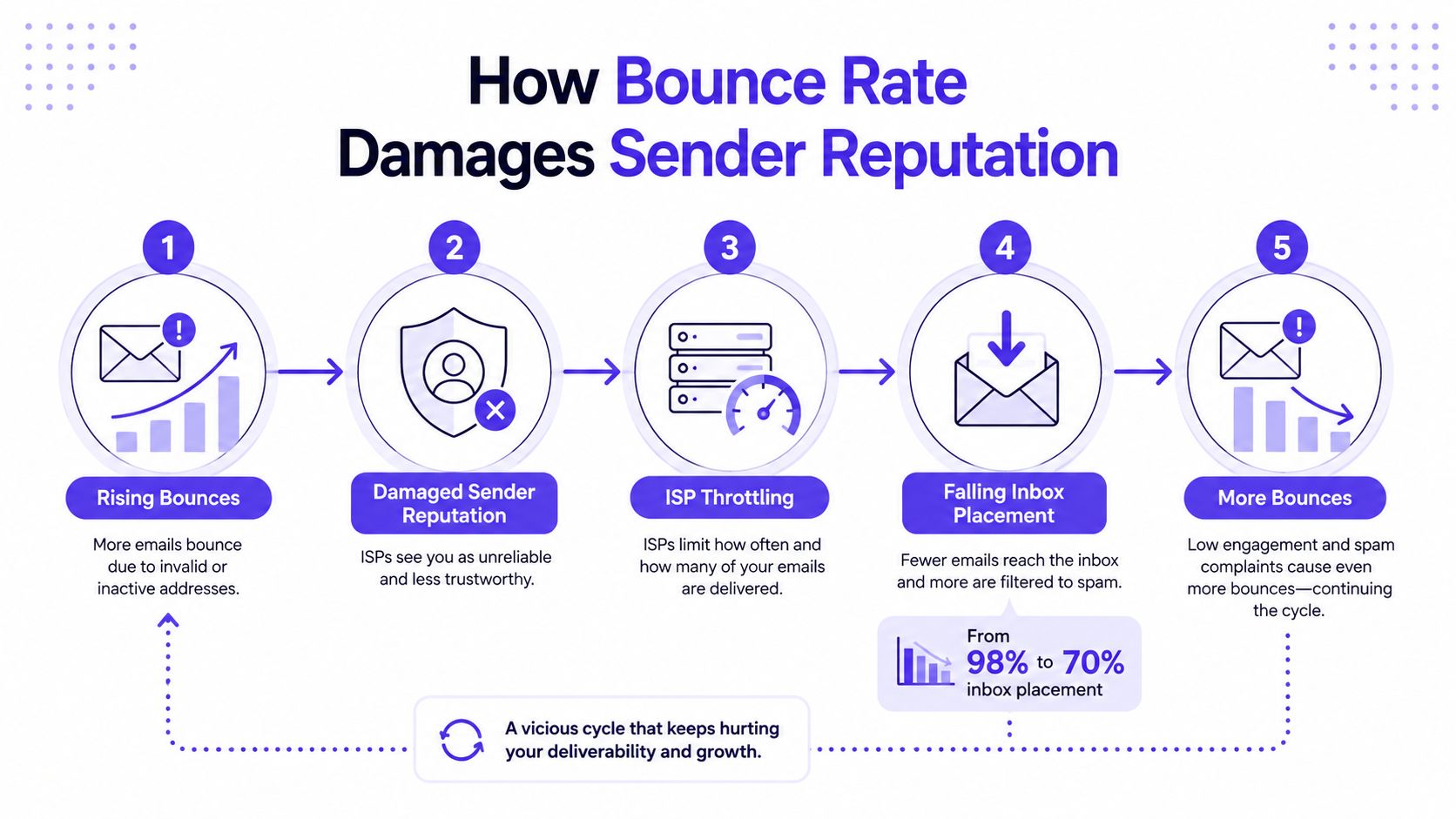
The feedback loop usually develops in this order:
- Rising bounces reveal invalid addresses, stale records, technical failures, or aggressive sending.
- Sender reputation weakens as providers see more failed deliveries and related negative signals.
- Receiving systems throttle traffic by delaying or limiting acceptance.
- Inbox placement falls, so more accepted messages may be filtered away from the primary inbox.
- Engagement weakens, and the resulting pattern can make future delivery even harder.
A bounce is different from spam placement. The receiving server rejects a bounced message before inbox placement can be evaluated. Spam placement means the server accepts the message but routes it away from the main inbox. That distinction matters because bounce rate can expose a delivery problem before open and click reporting reveals anything useful.
When a spike becomes an emergency
A single spike may follow a list import, a sender-domain change, or an ESP migration. That event deserves investigation, but a short-lived spike isn't automatically proof of a lasting reputation failure. The concern rises when the rate remains high, hard bounces keep appearing, or one provider shows a worsening trend while the aggregate result looks stable.
Teams should check if your domain is blacklisted when bounce patterns point to a broader reputation problem. They should also review authentication, recent volume changes, list age, and the receiving providers affected.
The risk compounds because falling placement reduces meaningful engagement. As fewer messages reach the inbox, recipients interact with fewer messages, and providers receive less positive evidence that future mail belongs there. Stopping the first pattern is easier than rebuilding trust after repeated throttling and filtering.
Common Bounce Codes and What They Are Telling You
SMTP codes are short server responses, but they can point directly to the next operational step. The first digit provides the broad classification: 4xx responses are usually temporary, while 5xx responses are usually permanent.
| Code | Type | Meaning | Action |
|---|---|---|---|
| 421 | Soft | The receiving service is temporarily unavailable or asking the sender to try later | Retry with controlled pacing and check whether the issue affects one provider or many |
| 450 | Soft | The mailbox is busy, unavailable, or temporarily refusing delivery | Retry, then review repeated failures for the same address |
| 451 | Soft or policy-related | The server has temporarily rejected the message, sometimes after a spam or policy signal | Check authentication, content, sending pattern, and provider-specific diagnostics |
| 550 | Hard | The user or mailbox is unknown, invalid, or permanently unavailable | Suppress the address and investigate list acquisition |
| 552 | Usually hard or persistent | The receiving mailbox or system has exceeded its storage limit | Retry cautiously, then suppress if the condition persists |
| 553 | Hard | The mailbox name or address format is invalid | Correct the address if possible, otherwise suppress it |
| 554 | Usually hard or policy-related | The transaction failed because the server rejected the message | Read the diagnostic text, then investigate reputation, authentication, or policy |
The exact wording after a code often matters more than the number alone. A 550 response may identify an unknown user, while another server may use the same family for a policy rejection.
How to read a bounce log
Three fields help with fast triage:
- diagnostic-status shows the extended delivery status and often adds the reason behind the response.
- remote-mta identifies the receiving mail-transfer system that returned the failure.
- original-recipient shows the address that the sending system attempted to reach.
A cluster of failures from the same remote system suggests a provider-specific issue. A broad spread across domains points more toward list quality, authentication, infrastructure, or sending behavior. The response should be based on the pattern, not on one code viewed in isolation.
How to Reduce Email Bounce Rate Step by Step
Reducing bounce rate requires both prevention and response. A practical team can run the following process before a major campaign and turn the repeatable parts into automation.
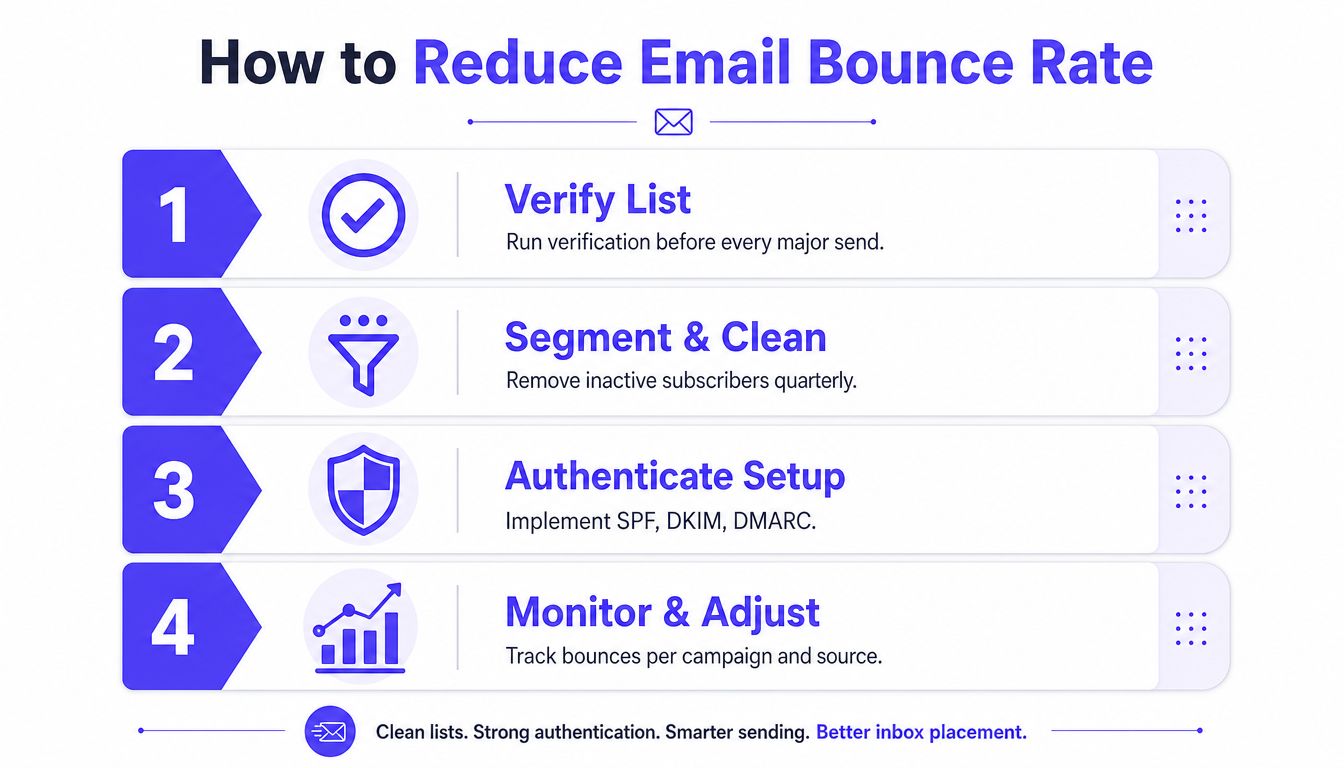
1. Verify the list before sending
Run recent contacts through a reputable verification service before a major send. Remove addresses identified as invalid, risky, role-based, or likely to create delivery problems. Mailwarm's picks for email verification can help teams compare verification approaches before choosing a provider.
Verification can't replace consent or good acquisition practices. It checks address risk, but it doesn't make an unwanted list safe to send.
2. Create a sunset policy
A sunset policy removes or suppresses contacts that no longer show meaningful engagement. The policy should define:
- The inactivity signal, such as a prolonged absence of opens or clicks.
- The warning stage, where the contact receives a preference or re-engagement message.
- The final action, where continued inactivity leads to suppression.
The supplied deliverability plan calls for suppressing subscribers with no opens or clicks in 90 to 180 days, depending on the program and audience (Monday Campaigns guidance). Teams should adapt that window to their consent model, buying cycle, and message frequency.
3. Use double opt-in for risky acquisition channels
Double opt-in asks a new subscriber to confirm the address before entering the active mailing list. That extra step catches typing errors, fake registrations, and sign-ups made without genuine intent.
It may reduce the number of immediately active contacts, but it improves confidence in the addresses that remain.
4. Monitor by provider and source
Review bounce rate by campaign, acquisition source, sending domain, and mailbox provider. A weekly review can reveal a bad form, an aging segment, or a provider-specific problem before the aggregate dashboard looks alarming.
Authentication deserves its own check. SPF, DKIM, and DMARC failures can create rejection or filtering problems, so authentication status should be reviewed alongside bounce classifications.
5. Warm up new domains and sending infrastructure
New domains and IP pools need a controlled sending pattern before a team scales volume. Start with engaged recipients, maintain consistent behavior, and watch both bounces and placement. Warmup can reduce reputation-related deferrals, but it doesn't repair an invalid list.
For broader guidance on authentication, list hygiene, and sending practices, teams can review the inbox strategies from Machine Marketing.
6. Separate migration noise from a real failure
A bounce spike after switching ESPs or domains can be normal for a few days while routing, reputation signals, and retry behavior settle. It shouldn't remain high for weeks.
Concern is justified when hard bounces continue, the spike affects several campaigns, one provider deteriorates repeatedly, or the sending team can't identify a change in list, authentication, volume, or infrastructure. At that point, pause the affected segment and investigate rather than allowing the pattern to spread.
Why Email Warmup Helps New Domains Avoid Early Bounces
A new sending domain has little or no established reputation with receiving providers. The provider may respond cautiously by deferring messages, applying greylisting, or rejecting traffic that arrives too quickly. Those responses can appear as soft bounces even when the recipient addresses are valid.
A structured warmup gives mailbox providers a controlled history to evaluate. The sending team begins with a manageable audience, maintains consistent activity, and gradually expands only when delivery and engagement signals remain stable.
What warmup can and can't solve
Warmup can support:
- Controlled volume growth, instead of an abrupt change in sending behavior.
- Positive engagement, including opens, replies, threads, spam removal, and important marking.
- Provider-level learning, so Gmail, Microsoft, Yahoo, and SMTP environments aren't treated as one generic destination.
- Early detection, through bounce, spam-score, and inbox-placement monitoring.
Warmup isn't a substitute for verification. A clean process combines address validation, authentication checks, relevant content, and careful volume management. Sending verified contacts through a warmed domain is materially safer than using warmup activity to disguise a poor list.
Mailwarm is a premium email warmup and deliverability platform that helps senders build reputation, monitor inbox placement, and improve deliverability through real inbox engagement, advanced warmup controls, and expert guidance. Its network includes 50,000+ aged real inboxes, and its controls cover provider-level warmup, B2B and B2C warmup, custom content warmup, spam score monitoring, authentication fix tools, bounce prevention, and deliverability analytics.
Depending on the plan, it can generate up to 100% replies to warmup emails, while its workflow doesn't require IMAP access or permission to read a user's private inbox. Teams can also use SMTP warmup when the sending setup requires a controlled SMTP-focused process.
Warmup should be treated as prevention and reputation development. It can't make an invalid address deliverable, and it can't remove the need for suppression rules.
FAQ and the One Action That Lowers Bounce Rate Fast
What is an acceptable email bounce rate?
Under 2% is generally considered healthy, 2% to 5% signals a warning, and above 5% calls for immediate investigation. Treat these as operating thresholds, not guarantees. A blended rate can hide a provider-specific problem, so compare B2B and B2C traffic, list age, and results from Gmail and Microsoft separately.
Do soft bounces hurt reputation?
They can when they repeat or occur at scale. A temporary 4xx response may clear on a later attempt, while repeated failures point to a mailbox, policy, or delivery problem. Track the affected addresses and suppress them after your documented retry window.
Why is my bounce rate suddenly high?
Check for an old list, a recent import, a sending-domain or ESP change, authentication trouble, a provider block, or a campaign sent too quickly. A spike after migration may settle, but a pattern lasting weeks warrants a pause and structured review.
Is the same bounce rate acceptable at Gmail and Microsoft?
Not necessarily. One reported comparison found cold-email bounce rates of 2.40% at Google and 2.46% at Microsoft, showing why provider-level reporting matters (Saleshandy deliverability statistics). Your overall rate may look acceptable while one provider is rejecting more mail and reducing inbox placement.
How long should suppressed addresses stay suppressed?
Hard-bounced addresses should remain suppressed unless a reliable, consent-based process corrects the recipient address. Repeated soft bounces should also enter suppression after the retry and re-engagement window defined by your program.
How is bounce rate different from complaint rate?
Bounce rate covers messages the receiving server could not accept. Complaint rate covers accepted messages that recipients report as spam. One points to delivery acceptance, the other to recipient response, so each needs a different investigation.
Does Mailwarm need access to a private inbox?
No. Mailwarm does not require IMAP access or permission to read a private inbox. It provides real inbox engagement, provider-level controls, monitoring, authentication tools, and deliverability guidance for reputation management.
The fastest practical action is a verification pass this week. Suppress critical hard-bounce patterns, then pause any provider segment with a rising trend. This catches list problems before they become broader inbox-placement failures.
Mailwarm helps teams prevent bounces, build sender reputation through real inbox engagement, and monitor provider-level inbox placement without IMAP access to private inboxes. Visit Mailwarm to review its warmup controls, verification and authentication support, deliverability analytics, and expert guidance.