
A founder launches outbound campaigns, a marketer checks a domain health tool, or an agency audits a client setup and sees the same warning. DMARC policy not enabled. It sounds severe, but it usually points to a rollout stage, not a disaster.
The confusion comes from the wording. Many teams assume something is broken when the issue is simpler. The domain is either missing a DMARC record, or it has one set to monitoring mode and never progressed beyond that.
The practical fix is straightforward. Publish a DMARC record, start with monitoring, review the reports, identify every legitimate sender, then move carefully toward enforcement.
Your Guide to Fixing a 'DMARC Policy Not Enabled' Warning
The warning often appears at exactly the wrong moment. A sales team is about to scale cold outreach, a marketing team is preparing a campaign, or a company is tightening security after seeing spoofed messages hit customer inboxes. The domain check returns a red flag, and nobody is sure whether to panic or ignore it.
Most of the time, neither reaction helps.
A DMARC warning usually means the domain hasn't reached enforcement yet. That matters, but it doesn't mean email authentication has failed across the board. It means the setup needs to move from observation to action.
Quick answer
If a domain shows DMARC policy not enabled, the right path is usually this:
Check whether a DMARC record exists on the domain.
If missing, publish one at the DMARC hostname in DNS.
Start with
p=noneso reporting can collect safely.Review aggregate reports to find all approved senders.
Fix SPF or DKIM alignment for each legitimate service.
Move to
p=quarantine, then later top=reject, usingpct=to ramp up gradually.
Practical rule: Don't jump straight to reject unless every sending source has been identified and authenticated correctly.
That last part is where teams get stuck. They publish a DMARC record, see that the warning remains because enforcement isn't active, then leave it in place for months. Monitoring is useful. Staying in monitoring forever isn't.
What 'DMARC Policy Not Enabled' Really Means
DMARC is a policy layer for email authentication. It tells receiving mail systems what to do when a message claims to come from a domain but doesn't authenticate in a way that aligns with that domain.
A status of policy not enabled usually means the domain has no DMARC record published or the policy is set to p=none, which monitors authentication but doesn't enforce quarantine or rejection. In practice, receivers aren't being told to take action on failing mail, so the domain remains in the monitoring stage rather than the enforcement stage, as explained in Mimecast's overview of DMARC policy not enabled.
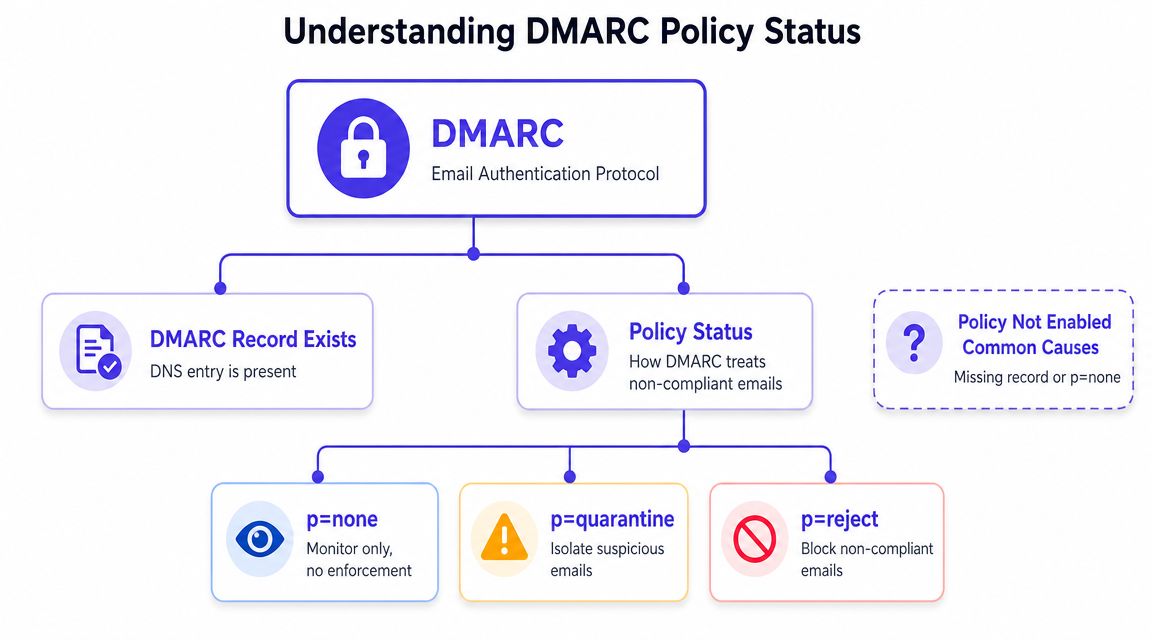
The three DMARC policy states
A simple way to think about DMARC is that it gives mailbox providers instructions.
| Policy | What it does | What it doesn't do |
|---|---|---|
p=none | Collects data and reports | Doesn't change delivery |
p=quarantine | Tells receivers to treat failing mail as suspicious | Doesn't fully block all failing mail |
p=reject | Tells receivers to refuse failing mail | Doesn't fix misconfigured senders automatically |
That distinction matters because many tools label p=none as if DMARC isn't enabled. Technically, a record may exist. Operationally, enforcement still isn't active.
Why the warning feels misleading
The wording suggests a setup failure. In reality, p=none is often the correct first step.
It allows a company to see every service sending mail with its domain in the visible From address. That often includes obvious systems like Google Workspace or Microsoft 365, plus less obvious ones such as a CRM, a support desk, a recruiting tool, or an invoicing platform.
A domain in
p=noneisn't protected by enforcement yet, but it may be exactly where a careful rollout should begin.
The mistake isn't starting there. The mistake is never moving past it.
Why Fixing Your DMARC Policy Matters for Deliverability
DMARC wasn't created as a box-ticking exercise. It exists because SPF and DKIM alone didn't solve a key problem. The visible From address could still be abused even when underlying authentication passed for some other identity. IRONSCALES describes DMARC as a protocol built on SPF and or DKIM to address that alignment gap, and notes that only p=quarantine and p=reject create actual enforcement, while p=none leaves mail delivery unchanged in its guide to DMARC policy not enabled.
Brand protection and trust
If a domain has no DMARC enforcement, bad actors have more room to impersonate it. Customers, prospects, and candidates don't see the difference between a spoofed message and a legitimate one if the From address looks familiar.
That risk isn't only about security. It affects trust in every future campaign sent from the same brand.
Deliverability is part of the same problem
Teams often separate security from deliverability, but mailbox providers don't. Authentication quality, alignment, and consistency shape how a sender is evaluated.
A domain that reaches enforcement sends a clearer trust signal than one that stays in monitoring forever. It's not a magic fix for inbox placement, but it's part of a serious sender posture.
For teams working through broader inbox placement issues, this guide on how to get emails to the inbox is a useful companion because it frames authentication alongside reputation, content, and sending practices.
What works and what doesn't
What works
Treating DMARC as an operational project, not just a DNS task
Identifying every sender before tightening policy
Using enforcement carefully once alignment is clean
What doesn't
Publishing
p=noneand assuming the job is doneTurning on reject too early and breaking valid mail
Blaming content first when the domain trust layer is still weak
How to Create and Publish Your DMARC Record
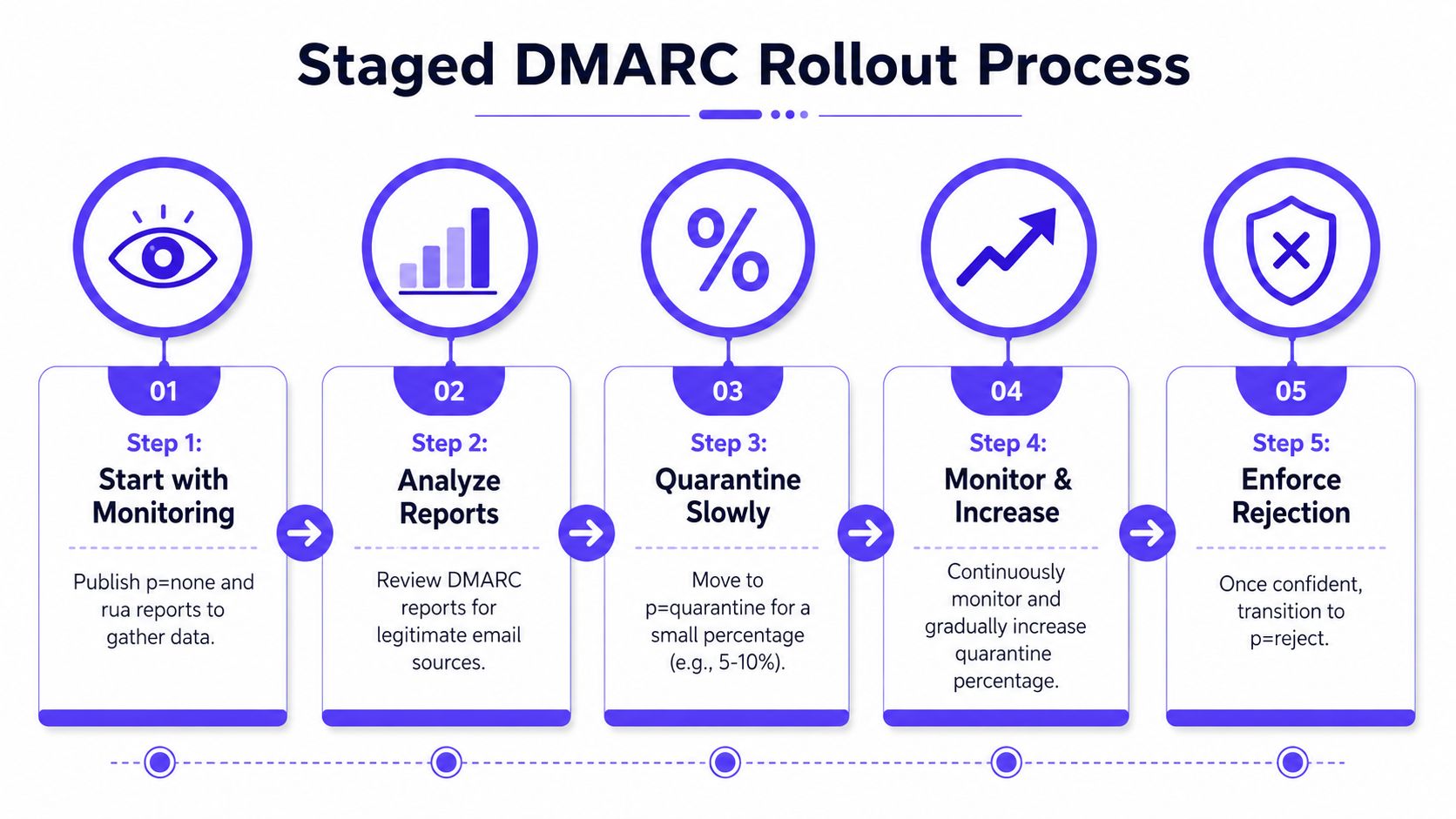
The safest path is a staged rollout. Start in p=none, collect reports, fix alignment issues, then increase enforcement gradually with pct= instead of making a hard jump. Valimail recommends staying in monitoring mode for 2–4 weeks and shows a gradual pattern such as 10% quarantine before increasing, in its guide on fixing DMARC policy not enabled.
A visual helps before getting into the mechanics.
Start with a monitoring record
The first publish should be simple and deliberate. The goal isn't enforcement yet. The goal is visibility.
A basic monitoring record includes:
v=DMARC1, which identifies the record as DMARCp=none, which sets the policy to monitoringrua=, which tells receivers where to send aggregate reports
A practical example looks like this:
v=DMARC1; p=none; rua=mailto:dmarc-reports@yourdomain.com
That reporting address matters. Without it, a team loses the easiest source of insight into who is sending mail on behalf of the domain.
Google's admin guidance also notes that SPF and DKIM should be enabled for at least 48 hours before turning on DMARC, which is why DMARC is usually a later step in an authentication rollout rather than the first one. A useful setup reference is Mailwarm's guide to setting up DKIM, SPF, DMARC, and BIMI.
Review what the reports reveal
Once reports start arriving, the true work begins. A founder or marketer usually discovers at least one sender nobody remembered to document.
Common examples include:
Sales engagement tools, which may sign with one domain while the visible From uses another
Marketing platforms, especially older newsletter systems
Support software, where replies come from the company domain
Recruiting and HR tools, which often send in the background
The job here isn't to remove everything. It's to separate legitimate sources from unauthorized ones and make sure authentic senders authenticate in alignment with the domain being shown to recipients.
A short explainer can help non-technical teams understand the rollout logic.
Move to quarantine, then reject
Once the reporting data is clean enough to trust, enforcement can begin gradually.
A careful path looks like this:
Switch to
p=quarantinefor a limited share of mail usingpct=.Watch for unexpected failures from legitimate systems.
Increase the percentage slowly as the sender list stabilizes.
Move to
p=rejectonly when failing mail is clearly unauthorized.
Many rushed rollouts often encounter failure. Teams assume SPF on the main mailbox is enough, but third-party platforms often cause significant breakage.
Key takeaway: DMARC enforcement should follow sender discovery, not guesswork.
Verifying and Monitoring Your DMARC Setup
Publishing the record isn't the finish line. DNS needs to propagate, the syntax needs to be valid, and the reports need to confirm that the policy is behaving as expected.
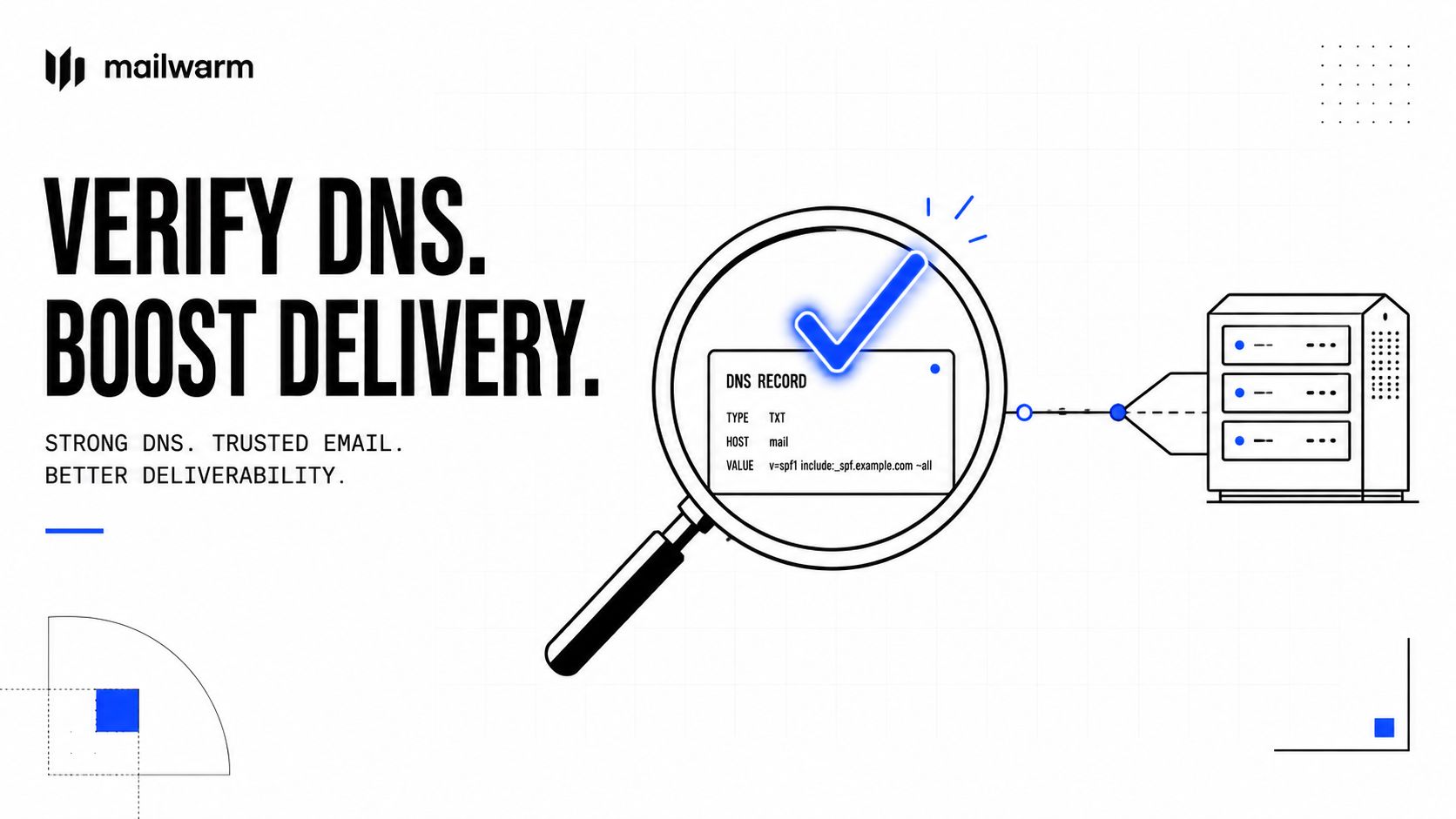
Check the record itself
The first verification step is simple. Confirm that the TXT record is visible at the DMARC hostname and that the tags are formatted correctly.
Tools such as the Mailadept DMARC Checker can help confirm whether the record is published, readable from public DNS, and valid. The tool is built to check whether a DMARC record exists, validate the setup, and help teams review the result before moving further into enforcement. Teams that want a dedicated verification workflow can also use the Mailwarm DMARC checker to inspect whether the policy is present and structured correctly.
Watch the reports, not just the green check mark
A DMARC record can validate and still be risky. Syntax is only the first layer.
The aggregate reports sent to the rua address show which systems are passing, which are failing, and which domains appear in the authentication flow. That's where forgotten senders usually surface.
Important patterns to look for include:
Unexpected platforms, which often point to shadow IT or old tools
Legitimate services failing alignment, which need SPF or DKIM work before enforcement increases
Traffic that shouldn't exist at all, which may indicate spoofing attempts
Monitoring is ongoing
A company's sender footprint changes. New tools get added, teams switch CRMs, agencies send campaigns, and support systems change vendors. That means DMARC monitoring can't be treated as a one-time migration task.
A healthy process usually includes:
| Check | Why it matters |
|---|---|
| Record validation | Catches syntax or publishing errors |
| Report review | Finds real senders and failures |
| Policy review after tool changes | Prevents fresh deliverability issues |
If a team increases enforcement without reviewing recent sender changes, it can block its own mail before it blocks abuse.
How Mailwarm Helps You Master Email Authentication
DMARC is one layer of deliverability, not the whole system. A domain can publish a clean record and still struggle with inbox placement if sender reputation is weak, warmup is inconsistent, or mailbox-provider behavior isn't being monitored.
Teams that want support beyond DNS setup often need a platform that connects authentication, reputation, and monitoring. Mailwarm's guide to mastering email authentication is a useful starting point for understanding how SPF, DKIM, and DMARC fit into broader deliverability work.
Mailwarm helps teams build sender reputation with real inbox engagement, warmup controls, inbox placement insights, spam score monitoring, authentication fix tools, and expert deliverability guidance. It also doesn't require IMAP access or permission to read a user's private inbox.
That matters because strong authentication performs better when the sending behavior behind it also looks trustworthy. A clean DMARC rollout protects the domain. Reputation-building systems help the domain earn better treatment once messages are sent.
Frequently Asked Questions About DMARC
Is DMARC policy not enabled always a problem?
No. It often means the domain is in monitoring mode with p=none, or that no record has been published yet. Monitoring is a valid starting point. The main issue is staying there too long.
What's the difference between no DMARC record and p=none?
No record means there are no DMARC instructions at all. p=none means a record exists, but receivers are only being asked to report, not enforce.
How long should a domain stay in monitoring mode?
A staged rollout is safest. One widely recommended approach is to stay in monitoring for 2–4 weeks before tightening enforcement, as noted earlier from Valimail's guidance.
Should a company switch straight to p=reject?
Usually not. That's where legitimate mail gets blocked if a CRM, support tool, or recruitment platform hasn't been aligned properly. A gradual move through quarantine is safer.
Does DMARC work without SPF and DKIM?
DMARC is built on SPF and or DKIM. In practice, a domain needs those underlying authentication methods working correctly before enforcement makes sense.
Why do valid emails still fail after a DMARC record is published?
Because publishing the record doesn't fix alignment on its own. The sending platforms also need to authenticate in a way that matches the visible From domain.
Can DMARC improve deliverability?
Yes, but as part of a wider setup. DMARC helps establish domain trust and prevent impersonation. It works best alongside sound sending practices, healthy list management, and solid sender reputation.
Why is Mailwarm more expensive than basic email warmup tools?
Mailwarm costs more because it combines real inbox engagement, up to 100% replies to warmup emails depending on the plan, spam score monitoring, provider-level warmup, authentication tools, no IMAP access required, and expert deliverability calls included in every plan.
If email is part of a growth strategy, Mailwarm helps teams build sender reputation, monitor inbox placement, and reduce spam risk with expert-guided warmup.