

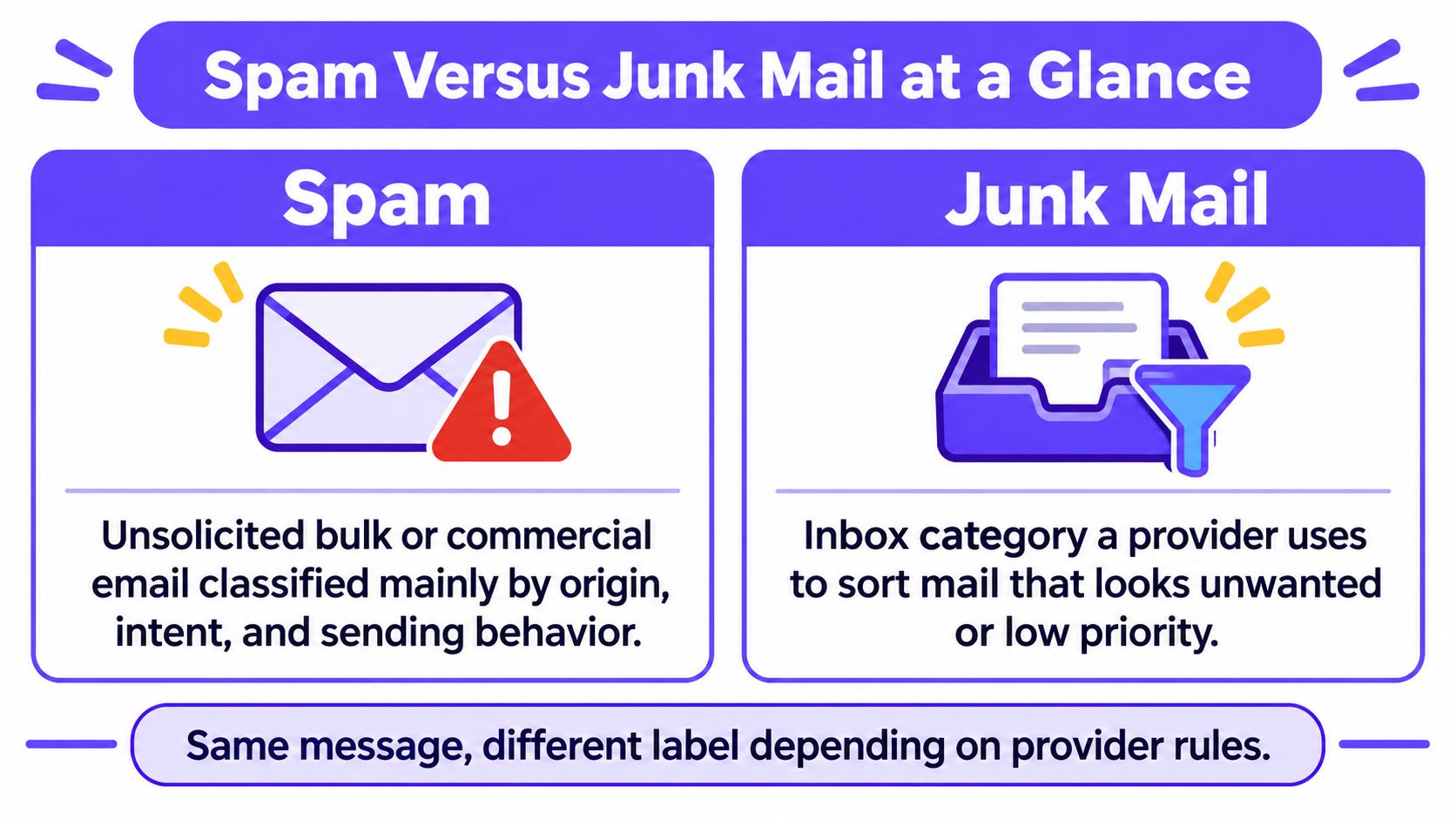
Spam is a message and sender classification, while junk mail is usually the folder a provider assigns to mail it predicts is unwanted. The two overlap without being exact synonyms, which is the practical difference between spam and junk mail.
The popular advice that they mean the same thing misses the decision that matters. A sender might have a permission problem, a preference problem, or a security problem. Changing subject lines won't fix all three.
Spam Versus Junk Mail at a Glance
Spam generally describes unsolicited bulk or commercial email judged by its origin, intent, and sending behavior. Junk mail usually describes a provider's handling decision, not a final verdict on whether the sender is legitimate.
Spam versus junk mail
| Question | Spam | Junk mail |
|---|---|---|
| What it describes | Unsolicited bulk or commercial mail judged by origin, intent, and behavior | A folder or client label for mail a filter predicts is unwanted or low value |
| Who decides | Legal rules, recipient complaints, and filters inform the classification | The mailbox provider, plus that user's safe and blocked lists |
| US legal frame | CAN-SPAM commercial email rules effective January 1, 2004 | Not a legal category |
| Can legitimate mail qualify | A permissioned newsletter that follows the rules isn't inherently spam | Yes. One recipient can junk a real newsletter |
| Where phishing sits | A security threat that belongs among unwanted mail | May reach Junk, quarantine, or the inbox first |
| What the sender controls | Permission, identity, list quality, and volume | Placement signals, not the folder name itself |
The meaning row separates the message from its destination. The decision-maker row explains why a sender's own opinion doesn't settle either classification.
The legal row matters because the FTC's CAN-SPAM implementation document states that the law was signed on December 16, 2003, and took effect on January 1, 2004. Its commercial email requirements include truthful headers, non-deceptive subjects, advertising identification, and an opt-out mechanism.
The legitimate-mail row shows why a genuine newsletter can still be unwanted. The phishing row separates security risk from ordinary promotional clutter, while the sender-control row distinguishes actions a team can take from outcomes only the receiving provider determines.
Compliance doesn't earn inbox placement
A real company can send legally compliant advertising that recipients don't want. An opt-out link doesn't create interest, and accurate headers don't establish permission.
There's also a naming trap. Consumer Outlook help uses junk email and spam as synonyms, while Microsoft 365 distinguishes spam from bulk mail. Those interface labels shouldn't replace a diagnosis.
Practical rule: Classify the problem as permission, preference, or security before changing copy or sending volume.
For example, an unrequested sales sequence needs permission and list work. An aging newsletter subscription needs relevance or an easy exit. A forged payment request needs a security response, not a marketing rewrite.
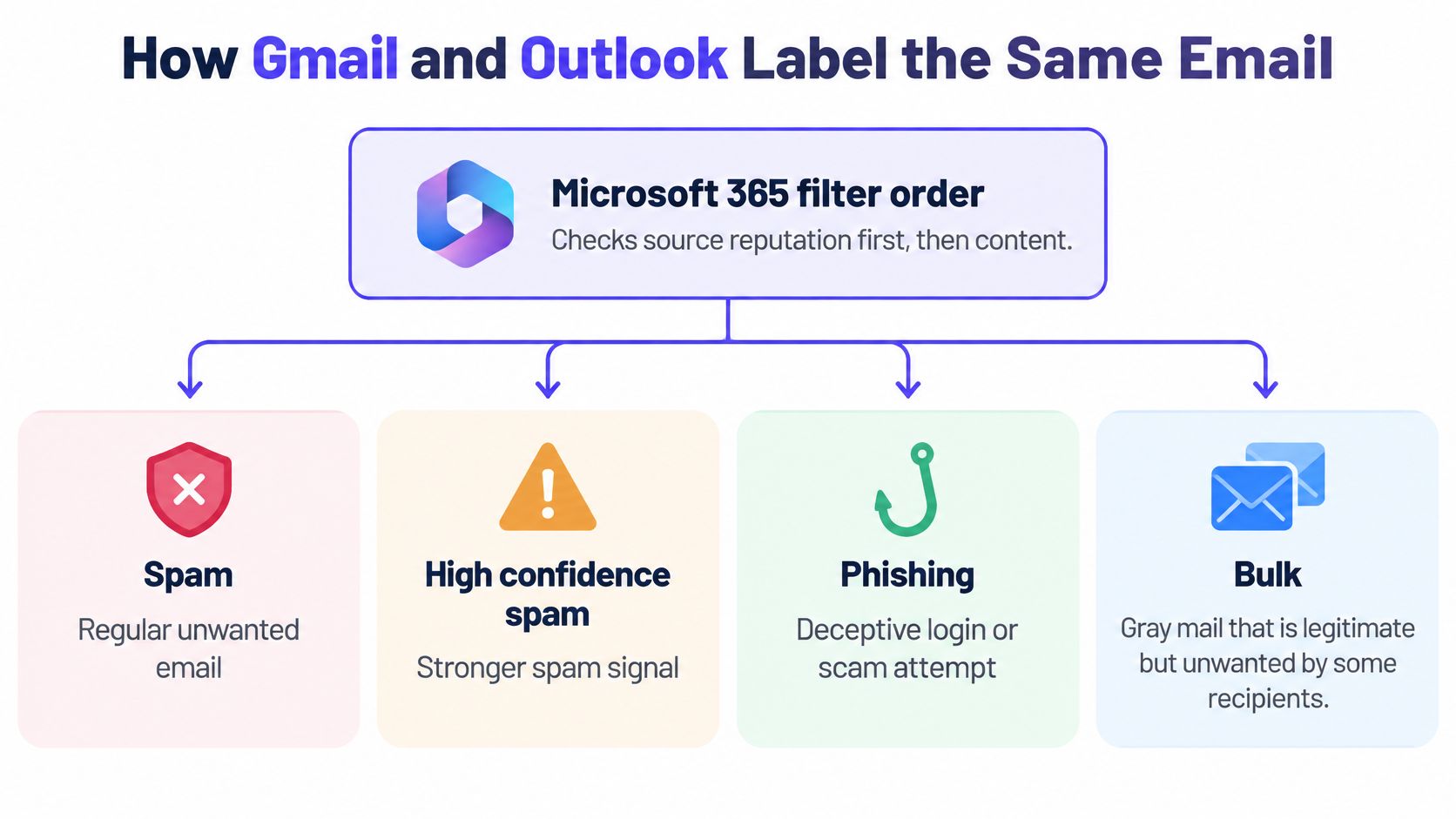
How Gmail and Outlook Label the Same Email
Microsoft 365 evaluates source reputation before applying content filtering. Its separate verdicts include Spam, High confidence spam, Phishing, and Bulk, according to Microsoft's anti-spam protection documentation.
Bulk, also called gray mail, can be legitimate marketing or newsletters sent at scale. The recipient may recognize the sender but have no interest in the message at that moment. A correct spam verdict represents mail treated as unwanted generally, rather than merely uninteresting to a particular subscriber.
Provider labels and what happens to the message
| Provider | Label | What the sender should assume |
|---|---|---|
| Outlook consumer | Junk Email | Suspected unsolicited mail moves to Junk. Delivery can still have succeeded. |
| Outlook consumer | Blocked Senders | That address or whole domain goes to Junk regardless of content. |
| Outlook consumer | Safe Senders | That address or domain isn't moved to Junk regardless of content under that list rule. |
| Microsoft 365 | Spam | Treated as universally unwanted when the verdict is correct. |
| Microsoft 365 | High confidence spam | A stronger spam verdict, separate from ordinary spam. |
| Microsoft 365 | Phishing | A security category that can be quarantined, not only foldered. |
| Microsoft 365 | Bulk | Gray mail. Legitimate mail at scale that wasn't actively requested then. |
| Gmail | Spam | A filtering destination that can contain unwanted messages and false positives. |
Consumer Outlook's filter considers sender lists, message content, and timing, as Microsoft's junk email guidance explains. It generally moves suspected messages rather than refusing delivery.
That distinction makes an SMTP 250 accepted response insufficient evidence of inbox placement. The receiving system accepted responsibility for the message. It didn't promise a particular folder.
Separate identity from interest
Outlook's sender lists are recipient-specific and can cover an entire domain. The same newsletter can therefore reach one subscriber's inbox and another subscriber's Junk folder without any change to its copy.
Gmail combines reputation and message-level checks rather than relying on a prohibited-word list. Google's reported protection figures describe its wider threat defenses, not a promise that every legitimate marketing message reaches the inbox.
Senders should separate three jobs:
- Authentication: Establish that the sending identity is authorized.
- Reputation: Reduce the likelihood of a spam classification.
- Targeting and content: Give recipients a reason to want the message.
An authenticated but irrelevant campaign can still receive complaints. The explanation of why authenticated emails still hit spam is useful when a team has verified DNS but still sees poor placement.
The practical opinion is straightforward: keyword editing is a secondary check. A team shouldn't remove ordinary commercial language while leaving an unwanted audience untouched.
Report Spam or Unsubscribe Instead
The useful split is three piles, not two folder names. Microsoft's guidance on junk email and phishing helps distinguish unwanted email from messages that present a security threat.
| Pile | What's wrong | Appropriate response |
|---|---|---|
| Unsolicited commercial mail | The sender lacked meaningful permission | Report unwanted mail and stop further contact |
| Legitimate low-interest bulk | The relationship is real, but the content no longer helps | Unsubscribe through a trusted mechanism |
| Phishing | The message attempts deception, credential theft, or another scam | Report phishing and avoid its links and attachments |
Phishing belongs among spam or junk, but not all spam is phishing. An ordinary promotion can be unsolicited without containing malware or a fraudulent offer.
Appearance affects complaints
In a 2025 ZeroBounce survey of 985 consumers, 80% said they would mark an email as spam based only on its appearance, while 76% said they check their spam folder, according to MediaPost's coverage of the survey.
Those findings support different actions. A confusing design can trigger complaints before a recipient evaluates the offer. Meanwhile, the Junk folder isn't a place that nobody opens, so folder placement doesn't remove the need for clear identity and safe content.
A sender should make the company name recognizable, explain the relationship, and provide a usable exit. The distinction between mailbox-level controls and ordinary footer links explains why footer unsubscribe links fall short.
Choose the action that matches the relationship
- Unsubscribe from a known sender: Appropriate when the organization is real, the offer is ordinary, and the recipient wants fewer messages.
- Report unrequested or deceptive mail: Appropriate when there was no meaningful permission, the identity appears forged, or the message misrepresents its purpose.
- Report phishing without engaging: An unsubscribe link inside a suspicious message isn't a safe way to resolve a security concern.
A spam report is a complaint signal about the sender. It isn't a court finding that the company committed fraud, but the sender shouldn't dismiss it for that reason.
Consider a sales team that receives an objection from a prospect who never requested contact. The correct response is suppression from the sequence, not a request to rescue future messages from Junk.
A prospect who doesn't want the mail should be removed, not recruited to repair the sender's reputation.
When Real Mail Lands in Junk
Participants in a 2025 study of email warning experiences encountered legitimate messages in spam or junk folders and found inconsistent warning banners confusing. Some messages displayed warnings while others didn't.
That makes both shortcuts unsafe: Junk doesn't always mean dangerous, and inbox placement doesn't prove trustworthiness. A server-side reputation check can divert a message before its recipient reads it.
A safe routine for recipients
- Compare the display name with the full sending address. A familiar company name isn't enough. The address should match the expected relationship.
- Inspect destinations without opening them. Hover over links where the interface allows it, or inspect the link preview. Unexpected attachments should remain unopened.
- Use Not spam or Not junk only for wanted mail. This provides a correction signal for that mailbox. It doesn't establish that everyone else should receive the campaign.
- Add a trusted Outlook sender when necessary. For repeated misclassification, the address or domain can be added to Safe Senders.
- Block a persistently unwanted source. Blocked Senders is appropriate when future mail from that address or domain should go to Junk.
Microsoft's junk-filter documentation confirms that blocked addresses and domains are treated as junk regardless of message content, while Safe Senders entries aren't moved to Junk under those list rules. Trusting an entire domain is broader than trusting a single address, so the narrower choice is preferable when only one sender is known.
What senders should investigate
A legitimate business should record which provider misclassified the message before changing its campaign. Authentication results and complaint rate belong beside that observation.
For example, a wanted purchase confirmation in Outlook Junk calls for an identity and recipient-rule check. A sales sequence repeatedly rejected by recipients calls for audience suppression, even if the company is genuine.
Senders shouldn't ask every recipient to click Not spam. That substitutes a manufactured preference signal for an honest assessment of whether the mail belongs in the relationship.
Not spam is a correction from someone who wants the mail, not a recovery button for a bad list.
Why Unwanted Mail Is Not Always Fraud
In an April 2003 analysis of more than 1,000 spam messages, the FTC found that approximately two-thirds contained likely false claims in the From line, subject line, or message text; its broader review found 84.5% were deceptive on their face or promoted an illegitimate product or service, according to the FTC's report to Congress.
That history helps explain why spam still suggests forged identities and dishonest offers. It doesn't establish that every modern junk-folder message is fraudulent.
Irrelevance and deception need different fixes
A repeated promotion might make entirely accurate claims. An old newsletter subscription might remain valid while the subscriber's interests have changed. A cold email might identify its sender clearly and still be unwelcome.
The CAN-SPAM framework also distinguishes promotional mail from transactional or relationship messages. Purchase confirmations, warranty information, and safety notices don't serve the same purpose as an advertisement.
| Example | Primary issue | Useful investigation |
|---|---|---|
| A forged company identity | Deception and security | Verify the sending identity and authorization |
| A genuine but unwanted newsletter | Preference | Review targeting and offer a clear exit |
| An expected order confirmation in Junk | Misclassification | Check identity signals and recipient rules |
For teams investigating sender identity, MailAdept's guide to email authentication provides context for distinguishing authorized sending from impersonation. Authentication is an identity check, not evidence that the recipient wanted the offer.
Traffic share isn't folder share
Kaspersky reported that spam represented 44.99% of global email traffic in 2025, as summarized in Keen Verdict's email statistics. Kaspersky's 2025 spam and phishing report placed the average spam share at 49.26% in the fourth quarter, with a 52.87% peak in November.
Those figures describe global unwanted email traffic. They don't describe the contents of a particular person's Junk folder or a company's own campaign placement.
Calling every junk placement fraud sends the team toward the wrong fix.
A forged From line needs identity investigation and a review of sending practices. A bored subscriber needs more relevant mail or an exit. Neither problem is solved by arguing that the company is legitimate.
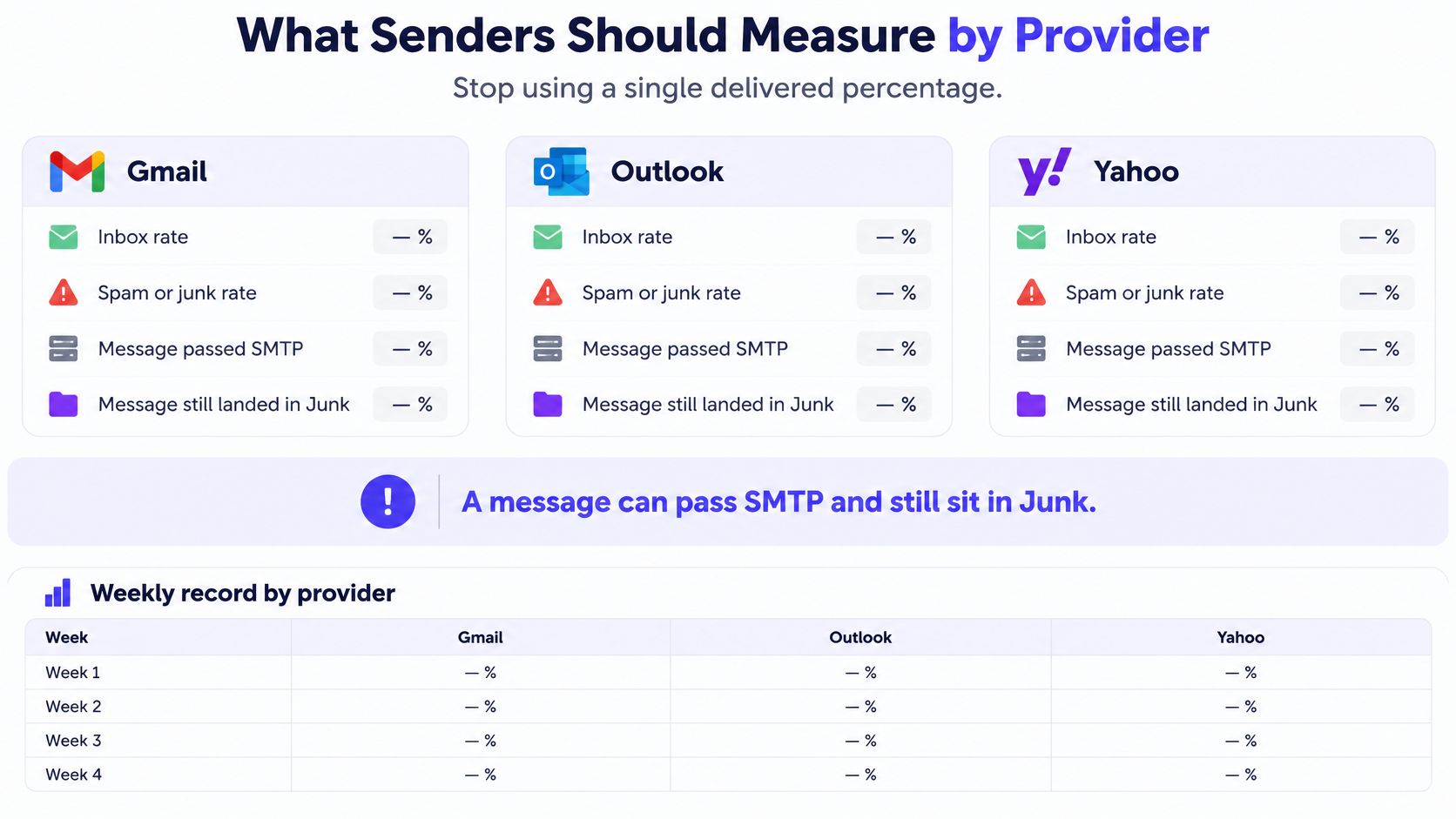
What Senders Should Measure by Provider
A single “delivered” percentage can hide where messages go. Track results separately for Gmail, Outlook, and Yahoo. This makes it easier to see whether a placement problem affects one provider or several.
Record inbox placement, spam or junk placement, complaints, bounces, and SPF, DKIM, and DMARC results or alignment. Keep the denominator for complaint rates consistent so comparisons remain useful.
Sender signals that are not the same as delivered
| Signal | Record this | Why delivered is not enough |
|---|---|---|
| Inbox versus junk | Rate by Gmail, Outlook, and Yahoo | A successful SMTP acceptance can still result in Junk |
| Complaint rate | Spam and junk reports per emails sent | Reports signal unwanted mail, even when a message isn't phishing |
| Authentication | SPF, DKIM, and DMARC pass or alignment | Identity can pass while relevance fails |
| Blocklist status | Listing status and the specific list | A listing is a separate reputation signal, not proof of inbox placement |
| Volume pattern | Daily sends compared with the prior week | A sudden jump calls for investigation, even if acceptance totals look normal |
In the seven days to October 14, 2026, monitored inboxes received 1,471,184 emails, with 26.5% filtered to spam, according to the Mailwarm network study, October 2026. That monitored population is not a global benchmark.
The study also checked 12,936 custom domains that emailed monitored inboxes from July to October 2026, including legitimate senders and spammers. SPF passed for 74% and was missing for 25%. DMARC used p=none on 45%, while 24% had no record. Valid BIMI appeared on 1.5%.
These checks describe separate conditions. They do not show that a particular DNS gap caused spam placement. Investigate each signal on its own.
A weekly diagnostic pass
- Compare placement by provider. Check where your emails land before assuming Gmail, Outlook, and Yahoo have the same issue.
- Read complaints beside junk placement. Complaints can point to unwanted mail or a mismatch in recipient expectations. A phishing warning calls for a separate security investigation.
- Verify authentication. Start with SPF, then check DKIM and DMARC.
- Review copy before sending. A spam word checker can flag risky wording, but it cannot make an unwanted list appropriate.
- Ramp unfamiliar sending gradually. Avoid moving a new domain straight to full outreach. Email warmup can support a gradual ramp, alongside list hygiene and stable sending patterns.
Decide the Fix and Take the Next Step
The difference between spam and junk mail becomes useful when it changes the next action. The folder name alone shouldn't determine the repair.
Match the response to the evidence
- Unsolicited scale or deceptive identity: Pause the campaign. Fix permission, suppression rules, and the sending identity before restarting.
- Real mail that subscribers ignore: Reduce the audience and narrow the offer. Provide an uncomplicated unsubscribe path rather than trying to retain unwilling recipients.
- Phishing-style warnings on legitimate mail: Investigate lookalike identities and SPF, DKIM, and DMARC results.
- Gmail and Outlook disagree: Investigate the affected provider instead of changing every mailbox at once. Teams preparing to warm up a new domain should establish a controlled baseline first.
An anonymized case in the Mailwarm network study, October 2026, recorded spam share moving from 75.6% to 11% in 14 weeks, while volume grew from 250 to 4,264 emails. It's a strong individual case, not an average or proof that one action caused the change.
Frequently asked questions
Are spam and junk mail the same?
They overlap, and providers sometimes use the words interchangeably. Operationally, spam can describe a message classification, while Junk describes a filtering destination.
Can legitimate email go to Junk?
Yes. A genuine message can be misclassified or routed there by recipient-specific rules. A recipient should verify the identity before marking it as wanted.
Is unsubscribe better than reporting spam?
Unsubscribe fits a recognized, legitimate sender whose messages are no longer useful. Reporting fits unrequested, deceptive, or suspicious mail, especially when interacting with the message would be unsafe.
Does CAN-SPAM compliance prevent junk placement?
No. Legal compliance doesn't establish recipient interest or override provider filtering. Permission and relevance still require separate attention.
Why does genuine business email go to spam?
Authentication problems, reputation, recipient complaints, and unwanted targeting can all require investigation. A real company name doesn't resolve those issues.
How does Mailwarm help sender reputation, and does it need inbox access?
Mailwarm is a premium email warmup and deliverability platform that combines real inbox engagement, advanced warmup controls, monitoring, and expert guidance. It helps build reputation and improve deliverability without requiring IMAP access or permission to read the private inbox.
Why does Mailwarm cost more than basic warmup tools?
Mailwarm costs more because it combines real inbox engagement, up to 100% replies to warmup emails depending on the plan, spam score monitoring, provider-level warmup, authentication tools, no IMAP access required, and expert deliverability calls included in every plan. The service also includes inbox placement insights, bounce prevention, and a network of 50,000+ real inboxes.
Mailwarm helps teams build sender reputation, monitor inbox placement, and reduce spam risk through expert-guided warmup. For businesses diagnosing a permission, preference, or provider-placement problem, a practical next step is to visit Mailwarm and evaluate the sending setup before increasing campaign volume.