
Cold email spam isn't just bad writing. It's usually what happens when sender reputation, authentication, list quality, and complaint control all work against the sender at the same time. The fastest way to avoid the spam folder is not to “sound less salesy,” it's to make the sending system look trustworthy to Gmail, Yahoo, and Microsoft 365 from the first message.
That's why most cold outreach advice misses the point. A polished subject line can't fix broken identity signals, and a clean list can't rescue a domain with poor engagement history. In practice, cold email spam is a delivery problem first, a content problem second, and a compliance problem all the way through.
What Counts as Cold Email Spam and Why It Happens
Cold email spam is any unsolicited commercial message that mailbox providers, users, or compliance teams treat as unwanted, deceptive, or high-risk. It happens when a legitimate sender behaves enough like an abuse source that filters, complaint systems, or recipient actions push the message out of the inbox.
The broader environment matters. In 2023, spam made up approximately 45.6% of all global email traffic and still accounted for almost one out of every two messages worldwide, according to Statista's global spam share data. That background makes inbox providers cautious by default, because every new outbound campaign is judged against a flood of abusive traffic.
Cold email is evaluated against the whole world of unsolicited mail, so even a well-written message inherits risk from the domain, infrastructure, authentication, and sending behavior behind it.
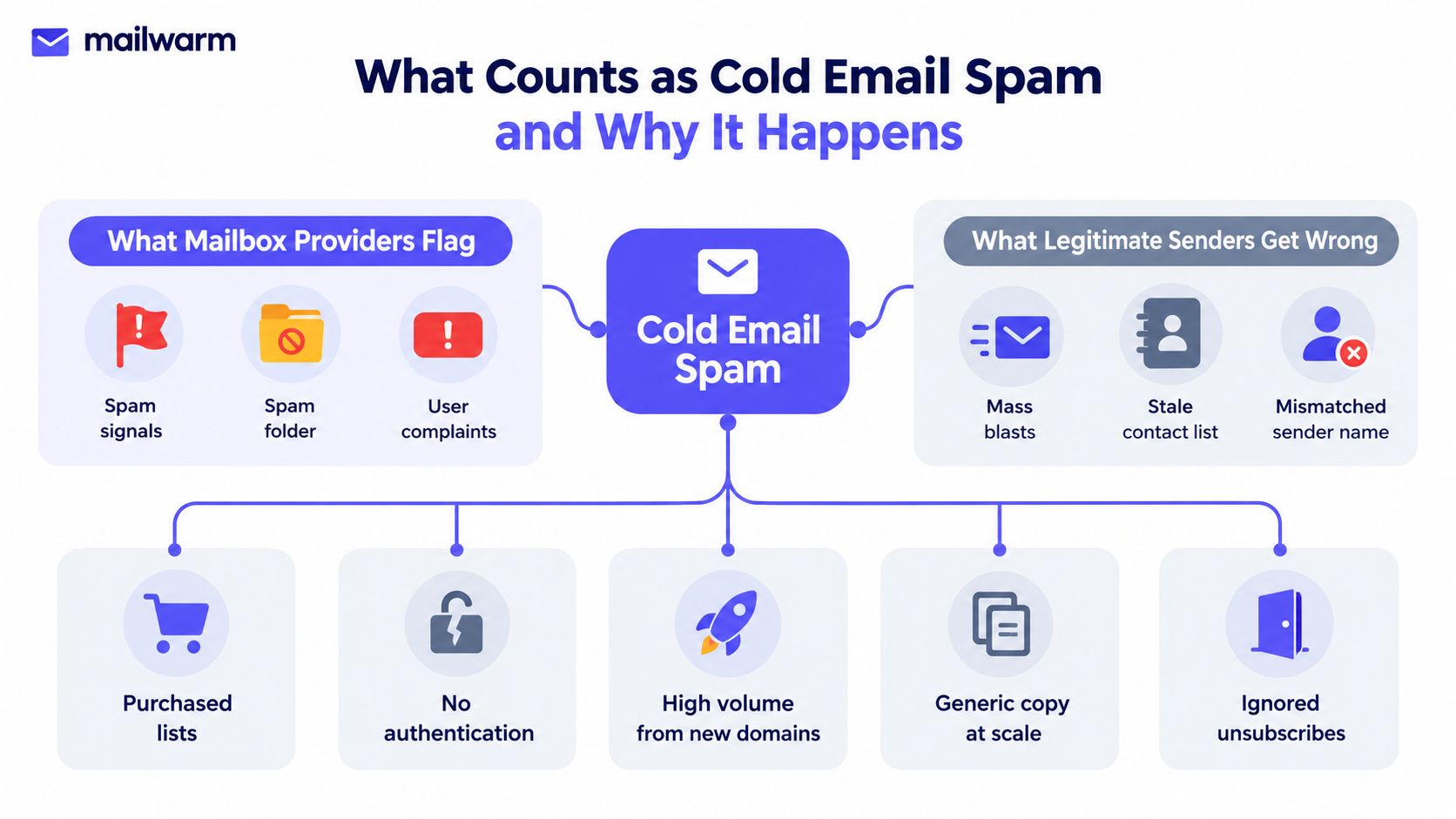
The five systems that usually go wrong
Weak sender identity. A new domain, mismatched From name, or broken authentication makes the message look unfamiliar. Mailbox providers are cautious when identity signals are thin or inconsistent.
Poor list quality. Hard bounces, stale contacts, role addresses, and prior complainers push complaint and bounce signals in the wrong direction. Bad lists make even decent copy look abusive.
Content triggers. Overhyped claims, misleading subject lines, and image-heavy layouts can increase the chance of filtering. The copy doesn't need to be “spammy” in the human sense to trigger machine suspicion.
Low engagement. If recipients ignore, delete, or complain, the provider learns that the mail is unwanted. Engagement from real inboxes matters because it helps separate legitimate outreach from noisy bulk sends.
Infrastructure misuse. Sending too much too fast from a fresh domain, using a poor subdomain strategy, or skipping authentication signals can make a normal campaign look like an abuse pattern.
The practical takeaway is simple. Cold email spam is rarely one mistake. It's the cumulative result of reputation, authentication, content, and list decisions pulling in the same bad direction.
How Sender Reputation Really Works
Sender reputation is the score mailbox providers build from domain-level and IP-level behavior over time. It's not a single label, and it's not universal. A sender can look acceptable at one provider and still struggle at another because Gmail, Outlook, and Yahoo don't weigh the same signals in the same way.
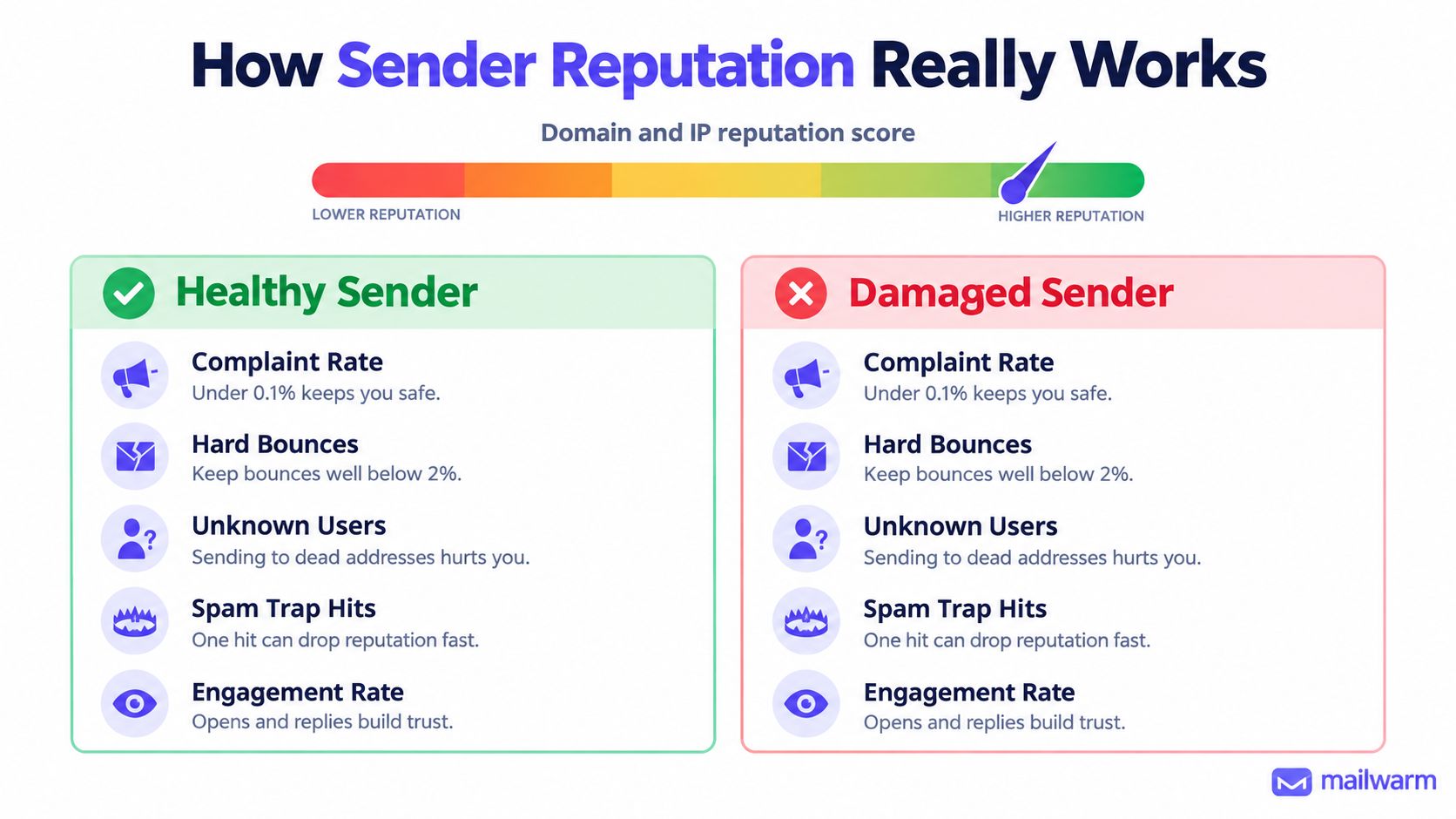
What providers actually watch
The strongest signals are the boring ones that repeat every day:
- Complaint rates. Gmail's guidance says spam rates should stay below 0.1% and must not reach 0.3%. When they do, deliverability protections can disappear.
- Hard bounces. Bad addresses tell providers the sender isn't controlling list quality.
- Unknown users. A stream of dead mailboxes looks like careless acquisition.
- Spam trap hits. One hit can damage trust fast because traps are designed to catch reckless senders.
- Engagement. Replies, moving mail out of spam, and continued interaction all help build trust.
Why reputation is provider-specific
A sender can't treat “good reputation” as a single score across the board. Gmail, Yahoo, and Microsoft 365 each use different filtering systems, complaint calculations, and trust signals. Yahoo, for example, calculates spam rates from messages delivered to the inbox, which changes how complaint data should be read. Microsoft 365 adds Bulk Complaint Level, or BCL, to help classify inbound bulk traffic.
| Provider | What matters most | What usually hurts most |
|---|---|---|
| Gmail | Authentication, complaint control, real engagement | Rising spam reports, poor alignment |
| Yahoo | Inbox-delivered complaint behavior, header accuracy, RFC compliance | Misleading identity, complaint-heavy campaigns |
| Microsoft 365 | Bulk reputation, BCL, authentication, bounce management | High-volume bulk behavior, weak sender hygiene |
A clean reputation is earned in layers. Authentication gets the sender recognized, complaint control keeps trust intact, and engagement tells the provider the mail is wanted.
Setting Up SPF, DKIM, and DMARC the Right Way
Authentication is the first proof that a sender is allowed to speak for a domain. SPF says which servers can send, DKIM signs the message so it can be verified later, and DMARC tells mailbox providers what to do when the checks fail. When these records don't align, cold email often breaks even before content gets judged.
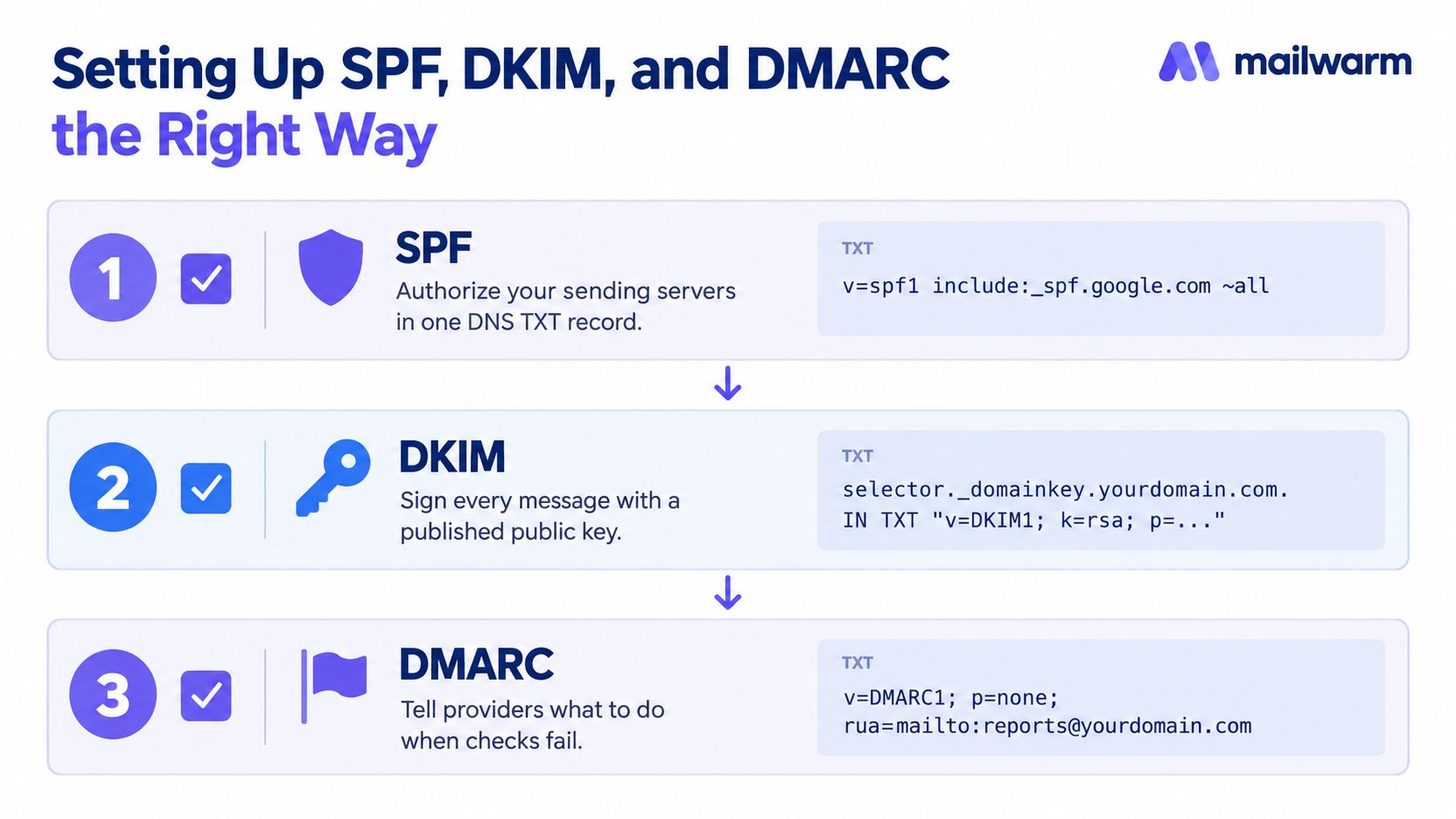
The setup sequence that works
Publish SPF for the sending infrastructure. The visible From domain and the infrastructure that sends the message should make sense together. SPF should authorize the actual sending path, not a random service no one monitors.
Sign every message with DKIM. A DKIM signature gives providers a durable way to verify the message after delivery. Google reports that correctly configured DKIM and DMARC commonly achieve at least 95% authentication success.
Add DMARC with alignment. DMARC only helps if the authenticated domain lines up with the visible From domain. For high-volume Gmail traffic, that alignment matters even more.
Common mistakes that break cold outreach
- Orphaned DKIM selectors. A selector that no longer matches a live key leaves messages exposed.
- Broken alignment. The visible From domain, DKIM domain, and return-path domain need to work together.
- Loose SPF management. Too many services, too many lookups, and too much drift create failures.
- Overly strict or too-soft DMARC policies. A policy that doesn't match the rollout stage can create avoidable rejection or weak protection.
For teams that want a second set of eyes, Ever Outbound's deliverability checker is useful as a quick verification step before scaling sends. Mailwarm also includes authentication fix tools in its deliverability stack, which helps teams review setup without guessing.
Quick checks before volume goes up
- Visible sender identity matches the domain strategy
- SPF, DKIM, and DMARC are all live
- Reply-to and From addresses are monitored
- New domains are not asked to carry full volume immediately
Authentication doesn't create deliverability by itself, but it removes the easiest reason for providers to distrust the message.
Warmup and Provider-Level Control That Actually Move the Needle
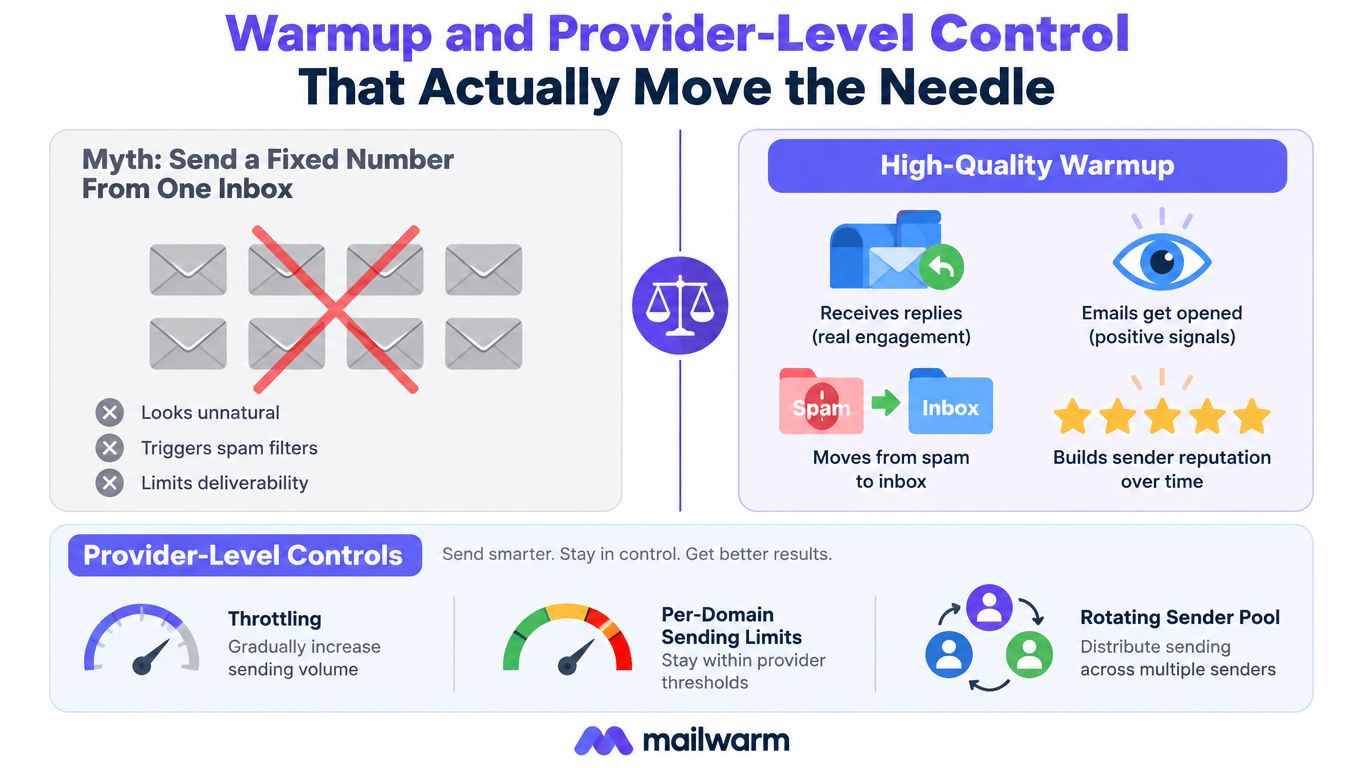
Warmup only works when it creates realistic inbox behavior. A fixed number of generic sends from one mailbox doesn't tell providers much. Real warmup uses aged inboxes, replies, threads, spam removal, and other engagement signals so the sender starts to look like a normal, trusted account.
Why generic warmup falls short
A warmup process that only simulates opens is thin proof. Providers care more about the quality of interaction than the appearance of activity. Replies, thread continuity, and messages moved out of spam are stronger reputation signals than empty volume.
That's why provider-level warmup matters. A sender that relies mostly on Gmail needs Gmail trust. A team that sends through Outlook or Microsoft 365 needs reputation support there too. Segmented warmup reflects the actual sending environment instead of treating every mailbox the same.
What stronger warmup includes
- Real engagement signals from aged inboxes
- Provider-level warmup for Gmail, Outlook, Microsoft 365, Yahoo, and SMTP
- Spam removal and important marking
- Bounce prevention so bad addresses don't poison the account
- Spam score monitoring to catch drift early
Mailwarm is one example of a premium email warmup and deliverability platform built around that model. It uses 50,000+ aged real inboxes, supports B2B and B2C warmup, and can generate up to 100% replies to warmup emails depending on plan, which gives providers more convincing engagement than open-only activity. It also does not require IMAP access, which matters because inbox-level access is a security trade-off many teams don't want to make.
What not to confuse warmup with
- Warmup is not consent
- Warmup is not list hygiene
- Warmup is not a substitute for authentication
- Warmup is not a fix for weak content
The useful version of warmup is a reputation-building system, not a checkbox. For teams that need structured setup, warm up an SMTP server can be part of a broader sending strategy rather than a standalone tactic.
List Hygiene and Content That Keep Complaint Rates Low
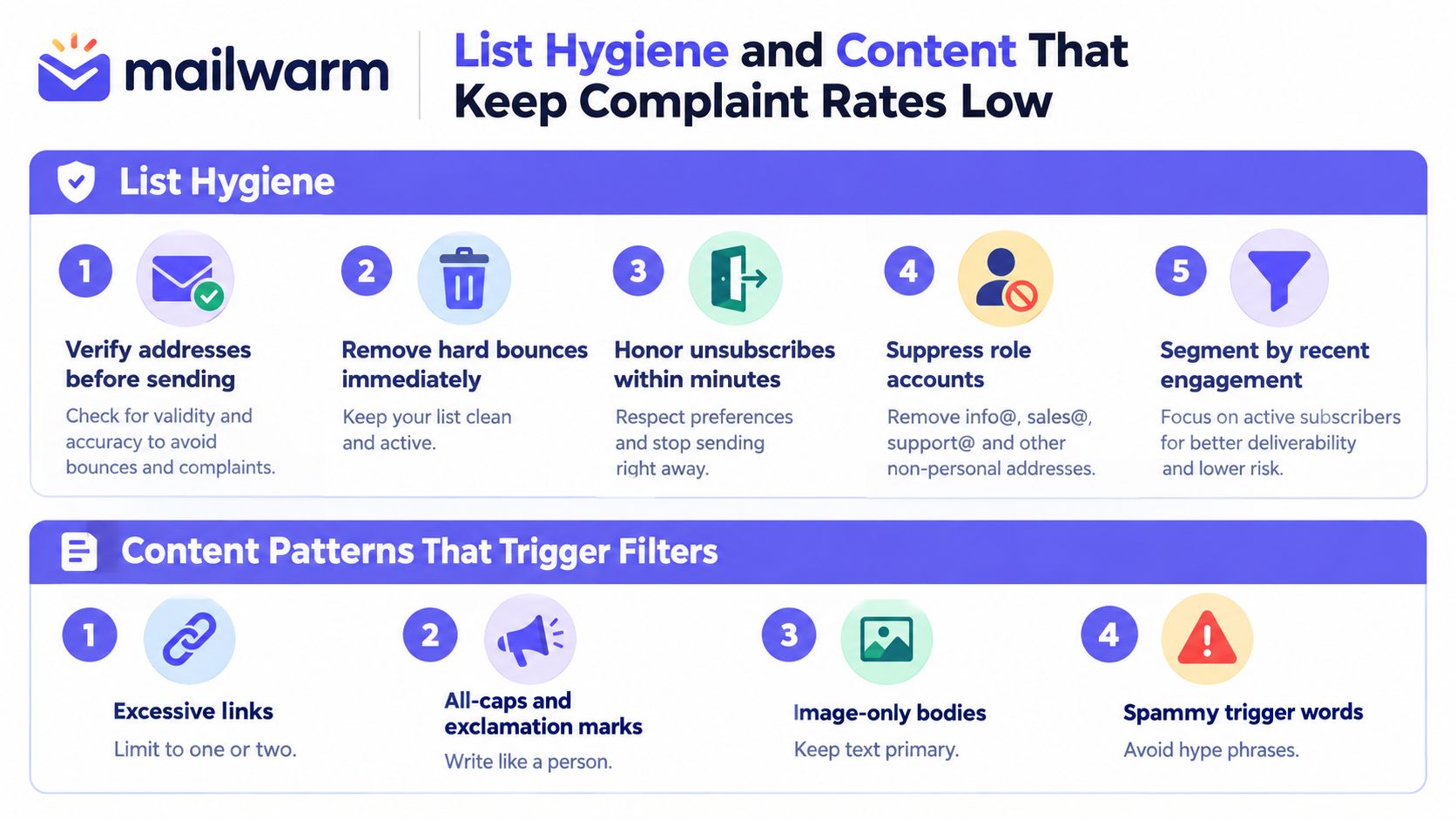
Complaint rates usually rise when a sender combines weak targeting with weak writing. A clean list lowers the risk of hard bounces and trap hits, while clearer content lowers the chance that the recipient marks the message as spam.
What to suppress before sending
- Hard bounces. Remove them immediately.
- Role accounts. Suppress addresses like generic team inboxes when they aren't appropriate.
- Prior complainers. Never re-add people who already complained.
- Repeated non-responders. Long stretches of silence are a warning sign.
- Stale contacts. Older contacts are more likely to bounce or ignore.
A quick verification pass before sending is cheaper than repairing reputation after the fact. Seed addresses, verification tools, and bounce checks catch obvious list problems before the campaign starts damaging the sender's profile.
What the message itself should avoid
- Aggressive sales language. “Limited-time,” “act now,” and similar phrases increase suspicion.
- Misleading subject lines. The subject has to match the intent of the email.
- All-image emails. Too little text looks less like a normal conversation.
- Too many links. One or two useful links are enough for most cold outreach.
A practical rewrite is usually simpler than a clever one. “Reaching out about your team's lead flow” is safer than “Quick question, huge opportunity.” The first sounds like a person. The second sounds like a blast.
For copy cleanup, guide to humanizing AI emails is useful when teams need to make templated outreach sound more natural without changing the intent. On the list side, spam word checker helps catch terms that can make a message look heavier than it should.
The compliance floor still applies
CAN-SPAM still matters in cold outreach. Messages need accurate sender identity, a valid physical postal address, and a clear opt-out path that's honored within 10 business days. The FTC's published guidance also notes a civil penalty of up to $53,088 per violating email. That isn't a reason to write fearfully, but it is a reason to send carefully.
Monitoring Inbox Placement and Provider Spam Signals
Deliverability work only matters if it holds up after launch. Seed-list tests show whether messages land in the inbox across Gmail, Outlook, Microsoft 365, Yahoo, and corporate domains. Postmaster dashboards show whether the sender is drifting in the wrong direction before complaints become obvious.
For a broader technical reference, the cold email deliverability guide is a helpful companion when a team wants to compare its own setup against common provider behavior.
Cold Email Spam Thresholds Across Major Providers
| Provider | Key Metric | Safe Target | Risk Threshold |
|---|---|---|---|
| Gmail | Spam rate in Postmaster Tools | Below 0.1% | At or above 0.3% |
| Microsoft 365 | BCL and bounce behavior | Low complaint and bounce levels | Messages may move to Junk or be rejected if problems persist |
| Yahoo | Inbox-delivered spam calculation and header compliance | Low complaint behavior with valid formatting | Misleading headers or poor inbox complaint behavior |
| Corporate domains | Placement and rejection patterns | Stable inbox placement | Rising filtering, junking, or blocks |
What to do when a provider starts filtering harder
Gmail needs a quick review of complaint levels, engagement, and authentication alignment. Google notes that senders at or above 0.3% spam rate can lose access to delivery mitigations, and eligibility may require seven consecutive days below that level. If numbers drift, volume should drop, not rise.
Microsoft 365 needs tighter bulk controls. Its guidance separates bulk mail from standard mail, assigns a Bulk Complaint Level, and recommends SPF, DKIM, DMARC, and custom bulk-mail subdomains instead of relying on the main corporate domain. Non-compliant messages may first move to Junk and later be rejected.
Yahoo wants clean technical formatting as much as clean content. Its sender guidance says messages should comply with RFC 5321 and RFC 5322, and it calculates spam based on inbox-delivered messages. That means a campaign can look fine on the content side and still fail because the message structure or headers are off.
A simple monitoring routine
- Check placement weekly across the major providers.
- Review postmaster data for complaint drift.
- Audit bounce lists after every volume increase.
- Re-read the copy whenever a new segment or provider starts underperforming.
For domain-level risk checks, check if your domain is blacklisted before scaling a campaign that already looks unstable.
Putting It Together and Choosing the Right Stack
Cold email spam drops when five layers work together, authentication, sender reputation, warmup, list and content hygiene, and ongoing monitoring. Skip any one of them, and the campaign starts looking like bulk abuse instead of legitimate outreach.
Mailwarm fits teams that want a premium email warmup and deliverability platform rather than a basic warmup loop. Its 50,000+ aged inbox network, provider-level warmup, spam score monitoring, inbox placement insights, authentication fix tools, and expert deliverability calls included in every plan are useful when the cost of a burned domain is higher than the cost of doing the setup properly.
A practical 30-day sequence is straightforward. Audit authentication, clean the list, segment by provider, enable warmup, monitor placement weekly, and book a deliverability call if anything drifts. That sequence won't remove risk entirely, but it will make spam placement much less likely.
If email is part of the growth plan, Mailwarm helps teams build sender reputation, monitor inbox placement, and reduce spam risk with real inbox engagement and expert guidance. Visit Mailwarm to see how its deliverability stack fits cold email programs that need more than basic warmup.