
The campaign is live, but messages are bouncing with “550 permanent failure for one or more recipients.” This means the receiving server has rejected the message as a permanent failure, not delayed it for later delivery. Stop resending the same campaign unchanged, preserve the complete bounce response, and identify the enhanced status code before changing the list or sending volume.
A 550 response can point to an invalid mailbox, a blocked sender, authentication failure, or a recipient-side filtering gateway. The generic text alone isn't enough to tell which one applies, especially after a domain change or a sudden volume increase, when the problem is often sender reputation rather than the recipient list.
What the 550 Permanent Failure Error Means
550 permanent failure for one or more recipients is an SMTP hard bounce. The receiving mail server has refused the message, and the sender shouldn't retry the same message as-is. The standards-based error system in RFC 3463 defines codes beginning with 5 as permanent failures, while RFC 5321 classifies 550 as a permanent negative completion reply.
That doesn't mean every recipient in a multi-recipient send failed. The receiving system may reject one address while accepting others, so the first operational task is to isolate the exact recipient or domain named in the diagnostic. A bulk resend hides that distinction and can repeat the same failure against addresses that have already been rejected.
The generic code hides the useful clue
The 550 number is only the top layer. The enhanced status code and the stage at which the rejection occurred provide the useful diagnosis:
- Recipient validation: The address may not exist, may be misspelled, or may point to a disabled mailbox.
- Policy evaluation: The recipient's server may reject the sender, content, authentication, or reputation.
- Gateway filtering: A security gateway may block the message before it reaches the mailbox provider.
A rejection during address validation calls for list hygiene. A rejection during policy evaluation calls for authentication, reputation, content, or provider-specific investigation. Treating both as simple typos wastes time.
Practical rule: Preserve the full bounce, including the enhanced status code, diagnostic text, recipient, sending domain, and message identifier before making changes.
The error isn't a temporary network glitch, so waiting and retrying won't resolve it by itself. For broader context on how hard bounces affect campaign reporting, the EmailScout guide on bounce rate offers a useful explanation of the distinction between permanent and temporary delivery failures.
Error Text Variants and Enhanced Status Codes
Senders see different wording depending on the mailbox provider, sending application, and SMTP relay. Gmail may show “550 5.1.1 User unknown” or “The email account that you tried to reach does not exist.” Outlook and Microsoft 365 responses can appear as “550 5.7.1 Access denied,” “550 5.2.1 Mailbox unavailable,” or a message stating that delivery was blocked by policy.
SMTP logs often retain the most useful version:
- “550 permanent failure for one or more recipients”
- “550 Requested action not taken: mailbox unavailable”
- “550 5.1.1 User unknown”
- “550 5.7.1 Message refused”
- “550 5.7.1 Message blocked”
- “550 5.4.1 Recipient address rejected”
The exact phrase can also indicate a gateway-level rejection. Documentation on 550 permanent failure associates the wording with spam filtering, blacklisting, authentication failure, invalid mailboxes, and, in some cases, Barracuda-filtered rejection.
Common 550 Enhanced Status Codes
| Enhanced Code | Meaning | Most Likely Cause |
|---|---|---|
| 5.1.1 | Nonexistent or unknown mailbox | Misspelled, deleted, or invalid recipient address |
| 5.2.1 | Disabled or unavailable mailbox | Recipient account is disabled or unavailable |
| 5.7.1 | Policy, security, or reputation rejection | Sender authentication, domain reputation, content, or gateway policy |
| 5.4.1 | Recipient address rejected | Recipient-side access rule or address policy |
These subcodes aren't interchangeable. A 5.1.1 response points first toward the address. A 5.2.1 response suggests mailbox state. A 5.7.1 response deserves an investigation of authentication, reputation, sending behavior, and content.
A gateway may reject a valid mailbox because the sending domain or IP doesn't meet its policy. That's why a clean address list doesn't automatically clear the sender. The MassMailer reference on bounce codes provides further context on how enhanced codes separate address problems from security and policy blocks.
How to Diagnose the Exact Cause
Diagnosis should move from the recipient outward. Start with the smallest test that can distinguish an address failure from a sender-side failure, then expand only when the evidence points toward reputation or policy.
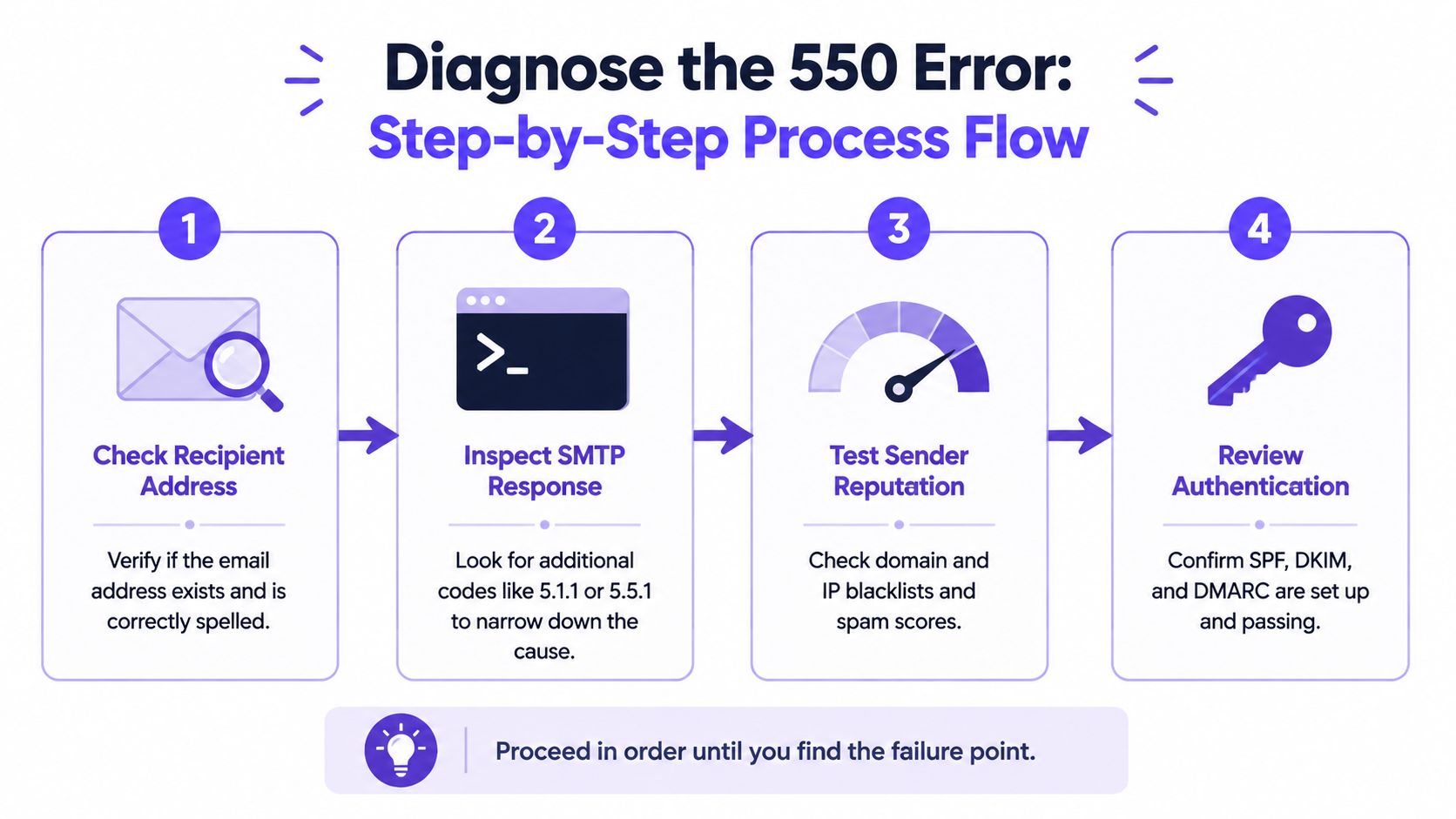
A practical isolation sequence
Check the recipient address. Confirm spelling, domain, and mailbox status in the original campaign record. Don't assume a previously valid contact still has an active mailbox.
Inspect the complete SMTP response. Record the enhanced code, rejecting host, diagnostic phrase, and the point in the transaction where the server refused the message. A code such as 5.1.1 changes the investigation immediately.
Test one address at a time. A single-recipient test prevents a multi-recipient send from obscuring which mailbox or domain caused the rejection. It also shows whether the same message succeeds elsewhere.
Compare recipient domains. If the message reaches a known-good mailbox but fails at one target domain, recipient-side policy or mailbox state becomes more likely. If several major providers reject it, examine sender reputation, authentication, and message composition.
Review sender authentication. Confirm that SPF, DKIM, and DMARC are aligned and passing for the domain used in the failing campaign. Authentication failures can surface as policy rejections rather than clear configuration errors.
Check reputation and blocklists. Teams can check if their domain is blacklisted and compare that result with the receiving server's diagnostic. A clean blacklist result doesn't prove good reputation, but a listing can explain broad rejection patterns.
For another explanation of gateway responses, the guide on why your email was blocked is useful when the address appears valid but the receiving system still refuses the message.
The following video can help teams understand the SMTP response flow while reviewing logs:
How to Fix Each Type of 550 Error
The correct fix depends on the rejection category. A list problem needs suppression, while a gateway block needs sender-side investigation. Applying the wrong remedy can make the campaign noisier without changing acceptance.
Invalid or disabled recipient
Suppress the confirmed hard bounce. Remove the rejected address from the active campaign so the same message isn't sent again unchanged.
Verify the source record. Compare the address with the contact's current company domain and spelling. If the mailbox is disabled or the person has left, replace the record rather than repeatedly testing it.
Segment uncertain contacts. Keep unverified addresses out of the next send until the list owner confirms them. This protects valid recipients from being mixed with clearly risky records.
Authentication failure
Review SPF authorization. Make sure the service sending the message is covered by the domain's SPF policy.
Validate DKIM signing. Check that the outgoing message carries a valid signature for the sending domain and that the receiving server can validate it.
Check DMARC alignment. The visible From domain should align with the authenticated sending identity. A mismatch can turn an otherwise deliverable message into a policy rejection.
Send a controlled test. Test one recipient after the records and alignment are corrected, then compare the new SMTP response with the preserved original.
Reputation or policy block
Pause the failing campaign. Continuing to send during a broad rejection pattern can create more negative signals and makes diagnosis harder.
Review recent changes. A domain change, new sending infrastructure, volume spike, new links, attachments, or altered copy can identify the trigger. From a deliverability team's operational experience, a 550 error that starts immediately after a domain change or volume spike is usually a reputation problem, not a recipient-list problem.
Inspect content and behavior. Remove unnecessary attachments, suspicious links, and abrupt sending patterns. Test the same message with a known-good mailbox before relaunching.
Contact the recipient administrator when appropriate. For a valid business recipient blocked by a gateway, the administrator may need to allow the sender or explain the policy. The sender should provide the full diagnostic rather than asking for a generic whitelist.
For a deeper troubleshooting reference, review these email deliverability fixes from Mailwarm, then apply only the steps supported by the actual enhanced code.
How to Prevent 550 Errors from Happening Again
Prevention starts with separating list quality from sender trust. A clean list can't compensate for broken authentication or a damaged reputation, and a strong sender reputation can't make a nonexistent mailbox deliverable.
Keep the recipient list controlled
- Suppress hard bounces immediately: Don't continue sending to addresses that have received a confirmed permanent rejection.
- Verify before launch: Check spelling, domain validity, and mailbox status before a new campaign enters the sending queue.
- Segment by engagement: Send the most important messages to contacts with a recent history of interaction instead of treating every record identically.
- Watch domain patterns: A cluster of failures at one recipient domain points toward its policy or gateway, while failures across providers suggest a sender-side issue.
Build trust before scaling
New domains, inboxes, and sending infrastructure need consistent behavior before a team increases campaign activity. Sudden volume changes can make a previously acceptable sender look suspicious, particularly when a domain has little established history.
Mailwarm is a premium email warmup and deliverability platform. It helps senders build reputation, monitor inbox placement, and improve deliverability through real inbox engagement, advanced warmup controls, provider-level warmup, authentication fix tools, spam score monitoring, bounce prevention, and expert guidance. Unlike basic warmup tools, it doesn't require IMAP access or permission to read a private inbox.
Teams can also warm up an SMTP server when SMTP sending infrastructure is part of the campaign. The useful objective isn't automated activity for its own sake. It's controlled sending, meaningful engagement signals, and visibility into provider-specific acceptance.
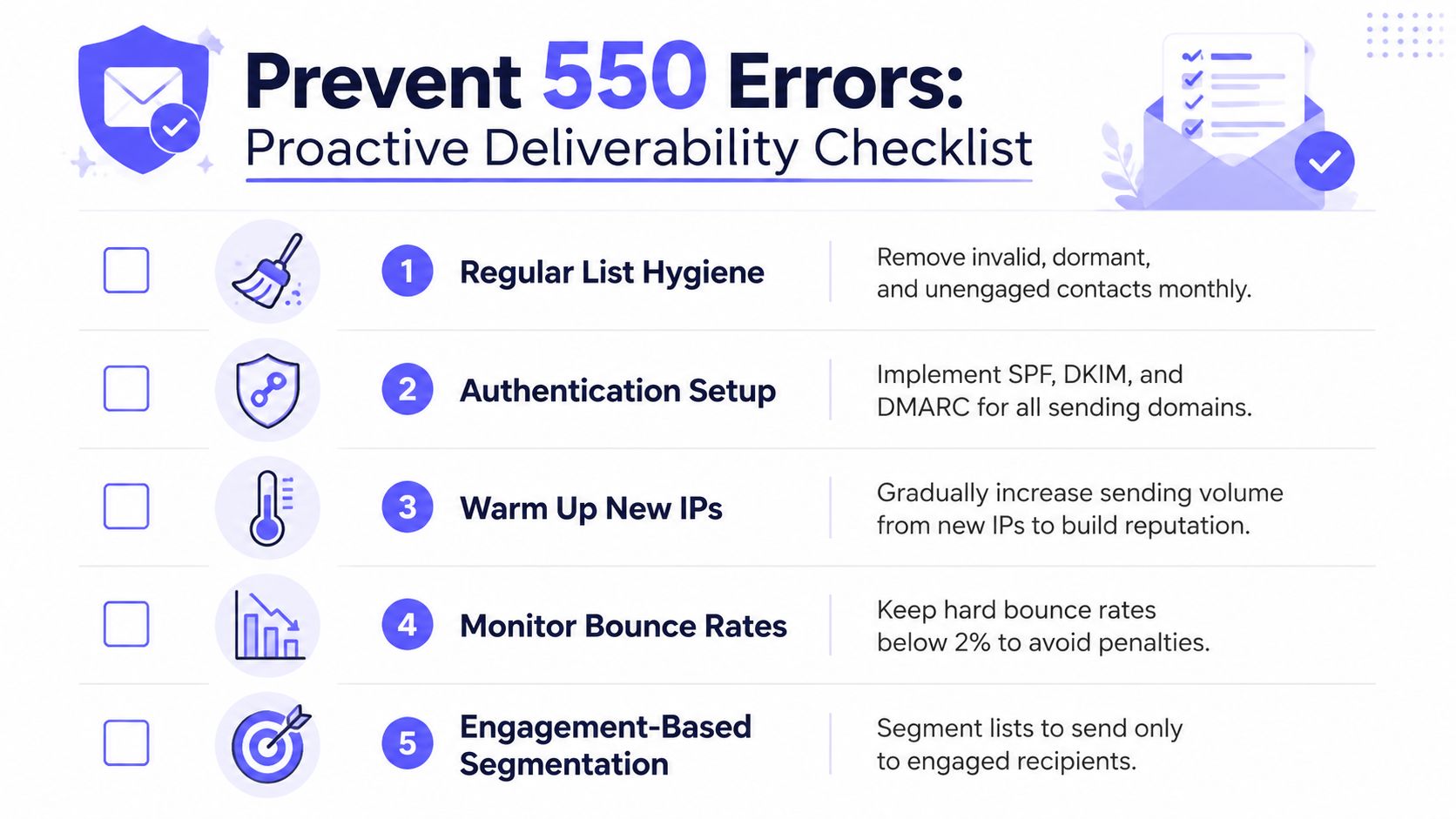
Authentication needs ongoing attention rather than a one-time setup. Teams should monitor SPF, DKIM, and DMARC results, review bounce diagnostics after infrastructure changes, and avoid launching a large campaign immediately after changing domains or providers.
Frequently Asked Questions
Is 550 permanent failure my fault or the recipient's?
It can be either. A 5.1.1 response usually points to an invalid recipient, while a 5.7.1 response can indicate sender authentication, reputation, content, or recipient-side policy. The enhanced status code and bounce stage provide a more reliable answer than the 550 number alone.
Does 550 hurt sender reputation?
A single recipient rejection doesn't automatically prove sender damage. Repeated hard bounces, broad policy blocks, or continued retries can create a more serious deliverability problem, so confirmed invalid addresses should be suppressed and wider rejection patterns investigated before sending resumes.
Should the sender retry a 550 message?
The sender shouldn't retry the same message unchanged. A 550 response is a permanent rejection, so the underlying address, authentication, reputation, content, or policy issue must be corrected first.
Can a valid address still receive a 550 error?
Yes. A valid mailbox can be behind a spam-filtering or security gateway that rejects the sender or message. This is why a gateway-level 550 response can require reputation, authentication, or recipient-policy work rather than list replacement.
How does Mailwarm help improve sender reputation?
Mailwarm uses real inbox engagement, provider-level warmup, spam score monitoring, inbox placement insights, authentication tools, bounce prevention, and deliverability analytics to help teams manage sender reputation. It provides expert deliverability calls with every plan, while avoiding IMAP access to a user's private inbox.
Does fixing authentication immediately remove the error?
Not necessarily. Correct SPF, DKIM, and DMARC address an important cause, but a recipient gateway may still evaluate domain reputation, sending behavior, content, and recipient policy. A controlled test with the full SMTP response is the fastest way to confirm whether acceptance has changed.
If a campaign is failing with 550 permanent failure for one or more recipients, preserve the bounce, isolate the recipient, and diagnose the enhanced status code before resending. Visit Mailwarm to build reputation through real inbox engagement, monitor inbox placement, and use expert-guided deliverability controls that help protect future campaigns.