
A 550 high probability of spam (Gmail) rejection means Gmail has decided your domain or IP isn't trustworthy enough to accept the message. Gmail blocks more than 99.9% of spam, phishing attempts, and malware before they reach users, so this response usually reflects a high-confidence reputation verdict, not proof that one email contains a bad word. Google's Gmail safety guidance explains the scale of the filtering system behind that decision.
That's why the most popular advice, rewrite the copy and resend, often wastes time. The fastest path back is usually the counterintuitive one: pause, authenticate, send less to better recipients, and rebuild trust before increasing volume.
What the 550 High Probability of Spam Error Actually Means
A typical Gmail response may contain wording such as:
550-5.7.1 The user or domain that you are sending to has a policy that prohibited the mail... high probability of spam
Some senders also encounter a newer 550-5.7.56 variant associated with ARC and reputation checks. The exact wording can vary, but the operational meaning is blunt: Gmail's filters have scored the sending domain, IP, account, or message stream as too risky to deliver.
This is a hard SMTP rejection, not a soft delivery delay. A 421 response generally tells the sending system to try again later. A 550 response says Gmail won't accept the message under the current conditions. Repeating the same attempt without changing those conditions doesn't solve the problem.
The rejection is about trust
The decision usually comes from Google's provider-level reputation systems, not the recipient's personal spam settings. Gmail evaluates signals around sending identity, authentication, volume, engagement, complaints, and suspicious behavior. Google community guidance identifies rapid sending, spam-like links or attachments, compromised accounts, suspicious IP or device reputation, and weak account trust as common contributors to this rejection. Google's community guidance on the error also recommends stopping bulk sends, securing the account, and rebuilding normal sending behavior.
That distinction matters for a founder, recruiter, agency, or sales team trying to recover a campaign. A polished message can still fail when the infrastructure behind it has a poor relationship with Gmail. Conversely, changing every subject line while leaving a damaged domain reputation untouched rarely changes the outcome.
The right response is to repair the verdict before resending. A sender should first determine whether the problem is reputation, authentication, list quality, volume, or account security. Immediate retries only create more evidence for the same decision.
What Triggers Gmail to Reject With 550 High Probability of Spam
Gmail doesn't need one defective element to reject a message. It can combine several moderate risks into a strong policy decision. Low sender reputation and weak authentication usually deserve attention before copy editing, although suspicious links, attachments, and formatting can add pressure.
Reputation signals
Google Postmaster Tools exposes domain and IP reputation categories such as High, Medium, Low, and Bad when sufficient data is available. A downward movement is more useful than a single isolated reading. If a domain or IP has recently lost trust, Gmail may reject mail even when SPF and DKIM technically pass.
Complaint signals matter heavily. The 2025 Validity benchmark report advises bulk senders to stay under 0.1% spam complaints and never approach 0.3%. The same report records Gmail inbox placement at 87.2% and spam placement at 6.8%, showing that even large-scale senders operate in a difficult, uneven environment.
Sudden volume is another obvious warning. A dormant domain or IP that abruptly sends a large campaign resembles compromised-account activity or bulk abuse. Purchased, unverified, stale, or spam-trap-heavy lists make the signal worse because recipients and filtering systems see little positive engagement.
Authentication and infrastructure
Gmail expects senders to maintain aligned SPF, DKIM, and DMARC. Missing records, failed signatures, or misalignment between the visible From domain and authenticated sending domain can turn an already weak reputation into a rejection. MailReach's Gmail guidance also treats authentication as a first-order diagnostic rather than a cosmetic technical detail.
Technical inconsistencies can contribute as well:
- Reverse DNS and HELO issues: An unclear server identity makes the sending infrastructure harder to trust.
- TLS problems: Insecure or inconsistent transport can add risk during SMTP evaluation.
- ARC breaks: Relaying through another platform can damage authentication context when ARC seals or forwarding chains fail.
- Content pressure: Excessive promotional language, image-heavy layouts, suspicious links, and attachments can reinforce a poor reputation.
A practical guide to sending bulk emails in Gmail can help teams review bulk-sending behavior, but it shouldn't replace provider-level reputation checks.
| Trigger | Gmail signal affected | Likely result |
|---|---|---|
| Low domain or IP reputation | Sender trust | Spam placement or 550 rejection |
| Missing or misaligned SPF, DKIM, or DMARC | Authentication confidence | Policy block or reduced delivery |
| Sudden volume spike | Behavioral consistency | Deferral, spam placement, or hard rejection |
| High complaint rate | Recipient response | Reputation decline and stricter filtering |
| Risky links, attachments, or formatting | Content risk | Additional pressure on the policy score |
| Suspicious infrastructure identity | Technical trust | Rejection or reduced acceptance |
The error therefore reflects a combined policy judgment. Fixing one link in the email may help, but it won't override a domain that Gmail already considers risky.
How to Diagnose the Root Cause Before Resending
Diagnosis should start with Google, not with a new subject line. Open Google Postmaster Tools, confirm the domain is correctly verified, and inspect the Domain Reputation and IP Reputation views for a recent decline. A single weak reading doesn't explain every event, but a clear downgrade near the time of the bounce is a strong lead.
Next, audit authentication using the headers from a message that did arrive. The receiving headers should show SPF and DKIM passing, with DMARC aligned to the visible From domain. This check needs to cover every sending source, including sales platforms, marketing automation, transactional systems, and agency-managed infrastructure.
Separate reputation from list quality
A sending IP can also have an external blocklist problem that compounds Gmail's own scoring. Run a reputable email blacklist check against the relevant domain and IP, then investigate any listing instead of assuming Gmail caused everything.
List quality deserves the same scrutiny. Review the source of the recipients connected to the rejection:
- Acquisition source: Identify purchased, scraped, or poorly verified contacts.
- Engagement age: Find contacts who haven't opened or replied for a long period.
- Address type: Suppress role accounts and generic aliases where appropriate.
- Campaign pattern: Compare complaints, bounces, and replies by sequence or segment.
- Security events: Check for unfamiliar logins, forwarding rules, or unauthorized sending.
A deliverability test can help isolate message-level risks after the infrastructure review. Mailwarm's email spam checker is relevant for checking content and spam signals, but content testing should support, not replace, reputation diagnosis.
Finally, compare sending logs with the first rejection. Look for a new platform, a new IP, a sudden campaign launch, a dormant mailbox becoming active, or a sharp change in recipient quality. The immediate objective is to identify the dominant signal. Resending before that signal is understood turns an investigation into a larger incident.
The Counterintuitive Fix That Actually Works
Most guides tell senders to swap links, remove promotional words, and try the campaign again. Those changes can reduce content risk, but they don't repair a damaged reputation. The stronger response is to reduce volume sharply and restrict sends to recipients who are most likely to engage.
Google's own guidance recommends stopping bulk sends for 24 to 48 hours, securing the account, and rebuilding trust through normal use. Tomba's recovery guidance describes a gradual restart at roughly 20% to 30% of prior daily volume, followed by increases of about 20% every two to three days, only when reputation remains stable.
The exact ramp should reflect the sender's risk, list quality, and provider signals. A sender already receiving hard rejections shouldn't treat any schedule as automatic permission to scale.
Less volume, better evidence
A recovery plan should prioritize:
- Pause the blast: Stop repeated attempts to the same large list.
- Keep engaged recipients: Send only to contacts with recent positive interaction.
- Remove risky elements: Clean suspicious links, attachments, and excessive promotional formatting.
- Secure the account: Change passwords and enable two-step verification if compromise is possible.
- Watch the signal: Increase volume only when reputation and complaint indicators remain stable.
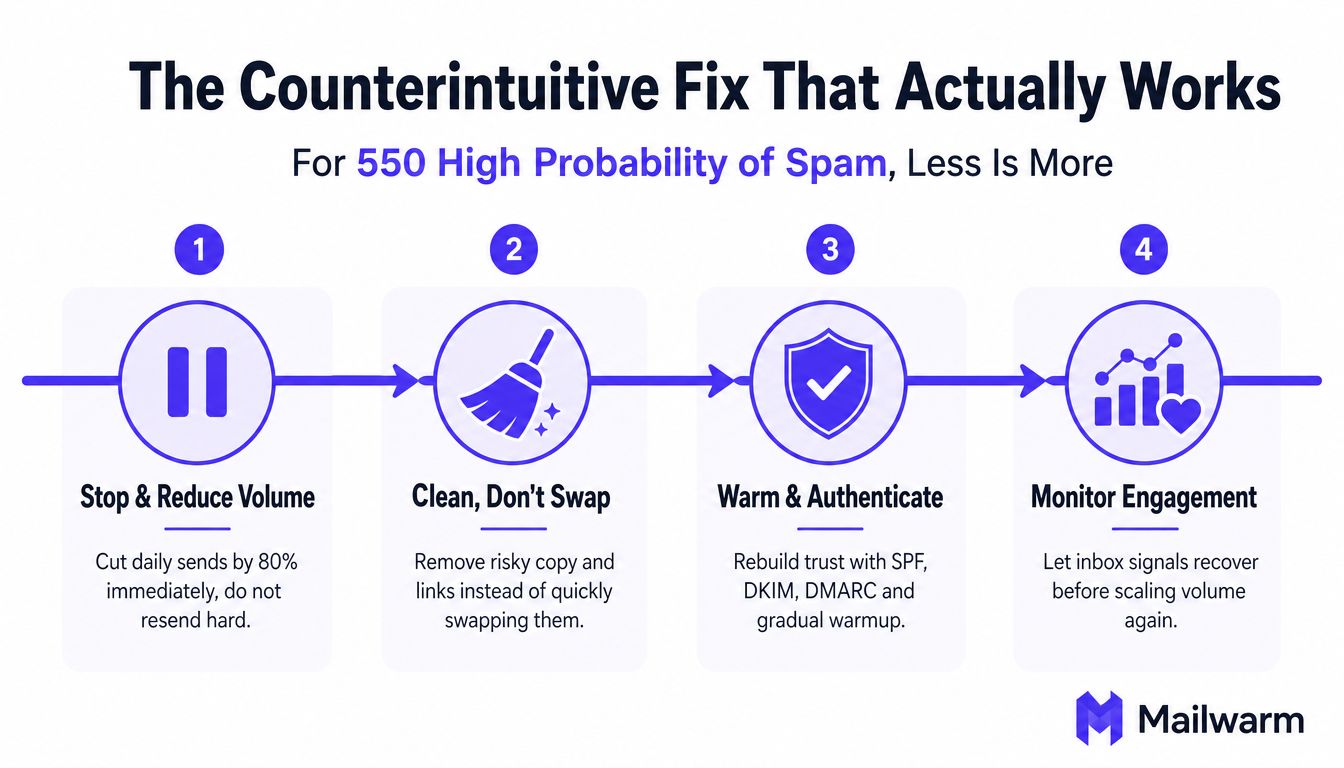
The logic is simple. Each unnecessary message sent to an unengaged, invalid, or unwilling recipient adds another negative interaction. Sending fewer messages to stronger recipients gives Gmail cleaner evidence about the domain's legitimate use.
A managed SMTP warmup process can support this gradual approach by creating controlled engagement activity across relevant providers. Mailwarm is a premium email warmup and deliverability platform that combines real inbox engagement, provider-level warmup, spam score monitoring, inbox placement insights, authentication fix tools, bounce prevention, and expert guidance. Its network includes 50,000+ aged real inboxes, and its engagement signals can include opens, replies, threads, spam removal, and important marking.
That doesn't make warmup a substitute for consent, list hygiene, or authentication. It makes controlled reputation rebuilding easier to monitor than an unsupervised full-volume restart.
Timeline to Recover and Send Safely Again
Recovery isn't an overnight switch. Gmail needs consistent evidence that the sending pattern has changed, and each sender will move at a different pace depending on the depth of the reputation problem.
A practical cadence looks like this:
- Day one: Finish the diagnosis, secure the account, correct authentication issues, and cut sending volume by at least 80%.
- Days two through seven: Send only to highly engaged recipients while watching Postmaster reputation and complaint trends.
- Weeks two and three: If the signals improve, increase volume by about 20% every three to four days, stopping the ramp when reputation flattens or worsens.
- After sustained stability: Return toward normal campaign volume only after the domain has shown clean, consistent behavior over time.
The Validity benchmark report places Gmail inbox placement at 87.2% and spam placement at 6.8% in its 2025 benchmark. Those figures don't predict one sender's recovery, but they show why inbox placement should be monitored continuously rather than assumed after one successful test.
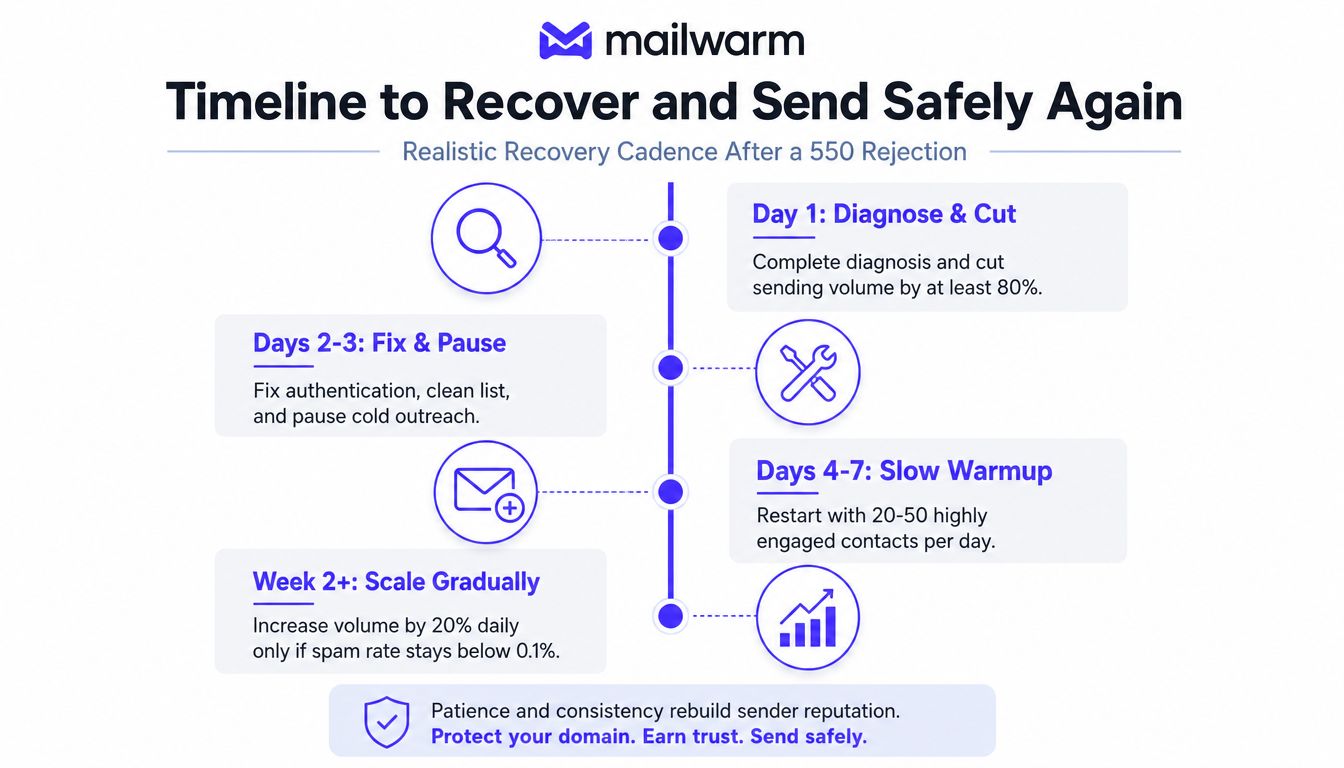
A rejection during the ramp doesn't automatically mean the process failed. It means the sender needs to stop, inspect the newest data, and decide whether the list, volume, or authentication still creates risk.
Practical rule: A flat or worsening reputation trend is a stop signal, not an invitation to send harder.
Senders often make the hole deeper by treating the first 550 as a temporary network error. The recovery timeline works only when the sending behavior changes before the next campaign.
Action Plan to Protect Your Domain Going Forward
A domain stays healthy through routine controls, not emergency copy edits. Four habits provide a practical operating system for teams that send sales, recruiting, marketing, or transactional email.
Monitor the provider signal
Check Google Postmaster Tools regularly and record changes in domain reputation, IP reputation, and complaint behavior. Gmail's bulk-sender guidance treats 0.1% as an important complaint-rate boundary and warns senders not to approach 0.3%, as documented by Validity's 2025 benchmark report. A rising trend should trigger a throttle before Gmail returns another hard block.
Authenticate every source
Keep SPF, DKIM, and DMARC aligned whenever a new platform or sending service goes live. A record that worked for one provider doesn't prove that a second provider is correctly authorized. Review authentication results after changes, not only during the initial setup.
Protect list quality
Use confirmed opt-in where appropriate, validate new addresses, suppress repeated bounces, and remove contacts who no longer engage. Teams that need help with consumer-side filtering can also review practical advice to stop unwanted messages with Simply Tech Today, though sender-side hygiene remains the primary responsibility.
Keep reputation warm
A cold domain followed by a sudden campaign creates avoidable risk. Mailwarm helps senders build reputation, monitor inbox placement, and improve deliverability through real inbox engagement, advanced warmup controls, and expert guidance. It supports B2B and B2C warmup, custom email content warmup, provider-level controls, deliverability analytics, and authentication checks without requiring IMAP access or permission to read a private inbox.
The protection checklist is straightforward:
- Monitor: Watch reputation and complaints before campaigns become urgent.
- Authenticate: Verify SPF, DKIM, and DMARC alignment for each sending source.
- Clean: Remove invalid, stale, role-based, and unengaged contacts.
- Ramp: Increase volume only when recipient signals support it.
A sender's relationship with Gmail is maintained through consistent behavior. Every campaign either reinforces trust or gives the provider another reason to question it.
Frequently Asked Questions About Gmail 550 Spam Rejections
Why does Gmail say the email has a high probability of spam?
Gmail says this when its systems judge the sending domain, IP, account behavior, authentication, or message pattern as too risky to accept. The rejection isn't necessarily caused by one spam word or one defective email. Google community guidance points to sudden sending, suspicious links or attachments, compromised accounts, and weak trust signals as common contributors.
Is a Gmail 550 rejection temporary?
A 550 response is a hard rejection at the time of delivery, unlike a temporary 421 deferral. The block can continue until the underlying reputation, authentication, account-security, or list-quality problem improves. Repeatedly retrying the same campaign doesn't make the rejection temporary.
Will changing the IP address fix the problem?
A new IP doesn't instantly transfer trust to a sender with a damaged domain, poor list quality, or weak authentication. It can also create a cold reputation that Gmail scrutinizes closely. The sending identity, domain behavior, authentication, and recipient response all need review before any infrastructure change.
How do senders check domain reputation with Google?
Senders can use Google Postmaster Tools to review available domain and IP reputation information, authentication-related signals, and spam-rate trends. The data becomes useful when compared over time and against campaign dates. A reputation check should be paired with header validation and sending-log analysis.
Can warmup tools accelerate recovery?
Controlled warmup can support recovery by creating measured engagement activity while the sender restricts campaign volume. It can't compensate for purchased lists, repeated complaints, compromised accounts, or broken SPF, DKIM, and DMARC. The sender still needs to reduce risk and scale only when provider signals remain stable.
Does Mailwarm require access to a private inbox?
No. Mailwarm doesn't require IMAP access or permission to read the user's private inbox. It combines real inbox engagement, provider-level warmup, monitoring, authentication tools, and expert deliverability guidance for teams that need more than basic automated warmup activity.
Mailwarm helps senders build reputation, monitor inbox placement, and reduce spam risk through real inbox engagement, advanced warmup controls, authentication checks, and expert deliverability calls included in every plan. Visit Mailwarm to review a controlled recovery approach before the next Gmail campaign.