

Gmail permanently rejected the message because authentication failed, either because SPF and DKIM both failed to pass or because DMARC failed on a domain with an enforcing policy. Resending the same message won't help until the sending setup changes.
That's the counterintuitive part for many teams. The copy can be clean, the address can be real, and the list can be fully opted in, and Gmail still won't accept the mail. 550 5.7.26 is an identity verdict at the SMTP door, not a judgement about the subject line. Fix the authentication trail first, then worry about reputation.
What 550 5.7.26 Means
The code identifies a permanent rejection, but Gmail's text explains the authentication failure. The message may have no SPF or DKIM pass, or it may fail DMARC alignment under an enforcing policy. Resending without changing the sending setup will produce the same result.
The diagram maps the rejection before you make DNS changes.
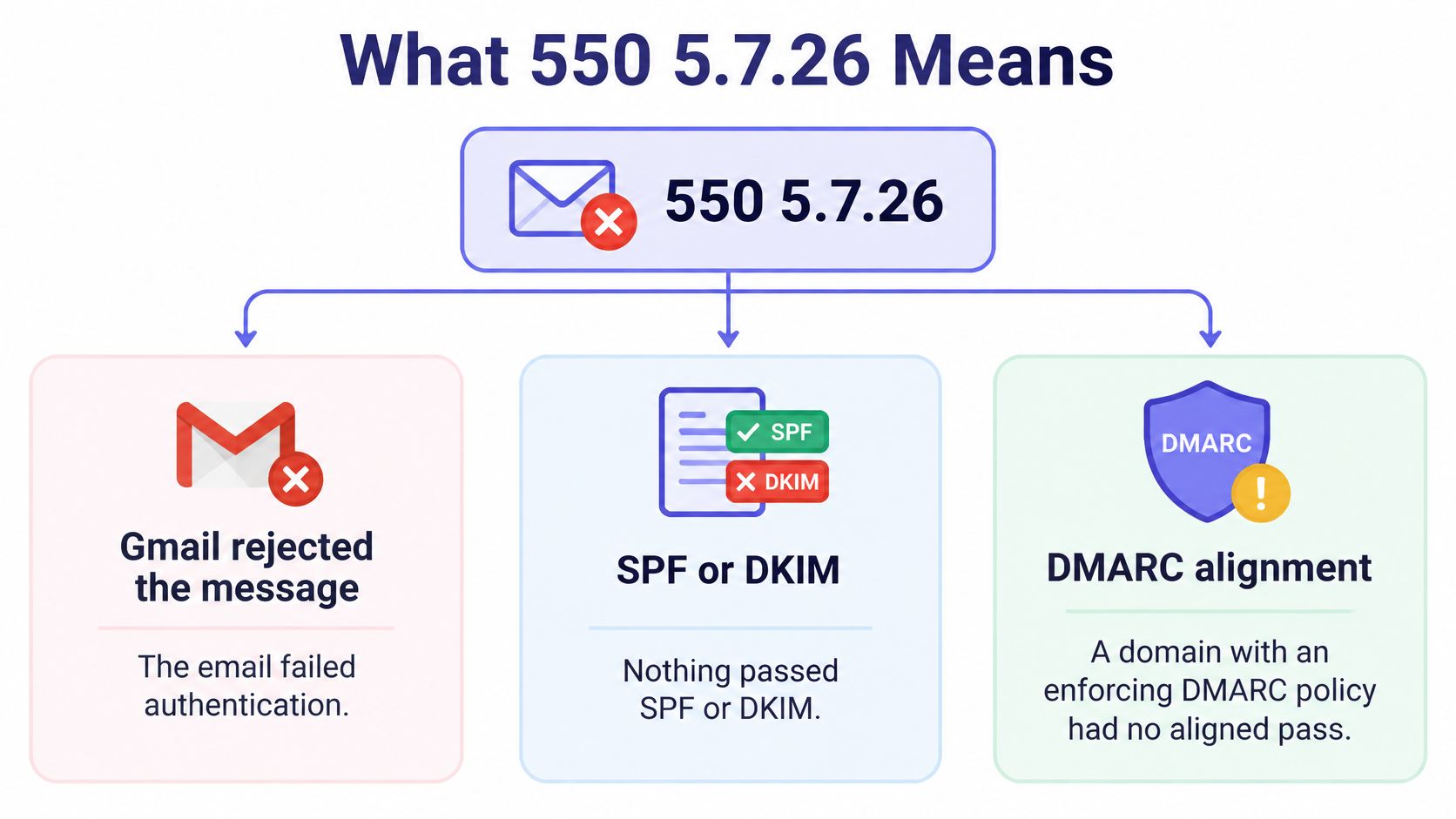
How to read the code
RFC 3463 defines the enhanced status-code structure: 5 indicates a permanent failure, and 7 identifies a security or policy subject. The RFC doesn't define sub-code 26. Gmail's own wording describes the authentication failure, so use that wording to understand the specific rejection.
SPF checks the envelope sender domain, while DKIM authenticates the signing domain. DMARC evaluates whether a passing SPF or DKIM identity aligns with the visible From domain. A pass under a different domain may not satisfy alignment.
What this error isn't
This code doesn't show that the recipient address is invalid, that the mailbox is full, or that the message contains spam-triggering wording. Those issues don't explain an authentication rejection.
- Copy: Rewriting the email won't change SPF, DKIM, or alignment results.
- List quality: Removing invalid addresses won't authenticate the sending domain.
- Warmup: Increasing warmup activity won't correct a missing or invalid DNS record.
Practical rule: Check the authentication results before changing content, volume, or warmup settings.
Evidence to save first
Keep the full SMTP reply before editing DNS. Record the exact wording, including whether it says the sender is unauthenticated or cites the domain's DMARC policy.
Also capture these details:
- Sending IP: The address evaluated for SPF.
- Envelope sender: The return-path domain SPF checks.
- Visible From domain: The domain DMARC uses for alignment.
- Sending system: The mailbox, CRM, helpdesk, relay, or outreach tool that sent the message.
These details help identify which system sent the message and which domain each authentication check evaluated.
Which of the Two Versions You Got
Gmail uses two main wordings for this rejection. The sentence after the code matters more than the code itself, because each version points to a different broken check.
550 5.7.26 This mail has been blocked because the sender is unauthenticated.550-5.7.26 Unauthenticated email from [domain] is not accepted due to domain's DMARC policy.Version one unauthenticated sender
The first wording means Gmail found no SPF pass and no DKIM pass on the message at all. Gmail's SMTP error guidance describes 550 5.7.26 as a permanent rejection for failed required authentication, commonly with both DKIM and SPF failing.
Typical causes are plain. The sending system isn't signing DKIM, the SPF record doesn't authorize the sending server, or SPF returns permerror and can't be evaluated.
Say a new mailbox gets connected to an outreach tool, but no DKIM selector is published for that tool. The tool sends as the company domain, DKIM is absent, SPF doesn't cover its server, and Gmail has nothing to trust.
Version two DMARC policy
The second wording means the domain publishes DMARC at quarantine or reject, and no passing method aligns with the visible From domain. Something may even pass, but under the wrong name.
Google's sender guidelines require at least one authentication method to pass and align with the visible From domain, with stricter SPF, DKIM, and DMARC requirements for bulk senders. That's the gap that gets missed.
Say a CRM sends as example.com but signs DKIM with its own vendor domain in the d= tag. DKIM passes for the vendor, DMARC still fails for example.com, and an enforcing policy gets the mail rejected.
| Bounce wording | What Gmail checked | What actually failed |
|---|---|---|
| 550 5.7.26, sender is unauthenticated | Whether any SPF or DKIM result passed | No SPF pass and no DKIM pass on the message |
| 550-5.7.26, not accepted due to the domain DMARC policy | Whether a passing method aligns with the visible From domain | DMARC is quarantine or reject and no aligned pass exists |
The hyphen question and the header check
550-5.7.26 isn't a different error. The hyphen is only SMTP line formatting in a multi-line reply, so both forms carry the same enhanced code.
Before editing any record, open the Authentication-Results header on a delivered test or the diagnostic data in the bounce. Note spf=, dkim=, header.from, and the DKIM d= domain.
Sending volume, copy, and links don't change which version arrived. The header values do.
Fix in This Order
Don't add another SPF include until the system that sent the rejected mail is identified. That's the advice that saves the most time, because a blind DNS edit can break a working sender while the broken one keeps failing.
The process below shows the order that matters.
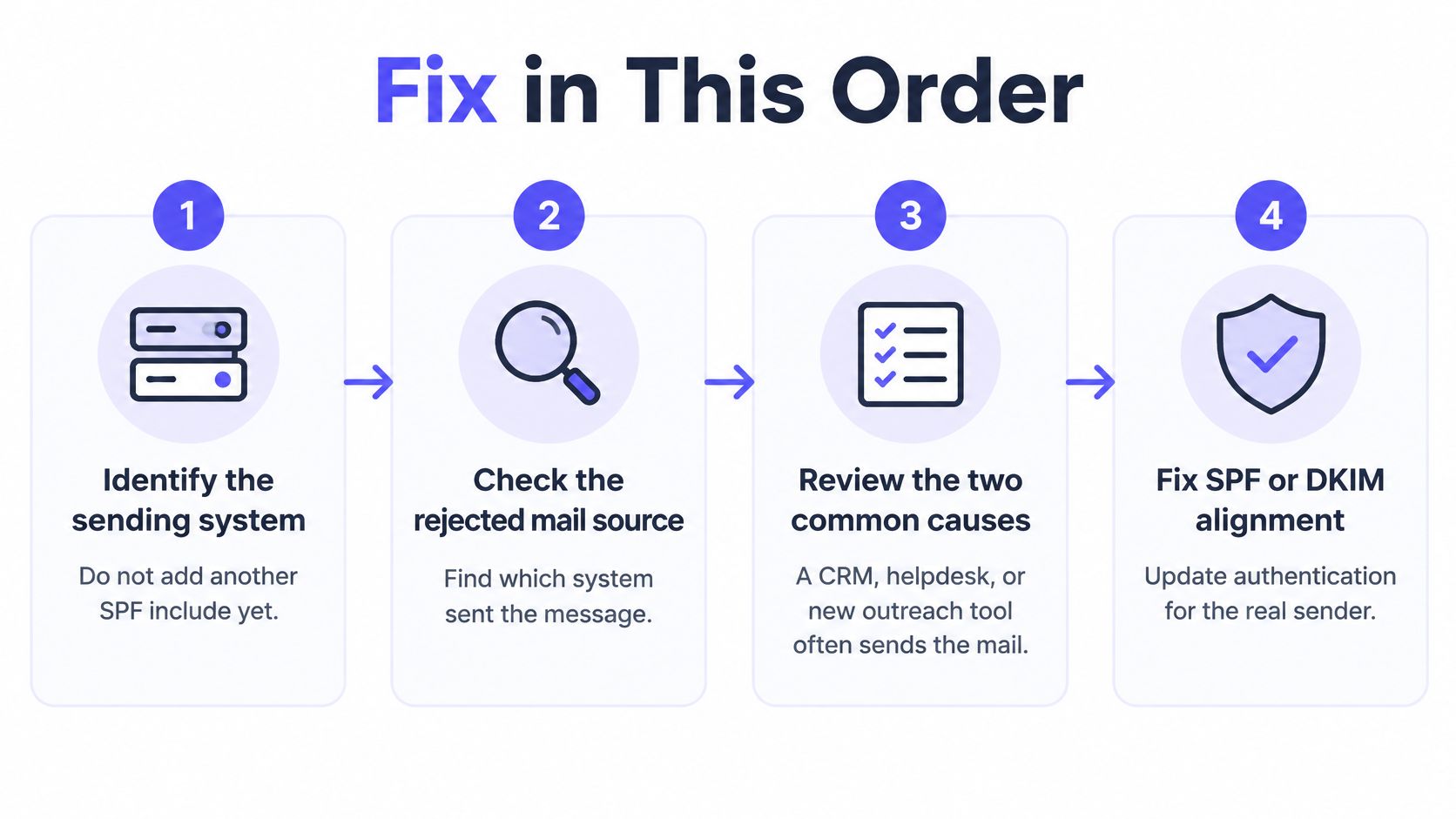
The two causes seen most often are specific. First, a CRM, helpdesk, or newly added outreach tool sends as the company domain without aligned DKIM. Second, SPF is broken by too many DNS lookups, returns permerror, and nothing passes.
Work through four checks
- Fix DKIM at the actual sender: Enable DKIM in that exact tool and sign with
d=set to the visible From domain, not the vendor's domain. Publish the selector's public key in DNS, send a fresh message, and confirmdkim=pass. Run the result through Mailwarm's DKIM checker to confirm the selector resolves. - Clean up SPF: Keep one SPF TXT record per domain covering every legitimate sender. Stay under the lookup limit, remove duplicate records and dangling includes, and end with
~allor-all. Use a checker to verify your SPF record before and after the edit. - Confirm DMARC alignment: SPF aligns on the envelope domain, DKIM aligns on
d=, and one aligned pass meets Gmail's minimum. Don't weaken an existingp=rejectorp=quarantineto hide the error. If no record exists, publishp=nonewith anruareporting address, then tighten once every sender aligns. Check the published policy with the DMARC checker. - Retest with a new message: Send a fresh test from the same tool that bounced, not a retry of the old message. The fastest way is to send a test email and read the authentication results. Wait for DNS changes to reach resolvers before judging the result.
The short video below walks through the same authentication checks in order.
Checklist before resuming
Clearance check
- DKIM signs with the From domain: The
d=value matches what recipients see.- One SPF record covers every sender: It stays under the lookup limit with no duplicates.
- DMARC aligns: Alignment comes through SPF or DKIM, preferably both.
- A fresh test passes: The new message shows aligned passes from the failing tool.
Each sender needs its own check. A pass for the mailbox provider doesn't cover the CRM, and a pass for the helpdesk doesn't cover the outreach tool.
That per-system discipline is also the foundation when teams work to improve email deliverability for B2B, since every automation and sending tool has to authenticate under the same domain rules. Mailwarm recommends fixing SPF, DKIM and DMARC first, starting warmup before your first campaign, ramping up slowly, and keeping a maintenance level running after.
Why It Started Happening
Google and Yahoo's sender requirements took effect in February 2024, bringing authentication failures into sharper view. Mail that had previously slipped through with weak authentication began getting rejected.
The timeline below shows when the requirements changed.
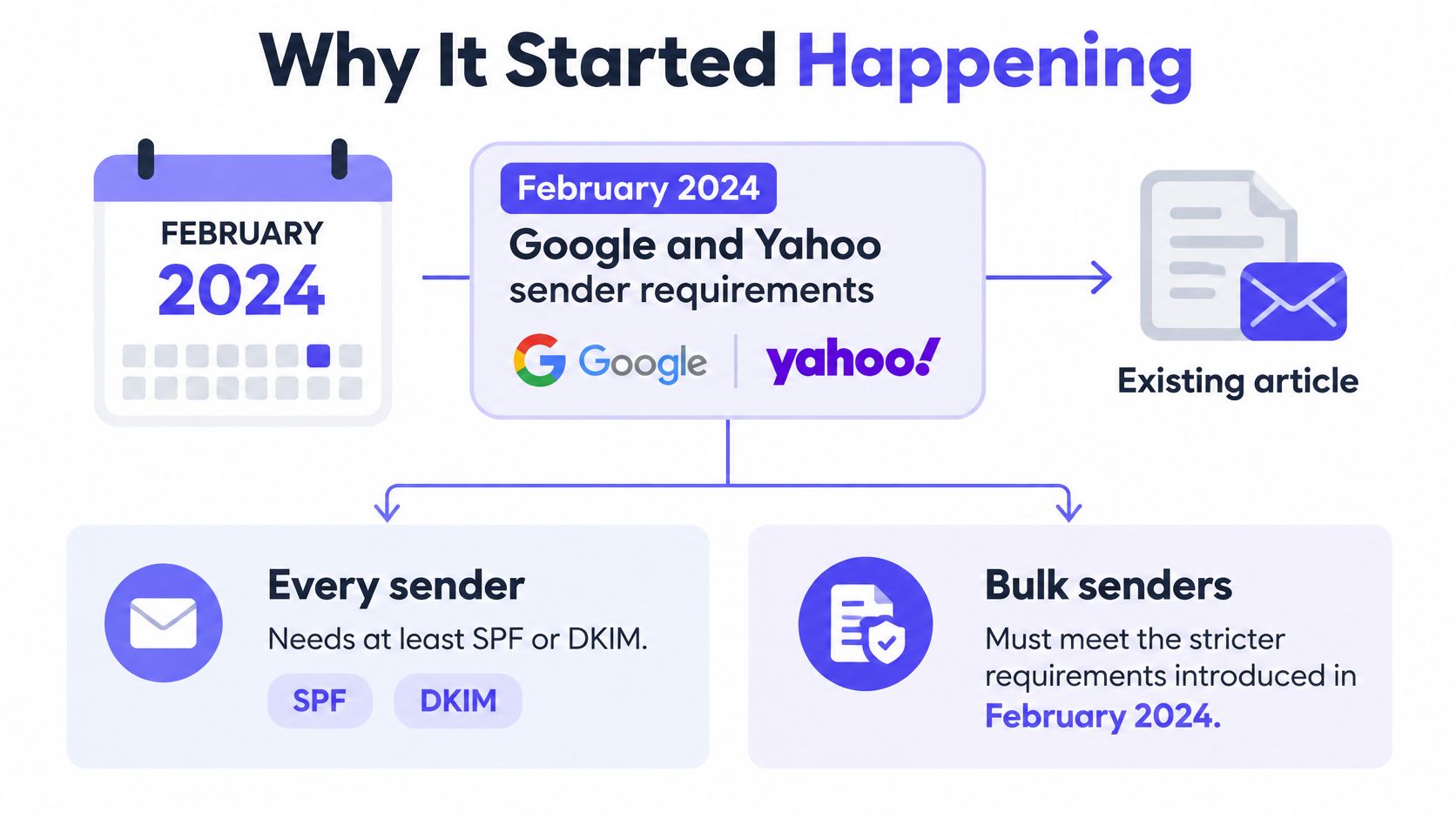
What changed in February 2024
Every sender needs at least SPF or DKIM. Bulk senders also need DMARC, aligned authentication, a spam complaint rate below the provider threshold, and a working unsubscribe path.
A domain may send cleanly at low volume, then fail as volume grows or a new CRM, helpdesk, or outreach tool sends as the company domain without aligned DKIM. An SPF record can also return permerror if it exceeds the DNS lookup limit. Fixing Gmail alone leaves Microsoft and Yahoo untested.
Why it looks sudden
A 550 5.7.26 rejection is an authentication check at SMTP time, before inbox placement is decided. It points to an authentication failure, not a sudden change in the receiver's opinion of the message content.
Receivers began rejecting mail that might previously have been delivered to spam.
A domain doesn't have to get worse to start bouncing. It only has to get checked.
How common the gap still is
Many custom domains still lack working SPF or a DMARC record. That leaves senders exposed when a provider checks authentication or when a new tool sends on the domain's behalf.
| DNS state | Relation to 550 5.7.26 |
|---|---|
| No working SPF | SPF can't pass for that domain |
| No DMARC record | The domain has no published DMARC policy |
| DMARC p=none | The policy requests reporting only, not rejection |
| DMARC quarantine or reject | A misaligned sender may be sent to spam or rejected |
p=none alone doesn't ask receivers to reject mail. DMARC policy wording in a bounce indicates that the receiver applied an enforcing policy.
Same Problem at Microsoft
Gmail and Microsoft enforce authentication through different rejection codes. A clean Gmail test doesn't establish that Microsoft will accept mail from the same domain.
Microsoft codes for the same failure
Microsoft's Outlook announcement for high-volume senders defines high volume as domains sending more than 5,000 messages per day. Those senders need SPF, DKIM, and DMARC at p=none or stronger, with alignment through SPF or DKIM, preferably both.
Microsoft first routed non-compliant mail to Junk, with rejection possible if problems continued. The rejection for a domain that doesn't meet the required authentication level is 550 5.7.515, access denied, according to Mailgun's summary of Microsoft's sender requirements.
| Provider | What you see | Rule behind it |
|---|---|---|
| Gmail | 550 5.7.26, unauthenticated or DMARC policy text | At least one of SPF or DKIM must pass and align; bulk senders also need DMARC |
| Microsoft, high volume | 550 5.7.515, access denied, authentication level not met | Domains over 5,000 messages a day need SPF, DKIM, and DMARC at p=none or stronger |
| Yahoo | Often a defer or junk placement, not 5.7.26 | SPF or DKIM required, DKIM keys of at least 1,024 bits, complaint rate under 0.3% |
Yahoo and the forwarding edge case
Yahoo's sender best practices require every sender to authenticate with SPF or DKIM at minimum. They recommend DKIM keys of at least 1,024 bits and require a spam complaint rate below 0.3%.
Yahoo may defer or junk unauthenticated mail rather than return 5.7.26. A message that doesn't bounce there hasn't necessarily passed authentication.
Forwarding can break SPF because the forwarding server isn't in the original record. DKIM may survive if the message body remains unchanged, which is why aligned DKIM helps cover a case SPF alone may not.
The three provider test
After a DNS change, send a fresh test to Gmail, Microsoft 365 or Outlook, and Yahoo. Check each provider's result separately. If you're addressing a Microsoft rejection tied to suspected spam, see how to resolve suspected spam rejections in Exchange.
What to Do After the Bounce Clears
A cleared 550 5.7.26 means the receiver can accept the message. It doesn't guarantee inbox placement. Once authentication passes, sender reputation and recipient engagement still affect where accepted mail lands.
Accepted isn't the same as inboxed
Authentication shows that the sending domain authorized the message and that DMARC alignment can pass. Complaints, bounces, and engagement remain relevant to placement. The SMTP2GO guide to SMTP error codes distinguishes permanent policy rejections from broader sender-quality signals.
Treat the DNS fix as the end of the rejection, not the end of deliverability work.
Restart in steps, not in a burst
Don't retry permanently rejected messages in a burst. Send fresh messages after the authentication fix, then resume gradually:
- Test each sending tool: Send a new message to Gmail, Microsoft 365 or Outlook, and Yahoo.
- Check Authentication-Results: Confirm authentication passes and aligns at each provider.
- Resume at a known volume: Start near the volume the domain sent successfully before the failures, then increase gradually.
- Monitor complaints and bounces: If either rises after sending resumes, investigate the cause before increasing volume.
Use Mailwarm's free deliverability test to check the initial results.
Where warmup fits, and where it doesn't
Warmup supports reputation after authentication is fixed. It won't repair a broken DKIM signature or an SPF permerror, so resolve those first.
Mailwarm is a premium email warm-up and deliverability platform with a network of 50,000+ aged inboxes. It generates engagement signals, doesn't require IMAP access, and offers deliverability expert calls. Warmup can support a careful restart, but it can't replace correct authentication or gradual sending.
Fix authentication to get accepted. Build reputation to improve inbox placement.
If all three providers show an aligned pass, resume sending gradually. If one still rejects the message, investigate that provider's result and the sending tool involved.
Questions After You Clear 550 5.7.26
Will resending the same email work?
No. A 550 response is a permanent failure, so resending the same message from the same setup is unlikely to change the result. Correct the authentication issue, confirm an aligned pass, then send a new message.
Is 550-5.7.26 different from 550 5.7.26?
No. The hyphen is part of the formatting used in a multiline SMTP reply. Both versions carry the same enhanced status code; the response wording identifies the specific cause.
Does fixing 5.7.26 guarantee inbox placement?
No. Fixing the rejection allows the receiver to accept the message. Reputation, complaints, and engagement still affect whether accepted mail reaches the inbox or spam folder.
Is SPF still needed if DKIM passes?
Yes. Keep SPF valid even when DKIM passes. A broken SPF record can remove a fallback if a DKIM signature is damaged in transit, and receivers may evaluate SPF as well as DKIM.
Does Mailwarm need access to my inbox?
No. Mailwarm doesn't require IMAP access or permission to read your private inbox. It provides SPF, DKIM, and DMARC validation, blacklist detection, and SMTP and IMAP configuration checks. The checks show which record is missing or misaligned.
Mailwarm also provides warmup to help build sender reputation after authentication is fixed.
Clear the authentication failure first, then rebuild placement with the team at Mailwarm. Expert deliverability calls, spam score monitoring, and a 50,000+ aged inbox warmup network support reputation management after DNS is fixed. No IMAP access is required.