
550 5.7.1 is a permanent SMTP failure where the receiving server refuses the message under a security or policy rule. The receiving server considers the sender a spammer on policy grounds, so resending the same email usually won't solve the problem.
The bounce often appears after a campaign that looked normal from the sender's side. A message may deliver to some recipients while Outlook, Gmail, or Microsoft 365 rejects it with a 550 5.7.1 message rejected as spam response. That pattern points to reputation, authentication, content, or recipient-policy signals, not just a broken mail client.
What 550 5.7.1 Message Rejected as Spam Actually Means
In plain English, 550 5.7.1 means the recipient's mail server has refused to accept the email because its policy engine doesn't trust the message, sender, or sending environment. The SMTP code belongs to the permanent-failure class, so the receiving server isn't asking the sender to try again later. It has made a delivery decision and rejected the transaction. Microsoft's explanation of the error describes the response as a content-filtering or policy rejection.
The sending mail transfer agent attempted delivery, but the recipient server evaluated the connection against its filtering rules before accepting the message. The recipient server generated the bounce, which means the wording reflects that provider's judgment, not necessarily an objective finding that the sender intentionally sent spam.
This distinction matters. A DNS, TLS, or mailbox syntax problem usually points toward infrastructure or addressing repairs. 550 5.7.1 belongs first to the reputation and policy category, although authentication and message construction can trigger the policy decision.
A useful diagnosis starts with three questions:
- Who rejected the message? Identify the receiving provider in the SMTP transcript.
- When did rejection occur? A refusal during the SMTP transaction indicates a policy block before mailbox delivery.
- What reason accompanied the code? Terms such as spam, authentication, reputation, blocked host, or content filtering narrow the repair.
Practical rule: Treat 550 5.7.1 as a hard rejection. Fix the sender-side signal before attempting another delivery.
The enhanced status-code framework exists to classify failures more specifically than a basic 550 response. Its consistent structure is why similar 5.7.1 patterns appear across Exchange, Gmail, Microsoft 365, and other mail systems.
How the Error Code Breaks Down and the Variants You Might See
The numeric structure gives a useful starting point. 550 indicates a permanent failure, while 5.7.1 identifies an authorization or policy refusal. In the enhanced status framework, the first digit marks permanent failure, the security or policy category is represented by the middle digit, and the final digit identifies the specific condition. A technical breakdown of SMTP 550 explains why this response means the server refused delivery rather than scheduling a retry.
Providers don't use identical wording. Gmail may mention unsolicited mail or authentication, Outlook.com may refer to basic authentication requirements, and a Microsoft 365 environment may identify a blocked sending host. Generic Postfix or Exim relays can append a diagnostic URL or a local policy explanation.
The wording helps, but the category stays consistent: the receiver rejected the message at SMTP time because a security, spam, or authorization policy failed.
550 5.7.1 Bounce Variants by Provider
| Provider | Typical Bounce Text | What It Implies |
|---|---|---|
| Gmail | 550-5.7.1 Our system has detected that this message is likely unsolicited mail | Gmail suspects unwanted mail, often because of reputation, authentication, consent, or sending behavior. |
| Outlook.com | 550 5.7.1 The sender does not meet basic authentication requirements | Authentication or alignment requirements need review. |
| Microsoft 365 | 550 5.7.1 Service unavailable, sending host blocked | The sending host or its reputation may be blocked by Microsoft policy. |
| Generic SMTP | 550 5.7.1 Message rejected as spam | The receiver's content or spam policy refused the transaction. |
| Postfix or Exim relay | 550 5.7.1 followed by a URL or local explanation | The relay provides a provider-specific diagnostic page or policy reason. |
Don't diagnose from the numeric code alone. The text after the code, the recipient provider, and whether other providers accept the same message determine the next move.
Why You Got Hit With 550 5.7.1 in the First Place
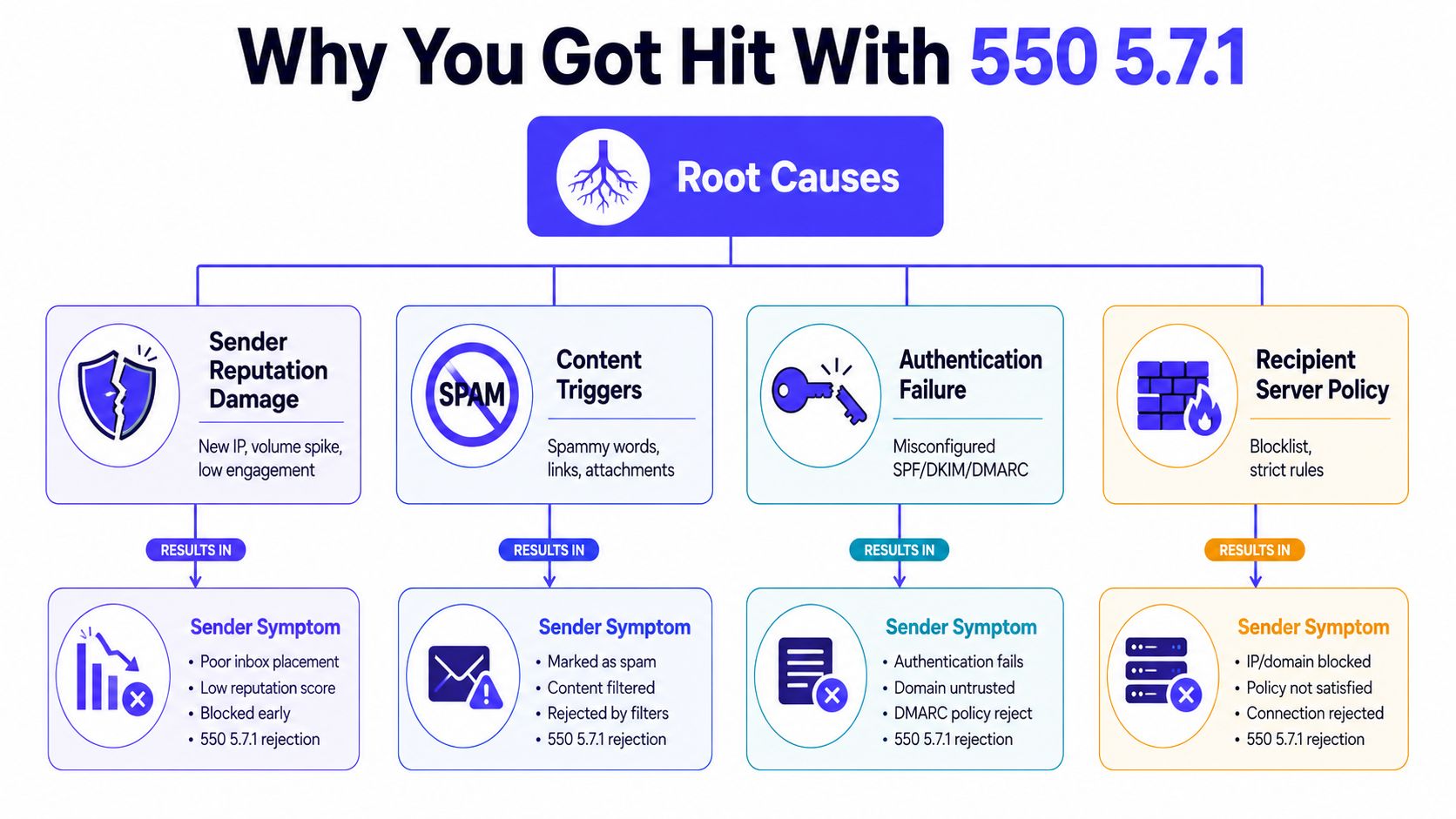
Most 550 5.7.1 message rejected as spam incidents come from four overlapping causes. A provider may react to one signal, or it may combine several weak signals into a single rejection.
Content was flagged
Spam filters inspect more than subject lines. Aggressive promotional language, excessive links, image-heavy HTML, attachments, malformed headers, or nearly empty messages can create suspicion. SonicWall's explanation of 550 5.7.1 content filtering specifically connects the code with content filtering and policy rejection.
The usual symptom is a rejection tied to one template, campaign, or message format. Removing a suspicious phrase can help, but changing copy won't repair a damaged domain reputation.
Sender reputation weakened
A new sending environment, an abrupt volume increase, poor engagement, complaints, or unwanted recipients can reduce trust in the sending domain or IP. Providers may refuse a message before the mailbox ever sees it when the reputation signal is sufficiently weak.
The symptom is broader than one email. Several templates may fail, or messages may reject only at one provider while reaching others.
Authentication failed or lost alignment
SPF, DKIM, and DMARC failures can make legitimate mail look unauthorized. Alignment matters too. The visible From domain should correspond appropriately with the authenticated sending identity, rather than presenting one domain while another domain signs or relays the message.
Missing headers, duplicate headers, IPv6 PTR issues, and linked-domain concerns can also appear in provider diagnostics. Gmail-focused troubleshooting guidance lists these signals alongside reputation and content concerns.
Recipient-side policy blocked the message
A recipient organization may use a transport rule, blocked distribution group, allowlist, or internal security policy. This case often affects a narrow group of recipients at one company rather than an entire provider.
The practical mistake is treating every rejection as a global sender problem. A single organization's rule may require its administrator to permit the sender, while a provider-wide block requires sender-side reputation repair.
Before assuming a policy block is provider-wide, teams should check if your domain is blacklisted. A public listing isn't proof of the cause, but it can explain why several receiving systems distrust the sender. For a second opinion, an email blacklist checker can reveal whether the sending infrastructure appears on monitored lists.
How to Fix 550 5.7.1 Step by Step
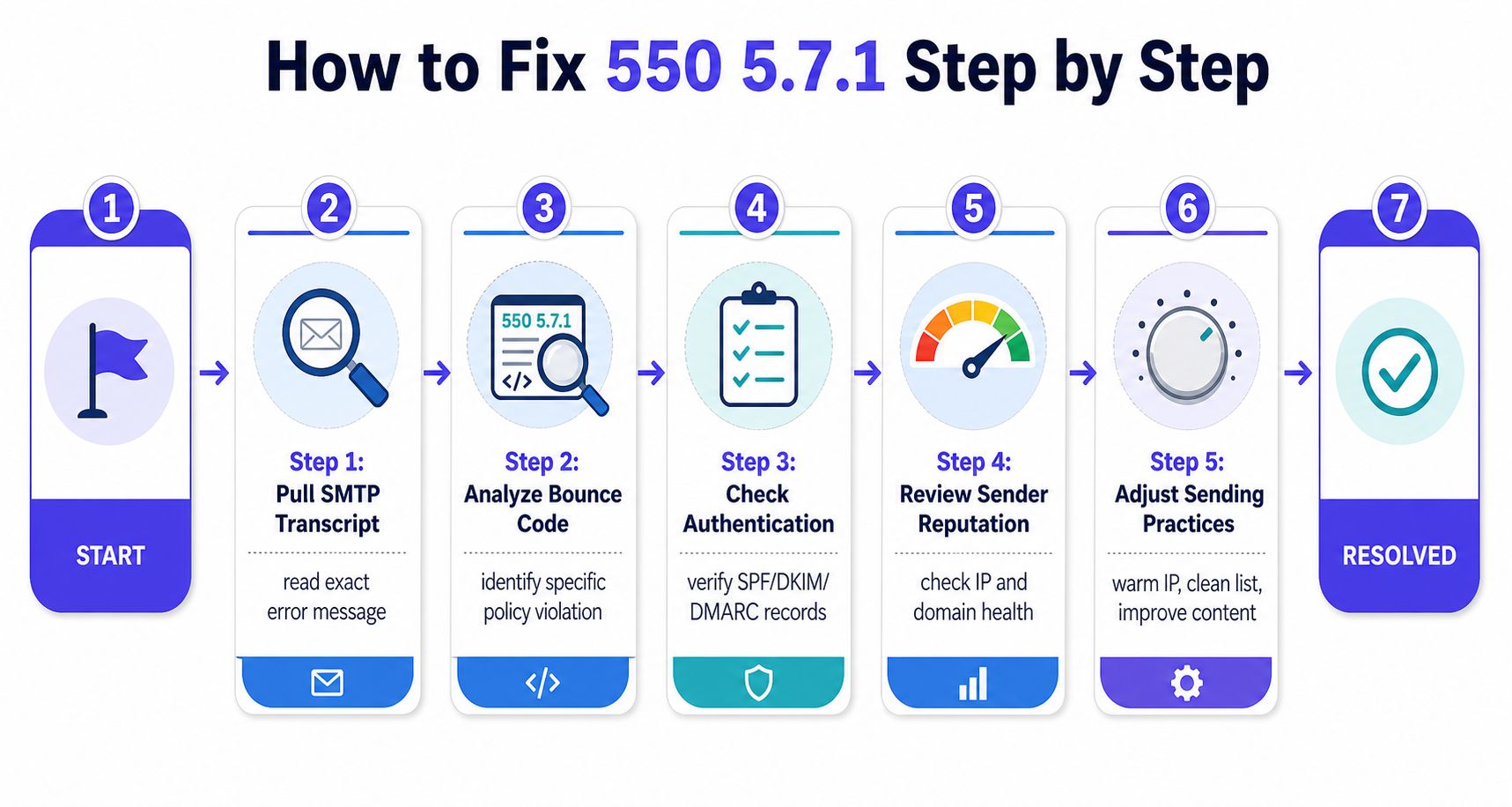
A reliable repair starts with evidence, not with repeated sends. The following order prevents teams from wasting time rewriting content when authentication or reputation is the issue.
1. Pull the complete SMTP transcript
Don't rely on a dashboard label that says “bounced.” Export the complete rejection, including the receiving hostname, enhanced status code, diagnostic text, and any provider-specific reference.
Action: Group failures by recipient provider and copy the exact response into the incident record. The error variant often tells whether the first investigation should focus on authentication, content, host reputation, or recipient policy.
2. Validate SPF, DKIM, and DMARC alignment
Check the sending domain and the subdomain used by the bouncing stream. Confirm that the service sending the message is authorized, that DKIM signatures validate, and that DMARC alignment matches the visible From identity.
Action: Use a DNS and authentication testing service, then send controlled messages to test mailboxes. If a DNS change or new sending provider introduced the failure, correct the record or signing configuration before sending again.
3. Check IP and domain reputation
Review public blocklists, then inspect the provider dashboards available for the affected traffic. Gmail Postmaster Tools can expose Gmail-specific reputation signals, while Microsoft's SNDS and JMRP provide Microsoft-oriented feedback when the sending setup qualifies for those services.
Action: Record whether the problem is domain-wide, IP-specific, or limited to one provider. Pause the affected stream if rejection continues, clean questionable recipients, and remove sudden volume changes from the plan.
4. Audit the message itself
Review the subject, HTML structure, links, attachments, headers, and unsubscribe handling. Pay particular attention to link shorteners, heavy image use, aggressive sales language, malformed headers, and messages with almost no meaningful body content.
Action: Send a plain, relevant test message without the questionable elements. A content change can identify a trigger, but it should never substitute for authentication and reputation repair.
5. Test provider by provider
Use seed addresses at Outlook, Gmail, and Yahoo. Keep the sender identity, message, and timing controlled so that each result can be compared properly.
Action: Map acceptance and rejection by provider. If only Outlook rejects, investigate Microsoft-specific reputation and authentication feedback rather than changing every campaign template.
6. Remove failed or unwanted recipients
A repeated retry to the same rejected address creates no repair. Segment addresses that have hard failures, confirm consent and relevance, and protect the remaining list from similar signals.
Action: Suppress persistent hard bounces and investigate recipient-side rules when the rejection affects one organization only.
A content-focused review can support the technical checks. Teams can use an email spam checker to identify message-level risks before testing delivery again.
When Only One Provider Rejects Your Emails
A provider-only rejection is a valuable clue. If Gmail accepts the message but Outlook recipients receive 550 5.7.1, the sender isn't facing one universal email failure. The sender is facing a reputation or policy interpretation specific to Microsoft's mail ecosystem.
Each provider evaluates traffic through its own filters, feedback channels, and trust history. A domain can have an acceptable standing with one provider and a weak standing with another because the providers observe different recipient interactions and apply different enforcement rules.
Read the provider pattern
| Provider | Typical Error Variant | Likely Trigger |
|---|---|---|
| Outlook.com | 550 5.7.1 The sender does not meet basic authentication requirements | Authentication, alignment, or Microsoft-specific sender requirements. |
| Microsoft 365 | 550 5.7.1 Service unavailable, sending host blocked | Sending-host reputation or an organizational Microsoft policy. |
| Gmail | 550-5.7.1 Our system has detected that this message is likely unsolicited mail | Gmail reputation, authentication, consent, or content signals. |
| Generic relay | 550 5.7.1 Message rejected as spam | A local content or policy engine refused the message. |
Provider-level warmup addresses this diagnosis more precisely than undifferentiated activity. It directs controlled engagement toward the provider where the sender's reputation is weak, rather than assuming positive activity at one provider automatically repairs another provider's view.
Mailwarm is a premium email warmup and deliverability platform that uses 50,000+ aged real inboxes across Gmail, Outlook, Microsoft 365, Yahoo, and SMTP providers. Its provider-level controls support real inbox engagement, including opens, replies, threads, spam removal, and important marking, while inbox placement insights and spam score monitoring help teams see whether the affected provider is improving.
The trade-off is important. Generic warmup activity may produce engagement without answering which provider distrusts the sender. Provider-specific controls are more targeted, but they still won't excuse poor list quality, failed authentication, or unwanted content. Reputation repair works only when the underlying policy signals improve too.
How to Prevent 550 5.7.1 From Coming Back
A one-time cleanup rarely protects a sender for long. Providers continuously evaluate authentication, recipient response, volume behavior, and message patterns, so prevention needs to operate as a routine rather than an emergency response.
Keep provider reputation visible
Monitor Gmail, Outlook, Microsoft 365, and Yahoo separately when the audience spans those systems. A single blended deliverability score can hide an Outlook-only or Gmail-only decline until hard rejections become obvious.
Provider-level warmup should support the actual distribution of recipients. It shouldn't create an artificial sense of safety by producing activity only in a provider that already accepts the mail.
Make authentication part of release management
Every new CRM, outreach platform, relay, or domain change can affect SPF, DKIM, and DMARC. Authentication checks should run whenever sending infrastructure changes, not only after a bounce appears.
The visible From domain, authenticated identity, and sending service need to tell a coherent story. That alignment is more durable than repeatedly adjusting subject lines.
Review reputation and list signals regularly
Postmaster and Microsoft feedback dashboards should be reviewed as part of routine operations. List hygiene, consent, recipient relevance, complaint signals, and hard-bounce suppression belong in the same process as campaign approval.
A sender who waits for a 550 5.7.1 response has already allowed the provider to make the decision. Earlier monitoring creates room to reduce volume, isolate a bad stream, or correct authentication before the provider moves to hard rejection.
Use a managed deliverability layer when scale adds complexity
Mailwarm combines warmup automation with provider-level warmup, inbox placement insights, spam score monitoring, authentication fix tools, bounce prevention, custom email content warmup, and deliverability analytics. It doesn't require IMAP access or permission to read a private inbox, and every plan includes expert deliverability calls.
Teams evaluating an smtp warmup approach should judge it by the quality of provider-specific engagement and diagnostic visibility, not by automated activity alone. The higher-cost approach makes sense when reputation protection, authentication support, real inbox signals, and expert guidance matter more than the cheapest warmup volume.
FAQ on 550 5.7.1 Message Rejected as Spam
Is 550 5.7.1 permanent?
Yes. The 550 class is permanent, and 5.7.1 represents a security or policy refusal, not a temporary delivery delay. The sender should repair the cause before attempting another delivery.
Does 550 5.7.1 mean the recipient personally blocked the sender?
Not usually. It means the receiving server rejected the message under a server-level policy, although an organization-specific rule or blocked group can produce a similar response.
Why does only Outlook reject my emails?
Microsoft may be evaluating the sender through a provider-specific reputation or authentication decision that Gmail and Yahoo haven't made. Outlook-only failures call for Microsoft-focused diagnostics and provider-level reputation repair, not a generic rewrite of every message.
Will resending the same email fix the problem?
No. Repeating the same message to the same address preserves the same policy signals and can reinforce the rejection pattern. Fix authentication, reputation, content, or recipient policy first, then suppress or segment addresses that continue to hard fail.
How long does recovery take?
Recovery is measured in sustained clean sending rather than an immediate retry. The sender needs consistent authentication, relevant recipients, controlled volume, and positive provider-specific engagement before the affected mailbox system is likely to reassess the traffic.
Mailwarm helps senders build reputation, monitor inbox placement, and improve deliverability through real inbox engagement, advanced warmup controls, and expert guidance. Visit Mailwarm to diagnose provider-specific 550 5.7.1 rejections and build a more controlled path back to the inbox.