

A sales team sends a batch of personalized outreach from a Yahoo mailbox, the copy looks solid, and the credentials seem correct. Then the sends stall, a few messages bounce, and the team starts wondering whether Yahoo SMTP is broken.
Yahoo SMTP servers are Yahoo's outgoing mail servers, and the required hostname for sending is smtp.mail.yahoo.com. They move outbound email from a Yahoo mailbox to the next mail server, but correct SMTP settings alone don't guarantee delivery because Yahoo also evaluates how that mail behaves after it's sent.
For founders, agencies, recruiters, and outbound teams, that distinction matters. A mailbox can be configured correctly and still struggle if Yahoo sees weak engagement or sending patterns that look risky.
Introduction to Yahoo SMTP Servers
Yahoo SMTP servers handle outbound email for Yahoo accounts. In plain terms, SMTP is the sending side of email, and Yahoo requires senders to connect through smtp.mail.yahoo.com when they want a Yahoo mailbox to send mail.
That sounds simple until a team starts sending real volume. One day, messages leave the outbox normally. The next day, a rep sees rejections, delays, or login prompts that keep returning. The natural assumption is that the server name or password is wrong.
Sometimes that's true. Often, it's only part of the story.
A Yahoo mailbox has to be configured with the right hostname, the right port, the right encryption, and the right authentication method. After that, the mailbox still has to send in a way Yahoo accepts. That's where many tutorials stop too early.
Practical rule: SMTP setup is the key that starts the car. Deliverability is the condition of the engine, the fuel, and the road ahead.
This guide focuses on the parts that usually cause confusion:
- Core settings such as hostname, ports, and encryption
- Client setup in tools like Outlook, Thunderbird, Apple Mail, and mobile apps
- Sending limits that can block bulk activity
- Authentication and reputation issues behind Yahoo rejections
- Troubleshooting common SMTP errors and practical fixes
For B2B and B2C senders, Yahoo SMTP works best when technical setup and sender reputation are treated as one system, not two separate jobs.
Understanding Key SMTP Settings
Yahoo's SMTP setup is built around one required hostname and two secure port choices. If any of those pieces are off, the connection can fail before a single email is sent.
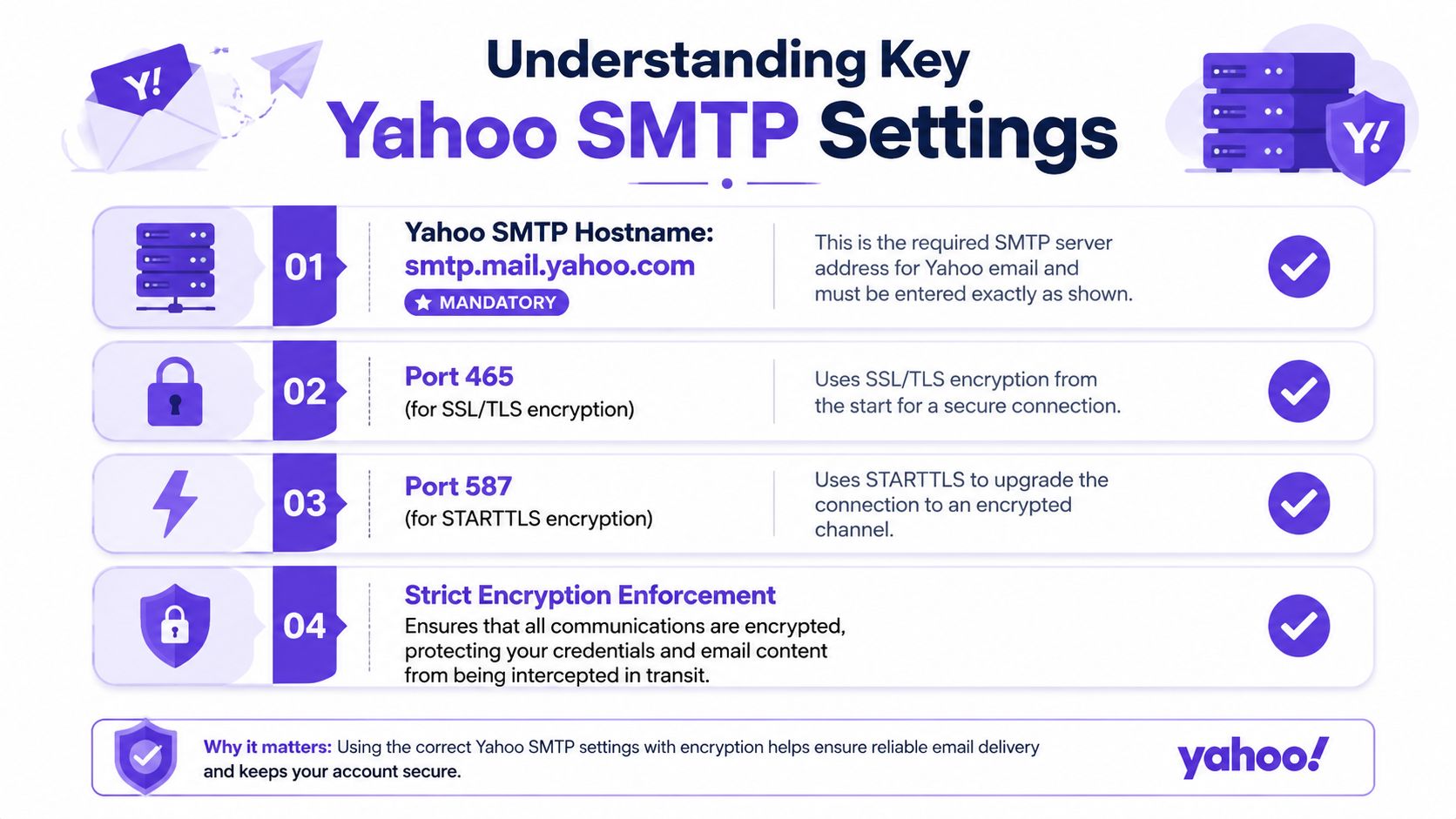
The required Yahoo SMTP hostname
The outgoing server must be smtp.mail.yahoo.com. Yahoo rejects generic or alternative server addresses that don't match that exact hostname, as explained in SmartReach's Yahoo SMTP settings guide.
That matters because many email clients try to autofill mail settings. Autofill is useful until it guesses wrong. A team might see a field labeled “outgoing server” and assume any Yahoo-looking address will work. Yahoo doesn't allow that shortcut.
Which port should be used
Yahoo supports two secure ways to connect:
- Port 465, for SSL
- Port 587, for TLS using STARTTLS
A simple analogy helps here. Port 465 is like entering a secure building through a locked front door. The connection is encrypted from the start. Port 587 with STARTTLS is like entering through a monitored lobby, then moving immediately into a secure room once the handshake upgrades the connection.
Both are valid. The key is that the connection must be protected.
Why encryption is mandatory
Yahoo requires strict encryption for outbound SMTP connections. It accepts SSL on port 465 or TLS (STARTTLS) on port 587 with the official hostname smtp.mail.yahoo.com, and connections that don't enforce those layers are rejected immediately, according to Zoho's SMTP server reference.
Users often struggle with this configuration. The server name may be right, and the username may be right, but if the client is set to “none” for encryption or to the wrong security mode, Yahoo treats the session as unsafe.
A failed SMTP setup often isn't a password problem. It's a security mismatch between the email client and Yahoo's server.
A quick settings checklist
Before testing a send, the client should match this checklist:
- Server name:
smtp.mail.yahoo.com - Port choice: 465 or 587
- Encryption: SSL for 465, STARTTLS for 587
- Authentication: enabled
- Username: full Yahoo email address
Those settings don't just help with connection reliability. They also protect credentials in transit, which is one reason Yahoo enforces them so strictly.
Configuring Yahoo SMTP in Email Clients
Configuring Yahoo SMTP in an email client is mostly about putting the right values in the right fields. The confusing part is that each app labels those fields a little differently.
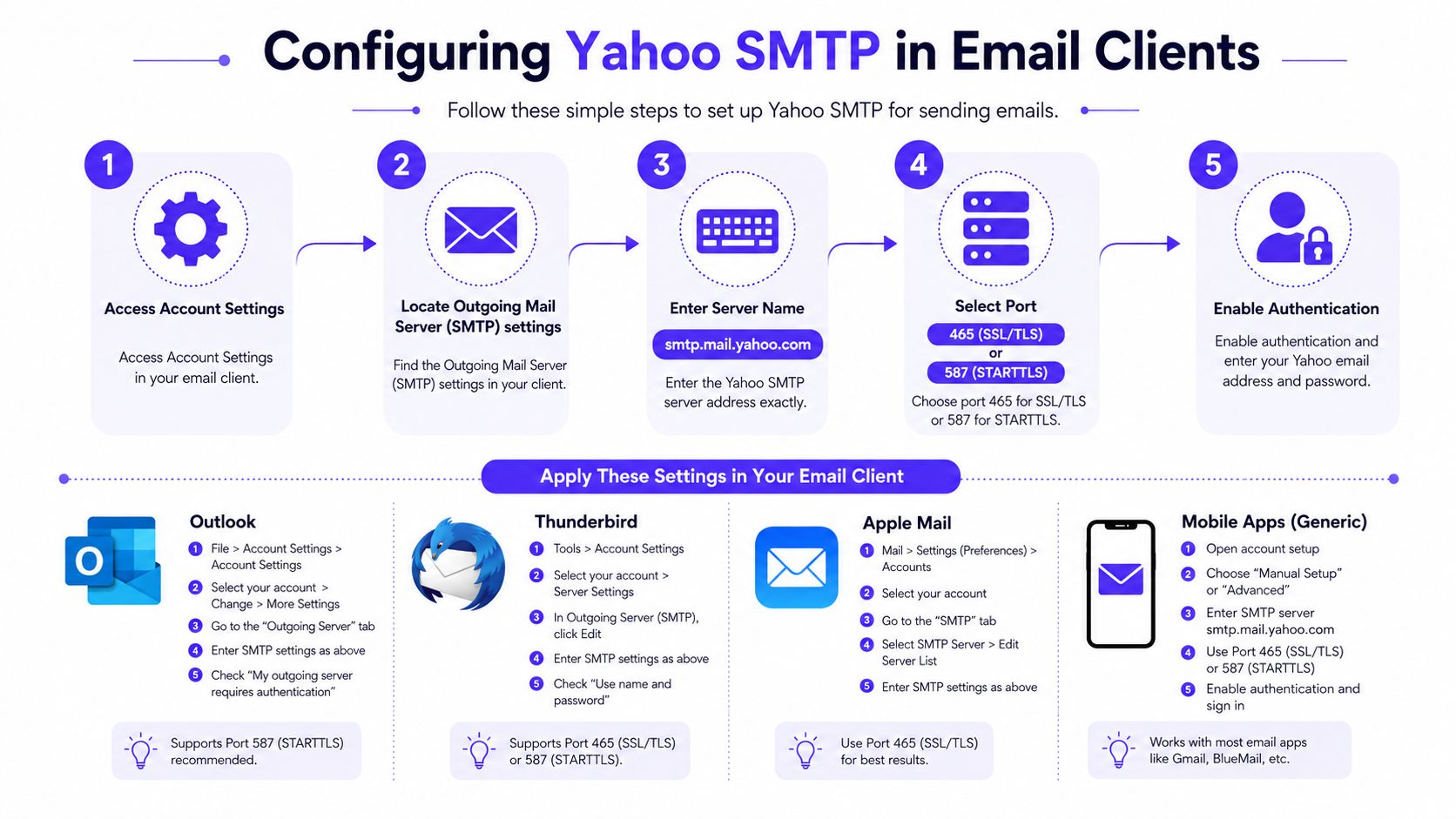
The general flow is the same across Outlook, Thunderbird, Apple Mail, and mobile mail apps:
- Open the account or mail settings
- Find the outgoing server or SMTP section
- Enter
smtp.mail.yahoo.com - Choose port 465 or 587
- Turn authentication on
- Enter the full Yahoo email address as the username
- Save and send a test email
A visual walkthrough can help when field names are buried in menus.
Outlook and Thunderbird
In Microsoft Outlook, users usually find SMTP settings under account settings, then server settings or advanced mail settings. Outlook may try to detect settings automatically, but manual review is still worth doing.
In Mozilla Thunderbird, the outgoing server settings are often easier to spot. Thunderbird separates SMTP settings clearly, which makes it a good client for checking whether the issue is with Yahoo or with the app itself.
For both clients, these fields matter most:
- Outgoing server set to
smtp.mail.yahoo.com - Authentication enabled
- Username entered as the full Yahoo address
- Connection security matched to the chosen port
Apple Mail and mobile apps
In Apple Mail, the outgoing server appears inside account preferences, often under server settings. Apple Mail may hide some advanced choices until manual setup is enabled.
On iPhone, iPad, and Android mail apps, the labels vary more. One app may say “SMTP Server,” another may say “Outgoing Mail Host.” Another may use a drop-down for security instead of a checkbox. The fields are different, but the underlying setup is the same.
Common mistake: Users enter only the mailbox name instead of the full Yahoo email address in the username field. Yahoo SMTP expects the full address.
The password issue that causes many login failures
Yahoo SMTP requires the full Yahoo email address as the username, plus a generated App Password when two-factor verification is active. If two-step verification is disabled, the standard password can be used instead, as noted in Kinsta's Yahoo SMTP settings overview.
That detail explains a lot of “invalid password” errors. The user may be typing the correct Yahoo login password, but the client still can't authenticate because Yahoo expects an App Password for that setup.
A clean setup process usually looks like this:
- Start with credentials. Confirm whether two-factor verification is active.
- Generate the right password. Use an App Password if Yahoo requires it.
- Check saved passwords. Old credentials cached by the client can keep causing failures.
- Run a small test. Send one message first before using the mailbox for active outreach.
When setup still fails after that, the problem usually shifts from configuration to account state, reputation, or connection errors.
Yahoo SMTP Sending Limits
Yahoo SMTP isn't designed for unrestricted bulk sending. Teams that try to use a single Yahoo mailbox for outreach or campaign traffic usually run into throughput limits before they run into content problems.
According to Mailtrap's Yahoo SMTP overview, Yahoo imposes a daily cap of 500 emails per authenticated account, a speculative hourly throughput limit of 100 emails, and a maximum of 100 recipients per single email message. Exceeding those thresholds can trigger blocks or throttling.
Yahoo SMTP sending limits
| Limit Type | Value | Notes |
|---|---|---|
| Daily cap | 500 emails per authenticated account | Exceeding it can trigger blocks or throttling |
| Hourly throughput | 100 emails | Described as speculative in the source |
| Recipients per message | 100 recipients | Applies to a single email message |
These limits change how a sender should plan activity. A founder sending occasional replies probably won't notice them. A recruiter, agency, or sales team using Yahoo mailboxes for steady outbound will.
Three practical effects show up fast:
- Campaign pacing matters. Large bursts can hit hourly friction even before the daily cap is reached.
- Mailbox sharing creates risk. Multiple users sending through one authenticated account can burn through the daily allowance quickly.
- Bulk recipient lists don't fit well. A single message can't exceed the recipient cap, so list-style sends become awkward and risky.
Yahoo SMTP works better for normal mailbox activity than for aggressive campaign throughput.
When a team needs predictable outreach sending, the safest approach is to treat Yahoo limits as hard operational constraints, not loose guidelines.
Yahoo SMTP Authentication and Deliverability
A technically valid Yahoo SMTP setup can still produce poor results. That's the gap that confuses many senders.
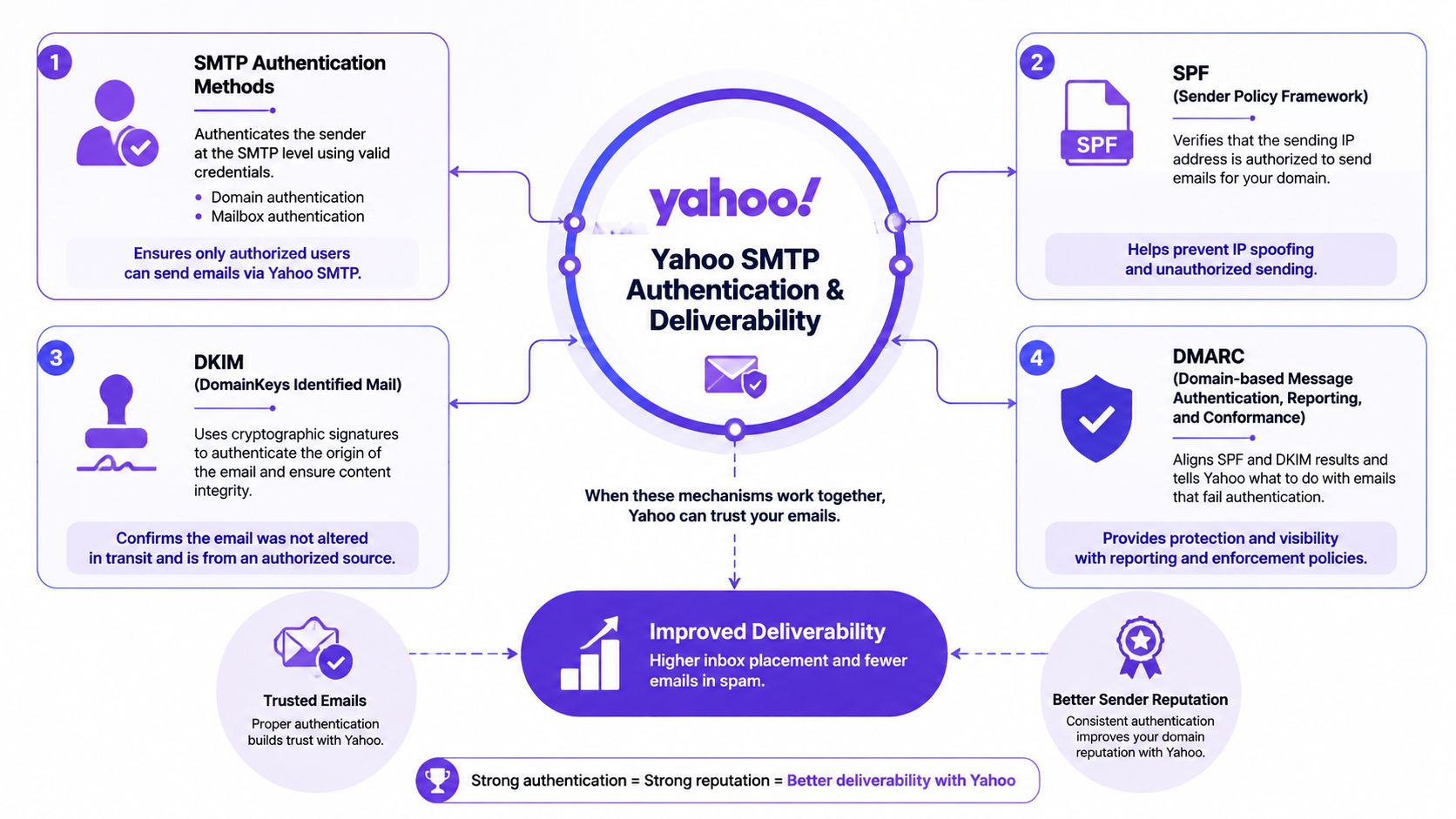
Authentication proves identity
SMTP authentication confirms that the mailbox is allowed to send. Domain authentication records such as SPF, DKIM, and DMARC help receiving systems evaluate whether the message is aligned with the claimed sender.
That technical foundation still matters. Without it, deliverability gets unstable quickly.
For teams that need a refresher on the record side, this guide to setting up DKIM, SPF, DMARC, and BIMI is a useful reference.
Why perfect setup still gets rejected
Users often see 550 5.7.1 rejections even when SPF, DKIM, and DMARC are correctly set up, because Yahoo's 2024-2025 shift toward dynamic reputation scoring penalizes low-engagement or high-volume cold outbound regardless of technical correctness, as described in Warmy's Yahoo SMTP settings guide.
That's the missing piece in most SMTP tutorials.
A mailbox can pass every technical check and still look suspicious if the sending pattern resembles cold blasting. Yahoo appears to weigh behavior, not just identity. In practical terms, a sender has to ask two separate questions:
- Is this mailbox authenticated correctly
- Does this mailbox send in a way that looks trusted
Behavioral signals matter
Behavioral signals are actual reactions to the email after it lands. Yahoo's reputation logic now puts more weight on those signs than many senders expect.
Examples include:
- Opens, which suggest the message was wanted
- Replies, which show active engagement
- Threads, which look more like genuine conversation than one-way promotion
A useful analogy is airport security. Authentication is the passport check. Behavioral reputation is everything that happens after entry, including whether the traveler behaves normally or triggers concern.
Strong deliverability usually comes from two things working together. Technical alignment and healthy engagement.
For cold outreach teams, that means setup isn't a one-time project. Reputation has to be maintained through sending discipline, audience quality, and campaign behavior.
Troubleshooting Yahoo SMTP Issues
When Yahoo SMTP fails, many users immediately blame the password. That's understandable, but it's often the wrong diagnosis.
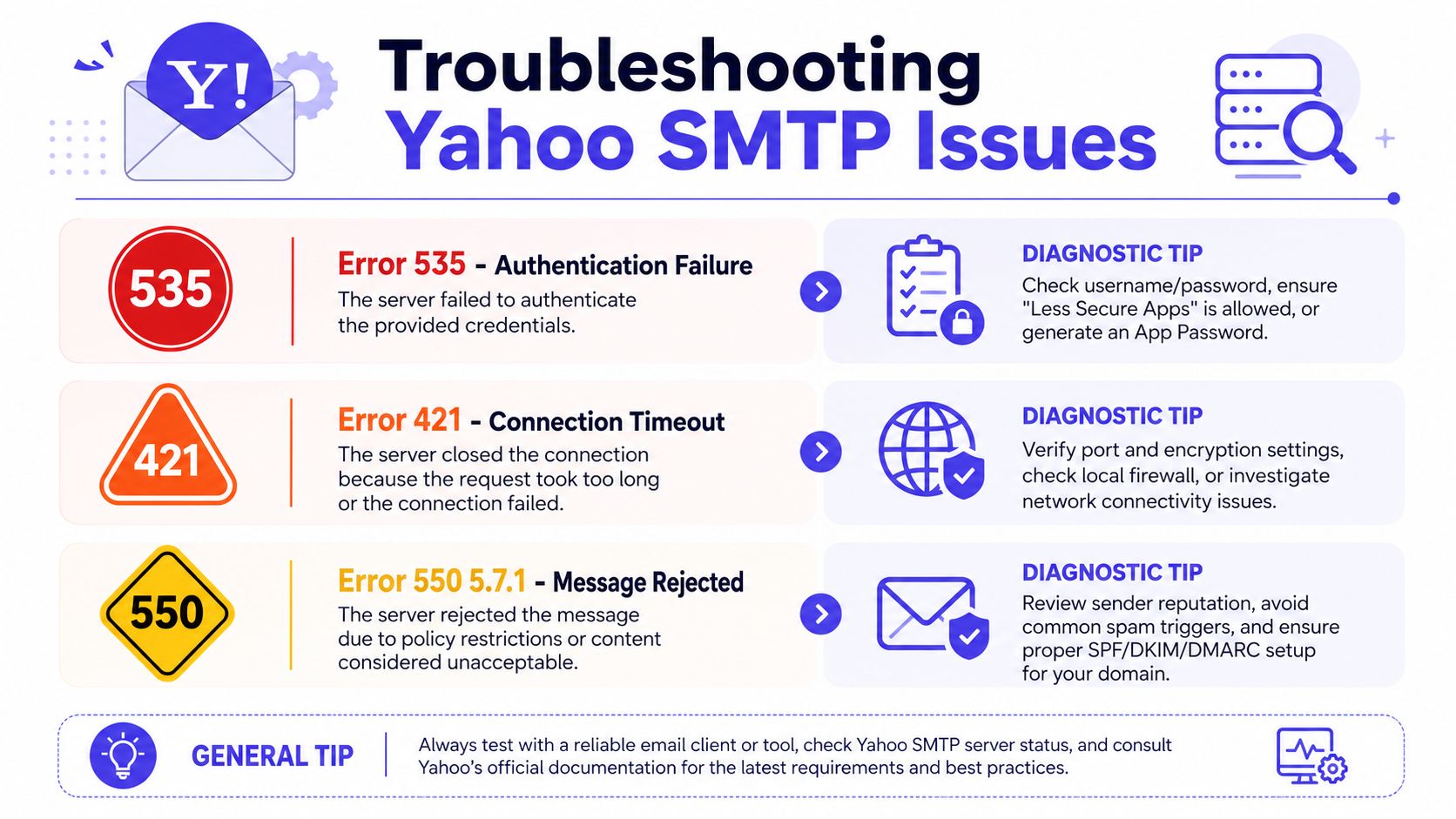
A better approach is to match the error to the likely cause, then test one thing at a time. For a broader guide to bounce interpretation, this walkthrough on SMTP error bounced emails is helpful.
Common Yahoo SMTP errors and fixes
| Error | What it usually means | Likely cause | One-line fix |
|---|---|---|---|
| 535 | Authentication failed | Wrong username, wrong password, or App Password issue | Re-enter the full Yahoo address and confirm the correct password type |
| 421 | Connection timeout | Port, encryption, firewall, or local network issue | Verify the chosen port and security mode, then test from another network |
| 550 5.7.1 | Message rejected | Reputation or policy issue | Review sending patterns, engagement quality, and domain alignment |
A fast troubleshooting sequence
Instead of changing everything at once, use a short sequence:
- Check the username format. It should be the full Yahoo email address.
- Confirm the password type. Standard password and App Password are not interchangeable in every account state.
- Review port and encryption together. Those two settings have to match.
- Send a single test email. A small test reveals more than a large failed batch.
- Inspect reputation clues. If the setup is valid but the message is rejected, the issue may be sender behavior, not SMTP syntax.
What often gets overlooked
Many teams assume a successful login means the mailbox is healthy. It doesn't. A mailbox can authenticate correctly and still face rejection if Yahoo dislikes the sending pattern.
Another overlooked point is cached credentials. Outlook, Apple Mail, and some mobile apps hold onto old login details longer than users expect. That can make a fixed setup appear broken.
If the connection works but the message is rejected, the problem has usually moved beyond setup and into deliverability.
Best Practices for SMTP Deliverability
Yahoo SMTP works best when the mailbox is treated carefully. Secure the connection, stay within Yahoo's sending limits, keep authentication aligned, and review error patterns before they pile up.
Deliverability also needs ongoing reputation management. That includes steady sending behavior, realistic volume, and healthy engagement over time. For teams that rely on Yahoo sending, Yahoo email warmup is often part of protecting that reputation before serious outreach begins.
A strong process is simple:
- Use secure SMTP settings
- Send within Yahoo's limits
- Keep domain authentication aligned
- Watch for rejection patterns early
- Build trust gradually instead of forcing volume
If email is part of a company's growth strategy, Mailwarm helps senders build reputation, monitor inbox placement, and improve deliverability through real inbox engagement, advanced warmup controls, and expert guidance. As a premium email warmup and deliverability platform, Mailwarm is built for teams that care about real inbox placement, not just automated warmup activity. It combines a network of 50,000+ aged real inboxes, real engagement signals like opens, replies, threads, spam removal, and important marking, plus spam score monitoring, inbox placement insights, provider-level warmup, authentication fix tools, bounce prevention, deliverability analytics, and expert deliverability calls in every plan. Unlike basic warmup tools, Mailwarm doesn't require IMAP access or permission to read a user's private inbox.
FAQ
What are Yahoo SMTP servers
Yahoo SMTP servers are the outgoing mail servers Yahoo uses to send email from Yahoo accounts. For sending, the required hostname is smtp.mail.yahoo.com.
Which port should be used for Yahoo SMTP
Yahoo SMTP supports port 465 with SSL and port 587 with STARTTLS. The correct choice depends on the client, but the connection must be encrypted.
Why does Yahoo SMTP reject messages even when the settings are correct
Correct settings only establish the connection and authenticate the sender. Yahoo can still reject mail based on reputation and engagement patterns, including cases where messages trigger 550 5.7.1 responses.
Does Yahoo SMTP support bulk sending
Yahoo SMTP has clear sending limits, including a daily cap, an hourly throughput constraint, and a maximum recipient count per message. That makes it a poor fit for aggressive bulk sending from a single mailbox.
Why do Yahoo SMTP logins fail in email clients
The most common reasons are the wrong username format, the wrong password type, or a mismatch between port and encryption settings. Accounts using two-factor verification may require an App Password instead of the normal login password.
Is email warmup enough to fix deliverability
No. Warmup can help support reputation, but it doesn't replace proper SMTP setup, authentication alignment, audience quality, and responsible sending behavior.
How does Mailwarm help improve sender reputation
Mailwarm helps improve sender reputation and reduce spam risk through real inbox engagement and deliverability insights. It goes beyond basic warmup by combining warmup automation, spam score monitoring, inbox placement insights, and expert deliverability guidance.
Why is Mailwarm more expensive than basic warmup tools
Mailwarm costs more because it combines real inbox engagement, up to 100% replies to warmup emails depending on the plan, spam score monitoring, provider-level warmup, authentication tools, no IMAP access required, and expert deliverability calls included in every plan.