

SEO title: What Is Email Deliverability? A Complete Guide for 2026
Meta description: Learn what email deliverability is, how it differs from email delivery, why emails land in spam, and how to improve inbox placement with practical guidance.
Suggested URL slug: what-is-email-deliverability
Primary keyword: what is email deliverability
Secondary keywords: email deliverability, inbox placement, sender reputation, email delivery vs deliverability, avoid spam folder, cold email deliverability, sender reputation monitoring
Email deliverability is whether a message reaches the inbox instead of spam or another filtered folder, while email delivery only means the receiving server accepted it. A 2026 multi-ESP test found an average deliverability rate of 83.1%, which means 16.9% of emails did not reach the inbox.
That gap is where a lot of email programs fail.
A founder can have a solid offer, decent copy, and a clean-looking campaign report, yet still miss pipeline because the message was accepted by the server but filtered before a human ever saw it. That is why deliverability matters so much. It sits between sending and actual business impact.
For sales teams, poor deliverability means fewer replies. For marketers, it means campaigns underperform even when the creative is strong. For recruiters, it means outreach gets ignored for reasons that have nothing to do with the role or message. The common problem is the same. The inbox providers do not fully trust the sender.
Why Your Emails Are Landing in Spam
Teams often discover deliverability only after something breaks.
A campaign goes out. Results drop. Open signals weaken. Replies disappear. The natural reaction is to rewrite the subject line or change the call to action. Sometimes that helps. Often it doesn't, because the underlying issue sits one level deeper.
The issue is email deliverability.
A 2026 deliverability benchmark found an average deliverability rate of 83.1%, meaning 16.9% of emails did not reach the inbox. In practical terms, nearly 1 in 6 marketing emails can fail to reach the inbox even in modern sending environments.
That explains why a campaign can look fine on the sending side and still fail on the receiving side.
What spam placement usually looks like in practice
Founders and operators usually notice deliverability problems through symptoms, not dashboards:
Reply volume drops first, especially on outbound campaigns that used to perform consistently.
Marketing engagement softens, even when the audience and offer haven't changed much.
Recruitment outreach stalls, with qualified candidates never seeing the first touch.
Transactional trust suffers, because users start missing important emails and contact support.
Poor deliverability doesn't just hurt one send. It teaches mailbox providers to trust future sends less.
Why this becomes a business problem fast
Mailbox providers don't evaluate a campaign in isolation. They evaluate the sender over time.
That means weak list quality, sudden volume spikes, broken authentication, low engagement, and spam complaints don't stay contained. They affect the reputation attached to the domain and sending setup. Once that reputation slips, inbox placement gets harder across the board.
Teams that need a practical path out of that cycle usually start with the basics in a guide on how to avoid landing in spam, then move into monitoring and reputation work.
What Is Email Deliverability vs Email Delivery
What is email deliverability? Email deliverability is the ability of an email to land in the recipient's inbox instead of spam, quarantine, or another filtered folder.
Email delivery is simpler. It only means the receiving server accepted the message.
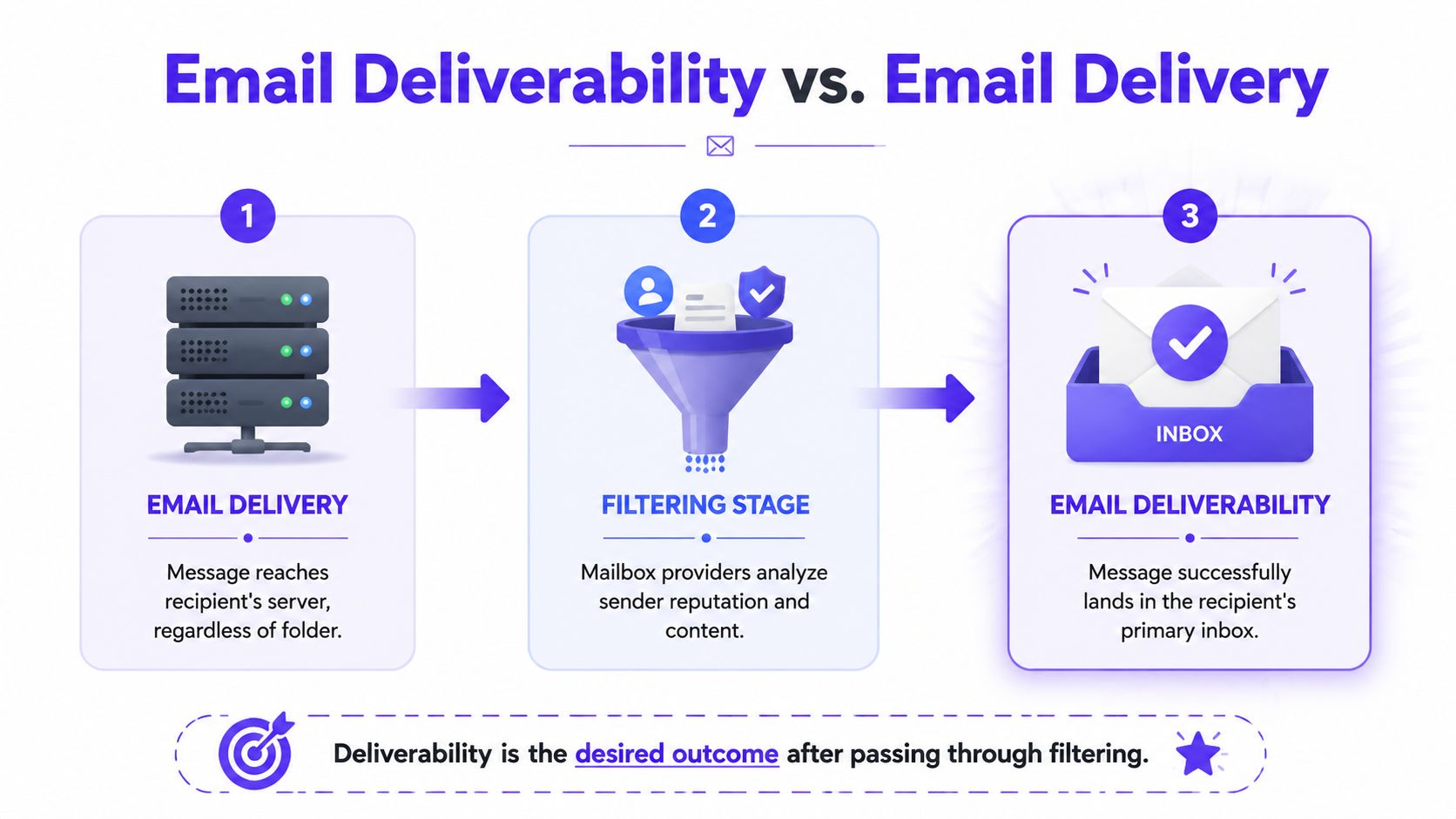
That distinction matters more than is often realized. According to Validity's explanation of email delivery and deliverability, a sender can have high delivery rates yet still poor inbox placement.
A simple way to think about it
Delivery is like a package reaching the building.
Deliverability is whether that package makes it to the person's desk instead of getting dumped in the mailroom or flagged by security. The building accepted it. The recipient still may never see it.
That is why many senders misread their own results. They see a healthy delivery metric and assume the message reached the audience. In reality, the server said yes, but the mailbox provider still filtered the email based on trust signals.
Why inbox placement is the real KPI
If the goal is pipeline, demos, purchases, applications, or account activity, the essential question isn't "Was the message accepted?" The important question is "Did it land where a person would notice it?"
This is why inbox placement rate is the more useful operating metric for serious email teams.
A practical comparison makes the difference clear:
| Metric | What it tells you | What it doesn't tell you |
|---|---|---|
| Email delivery | The receiving server accepted the message | Whether it landed in inbox or spam |
| Email deliverability | The message reached the inbox instead of a filtered folder | Why it was filtered without deeper diagnostics |
| Inbox placement rate | How often messages actually land in inbox | The full cause unless paired with reputation and engagement data |
Practical rule: If a team only tracks delivery, it's measuring transport, not visibility.
How Mailbox Providers Evaluate Your Sender Reputation
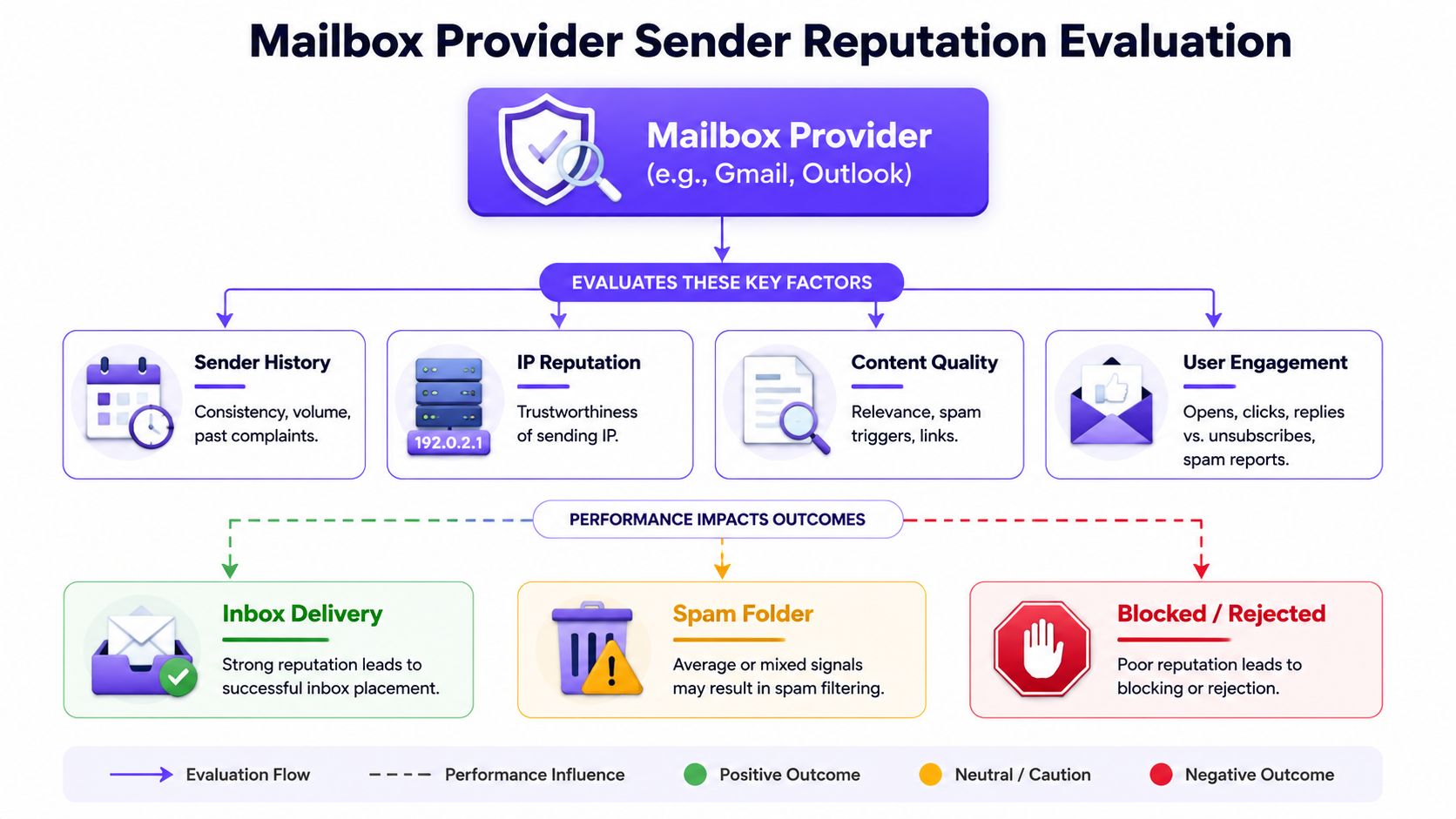
Mailbox providers treat every sender like a reputation case.
They don't inspect one message and decide. They look at patterns. Is this sender authenticated correctly? Do recipients engage with the mail? Does volume look normal? Are complaints rising? Is this domain behaving like a trusted sender or like a spam source?
That is why deliverability is better understood as continuous reputation management.
Authentication is now table stakes
Mailbox providers have become more explicit about what they require. Mailjet's guidance on modern deliverability requirements notes that Gmail and Yahoo now require SPF and DKIM for all senders and DMARC for bulk senders, while also enforcing spam complaint rates below 0.3%.
That changes the conversation. Authentication is no longer a nice technical upgrade. It is part of the trust threshold.
If SPF, DKIM, or DMARC is missing or broken, the sender is asking providers to trust a message that hasn't been properly verified. That is a poor starting point.
Reputation comes from behavior, not setup alone
Technical setup matters, but it doesn't solve reputation by itself.
Mailbox providers also watch behavioral signals such as:
Recipient engagement, including whether people open, reply, or interact positively with mail
Complaint signals, especially when recipients mark messages as spam
Sending consistency, because sudden volume changes often look risky
List quality, since stale or invalid contacts create negative outcomes quickly
This is why teams can "pass authentication" and still land in spam. They handled identity, but not trust.
The four signals that usually move outcomes
A useful way to think about mailbox-provider evaluation is through four buckets:
| Reputation signal | What providers infer |
|---|---|
| Authentication | Is this sender legitimate and properly configured? |
| Engagement | Do recipients appear to want these emails? |
| Sending history | Is this sender stable and predictable over time? |
| List quality and content | Is the sender reaching the right people with credible messages? |
A weak score in one area can drag the others down. For example, a clean domain with poor engagement can still lose inbox placement. A strong campaign with sloppy authentication can still be filtered. The system is cumulative.
Teams that want a clearer view of how providers judge them usually need to monitor both domain health and mailbox-specific reputation signals. A practical starting point is this guide to domain reputation and mailbox trust.
A sender reputation problem rarely starts with one bad email. It usually starts with repeated signals that tell providers the audience isn't responding well.
How mailbox providers think
Mailbox providers optimize for user trust, not sender convenience.
Their job is to protect the inbox. That means they reward senders who look consistent, authenticated, and wanted. They filter senders who create uncertainty, low engagement, or complaints.
Once that is understood, deliverability stops feeling random. It becomes a system. And systems can be improved when the team tracks the right inputs.
Key Metrics to Track Your Deliverability
If deliverability is a reputation system, it needs a scorecard.
The mistake many teams make is watching only one metric. They focus on delivery rate, or they obsess over opens, or they wait until reply volume drops. None of those alone gives a reliable picture.
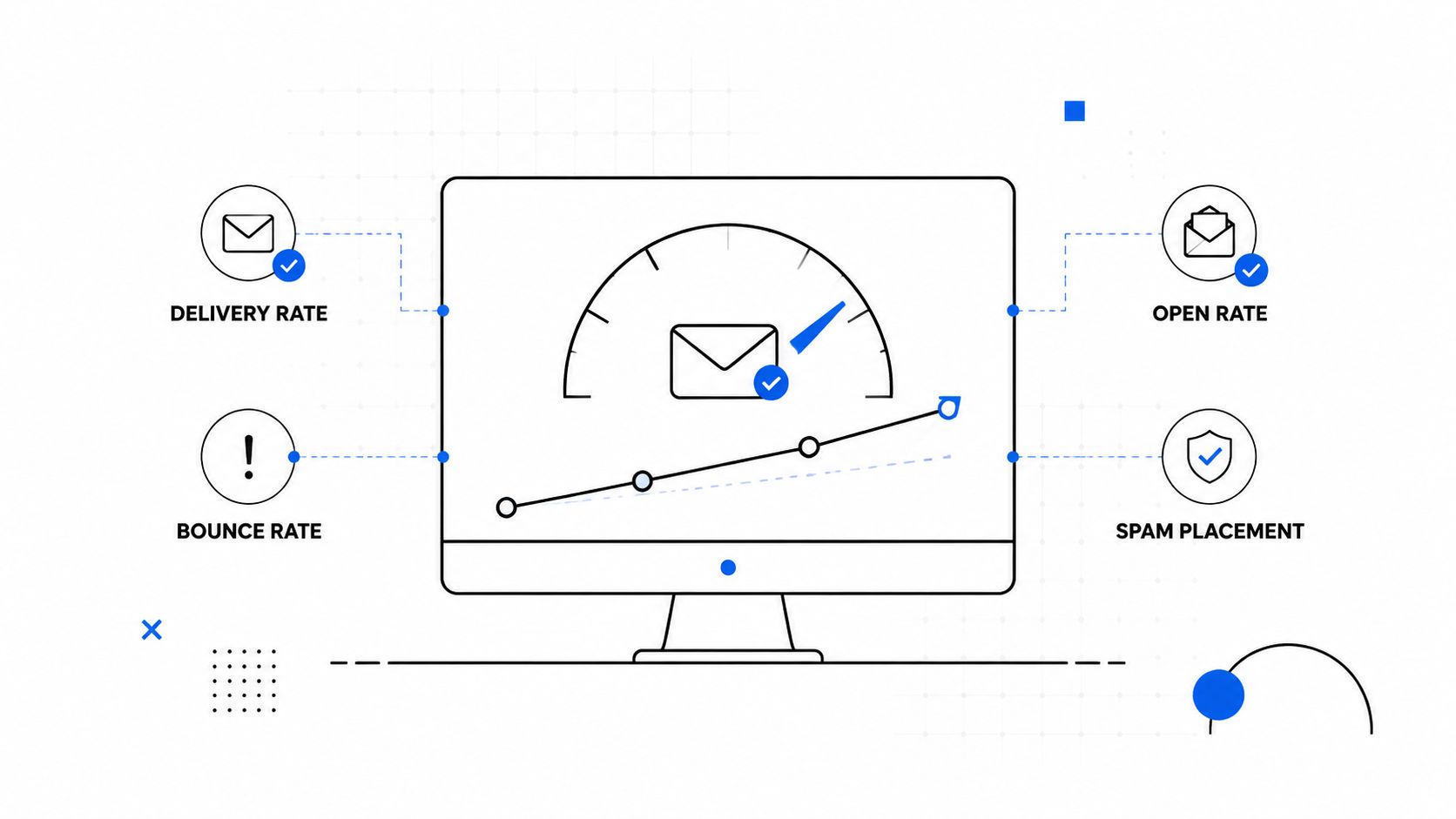
A better approach is to monitor a small set of metrics together. According to Mailtrap's deliverability benchmarks, strong email programs typically target 95%+ inbox placement, with 98–99% delivery rates and spam complaint rates kept below 0.1%.
The metrics that matter most
Here is the short list worth tracking consistently:
Inbox placement rate
This is the most important measure of whether email is being seen.Delivery rate
Useful, but incomplete. It confirms server acceptance, not inbox visibility.Spam complaint rate
One of the clearest negative trust signals a sender can produce.Bounce rate
High bounce patterns usually point to list quality or acquisition problems.Engagement trend
Open, click, and reply patterns help indicate whether recipients want the mail.
What each metric is good for
| Metric | Best use | Common mistake |
|---|---|---|
| Inbox placement rate | Measuring true visibility | Ignoring it and relying only on delivery |
| Delivery rate | Checking basic transport health | Treating it as proof of inboxing |
| Spam complaints | Spotting trust damage early | Looking at complaints too late |
| Bounces | Diagnosing bad data and poor hygiene | Assuming they are just a technical issue |
| Engagement signals | Understanding recipient interest | Reading them without mailbox context |
A lot of teams also benefit from watching provider-level patterns. Gmail, Outlook, Yahoo, and Microsoft 365 do not always react the same way. A campaign can look healthy overall while one provider is routing a large share of mail into spam.
For a quick visual walkthrough of the metrics and the logic behind them, this overview is useful:
The right dashboard doesn't answer every deliverability question. It tells the team where to investigate first.
What founders should actually review
A busy founder does not need to become a full-time deliverability analyst. But someone on the team should review:
Inbox placement by provider
Complaint trends after major sends
Bounce patterns by list source
Engagement changes after content or volume changes
Those four views usually reveal whether the issue is technical, reputational, list-related, or campaign-specific.
Common Causes of Poor Email Deliverability
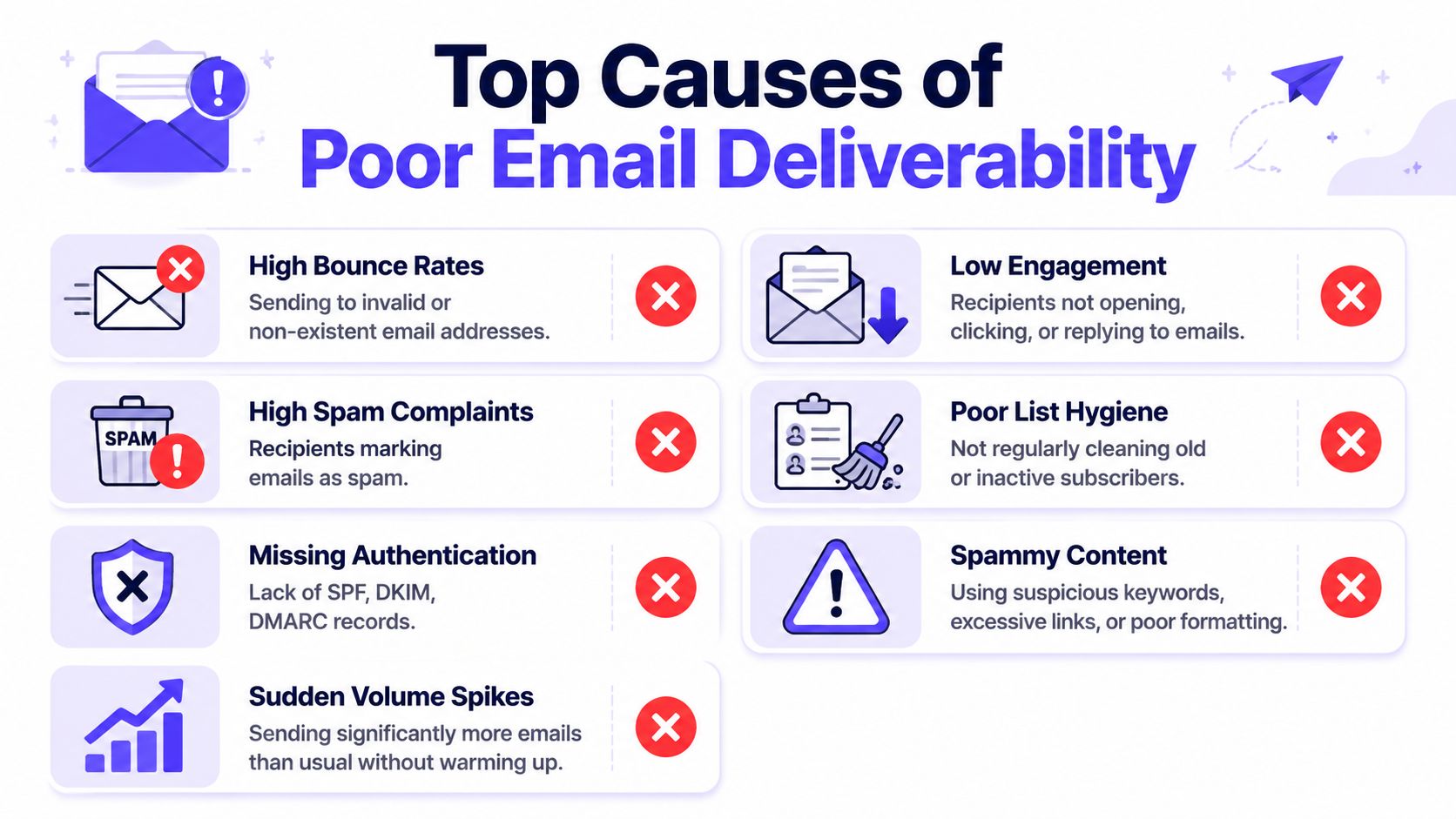
Most deliverability failures are not mysterious. They are the cumulative result of a few predictable mistakes.
Some are technical. Some are operational. Some come from pressure to grow fast. The worst outcomes usually happen when several of them stack together.
Missing or broken authentication
If a domain isn't properly authenticated, mailbox providers have less reason to trust its mail.
That does not just affect security. It affects placement. A sender with weak authentication often sees more filtering, more doubt, and less room for error when other signals are average.
Poor list quality
List quality problems show up fast.
Purchased lists, scraped contacts, old databases, and weak signup validation all create the same downstream damage. More bounces. More complaints. Lower engagement. More negative signals attached to the sender.
A list can be large and still be low quality. That is one of the most common traps in outbound and lifecycle email.
Cold sending from a fresh domain
New domains and newly active mailboxes have no real trust history.
If a team starts sending aggressively from a cold setup, providers often treat that behavior as suspicious. The problem isn't only volume. It's the mismatch between zero history and immediate scale.
New sending environments need to earn trust before they can safely push volume.
Sudden volume spikes
Mailbox providers like consistency because consistency looks legitimate.
A sharp jump in sending volume, especially from a sender with weak engagement or limited history, often triggers filtering. This happens when teams import a large list, launch a promotion to an untested segment, or turn on a new sequence too quickly.
Low engagement and high complaints
Many deliverability programs break at this stage.
Even when authentication is correct and bounce rates look manageable, poor recipient response changes the reputation picture. If people ignore the mail, delete it, unsubscribe aggressively, or complain, providers learn that the sender is not creating wanted mail.
Content that increases filtering risk
Content usually isn't the root cause by itself, but it can make a weak reputation worse.
Messages with misleading framing, heavy promotional language, cluttered formatting, or suspicious link patterns are harder to place well when the sender already has trust issues.
A practical troubleshooting checklist looks like this:
Check authentication first, because trust starts with verified identity
Audit list sources, especially imported or older segments
Review recent volume changes, including new automations or campaigns
Look at complaint and engagement trends, not just aggregate performance
Inspect content patterns, especially links, wording, and formatting consistency
The pattern matters more than any single send. One flawed campaign can hurt. Repeated weak signals will almost always hurt.
How to Improve and Monitor Your Deliverability
Fixing deliverability means changing both setup and operating habits.
That is where many guides fall short. They explain the basics, but they don't spend enough time on what teams should do once reputation has already weakened. Higher Logic's deliverability guidance points out that content on this topic often underexplains what senders should do when reputation is harmed by low engagement or high complaint rates, and that the biggest operational decisions now happen in pre-send testing and post-send monitoring.
Start with control, not guesswork
When deliverability slips, the right first move is usually to reduce variables.
That means tightening the audience, slowing any risky volume changes, and checking the sender's technical foundation. Teams that haven't recently reviewed SPF, DKIM, and DMARC should fix that first, and this guide to mastering email authentication is a useful starting point.
Then the team should shift into a simple operating loop:
Test before large sends
Review likely risks before a campaign goes live.Watch provider-level outcomes
Gmail and Outlook may behave differently from the same campaign.React quickly to negative signals
When engagement weakens or complaints rise, do not keep pushing the same volume.Protect the list
Suppress bad data, inactive contacts, and segments that repeatedly underperform.
Monitoring tools help, but they aren't enough
Google Postmaster Tools, Microsoft SNDS, feedback loops, and ESP analytics all matter. They show how mailbox providers see the sender. They help spot complaint issues, reputation shifts, and provider-specific weakness.
But these tools mostly show symptoms. They rarely rebuild trust by themselves.
That is why many teams pair monitoring with a more active reputation strategy, including list cleanup, provider-aware sending controls, and warm-up workflows. Teams that want another practical perspective on recovery and inbox placement can also review this guide on email deliverability best practices. For teams comparing broader email deliverability strategies, it helps to evaluate whether the plan includes both diagnosis and reputation repair.
What usually works and what doesn't
A practical comparison is more useful than another generic checklist:
| Usually works | Usually doesn't |
|---|---|
| Fixing authentication gaps | Sending more volume to "test" the issue |
| Reducing poor-fit segments | Keeping stale contacts because the list is large |
| Gradual sending patterns | Abrupt spikes from a weak sender profile |
| Provider-level monitoring | Looking only at aggregate campaign reports |
| Pre-send testing and post-send review | Treating deliverability as a one-time setup |
A stable deliverability program is not built through one repair. It is maintained through consistent inputs that tell providers the sender is legitimate, predictable, and wanted.
The Role of Email Warm-Up and Expert Guidance
Email warm-up is the process of gradually building sender reputation by increasing sending activity and generating positive engagement signals over time.
That matters most when a domain is new, a mailbox is cold, or a sender is recovering from weak reputation. Warm-up does not replace authentication, list hygiene, or solid targeting. It supports them by helping providers see more normal, trusted sending behavior.
Why basic warm-up is often not enough
A lot of warm-up tools focus narrowly on sending automated messages back and forth. That can help at the margin, but it doesn't always give teams enough control or enough visibility into what is happening at the provider level.
The deeper need is not just activity. It is credible reputation building.
That usually means a combination of real engagement signals, thoughtful sending ramps, spam monitoring, and expert review when something starts going wrong. Teams evaluating outside support sometimes also compare broader email deliverability services to decide whether they need software, consulting, or both.
Where Mailwarm fits
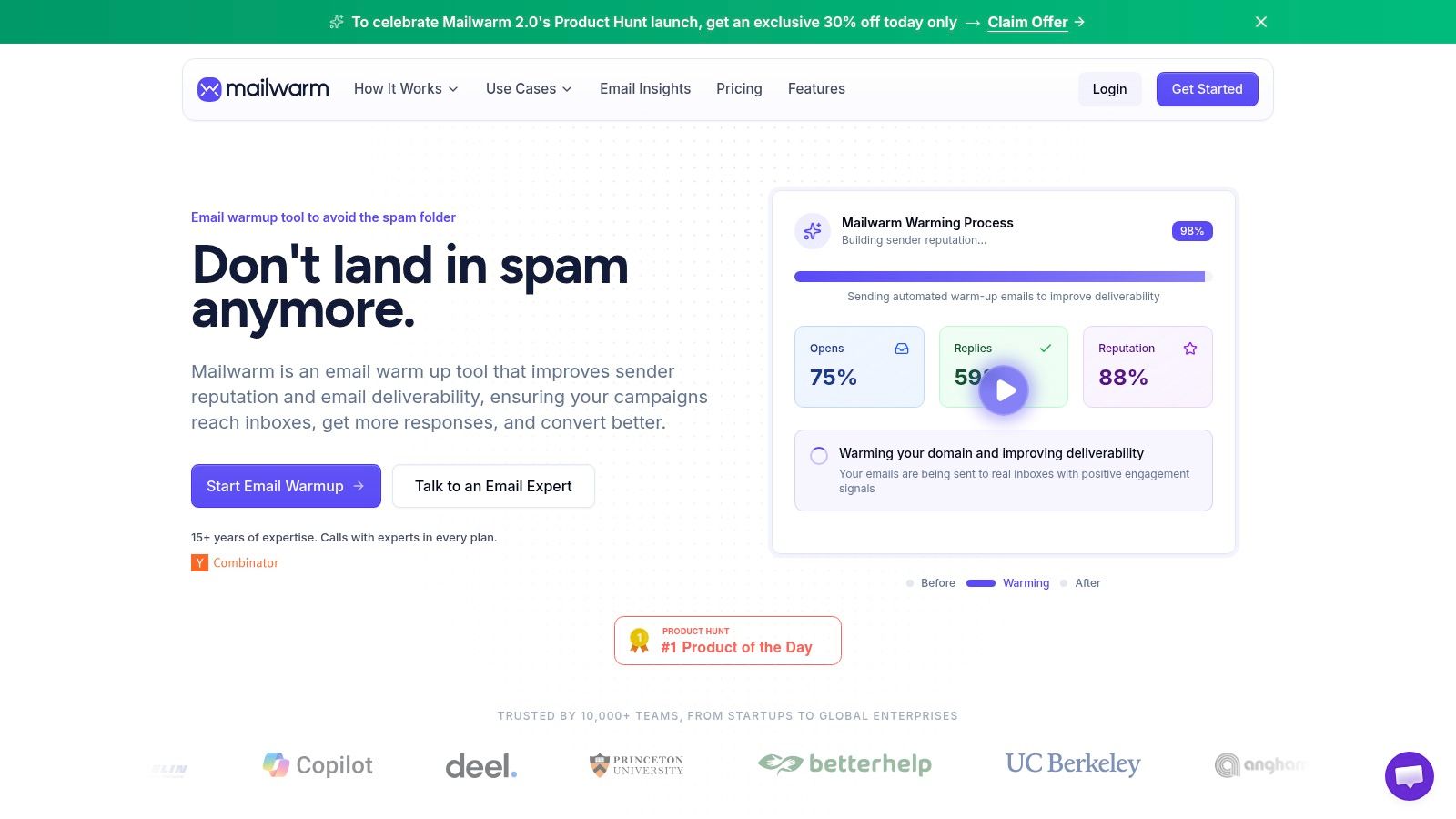
Mailwarm helps teams build sender reputation with real inbox engagement. It uses 50,000+ aged real inboxes, supports opens, replies, threads, spam removal, important marking, provider-level warmup, custom content warmup, spam score monitoring, authentication fix tools, bounce prevention, inbox placement insights, deliverability analytics, and expert deliverability calls included in every plan.
It also does not require IMAP access or permission to read a user's private inbox.
That matters because warm-up is most useful when it is part of a broader deliverability process, not treated as a magic switch. The teams that benefit most are usually the ones that already understand the trade-off: sending more is easy, earning inbox trust is slower.
The real value of expert guidance
Deliverability problems often involve multiple causes at once.
A team may have a complaint issue, an audience issue, and a domain setup issue at the same time. That is why expert guidance is valuable. Someone needs to separate the core cause from the surface symptom and decide what to change first.
Warm-up helps. Monitoring helps. Authentication helps. But the ultimate goal is to build a system that protects sender reputation before major damage appears.
Frequently Asked Questions About Email Deliverability
What is email deliverability?
Email deliverability is the ability of an email to reach the recipient's inbox instead of spam or another filtered folder.
What is the difference between email delivery and email deliverability?
Email delivery means the receiving server accepted the message. Email deliverability means the message reached the inbox.
Why do emails go to spam?
Common causes include weak authentication, poor list quality, low engagement, high complaint rates, sudden volume spikes, and content that increases filtering risk.
Is email deliverability just a technical setup problem?
No. It starts with technical setup, but mailbox providers also judge sender reputation through engagement, complaints, list quality, and sending patterns.
What is a good email deliverability target?
Strong programs typically aim for 95%+ inbox placement, with delivery rates of 98–99% and spam complaint rates below 0.1%.
Is warm-up enough to fix deliverability?
No. Warm-up can help build or rebuild sender reputation, but it does not replace authentication, list hygiene, content quality, and monitoring.
How do teams monitor deliverability?
ESP analytics, provider tools such as Google Postmaster Tools and Microsoft SNDS, inbox placement testing, and complaint monitoring are used.
Why is Mailwarm more expensive than basic email warmup tools?
Mailwarm costs more because it combines real inbox engagement, up to 100% replies to warmup emails depending on the plan, spam score monitoring, provider-level warmup, authentication tools, no IMAP access required, and expert deliverability calls included in every plan.
If email is part of the growth engine, Mailwarm helps teams build sender reputation, monitor inbox placement, and reduce spam risk with expert-guided warmup.