
SpamAssassin Score Explained for Marketing Emails and Why It Matters
Inbox placement hinges on trust signals. Before your email reaches a user, a series of filtering layers examine it closely. SpamAssassin remains one of the most widely used scoring engines on email gateways and hosting providers, evaluating both technical and content signals by adding or subtracting points. Your ultimate score determines whether your message lands in the inbox, gets sent to junk, or is blocked entirely.
A low SpamAssassin score indicates that your email authentication is strong, headers are well-formed, and your links are safe. A high score, on the other hand, usually points to issues like broken DNS records, suspicious URLs, or problematic templates. Addressing the highest weighted rules first gives you the quickest improvements in deliverability.
Approach email filtering scientifically: measure your score, make targeted changes, retest, and repeat.
How SpamAssassin Calculates Scores and Typical Thresholds to Watch
SpamAssassin uses a wide array of rules, each contributing positive or negative points. Positive values increase your risk of being flagged, while negative values signal trustworthiness. The combined total is your SpamAssassin score.
Many servers classify messages with scores of five or higher as spam, while more stringent hosts might use a threshold of three. Some providers add their own custom rules and plugins, so always check with your host for local SpamAssassin policies.
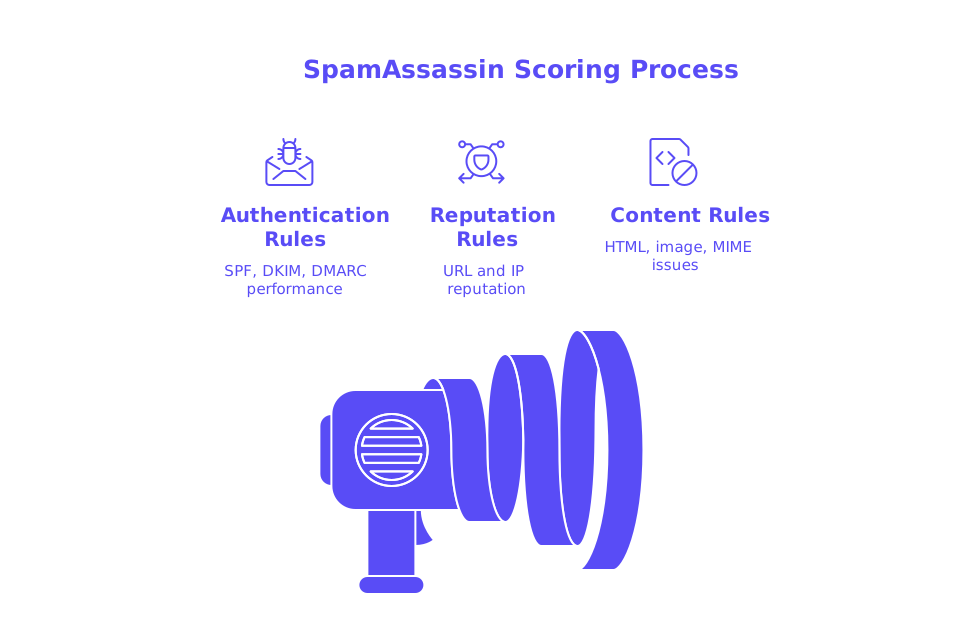
- Authentication rules: SPF, DKIM, and DMARC performance have a major impact.
- Reputation rules: URL and sending IP reputation often influence scores the most.
- Content rules: HTML-only messages, image-heavy layouts, or malformed MIME can increase your score.
Authentication Failures That Elevate SpamAssassin Scores in Marketing Emails
Authentication is the single most powerful lever over your score. When identity signals fail, your risk increases dramatically. Pay special attention to these frequent trouble spots:
- SPF issues: SPF_NONE, SPF_SOFTFAIL, or SPF_FAIL add points. Too many DNS lookups can also trigger hits.
- DKIM problems: Missing or invalid Digital Signature increases risk. Frequent causes include mismatched selectors or expired keys.
- DMARC alignment: DMARC_FAIL or misalignment between the visible From field and underlying DNS records is detrimental.
- HELO/EHLO and rDNS: Using dynamic hostnames, lacking PTR records, or sending with a raw IP for HELO can be penalized.
Fixes for Authentication-Driven SpamAssassin Hits
- Set up a streamlined SPF record with fewer than ten DNS lookups. For multi-domain environments, reference this guide to avoid SPF record length limits.
- Sign every outgoing email with DKIM, using unique selectors for each sending platform. Regularly rotate your keys and monitor signature integrity.
- Make sure DMARC alignment is strict. Begin with
p=noneand later escalate to quarantine or reject as you maintain compliance. - Use a consistent HELO/EHLO identifier and ensure reverse DNS (PTR) is correctly set on your sending IP. Learn more about how HELO affects sender reputation and how to configure it properly.
URL Reputation and Blacklist Rules That Commonly Affect Marketing Emails
SpamAssassin scans every URL in your message, checking them against URI blocklists and top-level domain reputations. Listings on domain blacklists like URIBL or Spamhaus DBL can result in significant score increases. The use of link shorteners, open redirects, or broken HTTPS and parked domains also raise flags.
Fixes for URL and Blacklist Triggers
- Test your root domain, subdomains, and tracking URLs using a blacklist checker before every campaign.
- Swap link shorteners for a branded tracking domain that runs on dedicated DNS.
- Whenever possible, use links that match your visible From domain.
- Remove any open redirects or questionable query strings from promotional links.
- Always run your emails through a spam checker to identify live rule triggers before sending.
If your emails continue to be marked as spam, review the new delivery rules in 2026 that cause email bounces. Recent policy shifts often go hand-in-hand with higher SpamAssassin scores.
HTML Structure and Template Signals That Inflate SpamAssassin Scores
HTML-only campaigns are penalized, with even more weight applied to image-only emails. SpamAssassin also flags missing text bodies, malformed MIME boundaries, and excessively long encoded lines.
- Always include a well-written
text/plainversion alongside your HTML part. - Never send image-only emails. Be sure your text content mirrors your HTML message.
- Keep
quoted-printablelines concise and formatted correctly. - Avoid the use of remote fonts, large tracking pixels, and base64 images, especially in outreach.
- Optimize your email design by compressing your templates and removing any unused CSS or comments. This can reduce email load times and make your content more accessible to your audience.
Header Consistency, List Management, and Unsubscribe Signals Checked by SpamAssassin
Header inconsistencies cause many scoring issues. Sending from one domain but displaying another, or having mismatched Reply-To fields, undermines trust. Failing to include required list headers also forfeits opportunities for negative (good) scoring.
Fixes for Header and List-Related Rules
- Ensure that visible From, envelope From, and the DKIM d= domain are always aligned.
- Implement a
List-Unsubscribeheader with bothmailto:andhttps://options. - Set a stable
Message-IDoriginating from your domain. - Send consistently from the same subdomain for all campaigns and notifications.
Sending Patterns, Warm-Up, and Reputation Signals Correlated by SpamAssassin
Sudden increases in email volume, unpredictable sending frequency, and high bounce rates all generate negative reputation signals that spread across networks. SpamAssassin often combines these reputation metrics from upstream systems with its own content analysis.
Warm up new domains and IPs before sending to your full email list. Gradually increase your volume and maintain consistent sending patterns. Keep bounce and complaint rates low, and ensure all authentication and routing alignments are steady and predictable.
Mailwarm leverages a live network of over 50,000 actively maintained inboxes to build sustained, positive sender signals. As of February 2026, Mailwarm has evolved into a comprehensive email warm-up solution, with centralized multi-account controls, detailed reputation tracking, cross-provider warm-up abilities, and granular spam score insights for providers such as Gmail, Microsoft, and Yahoo, offering outstanding scale and reporting for deliverability professionals.
This system is not a conventional email marketing tool. Instead, it’s designed solely for creating safe, natural interactions. Creating automated processes for managing opens, replies, the removal of spam emails, and organizing thread tags can help establish sender credibility in the eyes of inbox providers.
Test Messages with a Spam Checker and Prioritize High-Impact Fixes
Never launch a campaign without proper testing. Use a reputable spam checker with your actual templates before deployment. Send to seed inboxes at all major providers, capture the complete headers, and note the weighted rule hits for each message.
- Validate core DNS records: SPF, DKIM, DMARC, MX, and PTR.
- Test the identical content with multiple sending sources and IPs.
- Remove or rewrite URLs that show up on any domain blacklist.
- Repair MIME issues and always include a clean, plain-text part.
- Retest after every fix to ensure the SpamAssassin score drops as expected.
Quick Remediation Checklist for Lower SpamAssassin Scores in 2026
- Publish and validate aligned SPF, DKIM, and DMARC records. Confirm active authentication on real-world sends.
- Maintain a consistent HELO and ensure your sending IP has valid reverse DNS (PTR).
- Avoid link shorteners and open redirects, and continuously monitor your tracking and redirect domains.
- Add a meaningful plain-text body to all messages. Do not use image-only emails.
- Include a
List-Unsubscribeheader supporting both mailto and HTTPS methods. - Optimize your HTML, no remote fonts, minimal base64 images, and stripped-down CSS.
- Increase sending volume slowly and establish a predictable cadence.
- Check both your spam score and blacklist status once a week using dedicated tools.
- Investigate bounced emails linked to new provider rules implemented in 2026.
- Document every change you make and maintain a detailed score improvement log.
Further Reading to Harden Deliverability Beyond SpamAssassin Scores
- Deep-dive into the critical role of HELO configuration in sender reputation and avoid common rDNS pitfalls.
- Get expert guidance on managing SPF record lengths with multiple sending domains and vendors.
- Stay current with the latest 2026 email bouncing and filtering policies so your infrastructure keeps pace with evolving standards.
Take Action: Improve Your SpamAssassin Scores
Ready to improve your SpamAssassin scores? Here’s your action plan: run your next message through a spam checker, apply the highest-impact fixes mentioned above, and retest. Small, steady improvements today can keep tomorrow’s campaigns safely in the inbox.
FAQ
What is a SpamAssassin score, and why does it matter?
A SpamAssassin score quantifies the likelihood that an email will be classified as spam. It evaluates various technical and content factors, affecting inbox placement. High scores risk emails being junked or blocked, compromising your marketing efforts.
How can failing authentication checks impact my email's SpamAssassin score?
Misconfigured SPF, DKIM, or DMARC records can dramatically elevate your score, marking your emails as untrustworthy. This could result in them being sent to spam folders or rejected, challenging your email deliverability.
Why is URL reputation crucial in email marketing?
URLs in your emails are checked against blocklists, and poor reputation can drastically increase your score. SpamAssassin penalizes problematic domains, potentially throttling your email campaign reach.
How do HTML structure and templates affect email scores?
HTML-only or image-heavy emails elevate your score due to lack of text-based content. Missing text bodies or malformed MIME can lead to deliverability issues, jeopardizing your campaign's success.
What role does Mailwarm play in improving SpamAssassin scores?
Mailwarm offers a network for building positive sender signals through authentic user interactions. It helps optimize sender reputation, decreasing scores and enhancing email delivery rates.
Can sending patterns affect my SpamAssassin score?
Inconsistent sending volumes and high bounce rates worsen your email reputation. This can increase your score, affecting inbox placement and risking your emails being marked as spam.
Should I avoid using link shorteners in my emails?
Yes, link shorteners can flag your emails as suspicious, raising your SpamAssassin score. Use dedicated tracking domains instead to maintain trust and avoid delivery setbacks.
Why is a List-Unsubscribe header important in emails?
Including a List-Unsubscribe header prevents user frustration and reduces spam complaints. This practice can negatively impact your score when omitted, damaging deliverability over time.
How does Mailwarm differ from traditional email marketing tools?
Mailwarm is designed for email warm-up, not mass marketing. It focuses on maintaining positive sender reputations through genuine interactions, helping lower SpamAssassin scores effectively.
What quick fixes can I apply to reduce high SpamAssassin scores?
Align SPF, DKIM, and DMARC, remove problematic links, and ensure balanced HTML and plain-text parts. These strategic changes can immediately lower scores, preventing your emails from ending up in spam folders.