

Email spam filters judge mail in five layers, in order: connection and sending IP, authentication, domain and link reputation, content, and recipient engagement. Gmail, Outlook, and Yahoo can fail different gates on the same message, so a pass in one inbox can still be junk in another.
That order challenges the usual advice. Senders often rewrite subject lines first, even when the message was rejected at connection, failed DMARC alignment, or carried a poor domain history. At Mailwarm, our position is plain: name the failing layer before touching the words.
A clean sentence cannot rescue a dirty identity. Start with the gate that stopped the message.
What Email Spam Filters Check in Order
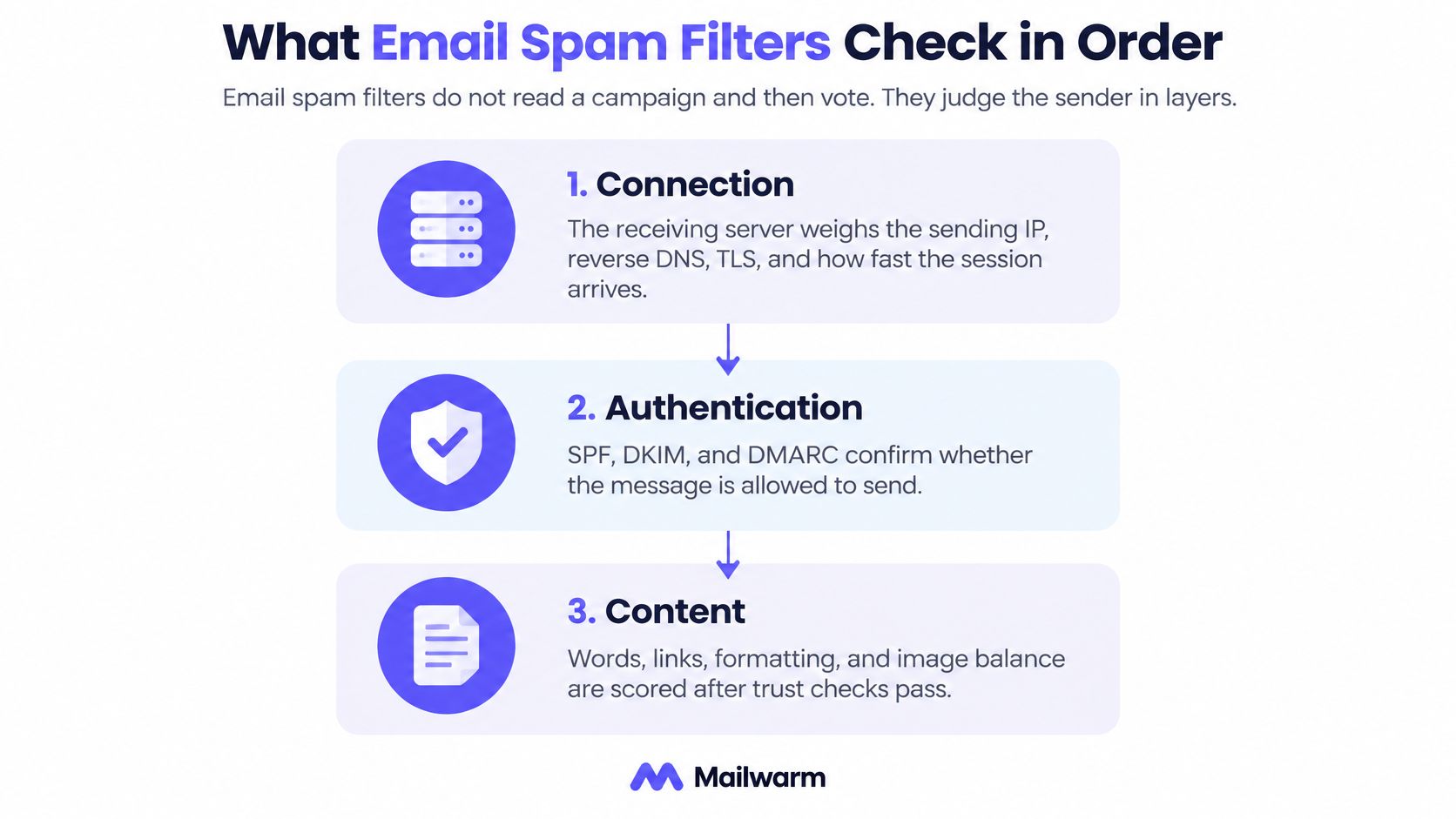
Email spam filters don't read a campaign and then vote. They work through five checkpoints in a fixed order, and each one can end the evaluation before the next begins: connection and sending IP, then authentication, then domain and link reputation, then content, and finally recipient engagement.
The checkpoints run like security screening at an airport. A passenger turned away at the entrance never reaches the gate, no matter how good their ticket looks.
What each spam filter layer checks
| Layer | What it checks | Typical failure | When it runs |
|---|---|---|---|
| Connection and IP | IP reputation, reverse DNS, TLS, connection rate | A blocked or poorly rated IP is rejected with a 550 reply | Before the message body |
| Authentication | SPF, DKIM, and DMARC alignment with the From domain | DMARC fails even when SPF or DKIM passes alone | After connection, before content decides placement |
| Domain and links | Sending-domain history and reputation of linked or tracking domains | Clean copy filtered because a shared link domain is poor | During the reputation lookup |
| Content | Words, HTML, images, attachments, URL patterns | A higher content score, rarely a hard reject by itself | During the content scan |
| Engagement | Opens, replies, deletes, spam reports, rescues from junk | Later mail filtered after complaints climb | After delivery, training the next decision |
Why the order matters more than any single check
A blocklisted IP can return a 550 before the body is accepted, so the content layer never runs. DMARC can fail on alignment even when SPF passes, and a shared tracking domain with poor reputation can outweigh clean copy. Content usually adds points to a score rather than rejecting mail on its own, while complaints shape what happens to the next send.
A hard reject at an early layer ends the sequence. Later layers don't get a chance to argue for the inbox, and there's no partial credit for a well-written paragraph that was never scanned. That's the part senders miss when they treat every spam placement as a copy problem.
Practical rule: If mail never arrived, start at connection. If it arrived in junk, start with authentication and reputation. Reach for the copy last.
Providers automate all five gates because the volume leaves no room for manual review. Every message is scored, filtered, or rejected by software in the time it takes to connect, and the same automated sequence runs on the next send from your domain. That automation is also why engagement history carries so much weight: yesterday's complaints become tomorrow's filter settings.
The work, then, is diagnostic. Readers should be able to point at one row of the table and say, that layer failed, before rewriting a subject line or swapping a call to action. Every later fix depends on getting that identification right.
Where Connection and Authentication Stop Mail
The first gate opens before a single word of the message is accepted. The receiving server weighs the sending IP, reverse DNS, TLS, and how fast sessions arrive from that source. A bad neighbor on a shared IP can stop mail that never contained a spammy sentence.
Two reply shapes tell most of the story at this gate:
550 5.7.1 Service unavailable; client host blocked421 4.7.0 Try again later
A 550 reject is final for that attempt. Retrying the same mail from the same source won't land it in the inbox. A 421 deferral is different. It's a temporary delay, often tied to rate or temporary reputation pressure, and the sending server is expected to try again later.
Treating those two replies as the same problem wastes days. A deferral calls for slower sending and patience. A reject calls for fixing the block, the listing, or the infrastructure first. Senders who want the wider picture on accepted mail that still misses its destination can read about why accepted emails miss the inbox from SendX.
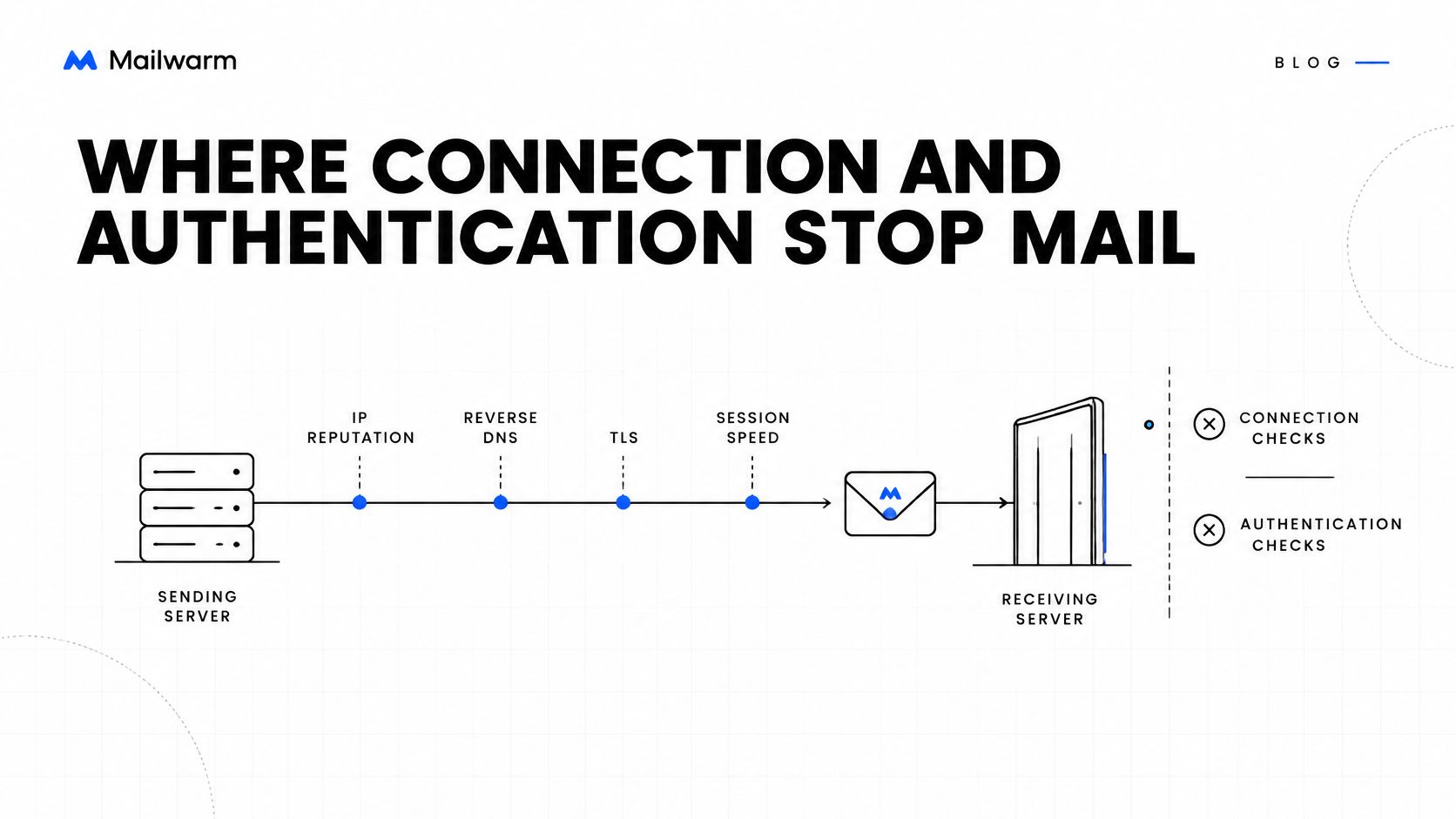
Authentication is about alignment, not existence
SPF checks the envelope sender. DKIM checks the signing domain. DMARC asks whether at least one of those authenticated domains aligns with the visible From domain that recipients see. Under RFC 7489, the DMARC specification, a message passes DMARC when at least one authenticated identifier both validates and aligns, and mismatches count as DMARC failures.
Three short records show what the receiver is comparing:
v=spf1 include:send.example.com -allv=DKIM1; k=rsa; p=..._dmarc: v=DMARC1; p=quarantine; adkim=s; aspf=s; rua=mailto:dmarc@domain.com
Now read a real failure shape in an Authentication-Results header:
spf=pass smtp.mailfrom=tool.example; dkim=pass header.d=tool.example; dmarc=fail header.from=customer.com
The opinion here is direct. That message didn't fail because records were missing. The sending tool signed with its own domain, so the customer's From domain failed alignment. Publishing a record isn't the same as aligning it, and a DKIM pass on the wrong domain is still a DMARC failure. Senders can check your DKIM record to confirm which domain is signing.
Alignment also isn't the finish line. Authentication reduces uncertainty about spoofing and gives receivers a policy for failures, but it doesn't guarantee the inbox. Complaints, engagement, sending patterns, and infrastructure reputation still sit downstream, ready to junk fully authenticated mail.
How Gmail Outlook and Yahoo Differ
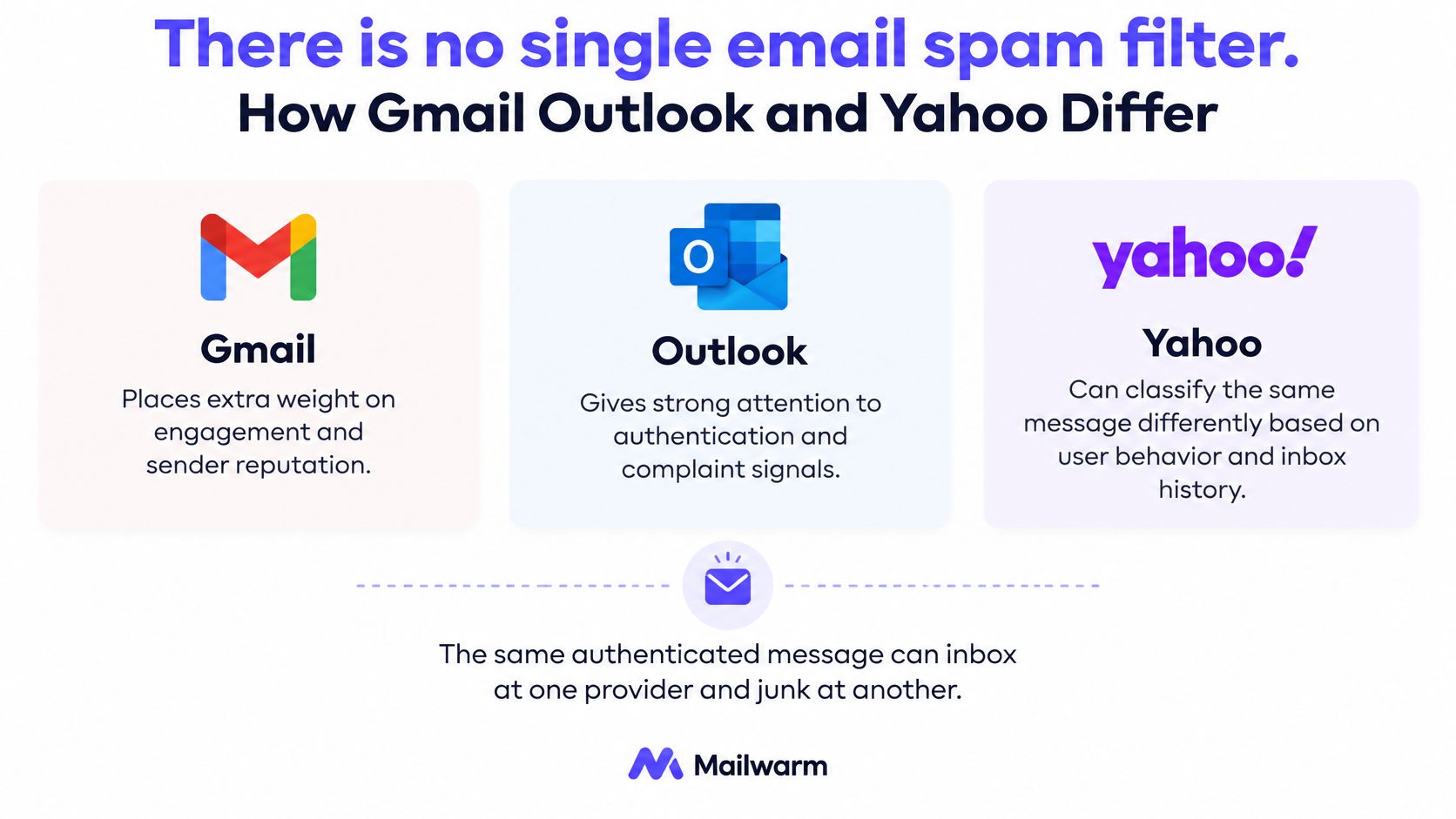
There's no single email spam filter. The same authenticated message can inbox at one provider and land in junk at another because each provider weighs a different layer more heavily.
How Gmail, Outlook, and Yahoo judge the same email
| Provider | Signal that weighs most | Complaint line | Where to look |
|---|---|---|---|
| Gmail | Recipient engagement and spam reports | Under 0.1 percent, and do not reach 0.3 percent | Postmaster Tools; bulk rules from February 1, 2024 at 5,000 messages a day |
| Outlook and Microsoft 365 | IP, domain, authentication, list quality, complaints, content, then SCL | No single published percent; complaints feed SmartScreen and SCL | SCL and junk versus inbox under SmartScreen |
| Yahoo | Spam reports on mail delivered to the inbox | Below 0.3 percent of inbox deliveries | A Yahoo-only complaint rate, not a blended rate |
Gmail weighs what recipients do
Gmail places heavy weight on recipient engagement and user-reported spam. Under the Gmail sender guidelines, senders of 5,000 or more messages per day to Gmail since February 1, 2024 must authenticate outgoing email, keep valid forward and reverse DNS, use TLS, and make unsubscribing easy.
The complaint math matters. Google advises keeping the user-reported spam rate below 0.1% and preventing it from reaching 0.3%, and bulk senders above that line lose mitigation until the rate stays below 0.3% for seven consecutive days, per Google Postmaster Tools guidance. That rate counts mail delivered to engaged inboxes and then marked as spam. It isn't mail rejected at the door.
Yahoo and Microsoft count differently
Yahoo requires senders to keep the spam rate below 0.3%, calculated from messages delivered to recipients' inboxes, according to Yahoo sender best practices. A blended complaint rate across all providers can hide a Yahoo-specific problem, so Yahoo traffic needs its own number.
Microsoft describes Outlook.com filtering as SmartScreen technology influenced by the sending IP, domain, authentication, list accuracy, complaint rates, and message content, with Microsoft 365 adding proprietary content filtering, per Microsoft Defender for Office 365 anti-spam documentation. The result is partly expressed as an SCL score. The mechanics and fixes live in the guides on Outlook spam filters and SCL thresholds, and recipient-side context sits in these email whitelisting tips for senders from Stamina.
A healthy overall delivery rate can hide a dead provider, and Gmail's size makes that hiding easier.
That's the contrarian point worth keeping. Strong aggregate numbers prove very little. A Gmail inbox doesn't transfer to Outlook, and a clean Yahoo result says nothing about Microsoft 365.
Why the Same Email Spams for One Sender
The trigger that surprises customers most is simple. A perfect email can land in spam because of the sender, not the message. Three causes account for most of these cases.
A new domain has nothing to recall
A new domain carries no sending history. The reputation layer has no record of recipients opening, replying, or rescuing its mail, so there's nothing positive to weigh against the risk of unknown bulk mail. Clean copy rarely gets the chance to compensate, because the decision leans on identity and history first.
This isn't a punishment. It's an absence of evidence. Providers can't distinguish a careful new sender from a fresh spam operation on day one, so new domains start under suspicion and earn trust through low volume and real engagement over time.
The link domain is judged with the message
Every link in an email brings its own reputation into the evaluation. A shared tracking domain used by hundreds of other senders, some of them careless, can drag a clean message into junk. The click domain outweighs the words around it.
Senders often audit their From domain and stop there. The redirect domain, the image host, and the landing page domain all count. If one of them is shared and dirty, the message inherits that history no matter how careful the copy is.
The identity didn't align
Consider a typical pattern rather than a single story. A sender with clean copy kept landing in spam at Microsoft. DKIM was signed by the sending tool's domain, so DMARC failed against the visible From domain even though SPF and DKIM both passed on their own terms.
Once DKIM was signed with the sender's own domain and warmup ran for a few weeks, placement recovered. Across the Mailwarm network, recoveries following this pattern took between 2 and 21 weeks. That's a range from real cases, not a promise for any individual sender.
The copy never changed. The authenticated identity did. Raising volume while that layer was still failing would only have produced more filtered mail and more negative history attached to the domain.
If two senders use identical text and only one inboxes, the difference is almost always IP, alignment, domain history, or engagement. It isn't the adjectives.
What a Spam Score Measures and Misses
A low spam score doesn't mean the inbox. That's the assumption worth dropping first. A spam score is a content and pattern estimate, usually a small numeric rating of how a message looks. It is not a placement verdict from any mailbox provider.
Scores typically flag wording and punctuation, HTML-to-text ratio, image weight, attachment type, and link count. In plain terms, the content layer reads how the message is built and how it reads. Those signals usually push a message toward junk rather than rejecting it outright. For catching a sloppy draft before sending, that's useful.
What a spam score sees and what it misses
| Signal | Seen by a spam score | Seen by a placement test |
|---|---|---|
| Spammy words, HTML layout, link count | Yes | Only if that provider junks the copy |
| SPF, DKIM, or DMARC alignment | Sometimes, as a header warning | Yes, in Authentication-Results and in where it lands |
| Gmail inbox and Outlook junk on the same send | No | Yes |
| User-reported spam rate | No | No, use Postmaster Tools or Yahoo complaint data |
| Sending IP on a blocklist | Sometimes | Yes, as a reject or as mail that never arrives |
The row a score can never fill
Look at the third row. A score can't show that Gmail inboxed a message while Outlook filtered the identical send, because that split lives in placement, not in the copy. The score sees one message. Providers produce several different outcomes from it.
A spam score also isn't Google's spam rate, and confusing the two causes real damage. The Postmaster figure reflects recipients reporting mail that already reached their inboxes. A content score reflects how a draft looks before anyone receives it. They answer different questions, at different layers, with different fixes.
For the content row only, an email spam checker is the right tool. It catches risky phrasing and formatting problems in a draft. But spam words matter far less than people think once the earlier layers are dirty, and no checker can see a blocklisted IP or a misaligned signature.
The opinion, stated once: Treating a low score as permission to scale volume is how clean-looking mail still lands in junk.
Readers should leave this section knowing which column answers their question. Draft quality belongs to the score. Provider outcomes belong to placement testing. Complaint behavior belongs to postmaster data. Mixing those up sends senders to fix layers that were never broken.
How to Test Placement Before You Send
Testing works when each result maps to one layer. Six steps, run in order, turn a vague spam problem into a named failure that can be fixed and retested.
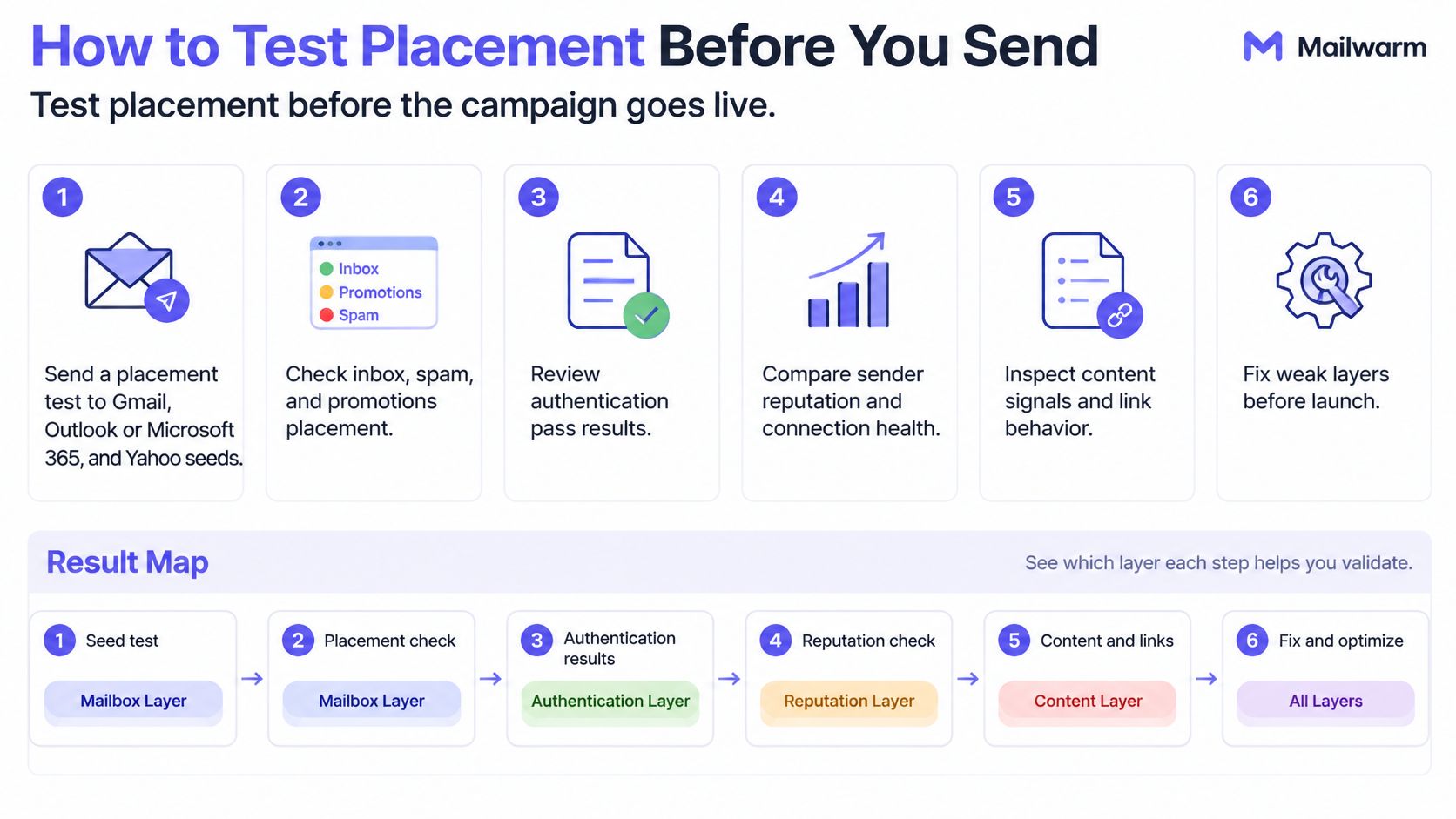
The six steps
- Send to provider seeds first: Run a placement test to Gmail, Outlook or Microsoft 365, and Yahoo seeds before the campaign. Senders can test your email deliverability to see where the message lands at each provider.
- Read Authentication-Results: Check the spf, dkim, and dmarc values in the received headers. Treat dmarc=fail as an alignment problem even when the other two pass.
- Record placement per provider: Write down inbox versus junk for each provider separately. Don't average them into one rate, because the average hides exactly the failure that matters.
- Interpret a split result: If Gmail inboxes and Outlook junks, that's an Outlook layer problem, not a copy problem. The Outlook spam filter guide and the SCL thresholds guide cover that provider's mechanics and fixes.
- Check content last: Only after authentication passes and the provider split looks clean should the copy go through a spam word checker. Content edits made before that point are guesswork.
- Change one layer and retest: Fix a single variable, rerun the same test, and hold volume steady while any reject or one-provider junk pattern is still present.
What continuous placement data adds
Mailwarm's inbox placement insights measure placement per provider on warmup email, so a sender can see Gmail inboxing while Outlook filters. That split points to the failing layer, and no single spam score can show it. Mailwarm provides live inbox vs spam folder placement tracking with continuous inbox placement tests running 24/7, and live reporting per mailbox and SMTP.
The test has limits worth stating plainly. It won't show the complaint rate, which still has to come from Postmaster Tools or Yahoo data. A seed test also isn't engagement from real recipients, so it can't predict how an actual list will open, reply, or report.
Decision rule: Fix the provider that holds the audience first. A pass somewhere else doesn't transfer.
A sender whose buyers sit on Microsoft 365 gains nothing from perfect Gmail seeds. Priority follows the audience, the complaint exposure, and the revenue at risk, in that order.
Questions to Settle Before the Next Send
Why do emails go to spam
An earlier layer failed, usually IP reputation, DMARC alignment, domain or link reputation, or recipient complaints. A single word rarely decides placement on its own. Finding the failing layer comes before any copy edit.
What is email warmup
Email warmup is the process of sending low-volume, engaged traffic so mailbox providers learn that a sender's mail is wanted. Opens, replies, and rescues from junk build the history a new or damaged domain lacks. Volume rises gradually as that history grows.
Is email warmup enough to fix deliverability
No. Warmup builds engagement and reputation, but authentication records, alignment, and list hygiene still have to be correct on their own. Warming a domain with a DMARC failure produces well-engaged mail that still fails identity checks.
Does email warmup improve inbox placement
It can help when it builds real engagement at the providers that hold the audience. Placement gains come from that provider-specific history, not from raw warmup volume. No tool guarantees inbox placement, and any claim otherwise should be treated with suspicion.
Does Mailwarm need access to my inbox
No. Mailwarm doesn't require IMAP access and doesn't read the user's private inbox. Warmup runs without permission to open personal mail, which keeps the process less intrusive than tools that need mailbox-level access.
The closing action fits in one sequence. Name the failing layer, fix authentication before rewriting copy, test placement per provider, then build reputation with real engagement. The detailed fix steps live in the guide on techniques to avoid spam filters. If email is part of the growth strategy, structured email warmup with expert guidance helps senders build reputation, monitor inbox placement, and reduce spam risk.
Mailwarm is a premium email warmup and deliverability platform that helps senders build reputation, monitor inbox placement, and improve deliverability through real inbox engagement, advanced warmup controls, and expert guidance. For senders working through the layer failures described here, that combination of provider-level warmup, spam score monitoring, and deliverability calls turns diagnosis into a concrete next step. Visit Mailwarm to see how the platform fits a current sending setup.