

Properly warmed and authenticated domains reached 87% inbox placement and 4.1% reply rates, while new domains with no warm-up reached the inbox only 12% of the time and produced 0.2% replies (Cleverly benchmark via this report). That is the starting point for email outreach campaigns in 2026. Not copy. Not cadence. Not automation.
building campaigns backwards remains common. They write sequences first, buy data second, and think about deliverability after results collapse. That approach burns domains, wastes list spend, and makes useful reply benchmarks look unreachable.
Email outreach campaigns work when the infrastructure is stable first, then the targeting is narrow, then the messaging is relevant, and then the team monitors reputation by provider instead of pretending all inboxes behave the same way.
What an Email Outreach Campaign Is and Why Deliverability Comes First
An email outreach campaign is a coordinated sequence of outbound emails, usually paired with follow-ups, built to drive one business outcome. That outcome might be a qualified reply, a booked meeting, a candidate response, a partnership conversation, or a sales opportunity.
The important part is coordination. A real campaign is not a single blast. It combines:
- Targeting logic that defines who should receive the message
- Messaging that matches one pain point or trigger
- Sequence timing that follows up without spamming
- Sending infrastructure that can reach the inbox
Why deliverability is the first filter
Inbox placement decides whether the rest of the campaign even gets a chance to work.
A 2024 cross-platform test found an average deliverability rate of 83.1% across 15 major sending platforms, with 10.5% of emails landing in spam and 6.4% disappearing entirely, which means roughly 1 in 6 messages never reaches the inbox (Emailchaser data). That is before the recipient judges the subject line, the CTA, or the offer.
Practical rule: If a team can't place mail consistently, every copy test is contaminated.
That is why teams with complex outbound motion often lean on both internal operators and outside specialists. For brands that need broader lifecycle support alongside outreach, managed email marketing solutions can help connect campaign strategy with deliverability operations.
The four parts that actually matter
Most outreach advice overweights copy. The stronger model is simpler.
List building
Clean data, clear ICP, tight segmentation.Messaging
Short emails, relevant triggers, low-friction asks.Sequence design
Enough follow-up to earn replies without training filters to distrust the pattern.Reputation management
Authentication, warm-up, inbox placement monitoring, and provider-specific control.
A campaign only performs as well as its weakest layer. In 2026, that weak layer is usually sender reputation.
Planning Goals, ICP, and List Building
Campaign planning decides whether you get useful signal or expensive noise.
Set one commercial goal before you build the list. If the goal is qualified meetings, optimize for qualified replies that can convert into meetings. If the goal is candidate conversations, optimize for replies from people who match the role. Teams that chase raw volume usually end up with inflated activity metrics, weak inbox placement, and no clear read on what is failing.
Start with one outcome and one operating metric
Use a primary outcome metric tied to revenue or pipeline. Then pair it with one operating metric the SDR team can influence every day.
A practical setup looks like this:
- Sales teams: qualified meetings booked
- Recruiting teams: candidate conversations started
- Agencies: discovery calls with fit accounts
- Partnership teams: relevant intro calls
For the operating metric, use positive reply rate or qualified reply rate. Plain reply rate is too noisy. It counts opt-outs, wrong contacts, and complaints alongside real interest. Open rate is worse. Privacy features distort it, and inbox placement problems can make opens look healthy when the account is already drifting into promotions or spam.
That distinction matters because campaign planning is not just list planning. It is reputation planning. A sloppy list creates bounces, non-engagement, and spam complaints. Those signals lower trust with Gmail and Microsoft before your sequence has enough volume to tell you whether the offer works.
Build the ICP with buying context, not broad labels
“B2B SaaS” is not an ICP. Neither is “healthcare companies” or “founders.”
A usable ICP answers four questions:
Who has the problem?
Define industry, size, region, and business model.Who owns the problem?
Use titles tied to budget, process ownership, or day-to-day pain.Why now?
Add a trigger such as hiring, expansion, new funding, product launch, or a stack change.What disqualifies the account?
Exclude segments with long sales cycles, no budget owner, weak email coverage, or poor fit for your offer.
That last point gets ignored too often. Exclusions improve performance fast. If a segment rarely replies, has high bounce risk, or consistently routes mail to shared inboxes that never answer, cut it.
Build smaller lists with tighter intent
Analysts at Woodpecker found that cold email campaigns segmented into narrower prospect groups produced stronger response rates than broad sends, while personalization had the biggest effect when it matched a specific pain point or trigger (Woodpecker cold email stats). That aligns with what good outbound teams already know. Smaller, tighter batches outperform giant exports because relevance survives contact with the inbox.
Use list size as a quality control decision, not a capacity target.
| List type | Typical use | What usually happens |
|---|---|---|
| Micro-list by persona plus trigger | New offer test, high-value accounts | Better reply quality, cleaner diagnostic signal, lower reputation risk |
| Mid-size segmented batch | Proven offer in a stable ICP | Scales acceptably if data is clean and provider mix is controlled |
| Large broad export | “Hit quota” sending | Lower relevance, more bounces, weaker engagement, faster reputation damage |
Start with small cohorts. Fifty to two hundred contacts per segment is enough to see whether the market, trigger, and message are aligned. If replies are weak, fix the segment before you add volume. More send volume does not rescue a bad ICP. It just spreads failure across more inboxes.
Treat list building as deliverability infrastructure
The list is part of your sending setup.
A bad list hurts placement in three ways:
- Invalid addresses create hard bounces
- Mismatched prospects ignore the email, which weakens engagement signals
- Bad fit offers drive spam complaints and manual filtering
That is why exported data is never send-ready. Build in layers, then clean in layers.
Use sources like LinkedIn Sales Navigator, Apollo, or ZoomInfo to gather candidates. Verify addresses with a tool such as ZeroBounce or NeverBounce before upload. Then segment by role, pain point, and trigger. If a record is missing title clarity, recent activity, or a valid business email, leave it out.
Be stricter with free-mail domains, catch-all domains, and old records from recycled datasets. Those contacts waste sends and muddy your results. They also make reputation monitoring harder because poor list quality can look like a copy problem when it is really a targeting problem.
For teams that sell services, fast follow-up after a positive reply matters almost as much as the first email. This speed to lead playbook for service businesses is a useful reference if replies are coming in but meetings are not getting booked.
Segment by provider before you send
This is the part many outreach guides miss.
Do not treat Gmail, Microsoft, and smaller providers as one audience. They score reputation differently, filter differently, and react differently to the same campaign. If half your list is Microsoft 365 and that segment starts slipping into junk, your overall reply rate can fall even when Gmail placement stays stable.
At minimum, tag each prospect by provider family before launch:
- Gmail and Google Workspace
- Microsoft 365 and Outlook
- Other corporate providers
- Catch-all or uncertain domains
That lets you spot placement problems early and keep diagnostics clean. If one provider segment underperforms, you can adjust volume, sending domain mix, or targeting without contaminating the rest of the campaign.
Good planning does three jobs at once. It defines the commercial target, sharpens the list, and protects sender reputation. Get those right first. Then your copy tests mean something.
Messaging, Personalization, and Sequence Design
Inbox placement decides whether your message gets a chance. Messaging decides whether that chance turns into a reply.
Teams spend too much time polishing copy and too little time making it relevant to one buyer, one problem, and one clear next step. Good outreach feels like a note written after doing your homework. Bad outreach feels like a template with a few tokens dropped in.
Subject lines and first lines
Your subject line has one job. Get opened by the right person without creating false curiosity.
Keep it short. Five words is often enough. Tie it to context the prospect recognizes right away, such as their role, a hiring push, a product launch, or a workflow problem you can reasonably help with. Avoid bait. If the subject line promises one thing and the email delivers another, you may win the open and lose the reply.
The first line carries more weight than the rest of the email. A specific observation beats a compliment every time.
Use personalization that proves relevance:
- Company change: new market, new team, new product
- Role pressure: pipeline coverage, outbound efficiency, hiring volume
- Recent signal: job post, event appearance, funding news, stack change
- Operational friction: slow follow-up, low demo conversion, poor show rates
Skip fake personalization. First name, company name, and “noticed your impressive growth” are not personalized. They are placeholders.
Write for reply, not admiration
Strong cold email copy is plain and restrained. Short emails usually work because they respect attention, but short and vague is still weak. Aim for 60 to 120 words for the first touch. That is enough room to show relevance, name the problem, and make a low-friction ask.
A practical structure looks like this:
- Context: why this person, why now
- Problem: one issue you can help fix
- Outcome: the business result, not a feature list
- Ask: one easy question
Keep the ask small. “Worth a quick look?” or “Should I send the 2 examples?” will often beat “Do you have 30 minutes next week?” in early touches because the commitment is lower.
Personalization needs a ceiling
SDR teams often over-personalize low-value accounts and under-personalize high-value ones. That is backwards.
Set rules by segment. For broad outbound, use light personalization tied to role and trigger. For named accounts with high contract value, spend the extra five minutes and reference a real initiative, workflow, or constraint. If an SDR cannot explain why that detail matters to the offer, cut it.
Good personalization scales through relevance buckets, not one-off creativity. Build message variants by provider segment, persona, and trigger type so you can compare reply quality cleanly later. That matters because copy performance can look weak when the issue is uneven inbox placement across Gmail and Microsoft tenants.
Sequence design that earns another look
Five touches is a reasonable default. More than that is fine if each message adds information. Repeating the same pitch with different wording trains people to ignore you.
Use a sequence like this:
- Email 1: direct problem and clear ask
- Email 2: same problem, new angle
- Email 3: short proof point or use case
- Email 4: objection handling or operational detail
- Email 5: simple close-the-loop note
Space them based on sales cycle and audience tolerance. A common pattern is 2 to 4 business days between touches. Enterprise prospects can handle a longer gap. SMB campaigns often benefit from tighter spacing.
Channel mix helps when it serves a purpose. A LinkedIn view, a call step, or a voicemail can support recall. Do not add channels just to make the sequence look full.
Stop judging campaigns by opens
Open rate is weak guidance now because mailbox privacy features distort it. Mailchimp explains that Apple Mail Privacy Protection pre-fetches tracking pixels, which inflates opens and makes open data less reliable for performance analysis (Mailchimp on Apple Mail Privacy Protection).
Use metrics tied to real buyer intent:
- Reply rate
- Positive reply rate
- Meeting rate
- Opportunity rate
- Reply rate by provider segment
- Bounce rate and unsubscribe rate
A campaign with average opens and strong positive replies is healthy. A campaign with inflated opens and weak replies usually has one of three problems: weak targeting, weak offer, or poor inbox placement inside a specific provider group. That is why sequence design cannot be separated from deliverability. If Microsoft recipients are seeing touch three in junk, your cadence data is already corrupted.
Authentication, Warmup, and Provider-Level Deliverability
A campaign can have a clean list, solid copy, and sensible cadence and still fail because the inbox provider does not trust the sender. That is why deliverability sits underneath everything else. If Gmail or Microsoft starts filtering your mail, your reply rate drops before your SDR team learns anything useful about the market.
Authentication is the starting line
Authentication proves your mail is allowed to come from the domain it claims to use. SPF, DKIM, and DMARC are the baseline records mailbox providers expect to see, and Sender's deliverability guide explains how each one supports sender trust (Sender guidance on deliverability).
Use a simple standard:
- SPF: lists the servers allowed to send on your behalf
- DKIM: adds a cryptographic signature to outgoing mail
- DMARC: tells receiving providers how to handle failed checks and where to send reports
Set all three before launch. Then verify alignment. A record that exists but fails alignment still weakens trust and creates placement problems that look like copy problems.
Warmup comes before volume
Mailbox providers distrust sudden spikes. A new domain or mailbox that jumps from near-zero activity to full campaign volume looks risky, even if the list is good.
Ramp volume gradually over a few weeks. Track placement while you ramp, not after it slips. Teams that need to warm up an SMTP server should do it during setup, before the first real campaign goes out.
Google's bulk sender requirements make the direction of travel clear: authentication, low spam complaint rates, and consistent sending behavior are expected if you want reliable placement at scale (Google bulk sender guidelines).
Provider rules are similar. Provider behavior is not.
Gmail, Microsoft, and Yahoo all expect proper authentication. They do not score mail the same way after that.
| Provider | What to watch most closely | Common failure pattern |
|---|---|---|
| Gmail | Engagement, complaint rate, domain consistency | Mail accepted but routed to Promotions or Spam after weak engagement |
| Microsoft 365 and Outlook | Sender reputation shifts, complaint signals, infrastructure quality | Bigger placement swings across tenants, especially after bounce spikes |
| Yahoo | Authentication, complaint rate, volume consistency | Filtering tightens quickly when volume changes abruptly |
This is the part many outreach guides miss. Provider-level placement changes campaign math. If Gmail is placing into inbox but Microsoft is junking touch two onward, your aggregate reply rate hides the issue. Review placement by provider segment every week, then adjust volume, mailbox allocation, and follow-up timing based on what each provider is doing.
Reputation monitoring matters more than launch checklists
Warmup is not a one-time task. Reputation moves every week.
Watch hard bounces, soft bounces, complaint signals, unsubscribes, and placement tests by provider. HireEZ's 2025 outreach benchmark report notes that bounce and unsubscribe levels can damage sender reputation quickly enough to affect performance, which is why ongoing monitoring matters more than a one-off setup checklist (hireEZ benchmark report).
Treat these as operational alerts, not reporting trivia. A rising bounce rate usually means list quality or verification slipped. A placement drop isolated to Microsoft usually points to reputation or infrastructure issues, not messaging.
Separate outreach infrastructure protects the main domain
Do not run cold outreach from your primary company domain if the brand matters. Use separate sending domains and isolated mailboxes so a reputation hit stays contained.
Mailwarm is an email warmup and deliverability platform that helps teams build sender reputation, monitor inbox placement, and improve deliverability through real inbox engagement, warmup controls, spam score monitoring, authentication fix tools, bounce prevention, and deliverability support. That matters because outreach infrastructure needs active maintenance, not just a one-time DNS setup.
The practical rule is simple. Protect the main domain, authenticate every sending asset, ramp volume slowly, and monitor Gmail and Microsoft separately. Outreach performance starts there.
Testing, Analytics, and the Signals That Matter
Open rate is too noisy to run an outbound program. Privacy protection broke it, bot opens inflated it, and inbox placement distortions made it worse. Track replies, positive replies, and provider-level placement if you want metrics that lead to useful decisions.
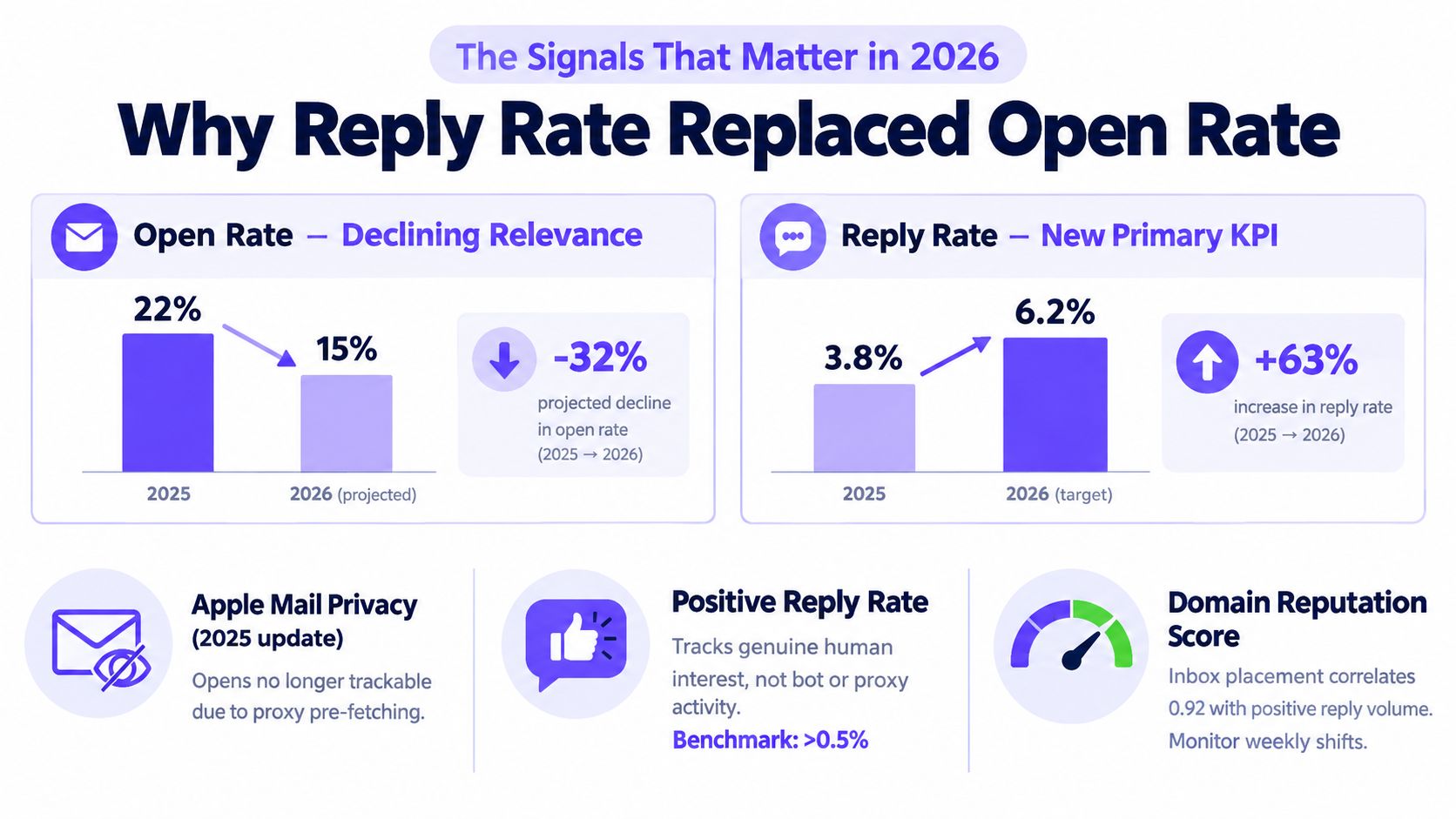
Suggested alt text if reused elsewhere: chart comparing declining open-rate relevance with rising reply-rate importance for outreach analytics.
What should be measured every week
Review the same operating metrics every week and tie each one to an action.
- Reply rate: your best top-line signal for message-market fit
- Positive reply rate: the metric that shows whether the campaign is producing real pipeline, not just reactions
- Inbox placement by provider: Gmail and Microsoft should be tracked separately because they fail differently
- Bounce patterns: hard bounces usually point to bad data, soft bounces often point to throttling or temporary provider friction
- Unsubscribe behavior: a fast way to spot weak targeting or a message that creates too much friction
Reply rates in cold outreach are usually thin. Belkins reported average cold email response rates in the 1% to 5% range, depending on list quality, targeting, and execution (Belkins cold email statistics). That is normal. It also means small sample sizes create bad decisions fast. Do not rewrite a sequence because two prospects replied negatively on Tuesday.
Use thresholds. After a meaningful send volume, scale campaigns with healthy placement and strong positive replies. Fix campaigns that get accepted but produce weak engagement. Pause campaigns when provider placement drops, because bad inboxing will contaminate every copy test you run after that.
How to test without fooling the team
Change one variable at a time. Keep the list source, offer, mailbox set, and daily volume stable during the test window. If you change the subject line, CTA, and send time at once, you did not run a test. You created noise.
Useful variables to test:
- Subject line
- Opening line
- CTA wording
- Offer framing
- Send window
Start with the variable closest to the reply decision. For most SDR teams, that means the opening line and CTA before the subject line. Subject lines matter, but a weak ask kills more campaigns than a plain subject line ever will.
Teams that want ideas for message experimentation outside email can borrow useful patterns from these A/B tests for cold DMs, especially around isolating opening hooks and friction in the ask.
Before you push a variant live, run it through an email spam checker. That step matters because a placement hit can make good copy look bad. If Gmail placement holds and Microsoft drops, treat that as an infrastructure or reputation issue first. Do not blame the sequence until delivery is stable.
One rule keeps teams honest. Judge every test on qualified replies and inbox placement together. A version that lifts replies while hurting placement is not a win. It is a short-lived spike followed by a reputation problem.
Troubleshooting and Optimizing Underperforming Campaigns
When a campaign underperforms, the fix depends on where it is breaking. Low placement, low replies, and reputation drops look similar in the dashboard. They are not the same problem.
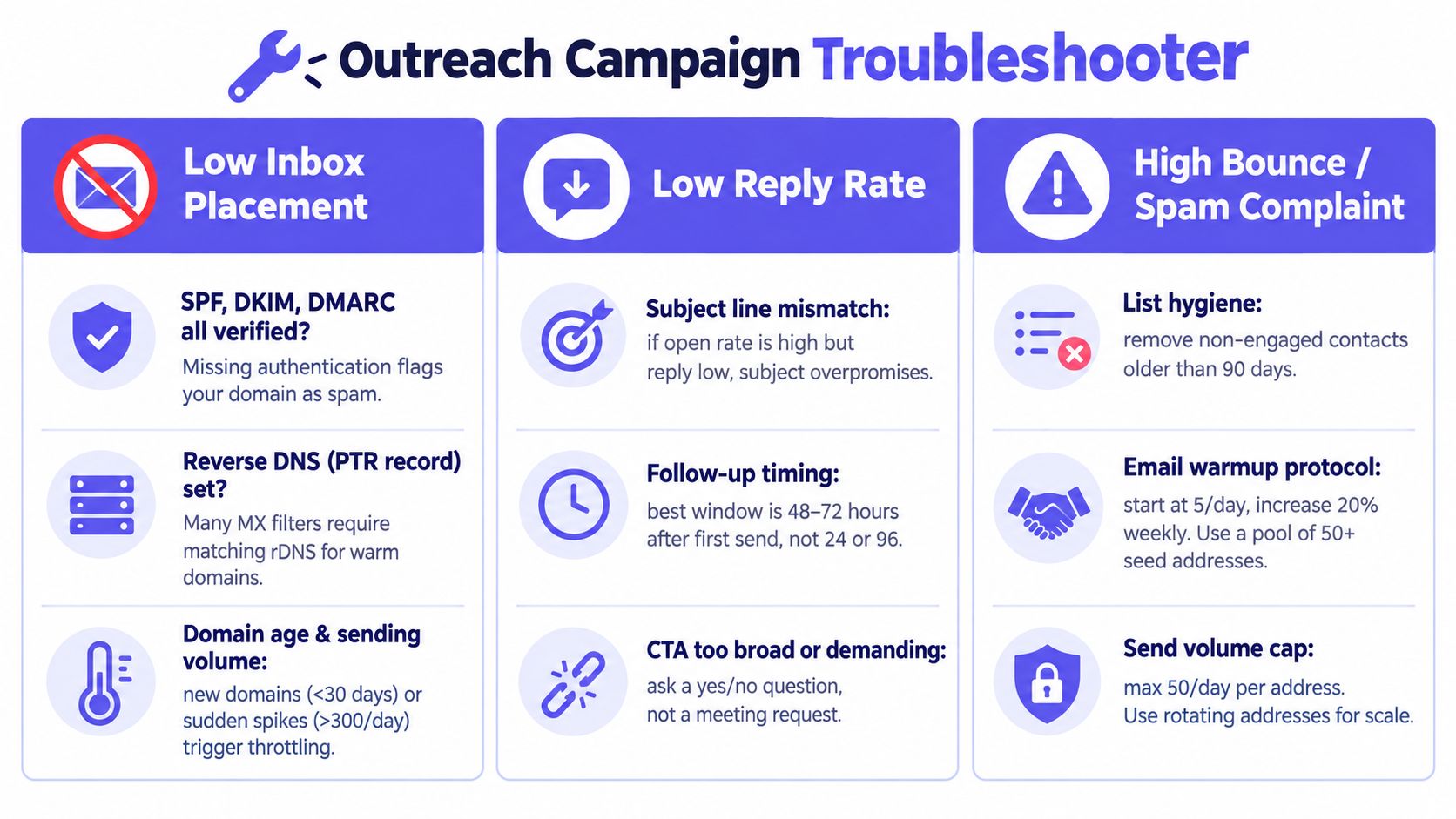
Suggested alt text if reused elsewhere: outreach troubleshooting chart for inbox placement, reply rates, and complaint issues.
Low inbox placement
If inbox placement falls first, the issue is usually technical or behavioral.
Common causes include:
- Authentication gaps: SPF, DKIM, or DMARC issues
- Volume spikes: jumping too fast after low activity
- Weak domain reputation: prior spam placement or poor engagement
- Content flags: repeated patterns or spam-heavy language
Recent benchmarks show a large gap between accepted mail and inboxed mail. One cited 2025 dataset reported 87.2% global inbox placement, and another benchmark reported roughly 83.5% to 87.2% inbox placement depending on methodology (Sender inbox placement benchmarks). That gap is why placement checks should happen before blaming the copy.
If a reputation problem appears, the first move is isolation. Pause the affected segment, audit list source and content, and check if your domain is blacklisted before resuming.
Low reply rates with stable placement
If placement is healthy but replies are weak, the campaign probably has a targeting or message problem.
The fastest audit is:
- Check ICP fit: are the contacts responsible for the pain point
- Cut message length: shorter usually reads more human
- Sharpen the value proposition: one problem, one outcome
- Rewrite the CTA: make the reply easy
A campaign can reach the inbox and still fail because the list is too broad or the offer is too generic.
Reputation drops after a decent start
This is common when teams scale too fast after early traction.
Look for:
- Provider-specific decline: Gmail fine, Microsoft poor
- Rising complaints or unsubscribes: relevance has slipped
- Bounce deterioration: list quality has degraded
- Sequence fatigue: too many similar sends from too many mailboxes
Pause faster than most teams think. A week of lower volume is cheaper than months of damaged sender reputation.
The weekly operating rhythm should be simple. Review provider-level placement, pull reply trends by segment, retire bad variants, and only scale the combinations that hold both relevance and trust.
Frequently Asked Questions
How many touches should email outreach campaigns use in 2026
Use 4 to 7 touches. That is enough follow-up to catch people who miss the first email without dragging the sequence into obvious repetition.
Each touch should do a different job. Change the angle, add a useful detail, or tighten the ask. If touch three says the same thing as touch one, you are training people to ignore you.
What is a healthy reply rate for email outreach campaigns
A healthy reply rate depends on list quality, offer strength, and inbox placement. Broad cold outreach usually produces modest results, and weak campaigns fall off fast.
Judge performance on two numbers: total reply rate and positive reply rate. Opens are too noisy to trust, especially after privacy changes. If replies are low but placement is strong, fix targeting or copy. If replies are low because inbox placement is weak, deliverability is the problem, not messaging.
Is cold email still legal under GDPR and CAN-SPAM
Yes, if you follow the rules.
Use accurate sender identity, target people with a legitimate business reason, include a clear opt-out, and handle personal data properly. If you are sending into the EU, get legal review before launch. SDR teams should not guess on compliance.
How long should domain warm-up take before scaling
Long enough to prove stable placement at the provider level.
Do not scale because a tool says warm-up is "done." Scale after authentication is configured, sending volume has ramped gradually, and Gmail and Microsoft placement both hold steady. If one provider is filtering while the other is fine, the domain is not ready for full volume.
Why do Gmail and Microsoft filter differently
They weigh trust signals differently. Complaint sensitivity, engagement patterns, authentication alignment, and historical sender behavior do not get treated the same way across providers.
That is why provider-level monitoring belongs at the center of campaign operations. A sequence can perform well in Gmail and still get buried in Microsoft 365. If you only look at blended campaign numbers, you will miss the problem.
How does Mailwarm help improve sender reputation
Mailwarm supports sender reputation with real inbox engagement, provider-level warmup controls, inbox placement insights, spam score monitoring, authentication fix tools, and expert guidance.
It also does not require IMAP access or permission to read a user's private inbox. That matters for teams that want warmup and monitoring without handing over mailbox-level access.
Why is Mailwarm more expensive than basic warmup tools
It includes more than automated warmup sends. The product combines real inbox engagement, spam score monitoring, provider-level warmup, authentication tools, and deliverability support calls in every plan.
That pricing only makes sense if your team treats deliverability as campaign infrastructure. If you just want a basic warmup loop, cheaper tools exist.
Does Mailwarm need access to the inbox
No. Mailwarm does not require IMAP access and does not need permission to read a user's private inbox.
That makes it a lower-friction option for teams with strict security or procurement requirements.
If email is part of the growth strategy, Mailwarm gives teams more than a basic warmup workflow. It helps build sender reputation, monitor inbox placement, and reduce spam risk with real inbox engagement, provider-level controls, and expert deliverability guidance.