

You wrote the campaign, checked the subject line, and still watched important sends land in promotions or spam. Email delivery optimization is the work of making sure mail is authenticated, paced correctly, and sent to the right people so it reaches the inbox more often, not just the server. For teams that rely on email to generate pipeline or revenue, that means treating deliverability as an operating system, not a one-time fix.
Inbox placement is never just about “good content.” Providers judge authentication, reputation, list quality, and engagement together, which is why a sender can have valid messages and still miss the inbox. The playbook below focuses on the parts that move outcomes, from DNS setup to warmup, list hygiene, provider controls, and monitoring.
Understanding Core Technical Setup
Strong email delivery optimization starts with the technical basics, because mailbox providers need proof that a sender is legitimate before they trust volume. Modern guidance says Gmail and Yahoo require senders to use SPF or DKIM, and bulk senders should also use DMARC. The same benchmark guidance points to bounce rates under 2% and complaint rates below 0.1% as healthy operating targets for inbox placement, which is why setup and sending behavior have to work together, not separately. Mailgun's deliverability guidance frames that shift clearly.
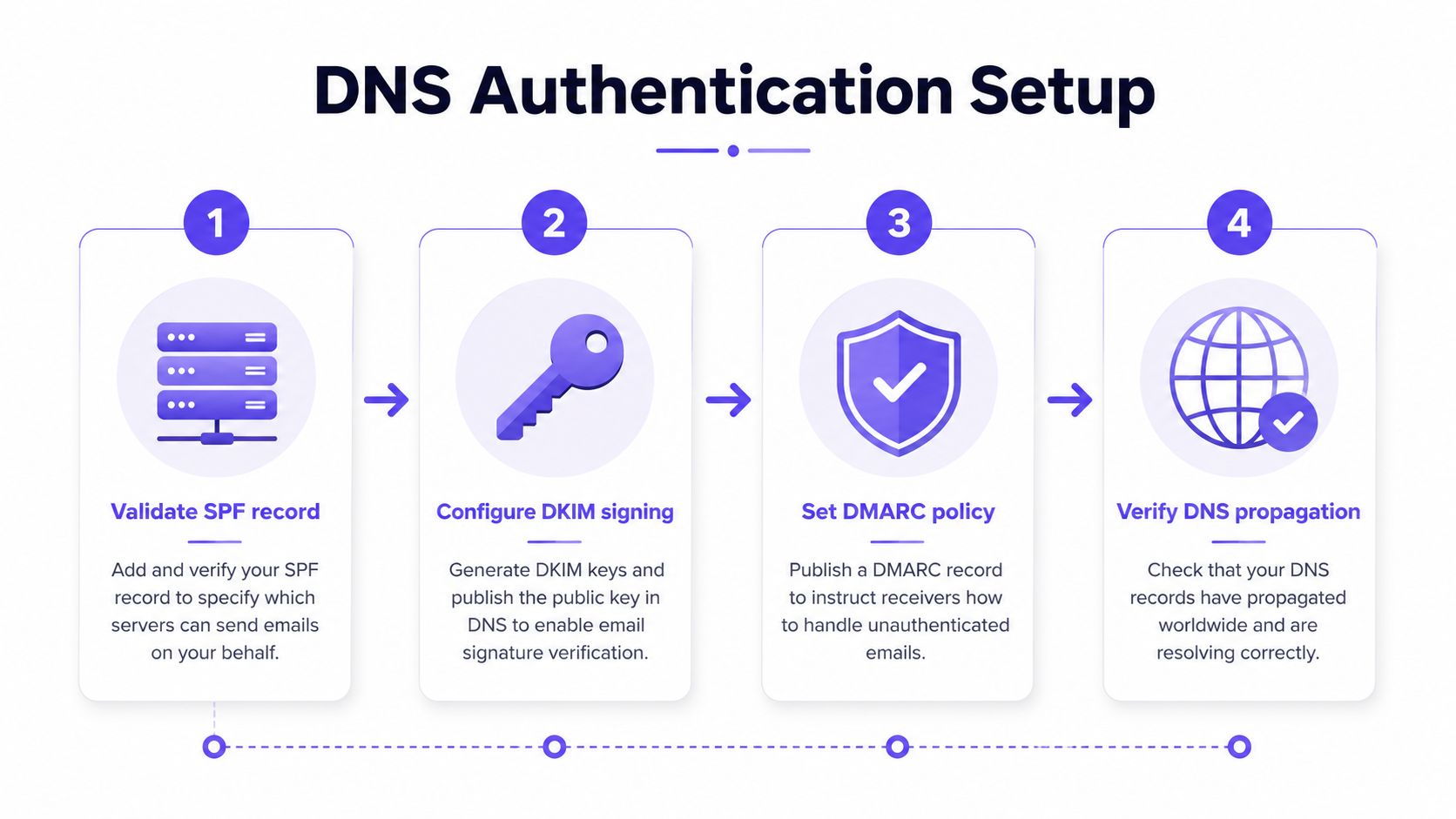
What to validate first
Start with the three records that establish trust. SPF tells providers which servers are allowed to send for the domain. DKIM signs messages so providers can verify the content hasn't been altered. DMARC ties those signals together and gives policy-level direction.
A clean setup usually fails in predictable ways, not mysterious ones. The most common issues are broken alignment between domain parts, incomplete DNS changes, and record syntax mistakes. A practical review also includes blocklist status and propagation checks, because a record that looks correct in one place may still not be visible everywhere.
Practical rule: authentication should be confirmed before volume ramps up, not after complaints start.
How to check the foundation
Verification doesn't need to be complicated. Teams usually confirm the DNS records, inspect blocklist status, and then test inbox placement through seed accounts. Once that baseline is stable, they can move into message-level testing with confidence instead of guesswork.
For a deeper walkthrough of the authentication side, this internal guide is useful: Mastering Email Authentication Guide.
A few checks deserve special attention:
- SPF alignment: confirm the sending infrastructure matches the authorized sending sources.
- DKIM signing: make sure every production message is signed consistently.
- DMARC policy: start with a policy that supports visibility, then tighten as confidence grows.
- Propagation timing: verify that changes appear across DNS before scaling sends.
- Blocklist review: look for obvious reputation problems before campaign volume increases.
Building Warmup and Volume Strategy
Warmup works because providers learn from sending patterns. If a brand-new domain suddenly pushes a large batch, filters see a reputation shock, and that can lead to throttling, deferrals, or spam-folder placement. A controlled ramp is safer because it lets mailbox systems observe consistent behavior, first with a small audience and then with broader volume.
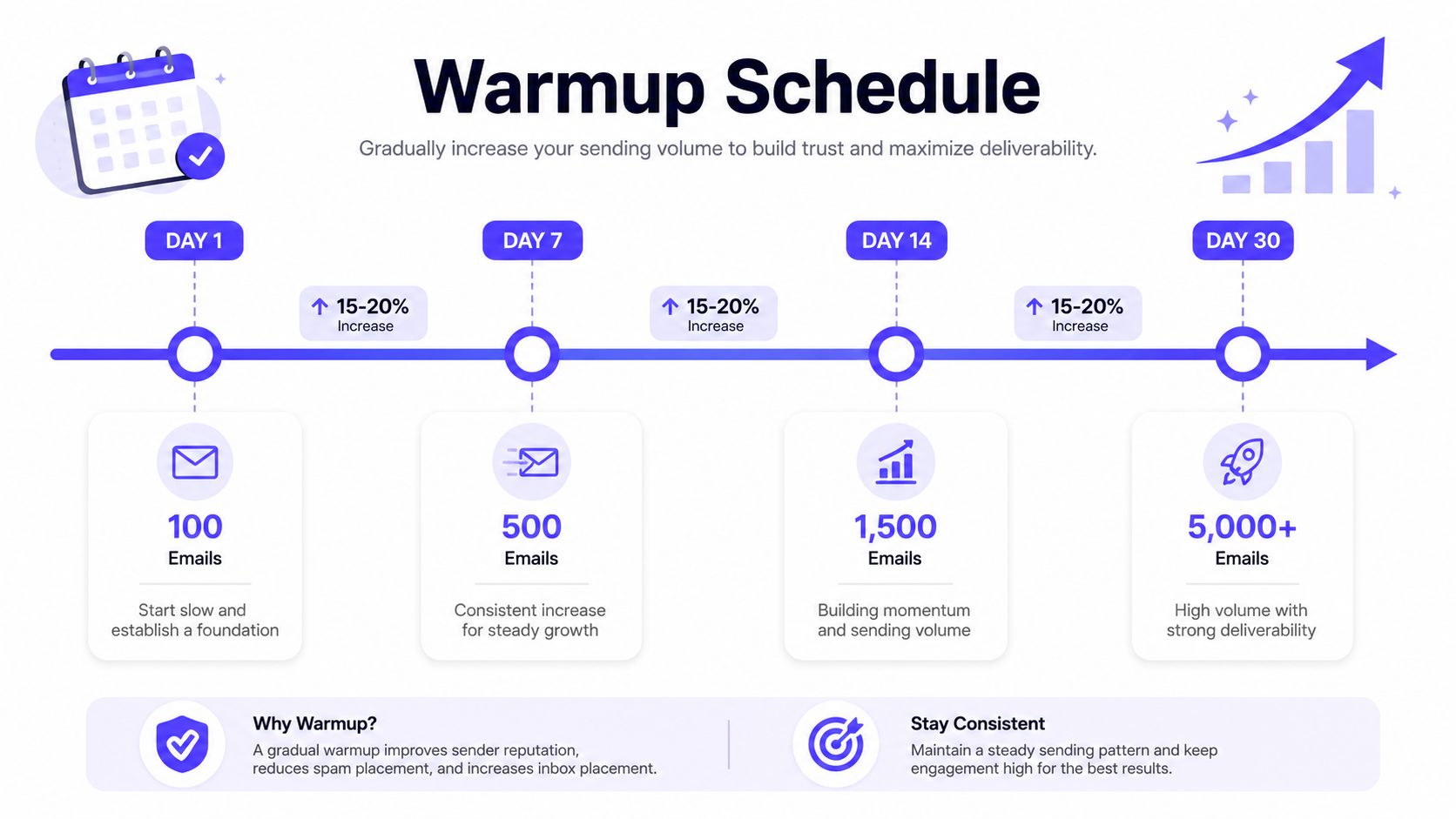
A simple ramp that avoids spikes
Industry guidance recommends starting with only 100 to 500 emails per day for the first few days, then increasing volume by 15% to 20% per week. Mailtrap's deliverability workflow also recommends validating SPF, DKIM, DMARC, DNS, and blocklist status before scaling, then watching inbox placement across Gmail, Outlook, and Yahoo with seed accounts.
A stable cadence matters as much as the number itself. Inbox providers use sending patterns as trust signals, so sends should be spread over several hours instead of blasted in a narrow burst. Guidance from warmup tools also warns against skipping days, because gaps can reset momentum.
A workable pattern often looks like this:
- Days 1 to 3: send to the most engaged contacts only.
- First week: keep the daily count small and steady.
- Week 2 onward: increase volume gradually if inbox placement stays healthy.
- Every step: test the effect of time of day, subject line, and audience slice.
Who should get the first sends
The first recipients should be the people most likely to respond, click, or reply. That usually means recent engagers, active leads, or contacts who already know the brand. Positive interaction is what builds trust, not raw volume.
The mail warmup market often over-focuses on speed, but speed without validation is a bad trade. A sender can move faster later, but only after the early batches show that delivery, engagement, and complaint signals are stable. For teams evaluating tools, Mailwarm's email warmup tool is one option that fits into a controlled warmup process.
A warmup schedule should feel boring. If the volume pattern looks dramatic, mailbox providers are more likely to treat it as risky.
Optimizing Content and List Hygiene
Content and list quality work together. Strong copy can still underperform if the list is stale, and a clean list won't save a message that looks sloppy or irrelevant. The fastest gains often come from reducing friction, tightening the message, and sending to people who still want the email.
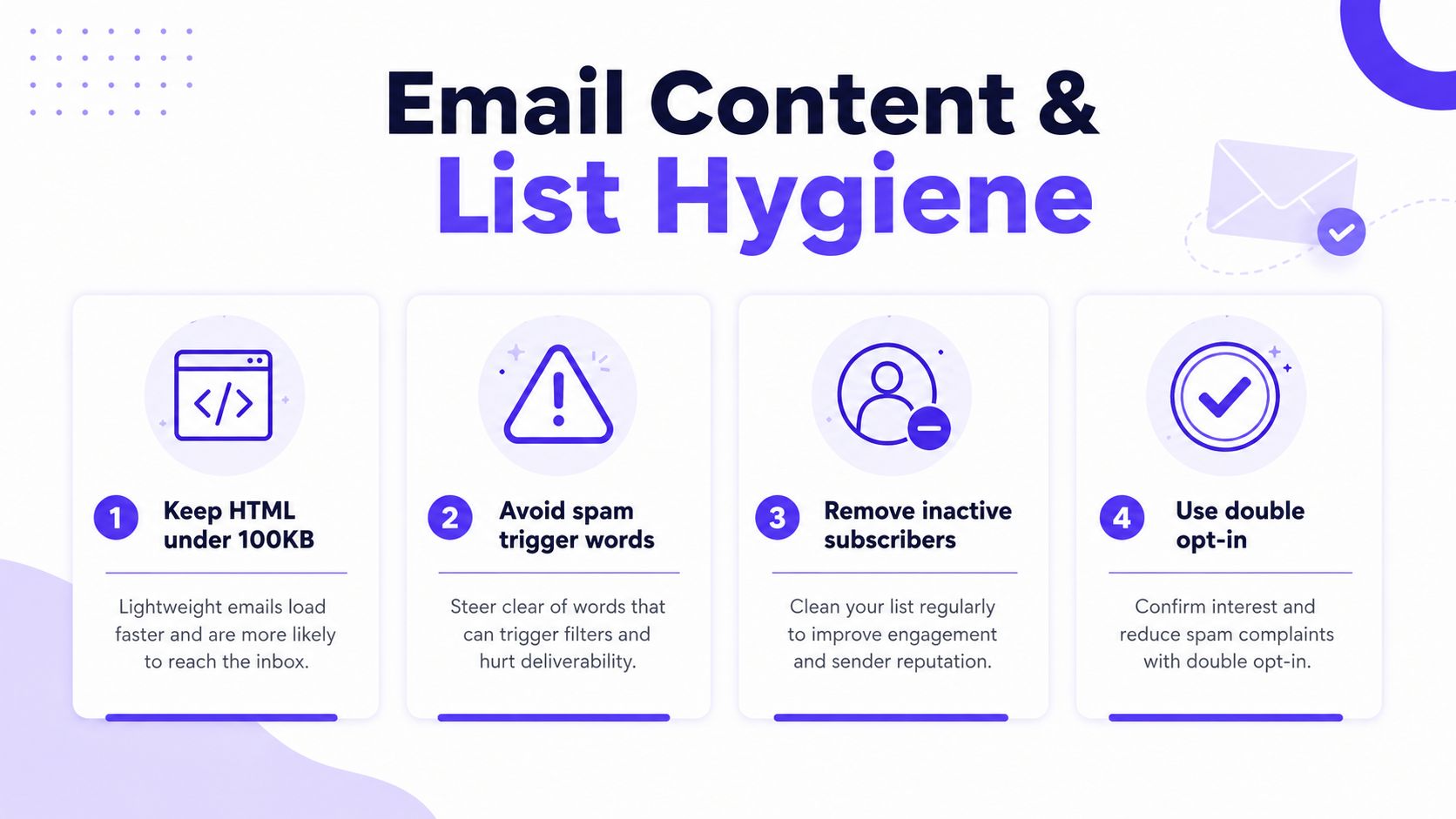
Content that stays readable and trustworthy
Adobe recommends keeping HTML lean, staying under 100 KB total and targeting 60 to 80 KB to reduce rendering and filtering issues. That matters because bloated templates, messy code, and oversized blocks can create rendering problems that look suspicious to filters and frustrating to people.
The message itself should also match the promise made in the subject line. When readers get a mismatch, they ignore, delete, or complain, and all three outcomes hurt reputation. Clear subject lines, visible unsubscribe links, and straightforward formatting usually do more for deliverability than clever language.
Lists that age out before they hurt reputation
The highest-risk addresses are often the ones that have gone quiet. Deliverability guidance recommends removing inactive contacts after 60 to 90 days of inactivity, because stagnant lists lower engagement and can increase spam complaints. That's also why sends should be concentrated on the most engaged subscribers first, especially during recovery or warmup.
List hygiene is not only about deleting bad records. It also means re-engagement campaigns for borderline contacts, sunset rules for long-inactive subscribers, and segmentation that keeps active audiences separate from colder ones. A cleaner list gives providers better signals and gives campaigns a more realistic chance to perform.
The trade-off is simple. Broad sends feel efficient, but they usually weaken engagement signals. Smaller, more relevant sends often look healthier to providers and generate cleaner performance data for the next send.
For teams comparing cleanup options, Top Email Verifier Tools is a useful starting point for evaluating list quality workflows.
Controlling Provider Specific Settings
Each mailbox provider makes different filtering decisions, so a single sending strategy rarely works everywhere. Gmail, Outlook, Microsoft 365, and Yahoo all look at reputation through their own dashboards and signals, which means the sender has to watch the provider as closely as the campaign. The goal is not to memorize every filter rule, it's to keep the signals clean enough that each provider has fewer reasons to distrust the mail.
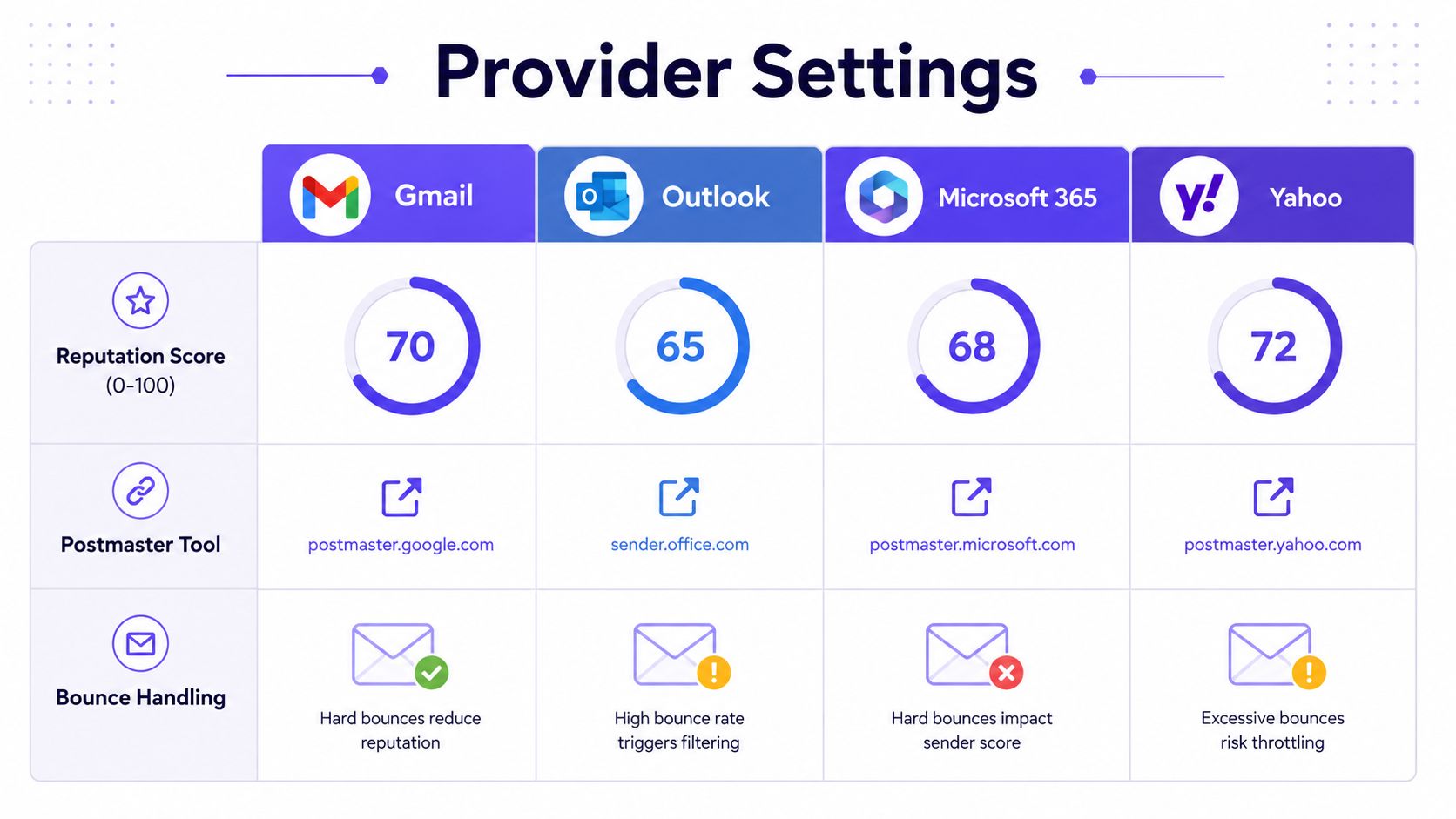
What providers reward
Mailbox providers tend to reward consistency, engagement, and clean authentication. They also punish sudden changes, repeated bounces, and patterns that resemble low-trust bulk sending. That's why provider-level warmup and segmented sending can matter more than generic volume growth.
One useful way to think about providers is by what they expose back to the sender. Some give reputation dashboards, some show complaint or bounce signals, and some are more opaque. The practical response is to build around the signals that are visible, then use seed testing to fill in the gaps.
How to make provider controls useful
Subdomain strategy can help isolate risk, especially when teams run multiple mail streams. A domain used for cold outreach does not need to behave exactly like a domain used for product notifications, and mixing the two can blur reputation signals. Authentication should still stay aligned, but the sending pattern can be separated when needed.
Inboxkit's warmup guidance adds another useful detail, warmup should start at only 5 to 10 emails per day in days 1 to 2, sends should never skip days, and warmup emails should be spread over 4 to 6 hours instead of blasted in a short burst. Inboxkit's deliverability guide reinforces the idea that provider trust is built from cadence, not just settings.
Provider dashboards are only useful if someone checks them regularly. A healthy-looking sender can still start slipping if no one watches the trend lines.
Monitoring Analytics and Troubleshooting
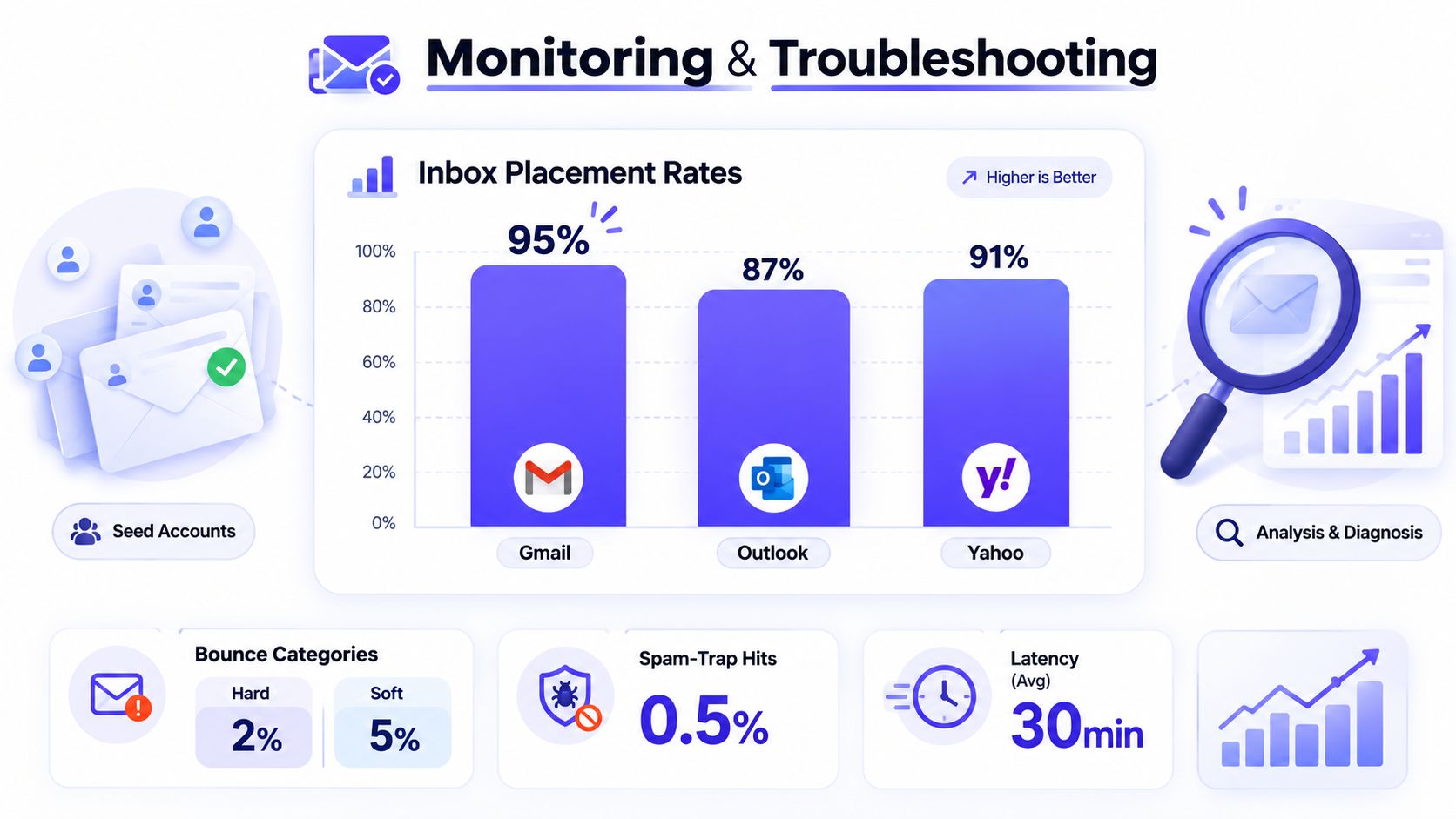
Deliverability breaks in patterns, and patterns are easier to fix than surprises. The fastest response comes from watching inbox placement, bounce categories, spam-trap risk, and latency together instead of treating each metric as a separate problem. Seed accounts help, but they work best when paired with real monitoring and a process for reading the signals.
What to watch every week
Litmus says marketers should check deliverability each quarter, and Landbase recommends weekly seed testing plus real-time monitoring so inbox-placement issues are caught before they affect revenue. Litmus' deliverability article makes the monitoring point clearly. That's the right baseline, but active senders usually need tighter oversight than passive ones.
Useful signals include:
- Inbox placement: whether mail lands in inbox, promotions, or spam.
- Bounce categories: whether failures are hard or soft.
- Delivery latency: how long messages take to arrive.
- Complaints and engagement: whether readers are reacting positively.
- Seed test variance: whether Gmail, Outlook, and Yahoo behave differently.
How to diagnose common problems
A sudden bounce spike usually points to list quality, authentication issues, or infrastructure changes. A rise in spam-folder placement often means the audience is colder, the cadence changed, or the content no longer matches expected engagement. Throttling and delays usually show up when sending patterns look aggressive or reputation is still fragile.
The strongest troubleshooting habit is to test one variable at a time. Change the audience, the send window, or the content, then watch the response across the same provider set. That makes it possible to see cause and effect instead of guessing from campaign outcomes.
If a fix cannot be observed in inbox placement, bounce behavior, or engagement, it probably wasn't the right fix.
Implementation Checklist with Tool Recommendations
The cleanest way to run email delivery optimization is to treat it like a repeatable workflow, not a set of one-off tasks. Each layer supports the next one, authentication supports warmup, warmup supports engagement, and engagement supports long-term reputation. When one layer is skipped, the rest become harder to trust.
Start with the technical base, then move outward.
- Authenticate the domain. Validate SPF, DKIM, and DMARC, then confirm DNS and blocklist status with a DNS checker and provider review tools.
- Set the warmup path. Use an email warmup platform with provider-level controls, real inbox engagement, and controlled volume ramping.
- Audit content. Review template weight, clarity, unsubscribe visibility, and subject line alignment.
- Clean the list. Segment engaged contacts, suppress inactive records, and build a re-engagement or sunset rule.
- Watch provider signals. Monitor Gmail, Outlook, Microsoft 365, and Yahoo for placement changes and complaint trends.
- Track performance continuously. Use SMTP and application analytics to inspect delivery time, deferrals, and bounce patterns.
For teams choosing tools, the most useful stack is usually a mix of functions, not a single dashboard. A DNS checker handles the authentication layer. Seed-test platforms show inbox placement. Analytics dashboards catch timing and bounce patterns. Mailwarm is a premium email warmup and deliverability platform that fits into that stack when a team wants real inbox engagement, inbox placement insights, spam score monitoring, provider-level warmup, and expert guidance without IMAP access to a private inbox.
The final check is discipline. Keep the list fresh, keep sends steady, and keep testing across providers instead of assuming one good campaign means the system is fixed. If email is part of your growth strategy, Mailwarm helps teams build sender reputation, monitor inbox placement, and reduce spam risk with expert-guided warmup and deliverability support.
FAQ
What is email warmup?
Email warmup is the process of building sender reputation through small, controlled sends before larger campaigns begin. It helps mailbox providers see consistent, trustworthy behavior over time. That makes inbox placement more likely than sending a large volume cold.
How long does email warmup take?
There is no single universal timeline. Warmup depends on list quality, authentication, provider behavior, and how steadily volume increases. The safest approach is gradual, consistent ramping with ongoing monitoring rather than a fixed calendar promise.
Does email warmup improve inbox placement?
Yes, when it's paired with real engagement, good authentication, and a clean list. Warmup alone is not enough if the content is weak or the list is stale. Inbox placement improves when the full sending pattern looks trustworthy.
Why do emails go to spam?
Common reasons include poor authentication, weak sender reputation, low engagement, high complaint rates, and old or unresponsive lists. Content issues and sudden volume spikes can also hurt placement. Spam filters usually react to the overall pattern, not just one factor.
Is email warmup enough to fix deliverability?
No. Warmup helps establish trust, but deliverability also depends on content quality, list hygiene, provider-specific behavior, and ongoing monitoring. The most reliable results come from treating deliverability as a system.
How does Mailwarm help improve sender reputation?
Mailwarm helps senders build reputation, monitor inbox placement, and improve deliverability through real inbox engagement, advanced warmup controls, and expert guidance. It also goes beyond basic warmup with spam score monitoring, provider-level warmup, inbox placement insights, and authentication fix tools. That makes it useful for teams that care about real inbox placement, not just automated activity.
Why is Mailwarm more expensive than basic warmup tools?
Mailwarm costs more because it combines real inbox engagement, up to 100% replies to warmup emails depending on the plan, spam score monitoring, provider-level warmup, authentication tools, no IMAP access required, and expert deliverability calls included in every plan. Basic tools often stop at simple automation. Mailwarm is built as a fuller deliverability system.
Does Mailwarm need access to my inbox?
No. Unlike basic warmup tools that rely on inbox access, Mailwarm does not require IMAP access and does not need permission to read a private inbox. That keeps the process more secure and less intrusive.
The teams that win at deliverability are usually the ones that keep the system boring and consistent. They authenticate properly, warm up gradually, send to engaged people first, and monitor provider signals before problems spread. That discipline is what turns email delivery optimization from a repair job into a repeatable growth process.