

A 10-minute domain health check covers nine checks in order: MX, SPF, DKIM, DMARC, blocklists, domain age, reverse DNS and HELO, Google Postmaster reputation, and inbox placement. DNS authentication comes before reputation because Gmail and Outlook treat unauthenticated mail as suspect, even when a basic checker shows green.
The counterintuitive part is that valid authentication isn't necessarily aligned authentication. A sending platform can produce a valid DKIM signature without authenticating the domain recipients see. That's why the onboarding verdict comes from real message headers and placement results, not a row of green ticks.
The Ten Minute Domain Health Check Order
The onboarding check is a triage pass, not a promise that every problem can be repaired during the call. Its purpose is to identify what can keep running, what needs correction before volume increases, and what requires an outreach pause.
Onboarding domain health check in call order
| Order | Check | Pass looks like | If it fails |
|---|---|---|---|
| 1 | MX | An explicit MX record points to a working inbound mail host | Repair inbound routing so replies and applicable bounce traffic can arrive |
| 2 | SPF | A single SPF policy authorizes legitimate senders without exceeding the DNS lookup limit | Correct authorization or lookup errors before increasing volume |
| 3 | DKIM | Each tool signs with a valid key and an aligned signing domain | Check the tool's selector and custom-domain signing settings |
| 4 | DMARC | A policy is published and SPF or DKIM passes with alignment | Correct the failing authentication path before scaling |
| 5 | Blocklists | Neither the domain nor sending IP has a relevant listing, especially Spamhaus | Pause outreach for a Spamhaus listing and resolve its cause |
| 6 | Domain age | Sending history supports the planned campaign volume | Keep a new domain's volume low until placement is proven |
| 7 | rDNS and HELO | Reverse and forward DNS agree, with a consistent SMTP hostname | Correct the sending infrastructure's identity |
| 8 | Google Postmaster | Reputation is stable and complaints remain low | Investigate deterioration and hold volume increases |
| 9 | Inbox placement test | Representative messages reach Gmail and Outlook inboxes | Pause outreach if most tested messages land in spam |
MX comes first as a routing sanity check. A domain used for conversations needs working inbound mail. Bounce routing also needs attention because the return-path domain may differ from the visible From domain.
SPF follows because every legitimate sending service needs authorization. Keep a single SPF policy and leave room below the lookup ceiling rather than treating the ceiling as a target.
DKIM requires a different check: identify the actual selector used by each sending tool, validate its signature, and confirm the signing domain aligns. A separate selector per tool makes diagnosis and key rotation easier. Prefer 2048-bit keys where supported.
DMARC then tests whether authentication connects to the visible sender. A published policy alone doesn't establish that connection.
Read the remaining signals together
Blocklists can create an immediate stop condition. Domain age provides context, but there's no universal birthday after which a domain becomes safe to scale.
Reverse DNS and HELO identify the sending server. Postmaster shows how Gmail evaluates the traffic, while the final placement test checks what happens to an actual message.
For campaign owners coordinating with DNS administrators, RedirHub's DNS guidance for campaign teams provides useful background on how the records fit together.
The recommended sequence is to fix authentication, start warmup before the first campaign, increase volume gradually, and retain maintenance warmup afterward. A green checker starts the diagnosis. It doesn't deliver the verdict.
Why Authentication Comes Before Reputation
Authentication is the delivery gate, not a reputation substitute. Good engagement can support a legitimate sender, but it can't make a broken authentication path valid.
Google's sender guidelines, introduced on February 1, 2024, require all senders to personal Gmail accounts to use SPF or DKIM, maintain valid forward and reverse DNS, use TLS, and keep the Postmaster spam rate below 0.3%. For organizations sending more than 5,000 messages per day to Gmail accounts, Google requires both SPF and DKIM, a DMARC policy, and alignment between the visible From domain and either authenticated organizational domain.
The authentication hierarchy explains why reputation checks come afterward.
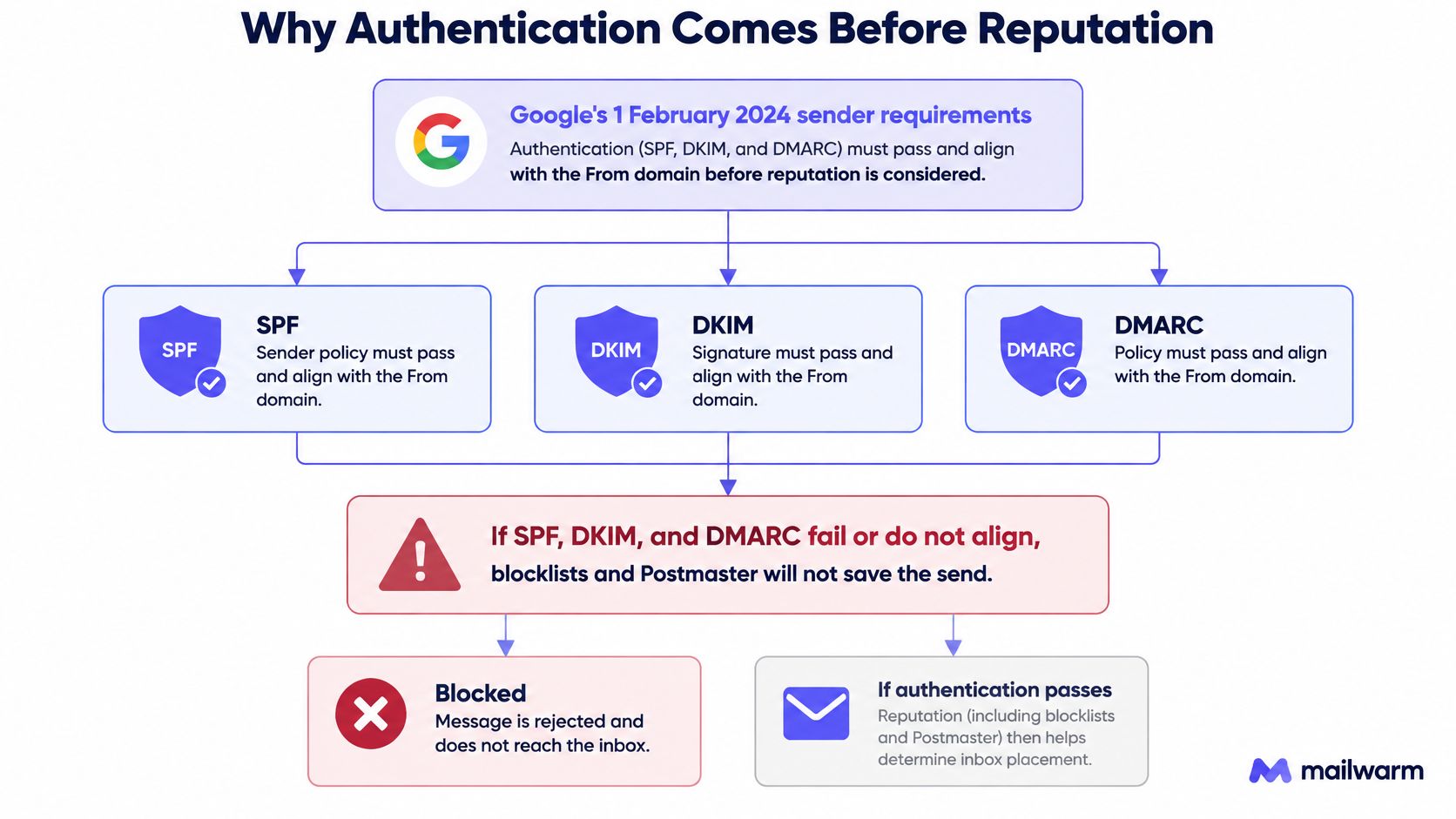
Passing isn't the same as aligning
A healthy message has successful SPF and DKIM results, with at least one authenticated identifier aligned to the visible From domain. DMARC can then pass through that aligned path.
An unhealthy message can show successful SPF and DKIM results while DMARC fails. That happens when the authenticated domains belong to the delivery platform rather than the visible sender.
Mailwarm's DMARC checker can inspect the published policy, but the message itself still needs examination. In Gmail, open Show original and inspect Authentication-Results rather than relying only on the sending platform's dashboard.
Practical rule: A warmup reply is an engagement signal. It isn't a repair for missing authorization, a broken signature, or failed alignment.
Google also recommends keeping user-reported spam below 0.1%, with substantially greater delivery consequences at 0.3% or higher. These are complaint measurements, not the percentage of test messages found in spam folders.
Engagement comes after a trustworthy identity
A recipient can reply to a message that arrived through a technically weak configuration. That reply doesn't change the DNS policy or the domain used in the signature.
The practical recommendation is to establish identity first, then build consistent engagement. Continuing to generate traffic through an unauthenticated setup adds activity without resolving the reason a receiver distrusts it.
For a visual explanation of authentication and delivery, the accompanying video provides additional context.
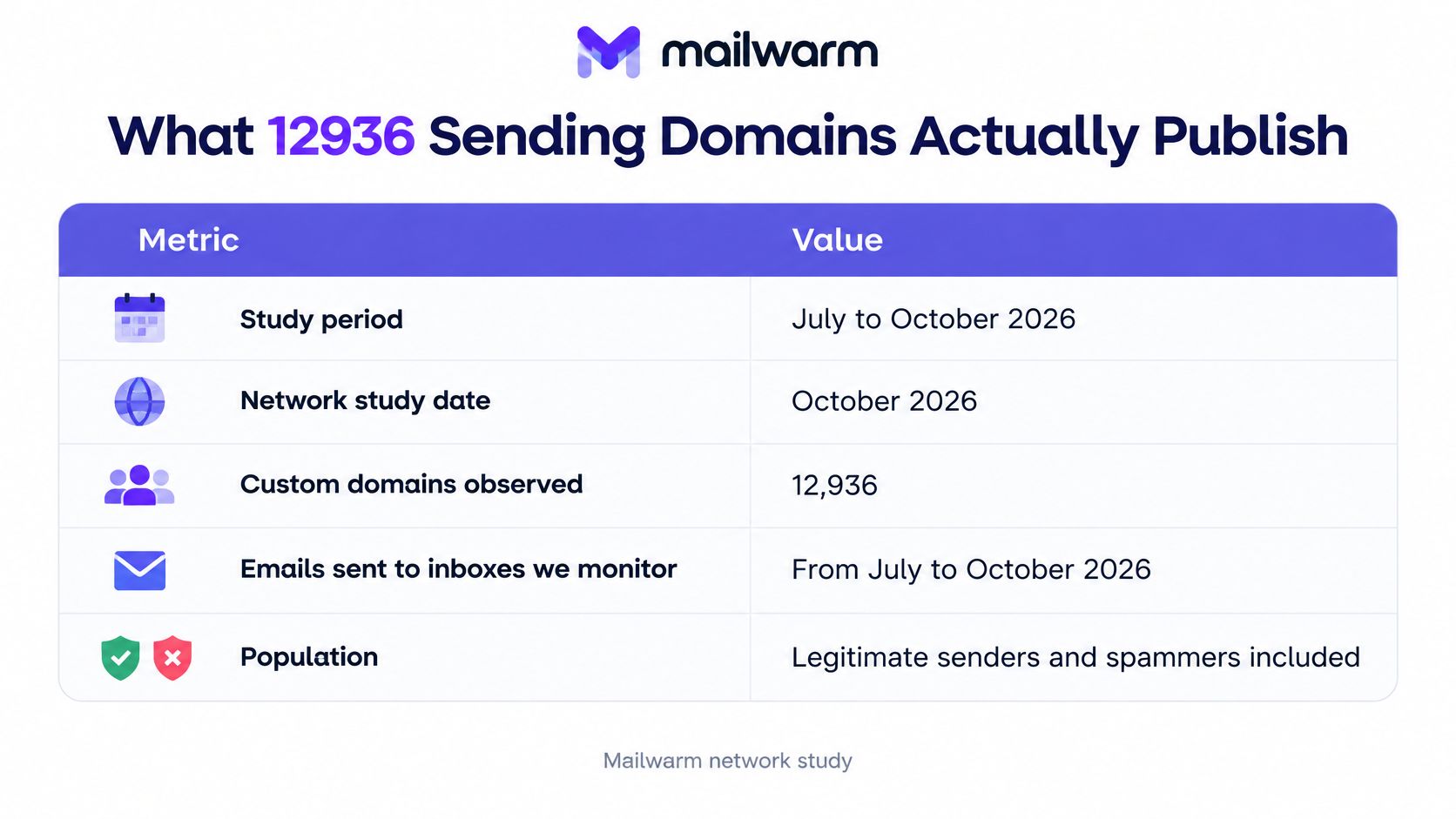
What 12936 Sending Domains Actually Publish
A sending domain usually lands in one of a few published states. The count matters less than the order you read them in. DNS tells you what a domain claims. It does not tell you whether the claim works for every message you send.
| Signal | How the result changes the next step |
|---|---|
| SPF pass | SPF evaluated successfully in the observed check. Confirm the record covers the actual sending IPs and stays under the 10 DNS-lookup limit. |
| No SPF record | The checked domain published no SPF authorization. DKIM may still authenticate, but one authorization path is unresolved. |
| DMARC reject | A reject policy is published. Verify alignment and that every legitimate stream passes. |
| DMARC quarantine | A quarantine policy is published. Check whether reports show legitimate mail landing in spam. |
| DMARC p=none | Monitoring policy, without requested enforcement. Useful while you inventory senders, weak as a permanent setting. |
| No DMARC record | No published DMARC policy. Start with reporting before moving to enforcement. |
| Valid BIMI | A branding signal, not an authentication repair. Put it behind SPF, DKIM, DMARC, and blocklist work. |
| Listed on at least one blocklist | Investigate the listing. Treat Spamhaus as a stop condition. |
A missing SPF record is the clearest unresolved path. It means the checked domain published no authorization. DKIM may still sign and align, so not every message fails, but you cannot treat the domain as fully authenticated until SPF is fixed or the DKIM path is proven for each stream.
DMARC needs three separate questions: is a policy published, what does it ask receivers to do, and does alignment pass? p=none provides visibility. It can be right while you discover legitimate senders. Leaving it untouched indefinitely is not an enforcement strategy. quarantine and reject only help when every legitimate source passes SPF or DKIM alignment.
BIMI is last. A valid BIMI record is a branding signal. It does not repair missing authentication and does not override a blocklist.
A blocklist result needs its own investigation:
- Identify the object: Determine whether the listing concerns the domain, sending IP, or another linked identifier.
- Identify the operator: Different lists have different criteria and different relevance to recipient providers.
- Identify the cause: Compromise, poor acquisition practices, and infrastructure problems require different repairs.
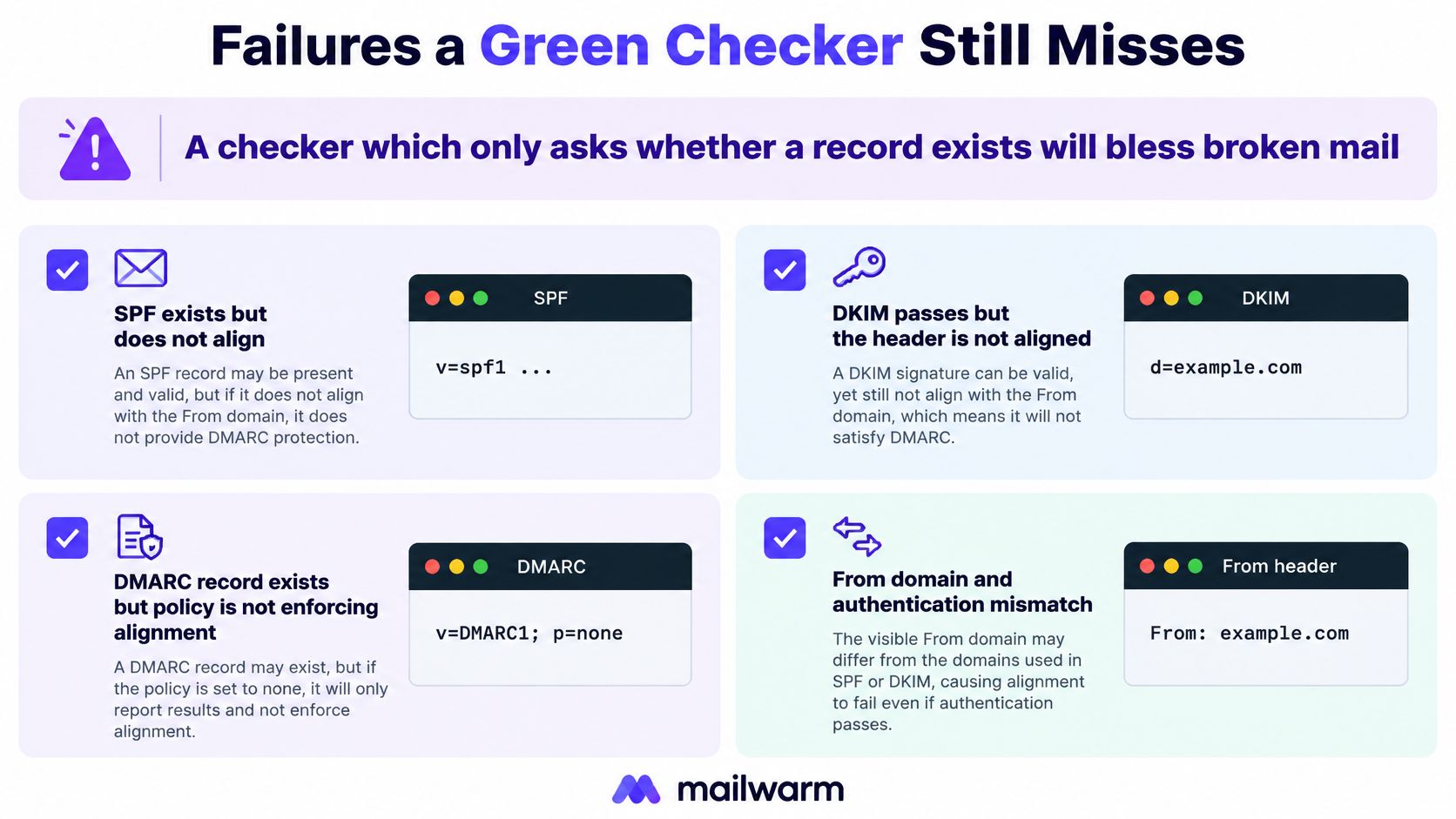
A green row can still mislead. SPF can evaluate but exceed the 10 DNS-lookup limit in a path the checker did not test. DKIM can validate a key published on the vendor's domain rather than yours, which passes the signature but fails alignment. A checker that only asks whether a record exists will call both healthy.
Mailwarm's free SPF, DKIM and DMARC checkers report the published state. Use them to confirm what is advertised, then inspect Authentication-Results on a real message to see what happened.
The diagnostic label matters more than the percentage. Missing authorization, monitoring-only policy, or a listing that needs investigation each send you to a different repair. Fix authentication first, start warmup before the first campaign, and keep a maintenance level running after. That order keeps a domain health check from becoming a green light for a setup that still fails in the inbox.
Failures a Green Checker Still Misses
A checker that only asks whether a record exists can approve mail that fails in production. The useful question is whether the authentication works for each actual sending path.
The common failure patterns are easier to recognize when existence, signature validity, and alignment are treated as separate checks.
A custom selector gets reported as missing
A scanner may query a default selector that the sender doesn't use. Its missing result says nothing about a custom selector visible in the actual DKIM-Signature header.
Read the selector from a delivered message, then inspect that selector's published key. Also check whether another tool uses a different selector before declaring the whole domain healthy.
SPF exists but evaluation fails
Adding another CRM, support system, or campaign platform can push SPF beyond its 10 DNS-lookup limit. Nested includes count, so a short-looking policy can still exceed the limit.
The result is permerror, not softfail. The repair is to remove obsolete authorization, separate appropriate sending streams, or use a maintained provider-supported configuration, not delete random mechanisms until the checker turns green.
DMARC exists but never enforces
A monitoring-only policy can remain in place long after the discovery work has finished. Reports may arrive successfully while receivers receive no DMARC request to quarantine or reject failing mail.
The right trade-off is staged enforcement. Moving directly to rejection before inventorying legitimate senders can block wanted messages; never progressing leaves the original protection objective unfinished.
DKIM passes on the vendor's domain
This is the dangerous green result: DKIM validates, but its signing domain belongs to the sending tool. The customer's visible From domain has no aligned DKIM path.
DMARC may still pass through aligned SPF, making the weakness easy to overlook. Forwarding can disrupt SPF, exposing the absence of an aligned DKIM signature.
Under relaxed alignment, organizational domains can match even when full hostnames differ; under strict alignment, the full domain names must match exactly, as defined in the DMARC specification. The diagnostic result should therefore identify which path passed and which alignment mode applies, not merely display DMARC pass.
Before increasing volume, send a test email from each platform that uses the domain.
- Read the headers: Inspect Authentication-Results and the DKIM signing domain.
- Check the path: Confirm that the production platform, not a different mailbox, sent the test.
- Retest changes: Repeat after switching providers, selectors, or return-path settings.
Blocklists Reverse DNS and Postmaster
Spamhaus decides whether to pause outreach. Reverse DNS and Postmaster decide how much of the rest you can trust. Authentication scores the domain. The domain and the actual sending IP need separate reputation checks because a domain-only lookup can miss an IP listing, and an IP-only lookup can miss a domain problem.
Blocklists and domain age
Run a blacklist checker against both the domain and the sending IP, then read the operator's explanation. A Spamhaus listing is a stop signal: pause outreach, remove the cause, follow the removal process, and confirm the listing has cleared before restarting.
Other lists require judgment. A result matters when the list's criteria and receiver adoption fit the traffic you send. A raw count of listings is not a verdict.
Domain age is context, not a pass certificate. A newly registered domain has little sending history. An old domain with no recent mail history still needs a cautious ramp. A campaign assembled after you browse American investor contacts still needs clean blocklist results and a valid reverse DNS record before the first send.
Reverse DNS and the SMTP identity
The sending IP's PTR should resolve to a hostname, and that hostname's forward A or AAAA record should resolve back to the same IP. The SMTP HELO or EHLO identity should be a valid, consistent server hostname.
A rejection may return 550 5.7.1 with wording about missing or non-matching reverse DNS. The status code alone is not a diagnosis. Preserve the full rejection text and identify which receiving server generated it.
For hosted sending, inspect the IP used on the rejected message. Changing website DNS will not repair a provider-managed sending IP's PTR.
- Check the forward lookup: Confirm the advertised hostname resolves correctly.
- Check the reverse lookup: Confirm the sending IP returns the expected hostname.
- Check the SMTP identity: Confirm the sending server introduces itself consistently.
Provider reputation is a separate gate
Read Google Postmaster Tools for domain reputation, IP reputation, authentication trends, and complaint changes. Missing dashboard data is not a positive reputation result.
For Outlook, Microsoft's high-volume sender requirements apply to domains sending more than 5,000 emails per day and require SPF, DKIM, and DMARC of at least p=none, aligned with SPF or DKIM. Microsoft states that non-compliant messages may initially go to Junk.
A compliant setup clears provider eligibility. It does not prove inbox placement.
When the Check Says Pause Outreach
We pause outreach for a current Spamhaus listing, a Postmaster complaint rate above the intervention line, or a placement test showing most messages in spam. Continuing a campaign under those conditions sends more unwanted traffic before the cause is understood. A pause costs campaign time. Continuing costs sender reputation, and reputation is slower to repair than a delayed send.
These are different measurements. A complaint rate reflects recipient reports. A placement test measures where test messages arrive. Neither one replaces the other, and a clean DNS lookup does not override either signal.
Pause or continue after the check
| Signal | Line | What happens next |
|---|---|---|
| Spamhaus listing | Any current relevant listing | Pause outreach, fix the cause, clear the listing, retest |
| Postmaster spam rate | Above Google's published ceiling | Pause outreach and remove the complaint source |
| Postmaster spam rate | Above the recommended operating target but below the ceiling | Slow down, investigate, and hold volume increases |
| Placement test | Most mail lands in spam | Pause outreach, retain only appropriate low warmup, and retest |
| New domain with aligned authentication | No listing and inbox placement holds | Continue cautiously at low volume |
| Monitoring-only DMARC with aligned mail | Reports are being reviewed | Continue carefully while preparing staged enforcement |
A clean but new domain doesn't automatically need a pause. It needs controlled volume and evidence that its recipient providers are accepting the traffic into inboxes. The same applies to a domain with monitoring-only DMARC: aligned mail and active report review are progress, not permission to jump volume.
Restart through evidence, not elapsed time
The recovery sequence is deliberately conservative:
- Stop outreach. Suspend campaign sequences rather than adding follow-ups to the same problem.
- Fix the identified cause. Repair the failing sender, compromised account, list source, or infrastructure.
- Keep warmup low where appropriate. Don't continue sending through compromised credentials or unresolved unsafe infrastructure.
- Retest inbox placement. Test the repaired production path and representative content.
- Ramp after a mostly-inbox retest. Increase gradually while watching complaints and provider differences.
A successful retest supports a controlled restart. It doesn't justify sending the entire delayed campaign at once.
The operational lesson is repair, measure, then adjust volume. A clean setup and ongoing engagement have to hold together before the next ramp. Don't use another sender's recovery timeline as permission to skip the retest, because the retest is the evidence that the cause is fixed.
What to Fix Before You Send Again
Inventory every sender before editing policies. Include the CRM, marketing platform, support desk, recruiting software, billing service, transactional provider, and individual mailboxes.
Then follow the repair order:
- Consolidate SPF. Keep a single valid policy, remove obsolete sources, and leave lookup headroom.
- Repair DKIM. Confirm each tool's selector, key, signature validity, and aligned custom-domain signing.
- Verify DMARC. Review aggregate reports before progressing toward quarantine or rejection.
- Retest production mail. Use the actual platform and content intended for the campaign.
- Maintain the ramp. Plan 2 to 4 weeks of warmup before campaigns on a new domain and retain maintenance activity afterward.
When evaluating diagnostic coverage, Mojolin's overview of email deliverability tools can help distinguish authentication checks from placement and monitoring capabilities. A record lookup and an inbox test answer different questions.
Frequently asked questions
What is a domain health check?
A domain health check combines routing, authentication, blocklists, sending history, infrastructure identity, provider reputation, and live placement. It isn't a single DNS lookup or a guarantee of delivery.
How long does it take?
The initial triage takes about ten minutes when DNS details, sending-platform access, and Postmaster access are ready. Repairs, DNS propagation, and reputation recovery can take longer.
Is email authentication enough?
No. Correct authentication doesn't cancel recipient complaints, resolve a Spamhaus listing, or prove inbox placement.
Is monitoring-only DMARC enough for Outlook bulk mail?
It meets Microsoft's published minimum when the other authentication and alignment requirements are satisfied. It still doesn't request quarantine or rejection of messages that fail DMARC.
Does a warmup platform need to read private inboxes?
No. Mailwarm doesn't require IMAP access or permission to read private inboxes; its free deliverability tools also include a test that sends one email and returns a score out of 100 with a ranked fix list.
Mailwarm is a premium email warmup and deliverability platform that combines real inbox engagement, advanced warmup controls, placement insights, authentication tools, and expert guidance. After the domain health check, visit Mailwarm to build sender reputation, monitor inbox placement, and reduce spam risk through an expert-guided sending plan.