
You've cleaned the list, checked the send settings, and still the bounce rate is climbing. That's usually the point where teams realize the problem isn't just bad addresses, it's a mix of list quality, authentication, reputation, and sending behavior. In email, bounce rate reduction is less about trimming contacts and more about fixing the signals mailbox providers trust.
A healthy bounce profile starts with knowing which failures are permanent, which are temporary, and which are really reputation or policy problems in disguise. It also means treating warmup, SPF, DKIM, DMARC, and inbox placement as part of the same system, not separate chores. Mailwarm helps senders build reputation, monitor inbox placement, and improve deliverability through real inbox engagement, advanced warmup controls, and expert guidance.
Why Emails Bounce and What Each Type Means
The worst moment is when a campaign goes out clean on paper, then the bounce alerts start rolling in anyway. In that moment, the fix depends on whether the issue is a broken address, a temporary mailbox problem, or a trust problem on the sender side.
In practice, bounce rate is the percentage of sessions in which a visitor lands on a page and leaves without interacting further, but in email delivery work the same word means something different. Here, it's the delivery failure that happens when a message doesn't reach the recipient's inbox. That's why teams need to separate email bounces from web analytics bounce rate before they start changing the wrong thing.
Hard bounces and soft bounces
A hard bounce usually means the address is permanently invalid, the mailbox no longer exists, or the recipient server has rejected the sender in a lasting way. A soft bounce points to a temporary condition, such as a full inbox, throttling, or a server issue that might clear later.
Practical rule: if the same address keeps failing, suppress it fast. If the failure looks temporary, watch the pattern before removing it.
The distinction matters because the response should be different. Hard bounces belong in suppression immediately. Soft bounces need a limit, a review, and then a decision.
Mailbox providers often expose the reason through SMTP response details, but many teams ignore those codes and only look at the count. That's a mistake. The code tells the story, and the story determines whether the problem sits in the list, the content, or the sending infrastructure.
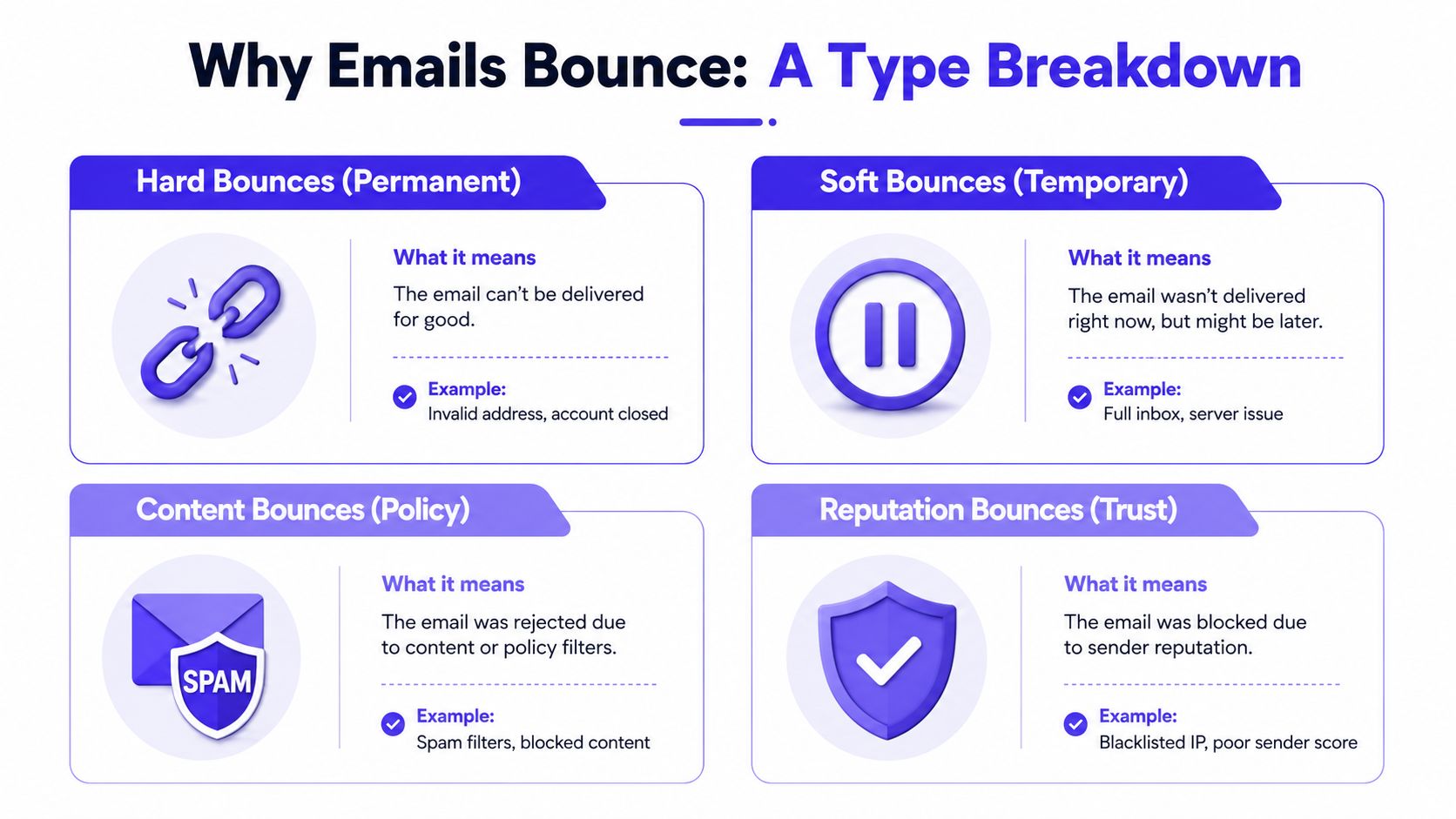
Keep the distinction between content bounces and reputation bounces in mind too. Content bounces happen when policy filters reject the message. Reputation bounces happen when the mailbox provider no longer trusts the sender enough to keep accepting mail. Those two are easy to confuse, and they need very different fixes.
Read the blocked vs bounced email distinction in Mailwarm's guide
Diagnosing the Root Cause of High Bounce Rates
A bounce spike looks simple on a dashboard, but the cause rarely is. Teams that jump straight into list pruning often miss the core issue, which can sit in content, sending patterns, authentication, or provider trust.
The cleanest way to diagnose the problem is to separate the failure into four buckets, then check which bucket lines up with the timestamps. If the bounces appear right after a volume jump, the infrastructure or reputation layer is usually involved. If they appear on one sequence or one page of a list, the problem is more likely content or list quality.
Build a four-part diagnosis sheet
Start with the basics from your ESP logs. Capture the SMTP response code, the affected domain, the time of failure, and whether the sender changed anything that day. Then group the failures into these categories:
- Content signals: wording, links, attachments, spam-like structure, or overly aggressive formatting.
- List signals: invalid addresses, disposable inboxes, role-based accounts, or stale contacts.
- Infrastructure signals: missing authentication, poor setup, or sending from a domain with weak trust.
- Reputation signals: repeated throttling, silent deferrals, or blocks tied to trust, not syntax.
A quick checklist helps when the same team owns outbound, nurture, and transactional mail. The bounce may not even be caused by the campaign under review.
If the spike follows a new template, investigate content first. If the spike follows a list import, start with list quality. If neither changed, look at authentication and reputation.
The most useful habit is timestamp cross-referencing. Teams should compare bounce spikes against send volume, segment choice, and provider mix, then ask what changed within the same window. That habit catches the hidden causes faster than broad cleanup ever will.
List Hygiene Tactics That Actually Lower Bounces
A clean list is still the cheapest bounce reduction lever, but “clean” has to mean more than deleting old contacts. The goal is to keep bad addresses out at capture, suppress repeat failures early, and avoid sending to contacts who stopped engaging long ago.
Use controls at capture and before send
Double opt-in is still the simplest way to cut bad signups before they reach the sequence. Real-time verification at the form fill stage helps too, especially for lead magnets and open web forms where fake or mistyped addresses slip in easily. For dormant subscribers, a re-engagement message should come before the prune, not after it.
Role-based addresses, disposable inboxes, and spam traps shouldn't be handled the same way. Role-based accounts can be valid but risky in sales outreach. Disposable inboxes are usually a poor fit for long-term programs. Spam traps are a reputation hazard, and repeated contact with them can poison future sends.
A useful reference on broader list control comes from this list hygiene direct mail guide, especially for teams that want to tighten acquisition and suppression discipline across channels.
Apply a repeatable hygiene routine
A practical list hygiene routine usually includes:
- Immediate suppression: remove hard bounces and repeated failures right away.
- Re-engagement before removal: give dormant contacts one final chance to respond.
- Capture-point validation: check addresses before they enter the CRM.
- Quarterly review: scan the highest-risk segments, imports, and inactive pools.
The point isn't to obsess over every address. It's to stop sending to recipients who create predictable failure patterns. That's where bounce rate reduction becomes durable instead of temporary.
Setting Up SPF, DKIM, and DMARC the Right Way
Authentication fixes a different class of bounce problems than list hygiene does. When the mailbox provider doesn't trust the sender identity, a technically valid campaign can still fail before it ever has a real chance to land well.
Treat each record as a separate layer
SPF tells the receiving server which systems are allowed to send on behalf of the domain. DKIM adds a cryptographic signature so the message can be checked for tampering. DMARC tells the mailbox provider how to handle alignment failures and whether to monitor or enforce policy.
A sender can have one record right and still fail the chain if another layer is broken. Common issues include a misspelled include value, duplicate records, or overly broad SPF setup that becomes hard to maintain. One practical guide recommends keeping SPF lookup pressure in mind because too many lookups create avoidable failure risk, while DMARC should move from monitoring to enforcement only after the domain is stable. The 7-point email verification method is also useful context when list quality and authentication are being checked together.
Authentication records at a glance
| Record | Purpose | Common Failure | Quick Check |
|---|---|---|---|
| SPF | Authorizes sending sources | Too many lookups, wrong include value | Confirm the sending service is listed correctly |
| DKIM | Signs the message | Broken signature, bad key rotation | Test that the signature passes after send |
| DMARC | Enforces alignment policy | Policy too strict too soon | Start in monitoring, then tighten gradually |
A sender can still see bounces after authentication is fixed if the content or reputation layer is weak. That's why authentication should be treated as a foundation, not the full solution.
The Mailwarm email authentication guide is a helpful companion when a team needs to review setup before chasing list changes.
How Warmup Protects Sender Reputation
A mailbox provider doesn't just ask whether a message is authenticated. It also asks whether the sender behaves like a real, trustworthy sender over time. That's where warmup matters most, because reputation bounces respond to consistent engagement, not one-off cleanup.
Why reputation signals still matter
Modern warmup works by creating real inbox activity that looks natural to mailbox providers. Opens matter less than they used to on their own. Replies, threads, spam removal, and important marking send stronger trust signals because they show actual interaction, not just passive delivery.
A network of 50,000+ aged real inboxes gives that activity more weight than scripted exchanges. It's not just about sending mail back and forth. It's about building the pattern providers expect from a sender that belongs in the inbox.
Provider-level warmup matters when a team cares more about Gmail than Yahoo, or Outlook than a generic mailbox mix. Different providers respond differently, so controlled warmup should reflect the audience mix rather than treating every mailbox the same.
The useful benchmark is simple. If the provider sees steady positive signals, trust can improve. If it sees erratic volume, poor engagement, or repeated reputation issues, bounce risk rises again.
The video below is a useful companion for teams that want a more visual explanation of how warmup affects sender trust.
Practical rule: warmup should protect reputation before the real campaign starts, not after inbox placement has already fallen apart.
Mailwarm's warmup duration guide is useful when a team wants to pace reputation building without overthinking the calendar.
Monitoring, Automation, and Ongoing Maintenance
Bounce rate reduction only lasts if the monitoring loop stays active. A sender can fix a domain this month and watch it drift again next month if suppression, alerts, and review cycles aren't built into the workflow.
What to monitor every week
Teams should watch for sudden bounce spikes, blocks, and changes in inbox placement. A sudden jump in block rates usually means the provider no longer likes the sender profile, while a soft-bounce spike often points to a temporary sending or mailbox issue. If the same domain keeps triggering alarms, pause the flow and inspect the most recent changes before sending more.
Automation helps keep the system honest. Common rules include suppressing repeated soft bounces, re-validating stale contacts before re-engagement, and routing risky segments into separate send queues. That reduces the chance that one bad batch distorts the rest of the program.
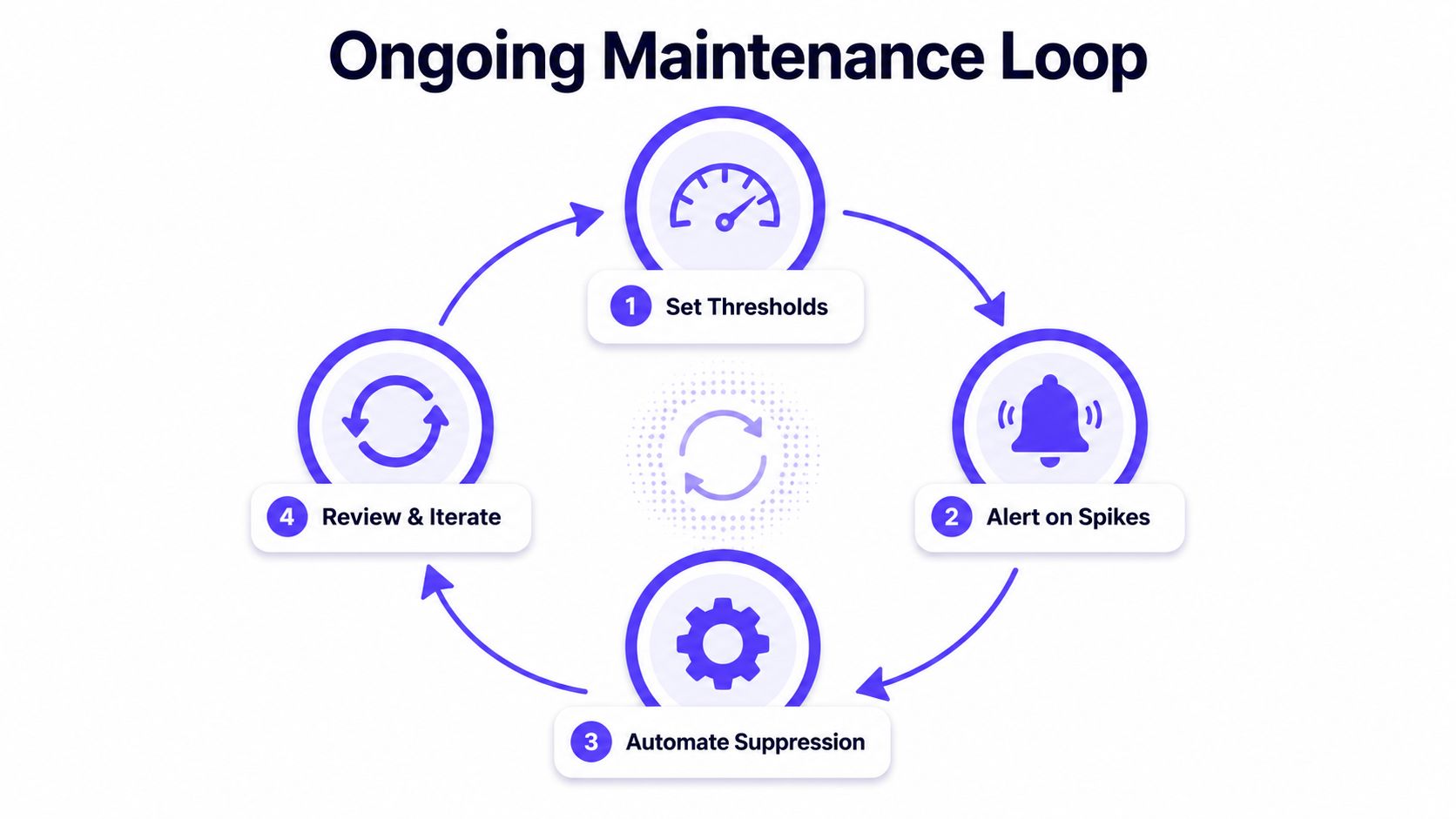
A simple maintenance calendar works better than a long playbook no one opens. Quarterly audits catch stale suppression logic, broken authentication, and list segments that have drifted into poor quality. Weekly checks keep the team from learning about trouble too late.
Where Mailwarm Fits in a Bounce Reduction Workflow
Mailwarm sits in the part of the workflow where reputation, inbox placement, and controlled engagement overlap. It's a premium email warmup and deliverability platform, not a basic warmup tool, so it's aimed at senders who need more than automated mail exchange.
Mailwarm vs Basic Warmup Tools
| Capability | Basic Warmup Tools | Mailwarm |
|---|---|---|
| Real inbox engagement | Often limited to simple activity | Real engagement signals across opens, replies, threads, spam removal, and important marking |
| Inbox placement insights | Usually minimal | Included |
| Provider-level warmup | Rare | Included |
| Authentication fix tools | Usually not included | Included |
| IMAP access requirement | Often required | No IMAP access required |
| Expert guidance | Rare or absent | Expert deliverability calls included in every plan |
The higher price makes sense for teams that want more than volume. Mailwarm includes a network of 50,000+ aged real inboxes, spam score monitoring, inbox placement insights, provider-level warmup, B2B and B2C warmup, custom content warmup, authentication fix tools, bounce prevention, and deliverability analytics. Depending on the plan, it can also generate up to 100% replies to warmup emails.
That said, it doesn't replace list hygiene or fix broken content by itself. It works best when reputation work is being done alongside authentication, suppression, and send discipline.
If email is part of the growth plan, Mailwarm helps teams build sender reputation, monitor inbox placement, and reduce spam risk with expert-guided warmup.