
Why Warming Up an Email Domain Safely and Effectively Determines Inbox Placement
Mailbox providers are more likely to deliver your emails if they can easily verify your legitimacy. If you start sending large volumes from a new, inactive domain with little or no history, poor authentication, and hastily set up infrastructure, you risk triggering spam filters. Warming up your domain creates a stable, trustworthy pattern, sending consistent emails, getting replies, and gradually increasing volume. Done right, it establishes a lasting reputation with providers and improves inbox placement.
The objective is clear: send low, consistent, and engaging email volumes that seem natural to mailbox providers. Then, gradually increase your outreach. This approach helps maintain the reputation of your domain and ensures that your initial unsolicited email outreach efforts are successful.
Technical Setup Required Before You Warm Up an Email Domain
Proper technical infrastructure is crucial before beginning the warm-up process. Ensure that your DNS, authentication records, and sending infrastructure are set up to allow mailbox providers to validate your messages easily.
- Publish a valid SPF (Sender Policy Framework) record that includes all services you plan to use for sending emails.
- Sign each message with DKIM (DomainKeys Identified Mail), using 1024-bit or stronger keys.
- Deploy DMARC (Domain-based Message Authentication, Reporting & Conformance) with identifiers that are properly aligned. Begin with a monitoring policy to gather feedback.
- Configure MX (Mail Exchange) records for your main domain or your warm-up subdomain.
- Set up reverse DNS and make sure your EHLO/HELO hostname is consistent.
- If needed, isolate your tracking and link domains from your core brand to mitigate risk.
Large organizations often encounter restrictions due to sender policy framework (SPF) limits. If you manage multiple services, you should familiarize yourself with techniques for avoiding SPF record length limits in multi-domain setups. This can help prevent your emails from being rejected or marked as spam during the warm-up phase.
How to Choose the Right Domain Structure When You Warm Up an Email Domain
Decide between using your root domain and a subdomain. Opting for a subdomain can help reduce risk to your primary mail, as it acts independently of your main website and can help to isolate issues related to email deliverability. Building reputation on a subdomain minimizes the chance of affecting the deliverability of your core business email. However, maintain clear branding so prospects still recognize your messages. Set up several mailboxes per domain or subdomain and warm up each address separately. Consistent sender names across these mailboxes allow providers to map and identify your legitimate activity over time.
A Practical Schedule to Warm Up an Email Domain Without Inviting Blocks
Start with a very low number of daily emails. Keep your messages straightforward, personable, and relevant, avoiding excessive links or attachments. Mix emails to new recipients with emails to trusted contacts whose engagement you can count on. Only increase send volumes as you confirm stability in inbox placement.
- Week 1: 5–15 emails per mailbox each day.
- Week 2: 15–30 emails per mailbox each day.
- Week 3: 30–50 emails per mailbox each day.
- Week 4+: Continue increasing volume but only if placement remains solid.
Carefully watch for soft bounces, spam folder placement, and engagement such as replies. If you encounter problems, pause any increases for several days before trying to ramp up again. For teams that need to scale quickly, explore structured warm-up schedules for reaching higher daily volumes. Following a measured plan protects your sender reputation as you grow.
How to Monitor Deliverability While You Warm Up an Email Domain
Examine your sender reputation signals every day. Use a spam checker to test for inbox placement before raising your sending limits. Perform tests by sending initial emails to accounts on platforms like Gmail, Outlook, and Yahoo. Keep track of email delivery failures (bounces), noting the type of failure and the email provider. Review your DMARC reports to confirm proper domain alignment. Monitor for complaint notifications and any signs of throttling by major providers.
Focus on actual inbox placement as your key metric. Compare your results against benchmarks for cold outreach deliverability. If your inbox rates fall behind these standards, hold on further increases and resolve root issues first.
Automating Safe Email Domain Warm-Up With Mailwarm
Warming up an email domain manually requires careful time management and consistent discipline to ensure it's not seen as spam. On the other hand, using a dedicated warm-up platform simplifies this process, as it can simulate real email interactions at scale, automating the time-consuming and complex tasks. For example, one such platform utilizes a network of over 50,000 active mailboxes to open, reply to, and recover messages from spam folders, tagging them as primary when appropriate. These test interactions build a credible sending history without involving your real prospect list. This is not conventional email marketing; these messages serve the sole purpose of establishing technical trust.
As of February 2026, Mailwarm has evolved into a sophisticated email warm-up solution. It now features centralized management for multiple accounts, comprehensive monitoring of email reputation, warm-up across multiple providers, and granular spam score tracking by provider (Gmail, Microsoft, Yahoo, etc.), all optimized for efficient and repeatable performance.
Mailwarm is not just an email warmup tool, it’s a deliverability system.
Every plan includes a dedicated email deliverability expert who helps you set up, monitor, and optimize your email infrastructure to maximize inbox placement.
Most tools stop at data. Mailwarm helps you turn it into results.
Deliverability Safeguards to Keep While You Warm Up an Email Domain
- Comply with the sending limits of every provider and your plan’s restrictions.
- Avoid including file attachments during the first weeks of sending.
- Draft simple copy; minimize the use of links early on.
- Send messages during business days to reflect normal, non-automated behavior.
- Practice list hygiene by using an email checker to remove invalid or risky addresses from your contacts.
- Offer a clear and simple opt-out option in every cold email you send.
Warm slowly. Prove trust. Then scale.
Keeping compliant as you expand your email activity reduces risk of blocking or blacklisting. Stay up to date with changing provider policies. Review the newest delivery rules that cause bounces in 2026 so your warm-up stays aligned with industry standards.
Troubleshooting When Your Email Domain Warm-Up Stalls or Hits Spam
If you see negative signals, like falling inbox placement or rising spam rates, immediately freeze your daily send volume. Maintain current activity levels for several days, then take specific steps to address issues.
- Use a blacklist checker on your sending IPs and domains to catch block listings early.
- Recheck your DNS, ensuring SPF, DKIM, and DMARC all pass validation and align correctly.
- Experiment with message content. Remove excess links and tracking while issues persist.
- Prioritize sending replies and continuing existing threads rather than initiating cold messages.
- Lower your daily sending to a proven stable threshold before resuming increases.
- Consult your monitoring tools for spam score patterns specific to different providers.
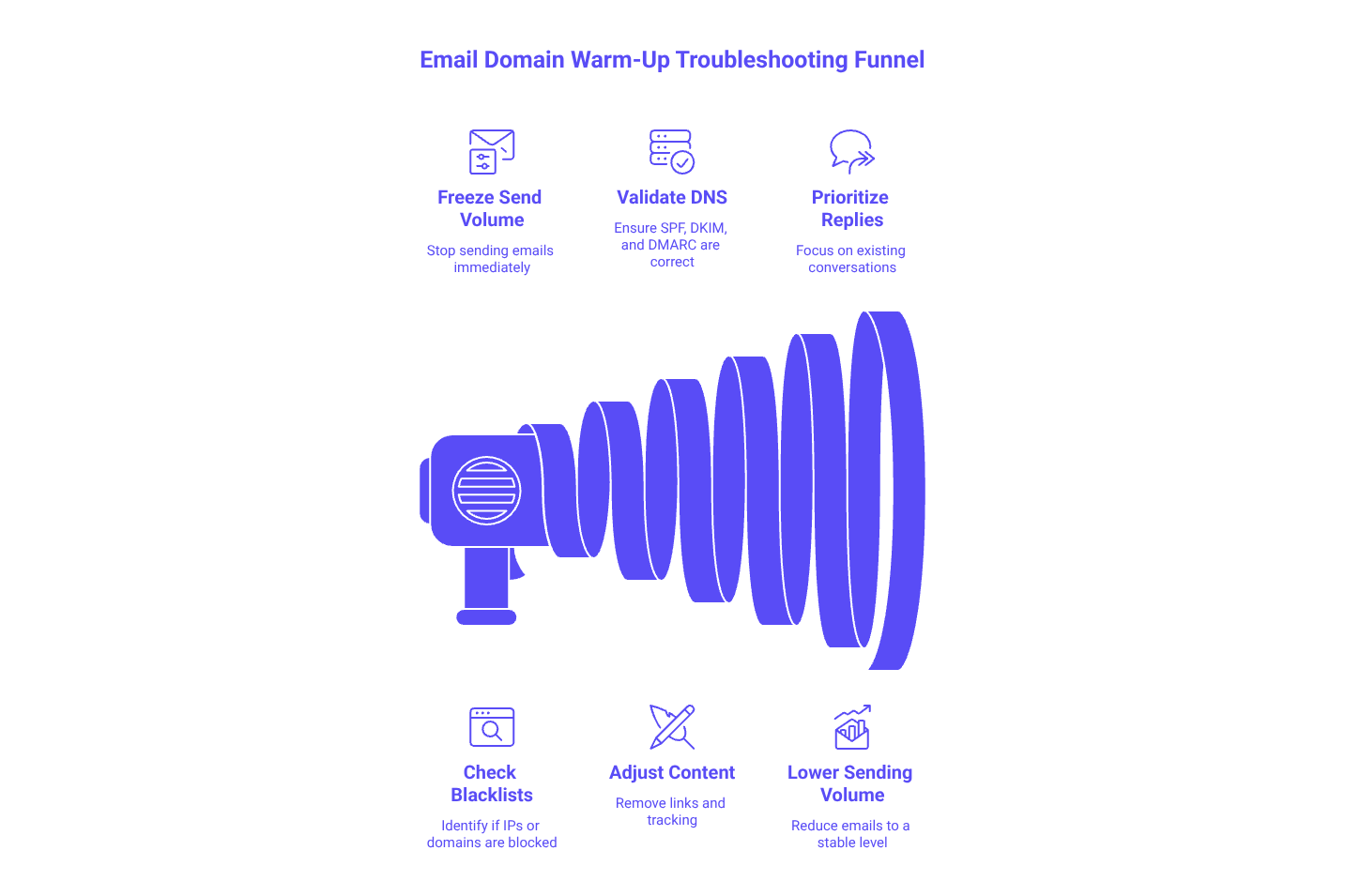
If inbox placement does not recover, rest your domain for several days, sending only to trusted contacts. Build positive engagement signals with controlled replies and gradually return to your ramp-up schedule once placement is stable again.
Closing Steps to Warm Up an Email Domain Today
Lay a solid foundation before contacting prospects. Authenticate your domain, verify all technical infrastructure, and set realistic daily limits. Begin with modest volumes, closely track inbox placement, and respond quickly to any warning signs. Always use a spam-checking tool before increasing your daily volume. If managing multiple mailboxes or large scales sounds daunting, leverage an automated warm-up service to ensure credible engagement and transparent reputation analytics.
Ready to start? Outline your first four weeks, set up your monitoring strategy, and build a warm-up routine with gradual increases. If you want a streamlined experience, consider a dedicated warm-up platform, one designed to create genuine interaction and deliver clear, actionable reputation data. This careful path will help your domain become a trusted sender over time.
FAQ
Why is it important to warm up an email domain?
Warming up an email domain is essential to establish a trustworthy sender reputation. Starting with large volumes without a history increases the risk of emails being flagged as spam. A gradual increase in sending creates a stable interaction pattern, ensuring optimal inbox placement.
What technical setups are necessary before beginning the warm-up process?
Ensure SPF, DKIM, and DMARC records are properly configured to authenticate email legitimacy. Correct setup of DNS and MX records is also crucial to prevent deliverability issues. Skipping these steps could lead to unnecessary blocks and misplacement.
Is it better to use a root domain or a subdomain for email campaigns?
Using a subdomain is often safer as it isolates email reputation from your main domain. This way, any deliverability issues won't impact your primary email communications, while still maintaining recognizable branding.
How can Mailwarm aid in automating the email domain warm-up process?
Mailwarm utilizes a network of active mailboxes to simulate real email interactions, saving time and reducing the complexities involved in manual domain warming. This automation helps in building a credible sending history without risking your actual prospect list.
What should you do if your email warm-up process triggers spam filters?
Immediately halt volume increases and maintain current sending levels. Review your SPF, DKIM, and DMARC alignments, and refine message content by reducing links and attachments. If issues persist, consult blacklist checkers and if necessary, rest the domain temporarily.
How can you monitor your domain's deliverability during the warm-up phase?
Consistently check sender reputation signals through spam checkers and monitor inbox placement across email platforms like Gmail, Outlook, and Yahoo. Pay close attention to DMARC reports and be vigilant about bounce and complaint rates.
Why avoid attachments and links during the initial phase of warming up an email domain?
Attachments and excessive links can raise spam flags if the sending history is still unproven. Keeping initial emails simple and genuine helps create a natural engagement pattern, which is crucial for building domain credibility.
Can poor email warm-up practices affect long-term deliverability?
Yes, jumping to high volumes or poor technical setups can lead to persistent spam listings and hurting your sender reputation. Overlooked errors during the warm-up phase tend to have compounding negative effects on future deliverability.