
Gmail Promotions Tab Explained, and How to Stay Out of It
Gmail classifies emails by intent, not just sender. The Promotions tab is designed for bulk or commercial messages, whereas the Primary tab prioritizes natural, person-to-person conversations with authentic replies. While you can’t guarantee Primary inbox placement, you can influence the signals Gmail evaluates. Aim for messages that look conversational, consistent, and trustworthy. Since tab placement can vary by user, always test your emails across multiple inboxes for best results.
Technical Signals That Push Emails Into Gmail’s Promotions Tab
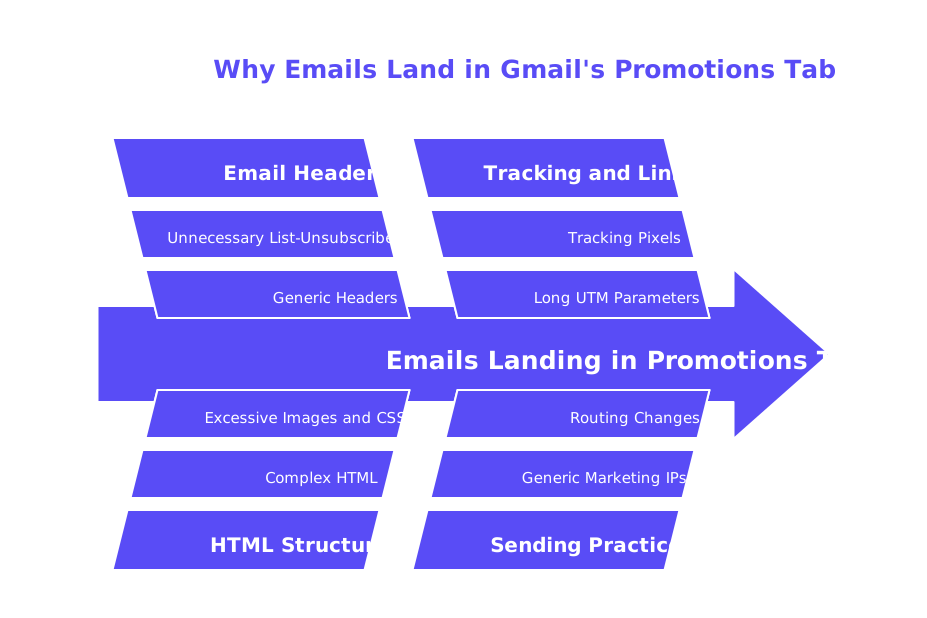
- Bulk email headers, such as including
List-Unsubscribefor personal one-to-one outreach. - Complex HTML structures packed with images, buttons, and numerous CSS classes.
- Widespread use of tracking pixels and lengthy UTM parameters on all your links.
- Link shorteners or destination URLs that don’t match your sending domain.
- Sending from generic marketing IPs, or abruptly changing your routing path.
- Templates that come across as advertisements or public announcements.
- Adding attachments, such as large PDFs, on your initial message.
Think “thread,” not “campaign.”Brief, straightforward messages with a natural, plain tone earn more Primary-like signals.
Authentication and Alignment Required to Avoid Gmail Promotions Tab
Make sure your emails pass SPF, DKIM, and DMARC checks for your exact sending domain. Align the visible “From” domain with your authenticated domains. You should keep DMARC set to quarantine or reject once you’re confident your setup is stable. Avoid using forwarding methods that may disrupt your DomainKeys Identified Mail (DKIM), this can happen if the forwarding changes the structure of your email, reducing verification and deliverability. Publish accurate MX and PTR (reverse DNS) records that clearly map to your envelope identity. You should add Brand Indicators for Message Identification (BIMI) only after Domain-based Message Authentication, Reporting & Conformance (DMARC) is stable. This ensures reliable email authentication before introducing brand logos into the message stream. While proper authentication doesn’t guarantee Primary placement, failing at it almost always leads to delivery problems.
Infrastructure Alignment (HELO/EHLO, IP, and DNS) for Gmail Promotions Tab
Match your HELO/EHLO banner, reverse DNS (rDNS), and SMTP identity to your own domain. Avoid using generic banners or hostnames that appear linked to shared bulk infrastructure. Dedicated IP addresses or proven shared pools with a strong history are best. For an in-depth explanation, see this guide on HELO/EHLO sender reputation and its impact. Keep your technical environment stable and predictable, Gmail favors infrastructure that is well-aligned and consistent.
Message Format and Content Patterns That Help Gmail Emails Stay Out of Promotions
Write Like a Human, Send Like a System
- Use slim HTML with a proper plain-text alternative for every message.
- Limit links to one main destination, ensuring “From” and link domains match.
- Avoid using link shorteners or adding tracking codes on your first outreach.
- Insert just one small logo at most, and steer clear of banners or multi-column designs.
- Remove
List-Unsubscribefrom personalized, one-to-one emails. - Choose subject lines that sound natural, steer clear of hype, coupons, numbers, and percentages.
- Begin or continue a personal thread; replies most often land in the Primary tab.
End with a single, plain request, skip multiple calls to action or graphical buttons. Keep your signature minimal; avoid big, image-based signatures that can look promotional. Always include a real-world address and valid contact details to build trust.
Sending Behavior and Domain Reputation to Avoid Gmail Promotions Tab
- Gradually “warm up” new domains, increasing volume in small, measured increments.
- Send from a domain or subdomain that has an established brand presence.
- Keep bounce rates low by using high-quality, verified contact lists.
- Remove recipients who never engage with your emails after multiple touches.
- Spread sends throughout regional business hours for your recipients.
- Avoid abrupt changes to sending IPs, providers, or envelope settings.
Keep in mind, reputation generally builds over time, this can take several weeks or even months, depending on numerous factors like the volume and quality of your emails, as well as the behavior of your recipients. Monitor the performance and placement of your email campaign loads in a way that respects user privacy and complies with privacy laws, you can do this by tracking aggregate engagement metrics, not individual user behavior.
Delivery Method Choices in Google Workspace and Gmail Tab Placement
Your sending method can influence Gmail’s placement as well. The Gmail API avoids SMTP restrictions and routes messages within Google. SMTP Relay offers flexibility, allowing use with outside mail transfer agents. Both methods work effectively when authenticated and configured properly. Review the pros, cons, and setup in this Gmail API vs. SMTP Relay guide. Choose one consistent path, frequent switching may resemble suspicious infrastructure changes to Gmail.
Testing, Measurement, and Spam Checks for Gmail Tab Placement
- Set up a seed list made up of real Gmail and Google Workspace inboxes.
- Send a small batch using your current template, route, and configuration.
- Record where emails land by tab and device, and log any spam folder hits.
- Use a spam checker to analyze headers, list activity, and risky content patterns.
- Simplify your template, remove superfluous links, reduce HTML, and retest to the same seeds.
- Repeat this process weekly until your Primary tab placement stabilizes.
Benchmark your outcomes against industry norms to set realistic expectations. This research on inbox placement for cold outreach is a good reference point. Make sure to change only one variable at a time, and keep your testing controlled.
Email Warm-Up Workflows That Help Keep Gmail Emails Out of Promotions
Warming up your sender reputation builds trust before broad outreach. Start with a very low volume and foster natural conversation threads. Realistic opens, replies, and extending conversations teach Gmail that your messages are valued by real people. These patterns resemble the type of activity usually seen in an individual's primary inbox, which is why they are referred to as Primary traffic.
As of February 2021, Mailwarm expanded into a fully advanced email warm-up system, including features like centralized multi-account management, in-depth sender reputation monitoring, cross-provider warm-up options, and spam score tracking for providers such as Gmail, Microsoft, and Yahoo, optimized for high-performance scalability. The platform relies on a network of over 50,000 active, well-maintained inboxes to generate authentic engagement signals. Actions like simulated opens, credible replies, spam removal, and marking emails as Primary all serve to shape the technical reputation of your domain and sending pattern. Remember: warm-up traffic serves a technical, preparatory purpose only and should not be confused with, nor replace, real outreach activity.
Troubleshooting When Gmail Routes Your Emails to the Promotions Tab
Stabilize Your Foundation
- Verify that SPF, DKIM, and DMARC all pass on live emails.
- Ensure close alignment between HELO/EHLO, rDNS, and “From” domains.
- Stick to a single delivery route and provider.
Reduce Promotional Cues
- Strip tracking codes from first-touch links and ensure link and “From” domains match.
- Send short, straightforward messages that mimic organic replies.
- Remove all images and buttons for several sends to reset signals.
Drive Real Engagement
- Ask your most trusted contacts to reply using plain text.
- Invite them to manually move your message to Primary if it lands elsewhere.
- Continue the warm-up process, keeping send volume steady and avoiding spikes.
If you also send newsletters, use a separate subdomain. This keeps promotional sends distinct from your personalized, one-to-one outreach. Continually audit your technical setup and engagement patterns to maintain solid sender reputation. With consistent improvements, you’ll see your tab placement and deliverability increase.
Further Infrastructure Reading for Staying Out of Gmail Promotions
Advance your technical understanding by exploring SMTP fingerprints and domain-related cues. Begin with this HELO/EHLO and sender reputation explainer. Then consider Google’s routing preferences detailed in this guide comparing Gmail API and SMTP Relay. Finally, benchmark your live results using research data on inbox placement rates and best practices. Adjust your process iteratively, making incremental changes and keeping careful records.
Ready to see more Primary placements? Start with a fresh spam check, simplify your message style, and launch a patient, careful warm-up regimen today.
FAQ
How can I ensure my emails land in Gmail's Primary tab?
Craft emails that resemble natural, person-to-person conversations. Avoid promotional cues like bulk headers and complex HTML, and ensure that your SPF, DKIM, and DMARC checks pass. Use Mailwarm to enhance email reputation and drive authentic engagement signals.
What technical factors could push my emails into Gmail’s Promotions tab?
Emails with complex HTML, bulk headers, and trackable links are prime candidates for the Promotions tab. Also, inconsistent domain alignment and using generic marketing IPs are red flags. Ensure your infrastructure is aligned and consistent to avoid these pitfalls.
Does using link shorteners affect email placement in Gmail tabs?
Yes, using link shorteners can raise Gmail’s suspicion and result in placement in the Promotions tab. It's critical to maintain domain alignment between your From address and destination URLs. Consistent domain alignment reduces the risk of promotional filtering.
Can changing my email delivery method affect my Gmail email placement?
Frequent changes in delivery method can make Gmail view your infrastructure as unstable, potentially affecting email placement. Stick to either the Gmail API or SMTP Relay, but not both, to avoid resembling suspicious behavior. Ensure these methods are properly authenticated.
How does domain reputation influence email deliverability in Gmail?
Your domain reputation, built over time, plays a crucial role in email placement. Consistent, authentic engagement signals and low bounce rates are vital. Tools like Mailwarm can help gradually improve domain reputation through structured warm-up workflows.
Why is message formatting significant in avoiding Gmail's Promotions tab?
Messages heavy with images, buttons, or banners scream Promotional to Gmail. Aim for simple HTML and align visual elements with authenticity to maintain a presence in the Primary tab. Less is more; let your content speak plainly.
What role do SPF, DKIM, and DMARC play in email placement?
These authentication protocols validate your email's legitimacy and alignment with your sending domain. Failure to implement them can result in degraded deliverability and increased chances of being filtered as spam or promotional. Accurate setup is non-negotiable for serious senders.
Why should tracking links be avoided in initial email outreach?
Tracking links can automatically trigger Gmail’s Promotions filter. For first-touch emails, it’s better to focus on trust-building. You can reintroduce tracking once your emails consistently land in the Primary tab, always ensuring link and From domain alignment.
How do warm-up workflows benefit my email strategy?
Warm-up workflows systematically develop your sender reputation by mimicking genuine user interactions. Mailwarm offers advanced features to facilitate this process, preparing your infrastructure for real outreach and enhancing deliverability prospects over time. Consistency and patience are key.