
Domain Variations for Cold Email Deliverability and Risk Control
Cold outreach can rapidly impact your domain’s reputation. But before you even think about domain setup, you need the right contacts, an email lookup is the essential first step. By using domain variations, you spread the risk and separate prospecting activity from your core business communications. This approach allows you to scale outreach volumes safely and ensures that if one domain encounters blocks, your other domains continue operating. Your brand’s integrity remains intact while your outbound pipeline stays active.
Consider a layered approach to your domain use. Reserve your primary domain exclusively for transactional and employee communications. Conduct cold outreach from dedicated domains or subdomains that reflect your brand identity. Avoid using random or suspicious strings that look disposable, as these attract scrutiny.
For teams that don't want to manage domain rotation, DNS records, and deliverability problems, a managed cold email infrastructure provider like Aerosend handles the full deliverability stack.
Aerosend provides inboxes with SPF/DKIM/DMARC configuration, biweekly inbox placement tests, and deliverability consulting.
How to Design a Practical Domain Portfolio for Cold Outreach Programs
- One root brand, several sending variations. For example, use brand.com for corporate mail, brandhq.com and brandlabs.com for outreach purposes.
- Use clean, readable names. Options like contact.brand.com or outreach.brand.com help maintain professionalism.
- Avoid suspicious TLDs. Select reputable top-level domains (TLDs) that are familiar in your target markets.
- Keep WHOIS consistent. Ensure the ownership details for all domains are aligned to avoid triggering manual reviews.
- Mirror structures. Apply similar mailbox naming patterns across all your domains so you can scale quickly and systematically.
Plan for domains to potentially fail.Assume one sender could lose deliverability over time. Having multiple domains allows your operation to absorb the impact with minimal disruption.
Configure SPF, DKIM, DMARC, PTR, and HELO for Each Domain Variation
Proper authentication is required for all sending domains and subdomains. Set up DomainKeys Identified Mail (DKIM) with robust keys. Where possible, align the From address, Return-Path, and DKIM domains. Start with a DMARC policy in monitoring mode to gather reports, and only tighten enforcement after confirming stability.
Keep your SPF record concise and only include active providers to reduce risk. Regularly remove outdated or unnecessary mechanisms. If your SPF record nears provider-imposed length limits, refer to this guide on avoiding SPF record length limits in multi-domain setups. Overly long SPF configurations often result in failed DNS lookups.
Match your EHLO/HELO hostnames with each sending server. Pair those hostnames with the correct reverse DNS (PTR records), as inconsistencies may cause spam filters to block your emails. Maintain responsive MX records on every sending domain to accept replies and bounces, which demonstrates authentic communication to providers.
Warm Up Every New Cold Email Domain and Subdomain Before Sending
New domains do not have a sending reputation. Warming up a domain means gradually increasing its sending activity to build a positive sender profile. The goal is to ensure that your emails consistently land in the inbox across major providers. This warm-up phase also helps you discover configuration errors before live sending.
Services such as Mailwarm offer next-generation email warm-up capabilities, including multi-account management, advanced deliverability and reputation monitoring, multi-provider warm-up, and provider-specific spam score tracking, features specifically designed to secure consistent deliverability at scale. Mailwarm utilizes a network of more than 50,000 active and curated mailboxes, engaging in automated exchanges such as opens, thread replies, spam removal, and inbox tagging. All activity is intended purely for technical conditioning rather than for marketing.
Mailwarm is not just an email warmup tool, it’s a deliverability system. Every plan includes access to a deliverability expert to help you fix what actually impacts your inbox placement. That’s why it’s priced higher, you’re paying for results, not just a tool.
Domain Rotation and Sending Limits that Protect Reputation Across Variations
Distribute your total send volume across several domains and keep daily limits conservative initially. Only increase send volume after each domain demonstrates stable deliverability. Use multiple mailboxes on each domain to spread out activity and avoid abnormal spikes that could be flagged as automated or suspicious.
- Rotate domains evenly to avoid overexposing any single variation.
- Centralize reply handling to ensure no conversations are missed, regardless of which sending domain receives the response.
- Keep newer mailboxes throttled for a longer period than aged accounts.
- Send test traffic from a dedicated domain variation to isolate risks.
Adjust these limits based on feedback from providers like Gmail and Outlook. Consistency and patience are more effective than speed in building sending reputation.
Avoid Common Traps that Derail Domain Variation Strategies for Cold Email
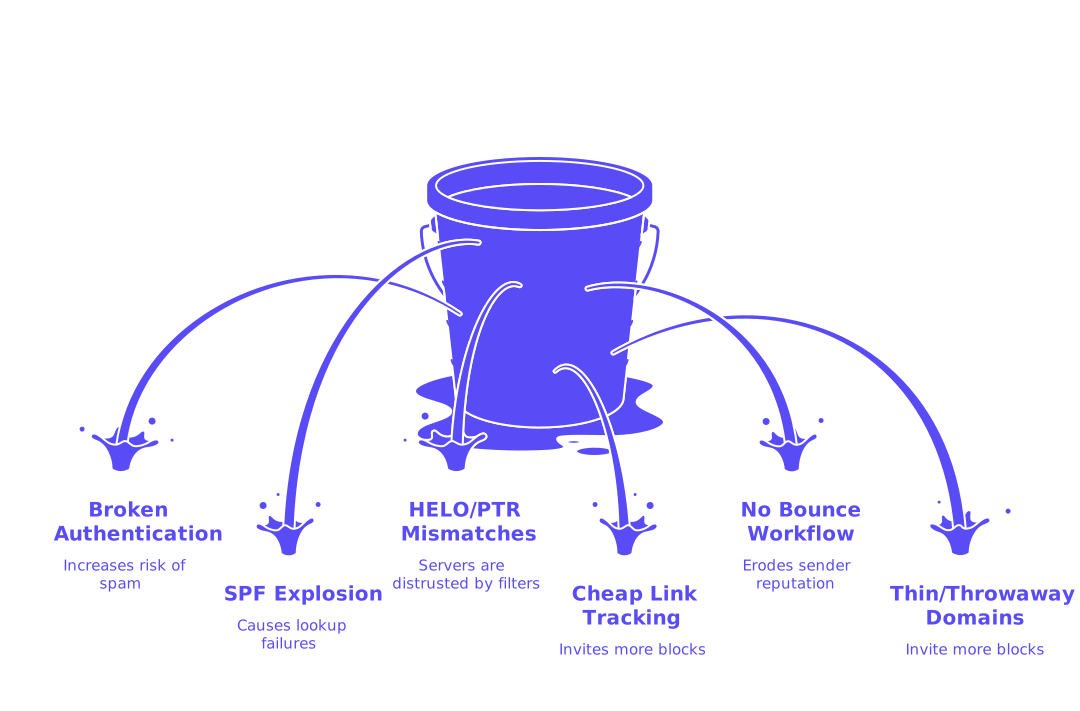
- Broken authentication. Missing DKIM or misconfigured DMARC increases the risk of your emails landing in spam folders.
- SPF explosion. Excessive SPF includes cause lookup failures. Consolidate mechanisms to keep records concise.
- HELO and PTR mismatches. Sending servers with conflicting host and reverse DNS entries are often distrusted by filters.
- Cheap link tracking domains. Always use branded link tracking domains with valid TLS certificates.
- No bounce workflow. Failing to process bounces and remove bad addresses quickly erodes sender reputation.
- Thin or throwaway domains. Disposable naming patterns invite more blocks and manual inspection.
If you encounter blocks, analyze error codes immediately. Reference this primer on why emails get bounced in 2026 to understand rule changes and troubleshoot new rejection messages effectively.
Monitor Inbox Placement and Domain Health Across Multiple Variations
Focus on what email filters see, not just open or reply rates. Routinely test deliverability with a spam checker for every mailbox provider you target. Track which domains and mailboxes land in spam. Use a blacklist checker to catch and address listings before they jeopardize your entire portfolio.
Regularly, on a weekly basis, review the compiled reports provided by Domain-based Message Authentication, Reporting and Conformance (DMARC). Carefully observe for any inconsistencies in domain alignment. Audit your DNS TTLs and renewal dates to prevent lapses. Rotate DKIM keys at intervals. Always validate prospect email addresses with a mail checker prior to sending to reduce bounce rates and protect your sender reputation.
Compare your results with trusted benchmarks for inbox placement in cold email campaigns to know when to pause or make adjustments.
When to Pause, Quarantine, or Recycle a Sending Domain Variation
- Pause activity if spam folder placements or provider blocks increase across several platforms.
- Quarantine domains where hard bounces persist after cleaning your lists; re-warm these domains at lower volume.
- Recycle a domain only after you see successful inbox placement and have resolved any previous blocks.
During a pause, reduce outreach to only your most engaged responders using other stable domains. Prioritize measured, focused recovery and avoid ramping up volume until warning signals clear.
Cold Email Domain Variations Checklist for Reliable Setup
- Reserve your primary domain for transactional and corporate email only.
- Register multiple, brand-matched domains or subdomains specifically for outreach.
- Publish DKIM records, create concise SPF, and start DMARC in monitoring mode.
- Align EHLO, PTR, MX, and establish a robust bounce-handling process for every domain variation.
- Warm up each new outreach domain with authentic, staged sending activity.
- Rotate domains and mailboxes; only increase sending caps after sustaining healthy metrics.
- Regularly use spam and blacklist checkers on a set schedule.
- Pre-validate your prospect list with a checker to reduce bounces.
- Monitor provider-specific feedback, error codes, and adjust processes as needed.
- Based on observation, pause, re-warm, or retire domains to manage risk.
Putting Domain Variations to Work in a Safe Cold Email Workflow
Strategically using domain variations transforms cold email outreach from a risky gamble into a repeatable, managed process. You minimize exposure, pace your growth, and control the technical signals that impact inbox placement. Domain warm-up and rotation support ongoing trust with major providers, while regular monitoring ensures you act on facts, not guesses.
Set your domains, authenticate them, and commence with a careful warm-up process, meaning a gradual increase in email sending volume to establish an IP reputation. Keep a steady schedule and ensure your lists are up to date. Respond quickly when risk signals appear and keep a record of adjustments. Consistent, incremental improvements are the backbone of reliable cold email success.
Ready to structure your domain variations and establish them with care? Start with a focused, simple approach. For powerful warm-up automation and domain reputation management at scale, try setting up a Mailwarm workspace and begin your sending with a steady, deliberate ramp-up.
FAQ
Why should I use domain variations for cold email outreach?
Using domain variations helps mitigate the risk of your primary business domain's reputation being damaged due to spam blocks. By compartmentalizing activities, you protect your central communication lines while maintaining the effectiveness of your outreach.
What are the potential risks of not authenticating sending domains properly?
Without proper authentication like SPF, DKIM, and DMARC, your emails are more likely to be flagged as spam, landing in junk folders instead of inboxes. This oversight can trigger penalties and a damaged sender reputation, leading to lower engagement rates.
How does domain warm-up influence email deliverability?
A gradual warm-up builds a positive sending reputation, ensuring higher inbox placement. Neglecting this step can result in the rapid deployment of a domain that's seen as suspicious, leading to blocks and diminished trust with email providers.
Is it necessary to use domain monitoring tools like Mailwarm?
Using tools like Mailwarm is essential for real-time monitoring of deliverability and sender reputation. They provide crucial insights into blacklist status and inbox placement, enabling swift adjustments before minor issues become critical problems.
What are the consequences of using suspicious or cheap domain names?
Using disposable or suspicious domains attracts scrutiny, increasing the risk of penalties from email providers. These practices invite manual reviews, which can disrupt your outreach operations and damage your brand's credibility.
How can lacking a bounce-handling process affect my campaigns?
Neglecting bounce-handling processes can inflate your bounce rate, leading to a downgrade in sender reputation and eventual IP blacklisting. Poor reputation drastically reduces email deliverability, crippling your outreach efforts.
How often should I rotate my sending domains?
Regularly rotating sending domains reduces the risk of any single domain being flagged and helps maintain consistent deliverability. Over-relying on a single domain can expose you to greater reputation risks if it faces deliverability issues.
What is the advantage of using reputable TLDs for outreach?
Reputable TLDs are generally less scrutinized by email filters, granting a smoother path to inbox placement. Risky TLDs heighten the chances of emails being blocked or landing in spam, severely impairing outreach effectiveness.
Why is it important to have consistent WHOIS information?
Consistent WHOIS information prevents suspicion from email providers who may flag inconsistencies as fraudulent activity, inviting further scrutiny. Misalignment can trigger manual reviews, compromising your entire domain portfolio.
When should I pause or recycle a sending domain variation?
If spam reports or block rates escalate, pausing a domain allows for issue resolution without further damage. Recycle only after confirming the resolution of previous issues to ensure that the recovered domain is capable of maintaining a good reputation.