
Most advice about cold outreach on LinkedIn gets the order wrong. It starts with templates, when effective outreach begins with profile trust, targeting, and a safe path to email. Cold outreach on LinkedIn works when the prospect sees relevance fast, and when the follow-through doesn't break the conversation by landing in spam.
That second part gets ignored far too often. A LinkedIn reply is not a win if the handoff to email ultimately fails.
Laying the Foundation Before You Send a Message
Most failed outreach starts with a bad list and a weak profile. Prospects don't read a message in isolation. They click the sender's name, scan the headline, check recent activity, and decide whether this person looks credible, relevant, or disposable.
An outreach-ready profile doesn't need to look polished for its own sake. It needs to answer one question fast. Why should this prospect take this message seriously?
Make the profile reduce risk
A profile that converts usually does three things well:
- Headline shows relevance: It should state who the sender helps and what problem gets solved. Job-title-only headlines waste space.
- About section sounds specific: It should describe the market, problem, and point of view in plain language, not a pile of buzzwords.
- Activity supports the claim: A prospect should see comments, posts, or reactions that make the sender look active and current.
Alt text suggestion: LinkedIn profile optimization graphic showing business outreach and target-based prospecting.
A simple test works well here. If a prospect lands on the profile for five seconds, they should understand the sender's market, offer, and credibility without scrolling much.
Practical rule: If the profile reads like a resume, outreach gets treated like a cold interruption. If it reads like a specialist's page, outreach feels more credible.
Build the list around signals, not job titles alone
Sales Navigator helps, but only when filters reflect buying context. Too many teams build lists from titles and industries, then wonder why acceptance is weak.
A better starting point is signal-based targeting. A critical pitfall in LinkedIn outreach is targeting inactive profiles. Filtering for recent job changes in the last 90 days can double reply rates, while reaching out within 48 hours of a prospect's post increases acceptance rates by 2.3x, according to LinkedReach's cold LinkedIn outreach benchmarks.
That changes how list building should work.
Instead of broad searches, narrow the list using signals such as:
Recent role change
New leaders are often reassessing vendors, processes, and priorities.Recent posting activity
Active users see messages, and their content gives the sender something real to reference.Company movement
Hiring, expansion, or visible change often signals active internal discussions.
Use a simple ICP filter stack
A practical stack inside LinkedIn usually includes:
| Filter type | What to look for | Why it matters |
|---|---|---|
| Role fit | Decision-maker or direct owner of the problem | Keeps the outreach relevant |
| Company fit | Industry, size, and business model match | Avoids accounts that can't buy |
| Timing signal | Job change or recent activity | Improves odds of visibility |
| Context clue | Posted opinion, hiring push, launch, funding mention | Gives the message a reason to exist |
There's also a trust layer often overlooked. Outreach from brand-new or weakly active accounts tends to underperform. That's one reason new sending identities also struggle in email. Teams that need a clean outbound setup should review why new Gmail accounts fail cold outreach and how to fix it before they scale volume across channels.
Crafting Messages That Actually Get Replies
The average message fails because it asks too much, too soon, and says too little that matters. Generic outreach gets skimmed, then ignored. Personalized outreach gets a different kind of attention because it signals effort, context, and social awareness.
Cold LinkedIn outreach has a mean response rate of around 10%, but highly personalized campaigns can reach 20–30%. The strongest pattern is a 2–3 touch sequence that starts with a connection request without a note, then uses personalized follow-ups, based on Sopro's cold outreach statistics.
What bad outreach sounds like
A weak message usually sounds like this:
Hi Sarah, I help companies like yours improve growth and streamline sales. Would love to connect and show you how we can help.
It fails for obvious reasons. There's no context, no proof of attention, no reason for Sarah to respond now, and no sign that this wasn't sent to hundreds of people.
Now compare it to this:
Hi Sarah, noticed the team is hiring into outbound after the recent expansion. That usually means pipeline targets are moving faster than process does. Curious whether reply quality or meeting consistency is the bigger issue right now.
This version works better because it doesn't pitch first. It shows awareness, names a likely business tension, and invites a reply that feels easy.
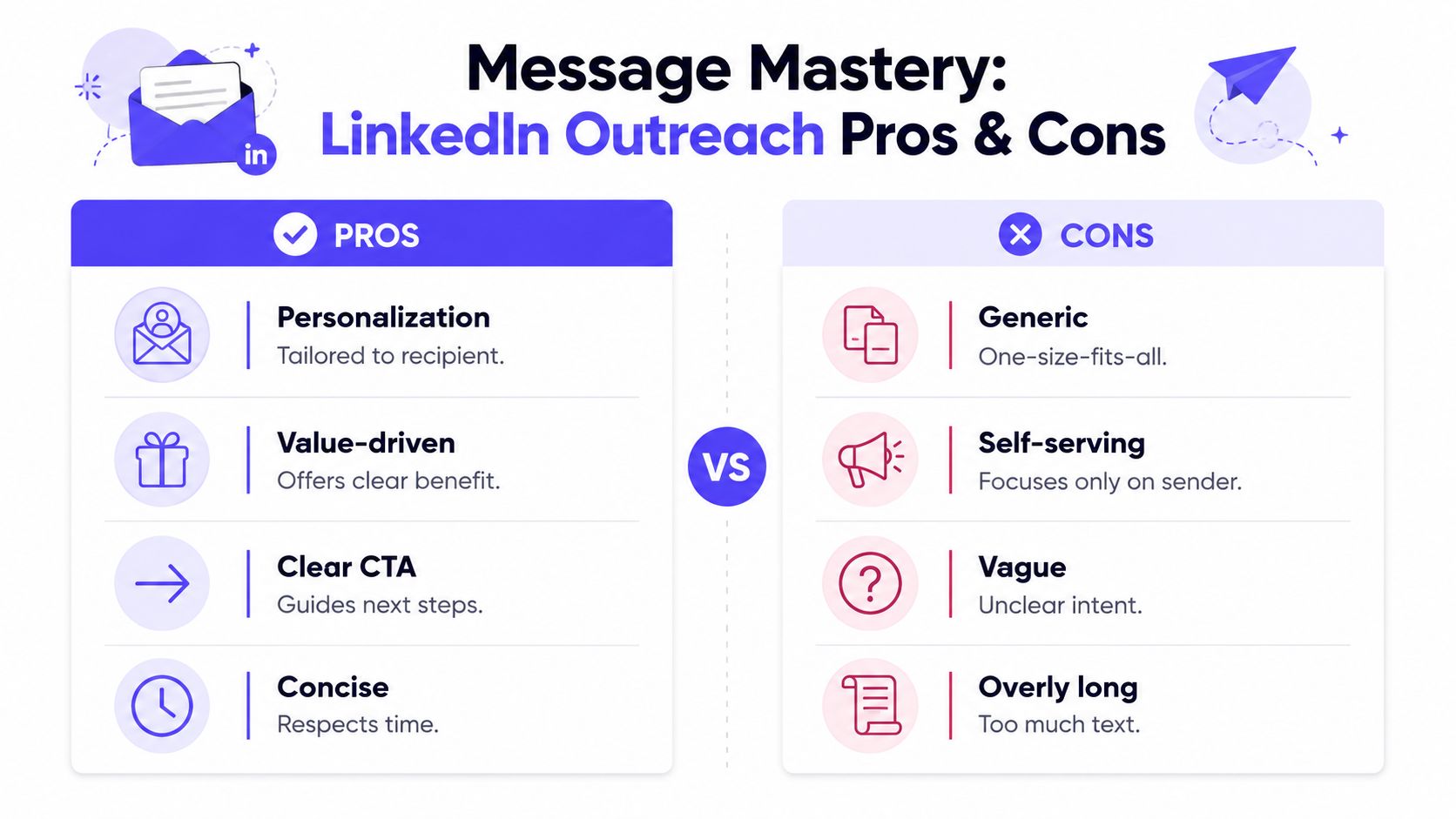
Alt text suggestion: Infographic comparing effective LinkedIn outreach messages with generic outreach mistakes.
Use Give, Give, Ask
A practical message pattern is Give, Give, Ask.
The first give is relevance. Show the prospect that the sender saw something real. The second give is insight. Add an observation, resource, or sharp question. Only then comes the ask.
That structure keeps the message from sounding extractive.
Example based on a recent post
Weak
- Great post. Would love to connect and tell you about what we do.
Stronger
- Saw the post on onboarding ramp time. The part about reps getting trained but not operational was sharp. A lot of teams don't have a training problem, they have a workflow problem. Curious if that's showing up in handoff or follow-up quality for the team.
Example based on a job change
Weak
- Congrats on the new role. We help leaders like you scale revenue. Open to a quick chat?
Stronger
- Congrats on the new role. New leaders usually inherit tools before they inherit clean process. If outbound is on the roadmap, the first issue is often message-to-channel consistency. Has that surfaced yet or is the focus still on team structure?
Why concise wins
Prospects don't need the whole story in LinkedIn DMs. They need enough to know the sender is thoughtful and relevant.
Useful message traits tend to be:
- Specific: Refer to one visible trigger
- Short: Keep it easy to process on mobile
- Conversational: Ask something answerable
- Low-pressure: Don't push for a meeting in the first exchange unless the context strongly supports it
Personalized outreach doesn't mean writing novels. It means proving the message belongs to this prospect.
A good follow-up message often earns more replies than the first touch because the sender now has context. That's where the sequence matters.
Building a Follow-Up Cadence That Converts
A lot of teams either stop too early or follow up like they're trying to collect a debt. Neither works. The right cadence feels calm, useful, and easy to ignore without conflict. That last part matters because pressure creates resistance.
The most effective LinkedIn sequence is usually short. Not endless. Not daily. Just enough touches to create a fair chance of response.
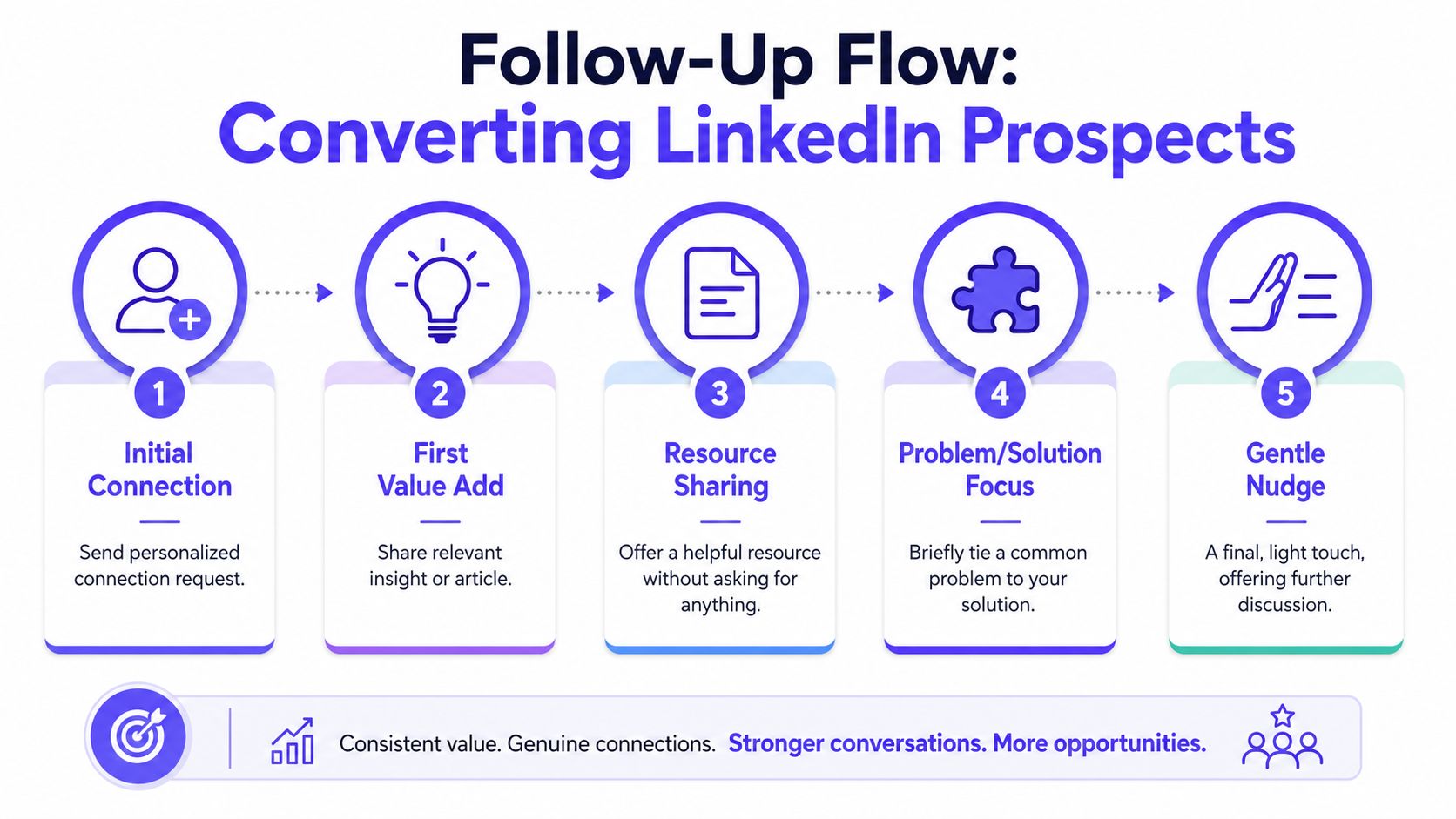
Alt text suggestion: Five-step LinkedIn follow-up flow from initial connection to final gentle nudge.
A simple cadence that respects attention
A strong follow-up motion often looks like this:
Connection request
Skip the note in most cases. The profile and targeting should carry the first decision.First message after acceptance
Send a short personalized note tied to a visible trigger, recent post, or business context.Second touch several days later
Add value. Share an observation, a sharp question, or a concise resource.Final touch after a further pause
Keep it light. Acknowledge timing and leave the door open.
That structure matches what tends to work operationally. It also keeps the sender from filling the inbox with repetitive check-ins.
A short walkthrough helps illustrate the pacing in practice.
What each follow-up should do
The first follow-up should earn the right to continue. It shouldn't ask for a meeting unless the prospect already showed clear interest.
The second follow-up should add something new. Not a restatement. That can be a simple insight such as a pattern seen in the prospect's market, a reframed question, or a useful asset if it's relevant.
The final touch should lower pressure, not raise it.
If a follow-up says "just checking in," it usually adds no value and gives the prospect no reason to respond.
A practical final message can sound like this:
Leaving this here in case outbound process is still on your list this quarter. If it's not a priority, no issue. If it is, happy to send over a concise breakdown tailored to your team structure.
Know when to stop
Not every non-response means rejection. Some people are busy, some don't use LinkedIn much, and some saw the note at the wrong time. But repeated touches without a new angle usually hurt more than help.
A healthy stop rule includes:
- No repeated bumping: If the sender has nothing new to say, silence is better.
- No guilt framing: Avoid language that pressures a reply.
- No channel spam: Don't hit LinkedIn, email, and phone all at once without context.
Good outreach protects future optionality. Even when a prospect doesn't reply today, they may remember the sender later if the messages felt thoughtful.
The Critical Handoff from LinkedIn to Email
The handoff from LinkedIn to email is where good outreach gets wasted.
A prospect replies on LinkedIn, agrees to continue by email, and then nothing happens because the message never reaches the inbox. Sales reps often blame timing or copy. In many cases, the underlying problem is sender reputation.
That gap is expensive. 70% of sales teams prioritize LinkedIn for prospecting, while 45% of cold emails from unwarmed domains land in spam, based on SalesCaptain's analysis of LinkedIn prospecting and email handoff friction. If the email side is weak, LinkedIn can still generate interest, but it will not carry the conversation far enough to create pipeline.
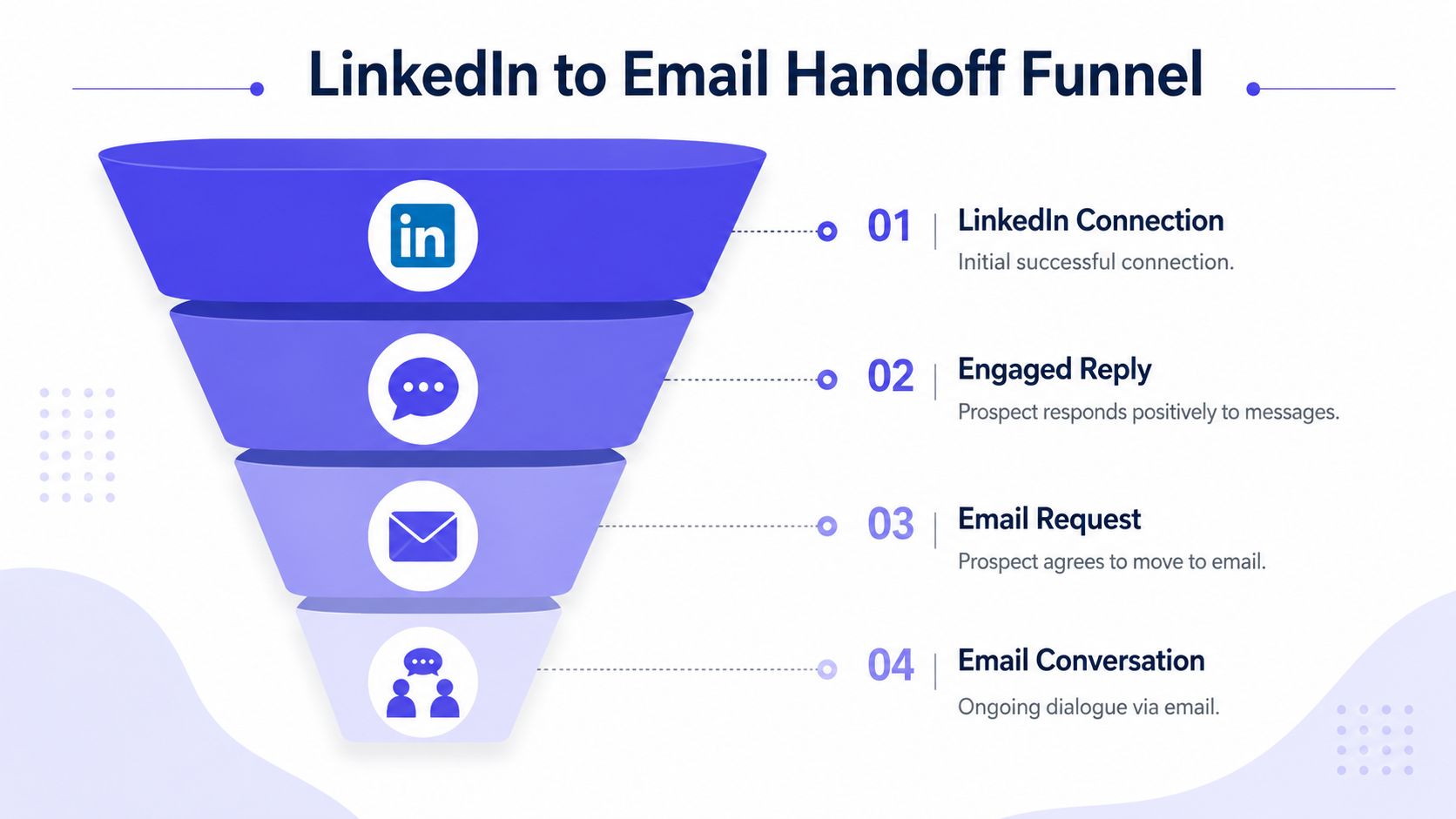
Alt text suggestion: Funnel showing the transition from LinkedIn connection to email conversation.
Why the handoff fails
LinkedIn and email run on different trust signals. On LinkedIn, profile familiarity does a lot of work. In email, mailbox providers care about domain history, engagement patterns, bounce rate, and sending behavior.
That creates four common failure points:
- Cold or newly set-up domains: The mailbox has little positive engagement history.
- Fast ramp-ups: Reps jump from low volume to full outbound volume too quickly.
- Weak list quality: Bad records create bounces and hurt domain reputation.
- Broken continuity: The email reads like a fresh cold pitch instead of a continuation of the LinkedIn exchange.
Teams that handle this well treat the email handoff as both a messaging job and a deliverability job.
How to move the conversation safely
The LinkedIn note that shifts the conversation should earn consent and set context. Keep it short. State what the prospect will get by email and why that channel makes sense.
A practical version looks like this:
Happy to send a short breakdown by email so it's easier to review and forward internally. If that's useful, feel free to share the best address.
That works because it gives the buyer a reason to switch channels. The seller is not asking for email out of habit. The seller is giving the prospect an easier format for the next step.
Prepare the inbox before the handoff
This work starts before the first prospect replies on LinkedIn. If the inbox is cold, the handoff is fragile from day one.
Industry guidance for cold outreach warmup recommends 2–4 weeks of gradual volume building, starting with 5–10 emails per day in week 1, then 15–25 in week 2, then 30–50 in week 3, before scaling more gradually after week 4, according to Mailwarm HQ's summary of email warmup pacing.
After warmup, sustainable sending usually stays within 20–50 emails per inbox per day, based on Clearout's email warmup checklist.
Bounce control matters just as much. Total bounce rate should stay below 2%, with hard bounces around 0.4% acting as a serious warning sign, as outlined in Mailwarm's guide to solving email warmup issues.
Teams that depend on outbound need a real process here. A proper email warmup setup for cold outbound helps preserve the interest already earned on LinkedIn instead of losing it to spam filtering.
The goal is not to send the email. The goal is to get it seen, recognized, and answered.
Keep continuity between channels
The first email should feel like the same conversation picked up in a better format.
Use a subject line that makes the LinkedIn context obvious. Open by referencing the exchange directly. Deliver the promised resource, summary, or recommendation without forcing the prospect to hunt for it. End with one clear next step.
| Element | What it should do |
|---|---|
| Subject line | Make the prior LinkedIn context obvious |
| Opening line | Reference the LinkedIn exchange directly |
| Body | Deliver the promised resource, summary, or next step |
| CTA | Ask for one clear action |
A clean handoff protects momentum. A sloppy one resets trust, hurts reply rates, and makes a good LinkedIn conversation look like a dead lead.
Measuring Success and Staying Compliant
LinkedIn outreach does not fail because reps send too little. It fails because teams celebrate activity while ignoring progression and channel health. If the conversation starts on LinkedIn and dies the moment it moves to email, the campaign was never performing as well as the dashboard suggested.
Track the funnel in order. First, check whether the right people accept. Then check whether they reply. Then check whether those replies turn into meetings. Finally, confirm the email handoff reaches the inbox and keeps the conversation alive.
What the numbers mean
Connection acceptance rate is the first signal. It reflects list quality, timing, and whether the profile gives the prospect a reason to engage. According to Sopro's cold outreach statistics, cold outreach campaigns often land in the 28 to 35% range for acceptance, while stronger personalization can push higher.
Reply rate tells a different story. Acceptance can be decent even when the message is weak, especially if the sender has a credible profile or a recognizable company. What matters is whether the prospect responds with enough intent to continue the conversation. Analysts at Belkins found in their LinkedIn outreach guide that personalization and relevance have a direct effect on response quality, which is why reply rate is a better test of message fit than acceptance rate alone.
Booked meetings are still the business metric that matters. But I would not read that number in isolation. If meetings are low, the problem might be targeting, message quality, qualification, or the handoff to an inbox with poor placement. That last one gets missed all the time.
Alt text suggestion: Deliverability and performance graphic showing growth and sender protection.
A simple operator dashboard
Use a review table that forces clear diagnosis instead of vanity reporting:
| Metric | Healthy signal | Likely issue if weak |
|---|---|---|
| Acceptance rate | The prospect list is relevant and timing is reasonable | Poor targeting, weak profile credibility, or low account activity |
| Reply rate | The message connects to a real problem or trigger | Generic copy, weak research, or an early pitch |
| Meeting conversion | The conversation is qualified and the next step is clear | Bad discovery, poor fit, or friction in the handoff |
| Email placement after handoff | The prospect can see and trust the follow-up email | Spam placement, sender reputation problems, or domain setup issues |
That fourth row matters more than many teams admit. A prospect can agree on LinkedIn, ask for details by email, and then never see the follow-up. Review inbox placement and sender reputation alongside campaign metrics. A practical place to start is this guide on how to avoid the spam folder.
Stay compliant and protect the brand
Compliance is not just a platform rule. It is a revenue protection rule.
Aggressive automation, irrelevant targeting, and repeated nudges to silent prospects hurt more than reply rates. They train buyers to ignore the brand, and they increase the odds that a warm handoff to email feels like unsolicited spam. That is the hidden cost. Bad LinkedIn habits often carry straight into bad deliverability outcomes.
A few standards keep outreach sustainable:
- Respect relevance: Contact people with a clear connection to the problem being solved.
- Use automation carefully: If a tool reduces message quality or creates unnatural activity patterns, scale it back.
- Honor silence: No reply is useful feedback. Stop pressing.
- Make opt-out easy: A simple, professional exit protects reputation on both LinkedIn and email.
Strong outreach looks like informed business development. Weak outreach looks like volume chasing.
Frequently Asked Questions About LinkedIn Outreach
Is cold outreach on LinkedIn still effective
Yes, if the outreach starts from a real reason to contact the person.
LinkedIn still works for cold outreach because buyers expect relevant professional conversations there. Results drop when reps target broad job-title lists, send generic templates, or ask for a meeting before they have earned any interest.
Should a connection request include a note
Usually, no.
A plain connection request often gets accepted at a higher rate, especially if the profile already explains who you help and why you are credible. Add a note when there is a specific reason to mention, such as a shared event, mutual connection, or timely trigger.
How many follow-ups should a sender use on LinkedIn
Keep it short.
A connection request, one individualized message after acceptance, and one final follow-up is enough to test interest in many campaigns. Longer sequences usually hurt response quality and make the eventual move to email feel forced.
When should a conversation move from LinkedIn to email
Move to email only after the prospect has engaged and there is a practical reason to continue there.
Good reasons include sending a recap, a pricing breakdown, a one-pager, or details the prospect may need to forward internally. Before making that handoff, confirm the sending domain is ready. A positive LinkedIn reply does not protect the next message from spam placement.
Why do LinkedIn replies disappear after moving to email
The handoff often fails because the email never reaches the primary inbox.
Sales teams read the silence as lost interest. In many cases, the prospect agreed to continue, then the follow-up landed in spam, promotions, or got filtered by a weak sender reputation. That is why LinkedIn outreach and email deliverability should be managed as one workflow, not two separate channels.
What is email warmup
Email warmup is the process of building trust with mailbox providers before sending outreach at scale.
That means starting with low volume, increasing gradually, and generating normal engagement patterns over time. The goal is simple. Give the domain and mailbox a credible sending history before using them for cold follow-ups from LinkedIn conversations.
How long does email warmup take
It usually takes a few weeks, not a few days.
The exact timeline depends on the age of the domain, mailbox configuration, authentication setup, and how aggressively the team plans to send. Rushing it is expensive. A prospect who asked for details on LinkedIn cannot reply to an email they never see.
Does Mailwarm need access to my inbox
No. Mailwarm doesn't require IMAP access or permission to read the user's private inbox.
If email is part of the growth strategy, Mailwarm helps senders build reputation, monitor inbox placement, and reduce spam risk with expert-guided warmup. As a premium email warmup and deliverability platform, Mailwarm helps senders build reputation, monitor inbox placement, and improve deliverability through real inbox engagement, advanced warmup controls, and expert guidance. It goes beyond basic warmup with 50,000+ aged real inboxes, real engagement signals, provider-level warmup, spam score monitoring, inbox placement insights, authentication fix tools, bounce prevention, deliverability analytics, and expert deliverability calls included in every plan. Unlike basic warmup tools, Mailwarm doesn't require IMAP access or permission to read the user's private inbox.