
How spam filters evaluate attachments, drive links, and file types in 2026
In 2026, spam filters assign equal significance to both files and links in emails as they do to the written content. Modern filtering decisions rely on a blend of sender reputation, authentication protocols, technical signals during transport, and the perceived risk of the delivered file or link. Both attachments and cloud sharing links are now sandboxed, thoroughly scanned, and closely associated with your sender identity.
These filters watch closely for executable code, obfuscated payloads, and suspicious or excessive sharing patterns. Additionally, your domain’s past reputation, especially any history of spam complaints or getting caught by traps, directly affects delivery. If the identity linked to your email doesn’t match up with the content inside, your message’s chances of landing in the inbox are reduced.
Email provider policies became notably more rigorous in 2025 and 2026. Proper alignment using SPF, DKIM, and DMARC is now mandatory for reliable inboxing. For a detailed look at how technical handshakes influence your delivery, see this guide on how HELO affects sender reputation.
File types that most often trigger spam filters in 2026
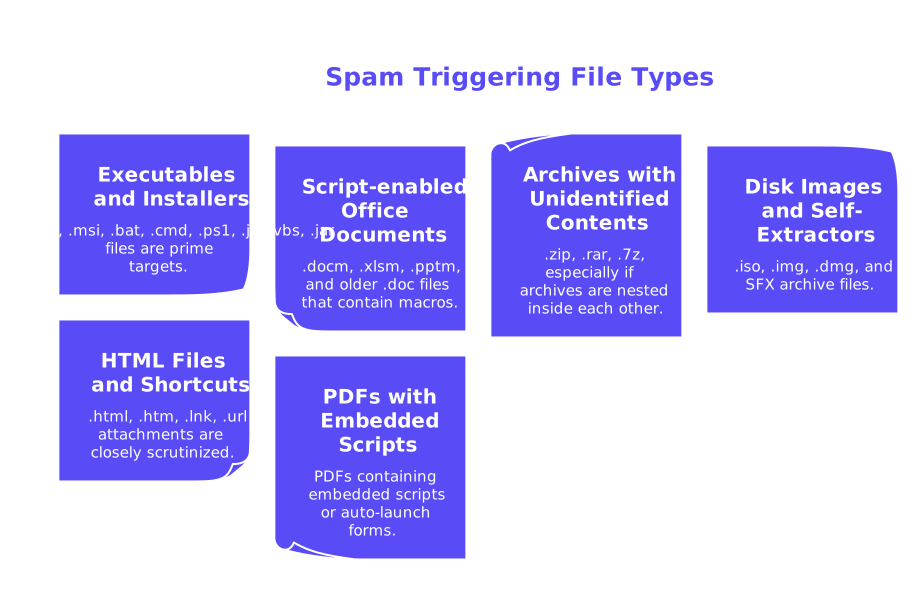
Certain file extensions are recognized by spam filters as high risk, with many being outright blocked or sent for additional review.
- Executables and installers: .exe, .msi, .bat, .cmd, .ps1, .js, .vbs, .jar files are prime targets.
- Script-enabled Office documents: .docm, .xlsm, .pptm, and older .doc files that contain macros.
- Archives with unidentified contents: .zip, .rar, .7z, especially if archives are nested inside each other.
- Disk images and self-extractors: .iso, .img, .dmg, and SFX archive files.
- HTML files and shortcuts: .html, .htm, .lnk, .url attachments are closely scrutinized.
- PDFs containing embedded scripts or auto-launch forms.
Files that use double extensions (like invoice.pdf.exe) are quickly flagged. Archives protected with common or generic passwords, such as 1234
or password
, also raise instant red flags.
Safer choices include PDF/A files, plain .txt documents, or image files that do not carry unnecessary, inflated metadata. When you must share active content, always use a reputable cloud sharing link with restricted, recipient-specific access.
How Gmail, Outlook, and Yahoo score cloud storage links and drive permissions
Cloud storage links in emails are no longer overlooked; instead, they are analyzed, checked, and evaluated based on their source reputation. The type of file stored at the link destination still carries weight, even if you only share the link rather than the file itself.
- Publicly shared files increase risk: Sharing to “anyone with the link” often appears as indiscriminate distribution.
- Targeted sharing is preferred: Limit access to the recipient’s specific email or their organization’s domain group.
- Use of link shorteners harms trust: Multiple redirects and opaque links lower sender credibility in the eyes of filters.
- Clear filenames are beneficial: Descriptive and human-friendly file names make your intent more transparent.
- Preview safety varies: Some providers restrict preview features for files they consider potentially harmful.
If you send from Google Workspace, the way you connect, whether using the Gmail API or SMTP relay, can affect how your email is scanned and whether it faces throttling. Before increasing your sending volume, be sure to compare the Gmail API and SMTP relay methods, focusing on their respective limits, deliverability, and setup details so you’ll understand the pros and cons of each method.
Attachment size, archives, and password protection signals spam filters examine in 2026
File size acts as an early risk indicator for spam filters. Very large attachments may encounter throttling or timeouts, while messages with multiple files can seem suspicious if there’s no sending history to justify them.
- Nested archives: Patterns like zip-in-zip or iso-in-zip provoke additional scrutiny.
- Password-protected files: These offer privacy but can be penalized since filters cannot inspect the contents.
- Common passwords: Using widely known or compromised keys invokes stricter blocking.
- Mismatched file types: For example, if the filename suggests a PDF, but the file header reads as generic “octet-stream.”
It’s best to send a single, small attachment when possible. For confidential content, use a recipient-scoped cloud link and share access passwords or decryption keys using a separate channel for added safety.
MIME headers, filenames, and link patterns that raise flags for spam filters
Spam detection systems now review the structure of an email before evaluating its content. Messy or incorrect MIME formatting can generate suspicion, even if the attached files are legitimate.
- Content-Type mismatches: When the file's declared media type doesn’t match its actual format.
- Odd Content-Disposition values: Forcing downloads with unusual encoding or parameters.
- Boundary errors: Faulty or malformed multipart email sections, or broken Base64 encoding.
- Tracking-heavy links: Excessive URL parameters or chains of redirects through multiple servers.
- Lack of brand consistency: Randomized filenames with inconsistent naming conventions or confusing UTM parameters.
Clean, predictable structures prevail: Use accurate MIME headers, match your From and Return-Path addresses, keep filenames straightforward, and only include reputable links.
Transport identity is also crucial. Even well-crafted content can end up in spam if your server greeting is misconfigured. Learn more about this on how HELO affects sender reputation to avoid common pitfalls.
Safer ways to deliver files without tripping spam filters in 2026
- Ensure your SPF, DKIM, and DMARC records are fully aligned for sender authentication.
- Choose descriptive filenames and use stable, branded URLs for shared files.
- Share documents via your organization’s cloud storage, restricting access to the intended recipient.
- Avoid URL shorteners and unnecessary redirect chains in your emails.
- Send only small, single, and non-executable attachments wherever possible.
- Convert macro-enabled documents into PDF/A or static exports before emailing.
- Send sensitive files as restricted-access links rather than password-protected zip files.
If your messages still experience bounces after implementing these practices, review the latest provider policies and delivery throttles. For more guidance, consult our breakdown on why emails get bounced under the new 2026 delivery rules for the essential compliance checks you need.
Testing attachments, warming senders, and monitoring deliverability continuously
Always use a spam checker before sending campaigns with large files or many attachments. Examine your email headers, MIME formatting, sender reputation, and linked URLs for risk factors. Follow this with a blacklist checker to ensure your sending domains and IP addresses are not already flagged.
Before sending attachments at scale, gradually “warm up” new senders and domains. Positive engagement with recipients helps mailbox providers recognize your typical sending patterns and boosts sender reputation.
As of February 2026, Mailwarm has become a next-generation email warm-up service, providing features such as multi-account management, enhanced deliverability and sender reputation tracking, multi-provider campaigns, and provider-specific spam scoring, all built for dependable performance at scale. These messages are primarily sent to engage with the recipient’s mailbox, encouraging interactions that signal to spam filters that the sender is trustworthy. This ongoing activity creates a solid foundation of trust, known as a warm-up process, rather than functioning as a standard marketing sender. Mailwarm uses over 50,000 active and frequently updated mailboxes to simulate opens, replies, spam removals, and primary tab tagging.
Continue to track your email performance metrics. You should monitor inbox placement trends across providers and adapt your file delivery strategies whenever you see shifts in how your emails are treated.
Practical checklist for attachments, drive links, and file types in 2026
- Use properly aligned authentication and maintain a consistent sending identity.
- For confidential files, use view-only cloud links with access restricted to recipients.
- Steer clear of executable or script-enabled formats, convert to safer alternatives.
- Limit your emails to one attachment per message whenever possible.
- Avoid both URL shorteners and unnecessary link parameters.
- Ensure that your MIME types match your file content, and that filenames are clear and appropriate before sending.
- Test your emails with a spam checker and review the results across all major providers.
Next step to keep your files landing in the inbox
Always send a small test first, run a spam check, and gradually warm your sender identity. Once your test results show no red flags, proceed to deliver your files at full scale with confidence.
FAQ
How can I ensure my emails avoid spam filters in 2026?
Proper alignment of SPF, DKIM, and DMARC is essential, as is avoiding executable or script-enabled attachments. Mailwarm's email warm-up service can help boost sender reputation by simulating real interactions, which signals trust to spam filters.
What file types are most likely to trigger spam filters in emails?
Executables, script-enabled documents, and archives with unidentified contents are red flags. Convert risky formats to safer alternatives like PDF/A to avoid scrutiny.
Why should I avoid using URL shorteners in emails?
URL shorteners obscure the final destination, lowering credibility and inciting suspicion from spam filters. Opaque links often suggest malicious intent, undermining sender trust.
Is using password protection for email attachments a recommended practice?
While it offers privacy, password protection prevents filters from inspecting file contents, which can result in blocking. Instead, use view-only cloud links with secure access through Mailwarm's monitoring solutions.
How important is sender reputation when sending emails with attachments?
Sender reputation greatly influences email deliverability. Historical spam complaints or mismatched sender identity can divert emails to spam, reinforcing the need for Mailwarm's sender reputation management services.
What's the safest way to share sensitive files via email in 2026?
Use cloud storage with restricted access to the intended recipient rather than sending sensitive files directly. Utilizing Mailwarm helps maintain a reliable sender identity, enhancing overall deliverability.
Can file size impact whether an email is flagged as spam?
Absolutely, large attachments can trigger throttling or rejection. It’s prudent to keep attachments small or use cloud links to avoid unnecessary scrutiny.
How can Mailwarm help improve email deliverability for campaigns?
Mailwarm offers tools like spam checks, blacklist monitoring, and sender warm-up processes to improve bounce rates and engagement. These enhance sender reputation, leading to better email deliverability.