

Read and notify in email means a sender gets some form of signal after a message is delivered, opened, or acted on. In 2026, that idea still matters, but the old habit of treating every open notification as proof of human interest doesn't hold up anymore.
Most advice on email tracking is stuck in an earlier era. Privacy protections, image preloading, and mailbox provider filtering have changed what “read” really means, which is why smart senders now care less about opens and more about real engagement that supports inbox placement.
What Does Read and Notify Mean for Email Senders
For email senders, read and notify usually refers to systems that report what happened after an email was sent. That can mean a read receipt, a tracking-pixel open, or a delivery notice from the receiving server.
Historically, this idea came from services like ReadNotify, which commercialized return email notifications and instant alerts when an email was opened. The core promise was simple. Send the message, then get notified when the recipient interacts with it.
That promise sounds useful, but the modern problem is reliability.
A sender can receive a “notification” without getting meaningful proof that the message influenced a real person. Some notifications are voluntary and controlled by the recipient. Others depend on images loading. Others only confirm delivery, not attention.
Practical rule: A read signal is only valuable if it reflects deliberate user behavior, not an automated system event.
That distinction matters most for teams that rely on outbound email. Sales teams, recruiters, agencies, and marketers don't just want activity logs. They need signals that help them judge whether messages reach the inbox, earn attention, and build sender reputation over time.
The useful question isn't “Did the platform notify the sender?” It's “Did the recipient do something that mailbox providers interpret as genuine interest?”
Read Receipts vs Tracking Pixels vs DSNs
These three systems often get lumped together, but they serve different purposes. A sender who treats them as interchangeable usually ends up with misleading reporting.
Read receipts
A read receipt is a request sent with the email asking the recipient's email client to confirm that the message was opened. This is the closest thing to a literal “notify me when they read it” feature.
The catch is consent. Read receipts usually depend on the recipient or their email client allowing that response. If the recipient declines, blocks, or uses a client that ignores the request, nothing comes back.
This makes read receipts useful in limited, controlled environments, such as internal business communication, but weak for outbound campaigns.
Tracking pixels
A tracking pixel is a tiny invisible image embedded in the email. When the image loads, the sender's system records an open event.
This became the default engine behind open-rate reporting because it worked at scale and required no action from the recipient. But it has obvious limits. If images are blocked, the open may not register. If images are preloaded by a mail client or privacy feature, the system may log an open even when no person read the email.
That's why pixel opens are now directional at best.
DSNs
A Delivery Status Notification, often shortened to DSN, is different from both read receipts and tracking pixels. It operates at the mail server level and reports delivery outcomes such as success, delay, or failure.
A DSN can confirm that the receiving system accepted the message. It cannot confirm that a person saw it, read it, or cared about it.
That makes DSNs useful for delivery diagnostics, bounce handling, and operational troubleshooting, but not for measuring interest.
Email Tracking Methods at a Glance
| Method | How It Works | Reliability | Recipient Control |
|---|---|---|---|
| Read receipt | Email client sends a confirmation after an open request | Low to moderate, because many clients block or ignore it | High |
| Tracking pixel | Invisible image loads and records an open event | Low for human intent, because privacy features can distort it | Moderate |
| DSN | Mail server returns delivery status information | Reliable for delivery state, not for attention | Low |
A practical way to think about the three:
Read receipts answer whether a client chose to confirm a read
Tracking pixels estimate whether the email content loaded
DSNs confirm whether a mail server accepted or rejected delivery
Delivery is infrastructure. Reading is behavior. Those are not the same signal.
Senders who separate those layers make better decisions. They use DSNs to manage delivery, treat opens with caution, and judge campaign quality through stronger engagement signals.
Why Open Rates Are a Flawed Metric
The biggest mistake in read and notify reporting is turning open rate into the main KPI. That used to be common. It's now a weak proxy for actual attention.

Mailbox providers and mail apps increasingly interfere with old tracking methods. Apple's Mail Privacy Protection is the clearest example. It can preload email content and trigger tracking pixels automatically, which means a sender may see an “open” even when a human never actively viewed the message.
That makes open reporting easy to overread. A campaign can appear healthy in the dashboard while replies stay flat and inbox placement weakens.
Why the metric broke
Open tracking depends on a technical event, not a human choice. If the image loads, the system often counts an open. But a loaded image isn't the same as interest.
The broader trend confirms the shift. Industry data shows a decline in notify-based open rates from 25% in 2020 to under 12% in 2026, while reply-based engagement rates remain a more stable indicator of recipient interest (ReadNotify FAQ).
That change should affect reporting habits. Teams that still optimize around open rate alone are often optimizing for noise.
For a broader view of what should replace vanity metrics, Du Marketing's guide to 7 essential marketing metrics) is worth reviewing alongside campaign-level deliverability data.
What to look at instead
A better approach is to downgrade open rate from a headline KPI to a supporting signal.
Use opens directionally: They can suggest whether subject lines or delivery patterns changed
Check replies and threads: These show actual recipient intent
Watch placement trends: Inbox vs spam matters more than image loads
Compare provider behavior: Gmail and Outlook often behave differently in practice
For teams benchmarking outreach, Mailwarm's breakdown of cold email open rates and industry benchmarks is useful, but the key is not to stop at opens.
A short visual explanation helps make the point:
Open rates still have a place. They just don't deserve the authority many dashboards still give them.
From Passive Opens to Active Engagement
Once opens lose their status, the next question is simple. What matters?
The answer is active engagement. Mailbox providers trust user actions that show clear intent, especially actions that privacy systems can't fake with automated image loading.
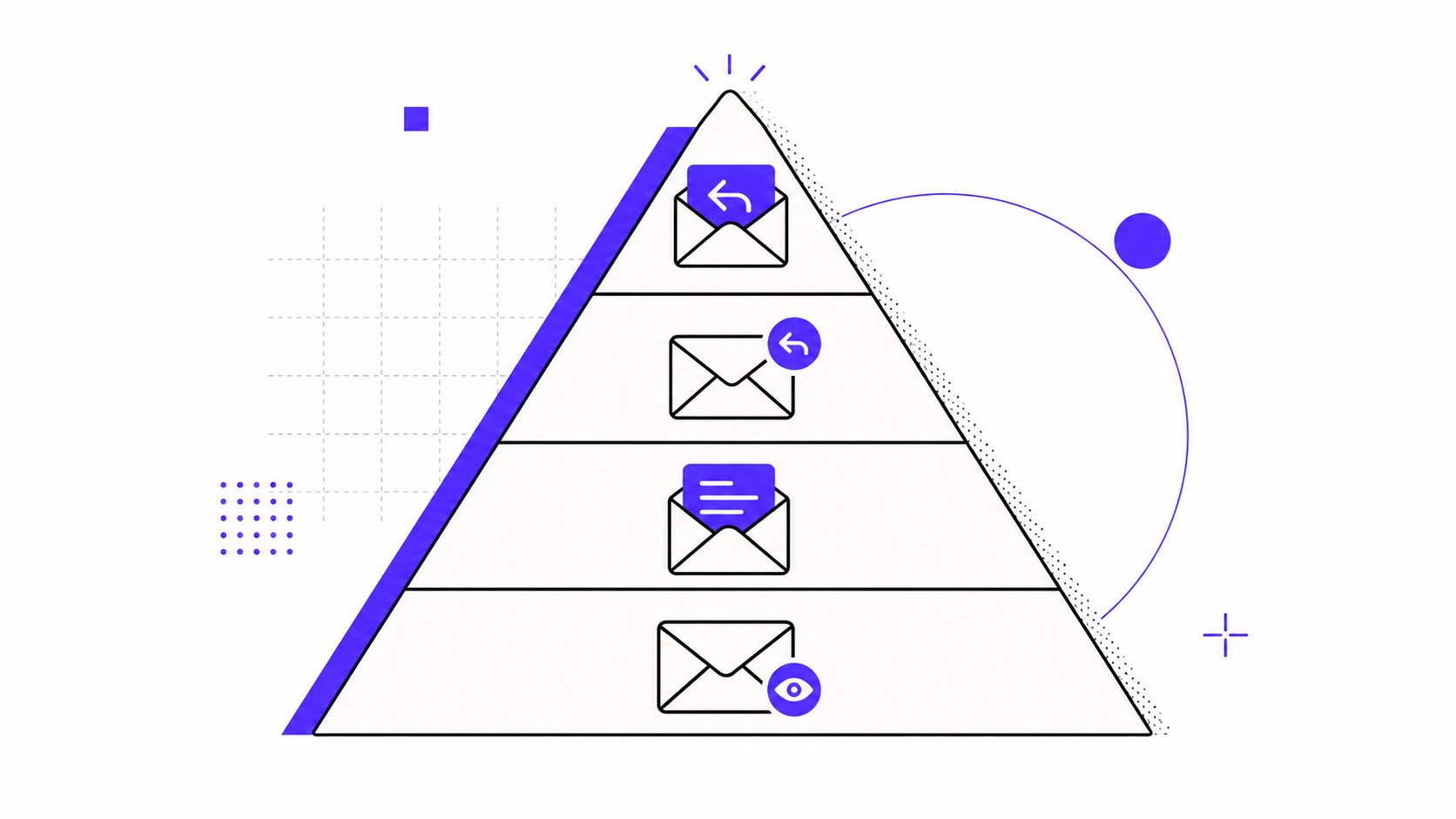
The engagement pyramid
At the bottom are passive signals. An open may tell a sender that something happened. It doesn't prove that the email landed well.
Higher up are actions that require deliberate effort. A click, a forward, time spent reading, a move out of spam, or marking a message as important all carry more weight. At the top are replies and downstream actions because they show unmistakable interest.
The closer a signal gets to human effort, the more useful it becomes for sender reputation.
That's also why mailbox providers increasingly favor quality engagement over shallow activity. Emails that generate explicit replies can improve inbox placement rates by up to 40% compared to campaigns that only track opens. That fact belongs at the center of any serious deliverability strategy, not at the margins.
Signals that actually help reputation
The strongest signals usually include:
Replies: The clearest indicator that the message was relevant enough to answer
Important marking: A recipient is telling the mailbox provider the sender matters
Spam removal: Moving a message out of spam is a direct corrective signal
Threads and ongoing conversation: Continued interaction beats one-time visibility
Contact saving or trusted-sender behavior: Another strong indication of legitimacy
What matters here is the pattern. A sender doesn't need vanity activity. A sender needs a healthy stream of credible interactions.
Mailwarm's article on cold email engagement and positive interactions gives a practical view of which actions tend to reinforce trust across providers.
Why this changes outreach strategy
This shift affects more than reporting. It changes how emails should be written and evaluated.
A subject line built only to trigger an open can still hurt performance if the content doesn't earn a response. By contrast, a simpler subject line tied to a clear, relevant message often drives fewer raw opens but stronger downstream engagement.
That's why modern outreach should be measured by whether recipients act, not whether a pixel fired.
Building Reputation with Real Engagement and Zero Inbox Access
The security side of read and notify gets far less attention than it should. Many teams focus on whether a tool can detect opens or simulate warmup activity, but skip the harder question. What permissions does that tool require?
That matters because inbox access is not a small technical detail. It's a trust decision.
Why inbox access is a real risk
Some warmup tools ask for IMAP access so they can read mailbox activity directly. For businesses, that can create a serious privacy and security concern.
A 2025 industry report showed that 68% of SMBs rejected warmup tools requiring IMAP access due to data breach fears (video reference on inbox-access concerns). That hesitation is rational. IMAP-level access can expose message content and broader mailbox data that many teams should never hand over lightly.
A modern deliverability platform should reduce operational risk, not add a new one.
What a better setup looks like
The more durable model is to focus on authentic reputation-building signals without requiring permission to read a private inbox. That means using systems designed around:
Real inbox engagement
Provider-aware warmup behavior
Inbox placement monitoring
Spam-risk visibility
Safer account architecture
Premium platforms distinguish themselves from basic warmup tools. Mailwarm helps senders build reputation, monitor inbox placement, and improve deliverability through real inbox engagement, advanced warmup controls, and expert guidance.
It goes beyond simple automation. The platform uses 50,000+ aged real inboxes, supports real engagement signals such as opens, replies, threads, spam removal, and important marking, and can generate up to 100% replies to warmup emails depending on the plan. It also includes spam score monitoring, provider-level warmup, authentication fix tools, bounce prevention, deliverability analytics, B2B and B2C warmup, custom email content warmup, and expert deliverability calls in every plan.
A warmup system should help a sender earn trust with mailbox providers, not require broad access to private correspondence to do its job.
Unlike basic warmup tools, Mailwarm does not require IMAP access or permission to read a user's private inbox. Teams that care about security, sender reputation, and long-term inbox placement should treat that as a meaningful buying criterion, not a minor feature.
For a deeper look at the reputation side, Mailwarm's guide on how to improve email sender reputation is a useful next read.
Actionable Steps for Better Email Outreach
Many teams don't need more notifications. They need better signals and better habits.
A simple outreach checklist helps:
Write for replies, not curiosity: Strong subject lines matter, but the body has to earn a real response.
Treat opens as secondary: Keep them in the dashboard, but don't build strategy around them.
Review inbox placement regularly: Delivery accepted isn't the same as inboxed.
Track high-value actions: Replies, spam removal, important marking, and continued threads deserve more attention than open spikes.
Choose tools with safer permissions: Avoid platforms that need broad inbox access just to operate.
Use provider-aware warmup: Gmail, Outlook, Microsoft 365, Yahoo, and SMTP ecosystems don't behave identically.
For an additional perspective on deliverability fundamentals, teams can also review themailX's email deliverability guide.
The strategic shift is straightforward. Stop asking whether a message was merely “seen.” Start asking whether it created a response that mailbox providers can trust.
Frequently Asked Questions About Read Notifications and Deliverability
| Question | Answer |
|---|---|
| What does read and notify mean in email? | It usually means a sender receives some type of signal after an email is delivered, opened, or acted on. In practice, that can come from read receipts, tracking pixels, or delivery notifications. |
| Can recipients block read notifications? | Yes. Many email clients let recipients ignore read receipt requests, and many privacy features limit or distort open tracking. Some messaging platforms also require users to manually enable read receipts before senders can see them. |
| Do read receipts improve deliverability? | Not by themselves. A read receipt is just a notification event. Deliverability improves more reliably when recipients take meaningful actions such as replying, moving messages out of spam, or marking messages as important. |
| Is email warmup enough to fix deliverability? | No. Warmup helps, but it won't solve every problem on its own. Authentication, sending patterns, list quality, content, reputation, and inbox placement all affect whether messages reach the inbox. |
| Does Mailwarm need access to a user's inbox? | No. Unlike basic warmup tools that require IMAP access, Mailwarm does not need permission to read a user's private inbox. That makes it a safer option for teams that take data access seriously. |
| Why is Mailwarm more expensive than basic warmup tools? | Mailwarm costs more because it combines real inbox engagement, up to 100% replies to warmup emails depending on the plan, spam score monitoring, provider-level warmup, authentication tools, no IMAP access required, and expert deliverability calls included in every plan. |
If email is part of a company's growth strategy, Mailwarm helps senders build reputation, monitor inbox placement, and reduce spam risk with expert-guided warmup. It's a premium email warmup and deliverability platform built for teams that care about real inbox placement, not just automated warmup activity.