
MTA-STS and TLS-RPT for Email Security and Deliverability: Why They Matter and How to Set Them Up
Email communication relies on SMTP, which negotiates TLS encryption during delivery. However, attackers can strip or downgrade this TLS encryption, exposing messages to potential interception. MTA-STS helps protect your emails by instructing sending servers to use TLS encryption and only trust your designated mail servers. TLS-RPT complements this by giving you daily reports on how encrypted email delivery fared the previous day. Used together, these protocols strengthen email transport security and deliver valuable visibility into your system’s performance.
It’s important to note that MTA-STS and TLS-RPT do not replace SPF, DKIM, or DMARC, they work alongside these protocols to protect the “in transit” layer of your emails. This extra protection impacts your sender reputation, inbox placement, and the speed of incident response.
How MTA-STS Works to Prevent SMTP Downgrade and On-Path Attacks
MTA-STS is a policy you host, and other mail servers retrieve it over HTTPS. This policy specifies which mail servers (MX hosts) are trustworthy and what level of TLS (encryption) is required. If a sender sees mode: enforce in your policy, it must use TLS to deliver mail to your designated MX servers. If it can’t, mail delivery should be deferred or failed instead of defaulting to unencrypted transport.
The outcome is simple: senders are required to use encryption and connect only to the MX hostnames you have named. This helps block attempts at STARTTLS stripping and prevents mail from being misdelivered.
How TLS-RPT Offers Insights Into Encrypted SMTP Delivery
TLS-RPT works by publishing a dedicated reporting address in your domain’s DNS records. Participating email providers send daily JSON summaries of their encrypted delivery attempts to this address. These reports highlight TLS failures, weak encryption ciphers, expired certificates, and policy enforcement issues related to MTA-STS.
This creates a daily feedback loop, enabling you to spot issues like a misconfigured mail server or certificate error before it affects your users.
Step-by-Step MTA-STS Setup for Your Domain
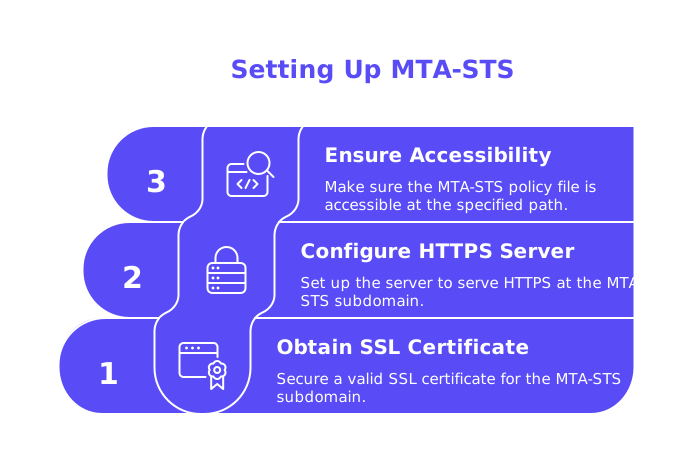
- Prepare the policy host.
- Obtain a valid SSL certificate for the subdomain
mta-sts.yourdomain.com. - Configure the server to serve HTTPS at
mta-sts.yourdomain.com, ensuring there are no redirects to other hosts. - Ensure the path
/.well-known/mta-sts.txtis accessible.
- Obtain a valid SSL certificate for the subdomain
- Publish the policy file.
version: STSv1mode: testingmx: mx1.yourdomain.commx: mx2.yourprovider.netmax_age: 86400Begin with mode: testing so that senders can log issues but continue to deliver mail. Start with a modest
max_agevalue for easier troubleshooting and iteration. - Add the DNS TXT record for policy discovery at
_mta-sts.yourdomain.com.v=STSv1; id=2026-04-29Update the
idevery time you change your policy file. This signals sending servers to fetch the latest version. - Wait for DNS and HTTPS caches to propagate, then confirm that your policy file is accessible over TLS 1.2 or newer.
- Review your TLS-RPT reports for feedback about setup issues, such as certificate problems or misconfigured MX records, and address any findings.
- Switch to mode: enforce and consider increasing
max_ageonce your configuration is stable and error-free.
Step-by-Step TLS-RPT Setup for Your Domain
- Create a monitored mailbox (like
tlsrpt@yourdomain.com) to receive daily reports. - Publish a DNS TXT record at
_smtp._tls.yourdomain.com:v=TLSRPTv1; rua=mailto:tlsrpt@yourdomain.com - Expect daily reports, usually JSON files sent as compressed attachments. Store these files and parse them for insights.
{ organization-name: Your Org, date-range: { start-datetime: 2026-04-28T00:00:00Z, end-datetime: 2026-04-28T23:59:59Z }, report-id: 2026-04-28-0001, policies: [{ policy: { policy-type: sts, policy-string: mode: enforce; mx: mx1.yourdomain.com, policy-domain: yourdomain.com, mx-host: mx1.yourdomain.com }, summary: { total-successful-session-count: 1234, total-failure-session-count: 7 }, failure-details: [{ result-type: certificate-expired, sending-mta-ip: 203.0.113.10, failed-session-count: 7 }] }]} - Set up alerts for spikes in failures or recurring errors related to ciphers or certificates, so you can react promptly.
Testing and Monitoring MTA-STS and TLS-RPT Safely
- Validate all DNS TXT records using your domain’s DNS tools.
- Check that your policy file is being served over HTTPS by running:
curl -v https://mta-sts.yourdomain.com/.well-known/mta-sts.txt - Leave mode: testing active for a week or two while monitoring for issues.
- Run placement and spam-folder tests using a spam checker during the testing phase.
- Check blacklist status before moving to enforced mode. Fix any blacklist issues before proceeding.
- Confirm all your certificates cover the policy host and every active MX hostname.
Common MTA-STS and TLS-RPT Pitfalls in Multi-Provider and Multi-Domain Environments
- MX name mismatches: Always list MX hostnames, not IP addresses, in your policy.
- Forgetting to certificate the policy host: Ensure
mta-sts.yourdomain.comhas a valid SSL certificate. - Policy file redirects: Avoid redirecting the policy URL to a different host.
- Overly aggressive
max_agevalues: Start small and only increase after stable reports. - Stale
idvalues: Update theidevery time the policy file changes to prompt senders to download the update. - Supporting multiple providers: Be sure to list every MX server used by all providers.
- Managing many domains: Replicate this setup for each domain. Keep your DNS records clear and organized. If your SPF records start to approach length limits, see this guide to avoiding SPF record length limits in multi-domain setups.
Integrating MTA-STS and TLS-RPT With SPF, DKIM, DMARC, HELO, and Bounce Management
MTA-STS and TLS-RPT work together to secure email transport and give you actionable telemetry. SPF, DKIM, and DMARC focus on authenticating sender identity and aligning sender policy. Don’t overlook the SMTP layer details that can affect deliverability, be sure your SMTP greetings (HELO banner) are consistent and appropriate.
If you want to know more about how the HELO signal can impact your reputation, read this deep dive on how HELO affects sender reputation. For troubleshooting persistent email bounces, start by reviewing your provider’s rules and error codes. This guide on new delivery rules for 2026 email bounces can help you address specific issues.
Where Automated Warm-Up Fits Alongside MTA-STS and TLS-RPT
Implementing stringent transport security measures, like MTA-STS and TLS-RPT, can help mitigate certain delivery risks such as unauthorized interception or alteration of your emails. But maintaining and growing sender reputation requires ongoing, positive engagement. That’s where structured warm-up routines help both new and dormant domains establish solid deliverability before launching campaigns.
Mentioning a single solution for context: Mailwarm strengthens the warm-up process by utilizing a network of more than 50,000 active, regularly maintained mailboxes. Starting February 2026, Mailwarm will step into a new era as an advanced email warm-up solution. The platform will provide multi-account management, comprehensive deliverability and reputation monitoring, multi-provider warm-up features, and provider-level spam score tracking, built for organizations that send at scale. This solution differs from traditional email marketing tools: It aims to send out a stream of consistent, engagement-eliciting emails during the warm-up process, which helps calibrate email filters to your domain and improve deliverability.
Monitor the warm-up process alongside TLS-RPT data. If reports indicate any TLS failures, identify the source of the issue and rectify them before increasing your delivery volume. Make it a habit to run a spam placement test weekly as your configuration evolves.
Next Steps: Deploy MTA-STS and TLS-RPT for Secure, Reliable Delivery
Get started by publishing a cautious MTA-STS policy and enabling TLS-RPT for daily delivery feedback. Monitor your setup, troubleshoot any reported issues, and only tighten enforcement after everything runs smoothly. Align your SPF, DKIM, DMARC, and SMTP banner settings, and plan a careful warm-up strategy tailored to your sending needs.
Ready to strengthen email transport and boost deliverability? Begin with a single domain, publish your policy, and review your first feedback report tomorrow. Proactive, incremental steps today can prevent major headaches down the line.
FAQ
What is the primary purpose of MTA-STS?
MTA-STS ensures that email delivery cannot be intercepted by enforcing that messages are sent via encrypted connections and received by designated mail servers only. This security measure is crucial as it prevents attackers from downgrading or stripping encryption, a common threat.
How does TLS-RPT enhance my email security?
TLS-RPT provides daily reports detailing the status of encrypted email deliveries to your domain, revealing any encryption failures. By catching configuration errors early, it allows you to proactively address issues that could weaken your email security.
Can MTA-STS and TLS-RPT replace SPF, DKIM, or DMARC?
No, MTA-STS and TLS-RPT do not replace SPF, DKIM, or DMARC but complement them by securing the transmission layer. Omitting MTA-STS and TLS-RPT leaves a critical gap in your security strategy, exposing emails in transit.
Is it necessary to start with 'mode: testing' for MTA-STS?
Starting with 'mode: testing' is critical as it allows you to identify and resolve issues without disrupting email delivery. Ignoring this could lead to immediate and widespread nondelivery if issues arise when in enforce mode.
Why do I need to update the ID in my MTA-STS policy?
Updating the ID signals email senders to retrieve the latest policy changes. Failing to update it can result in outdated configurations persisting, compromising intended security measures.
What role does an SSL certificate play in MTA-STS setup?
An SSL certificate is crucial for securing the policy hosted on your domain, ensuring it is retrieved over HTTPS. Without it, your policy can be vulnerable to tampering or may not be fetched by sending servers at all.
How can Mailwarm assist with MTA-STS and TLS-RPT?
Mailwarm's active mailbox network aids in safely warming up new or dormant domains, aligning with the security benefits of MTA-STS and TLS-RPT. Its comprehensive monitoring ensures that any TLS-related issues are addressed swiftly, maintaining robust delivery performance.
Are there any risks with high 'max_age' values in MTA-STS?
Setting a high 'max_age' too soon can lock you into problematic settings, forcing prolonged periods of misconfigured policies. Start with lower values to allow flexibility and quick adjustments based on feedback from TLS-RPT reports.
Why is daily report analysis important for TLS-RPT?
Daily reports provide insights into repeated encryption issues or security vulnerabilities, enabling prompt corrective action. Skipping this analysis might result in unresolved issues, affecting email delivery security and reliability.