
Measuring Cold Email Performance Without Open Rates After Apple MPP
The landscape of cold email tracking fundamentally changed with the rollout of Apple's Mail Privacy Protection (MPP). Apple's MPP automatically preloads tracking pixels in emails, causing an email to register as opened even if the recipient never actually reads it. As a result, open rates became dramatically inflated, turning what used to be a useful metric into a misleading one. This issue began in late 2021 and continues through May 2026, with additional email clients now also caching images and distorting open data. The impact remains clear: relying on open rates hides real deliverability challenges for cold email teams.
Today, the focus has shifted toward outcomes and reliable indicators of inbox placement. Teams need to prioritize metrics that truly reflect where emails land and how prospects respond. This includes tracking replies, bounces, spam complaints, and unsubscribes, as well as monitoring technical signals within your sending infrastructure. Adapting to these metrics allows you to detect problems early and manage sending volumes with confidence.
Opens are noise; replies and placement are signals.
Reliable Cold Email Metrics That Matter More Than Opens for Cold Outreach
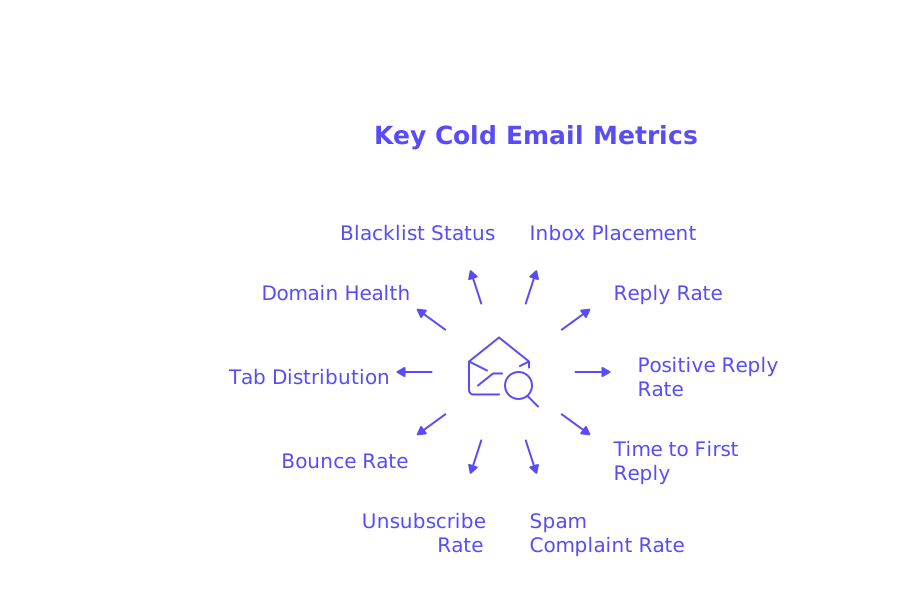
- Inbox placement rate: Track how often your emails arrive in the primary inbox versus Promotions or Spam, broken down by provider.
- Reply rate: Measure the percentage of delivered emails that receive a genuine human response, excluding out-of-office and autoresponder replies.
- Positive reply rate: Categorize replies into “interested,” “booked,” or “referral” to pinpoint actual movement in your sales pipeline.
- Time to first reply: Record the median time from sending an email to receiving the first relevant response.
- Spam complaint rate: Track both feedback loops (FBLs) and manual complaints, small increases can indicate reputational strain.
- Unsubscribe rate: Monitor trends over time rather than isolated daily spikes, as this provides context for what is and isn't typical in cold outreach.
- Bounce rate, by type: Separate hard bounces (indicating possible list or domain issues) from soft bounces (which can imply throttling or temporary problems).
- Tab and folder distribution: Analyze Gmail tab results and spam folder hits across seeded test accounts.
- Domain health indicators: Examine DMARC alignment, DKIM pass rates, SPF configuration, and PTR record status.
- Blacklist status: Regularly check if your sending domain or IP has been blacklisted and track resolution times.
If you need guidance on the typical tolerance level of your audience towards cold emails, consider reviewing our helpful guide on Cold Email Unsubscribe Rate: What’s Normal and When to Worry. You can use the patterns detailed in this guide to adjust your email activity thresholds and implement appropriate pause protocols.
How to Measure Inbox Placement Rate for Cold Email Campaigns
Inbox placement is the foundation for all other metrics, if emails don’t reach the inbox, nothing else matters. To properly measure this, build a seed list that includes Gmail, Outlook, Yahoo, and key regional providers, then send test batches before and during each campaign. Document where emails land, Primary Inbox, Promotions, Updates, or Spam, for every provider.
Supplement these seed tests with a strong spam checker before each send. Evaluate your email headers, authentication status, and flag any risky language. After sending, compare the spam checker’s predictions to actual inbox placement across your seeding accounts. For more detailed benchmarking methods, read Inbox Placement Rate for Cold Emails: Benchmarks and Best Practices.
Interpreting Bounces, Replies, and Time-to-First-Response Without Open Data
Begin by classifying all bounces. Hard bounces typically indicate invalid email addresses or blocked domains, while soft bounces often signal temporary rate limits, DNS issues, or greylisting. Carefully review SMTP codes, they provide direct insight into the cause of each bounce.
It is beneficial to associate each bounce code with a specific corrective action. For example, remove any invalid addresses resulting in hard bounces, slow your sending cadence in response to temporary failures, and investigate DNS or hosting settings if you see repeated soft errors. For the latest industry patterns and evolving delivery rules, consult Why Emails Get Bounced in 2026 and the New Delivery Rules.
After bounces, focus on replies by categorizing their intent. Use tags such as Interested, Not Now, Referral, Objection, and Out of Office to map responses. Tracking the share of Interested replies helps forecast booked calls without needing to rely on link tracking. Monitoring time to first reply is also valuable, faster direct replies usually reflect stronger fits and accurate placement.
Technical Deliverability Signals That Predict Outcomes After Apple MPP
Maintaining strong authentication is crucial. Monitor your DMARC alignment rate for both the “From” and “Return-Path” fields. Confirm DKIM passes remain consistent with stable selectors, while keeping SPF records within the 10-lookup limit and free of dangling includes. Publish steady reverse DNS records with matching HELO/EHLO strings, and ensure all hops support up-to-date TLS configurations.
Pay close attention to your sending method. Delivering via API versus SMTP can affect provider rate limits and error feedback. Track throttling events and provider spam scores. Always include correct headers for complaints and unsubscribes. Ensure consistent alignment among your envelope, visible sender, and tracking domains to reduce spam filtering risks.
Warm-Up Insights: Using Automated Inbox Interactions to Protect Cold Email Measurement
Email warm-up is designed to build a sender's reputation for delivering reliable and wanted emails, not to facilitate immediate prospecting. These warm-up emails are meant solely to boost sender credibility and generate positive technical signals, such as opens, thread replies, spam removal, and Primary tagging, making them an essential part of any sender’s preparation, rather than a marketing tactic.
A robust warm-up network is key. This network should include over fifty thousand genuine, active mailboxes, regularly updated to create natural engagement patterns across different providers and locations.
Mailwarm leverages this strategy by replicating organic inbox engagement through a vast, curated network as you build email volume. As of February 2026, Mailwarm transformed into a cutting-edge deliverability platform, featuring new capabilities such as multi-account management, advanced deliverability and reputation tracking, cross-provider warm-up, and provider-specific spam score monitoring, all built to support scaling operations securely.
- As of February 2026, Mailwarm’s platform now includes:
- • Centralized management for multiple accounts and domains
- • Cross-provider warm-up with intelligent volume distribution
- • Real-time sender reputation and inbox placement monitoring
- • Individual spam score analysis for Gmail, Outlook, and more
- • Automated engagement through natural thread replies
- • Automatic spam recovery and correction of inbox placement issues
- • Gradual volume ramp-up guided by adaptive algorithms
- • Ongoing blacklist monitoring and reputation safeguarding
- • Complete authentication diagnostics (SPF, DKIM, DMARC, MX)
- • Agency-ready analytics for large outreach teams
Mailwarm is crafted to optimize inbox placement, maintain domain health, and scale your outbound efforts securely, making it one of the most advanced email warm-up ecosystems available today.
A Weekly Reporting Cadence for Cold Email Teams Without Opens
- Run a pre-send spam checker and address any flagged issues.
- Conduct a controlled seed test across major mailbox providers.
- Record the tab and folder where each seed email lands, by provider and by domain.
- Launch prospect batches gradually, stepping up send volume with care.
- Categorize and tag all replies by intent within 24 hours of receipt.
- Review bounces by code and implement the appropriate fixes.
- Summarize unsubscribes and complaints, adding interpretive context.
- Check DMARC, DKIM, and SPF pass rates for ongoing configuration health.
- Make a decision: continue, scale up, or pause/cut back on sending based on results.
Pitfalls to Avoid When Measuring Cold Email Without Open Rates
- Be wary of vanity metrics; focus on inbox placement and human intent rather than pixel counts.
- Don’t ignore the differences between providers, Gmail and Outlook filter emails in distinct ways.
- Resist overreacting to results from a single seed test; look for consistent trends over time.
- Avoid ramping up send volumes without a comprehensive warm-up, rapid increases can quickly damage reputation.
- Don’t mix transactional and cold outreach emails on the same domain.
- Avoid neglecting changes to your Domain Name System (DNS) settings. It's essential to track every modification and retest immediately to prevent potential deliverability issues.
- Never skip unsubscribe trend analysis, as emerging patterns often warn you before complaints escalate.
Closing Thoughts on Measuring Cold Email Performance After Apple MPP
Open tracking is no longer a trustworthy signal for cold outreach. Instead, focus on delivering emails to the primary inbox, generating genuine replies, and carefully maintaining domain health. Rely on seeding, reply intent data, bounce codes, and authentication results to steer your strategy. For further benchmarking and up-to-date best practices, keep resources such as Inbox Placement Benchmarks, 2026 Bounce Rules, and Unsubscribe Norms close at hand.
Ready to start reporting results you can rely on? Begin with a quick spam check, conduct a seed test, and start tagging your replies today.
FAQ
Why are open rates unreliable for tracking email performance after Apple's MPP?
Apple's MPP preloads email tracking pixels, inflating open rates by marking emails as opened even if they weren't. This distortion masks real performance, making open rates a poor indicator of engagement.
What metrics should be prioritized over open rates for cold email campaigns?
Focus on inbox placement rate, reply rate, and bounce rate instead of open rates. Tracking genuine interactions and technical signals better reflects recipients' engagement with your emails.
How does Mailwarm enhance email deliverability for cold email campaigns?
Mailwarm optimizes inbox placement through a structured warm-up process and advanced reputation monitoring. It leverages a robust network to simulate natural interactions, improving domain credibility.
What are the consequences of ramping up email volumes too quickly?
Sudden increases in email volume can damage your sender reputation, leading to more emails landing in spam. A gradual approach, guided by Mailwarm, ensures consistent deliverability and mitigates risks.
How can I effectively categorize email replies without relying on open data?
Classify replies by intent, such as Interested or Not Now, to gauge real engagement. This approach provides actionable insights into your sales pipeline and replaces unreliable pixel-based tracking.
What role does authentication play in email deliverability?
Strong authentication like DMARC, DKIM, and SPF ensures that your emails aren't filtered as spam. Inconsistent records or missing protocols can hurt placement, as Mailwarm supports maintaining rigorous compliance.
Why is it important to separate transactional and cold outreach emails?
Mingling these emails on the same domain risks tarnishing your transactional email reputation if outreach encounters issues. Distinct domains prevent unwanted cross-contamination of sender reputations.