
Gmail Bulk Sender Requirements in 2026 and Who They Apply To
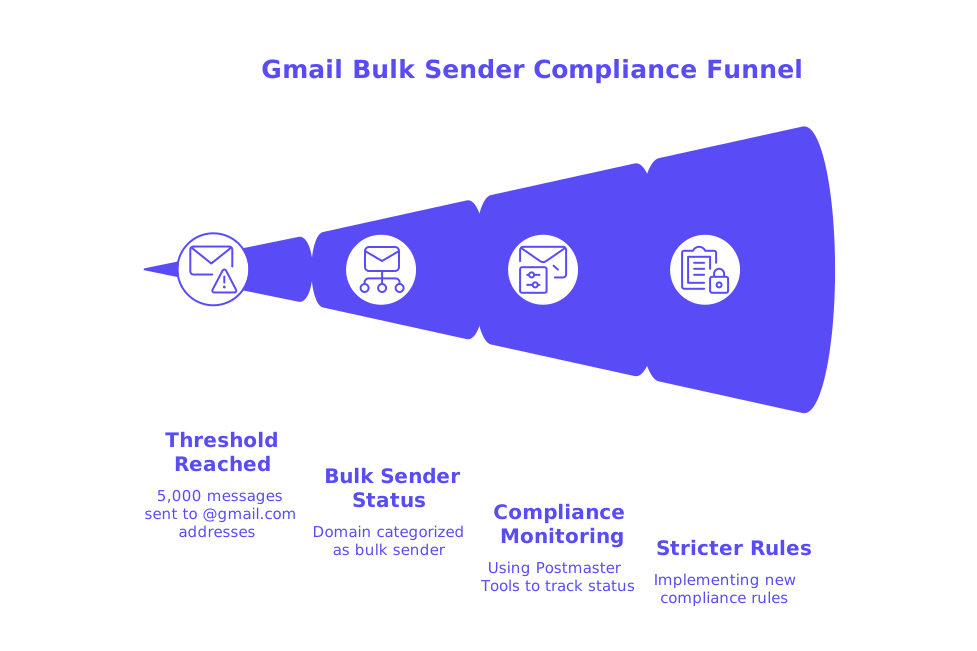
Gmail defines a bulk sender as any sender that sends around 5,000 messages to personal Gmail accounts in a 24-hour period. Once you reach this threshold, your domain is categorized as a bulk sender until changes are made to reduce your sending volume. This status is based on the total volume across your organizational domain, including all subdomains. Importantly, these rules apply only when sending to @gmail.com or @googlemail.com addresses, not to recipients on Google Workspace. Starting November 2025, Gmail implemented stricter compliance rules, resulting in more frequent temporary and permanent rejections for non-compliance. You can now monitor your compliance status in the updated dashboard within Postmaster Tools. (support.google.com)
- The 5,000-message threshold takes all subdomains into account for your organization. (support.google.com)
- Bulk sender classification does not expire automatically once it is assigned. (support.google.com)
- Regulations specifically affect mail sent to personal Gmail users, not Google Workspace destinations. (support.google.com)
Gmail Bulk Sender Authentication Checklist: SPF, DKIM, DMARC, and Alignment
Gmail requires all bulk senders to authenticate using both SPF and DKIM. You must publish a DMARC record that includes a specified policy, at minimum, p=none, and ensure that your RFC5322 From domain aligns with either your SPF or DKIM organizational domain. Full alignment with both SPF and DKIM is recommended and may become mandatory in the future. (support.google.com)
- Configure SPF records for every sending domain and subdomain. Keep them valid and within DNS lookup limits. For lengthy records, consult this guide on managing SPF record length in multi-domain setups.
- Enable DKIM with a consistent selector and update keys as needed. Gmail will block or throttle traffic if DKIM authentication fails. (support.google.com)
- Publish a DMARC record featuring at least one policy tag. Routinely monitor reports and ensure alignment requirements are met for all messages. (support.google.com)
- Check From-domain alignment after any change to templates or routing. Any misalignment will trigger 4.7.x errors or send emails to spam. (support.google.com)
Before launching a new campaign, use an email header checker to confirm alignment and other authentication details.
Gmail Bulk Sender Infrastructure Requirements: TLS, PTR, and DNS Best Practices
Bulk senders must use TLS for all SMTP transmissions to Gmail. Failing to meet this standard may result in temporary limits or even blocks. (support.google.com)
- Make sure each sending IP has a valid PTR record, with matching forward and reverse DNS. Mismatches or missing PTR records generate 5.7.25 errors. (support.google.com)
- Serve consistent EHLO/HELO hostnames that resolve correctly, together with accurate DNS configurations.
- Synchronize your mail server’s clock and ensure email headers conform to RFC5322, as Gmail enforces format standards strictly. (support.google.com)
Gmail Bulk Sender Unsubscribe Rules and Complaint Rate Limits for 2026
Promotional or marketing messages must support one-click unsubscribe using RFC 8058 headers. Add List-Unsubscribe and List-Unsubscribe-Post: List-Unsubscribe=One-Click, with one HTTPS link in the header. Gmail recommends processing unsubscribe requests within 48 hours. Including unsubscribe links only in the message body or via mailto is not sufficient. (support.google.com)
Your spam complaint rate is tracked daily in Postmaster Tools. Maintain spam rates under 0.1%, and never let them reach or exceed 0.3%. Rates at or above 0.3% will lead to severe deliverability issues. Use Postmaster Tools’ compliance dashboard to monitor your reputation. (support.google.com)
For more on what to expect from your delivery results, explore these inbox placement benchmarks for cold outreach.
Gmail Bulk Sender Sending Behavior and Domain Ramp-Up Expectations in 2026
Gmail enforces stricter requirements faster for new domains. To avoid enforcement issues, ramp up your sending volume in gradual stages, closely monitor spam complaints, and increase your sends only if you maintain low spam and high engagement. Only when a mail meets all Gmail’s compliance standards will the unsubscribe button be prominently displayed in Gmail’s interface. (support.google.com)
Before each campaign, use a blacklist checker to confirm that your sending IPs and domains are not on blocklists.
Practical Gmail Bulk Sender Compliance Checklist: Weekly Steps to Follow
- Check Postmaster Tools for your spam rate, domain reputation, and overall compliance dashboard status. (support.google.com)
- Test and validate
SPF,DKIM, andDMARCfor all sending domains and subdomains. Confirm alignment after any template or routing changes. (support.google.com) - Verify that TLS is enforced both by your sending server and your email service providers. (support.google.com)
- Verify PTR and forward DNS symmetry for every sending IP address. (support.google.com)
- Send a test email to yourself and check the raw headers to make sure both one-click unsubscribe headers are present.
- Use a spam checker before sending to identify risky content or authentication gaps.
- Double-check your suppression lists and recent unsubscribes. Process unsubscribe requests quickly.
- Document any Gmail error codes and track them to the exact failing element. (support.google.com)
- If complaints spike, immediately decrease volume and address the sources. Keep daily spam rates below 0.1%. (support.google.com)
If your emails are unexpectedly rejected, review this guide on resolving email bounces under Gmail’s new delivery requirements.
How Email Warm-Up Supports Gmail Bulk Sender Compliance Without Crossing Critical Lines
Email warm-up plays a crucial role in establishing healthy sending habits for new or dormant domains by focusing on technical trust signals. This approach involves carefully controlled sending patterns to generate positive metrics, such as opens, replies, and removing mail from spam folders, which helps stabilize your deliverability as you scale up.
Mailwarm interacts with a network of more than fifty thousand active, continuously maintained inboxes to simulate authentic engagement behaviors such as opens, replies, spam removals, and primary-inbox tagging. From February 2026, Mailwarm has expanded into a sophisticated email warm-up tool offering multi-account management, thorough deliverability and reputation monitoring, multi-provider support, and provider-specific spam score tracking, specifically tailored to high-volume bulk senders. Importantly, Mailwarm is not an email marketing tool; its interactions are technical and reputation-focused rather than promotional.
For more options, see this overview of top agency-friendly warm-up tools in 2026.
Troubleshooting Gmail Bulk Sender Rejections and Bounces in 2026
Gmail provides detailed 4.7.x (temporary) and 5.7.x (permanent) error codes for failures in meeting bulk sender requirements. These codes pinpoint which compliance check failed, such as SPF, DKIM, or DMARC configuration, From-domain alignment, TLS, or PTR record. (support.google.com)
- 4.7.27 or 5.7.27: SPF errors for bulk mail. (support.google.com)
- 4.7.30 or 5.7.30: DKIM verification issues. (support.google.com)
- 4.7.31: Missing DMARC record or undefined DMARC policy. (support.google.com)
- 4.7.29 or 5.7.27/5.7.29: TLS not enforced on SMTP. (support.google.com)
- 5.7.25: PTR records are missing or mismatched. (support.google.com)
Correct the failing configuration, send a controlled test batch, and monitor the results in Postmaster Tools. Refer to Gmail’s Email Sender Guidelines for ongoing reference.
Wrap-Up: Maintain a Routine Schedule to Ensure Gmail Bulk Sender Compliance
Make your compliance checklist a weekly habit. Ensure all authentication methods are properly aligned, keep email headers accurate, maintain robust infrastructure, and facilitate an effortless unsubscribe process. Monitor your spam rate daily and respond quickly if issues arise. With consistent maintenance, Gmail bulk sender rules for 2026 are manageable and reliable. If you want a risk-free way to rehearse email ramp-up, start with a structured warm-up and transition to your main campaigns afterward.
Ready to take control of your compliance? Get started with Postmaster Tools, run a quick spam check, and approach your next send with confidence.
FAQ
What qualifies as a bulk sender under Gmail's requirements?
If your domain sends 5,000 or more emails to Gmail addresses within 24 hours, you're tagged as a bulk sender. This happens even if the volume comes from different subdomains, so containment is critical.
How does Gmail's bulk sender authentication impact email deliverability?
Lacking proper SPF, DKIM, and DMARC records places your emails on a fast track to spam, or even block lists. Full alignment isn't just a guideline—it's a must for survival.
Why is email warm-up crucial for new domains?
New domains without warm-up often crash against Gmail's strict compliance walls. Mailwarm can help simulate positive engagement to avert suspicion from ISPs.
What are Gmail's bulk sender infrastructure requirements?
Failing to use TLS and maintain proper PTR records sets off Gmail's alarms. Missing such basics can activate severe send restrictions faster than you think.
What are the consequences of a high spam complaint rate?
Cross the 0.3% spam complaint threshold, and say goodbye to confident deliverability. Gmail won't coddle your domain—responsibility for compliance rests solely on you.
How can Mailwarm benefit bulk senders specifically?
Mailwarm provides targeted warm-up strategies, building trust signals necessary for Gmail compliance. It emphasizes technical reputation over marketing mass sends.
Is one-click unsubscribe optional in emails sent to Gmail?
No, ignoring the one-click unsubscribe mandate means inviting spam filters to feast on your messages. Header compliance isn't flexible—it's enforced.
What role does domain ramp-up play in Gmail bulk sending?
Ramp up gradually or face swift compliance crackdowns from Gmail. Fast climbs generally equate to fast falls unless handled with meticulous care.