
Sender Rewriting Scheme (SRS) explained: Why Forwarded Email Breaks SPF and DMARC
Email forwarding appears straightforward: a message arrives at your server, which then redirects it to another destination. Underneath, however, Sender Policy Framework (SPF) interprets this differently. SPF checks whether the sending server’s IP address is authorized to send mail on behalf of the envelope sender’s domain. When you forward an email, the IP address reflects your forwarding server, not the original domain’s server, resulting in a mismatch that very often causes SPF authentication to fail.
Forwarding an email changes its path but retains the original domain in the email header. This can lead to issues if the Sender Policy Framework (SPF) verification fails, or if the DomainKeys Identified Mail (DKIM) gets compromised during transit, resulting in the Domain-based Message Authentication Reporting and Conformance (DMARC) also failing. Many legitimate messages can end up landing in spam folders or bouncing as a result.
Sender Rewriting Scheme (SRS) addresses the SPF issue. By rewriting the envelope sender during forwarding, SRS allows the forwarded message to authenticate using the forwarder’s own domain and IP addresses.
For a refresher on how SMTP identity checks, such as HELO/EHLO, impact sender reputation and how SPF validation works within this process, see the overview on HELO/EHLO's impact on sender reputation.
How Sender Rewriting Scheme (SRS) Rewrites the Envelope Sender to Restore SPF Validation
SRS intervenes by modifying the envelope sender (the address in the MAIL FROM command) before your server forwards a message. This process encodes both the original sender and their domain within a new address specific to the forwarding server’s domain.
Think of SRS as attaching a trusted return address sticker from the forwarder. Mail receivers can validate this sticker’s domain with SPF, while any bounces are reliably routed back to the original sender along a secured path.
Example:
- Original sender:
MAIL FROM:<alice@orig.example> - Forwarded with SRS:
MAIL FROM:<SRS0=HHH=TS=orig.example=alice@fwd.example>
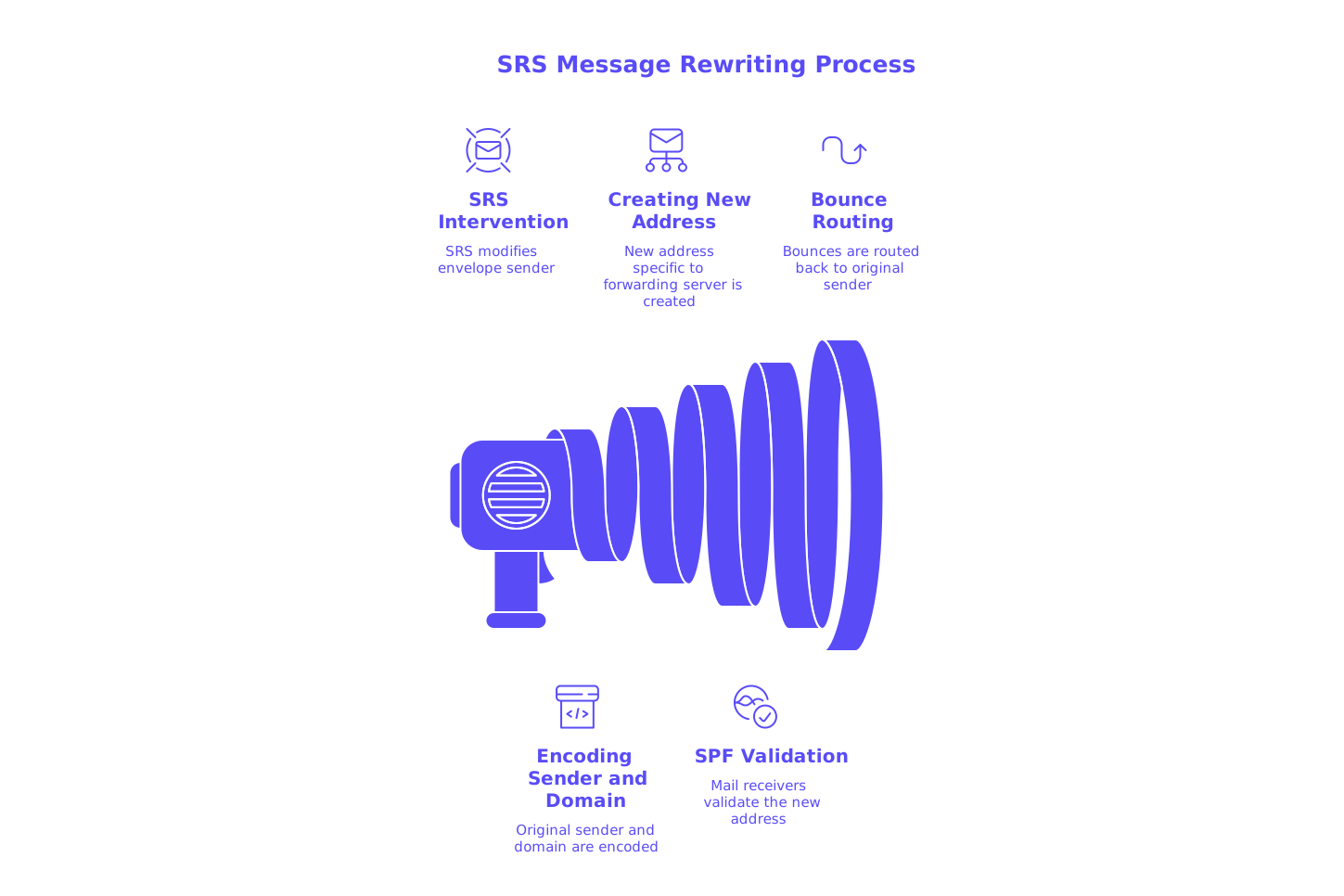
The “SRS0=” prefix marks the first rewrite, and the address includes a hash, a timestamp, the original domain, and the original local-part. If a bounce happens further downstream, it goes to the SRS-encoded address at fwd.example, whose server can reverse the process (often indicated as SRS1) and send the bounce back to the true origin.
This rewrite allows SPF to pass for fwd.example, aligning the sending IP and domain, and effectively resolving SPF failures specifically caused by forwarding.
How to Preserve DMARC Alignment When Using SRS on Forwarding Systems
DMARC relies on an alignment check between the visible From: domain in the email header and whichever identity (SPF or DKIM) passes authentication. While SRS fixes SPF, the rewritten sender address will typically belong to the forwarding domain, breaking DMARC’s SPF alignment. To ensure DMARC passes, follow these strategies:
- Rely on DKIM alignment from the original sender. The sending domain should sign all messages using DKIM, with the same organizational domain as seen in the header
From:. - Maintain DKIM signatures in transit. When forwarding, avoid modifications to the message body or critical headers that could invalidate the DKIM signature. It’s recommended to use
relaxed/relaxedcanonicalization to improve resilience. - Adopt ARC for complex delivery paths. Authenticated Received Chain (ARC) technology lets intermediaries vouch for the original authentication results. Some receiving MTAs weigh ARC when making final delivery decisions, especially if DKIM breaks downstream.
In summary: SRS reliably addresses SPF issues with forwarded mail, while preserving DKIM alignment supports successful DMARC validation. Both are essential for maintaining the trustworthiness of forwarded messages.
Practical Steps to Deploy Sender Rewriting Scheme (SRS) on Common Mail Transfer Agents (MTAs)
Most current Mail Transfer Agents (MTAs) support SRS through native options or easy add-ons. The following checklist applies across platforms, though specific implementation details differ:
- Install an SRS implementation. Select a reputable SRS library or service compatible with your MTA infrastructure.
- Set up a stable SRS secret and rotation policy. This secret signs the SRS hash; rotate routinely, but retain prior secrets for a safe transition window.
- Configure the SRS domain. Choose and control the domain used for rewriting, such as
fwd.exampleor a designated subdomain. - Enable rewriting for forwarding traffic only. Apply SRS exclusively to relayed third-party mail, avoiding first-party (outbound) messages.
- Set bounce handling properly. Ensure your MTA can reverse SRS rewrites so non-delivery reports (bounces) reach the original sender.
- Monitor with logs. Track rewritten addresses and successful reversals to confirm correct function and quickly resolve issues.
After configuration, always send test emails through representative forwarding scenarios to check for SPF passing under the new configuration, along with DKIM validity and delivery rates.
DNS, SPF Limits, and Domain Alignment Considerations When Implementing SRS
Your forwarding domain must have a valid SPF record permitting your outbound (egress) IP addresses. Ensure this record remains compliant, concise, and within the SPF 10-lookup constraint. The lookup limit can become problematic when managing multiple brands or external service providers.
Use consolidation or record flattening as needed. For expert advice, see this guide to managing SPF record length in multi-domain environments.
Keep in mind: When SRS is in use, DMARC alignment generally relies on DKIM. Always confirm that the original sender’s domain applies DKIM signatures correctly and maintains a published, accurate DMARC policy. Begin with a monitored DMARC policy, and move to stricter enforcement after successful testing.
Testing SRS, SPF, DKIM, and DMARC with a Spam Checker Before Going Live
Before implementing the process in your daily operations (known as production traffic), make sure to thoroughly test your setup. A reliable spam checker tool will summarize SPF, DKIM, DMARC, ARC, and header results, providing a comprehensive email health snapshot. It is beneficial to test these three key flows:
- Email sent directly from the original sender to the testing address.
- Email forwarded through your SRS-enabled relay to the testing address.
- Email sent through a mailing list or auto-responder before reaching the testing address, if applicable.
For forwarded emails, expect SPF to pass based on the forwarding domain. DKIM should also pass and remain aligned with the origin. If mailing lists modify the message, inspect ARC results. Compare and document the test results after every change to continually verify deliverability and authentication accuracy.
Handling Mailing Lists, Auto-Responders, and ARC with Sender Rewriting Scheme (SRS)
Mailing lists and auto-responders create extra challenges by altering subject lines, modifying footers, or adjusting headers. These changes can often disrupt DKIM signatures:
- Favor mailing lists engineered for DMARC compatibility. Lists that minimize message alterations are less likely to break DKIM.
- Use ARC where possible in the mail flow. ARC helps downstream servers evaluate the original authentication, even after intermediary modifications.
- Keep SRS active. Even if DKIM breaks, SRS ensures forwarded messages are not rejected due to SPF failures.
For more on how receiver filtering and policy rules are evolving, check the latest analysis of email delivery rules and bounce causes in 2026.
Warm-Up and Deliverability Context: Where SRS Fits in a Healthy Sending Program
SRS solves authentication challenges at the forwarding level, but it does not by itself establish or improve sender reputation in the eyes of inbox providers. That requires a holistic approach. For example, Mailwarm now offers an advanced suite of features, enhancing its role as a comprehensive solution for email warming. Mailwarm operates by consistently interacting with a substantial network of actively maintained mailboxes, aimed at creating natural mailbox activity to gradually build up a positive sender reputation.
Since February 2026, Mailwarm has expanded to include multi-account management, detailed deliverability and sender reputation monitoring, support for multiple mail providers, and real-time spam score tracking, especially beneficial for high-volume organizations.
Your email infrastructure, or technical stack, should combine solid authentication measures, including SPF, DKIM, DMARC, SRS, and ARC, with consistent, natural mailbox engagement over time to establish a credible sender reputation. This combination reduces spam misclassification and increases inbox placement for your legitimate mail.
Operational Checklist for a Clean SRS Rollout that Fixes SPF and Preserves DMARC
- Publish a robust SPF record on your forwarding domain and verify coverage of all relevant outbound IPs.
- Activate SRS exclusively for mail that you are forwarding, not for internal or originating sends.
- Maintain DKIM signatures from the original sender to uphold DMARC alignment.
- Integrate ARC headers on servers that modify message content between hops.
- Implement and periodically rotate your SRS secrets, while monitoring reversal outcomes.
- Test all significant paths using a spam checker tool, and keep records of validation outcomes.
- Review system logs for unexpected bounces or forwarding loops.
- Reexamine your HELO/EHLO practices to avoid negative impacts on sender reputation; see this deep dive on HELO/EHLO’s role in sender reputation for insights.
Key Takeaways on Fixing SPF Failures with Sender Rewriting Scheme (SRS)
SRS enables forwarded messages to pass SPF checks by treating the forwarder’s domain as the sender. To ensure messages also maintain DMARC compliance, original senders must sign emails with DKIM and maintain alignment with the visible From: domain. Keep all signatures intact, stay within SPF limits, and regularly test across all forwarding scenarios for optimal results. If handling multiple brands or complex setups, revisit your SPF approach using this guide on SPF record management. Stay informed about changing receiver policies and emerging bounce reasons by consulting the latest delivery rule analysis for 2026.
Ready to address forwarding issues, eliminate SPF failures, and maintain DMARC protection? Implement SRS, validate your configuration with testing tools, and support it with continual monitoring. When both authentication and sender reputation are managed effectively, a greater share of your legitimate email will reach users’ inboxes as intended.
FAQ
What is Sender Rewriting Scheme (SRS) and why is it important?
SRS is a mechanism that adjusts the sender address during email forwarding, allowing forwarded messages to pass SPF checks. It's crucial because standard forwarding often results in SPF failures, which can cause legitimate emails to bounce or get marked as spam.
How does SRS affect DMARC compliance?
SRS rewrites can break DMARC alignment because the sender domain appears different after forwarding. To maintain DMARC compliance, ensure the original sender signs emails with DKIM and retains alignment with the visible From domain.
Can SRS resolve all issues with email forwarding?
No, while SRS fixes SPF alignment issues, DKIM and DMARC rely on different factors. Ensure the original sender maintains strong DKIM practices, and consider using ARC to support complex forwarding paths.
What role does Mailwarm play in email deliverability?
Mailwarm enhances email deliverability by interacting with a network of active mailboxes, building a positive sender reputation over time. While SRS tackles forwarding challenges, Mailwarm supports a holistic reputation strategy.
Is it necessary to update SPF records when implementing SRS?
Yes, your forwarding domain's SPF record must authorize your outbound IPs to ensure successful SPF validation. Regularly review and optimize your SPF record to stay within the 10-lookup limit and improve reliability.
How can I ensure ARC headers support successful email delivery?
ARC provides a way for intermediaries to authenticate messages and maintain the trust chain during forwarding. Make sure to integrate ARC headers if your servers modify message content, as this can help preserve the original authentication results.
What precautions should be taken when setting up SRS?
Implement a secure SRS secret and periodically rotate it to protect against misuse. Monitor logs for misconfigurations and test all forwarding scenarios to verify SPF, DKIM, and DMARC performance consistently.
Does using SRS guarantee inbox placement for forwarded emails?
SRS improves SPF compliance but doesn't guarantee inbox placement, as it doesn't address other factors like sender reputation. Employ robust authentication measures and consistent mailbox interactions as part of your deliverability strategy.
Are there alternatives to SRS for solving email forwarding issues?
While SRS is a popular solution, using alternatives like trusted forwarding services or setting up dedicated forwarding domains might also mitigate forwarding issues. Evaluate your specific needs and infrastructure before choosing a method.