
Do exotic TLDs hurt cold email deliverability in real-world campaigns?
Many senders worry that .io or .xyz land in spam by default. That fear is common, but often misplaced. Mailbox providers judge your domain and message quality first. The TLD sits far down the list. When setup and behavior are equal, the gap between TLDs narrows fast.
So the real question is not “Which TLD?” It is “Does my sending setup earn trust?” This article shows how to make that true, even on non-.com domains.
How mailbox providers score domains used for cold outreach regardless of TLD
Filtering systems look at a stack of technical and behavioral signals. These outweigh your TLD choice in most cases.
- Authentication: SPF, DKIM, and DMARC with alignment to your visible From domain.
- Infrastructure: reverse DNS, TLS, and stable, predictable SMTP behavior.
- Reputation: complaint rate, bounce rate, and spam trap hits.
- History: domain age, prior sending patterns, and list hygiene.
- Content risk: phishing markers, malicious links, and mismatched branding.
- User feedback: replies, “not spam” actions, and genuine conversations.
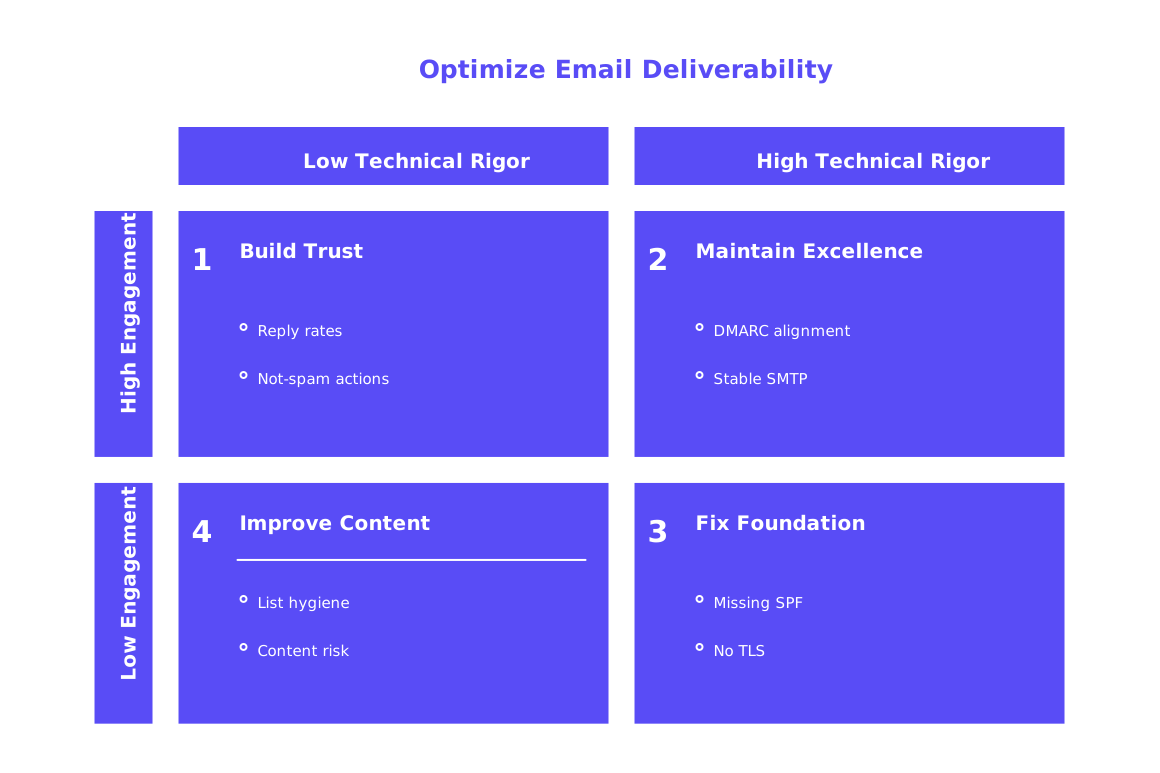
Get these right, and .io or .xyz can perform on par with .com.
What controlled tests suggest for .io, .xyz, .ai, and .co senders
Across audits and test sends, TLD alone rarely decides inbox placement. Fresh domains struggle more than mature ones, no matter the TLD. Cheap or over‑abused TLDs may face extra scrutiny, yet sound setup still wins.
Reputation and authentication beat TLD aesthetics. The mailbox sees behavior, not hype.
If you run the same template, cadence, and infrastructure, performance differences usually stay small. Greater variations in results stem from the warm‑up process, how well your system aligns with standard email protocols (SPF, DKIM, DMARC and domain alignment), and how recipients respond to your emails.
DNS authentication and alignment steps that matter more than your TLD
Lock in SPF, DKIM, and DMARC
- Publish SPF with only the services that send for your domain.
- Sign all mail with DKIM, and rotate keys on a safe schedule.
- Deploy DMARC with alignment enabled. Start at p=none, review reports, then move higher.
When managing many domains, be mindful of SPF record length and lookup limits. A large number of include: mechanisms can quickly exceed limits and cause authentication to fail. Keep your records lean, consolidate senders where possible, and test changes before they go live. For deeper guidance, see this guide to avoiding SPF record length limits in multi‑domain setups.
Use a sending subdomain with clear alignment
Pick a neutral subdomain like mail.yourbrand.tld. Align it with your visible From domain through DKIM and DMARC. Keep marketing and cold outreach on separate subdomains to protect reputation.
Reputation signals that shift faster than any TLD label
- Complaint rate: even small spikes can crater trust.
- Hard bounces: high levels look like guessing addresses.
- Engagement quality: genuine replies carry strong weight.
- Consistency: jagged send patterns look risky to filters.
Your TLD cannot save a bad pattern. It also will not sink a well‑run program.
Warming up exotic TLDs with realistic engagement and controlled volume
New or dormant domains need a warm‑up period. You want real‑looking threads, gradual ramps, and provider diversity. That activity should generate replies, message moves, and “not spam” signals across major inboxes.
To make this easier, you might use a dedicated warm‑up platform, such as Mailwarm, that provides centralized multi‑account management, reputation monitoring, cross‑provider warm‑up, and per‑provider spam score tracking (e.g., Gmail, Microsoft, Yahoo). Tools like these help create natural interactions that build a healthy sender reputation before cold outreach starts.
Before you scale, run a spam checker on sample messages. Review headers, authentication, and content risk. Fix issues, then keep warming until signals stabilize.
Measuring inbox placement and bounce reasons for non-.com domains
Test with seed addresses spread across Gmail, Outlook, and Yahoo. Record where messages land. Keep that log next to your volume and template changes.
- Track inbox, promotions, and spam placement by provider.
- Analyze bounce codes and map them to specific fixes.
- Read DMARC aggregate reports for alignment and source drift.
- Watch sender reputation in provider dashboards where available.
For context on measurement, review these inbox placement benchmarks for cold email. If you see rising bounces, compare against the new rules summarized in why emails get bounced in 2026.
Cases where an exotic TLD is the wrong tool for your outreach
- Your brand trust relies on strict corporate naming rules.
- The TLD carries heavy abuse history in your region or industry.
- You cannot obtain a short, readable domain within that TLD.
- Partners must whitelist only .com due to policy limits.
In these cases, use a recognizable TLD and focus on airtight alignment. It reduces friction with security teams and automated gateways.
Technical checks that lift confidence for .io, .xyz, and more
- Confirm reverse DNS points to a name you control.
- Serve TLS for SMTP and verify modern ciphers.
- Keep your envelope MAIL FROM aligned with DMARC.
- Separate transactional, marketing, and outreach traffic by subdomain.
- Audit unsubscribe handling and local laws for your region.
- Document bounce handling so list hygiene stays clean.
Repeat these checks monthly. Catch drift before it tanks reputation.
Practical checklist for safe sending from .io, .xyz, and more
- Register the domain for several years to signal stability.
- Publish SPF, DKIM, and DMARC with strict alignment.
- Keep SPF within lookup/length limits and test DNS after edits.
- Warm the domain with authentic conversations across providers.
- Send only to validated addresses. Avoid guesswork.
- Monitor bounces and complaints daily, especially at the start.
- Use a spam checker before each new template or mailbox change.
- Scale volume only when inbox placement holds steady.
Bottom line: Exotic TLDs do not doom cold email. Poor setup does. Get authentication and alignment right, warm with real activity, and measure every send. When the signals look healthy, you can ship confidently.
Ready to see how your domain performs? Begin with a short preliminary warm‑up: send a small, steadily increasing number of emails per mailbox, gather real replies and “not spam” signals, and check each campaign with a spam checker. Start full‑scale sending only after placement stays consistently in the inbox (not promotions or spam) across major providers for a sustained period.
FAQ
Do exotic TLDs negatively impact email deliverability?
Exotic TLDs alone don't doom deliverability. Proper setup and domain reputation trump TLD choice. Focus on building trust with mailbox providers and align your domain strategies with standard email authentication protocols.
What email authentication protocols are vital for improving deliverability?
SPF, DKIM, and DMARC are crucial. These protocols help authenticate the legitimacy of your domain, reducing the likelihood of being flagged as spam. Consistently align them with your visible From domain.
Why is domain warming important for new or exotic TLDs?
New domains require warming to establish a positive sending reputation. Use genuine engagement and realistic sending behavior to build trust. Tools like Mailwarm can help fine-tune this process.
How can I maintain a positive sender reputation?
Minimize complaint and bounce rates, focus on engagement quality, and maintain consistent sending patterns. Monitor responses and adapt strategies to keep sender reputation intact.
Do I need to separate subdomains for different email activities?
Yes, using separate subdomains for marketing, transactional, and cold outreach emails is pivotal. This segregation shields critical domains from reputation damage due to varied sending behaviors.
How can Mailwarm assist in the email warming process?
Mailwarm provides tools for centralized management, reputation monitoring, and multi-provider warm-ups. These capabilities facilitate realistic interactions and robust sender reputation before scaling outreach.
Is it necessary to regularly test my email setup?
Absolutely. Regular testing with spam checkers and monitoring bounce reasons help catch problems early. This vigilance is essential to maintain a healthy reputation and avoid penalties from email providers.
Can poor setup impact my deliverability even with a .com domain?
Yes, a poor setup will ruin deliverability regardless of the TLD. Misconfigured authentication or erratic sending behavior can result in significant reputation damage, making your emails less likely to reach the inbox.
What risks are involved with using an exotic TLD for outreach?
Exotic TLDs can face harsher scrutiny if associated with abuse. They may also encounter resistance if partners use strict whitelisting rules. Ensuring stringent configuration and reputation management is key to overcoming these challenges.