
Emails go to spam for three main reasons: broken authentication, poor sender reputation, or bad content and sending habits. In 2024, spam made up 47.27% of global email traffic, so mailbox providers are filtering aggressively and legitimate messages often get caught as collateral damage (industry spam data).
A business owner usually notices the problem the same way. A sales sequence gets no traction. Customers say they never got the receipt. A newsletter looks fine in preview, then lands in junk. The fix isn't guessing. It's a diagnostic workflow that starts with technical checks, moves into reputation, and ends with content and sending behavior.
Why Your Emails Are Going to Spam and How to Fix It
A common failure pattern looks like this. The campaign is live, open rates collapse, a few customers mention they found the message in junk, and the team starts rewriting copy before confirming whether the sending domain is even set up correctly.
Mailbox providers make a layered decision every time an email arrives. They check whether the message is properly authenticated, whether the sender has a credible history, and whether the campaign behaves like wanted mail. If any one of those layers breaks, inbox placement drops.
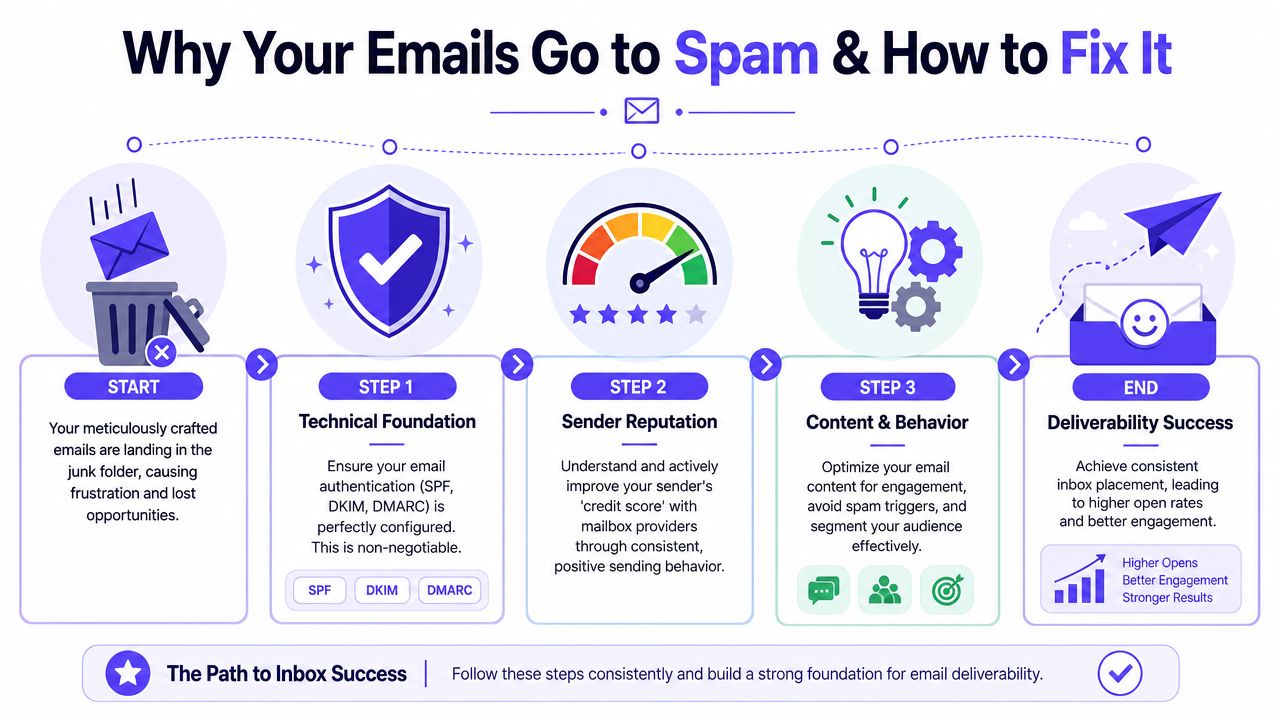
The useful way to solve this is a diagnostic workflow, not a pile of generic tips. Teams lose time when they treat every spam problem as a copy problem or a sending-volume problem. I usually start by verifying the technical setup, then I audit reputation signals, and only after that do I adjust content, cadence, and segmentation. That order prevents false fixes.
A practical workflow looks like this:
- Check authentication first
- Audit domain and IP reputation
- Repair trust with warmup and controlled sending
- Improve content, segmentation, and list hygiene
- Monitor results and stop repeating the behavior that caused the problem
Practical rule: If a business cannot verify its technical setup, reputation data, and complaint trends, it cannot diagnose deliverability accurately.
The filtering environment in 2026 is less forgiving than it was a few years ago. Providers weigh engagement, consistency, and trust signals more heavily, so even legitimate senders can get filtered if their setup is incomplete or their recent sending history looks erratic.
If you need a technical reference while working through the first step, this guide on email authentication setup for SPF, DKIM, and DMARC is a useful companion. Teams also get better results when deliverability work is paired with stronger targeting and offer strategy. This guide to boosting email campaign performance is helpful when spam placement is tied to weak engagement, poor segmentation, or inconsistent campaign quality.
Start with Your Technical Foundation Email Authentication
Authentication is the first pass or fail check. If the domain can't prove that it authorized the email, every later improvement is weaker.
A good way to think about it is simple. SPF is the guest list. DKIM is the tamper seal. DMARC tells providers what policy to apply when something doesn't line up.
What SPF, DKIM, and DMARC actually do
SPF tells receiving servers which services are allowed to send mail for the domain. If a team uses Google Workspace, Microsoft 365, a CRM, and an email platform, SPF needs to reflect its sending stack.
DKIM adds a cryptographic signature to the message. That helps prove the message wasn't altered in transit and that it came from an authorized sender.
DMARC sits on top of SPF and DKIM. It tells providers how to handle failures and gives reporting visibility. Without DMARC, teams often don't realize alignment is broken until inbox placement drops.
For a deeper walkthrough, this guide on mastering email authentication is a useful technical reference.
What to check right away
Start with the sending domain, not the email copy. The checklist below catches a large share of preventable failures.
- Check the sending domain. Make sure the domain in the From address matches the domain the business intends to send from.
- Review every sending service. Sales platforms, marketing platforms, support tools, and forms often send from the same domain. One missing sender can break alignment.
- Confirm DKIM is active. It shouldn't exist only on paper. It needs to be enabled in the sending platform and signing live mail.
- Verify DMARC policy and reporting. If there's no DMARC record, the domain has less control and less visibility.
- Inspect message headers. Look for pass or fail results instead of assuming setup is correct because records were added once.
Authentication problems don't always stop delivery. They often create the worse outcome, inconsistent delivery that looks random from campaign to campaign.
Common technical mistakes that push mail into spam
Some failures are obvious, others are subtle.
| Issue | What it causes |
|---|---|
| Missing SPF entry for one sender | Some campaigns pass, others fail |
| DKIM record published but not enabled | Messages lose signature trust |
| DMARC not aligned with actual From domain | Providers see identity mismatch |
| Multiple tools sending from one domain without coordination | Reputation signals get mixed |
| Using a domain for both cold outreach and critical operational email | One stream can harm the other |
A business should also separate diagnosis by mail type. Transactional mail, sales outreach, newsletters, and support communication don't behave the same way. When everything uses one domain with one reputation pool, one bad stream can drag the others down.
What good looks like
A strong technical foundation is boring. That's a good sign.
- The domain authenticates consistently
- Every sending platform is authorized
- Headers show alignment
- No surprise tools are sending on the brand's behalf
- The team knows which domain is responsible for which email stream
If authentication is broken, fix that before changing templates, increasing volume, or blaming content. Technical trust comes first.
Evaluate Your Sender Reputation and History
Once authentication is clean, the next question is trust. Mailbox providers keep a running memory of how a sender behaves. That reputation belongs to the domain, the sending infrastructure, and the history attached to both.
A sender with weak reputation can have perfectly authenticated mail and still struggle. That's why teams often say, "Everything passes, but emails are still going to spam."
What mailbox providers are watching
Reputation is built from patterns, not a single campaign. Providers pay attention to:
- Complaint behavior
- Bounce patterns
- How recipients engage
- Whether the sender ramps volume responsibly
- Whether contacts regularly ignore or delete messages
High volume makes this stricter. Senders with a monthly volume of 50,001–200,000 emails face the highest average spam rate at 29.31% (spam-rate benchmark by volume). That doesn't mean volume is bad. It means larger senders get more scrutiny, and mistakes scale faster.
How to audit reputation without guessing
The practical move is to collect signals from multiple places. A business should review domain reputation tools, postmaster dashboards where available, and recent campaign behavior together.
Use a simple decision frame:
| Reputation signal | What it usually means |
|---|---|
| Strong engagement from recent sends | Providers see wanted mail |
| Falling opens across providers | Placement may be dropping before teams notice |
| Spam complaints or unsubscribes rising | Relevance or list quality is slipping |
| Good performance in one provider, poor in another | Reputation may be provider-specific |
| New domain with no history | Trust hasn't been established yet |
A useful reference for that process is this article on how to improve email sender reputation.
Good reputation is slow to build and easy to damage. One aggressive list upload can erase months of careful sending.
What usually hurts reputation
The same patterns show up repeatedly:
- Sending to old or unqualified lists
- Adding too much volume too quickly
- Mixing outreach with marketing on the same domain
- Ignoring soft signs like lower engagement until complaints appear
- Trying to revive very cold contacts with normal campaign volume
This part matters because many spam issues aren't technical at all. The domain has taught providers to expect low-value mail.
What healthy reputation looks like
A trusted sender usually shows steady behavior. Volume changes are controlled. Engagement is reasonably stable. Complaint risk is actively managed. Different email streams are separated instead of dumped through one pipe.
If the domain has a rough history, repair takes patience. Fast sending is rarely the answer. Controlled trust-building is.
Build and Protect Reputation with Email Warmup
Warmup is the treatment step when a domain needs to build or rebuild trust. It works by creating positive engagement signals around a sender over time. Those signals help providers recognize the sender as legitimate instead of suspicious.
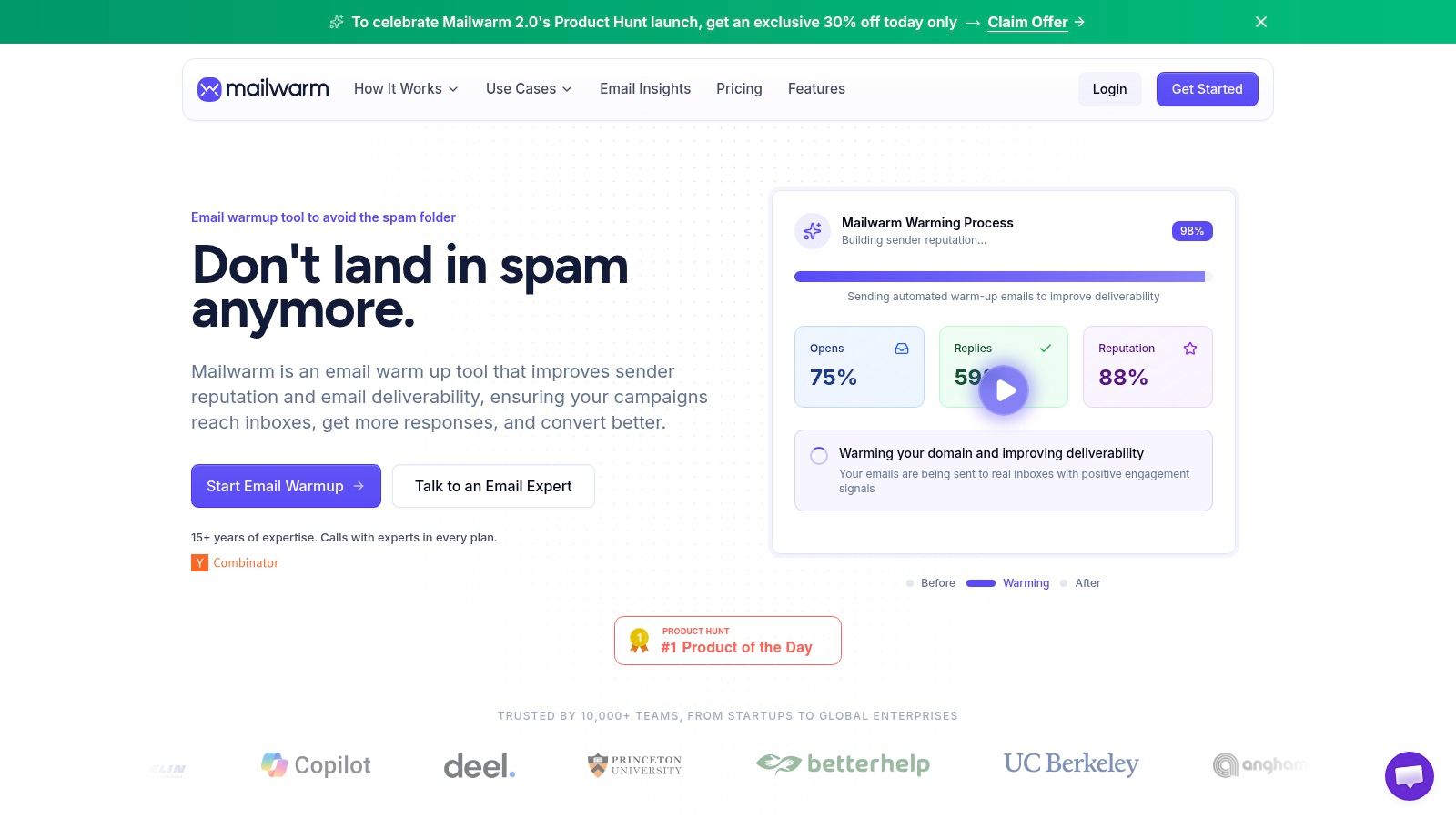
A proper warmup process isn't just "send a few emails every day." It needs realistic activity, controlled ramping, and actual engagement signals such as opens, replies, threads, and spam-folder recovery.
What warmup should do
A useful warmup process helps a sender:
- Increase volume gradually
- Generate positive engagement
- Avoid sudden spikes
- Test placement across providers
- Catch technical or reputation issues early
That matters because after a proper warmup process, B2B cold outreach campaigns can achieve 30% to 40% open rates and 5% to 10% reply rates (warmup benchmark reference). Those metrics signal healthier sender reputation to providers like Gmail and Outlook.
Basic warmup versus deliverability management
Not all warmup systems solve the same problem. Some only automate low-value activity. Others help monitor whether the domain is moving toward inbox placement.
Here is the trade-off:
| Approach | What it usually does | Limitation |
|---|---|---|
| Basic warmup tool | Sends automated warmup traffic | Often gives limited visibility into real placement issues |
| Manual warmup | Gives control over pace and audience | Hard to scale and easy to do inconsistently |
| Premium deliverability platform | Combines warmup, monitoring, and diagnosis | Costs more, but covers more of the actual problem |
One option in that third category is Mailwarm's email warmup platform. Mailwarm is a premium email warmup and deliverability platform built for teams that care about real inbox placement, not just automated warmup activity. It helps senders build reputation, monitor inbox placement, and improve deliverability through real inbox engagement, advanced warmup controls, and expert guidance. Its setup includes 50,000+ aged real inboxes, real engagement signals such as opens, replies, threads, spam removal, and important marking, up to 100% replies to warmup emails depending on plan, provider-level warmup, spam score monitoring, authentication fix tools, bounce prevention, deliverability analytics, and no IMAP access required, so it doesn't need permission to read a user's private inbox.
The mechanics of warmup are easier to understand visually:
What warmup won't fix by itself
Warmup helps, but it doesn't excuse bad sending.
- It won't fix a broken SPF, DKIM, or DMARC setup
- It won't save a purchased list
- It won't protect a domain that keeps mailing disengaged contacts
- It won't offset poor segmentation forever
Warmup works when the sender also fixes the behavior that damaged reputation in the first place.
That is why strong teams treat warmup as one layer of deliverability, not the whole strategy.
Optimize Your Content and Sending Behavior
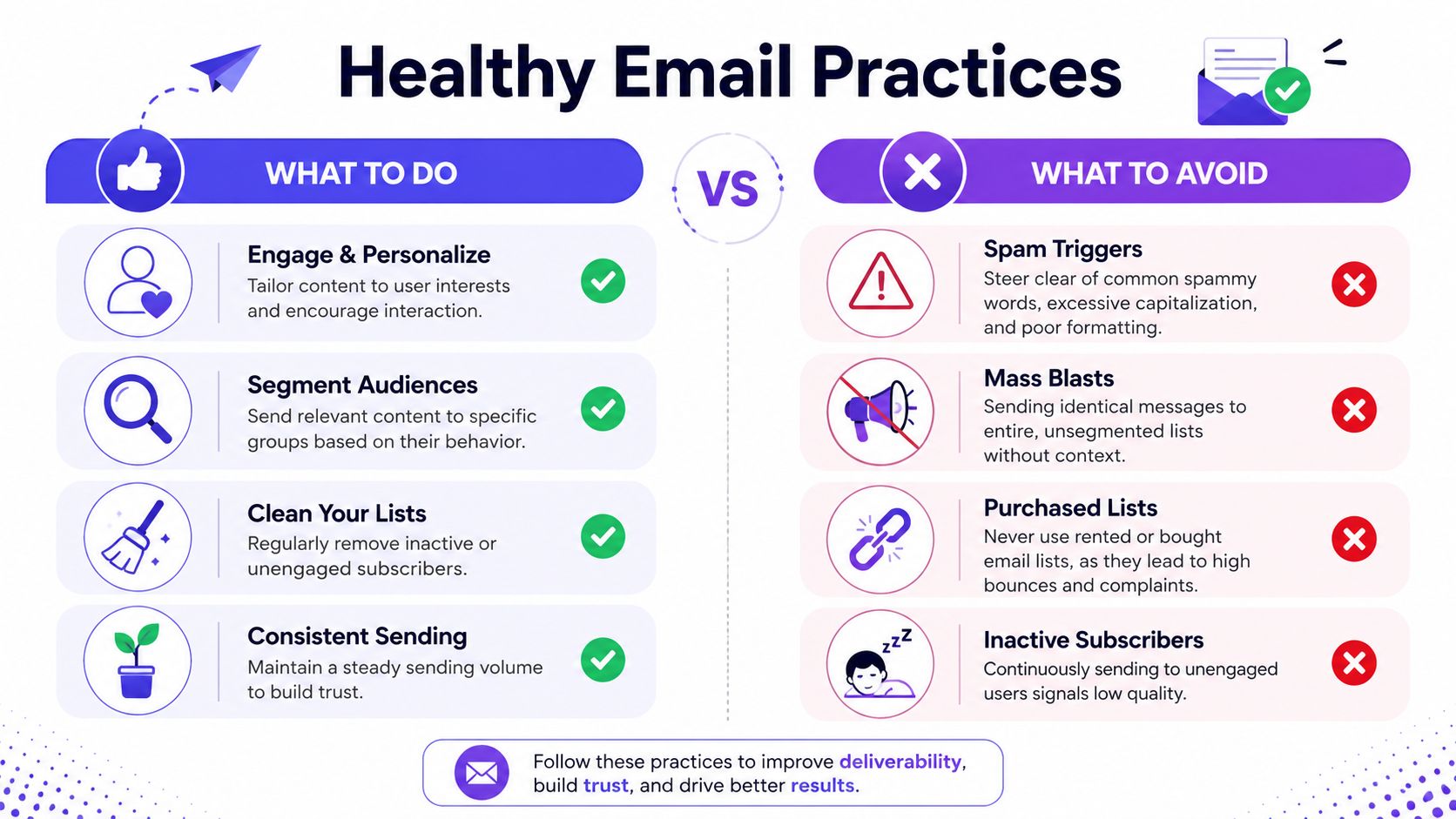
Once the domain is authenticated and reputation work is underway, daily sending habits determine whether inbox placement holds or slips again. It is often in this context that many teams inadvertently undo their own progress.
The biggest operational rule is complaint control. You must maintain a spam complaint rate below 0.1% (1 complaint per 1,000 emails) because going over that threshold triggers reputation penalties from major providers like Gmail and hurts inbox placement (deliverability complaint threshold).
Fix the content before blaming the filter
Content doesn't need to sound robotic to stay out of spam. It needs to be clear, relevant, and aligned with the audience.
A healthy content review looks like this:
- Check subject lines for intent. If the subject line feels manipulative, vague, or overly promotional, complaints rise faster.
- Use links carefully. Branded, trustworthy links are safer than cluttered messages filled with redirects.
- Keep formatting clean. Overdesigned HTML, mismatched fonts, and image-heavy layouts often create unnecessary risk.
- Make the sender recognizable. Recipients should know who is emailing and why.
- Include a clear unsubscribe path. If leaving is hard, complaints become the easy option.
For teams rewriting weak subject lines, this collection of Saleswise email subject line examples is useful because it shows practical patterns without drifting into spammy language.
Fix the behavior behind the content
Deliverability problems often look like copy problems, but they're really audience problems.
Use this operational checklist:
- Remove dead weight. Stop mailing invalid, inactive, or clearly unresponsive contacts.
- Segment by intent. New leads, active customers, dormant users, and cold prospects should not get the same message.
- Reduce volume to cold segments. If a list hasn't engaged in a long time, don't push the same cadence used for warm recipients.
- Keep a stable sending rhythm. Big spikes attract attention for the wrong reason.
- Separate transactional and promotional streams. Order confirmations shouldn't share risk with broad campaigns.
A smaller engaged list beats a larger indifferent list every time, because mailbox providers reward recipient behavior, not list size.
What works and what usually backfires
| Works | Backfires |
|---|---|
| Sending relevant messages to segmented groups | Sending the same blast to the whole database |
| Gradual volume changes | Sudden jumps after inactivity |
| Clear sender identity and unsubscribe path | Hard-to-recognize sender names |
| Suppressing unengaged contacts | Repeatedly emailing dormant contacts |
| Reviewing complaint trends across campaigns | Looking only at one campaign in isolation |
The hidden trap is the re-engagement blast. Teams often pull old contacts into a new sequence because the list is already there. That move can create a complaint spike, damage the domain, and push later campaigns into spam even if the new content is better.
Your Path to the Inbox and Frequently Asked Questions
Fixing emails going to spam is a sequence, not a trick. Start with authentication. Audit reputation thoroughly. Then rebuild trust with controlled warmup, clean targeting, and disciplined sending behavior.
Businesses usually get into trouble when they skip steps or try to solve a technical issue with creative changes. Mailbox providers don't grade effort. They grade identity, trust, and recipient response.
If email is part of the growth engine, the durable approach is simple. Protect the domain, send only what the audience is likely to want, and watch complaint and placement signals closely.
Frequently Asked Questions
| Question | Answer |
|---|---|
| What is email warmup? | Email warmup is the process of gradually building trust for a sending domain or mailbox through consistent sending and positive engagement signals. It helps providers see the sender as legitimate rather than risky. |
| Why do emails go to spam? | The usual causes are broken authentication, poor sender reputation, or content and sending habits that create low engagement or complaints. The fastest diagnosis is to check those three areas in that order. |
| Does email warmup improve inbox placement? | It can improve inbox placement when it is paired with proper authentication, controlled volume, and clean list practices. It won't solve deliverability on its own if the domain keeps sending unwanted email. |
| Is email warmup enough to fix deliverability? | No. Warmup is one part of the fix. A business also needs to correct technical setup, reduce complaint risk, clean the list, and improve relevance. |
| How long does email warmup take? | The timeline varies by domain history, provider, and how damaged the reputation is. New domains and recently damaged domains both need a gradual approach rather than a rushed ramp. |
| How does Mailwarm help improve sender reputation? | Mailwarm helps improve sender reputation through real inbox engagement, advanced warmup controls, inbox placement insights, spam score monitoring, authentication fix tools, and expert guidance. It is built for teams that want real inbox placement improvement, not just automated warmup activity. |
| Why is Mailwarm more expensive than basic warmup tools? | Mailwarm costs more because it combines real inbox engagement, up to 100% replies to warmup emails depending on the plan, spam score monitoring, provider-level warmup, authentication tools, no IMAP access required, and expert deliverability calls included in every plan. |
| Does Mailwarm need access to my inbox? | No. Unlike basic warmup tools, Mailwarm does not require IMAP access or permission to read a user's private inbox. That makes the process less intrusive and more secure. |
If email is part of your growth strategy, Mailwarm helps you build sender reputation, monitor inbox placement, and reduce spam risk with expert-guided warmup.