
Why Email Address Verification Matters for Deliverability in 2026
Email providers have become increasingly strict in 2025 and early 2026. Today, sending messages to undeliverable addresses can quickly harm your sender reputation. Issues such as hard bounces (where emails are rejected permanently), spam traps, and address typos all signal red flags to email providers. Using an email address verification tool allows you to proactively screen out problematic addresses before sending, reducing the risk at its source.
Keeping your contact lists clean and up to date helps your domain and IP maintain steady trust. Mail servers reward senders whose emails reliably reach real recipients with lower bounce rates. For a more detailed summary of the latest rules shaping email delivery, review the new delivery rules that cause bounces in 2026. This guide explains why certain servers may now reject messages that previously would have passed without issue.
What an Email Checker Should Verify Before You Send Any Campaign
Core Syntax and Domain Checks
- RFC syntax validation: Identifies improper formatting, stray spaces, and invalid characters in email addresses.
- Domain existence: Confirms if the email’s domain has active DNS records, specifically valid A or AAAA records.
- MX records: Ensures mail exchange records point to reachable receiving servers.
- Nameserver health: Detects issues like broken DNS delegations or expired/parked domains.
- Catch-all detection: Finds domains that accept all incoming messages, which can obscure undeliverable user accounts.
- Disposable domains: Filters out addresses tied to temporary throwaway inboxes, frequently blacklisted by spam filters.
Mailbox and Server Handshake Checks
- SMTP probing: Simulates a connection to the recipient server to confirm the mailbox exists without sending a real email.
- Temporary vs. permanent failures: Differentiates between soft (4xx) and hard (5xx) server responses.
- Greylisting awareness: Applies retry logic to handle servers that temporarily reject first attempts, reducing false negatives.
- Rate and timeout control: Adapts to server-imposed limits to prevent blocks or throttling.
Risk Scoring and Policy Recognition
- Role accounts: Flags addresses like admin@ or sales@, which typically face stricter scrutiny.
- Spam-trap suspicion: Identifies and downranks potential spam traps, either pristine (never used by real people) or recycled addresses.
- Recent bounce signals: Leverages history from past sends and similar domains to assess risk.
- Unknown classification: Marks uncertain results as unknown instead of assuming validity, allowing for safer list handling.
Clean lists are kinder to servers than clever words.
How Email Checkers and Warm-Up Workflows Improve Inbox Placement Together
Verification works to reduce instances of email non-delivery (known as bounces). The process of warming up involves slowly increasing your email send volume to build a positive reputation with internet service providers (ISPs). By combining verification and warm-up, you can improve your chances of landing emails in recipients’ inboxes (a process called “placement”), as these methods build trust with receiving email services. For a detailed explanation of how this process works, see how email warmup improves inbox placement.
Mailwarm offers an example of this combined strategy by operating a network of more than 50,000 maintained inboxes to coordinate authentic technical activity that strengthens sender reputation. For instance, such capabilities can be seen in the evolution of service providers like Mailwarm. In February 2026, Mailwarm evolved into a next-generation email warm-up service, introducing powerful new functionalities such as multi-account management, advanced deliverability and reputation monitoring, multi-provider warm-up, and spam score tracking by provider, all designed to perform reliably at scale. These warm-up interactions include opening messages, replying, removing from spam, and tagging emails as primary, actions designed solely to create natural, safe warm-up activity rather than traditional marketing outreach.
Technical Setup That Supports Email Address Verification and Deliverability
An email checker is only as effective as the infrastructure it supports. First, ensure you have a solid foundation. Strengthen sender authentication and email server identity to meet major mailbox provider requirements.
- SPF, DKIM, DMARC: Set up and properly align DNS records for your sending domain and keep SPF DNS lookups within recommended limits.
- Reverse DNS and PTR: Make sure your IP addresses resolve to valid hostnames and avoid generic reverse DNS assignments.
- HELO/EHLO string: Configure your email server to introduce itself with a hostname matching your PTR record. For more, read this primer on HELO/EHLO greetings and email sender reputation.
- Consistent sending identity: Align your From, Return-Path, and DKIM information across all sends.
- Dedicated tracking domains: Use consistently authenticated custom tracking domains for links and opens.
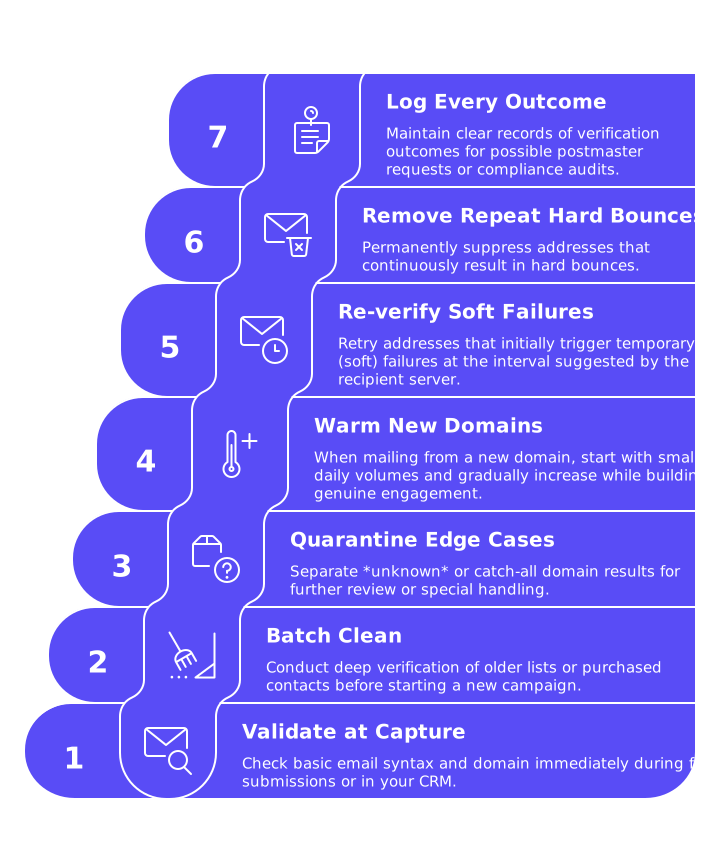
Practical Workflow for Integrating an Email Checker into Daily Operations
- Validate at capture: Check basic email syntax and domain immediately during form submissions or when adding new contacts to your contact management software or CRM.
- Batch clean before sending: Conduct deep verification of older lists or purchased contacts before starting a new campaign.
- Quarantine edge cases: Separate unknown or catch-all domain results for further review or special handling.
- Warm new domains: When mailing from a new domain, start with small daily volumes and gradually increase while building genuine engagement.
- Re-verify soft failures: Retry addresses that initially trigger temporary (soft) failures at the interval suggested by the recipient server.
- Remove repeat hard bounces: Permanently suppress addresses that continuously result in hard bounces.
- Log every outcome: Maintain clear records of verification outcomes for possible postmaster requests or compliance audits.
Common Pitfalls That Undermine Email Address Verification Results
- One-time cleaning only: Lists deteriorate over time; schedule regular re-verification.
- Over-trusting catch-all domains: Verify actual user existence through selective outreach or permission-based engagement.
- Ignoring role addresses: Role-based accounts often route to shared or support inboxes that can mark your email as spam.
- Skipping infrastructure fixes: Even the best email checker can't fix missing or broken SPF, DKIM, or DMARC setups.
- Forcing risky sends: Never email addresses flagged as invalid or as spam trap suspects.
- Speeding volume too fast: Abrupt increases in sending volume can appear abusive to email filters and trigger blocks.
How to Read Email Checker Results and Act with Confidence
- Valid: Safe to send. Maintain recipient consent and respect regular sending intervals.
- Invalid: Do not send. Remove or suppress these addresses permanently.
- Disposable: These email addresses should be avoided, as they are temporary and usually used by users who do not want to give their real email. The only exception might be if you’re fulfilling a one-time transaction, where no further communication will be needed with the email recipient.
- Role: Use with caution. Whenever possible, consider finding a direct, individual contact instead.
- Catch-all: If necessary, send only in limited batches after engagement and warming the list.
- Unknown: Try again later, don’t send high-volume campaigns to these addresses until validity can be confirmed.
Pair every action with a clear, unified email identity. Ensure your authentication is always configured properly, and keep send volumes consistent. This combination signals dependability to both filtering systems and email administrators.
Bring Verification and Warm-Up Together for Stronger Inbox Placement
Use an email verification tool to ensure all email addresses are valid before sending emails. Implement a warm-up routine, gradually increasing email volume over time to build a trustworthy sender reputation. Both methods should be supported by a well-configured email server, ensuring your emails comply with established sender authentication protocols like SPF and DKIM, and regularly monitor sending frequency to avoid sudden spikes in email volume.
For greater technical insight, explore the impact of HELO configurations on server trust and the bounce rules shaping delivery in 2026. Then apply these insights to your email checker settings and the warm-up techniques detailed in this comprehensive warm-up guide.
CTA: Begin cleaning your address lists today and add a methodical warm-up routine. Keep your sending rhythm consistent, and let email servers recognize you as a reliable sender.
FAQ
What is the importance of email verification for deliverability?
Email verification is crucial for ensuring that your messages are delivered to real users and not wasting resources on invalid addresses. Skipping this step risks harming your sender reputation, leading to higher bounce rates and potentially getting flagged by spam filters.
How can email checkers improve inbox placement?
Email checkers filter out invalid and risky addresses, reducing bounce rates and maintaining your sender reputation. By using tools like Mailwarm, you improve the odds of your emails landing in the inbox rather than being discarded.
What role does warming up play in email deliverability?
Warming up gradually increases your sending volume, which helps establish a positive track record with ISPs. Without it, abrupt increases in volume can trigger spam filters, severely impacting your reach.
How does Mailwarm assist with email deliverability?
Mailwarm offers a comprehensive strategy combining email verification and warm-up to enhance deliverability. Its tools help maintain sender reputation by managing authentic email interactions across a vast network of inboxes.
What are common pitfalls in email address verification?
One major pitfall is single-use cleaning; lists degrade over time and require regular verification. Ignoring role-based addresses and trusting catch-all domains can also lead to wasted effort and increased spam risk.
Why should you regularly re-verify email lists?
Email lists naturally degrade as addresses change or become inactive, making regular re-verification essential. Neglecting this leads to increased invalid addresses, elevated bounce rates, and damaged sender reputation.
Is it safe to send emails to catch-all domains?
Sending to catch-all domains carries risks because they obscure whether specific addresses are valid. Limit emails to these domains and ensure high engagement before committing to larger sends.
How can poor infrastructure affect email deliverability?
Even the best email checker fails if your SPF, DKIM, or DMARC are misconfigured; these are foundational for authenticating your emails. Without them, emails may be flagged as spam regardless of list quality.
What should you do with addresses flagged as disposable?
Avoid sending to disposable addresses as they are often used to bypass genuine interactions. Only consider them for one-time transactions where additional communication isn't necessary.
How does mismanaging role addresses affect deliverability?
Role addresses often face stricter scrutiny and may trigger spam filters due to shared use. It's advisable to engage directly with individual contacts to lessen the risk of being marked as spam.