
Warmup cache requests for email deliverability: a strategy to minimize first-user latency
First-user latency can negatively affect the success of your cold outreach, as your first recipient may experience delays while mailbox filters ascertain the nature of your content. In some cases, providers may automatically send that initial email to spam. These issues often arise from an unestablished sending reputation and cold infrastructure caches.
Smart warmup cache requests help mitigate these issues by proactively preparing the systems mailbox providers use to screen your messages. By sending low-volume, authentic-looking messages that generate real engagement, you establish a positive track record in advance. When your first genuine prospect receives your email, filters already “recognize” you, resulting in faster delivery and improved inbox placement.
How first-user latency appears inside mailbox provider pipelines and caches
Mailbox providers implement extra caution with new or unknown senders. When encountering unfamiliar domains, their systems introduce additional checks, slower processing, and more comprehensive scans. Before deciding whether your message belongs in the inbox, various caches and models come into play:
- DNS caches pull SPF, DKIM, and DMARC records; a cold cache means slower lookups.
- Reverse DNS and HELO hostname checks are triggered early during SMTP connections.
- Content and URL reputation models evaluate the trustworthiness of your links and domains.
- Rate limits and greylisting can stall messages from unfamiliar IPs or domains.
- Engagement models look at opens, replies, and spam folder actions to influence delivery decisions.
New delivery rules introduced in 2026 have increased bounce rates for unproven traffic. (For a detailed explanation of these changes, refer to our guide on 2026 delivery rules that drive bounces.)
Smart cache preloading with an email warmup network that simulates positive signals
Cache preloading is the process of priming these key systems before your real outreach campaign begins. This involves sending controlled messages to a dedicated set of active mailboxes, prompting interactions that mailbox providers interpret as positive engagement.
Mailwarm operates on a large scale, using a network of over 50,000 maintained inboxes to receive your initial emails, thereby assisting in building and speeding up your email reputation. This network opens messages, replies, rescues emails from spam, and marks them as primary, all through automated actions that mimic genuine user behavior. These positive signals teach filters that your domain can be trusted.
This process is not a form of email marketing. The goal is strictly technical: to establish healthy sender activity and pre-populate reputation caches. The result is faster acceptance and more reliable inbox placement for your subsequent campaigns.
Think of warmup as priming your sending reputation, minimizing cold-start issues by ensuring essential caches are already populated with positive signals.
A practical checklist of caches and signals to preload for new sending domains
Prior to sending your first batch of prospecting emails, review this checklist. Each item correlates with a cache or model that benefits from being preloaded:
- SPF, DKIM, DMARC: Publish authentication records, and let warmup traffic refresh DNS resolvers. Use sensible TTLs to facilitate timely propagation of updates.
- HELO/EHLO and reverse DNS: Ensure the HELO name, PTR record, and visible hostname are in alignment. (See how proper alignment can influence sender reputation.)
- Envelope consistency: Make sure From, Return-Path, and DKIM d= domains match for consistent sender identity.
- New IP addresses or IP pools: Establish an acceptance history through steady, low-volume sending; avoid abrupt volume spikes.
- Link and tracking domains: Warm up any domains used in links or tracking, as their reputations are assessed independently from your message content.
- Engagement signals: Focus on generating replies, fostering thread depth, and rescuing messages from spam in small numbers early on.
- Complaint resistance: Warming up mailboxes helps prevent early filtering, reducing complaint rates later on.
Workflow to run cache preloading with Mailwarm without changing your stack
You can implement cache preloading in parallel with your current ESP or SMTP provider. The setup process is quick and mirrors your actual sending pattern.
- Connect your real sending identity. Use the same domain, From name, and signature intended for your outreach.
- Adjust to a gradual daily volume. Start with a low sending rate; Mailwarm will automatically increase it as your reputation builds.
- Warm your intended link domain. Use consistent URLs throughout the warmup and initial outreach phases.
- Allow the network to interact. Opens, replies, spam rescues, and taggings as “primary” collectively strengthen your sending history.
- Monitor SMTP responses. Note that deferrals should decline as your domain’s acceptance and inbox placement improve.
If you need guidance on pacing, refer to our resource on structuring warmup schedules for sending up to 1,000 emails per day. This can help you set appropriate targets for new domains and IPs.
Ways to verify that preloading reduced first-user latency in practice
Measure technical improvements to validate that cache preloading has successfully reduced first-user latency. The aim is to achieve faster acceptance and better inbox placement from the outset:
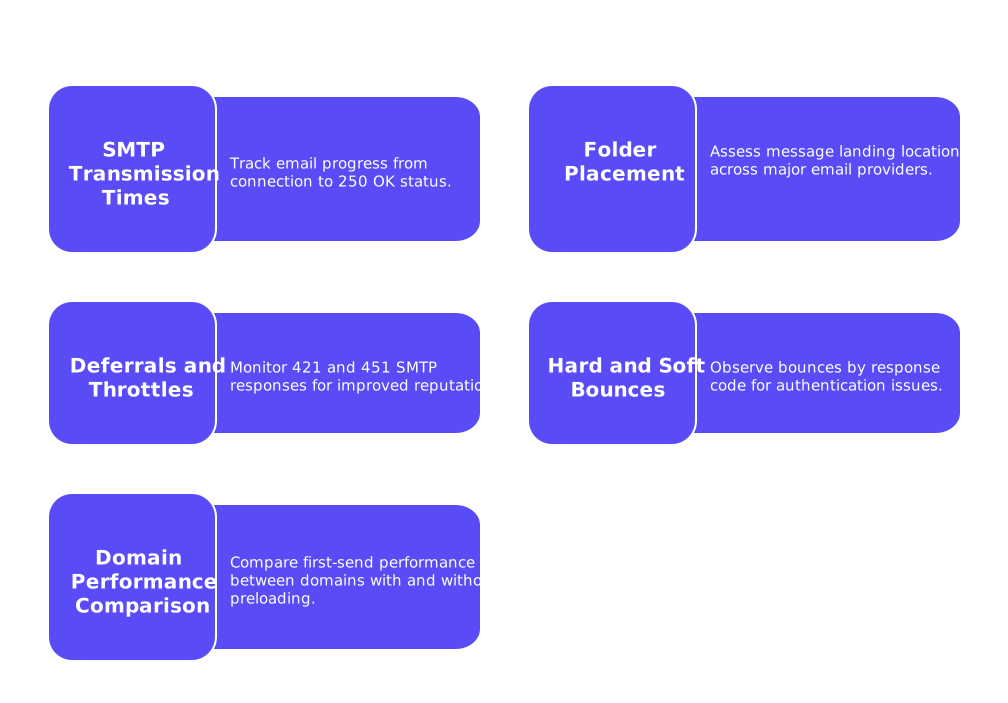
- Monitor SMTP transmission times. Track how long it takes for your emails to progress from connection to a 250 OK status using seed inboxes.
- Assess folder placement. Use test accounts across major providers to see where your messages land during and after warmup.
- Track deferrals and throttles. A reduction in 421 and 451 SMTP responses signals improved sending reputation.
- Observe hard and soft bounces by response code. Authentication or policy-related bounces should decrease as reputation builds.
- Compare first-send performance between domains. Domains with preloading should perform noticeably better on first send.
Document these findings over a period of two to four weeks, as it may take this long for a new domain’s signals to stabilize.
Common mistakes that reintroduce latency even after warmup cache requests
- Switching IPs during warmup. Changing IPs resets reputation caches, causing providers to evaluate your traffic as new.
- Rotating identities too quickly. Keep the From address and DKIM d= domain stable during the initial warmup period.
- Skipping warmup for link domains. Unwarmed tracking domains may be flagged by content filters.
- Increasing volume too rapidly. Sudden spikes can prompt throttling or temporary delivery blocks.
- Overlooking authentication changes. Make DNS edits with care and allow time for them to propagate, avoiding unnecessary bounces.
- Ceasing warmup activity as outreach begins. Maintain a low-level warmup flow to keep critical caches active.
If you’re still encountering rejections even after warmup requests, it’s advisable to revisit your current policies. Understanding why emails get bounced in 2026 could also provide insights for these rejections, as many issues can be traced to identity, policy, or rate control factors.
Keep caches warm after changes to domains, IPs, or sending patterns
Caches and reputation models adapt over time, often expiring old entries when significant changes occur. Shifts to your sending domain, IP, or link structure can result in a “cold” status unless you proactively maintain warmth.
- After DNS record updates: Resume a light warmup regimen for several days as DNS resolvers refresh their records.
- Before scaling volume: Gradually increase your email volume during the maintenance warmup phase.
- When adding a subdomain: Use the same cache preloading process as you would for a root or primary domain.
- After deliverability incidents: Deploy a targeted warmup sequence to restore positive signals and rebuild reputation.
A consistent and smooth warmup process plays a critical role in maintaining and improving your reputation. It ensures a steady email delivery and decreases the latency experienced with every new email sent.
Where warmup cache requests fit in your broader deliverability practice
Warmup is just one component within a strong deliverability framework, which also includes sender identity and policy alignment. Ensuring that your domains, hostnames, and policies such as SPF, DKIM, and DMARC are properly configured, in addition to preserving a history of safe, steady, and engaged sending, makes first-user latency almost invisible. Your first genuine email appears “familiar” to spam filters.
For deeper insights on identity and technical setup, consult our guide on HELO and sender reputation. For optimal pacing and scaling strategies, keep our advice on email warmup schedules for higher daily volumes on hand.
Ready to minimize first-user latency for your next sending domain? Begin a targeted preloading session with Mailwarm and maintain warm caches as you grow to ensure optimal delivery from day one.
FAQ
What is first-user latency, and why is it a problem?
First-user latency refers to delays and potential spam filtering by mailbox providers when they encounter a new or unknown sender. It can damage your outreach success by hindering prompt delivery even before engagement begins.
How does Mailwarm assist in reducing first-user latency?
Mailwarm uses a network of seasoned inboxes to simulate genuine engagement with your emails. This trains mailbox providers to recognize and trust your domain, improving delivery times and inbox placement.
Why is warming up link tracking domains important?
Link tracking domains are independently assessed for reputation, and unwarmed domains can trigger content filters. Failure to warm them up can induce delivery hurdles and trust issues with mailbox providers.
What are the risks of increasing email volume too quickly?
Rapid spikes in email volume can raise red flags with mailbox providers, leading to throttling or temporary blocks. A gradual increase during initial warmup maintains reputation and avoids these pitfalls.
Why might email deliverability issues persist despite warmup efforts?
Persisting issues can stem from improper IP or identity management, sudden changes, or policy misconfigurations. Revisiting your overall sender policy and warming practices can address these persistent problems.
Is cache preloading a long-term solution?
Cache preloading is effective initially but requires ongoing care to maintain. Regular warmup activities are crucial, especially when making changes to domains or sending patterns, to avoid reverting to cold status.
How can monitoring and testing assist in warmup verification?
Monitoring metrics like SMTP response times and folder placement helps confirm effective warmup. Consistent tracking reveals improvements in reputation, aiding in adjusting strategies as needed.
Can changing IPs during warmup affect my email reputation?
Yes, changing IPs can reset reputation caches, prompting providers to reassess your traffic. Consistency is key during initial warmup to prevent being reclassified as an unfamiliar sender.