
You're probably looking at a DMARC record that's already live in p=none, the aggregate reports are piling up, and nobody wants to touch enforcement because one broken SaaS sender could stop legitimate mail. That's the core DMARC implementation problem. A dmarc implementation guide that works in production has to cover inventory, alignment, reporting, staged enforcement, and rollback, not just a DNS paste and a thumbs-up.
DMARC is a migration process, not a checkbox. The protocol was standardized in RFC 7489 in 2014 and built around SPF and DKIM alignment for the visible From domain, with a rollout sequence that starts with monitoring and only later moves toward enforcement (RFC 7489). The teams that succeed treat the first publish as the beginning of operations, not the end of setup.
Why Most DMARC Rollouts Stall Before Enforcement
A rollout usually stalls in the same place. A team publishes p=none, aggregate reports start arriving from mailbox providers, and the reports sit in someone's inbox because no one has turned them into a sender inventory. Weeks pass, the domain stays in monitoring mode, and the organization keeps seeing the same unknown sources with no decision on what to do next.
That delay comes from how DMARC behaves in production. Marketing tools, CRMs, help desks, billing systems, and transactional ESPs all send mail for the same brand, and each one can fail alignment for a different reason. The protocol's staged model starts with SPF and DKIM, then moves to aligned authentication, then p=none, and only later to quarantine and reject once the team knows which senders are clean and which ones still need work (RFC 7489).
Start with sender inventory, not policy
Before the record changes, every legitimate sender needs to be mapped. That means the parent domain, active subdomains, and every third-party platform that sends on behalf of the brand. If one sender is missing from that list, the move to enforcement can break mail that internal teams still depend on.
Practical rule: if a team cannot name a sender, it should not tighten DMARC yet.
The inventory step also has to include authentication checks. SPF has to be valid, and DKIM has to sign with a d= domain that aligns with the visible From domain. DMARC evaluates alignment, not just whether SPF or DKIM exists, so a sender that passes authentication in isolation can still fail in production.
Common blind spots include:
- CRM platforms that send sales sequences and notifications.
- Ticketing systems that generate support updates.
- Marketing automation tools that use a shared infrastructure domain.
- Transactional ESPs that were added months ago and forgotten.
A useful external lens on layered control is multi-layered cyber defense tips. DMARC fits that same mindset, because a single control layer does not give full confidence when many systems can send mail.
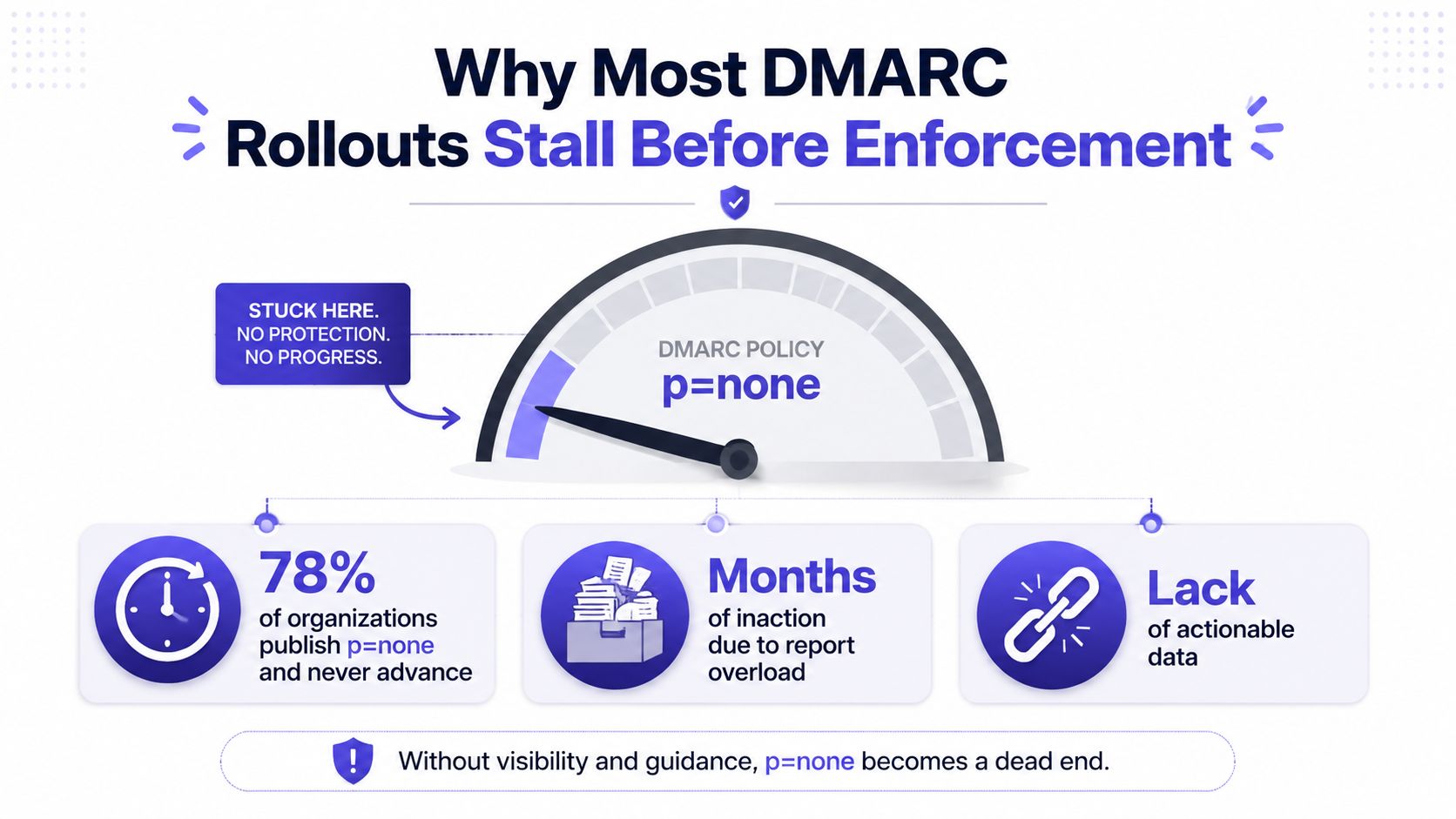
A rollout also needs an operational owner. Security may own the record, marketing may own a sender, IT may own DNS, and nobody may own the path from authentication checks to enforcement. That gap is why a DMARC program often looks active while the domain never moves past monitoring. For teams setting up the rest of the authentication stack, the DKIM, SPF, and DMARC setup guide is a useful reference point before enforcement decisions start affecting live mail.
Crafting the DMARC Record Tag by Tag
A DMARC record is a TXT record published at _dmarc, but the tags are where production behavior is controlled. The minimum useful starting point is monitoring with reporting turned on, because without reporting, there's no way to see who is sending as the domain. A standard monitoring record looks like v=DMARC1; p=none; rua=mailto:... (DMARC.org overview).
What each tag changes in production
| Tag | Purpose | Example value |
|---|---|---|
| v | Identifies the record version | DMARC1 |
| p | Sets the main policy for failing mail | none, quarantine, reject |
| sp | Sets policy for subdomains | none, quarantine, reject |
| rua | Sends aggregate reports | mailto:dmarc-reports@domain.com |
| ruf | Sends forensic reports where supported | mailto:forensic@domain.com |
| pct | Limits enforcement to a percentage | 25, 50, 100 |
| adkim | Sets DKIM alignment mode | r or s |
| aspf | Sets SPF alignment mode | r or s |
The policy tags do very different jobs. p controls what receivers should do with mail that fails DMARC. sp matters when subdomains are used by separate systems. rua is the main reporting feed, and ruf is far less common in practice because many operators prefer not to receive failure-level detail.
What to check before publishing
A clean implementation depends on SPF and DKIM being ready first. SPF has to include all authorized senders, and DKIM has to sign with the right organizational domain. If a third-party platform signs with its own domain instead of yours, the message can still pass DKIM but fail DMARC alignment.
A few syntax mistakes show up again and again:
- Missing
mailto:inrua, which breaks report delivery. - Invalid reporting URI formats, which receivers ignore.
- Strict alignment too early, which blocks legitimate third-party mail.
- Assuming SPF alone is enough, which it isn't.
For the record generation step, the cleanest companion resource is Mailwarm's DKIM, SPF, and DMARC setup guide, which pairs the DNS record with the authentication pieces that have to work first.
The Staged Rollout From Monitoring to Reject
A DMARC rollout breaks when a team treats enforcement like a single DNS change. In production, the policy has to move in stages, p=none for monitoring, p=quarantine for controlled filtering, and p=reject for strict handling of mail that fails alignment. The rollout needs room for vendor fixes, because a legitimate SaaS sender can start failing after enforcement if it signs with the wrong domain or shifts to a different mail path. That is the operational reason to stage the change, not just publish a record and hope for the best. The CCN-CERT best-practice DMARC guide describes this same progression and recommends increasing enforcement in small steps during rollout.
A practical rollout usually follows this order, even when the timing changes by organization.
- Preparation window. Inventory every sender, confirm SPF and DKIM, and make sure reporting destinations are ready.
- Discovery window. Run p=none and map each source that appears in aggregate reports.
- Authentication-fix window. Correct alignment problems, then verify that legitimate traffic passes consistently.
- Phased enforcement window. Raise pct gradually before moving to the final policy.
Start with the lowest-risk senders first. Microsoft's guidance to begin with simpler subdomains makes sense because those mail streams usually have fewer platforms attached to them, so a mistake does not interrupt core business mail. Keep the parent domain for last. It carries the widest mix of traffic, so a bad policy change there creates the most rollback work.
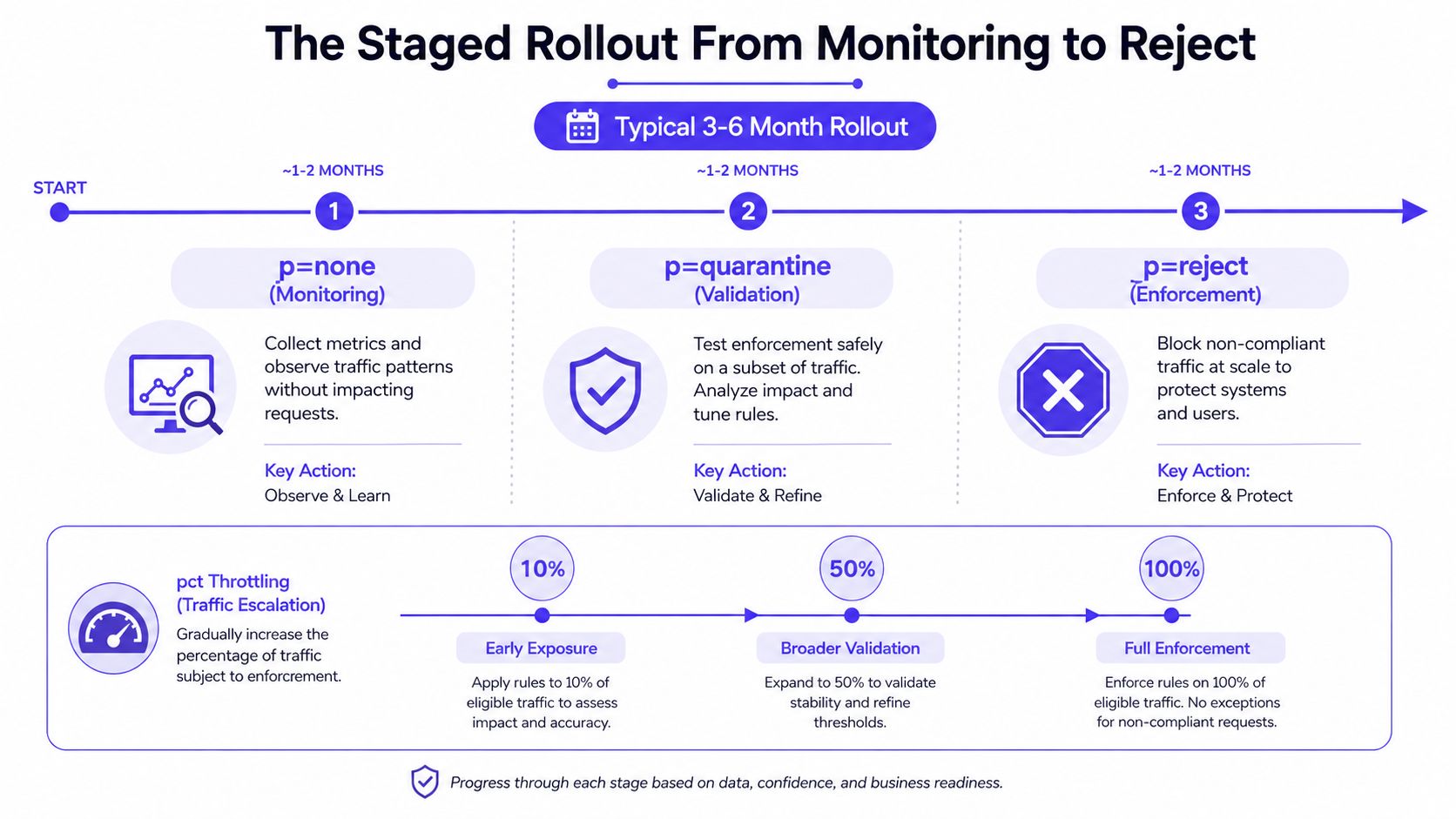
The decision to advance should come from observed mail behavior, not from a calendar target. If legitimate mail still fails alignment, hold the policy at the current stage. If the sender map is stable and the stack has not changed, increase enforcement in a controlled way. If complaints spike or a vendor update breaks alignment, back the percentage down before tightening policy further.
A simple precheck helps catch trouble before it reaches enforcement. Use this DMARC checker against the domain, confirm the published record matches the intended policy, and compare the result with live sender behavior before you raise pct again.
Reading Aggregate and Forensic Reports
The first reports that usually matter are aggregate reports, not enforcement outcomes. They show who sent the message, from which source, and whether SPF, DKIM, and DMARC aligned. The practical task is turning that XML into a sender map that a human can work with.
Aggregate reports form the core operational feed. They usually expose the source IP, header From domain, SPF and DKIM pass or fail status, and the final disposition. Microsoft recommends using Authentication-Results headers and message trace tools to isolate specific failures, which is how a support team separates a DNS problem from a vendor setup issue or an unaligned send path (Microsoft DMARC configuration guidance).
How to triage reports weekly
- Group by sender source. Identify which platform generated the message.
- Check alignment outcome. Separate raw authentication pass from DMARC pass.
- Match failures to business owners. Marketing, support, and sales usually own different senders.
- Look for new IPs or vendors. Unexpected sources often point to shadow IT.
- Fix the sender, not the symptom. DNS changes should come from the root cause.
Forensic reports, sent through ruf, serve a narrower purpose. They can help with specific investigations, but many operators avoid depending on them because support is inconsistent and the volume can be noisy. Aggregate reports remain the dependable operational feed, especially once enforcement starts and you need a stable view of what is still aligned versus what is drifting.
Before a deeper review, it helps to verify the published record itself with Mailwarm's DMARC checker. It is useful when a record looks correct on paper but the team still sees unexpected parsing or policy behavior.
Day-2 Operations and Rollback Planning
DMARC doesn't end at p=reject. That's where ongoing operations begin, because every new SaaS sender, vendor change, or DKIM rotation can break alignment after the original rollout is finished. The hidden work is keeping the authenticated sending stack current as the business changes.
What to do when a sender breaks after enforcement
When a new tool starts sending as the domain and fails DMARC, the fix path should be mechanical. First, confirm whether SPF or DKIM is the failing leg. Then update the sender's authentication setup, recheck alignment, and watch the next report cycle before raising policy again.
Rollback needs to be explicit, not improvised. If a legitimate mail stream is failing and business mail is getting blocked, lower pct first. If the problem is broader, temporarily return from reject to quarantine while the sender is repaired.
The safest maintenance pattern looks like this:
Rollback rule: if a legitimate stream breaks after a policy increase, reduce the blast radius before troubleshooting the sender in production.
Teams also need to watch SPF lookup creep. As more third-party includes get added, the record becomes harder to keep clean and more likely to fail. DKIM key rotation needs regular attention too, especially when vendors change or signature domains drift away from the visible From domain.
The most useful habit is to treat DMARC reports as an ongoing change detector. Every new sender, every rotation, and every policy increase should feed back into the same monitoring loop. That's what keeps enforcement from becoming brittle.
Mailbox Provider Notes for Gmail, Microsoft 365, and Yahoo
A DMARC record only matters if the mailbox provider accepts the authentication path behind it. Gmail and Yahoo require bulk senders to authenticate with SPF, DKIM, and DMARC, and the industry guidance tied to those requirements applies to senders of 5,000 or more emails per day (bulk-sender authentication requirements). That threshold is useful for planning, but smaller senders still need the same alignment discipline before volume increases.
Microsoft 365 is usually where rollout mistakes show up first. Its guidance is geared toward operators, starting with lower-volume subdomains and checking message trace alongside aggregate reports, which gives you a cleaner way to spot drift than assuming a published record means every stream is aligned (Microsoft DMARC configuration guidance).
| Provider | SPF/DKIM/DMARC required | Volume threshold | Practical implication |
|---|---|---|---|
| Gmail | Yes for bulk senders | 5,000+ per day | Authentication needs to be stable before scale makes failures visible |
| Yahoo | Yes for bulk senders | 5,000+ per day | Misalignment can reduce inbox placement and delivery reliability |
| Microsoft 365 | Required in modern sender guidance | Bulk-sender expectations apply | Start small, trace failures, then expand enforcement carefully |
The common mistake is treating p=none as the endpoint. It only turns on reporting. The work starts when those reports show which vendor, subdomain, or campaign path needs alignment repairs, and that is also where how to avoid the spam folder fits into the wider deliverability process.
Subdomains need separate judgment if they send very little mail. Low-volume subdomains often make better rollout candidates because they limit blast radius, and that matters when a SaaS sender or relay service starts breaking alignment after enforcement. A clean rollout lets you isolate the problem, fix the sender, and then return to stronger policy without guessing which stream caused the failure.
Connecting DMARC to Deliverability and Warmup
DMARC improves trust when it's part of a broader deliverability program, but the record itself doesn't magically improve inbox placement. Authentication tells mailbox providers the message is legitimately tied to the domain. Reputation and engagement still decide how that mail is treated over time. Mailwarm is a premium email warmup and deliverability platform that combines real inbox engagement, provider-level warmup, spam score monitoring, inbox placement insights, and authentication fix tools, so DMARC work can sit inside a larger reputation process rather than standing alone.
The practical relationship is straightforward. SPF and DKIM make authentication possible. DMARC confirms alignment. Warmup and engagement help build sender reputation so legitimate mail keeps reaching inboxes as volume grows. For teams trying to avoid the spam folder, that combination matters more than any single tag in the record (how to avoid the spam folder).
What changes after publishing the record
A p=none record is still useful because it reveals every sender claiming the domain. That visibility is what lets a team fix broken SaaS sends before quarantine or reject starts blocking anything important. Once the stack is clean, enforcement becomes a governance choice, not a guessing game.
Subdomains need separate judgment if they send very little mail. Low-volume subdomains often make better starting points than the parent domain, because they reveal alignment issues without risking the main brand stream. That sequence is consistent with the staged rollout pattern already covered above.
What to do when a policy increase breaks mail
- Pause the increase. Don't keep tightening policy while mail is failing.
- Check the sending source. Find the platform that changed.
- Validate SPF and DKIM alignment. Authentication alone isn't enough if the domains don't line up.
- Lower enforcement if needed. Return to a safer policy until the sender is fixed.
- Re-test before moving again. Reports should show clean alignment before the next step.
Mailwarm fits here because it isn't just basic warmup software. It's built for teams that care about real inbox placement, not just automated activity, and its expert deliverability guidance can help review authentication, sender reputation, and inbox placement together. That matters when DMARC enforcement is live but delivery still depends on reputation signals outside the DNS record.
FAQ
What is a DMARC implementation guide supposed to cover?
A real DMARC implementation guide should cover inventory, SPF and DKIM alignment, record syntax, report analysis, staged rollout, and rollback planning. If it only shows how to paste a TXT record, it leaves out the part that usually breaks in production.
Does p=none do anything useful?
Yes, it does one important thing, it collects visibility without enforcement. That lets teams discover legitimate senders, spot misconfigurations, and prepare for quarantine or reject without blocking mail.
How long does a DMARC rollout usually take?
A practical rollout is usually staged over weeks or months, not minutes. The timeline depends on how many legitimate senders need fixing, how many subdomains exist, and how quickly reports are reviewed.
What happens if a SaaS sender breaks alignment after enforcement?
The safest move is to lower enforcement or reduce pct first, then repair the sender's SPF or DKIM setup. After the fix, reports should be checked again before tightening policy.
Why is Mailwarm relevant to DMARC work?
Mailwarm helps teams protect sender reputation while they handle authentication and enforcement. It combines real inbox engagement, inbox placement insights, authentication tools, and expert guidance, which makes it useful when deliverability and DMARC need to be managed together.
Does Mailwarm need access to a private inbox?
No, Mailwarm doesn't require IMAP access or permission to read a private inbox. That keeps the setup less intrusive than tools that depend on mailbox-level access.
If DMARC is part of your growth stack, Mailwarm helps teams connect authentication, sender reputation, and inbox placement in one deliverability workflow. Visit Mailwarm to see how real inbox engagement, provider-level warmup, and expert guidance can support the same domain you're tightening with DMARC.